containers
34 Topics
Windows Server 2019: The component store has been corrupted. Error 0x80073712
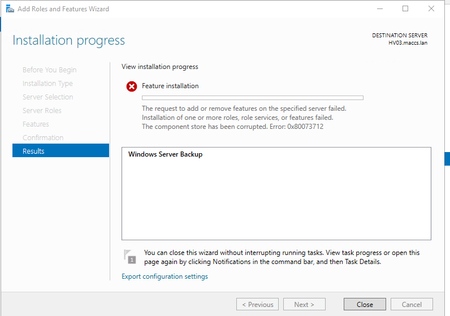
Hi all, I'm trying to install the Server Backup feature on our 2019 Server, but it results in this error: Any ideas on what may have caused this, and how to solve it? The server was installed about 5 months ago, and the installation is basically stock, not much changes made. Thanks in advance.37KViews1like12Comments
How to see who is a member of schema admin and how to add a member in
Hi All, Im currently trying to install Sccm and need to link my SCCM server to DC but due to me getting the below error I cant go any further. Im currently on the Administrator account but it seems that I still need to put this account in the Schema admin group. I cant seem to access this group I cant see it in Users or anywhere - When I search for the account I have to search the Entire directory but then cant access the properties? How do I add a user or even the admin account into this group so I can carry on doing the necessary step to install SCCM? I get this message Please help! and thanks in advance!34KViews0likes12CommentsBuilding a Windows Server Lab with an Intel NUC
With the release of Windows Server 2019, which includes a ton of Hybrid Cloud integration features, it was time to build a new lab environment. The plan is to create a lab and demo environment for my presentations and workshops. Check out more here: https://www.thomasmaurer.ch/2018/11/windows-server-lab-intel-nuc/13KViews1like1CommentWhich Windows Server 2019 Installation Option should I choose?
Windows Server 2019 will bring several installation options and tuning options for virtual machines, physical servers as well as container images. In this blog post I want to give an overview about the different installation options of Windows Server 2019. Find out more here: https://www.thomasmaurer.ch/2019/03/which-windows-server-2019-installation-option-should-i-choose/6.5KViews0likes0Comments
Changing default location (OU) for domain computers
Hello All, To bring some better structure to our AD, we're looking into organizing our client domain machines in AD, under an OU hierarchy. Part of this was also (possibly) changing newly joined machines to go to a separate OU, versus inside of the default Computers container. I've found a couple of methods for doing this, however, I'm not sure if this is a supported thing to do. I'm curious what others' opinions are of this. Thanks6.2KViews0likes2CommentsHow to switch Container OS on Windows Server 2022
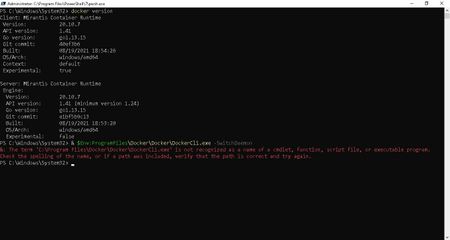
I have installed docker on Windows Server 2022 (in Azure VM). Am able to run & build windows based container as per MS articlehttps://docs.microsoft.com/en-us/virtualization/windowscontainers/quick-start/run-your-first-container Further my requirement is to run Linux containers. In above MS article it is stated to use below command to switch between containers. & $Env:ProgramFiles\Docker\Docker\DockerCli.exe -SwitchDaemon However, when I try to switch between containers OS using above command, it throws error that 'DockerCli.exe' is not recognized as a name of a cmdlet, function, script file, or executable program (see below screen). How can I get DockerCli.exe? Is there any other option to switch between containers OS on Windows Server 2022? Is there a way to get DockerCli.exe as part of docker installation on Windows Server 2022? Appreciate your help. Thank You.3.6KViews0likes0Comments
Windows Server 2025 Desktop Experience: Hyper-V cannot be installed
I have a lab with various Servers running Windows Server 2025. Some of them are installed without Desktop Experience, some with. Aside from Desktop Experience, the VMs and the operating are configured the same way using automated setup scripts. I exposed the VirtualizationExtensions for all VMs on the host using Set-VMProcessor -ExposeVirtualizationExtensions $true. Moreover, I configured all VMs to use static memory assignment. However, when I try to install Hyper-V on Windows Servers 2025 with Desktop Experience, I receive the error Hyper-V cannot be installed because virtualization support is not enabled in the BIOS. The issue occurs without any updates installed as well as with KB5050009 (2025-01 Cumulative Update for Microsoft server operating system 24H2 for x64 based Systems) installed. On machines without Desktop Experience, Hyper-V can be installed without any issues. As a side note, on VMs using Windows 11 24H2 on the same host, I can install Hyper-V without any issues.3.3KViews0likes4Comments
Unable to access shared folder
Hi, I have one shared folder. when i am trying to access it OR trying to change its permission it is not allowing me and says access denied. I tried it using Domain Administrator. It give below error. "Failed to enumerate object in container. Access denied." If i take ownership of folder after that i can access only that particular folder but if i try to access subfolder OR files located in it then it will again says Access denied. Inheritance is already enabled. Domain admin has full permission on folder. Server is located on premise. Is there any fix for above issue ?3.3KViews0likes7Comments