containers
123 TopicsEnhancements to Windows Containers
Everyone, I have created a github issue list for getting Windows Containers on par with linux containers: Here are the issues I documented: Syscall/capability-scoped restriction policy for process-isolated containers (seccomp/capabilities parity) #649 — Syscall/capability-scoped restriction policy for process-isolated containers (seccomp/capabilities parity) True PID namespace isolation for process-isolated containers (server silos) #650 — True PID namespace isolation for process-isolated containers (server silos) CimFS-backed overlay mount performance parity with Linux overlayfs for container image layers #651 — CimFS-backed overlay mount performance parity with Linux overlayfs for container image layers Decouple container base image version from host OS version for process-isolated containers #652 — Decouple container base image version from host OS version for process-isolated containers Please check them out and upvote them. We need to make Windows containers as capable as Linux containers.158Views0likes0Comments
Azure VM Agent Status not ready
I have created a red hat openshift private cluster but the VMS are stuck in the state of "agent status not ready." I have followed these troubleshooting steps: Linux Virtual Machine Agent Status "Not Ready" - Microsoft Community Hub However, all of them seem to point to trying to check and see what is on the VM itself. I am unable to do this because I can't SSH into the machine. Has anyone else ran into this issue and been able to resolve it? I am deploying it via CLI as I was not able to do it via GUI for some reason. This is my script: #az login az account set --name "accountnamehidden" #az provider register -n Microsoft.RedHatOpenShift --wait #az provider register -n Microsoft.Compute --wait #az provider register -n Microsoft.Storage --wait #az provider register -n Microsoft.Authorization --wait $LOCATION= "eastus" # the location of your cluster $RESOURCEGROUP= "sample-rg" # the name of the resource group where you want to create your cluster $CLUSTER= "K8sDev1test" # the name of your cluster $arovnet= "sample-vnet" $mastersubnet = "k8sDev1-master-ue-snet" $workersubnet = "k8sDev1-worker-ue-snet" az aro create --resource-group "samplerg" --vnet-resource-group "sample-vnet-rg" --name $CLUSTER --vnet $arovnet --master-subnet "k8sDev1-master-ue-snet" --worker-subnet "k8sDev1-worker-ue-snet" --apiserver-visibility Private --ingress-visibility Private --fips true --outbound-type UserDefinedRouting --client-id hidden --client-secret hiddenCreate a CLI and API like wslc but for Windows containers
The current issue is the dependency on Docker and the docker cli for Windows Containers. We would like a native solution from Microsoft for Windows Containers. This would be similar to wslc, but fully compatible for Windows containers. This could be done by leveraging existing Windows container APIs and the containerd container engine for Windows containers. I have also opened an enhancement feature on github for Windows Containers a month ago but there has been no feedback. https://github.com/microsoft/Windows-Containers/issues/643 Microsoft needs to step up and make Windows/ Windows Server containers on par with linux containers247Views0likes0Comments
Simplifying gMSA for Windows Containers on AKS: Open-Source Tooling Now Available
We’re excited to announce that the Windows Containers AKS gMSA tooling is now publicly available on our GitHub repo (Microsoft/Windows-Containers-AKS-gMSA): Windows-Containers-AKS-gMSA. This open-source repository provides tooling to simplify configuring Group Managed Service Accounts (gMSA) for Windows containers running on Azure Kubernetes Service (AKS)—making it easier to containerize and run Active Directory–dependent applications in Kubernetes. Many enterprises rely on Windows applications that integrate with Active Directory (AD) for authentication and authorization. As these workloads move to AKS using Windows containers, it’s critical that they continue to securely support AD‑based authentication. This tooling helps organizations modernize to containers while maintaining trusted identity and authorization workflows built on Active Directory. Who this is for This tooling is intended for: Teams modernizing existing AD-dependent Windows applications Customers running Windows containers on AKS who require Kerberos or Integrated Windows Authentication Platform and infrastructure teams looking to standardize gMSA setup across environments Anyone evaluating whether gMSA is the right fit for their Windows container scenarios If you’re running workloads that depend on Active Directory and want to bring them to AKS with minimal refactoring, this repository can serve as a starting point for validating gMSA in your environment. Why gMSA on AKS matters Windows containers are a natural fit for modernizing existing IIS, .NET Framework, and other AD-integrated applications with minimal code changes. However, containers themselves can’t be domain joined, which historically made AD authentication challenging in containerized environments. With gMSA support on AKS, Windows containers can securely authenticate to Active Directory without requiring domain-joined nodes, instead relying on the AKS host to perform authentication on the application’s behalf. This enables: Secure AD authentication for Windows containers Easier cluster scaling and upgrades Reduced operational overhead compared to domain-joined node models with no changes to the AD infrastructure required While platform support exists, configuring gMSA on AKS still involves multiple moving parts—including AKS, Active Directory, Azure Key Vault, and credential specifications. This tooling is intended to help streamline that setup by reducing manual configuration across these components. What’s in the repository The Windows-Containers-AKS-gMSA repository provides a PowerShell module and supporting scripts designed to simplify the end-to-end setup of gMSA for Windows containers on AKS. Key highlights include: A PowerShell module to help configure an AKS cluster for gMSA usage Automation to reduce manual setup across Azure, AD, and AKS components Documentation and troubleshooting guidance for prerequisites and common pitfalls A trial/validation setup to help stand up a test environment for gMSA on AKS The goal is to lower the barrier to entry and make it easier for teams to experiment with—and ultimately adopt—gMSA for their Windows container workloads. Getting started To get started, visit the GitHub repository and review the README and documentation: https://github.com/microsoft/Windows-Containers-AKS-gMSA You’ll find: Environment and prerequisite requirements Instructions for importing and using the PowerShell module Guidance for validating your setup in a non-production environment For the official documentation, please visit Use gMSA on Azure Kubernetes service in Windows containers | Microsoft Learn. Open source and community feedback By making this repository public, we’re inviting the community to explore, experiment, and provide feedback. While this tooling is designed to simplify setup, it’s important to review the documentation carefully and validate configurations in test environments before production use. We welcome issues and feedback, suggestions for improvements, and any contributions that help improve reliability, clarity, or usability. What’s next This release is part of our continued effort to improve the experience of running Windows containers on AKS—particularly for customers modernizing existing Windows Server workloads that depend on Active Directory. We look forward to hearing how you’re using gMSA on AKS and where we can continue to improve the setup and deployment experience.299Views0likes0Comments
Active Directory Unable to reset user passwords
I am managing a Windows Server 2025 Active Directory environment with client machines. I created a test user and enabled the option “User must change password at next logon.” I then provided a temporary password to the user, expecting them to get the prompt to change it on first login. However, when the user attempts to change the password, they receive the error: “The user must change password before signing in.” My goal is that when I provide a temporary password to a user: They get the prompt to change the password at next logon. When they change it, it should not throw the “user must change password before signing in” error. I need guidance on how to achieve this so users can reset their passwords successfully.341Views0likes1Comment
Windows Server Datacenter: Azure Edition preview build 26484 now available in Azure
Hello Windows Server Insiders! We welcome you to try Windows Server vNext Datacenter: Azure Edition preview build 26484 in both Desktop experience and Core version on the Microsoft Server Operating Systems Preview offer in Azure. Azure Edition is optimized for operation in the Azure environment. For additional information, see Preview: Windows Server VNext Datacenter (Azure Edition) for Azure Automanage on Microsoft Docs. For more information about this build, see Announcing Windows Server vNext Preview Build 26484 | Microsoft Community Hub.166Views1like0CommentsAnnouncing Windows Server vNext Preview Build 26484
Announcing Windows Server vNext Preview Build 26484 Hello Windows Server Insiders! Today we are pleased to release a new build of the next Windows Server Long-Term Servicing Channel (LTSC) Preview that contains both the Desktop Experience and Server Core installation options for Datacenter and Standard editions, Annual Channel for Container Host and Azure Edition (for VM evaluation only). Branding remains, Windows Server 2025, in this preview - when reporting issues please refer to Windows Server vNext preview. If you signed up for Server Flighting, you should receive this new build automatically. What's New Windows Server Flighting is here!! If you signed up for Server Flighting, you should receive this new build automatically later today. For more information, see Welcome to Windows Insider flighting on Windows Server - Microsoft Community Hub Feedback Hub app is now available for Server Desktop users! The app should automatically update with the latest version, but if it does not, simply Check for updates in the app’s settings tab. Known Issues Download Windows Server Insider Preview (microsoft.com) Flighting: The label for this flight may incorrectly reference Windows 11. However, when selected, the package installed is the Windows Server update. Please ignore the label and proceed with installing your flight. This issue will be addressed in a future release. Available Downloads Downloads to certain countries may not be available. See Microsoft suspends new sales in Russia - Microsoft On the Issues. Windows Server Long-Term Servicing Channel Preview in ISO format in 18 languages, and in VHDX format in English only. Windows Server Datacenter Azure Edition Preview in ISO and VHDX format, English only. Microsoft Server Languages and Optional Features Preview Keys: Keys are valid for preview builds only Server Standard: MFY9F-XBN2F-TYFMP-CCV49-RMYVH Datacenter: 2KNJJ-33Y9H-2GXGX-KMQWH-G6H67 Azure Edition does not accept a key. Symbols: Available on the public symbol server – see Using the Microsoft Symbol Server. Expiration: This Windows Server Preview will expire September 15, 2026. How to Download Registered Insiders may navigate directly to the Windows Server Insider Preview download page. If you have not yet registered as an Insider, see GETTING STARTED WITH SERVER on the Windows Insiders for Business portal. We value your feedback! The most important part of the release cycle is to hear what's working and what needs to be improved, so your feedback is extremely valued. Please use the new Feedback Hub app for Windows Server if you are running a Desktop version of Server. If you are using a Core edition, or if you are unable to use the Feedback Hub app, you can use your registered Windows 10 or Windows 11 Insider device and use the Feedback Hub application. In the app, choose the Windows Server category and then the appropriate subcategory for your feedback. In the title of the Feedback, please indicate the build number you are providing feedback on as shown below to ensure that your issue is attributed to the right version: [Server #####] Title of my feedback See Give Feedback on Windows Server via Feedback Hub for specifics. The Windows Server Insiders space on the Microsoft Tech Communities supports preview builds of the next version of Windows Server. Use the forum to collaborate, share and learn from experts. For versions that have been released to general availability in market, try the Windows Server for IT Pro forum or contact Support for Business. Diagnostic and Usage Information Microsoft collects this information over the internet to help keep Windows secure and up to date, troubleshoot problems, and make product improvements. Microsoft server operating systems can be configured to turn diagnostic data off, send Required diagnostic data, or send Optional diagnostic data. During previews, Microsoft asks that you change the default setting to Optional to provide the best automatic feedback and help us improve the final product. Administrators can change the level of information collection through Settings. For details, see http://aka.ms/winserverdata. Also see the Microsoft Privacy Statement. Terms of Use This is pre-release software - it is provided for use "as-is" and is not supported in production environments. Users are responsible for installing any updates that may be made available from Windows Update. All pre-release software made available to you via the Windows Server Insider program is governed by the Insider Terms of Use.586Views1like0CommentsAnnouncing Windows Server vNext Preview Build 26470
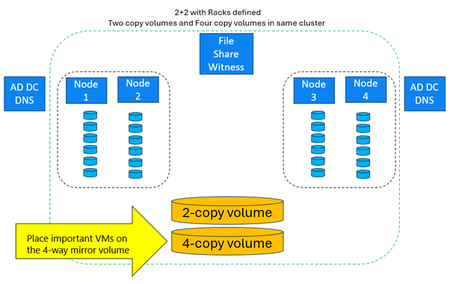
Announcing Windows Server vNext Preview Build 26470 Hello Windows Server Insiders! Today we are pleased to release a new build of the next Windows Server Long-Term Servicing Channel (LTSC) Preview that contains both the Desktop Experience and Server Core installation options for Datacenter and Standard editions, Annual Channel for Container Host and Azure Edition (for VM evaluation only). Branding remains, Windows Server 2025, in this preview - when reporting issues please refer to Windows Server vNext preview. If you signed up for Server Flighting, you should receive this new build automatically. What's New Rack Level Nested Mirror (RLNM) for S2D Campus Cluster Rack Level Nested Mirror (RLNM) for S2D Campus Cluster enables customers to meet NIS2 two data room requirements for their factories by providing fast and resilient storage using Storage Spaces Direct (S2D). For S2D Campus Cluster, we recommend using all-flash storage (SSD or NVMe drives), all capacity (no cache drives), and RDMA NICs (iWARP, RoCE, or InfiniBand). Note: Rack fault domains must be created on the cluster in order to use this feature – a new cluster must be created: #Create a test cluster but do not create storage: New-Cluster -Name TestCluster -Node Node1, Node2, Node3, Node4 -NoStorage #Define the fault domains for the cluster – two nodes are in “Room1” and two nodes are in “Room2”: Set-ClusterFaultDomain -XML @”<Topology><Site Name=”Redmond”><Rack Name=”Room1”><Node Name=”Node1”/><Node Name=”Node2”/></Rack><Rack Name=”Room2”><Node Name=”Node3”/> <Node Name=”Node4”/></Rack></Site></Topology>”@ #Add Storage Spaces Direct (S2D) Storage to the cluster – note that Enable-ClusterS2D cmdlet can also be used: Enable-ClusterStorageSpacesDirect #Check that the Storage Pool’s FaultDomainAwareness property is set to StorageRack: Get-storagepool -FriendlyName <S2DStoragePool> | fl #Create a four-copy volume on the storage pool: New-Volume -FriendlyName “FourCopyVolume” -StoragePoolFriendlyName S2D* -FileSystem CSVFS_ReFS –Size 500GB -PhysicalDiskRedundancy 3 -ProvisioningType Fixed -NumberOfDataCopies 4 –NumberOfColumns 3 #Create a four-copy volume on the storage pool, thinly provisioned: New-Volume -FriendlyName “FourCopyVolume” -StoragePoolFriendlyName S2D* -FileSystem CSVFS_ReFS –Size 500GB -PhysicalDiskRedundancy 3 –ProvisioningType Thin -NumberOfDataCopies 4 –NumberOfColumns 3 Windows Server Flighting is here!! If you signed up for Server Flighting, you should receive this new build automatically later today. For more information, see Welcome to Windows Insider flighting on Windows Server - Microsoft Community Hub Feedback Hub app is now available for Server Desktop users! The app should automatically update with the latest version, but if it does not, simply Check for updates in the app’s settings tab. Known Issues Download Windows Server Insider Preview (microsoft.com) Flighting: The label for this flight may incorrectly reference Windows 11. However, when selected, the package installed is the Windows Server update. Please ignore the label and proceed with installing your flight. This issue will be addressed in a future release. Available Downloads Downloads to certain countries may not be available. See Microsoft suspends new sales in Russia - Microsoft On the Issues. Windows Server Long-Term Servicing Channel Preview in ISO format in 18 languages, and in VHDX format in English only. Windows Server Datacenter Azure Edition Preview in ISO and VHDX format, English only. Microsoft Server Languages and Optional Features Preview Keys: Keys are valid for preview builds only Server Standard: MFY9F-XBN2F-TYFMP-CCV49-RMYVH Datacenter: 2KNJJ-33Y9H-2GXGX-KMQWH-G6H67 Azure Edition does not accept a key. Symbols: Available on the public symbol server – see Using the Microsoft Symbol Server. Expiration: This Windows Server Preview will expire September 15, 2026. How to Download Registered Insiders may navigate directly to the Windows Server Insider Preview download page. If you have not yet registered as an Insider, see GETTING STARTED WITH SERVER on the Windows Insiders for Business portal. We value your feedback! The most important part of the release cycle is to hear what's working and what needs to be improved, so your feedback is extremely valued. Please use the new Feedback Hub app for Windows Server if you are running a Desktop version of Server. If you are using a Core edition, or if you are unable to use the Feedback Hub app, you can use your registered Windows 10 or Windows 11 Insider device and use the Feedback Hub application. In the app, choose the Windows Server category and then the appropriate subcategory for your feedback. In the title of the Feedback, please indicate the build number you are providing feedback on as shown below to ensure that your issue is attributed to the right version: [Server #####] Title of my feedback See Give Feedback on Windows Server via Feedback Hub for specifics. The Windows Server Insiders space on the Microsoft Tech Communities supports preview builds of the next version of Windows Server. Use the forum to collaborate, share and learn from experts. For versions that have been released to general availability in market, try the Windows Server for IT Pro forum or contact Support for Business. Diagnostic and Usage Information Microsoft collects this information over the internet to help keep Windows secure and up to date, troubleshoot problems, and make product improvements. Microsoft server operating systems can be configured to turn diagnostic data off, send Required diagnostic data, or send Optional diagnostic data. During previews, Microsoft asks that you change the default setting to Optional to provide the best automatic feedback and help us improve the final product. Administrators can change the level of information collection through Settings. For details, see http://aka.ms/winserverdata. Also see the Microsoft Privacy Statement. Terms of Use This is pre-release software - it is provided for use "as-is" and is not supported in production environments. Users are responsible for installing any updates that may be made available from Windows Update. All pre-release software made available to you via the Windows Server Insider program is governed by the Insider Terms of Use.890Views3likes0Comments