compliance
933 Topics
Enrollment blocked by trust verification - cannot publish Excel add-in
Hello, I am trying to enroll in the Microsoft 365 and Copilot program to publish an Excel add-in on AppSource. My enrollment is being blocked by the automated trust check immediately after submitting company information. Reference number: 715-123160 Transaction ID: 9c3fc538-f972-4ea3-bdd1-9056cc9ea9f2 Correlation ID: eb079fa4-1be5-4eca-8458-ac7eb738eacd Because the enrollment was blocked at this stage, no Partner Center workspace was created, so I cannot open a support ticket through the normal method. Please escalate this to the Partner Trust & Safety / Vetting team for manual review. Thank you.Introducing new security and compliance add-ons for Microsoft 365 Business Premium
Small and medium businesses (SMBs) are under pressure like never before. Cyber threats are evolving rapidly, and regulatory requirements are becoming increasingly complex. Microsoft 365 Business Premium is our productivity and security solution designed for SMBs (1–300 users). It includes Office apps, Teams, advanced security such as Microsoft Defender for Business, and device management — all in one cost-effective package. Today, we’re taking that a step further. We’re excited to announce three new Microsoft 365 Business Premium add-ons designed to supercharge security and compliance. Tailored for medium-sized organizations, these add-ons bring enterprise-grade security, compliance, and identity protection to the Business Premium experience without the enterprise price tag. Microsoft Defender Suite for Business Premium: $10/user/month Cyberattacks are becoming more complex. Attackers are getting smarter. Microsoft Defender Suite provides end-to-end security to safeguard your businesses from identity attacks, device threats, email phishing, and risky cloud apps. It enables SMBs to reduce risks, respond faster, and maintain a strong security posture without adding complexity. It includes: Protect your business from identity threats: Microsoft Entra ID P2 offers advanced security and governance features including Microsoft Entra ID Protection and Microsoft Entra ID Governance. Microsoft Entra ID protection offers risk-based conditional access that helps block identity attacks in real time using behavioral analytics and signals from both user risk and sign-in risk. It also enables SMBs to detect, investigate, and remediate potential identity-based risks using sophisticated machine learning and anomaly detection capabilities. With detailed reports and alerts, your business is notified of suspicious user activities and sign-in attempts, including scenarios like a password-spray where attackers try to gain unauthorized access to company employee accounts by trying a small number of commonly used passwords across many different accounts. ID Governance capabilities are also included to help automate workflows and processes that give users access to resources. For example, IT admins historically manage the onboarding process manually and generate repetitive user access requests for Managers to review which is time consuming and inefficient. With ID Governance capabilities, pre-configured workflows facilitate the automation of employee onboarding, user access, and lifecycle management throughout their employment, streamlining the process and reducing onboarding time. Microsoft Defender for Identity includes dedicated sensors and connectors for common identity elements that offer visibility into your unique identity landscape and provide detailed posture recommendations, robust detections and response actions. These powerful detections are then automatically enriched and correlated with data from other domains across Defender XDR for true incident-level visibility. Keep your devices safe: Microsoft Defender for Endpoint Plan 2 offers industry-leading antimalware, cyberattack surface reduction, device-based conditional access, comprehensive endpoint detection and response (EDR), advanced hunting with support for custom detections, and attack surface reduction capabilities powered by Secure Score. Secure email and collaboration: With Microsoft Defender for Office 365 P2, you gain access to cyber-attack simulation training, which provides SMBs with a safe and controlled environment to simulate real-world cyber-attacks, helping to train employees in recognizing phishing attempts. Additionally automated response capabilities and post-breach investigations help reduce the time and resources required to identify and remediate potential security breaches. Detailed reports are also available that capture information on employees’ URL clicks, internal and external email distribution, and more. Protect your cloud apps: Microsoft Defender for Cloud Apps is a comprehensive, AI-powered software-as-a-service (SaaS) security solution that enables IT teams to identify and manage shadow IT and ensure that only approved applications are used. It protects against sophisticated SaaS-based attacks, OAuth attacks, and risky interactions with generative AI apps by combining SaaS app discovery, security posture management, app-to-app protection, and integrated threat protection. IT teams can gain full visibility into their SaaS app landscape, understand the risks and set up controls to manage the apps. SaaS security posture management quickly identifies app misconfigurations and provides remediation actions to reduce the attack surface. Microsoft Purview Suite for Business Premium: $10/user/month Protect against insider threats Microsoft Purview Insider Risk Management uses behavioral analytics to detect risky activities, like an employee downloading large volumes of files before leaving the company. Privacy is built in, so you can act early without breaking employee trust. Protect sensitive data wherever it goes Microsoft Purview Information Protection classifies and labels sensitive data, so the right protections follow the data wherever it goes. Think of it as a ‘security tag’ that stays attached to a document whether it’s stored in OneDrive, shared in Teams, or emailed outside the company. Policies can be set based on the ‘tag’ to prevent data oversharing, ensuring sensitive files are only accessible to the right people. Microsoft Purview Data Loss Prevention (DLP) works in the background to stop sensitive information, like credit card numbers or health data, from being accidentally shared with unauthorized people Microsoft Purview Message Encryption adds another layer by making sure email content stays private, even when sent outside the organization. Microsoft Purview Customer Key gives organizations control of their own encryption keys, helping meet strict regulatory requirements. Ensure data privacy and compliant communications Microsoft Purview Communication Compliance monitors and flags inappropriate or risky communications to protect against policy and compliance violations. Protect AI interactions Microsoft Purview Data Security Posture Management (DSPM) for AI provides visibility into how AI interacts with sensitive data, helping detect oversharing, risky prompts, and unethical behavior. Monitors Copilot and third-party AI usage with real-time alerts, policy enforcement, and risk scoring. Manage information through its lifecycle Microsoft Purview Records and Data Lifecycle Management helps businesses meet compliance obligations by applying policies that enable automatic retention or deletion of data. Stay investigation-ready Microsoft Purview eDiscovery (Premium) makes it easier to respond to internal investigations, legal holds, or compliance reviews. Instead of juggling multiple systems, you can search, place holds, and export information in one place — ensuring legal and compliance teams work efficiently. Microsoft Purview Audit (Premium) provides deeper audit logs and analytics to trace activity like file access, email reads, or user actions. This level of detail is critical for incident response and forensic investigations, helping SMBs maintain regulatory readiness and customer trust. Simplify Compliance Management Microsoft Purview Compliance Manager helps track regulatory requirements, assess risk, and manage improvement actions, all in one dashboard tailored for SMBs. Together, these capabilities help SMBs operate with the same level of compliance and data protection as large enterprises but simplified for smaller teams and tighter budgets. Microsoft Defender and Purview Suites for Business Premium: $15/user/month The new Microsoft Defender and Purview Suites unite the full capabilities of Microsoft Defender and Purview into a single, cost-effective package. This all-in-one solution delivers comprehensive security, compliance, and data protection, while helping SMB customers unlock up to 68% savings compared to buying the products separately, making it easier than ever to safeguard your organization without compromising on features or budget. FAQ Q: When will these new add-ons be available for purchase? A: They will be available for purchase as add-ons to Business Premium in September 2025. Q: How can I purchase? A: You can purchase these as add-ons to your Business Premium subscription through Microsoft Security for SMBs website or through your Partner. Q: Are there any seat limits for the add-on offers? A: Yes. Customers can purchase a mix of add-on offers, but the total number of seats across all add-ons is limited to 300 per customer. Q: Does Microsoft 365 Business Premium plus Microsoft Defender Suite allow mixed licensing for endpoint security solutions? A: Microsoft Defender for Business does not support mixed licensing so a tenant with Defender for Business (included in Microsoft 365 Business Premium) along with Defender for Endpoint Plan 2 (included in Microsoft 365 Security) will default to Defender for Business. For example, if you have 80 users licensed for Microsoft 365 Business Premium and you’ve added Microsoft Defender Suite for 30 of those users, the experience for all users will default to Defender for Business. If you would like to change that to the Defender for Endpoint Plan 2 experience, you should license all users for Defender for Endpoint Plan 2 (either through standalone or Microsoft Defender Suite) and then contact Microsoft Support to request the switch for your tenant. You can learn more here. Q: Can customers who purchased the E5 Security Suite as an add-on to Microsoft 365 Business Premium transition to the new Defender Suite starting from the October billing cycle? A: Yes. Customers currently using the Microsoft 365 E5 Security add-on with Microsoft 365 Business Premium are eligible to transition to the new Defender Suite beginning with the October billing cycle. For detailed guidance, please refer to the guidelines here. Q: As a Partner, how do I build Managed Detection and Response (MDR) services with MDB? A: For partners or customers looking to build their own security operations center (SOC) with MDR, Defender for Business supports the streaming of device events (device file, registry, network, logon events and more) to Azure Event Hub, Azure Storage, and Microsoft Sentinel to support advanced hunting and attack detection. If you are using the streaming API for the first time, you can find step-by-step instructions in the Microsoft 365 Streaming API Guide on configuring the Microsoft 365 Streaming API to stream events to your Azure Event Hubs or to your Azure Storage Account. To learn more about Microsoft Security solutions for SMBs you can visit our website.82KViews9likes42Comments
Why “Data in Switzerland” Is Not Enough
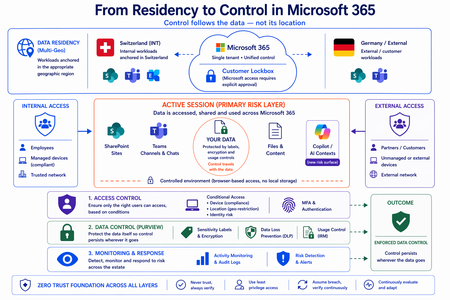
Moving from Residency to Control in Microsoft 365 Every conversation about data sovereignty in regulated industries tends to start the same way: “We use Multi-Geo. The data stays in Switzerland.” It’s the right starting point. Microsoft 365 Multi-Geo allows organizations to place selected workloads - SharePoint sites, OneDrive accounts, Teams data, or Exchange mailboxes - into specific regions, including Switzerland, while maintaining a single global tenant. This makes it possible to align sensitive data with regulatory or customer requirements without fragmenting the overall environment. But it only answers one question: Where is the data stored? It does not answer who accessed the data, from where, under which conditions, or what happened after access. That is where the real problem begins. A scenario that happens every day A Swiss engineering firm stores sensitive project documentation in Switzerland using Multi-Geo. An external contractor - working from an unmanaged device outside Switzerland - is granted access to review a file. The document opens. The data is now on a screen in an unknown location, on a device with no compliance posture, in a session with no restrictions. From the platform’s perspective, residency was enforced. From a sovereignty perspective, control was lost the moment access was granted without conditions. The file never left Switzerland. But sovereignty did. Residency is static. Control is not. The moment a document is opened, storage location stops being the relevant boundary. The file is no longer just “in Switzerland.” It moves instantly across endpoints and browsers, collaboration tools like Teams, external users and partners, and increasingly AI-driven contexts. The infrastructure remains unchanged. The data does not. From the platform’s perspective, everything is working as designed - access was granted, residency was enforced - and control was lost. Most “data in Switzerland” strategies fail at exactly this moment: when the data is used. The shift: from location to conditions If data sovereignty is the goal, the question must change. Not “Where is the data stored?” but: Under which conditions can data be accessed and used? This shift fundamentally changes the architecture. Control must be applied across three distinct layers - and all three must be connected. Layer 1: Access is conditional, not static Conditional Access extends control beyond authentication and turns it into continuous evaluation. Access decisions can depend on: Device compliance Location (geo-restriction) Identity and risk signals Multi-Geo ensures data is placed correctly. Conditional Access ensures it is reachable only under defined conditions. The two must work together - residency without access governance is an incomplete control. Layer 2: The session is the real risk surface Even with strict access controls, risk remains. A session is an exposure surface by design. During an active session, data is viewed, copied, shared, processed by applications, and connected to AI prompts. The gap does not appear at storage or authentication. It appears during active usage - inside the session. This is the layer most architectures do not explicitly address. Controls must extend into the session itself: limiting data transfer and replication, restricting interaction patterns, and enforcing policies in real time. Access is no longer a one-time event. It becomes continuously governed. This becomes even more critical as AI assistants consume content across SharePoint, Teams, Exchange, and other Microsoft 365 services. The question is no longer only where the source document resides - but whether the AI interaction itself is governed by the same access and protection controls as direct access. Layer 3: The document becomes the control point The most durable control does not sit in the network or in the session. It sits in the data itself. In regulated industries, organizations often arrive at this architecture having first evaluated sovereign or national encryption solutions. The decision to rely on native Microsoft 365 Purview encryption rather than a separate layer comes down to integration: AES-256 protection operating natively at file, user, and SharePoint level - including geo-based access restrictions - without an additional system to maintain. When protection is applied directly to the document through Microsoft Purview: Sensitivity labels define classification - automatically assigned based on content Encryption enforces access - AES-256, bound to the file itself IRM controls usage - view, copy, print, share, and presentation rights DLP governs movement across services - preventing data from leaving defined boundaries Dynamic watermarking tracks exposure - applied on open, view, or print At that point, access is enforced by the file, usage restrictions travel with it, and control persists regardless of location. The document becomes the perimeter. Platform control: limiting provider access One dimension often overlooked in sovereignty discussions is platform access itself. Even a perfectly configured tenant is only as sovereign as the controls placed on the operator. Customer Lockbox ensures that even Microsoft support cannot access customer data without explicit, logged, time-bound approval. Every access request is visible, auditable, and subject to customer veto. Data control applies not only to users - but also to the platform operating the service. Enforcement requires an integrated architecture Most organizations already have the required capabilities: Multi-Geo, Conditional Access, session control, Purview (labels, encryption, DLP, IRM), and monitoring. The issue is not capability. It is fragmentation. In practice, fragmentation looks like this: residency is configured in one project, Conditional Access policies are managed by a different team, and Purview labels were applied during a compliance initiative that never connected to the access layer. The tools exist. The signals do not flow between them. When designed as a single architecture: Data is placed intentionally - residency aligned to regulatory requirements Access is governed by context - device, location, and identity evaluated continuously Usage is controlled dynamically - session-level restrictions enforced in real time Protection is embedded in the document - encryption and IRM travel with the file Signals are connected across the platform - monitoring feeds access policy, not just audit logs “Data in Switzerland” becomes not just a statement - but an enforceable system property. Closing thought Placing data in Switzerland is the right first step. Multi-Geo makes it possible, even in global environments. But residency alone is not control. Data residency answers where information is stored. Data sovereignty requires proving who can access it, under which conditions, and what controls remain in place after access is granted. In Microsoft 365, sovereignty is no longer defined by geography alone. It is defined by the ability to enforce control wherever the data travels.Microsoft Purview enables developers with strong data security across AI apps and agents
Today, developers are at the center of a new wave of innovation—building AI applications and agents that are deeply connected to enterprise data. But with this opportunity comes a new and complex set of security challenges. AI systems operate across cloud platforms, third-party services, and even local and on-premises development environments, interacting dynamically with sensitive data such as customer records, financial information, and intellectual property. Traditional security approaches weren’t designed for this level of scale, autonomy, or fluid data movement—leaving developers to navigate fragmented tools, unclear policies, and the risk of unintentionally exposing sensitive information. At the same time, expectations are rising. Organizations need to ensure that AI applications and agents are compliant, auditable, and secure by default on an enterprise-level—not retrofitted after deployment. But for developers, adding security often means additional complexity, custom integrations, and slower time to market. This tension between speed and control has become one of the biggest barriers to moving AI from experimentation into production. Microsoft Purview is designed to help with this challenge by embedding data security and compliance controls across the development cycle. Purview provides a consistent way to govern how data is accessed, used, and shared—without requiring developers to become security experts. The result is a simpler path to building AI systems that are secure, compliant, and enterprise-ready by design. Extending data security and compliance to local agents and claws Local and endpoint agents, built in platforms such as GitHub Copilot CLI and OpenClaw, introduce a new class of data security challenges as they operate outside traditional control planes and directly on user machines. Unlike cloud systems, these agents can access local files, credentials, terminals, and enterprise apps simultaneously—often moving data across tools and environments. This expands data risks, from sensitive data being unintentionally stored, copied, or shared, to API keys and tokens being exposed, and autonomous workflows triggering data movement without explicit user intent. At the same time, many existing security controls were designed for browser or cloud-based activity, leaving a growing blind spot at the endpoint where agents are increasingly running. The result is a widening gap between how developers build agents to operate locally in the users machines, and how organizations can detect, govern, and protect the data those agents interact with. Microsoft Security and Windows are integrating management and security capabilities directly into the local agents’ development workflow, enabling security as an architectural guarantee rather than an implementation choice. At Build, we are thrilled to be extending Purview visibility and protection capabilities to local agents developed on GitHub Copilot CLI, Claude Code, OpenAI Codex, and OpenClaw - in Public Preview. Unlike traditional cloud applications, these agents operate closer to the data and often create new risks for data exposure. Purview addresses this challenge across all types of agent interactions with a clear, simplified set of scenarios: ▪ Observability: Visibility on Purview Data Security Posture Management (DSPM) across agent inventory, as well as into how local agents interact with sensitive data—across prompts, responses, and actions. ▪ Runtime data protection: Purview Data Loss Prevention (DLP) controls enforced directly into the agent execution flow, inspecting prompts and tool calls in real time to prevent sensitive data exfiltration. ▪ Agentic risk detection: Risky or anomalous agent behaviors detected through Insider Risk Management (IRM) signals, helping teams detect unsafe interactions early. ▪ Audit: Comprehensive, end-to-end logging of all local agent interactions—capturing prompts, responses, data access, and actions for data context. For example, a developer is using a local coding agent to generate code and accidentally includes sensitive credentials in a prompt. AI observability in DSPM surfaces the interaction and shows what data the agent accessed. DLP detects the sensitive data in real time and blocks it from being sent or processed (or sensitive files from being accessed and exfiltrated). At the same time, agentic risk detection flags the session as high risk based on the behavior pattern. All of this activity is captured in audit logs, enabling the security team to investigate and take action quickly. Developers and security teams gain visibility into agent activity and data interactions, while policies prevent sensitive data leakage. This ensures consistent security outcomes across both cloud and endpoint environments, without disrupting developer workflows. Strengthening visibility and controls for Foundry agents Foundry gives developers a central place to build and manage AI agents, but it also creates a need for data security context directly in that workflow—especially as prompts, model interactions, and downstream actions increasingly involve sensitive enterprise data. At Build, we are excited to announce the expansion of the Foundry integration with Purview. This includes Purview DLP runtime controls for prompt processing in Foundry, in Public Preview. As agents and applications built on Foundry increasingly interact with sensitive data, Purview ensures those interactions are governed by trusted controls, identifying Sensitive Information Types (SITs) in real time to detect and protect confidential data embedded in prompts. For example, if a user includes customer PII or financial data in a prompt, Purview can automatically identify the sensitive content and block that prompt from being processed by the model. This ensures that all Foundry apps and agents, regardless of how they’re built or deployed, inherit consistent data protection – allowing organizations to reduce risk of inadvertent data exposure, centralize compliance enforcement across AI workloads, and confidently scale AI adoption knowing sensitive data is protected by design. We’re also building up on the Purview coverage for Foundry shared at the last Microsoft Ignite by announcing Purview insights embedded directly into the Foundry Control Plane, in General Availability, bringing rich data security context to the plane where developers already work. Purview surfaces crucial signals—such as SITs detected in the agentic interactions, % of agentic interactions involving sensitive data, and spread of high-risk users — so Foundry admins can know how AI apps and agents are built in their environment. This shift enables developers to make faster, better decisions in the moment, reducing rework and closing security gaps early on. For customers, the value is clear: stronger security by design and at enterprise scale, accelerated development cycles, and reduced risk of data leaks or compliance issues—without slowing down innovation. Innovating for developers everywhere, at the pace of AI growth Microsoft is also expanding Purview’s reach across the broader developer ecosystem. New integrations help organizations apply consistent oversight to AI tools and platforms developers already use, without adding separate compliance workflows. GitHub Copilot is a critical productivity layer for developers, accelerating how code is written and shipped—making it equally important that developer interactions with GitHub Copilot are governed and secured with the same rigor as enterprise data. Microsoft Purview now extends data governance and compliance capabilities to GitHub Copilot interactions, in Public Preview, enabling GitHub Enterprise customers with Entra SSO to stream audit logs directly into Purview. This brings centralized visibility for AI activity, allowing security and compliance teams to analyze GitHub Copilot agent session activity alongside other AI workloads. With this native integration into GitHub workflows, Purview audits Copilot activity across repositories, pull requests, and developer sessions—ensuring AI-generated code aligns with enterprise data policies, compliance requirements, and secure development standards. By integrating Purview into existing workflows, organizations can govern GitHub AI usage without building parallel pipelines—reducing complexity while ensuring consistent compliance coverage across their entire data estate. Today’s AI agents aren’t built in just one ecosystem—they span custom apps, third-party platforms, and open-source frameworks. Without consistent controls, this creates blind spots where sensitive data can be exposed outside enterprise guardrails. That’s why extending Purview protection beyond Microsoft environments is critical: it ensures developers can apply the same data security, DLP policies, and compliance controls to any agent, anywhere—so innovation can scale without increasing risk. Developers already use Microsoft Purview APIs to embed data protection into enterprise workflows. Today, we’re introducing the Microsoft Purview SDK for .NET — a simple, drop-in toolkit that brings Purview capabilities directly into any application, in Public Preview. Instead of weeks spent wiring APIs, authentication, and error handling, developers can add content scanning, DLP checks, and sensitivity labeling in just a few lines of code. The SDK handles the heavy lifting — including auth, retries, caching, and telemetry — so teams can focus on building experiences. For AI apps and agents built outside of the Microsoft AI platforms, SDK adds built-in support and can evaluate prompts and responses in real time against DLP and content policies — helping prevent data exposure at runtime without custom logic. Designed for both real-time and asynchronous patterns, and for authenticated or anonymous flows, the SDK also feeds activity back into Purview to give security teams centralized visibility and control. The bottom line is- the Microsoft Purview SDK enables developers to build AI apps and agents that are secure and compliant by default — cutting integration time from weeks to days while ensuring data protection scales with AI. The SDK will be available in public preview within the next month. Together, these announcements represent a significant step forward in how developers build secure AI systems. Microsoft Purview is no longer just a data security and compliance solution—it is a first-class layer of the development process by protecting data across AI applications and agents, and enables a bridge between developers and security teams. As AI becomes more agentic, distributed, and deeply connected to enterprise data, the need for built-in security will only grow. With Purview, developers no longer must choose between speed and security—they can build both into every application from the start Getting connected with Microsoft Purview and learn more Learn more about Microsoft Purview on our website and Microsoft Learn. Explore Agent 365. Try Microsoft Purview data security. Learn more about Microsoft Purview SDK.
We never really knew if our Azure followed CAF or Well-Architected — so we built something
For years we ran Azure environments professionally and CAF and WAF reviews were always the same story. A consultant every 12-18 months, a thick PDF, good intentions — and then nothing until the next one. The problem wasn't that we didn't care. It was that there was no lightweight way to track it continuously. Defender had some parts of CIS. WAF had the assessment tool. CAF had... a whitepaper and a spreadsheet we kept meaning to update. We couldn't answer basic questions like: are we getting better or worse? Which subscriptions are drifting? What would an auditor actually see if they looked at our CAF posture today? Eventually we got frustrated enough to build Anubion — it connects agentlessly to your Azure tenant and runs continuous checks across CIS, CAF, and WAF in one place, with findings prioritised and evidence stored over time. Happy to share more if anyone's interested. But also genuinely curious — how are other teams handling CAF and WAF tracking between formal assessments? If anyone is curious about their scores, you can sign up for at 14 day free trial. The setup is short and you only need a read-only service principal. Check out https://anubion.io/#request-accessPartner Center Enrollment Blocked – Trust Code 715-123160 – Requesting Manual Review
Hello Microsoft Support Team, Our company in Kuwait is attempting to enroll as a Cloud Solution Provider (CSP), but our registration has been hard-blocked by the automated trust check system.Because our enrollment is blocked at this preliminary stage, no Partner Center workspace has been created. As a result, we are caught in a loop and cannot submit an internal support request.Please escalate this case to the Partner Vetting / Trust & Safety team so they can allow us to submit our official company registration documents manually. Reference Number: 715-123160 Transaction ID: 85680e64-06b9-42cd-89d5-1af827650d40 Correlation ID: c738e2f9-c142-4fd3-8ef5-178c2381e60a Thank you.Security Review for Microsoft Edge version 148
We have reviewed the new settings in Microsoft Edge version 148 and determined that there are no additional security settings that require enforcement. The Microsoft Edge version 139 security baseline continues to be our recommended configuration which can be downloaded from the Microsoft Security Compliance Toolkit. Microsoft Edge version 148 introduced 16 new Computer and User settings; we have included a spreadsheet listing the new settings to make it easier for you to find. As a friendly reminder, all available settings for Microsoft Edge are documented here, and all available settings for Microsoft Edge Update are documented here. Please continue to give us feedback through the Security Baselines Discussion site or this post.
Urgent: Enrollment Blocked for Sorted Keys LLC (Error 715-123160) - No Workspace Access
Hello Microsoft Partner Community Team, I am reaching out here because I am currently stuck in a Support Loop while trying to enroll my business, Sorted Keys LLC, into the Microsoft AI Cloud Partner Program. While entering my company information, I encountered the Error Code: 715-123160 stating that the request was blocked. Because the enrollment was halted at this stage, a Partner Center Workspace has not been created for my account. This prevents me from logging in to the portal to raise a standard support ticket. I am an authorized representative of the business and have all legal documentation ready for manual verification. Application Details: Legal Business Name: Sorted Keys LLC Transaction ID: 348fc4c3-6b8a-45de-97ea-5a51a7517ac3 Reference Number: 715-123160 Correlation ID: 1cbc853b-9496-47d3-80b1-55cbfa92d60a Requested Action: Could a community manager please escalate this to the Vetting/Identity team to manually review my entity details or reset the enrollment block so I can proceed with the CSP Indirect Reseller application? Thank you for your time and assistance.Windows 11, version 25H2 security baseline
Microsoft is pleased to announce the security baseline package for Windows 11, version 25H2! You can download the baseline package from the Microsoft Security Compliance Toolkit, test the recommended configurations in your environment, and customize / implement them as appropriate. Summary of changes This release includes several changes made since the Windows 11, version 24H2 security baseline to further assist in the security of enterprise customers, to include better alignment with the latest capabilities and standards. The changes include what is depicted in the table below. Security Policy Change Summary Printer: Impersonate a client after authentication Add “RESTRICTED SERVICES\PrintSpoolerService” to allow the Print Spooler’s restricted service identity to impersonate clients securely NTLM Auditing Enhancements Enable by default to improve visibility into NTLM usage within your environment MDAV: Attack Surface Reduction (ASR) Add "Block process creations originating from PSExec and WMI commands" (d1e49aac-8f56-4280-b9ba-993a6d77406c) with a recommended value of 2 (Audit) to improve visibility into suspicious activity MDAV: Control whether exclusions are visible to local users Move to Not Configured as it is overridden by the parent setting MDAV: Scan packed executables Remove from the baseline because the setting is no longer functional - Windows always scans packed executables by default Network: Configure NetBIOS settings Disable NetBIOS name resolution on all network adapters to reduce legacy protocol exposure Disable Internet Explorer 11 Launch Via COM Automation Disable to prevent legacy scripts and applications from programmatically launching Internet Explorer 11 using COM automation interfaces Include command line in process creation events Enable to improve visibility into how processes are executed across the system WDigest Authentication Remove from the baseline because the setting is obsolete - WDigest is disabled by default and no longer needed in modern Windows environments Printer Improving Print Security with IPPS and Certificate Validation To enhance the security of network printing, Windows introduces two new policies focused on controlling the use of IPP (Internet Printing Protocol) printers and enforcing encrypted communications. The setting, "Require IPPS for IPP printers", (Administrative Templates\Printers) determines whether printers that do not support TLS are allowed to be installed. When this policy is disabled (default), both IPP and IPPS transport printers can be installed - although IPPS is preferred when both are available. When enabled, only IPPS printers will be installed; attempts to install non-compliant printers will fail and generate an event in the Application log, indicating that installation was blocked by policy. The second policy, "Set TLS/SSL security policy for IPP printers" (same policy path) requires that printers present valid and trusted TLS/SSL certificates before connections can be established. Enabling this policy defends against spoofed or unauthorized printers, reducing the risk of credential theft or redirection of sensitive print jobs. While these policies significantly improve security posture, enabling them may introduce operational challenges in environments where IPP and self-signed or locally issued certificates are still commonly used. For this reason, neither policy is enforced in the security baseline, at this time. We recommend that you assess your printers, and if they meet the requirements, consider enabling those policies with a remediation plan to address any non-compliant printers in a controlled and predictable manner. User Rights Assignment Update: Impersonate a client after authentication We have added RESTRICTED SERVICES\PrintSpoolerService in the “Impersonate a client after authentication” User Rights Assignment policy. The baseline already includes Administrators, SERVICE, LOCAL SERVICE, and NETWORK SERVICE for this user right. Adding the restricted Print Spooler supports Microsoft’s ongoing effort to apply least privilege to system services. It enables Print Spooler to securely impersonate user tokens in modern print scenarios using a scoped, restricted service identity. Although this identity is associated with functionality introduced as part of Windows Protected Print (WPP), it is required to support proper print operations even if WPP is not currently enabled. The system manifests the identity by default, and its presence ensures forward compatibility with WPP-based printing. Note: This account may appear as a raw SID (e.g., S-1-5-99-...) in Group Policy or local policy tools before the service is fully initialized. This is expected and does not indicate a misconfiguration. Warning: Removing this entry will result in print failures in environments where WPP is enabled. We recommend retaining this entry in any custom security configuration that defines this user right. NTLM Auditing Enhancements Windows 11, version 25H2 includes enhanced NTLM auditing capabilities, enabled by default, which significantly improves visibility into NTLM usage within your environment. These enhancements provide detailed audit logs to help security teams monitor and investigate authentication activity, identify insecure practices, and prepare for future NTLM restrictions. Since these auditing improvements are enabled by default, no additional configuration is required, and thus the baseline does not explicitly enforce them. For more details, see Overview of NTLM auditing enhancements in Windows 11 and Windows Server 2025. Microsoft Defender Antivirus Attack Surface Reduction (ASR) In this release, we've updated the Attack Surface Reduction (ASR) rules to add the policy Block process creations originating from PSExec and WMI commands (d1e49aac-8f56-4280-b9ba-993a6d77406c) with a recommended value of 2 (Audit). By auditing this rule, you can gain essential visibility into potential privilege escalation attempts via tools such as PSExec or persistence mechanisms using WMI. This enhancement helps organizations proactively identify suspicious activities without impacting legitimate administrative workflows. Control whether exclusions are visible to local users We have removed the configuration for the policy "Control whether exclusions are visible to local users" (Windows Components\Microsoft Defender Antivirus) from the baseline in this release. This change was made because the parent policy "Control whether or not exclusions are visible to Local Admins" is already set to Enabled, which takes precedence and effectively overrides the behavior of the former setting. As a result, explicitly configuring the child policy is unnecessary. You can continue to manage exclusion visibility through the parent policy, which provides the intended control over whether local administrators can view exclusion lists. Scan packed executables The “Scan packed executables” setting (Windows Components\Microsoft Defender Antivirus\Scan) has been removed from the security baseline because it is no longer functional in modern Windows releases. Microsoft Defender Antivirus always scans packed executables by default, therefore configuring this policy has no effect on the system. Disable NetBIOS Name Resolution on All Networks In this release, we start disabling NetBIOS name resolution on all network adapters in the security baseline, including those connected to private and domain networks. The change is reflected in the policy setting “Configure NetBIOS settings” (Network\DNS Client). We are trying to eliminate the legacy name resolution protocol that is vulnerable to spoofing and credential theft. NetBIOS is no longer needed in modern environments where DNS is fully deployed and supported. To mitigate potential compatibility issues, you should ensure that all internal systems and applications use DNS for name resolution. We recommend the following; test critical workflows in a staging environment prior to deployment, monitor for any resolution failures or fallback behavior, and inform support staff of the change to assist with troubleshooting as needed. This update aligns with our broader efforts to phase out legacy protocols and improve security. Disable Internet Explorer 11 Launch Via COM Automation To enhance the security posture of enterprise environments, we recommend disabling Internet Explorer 11 Launch Via COM Automation (Windows Components\Internet Explorer) to prevent legacy scripts and applications from programmatically launching Internet Explorer 11 using COM automation interfaces such as CreateObject("InternetExplorer.Application"). Allowing such behavior poses a significant risk by exposing systems to the legacy MSHTML and ActiveX components, which are vulnerable to exploitation. Include command line in process creation events We have enabled the setting "Include command line in process creation events" (System\Audit Process Creation) in the baseline to improve visibility into how processes are executed across the system. Capturing command-line arguments allows defenders to detect and investigate malicious activity that may otherwise appear legitimate, such as abuse of scripting engines, credential theft tools, or obfuscated payloads using native binaries. This setting supports modern threat detection techniques with minimal performance overhead and is highly recommended. WDigest Authentication We removed the policy "WDigest Authentication (disabling may require KB2871997)" from the security baseline because it is no longer necessary for Windows. This policy was originally enforced to prevent WDigest from storing user’s plaintext passwords in memory, which posed a serious credential theft risk. However, starting with 24H2 update, the engineering teams deprecated this policy. As a result, there is no longer a need to explicitly enforce this setting, and the policy has been removed from the baseline to reflect the current default behavior. Since the setting does not write to the normal policies location in the registry it will not be cleaned up automatically for any existing deployments. Please let us know your thoughts by commenting on this post or through the Security Baseline Community.30KViews7likes12Comments
Partner center account removed suddenly!!
Hello. I’m an individual developer for Microsoft apps since the old days of Windows Mobile 6.5 , Windows Phone, Windows 8,8.1 , 10 and now 11. I’m a registered individual developer since 2008 (yeah, that’s correct, 16 years). I have published over 50+ different applications for different platforms. Windows desktop, MS Edge extension developer, Azure dev etc… Since last month, I received some app removal of some old apps I had in MS Store (all of them 100%). After a communication with the report app team they explained what I must don’t do and I started updating the problematic apps according their instructions. But, suddenly, yesterday a got an email that my account is removed and to read the ADA (application developer agreement). I already contact by email the reportapp Team to try to fix this and to restore my account. Can someone from MS explain to me this “behavior “ . Is this something personal against me? I don’t make any problems, I just dev apps , focus only on MS products, and provide them almost always for free, without any subscriptions or costs. I have build a personal ecosystem around my partnership with MS . Developing but using also Azure monthly subscriptions (heavily costed). My developer name: Mobility in life applications