community
10 Topics
AZ-500 Online MSL Learn Modules
Hello Folks, I'm using AZ-500 as part of a course I deliver this fall one last time. I'm curious if there is a link to the MSL training modules that I can share with students. I've done some looking, but it appears to have been taken offline. Any help would be appreciated....Solved135Views0likes1Comment
Power BI, PL-300
I am new to this program, creating a community college level course on Power BI. I have accessed the downloads; however, I do not see the actual content anywhere. I even found best practices for 12 modules, but I can't find the modules/course materials for students anywhere. Can you please provide a link or instructions on where to go. Thank you!Solved143Views0likes1Comment
Institution verification blocked by AVE, and support case form is failing
Hello, I am unable to complete institution verification for Microsoft Learn for Educators, and both documented support channels are currently failing for me. What is happening: 1. My institution verification was rejected with a "Blocked" response from AVE. 2. The in-portal Create a Case form returns "An error has occurred while processing your request. Please try again later" every time I submit, so I cannot raise a ticket through the documented route. I understand at least one other educator has reported this same combination recently, so I am writing directly in the hope this can be routed manually. I believe the AVE block is because our institutional domain is pathfinderfoundation.co.in rather than a .edu or .ac.in domain. In India, a large proportion of accredited private higher education institutions operate on .co.in and .org domains, so the suffix is not an indicator of accreditation status here. AICTE records are the authoritative source. Institution details: Name: Pathfinder Research and Training Foundation (PRTF) Website: https://pathfinderfoundation.co.in/ Accreditation: Approved by the All India Council for Technical Education (AICTE), the statutory national regulator for technical and management education in India, under the Ministry of Education, Government of India. AICTE Permanent Institution ID: 1-43701706366 AISHE Code: C-72792 Programmes offered: 1. Post Graduate Diploma in Management (PGDM), AICTE approved, two-year full-time, 120 students per batch. The programme is AI-centric by design, with Year 2 specialisation tracks in AI and Data Sciences, and Marketing and Finance. 2. Professional certification programmes in cloud and AI, delivered on campus as continuing education alongside the PGDM. Both fall within the Educational Institution Option scope, which covers accredited degree, diploma, certificate, and continuing or further education programmes. Faculty verification: I am Associate Professor in the AI and Data Science department. My profile, showing my institutional email address, is published at https://pathfinderfoundation.co.in/mentor-and-guest-faculty/ Domain ownership: pathfinderfoundation.co.in is owned and operated by the institution.. Intended use: Microsoft Official Curriculum maps onto our existing teaching plan. AI-900 and AI-102 into the AI and Data Sciences track, PL-300 and MB-220 into Marketing and Finance, AZ-900 and DP-900 as core digital foundations. Could someone please complete verification manually, or advise on an alternative route while the case form is unavailable? I am happy to provide any further documentation. Thank you, Aayan Kumar Associate Professor, AI and Data Science Department Pathfinder Research and Training Foundation (PRTF) email address removed for privacy reasonsSolved511Views1like2Comments
How can I save PowerPoint presentations from SlideShare for offline use?
I use Microsoft PowerPoint for studying and creating presentations, and sometimes I find useful presentations on SlideShare that I’d like to keep for offline reference. What is the easiest way to save a SlideShare presentation in a format that can be opened or edited with Microsoft PowerPoint? I came across ahttp:// https://slidesextract.com/ that can download presentations for offline use Would this be a suitable option for getting a presentation and then opening it in PowerPoint?104Views0likes0Comments
Microsoft survey branching
Branching issues here, I have 6 questions, i branched Q4 to a sub question Q4a, the issue is that 5 and 6 is hidden and only shows when 4a is open, i want 5 and 6 to be showing regardless of the branching in 4. I have already tried the expected fix with the "Go To" as below Q4 Option A → Q4a → Q5 Option B/C → Q5 Q5 → Q6 (normal flow) But still not working, the form just stops at Q4 and only opens with options are selected showing Q4a , 5 and 6 How do i fix this?262Views0likes2CommentsOutlook has been locked out for days
I am the sole Global Administrator of my Microsoft 365 tenant My main account has been locked out for days due to a broken Microsoft Authenticator registration (Error 500121). I have tried: Adding GitHub and personal email as alternate methods Signing out of all devices Clearing cache and cookies multiple times Reinstalling Microsoft Authenticator multiple times Removing 2-step verification where possible I was able to sign into Microsoft 365 (admin center / web apps) with alternative email using “Sign in another way” options, but I am still unable to access Outlook (desktop and mobile) — which is the main goal. In Microsoft additional security options - changed some settings. I removed two-step verification because Outlook keeps prompting for approval through the Microsoft Authenticator app. Authenticator app does not let me add my work account it is showing an error. Thus unable to approve the code in the authenticator app, stuck in the loop. When I removed two-step verification in Microsoft additional security options, signed out of all the devices, cleared cache and cookies, attempted to sign in again, being prompted to enter backup email for the verification code, which is not being sent after numerous attempts while I received notifications to that email that two-step verification was removed. Stuck. Any tips would be great. Thank you!212Views0likes1Comment
SKU, quota and policy restrictions on Azure for Students and Free Subscriptions
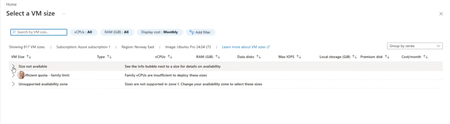
Subject: Azure for Students VM Availability Appears Inconsistent Across Students Hello everyone! We're seeing an issue across multiple cohorts using Azure for Students subscriptions, and I'm hoping someone can clarify whether there are additional restrictions being applied behind the scenes. We understand and accept the recent changes regarding: Allowed deployment regions for Azure for Students subscriptions The 4 vCPU quota limitations Regional capacity constraints We've updated our teaching materials accordingly and have troubleshooting guidance for students. However, we're observing behaviour that appears inconsistent between students with what seem to be identical subscription types. Examples: Student A can deploy several B-series VM sizes in an approved region. Student B can deploy only one VM size in the same approved region. Student C sees "Size not available" for every VM size in multiple approved regions. Student D eventually succeeds only after trying several approved regions, despite having available credit and no existing VMs. In one recent case, a student had: A Free subscription $200 credit available No deployed VMs No Allowed Regions policy visible (which made troubleshooting particularly confusing) Most regions the student tested showed one or more of the following: No available VM sizes Family quota limit messages Unsupported availability zone messages Eventually, Denmark East allowed deployment of a Standard_B2als_v2 VM, while several other regions did not. I have collected examples from multiple students and am seeing several different failure modes: Total Regional Core quota exceeded (expected and understandable) Allowed Locations policy restrictions VM size unavailable in approved regions Policy assignments showing "Not Registered" because Microsoft.PolicyInsights is not registered The challenge is that students with apparently identical Azure for Students subscriptions are not encountering the same restrictions. Has Microsoft introduced additional backend controls, SKU filtering, capacity restrictions, or subscription-specific policies that are not surfaced clearly through the Azure portal? From an educational perspective, the lack of consistency is making it difficult to provide reliable lab instructions because one student's successful deployment path may not work for another student with the same subscription type. My questions are: Are there additional backend restrictions beyond the visible Allowed Locations policy and published vCPU quotas? Is VM size availability being dynamically restricted per student subscription? Are regional capacity controls being applied differently across Azure for Students subscriptions? Is there a recommended method for identifying which regions and VM families are actually deployable for a specific student before beginning a lab exercise? Any clarification would be greatly appreciated, as we're trying to reduce classroom troubleshooting time and provide students with more reliable deployment guidance. Thank you.Solved819Views1like4CommentsUnable to tag distribution lists (DLs) in Viva engage posts
Dear All, It would be helpful to have a feature in Viva Engage posts that allows us to tag DLs when needed. While planning a post, I noticed that cross functional teams are not part of the community for specific reasons, which I understand. Instead of reposting in their community, it would be useful if we could tag DLs so the original message reaches everyone intended.87Views0likes0CommentsMicrosoft Showcase School and MCE Vouchers...
Hello Microsoft Tech Community, My name is Diogo Azeredo, and I am the STEAM Coordinator at escolaglobal, a Microsoft Showcase School based in Portugal for over ten years. We recently became aware that Microsoft had sent an email informing us about the possibility of requesting new vouchers for MCE (Microsoft Certified Educator) exams — up to two per educator — free of charge, until March 15th, by completing a form. Unfortunately, due to a network intervention at our school that affected our email services, we did not receive this notification in time. By the time we were informed, the deadline had already passed. Given these circumstances, I would like to kindly ask if there is any possibility to still request these vouchers, or if there is an alternative way to access this opportunity. We would greatly appreciate any guidance or support you can provide on this matter. Thank you very much in advance.198Views0likes1Comment