community
265 TopicsAfter seven years of being helped and even offering some help to others ...
... I think AI has effectively put this site out of business. So although I'll check in a few more times over the next month or so, and will definitely miss the virtual friends (real people) I've met, with whom I've exchanged messages...but other than that, it's a sad farewell. Thanks for the memories.322Views5likes6CommentsExcel Tools for Network & Windows
Excel Tools for Network & Windows Some time ago I already shared an earlier version of this project. Since then, I have added several new features. These tools are based on functionalities that already exist in Windows and its associated software. I have consolidated them into a single Excel-based interface, allowing all tools to be executed directly from Excel. The files are free for private use. For business or enterprise environments, a more comprehensive toolbox can be developed, enabling direct support, repair, management, monitoring, and control of users and systems. Everything can be customized according to specific requirements — the scope depends solely on the desired functionality, time investment, and budget. I appreciate any positive feedback, suggestions, or constructive tips. If this project is not of interest to you, please feel free to ignore it. Thank you, and I wish everyone happy holidays.230Views2likes2CommentsHow to Be an Excel Detective: Finding and Highlighting Formulas
Hi everyone, I recently wrote a blog post on some simple, yet powerful, techniques for anyone who works with Excel spreadsheets, especially those with complex data. I wanted to share a summary of it with this community, as it might be helpful to others who are looking to understand and protect their work. The post covers two main things: Quickly Revealing All Formulas: A simple keyboard shortcut (Ctrl + `) or the "Show Formulas" option can instantly reveal all formulas in a worksheet. This is a great way to quickly see how a spreadsheet is structured. Permanently Highlighting Formulas: The article shows how to use the "Find & Select" > "Formulas" feature to select all cells containing formulas and then permanently highlight them with a fill color. This visual cue can help prevent accidental edits and protect your data. Watch This in Action: For a step-by-step guide on how to use these techniques, you can watch the video on my https://www.youtube.com/@BIGurus. 🔗 https://youtu.be/1x-1dbqlWXk You can also read the full article here: https://medium.com/@anandsharad/how-to-be-an-excel-detective-finding-and-highlighting-formulas-fe9d4fdbc1b1 I'd be happy to answer any questions you have or discuss other Excel tips and tricks in the comments!118Views2likes0Comments
Excel Help
Is there a way (either formula or macro /something) for the following. I have 2 different spread sheets (files) open at the same time. First is called Time Card Second is called Wages Time Card will have a staff members details as well as dates and shift times. (20 Tabs for different staff members and their details) Wages will have Tab 1 - Summary of all staff names, hourly rates, hours worked for each day and gross amounts to be paid Tab 2 - 20 payslips with the above mentioned details, but payslip style. Lets call the first person Joe Deer I need something in Time Card next or close, to this person's name, when clicking it it will jump to his payslip in Wages sheet As mentioned. Formula or macro.. Guess anything will do. Thanks622Views1like4Comments
Alternative to Pivot Table in Dashboard for better UI Experience
Hi, currently I am using Excel to build a dashboard for asset management, in particular it is used to track how many items remain after someone borrow it for a particular date range. The data comes from MS Form and has been populated into Excel. I have cleaned up and transform the original data using Power Query and the final form of my data to build the dashboard look something like this. I wish the dashboard to be able to show the following part bracket in red, which represent the details of items being borrowed. Currently I am using pivot table as my solution, as you can observe above. Is there any idea or solution to enhance the overall look of the dashboard? Basically, what I want is instead of directly on the Excel grid, can this be turned into draggable table pane?Solved447Views1like2Comments
MO 365 Excel - Difficulty Changing a Date format
I am using MO 365 - apps for Business, currently received an Excel Spreadsheet and am attempting to change date format in Excel and have tried all the usual methods however the dates remain unchanged. I need to change the date from month /day/year as 1/31/2025 to Year/Month/Day 2025/1/31 Any Suggestions? Thanks CJ269Views1like2Comments
Name Manager using for create name which is contain atleast two name.
Hello. I creating somthing in excel with tables. These tables has thier own name, and can be dynamic or not. Any way. I using list in cell to select each data from a tables column. For that I created names with the content of a column. Unfortunatly i had to make a kind of name which is contain atleast 2 columns. These can grow dynamicly. So I think a plus helper tabel is not the right sollution for that. I think about 3 kind of solution. 1. =UNIQUE( VSTACK( INDEX(Tabla1[#Data];0;MATCH("Type_name";Tabla1[#Headers];0)); INDEX(Tabla2[#Data];0;MATCH("Column_name";Tabla2[#Headers];0)) ) output #name? 2. =UNIQUE(VSTACK(Lista_A; Lista_B)) lista_A as a name output #name? 3. created a helper table with the existing names. Created another name and use the table in it. output was the elements contained by the helper tabel, and the lista_A and lista_B tables each dedicated column. So How can i create list for a cell or cells from two column which are dynamicly growing, without a user needs to touch the core modell? Best Balázs177Views1like3CommentsAn unhelpful Error Message
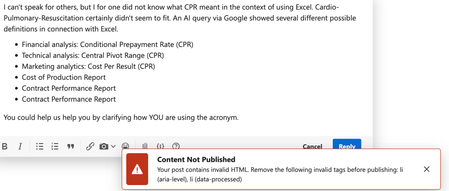
This is for the Microsoft folks who monitor this forum. I was attempting to respond to a question a few minutes ago and got the error message that appears at the bottom of this image. Note: I had not added any HTML myself. I had copied and pasted the items in the bulleted list, so it's possible that something carried over from Google...but in either case, that message -- how should I say it? -- contains invalid tech-speak. I was able to post the reply by eliminating the bullets, but those bullets had been added by, you guessed it, the forum's own software. Does the TechCommunity's left hand know what the TechCommunity's right hand is doing?163Views1like4Comments