communication sites
31 Topics
Communication Site Events Add to Calendar Behaviour
When I use the event's functionality in a modern communication site, the events I create have a little button added to them to "Add to my calendar." When I click it, I get an .ics file. That seems weird to me. I'm in Office 365, why doesn't it add it to my Outlook Online Calendar? Or maybe present me with an option to add it to my online calendar or desktop Outlook?1.5KViews0likes0Comments
Per-Site Anyone Link Expiration Policy just for Communication Sites
I have a question regarding the message center post MC186627 "Per-Site Anyone Link Expiration Policy", roadmap ID 53748. We can use the feature in our tenant, but just for Communication Sites. If I want to change the policy on a group-connected teamsite Powershell fails with an error the parameters are not valid for group-connected sites. If I use the same parameters on CommSites we have no issues. Does anyone know why this feature is limited to Communication sites? Example: Set-SPOSite -Identity $Site -AnonymousLinkExpirationInDays 90 -OverrideTenantAnonymousLinkExpirationPolicy $true Best regards Tobias2.6KViews0likes6CommentsSharePoint Home Sites
At SPC19 Microsoft announced the new Home Sites. I've written an article about Home Sites. What are Home Sites, how to create them, what do you get and how do they fit in the Modern Workplace puzzle? You'll find it here: https://medium.com/hellonext-nl/sharepoint-home-sites-a-complete-intranet-and-modern-workplace-in-just-minutes-9d44f49bc0fa?source=friends_link&sk=c3912e3e196d98189419aee3f6115f5a853Views1like0Comments
Location in Highlighted webpart refers to sitepages instead of location homepage
It seems I have found a bug in the highlighted content webpart. When I want to show news in the highlighted content webpart, the location of the newspost refers to sitepages instead of the homepage of the location. Anyone familiar with this problem?1.1KViews0likes2Comments
[O365] Global Hub site navigation and communication site titles cached even after weeks...
Even weeks after changes have been made to the global structured navigation on our hub sites or to site titles on communication sites belonging to a hub site, some users keep seeing the old navigation or standard "communication site" title. Switching to a different browser, clearing cookies or using in private mode does not resolve this. This is only happening to some users, and there is no common ground to be found. Are we the only onces experiencing this? Does any one have a clue on how to fix this?2KViews0likes4CommentsAnnouncing SharePoint page approvals
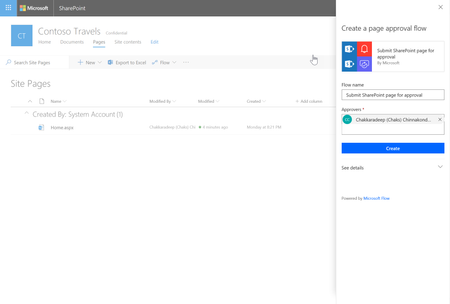
We are happy to announce that we will be releasing SharePoint page approvals to Targeted Release. We expect to start the rollout of this feature to all Targeted Release tenants by end of July 2018. Rollout status Current rollout status: July 31st, 2018 - Deployed to 10% of Targeted Release tenants August 3rd, 2018 - Deployed to 50% of Targeted Release tenants August 6th, 2018 - Deployed to 100% of Targeted Release tenants January 8th, 2019 - Deployed to all tenants in SharePoint Online Documentation: 1. Configure page approval 2. Page approval flow Known issues If the page is checked-out by another user and you (the author in this case) submit the page for approval, the page will not notify and proceed with the approval. The flow will run and send an email indicating to the author indicating an error occurred in publishing the page. If you have only major versions enabled for the Site Pages library, submit for approval will result in int he following error: Could not complete that action: The type of data at position 0 is different than the one expected. There an issue with the Flow service for the UK region. Any existing UK tenants created before March 2018 will work while it affects only new tenants created after March 2018. We expect to have this resolved by end of September if everything goes according to the plan. See this thread for more information. Good news is that these will be fixed soon are fixed! If you have any feedback, please make sure you discuss here! Configure page approval Site owners can configure page approval to add to the standard publishing process for a site. After adding page approval flow, new and updated pages will be not be published directly. Instead, only the completion of the approval flow will make changes visible to all readers of the site. A site owner can configure page approval flow from the Flow menu of a pages library. Submit page for approval Once the page approval is configured, authors will be able to submit page for approval. The publish button will be replaced by a submit for approval button. The page will be published once the page is approved. Rejecting a page will put that page back to draft status. Approve page Approvers will get an email regarding the page approval request. They can either approve the page directly in the email (in email clients that support actionable messages) or open the page from the email to review and approve the page in SharePoint. Customizing the page approval flow Since page approvals use Microsoft Flow behind the scenes, the page approval flow is available to site owners to modify and add any custom business process items in the flow. After creating the flow, the site owner can click on Flows -> See your flows in the pages library to find the page approval flow. For example, The default approval type is set to ‘anyone can approve’. Site owners can modify the flow and change the approval type to ‘everyone must approve’ if that is the requirement.50KViews16likes63CommentsCommunication site news web part doesn't show pictures to B2B users
We have a situation where we have a Communication site and use the out of the box News web part. This web part is working ok for normal users, but B2B users invited to the site don't see the pictures in the news items. The news items itself are displayed in the web part though. When a B2B user opens up a news item, the picture is displayed correctly. When we use the Highlighted web part to show news items, the pictures are shown as expected. So it looks like it is an issue within the News web part. Anyone else noticed this before or has a solution for this? Vesa Juvonen have you seen this before?Solved2.3KViews0likes3CommentsScoping of search in team site / communication sites
Hi! I am working on the modern search experience in sharepoint. One of the things that we have had some feedback on is the scoping of search when searching from a team site or a communication site. I would like to ask you what you think of the current experience and if / how you would like to have it. The idea is that when you do a search from the site we will surface the search results scoped to the site you have search from. You can then choose to upscope the search to all Sharepoint results by clicking the Sharepoint link in the search breadcrumb in the following picture. What do you think about this feature?14KViews1like23Comments