channels
57 TopicsBeta and Dev Channels options are not showing up (Windows 10)
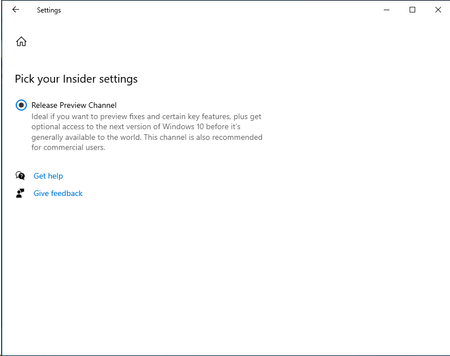
Note: This question is nothing related to Windows 11. I have installed the below Windows 10 Insider ISO (Version 20H2 (OS Build 19042.1052))on my Hyper-V virtual machine. When I go to Windows Insider Settings, I only see the Release Preview Channel, as shown below. Why is Beta and Dev Channels not getting shown? Can someone help me why such behavior? Thanks, Kamlesh42KViews0likes18CommentsTeams to Begin Automatically Hiding Inactive Channels
From mid-July 2024, Teams will begin hiding inactive channels for users. The inactive channels can be unhidden, and users can opt out of the automatic process. The new clean up routine can be invoked whenever users want and if a mistake is made, it’s easy to unhide a channel. Given the number of channels in use, it’s likely that a few in everyone’s channel list are inactive and deserve to be hidden. https://office365itpros.com/2024/07/03/teams-inactive-channels/25KViews1like29Comments
Automatically show this channel in everyone’s channel list
I'm sure this is extremely basic, but I'm not understanding the purpose of the channel setting "Automatically show this channel in everyone’s channel list". Given that there is already a setting to determine private vs available to all team members, I am not seeing the purpose. Possibly the thing I'm missing is that our organization has barely used Teams (beyond chat) so far, and no team has more than a couple channels. But the only documentation I find seems to just re-state the same words that are communicated by the setting itself. 1) Does this mean that when the Team has more Channels that can be visible at one time (I believe I read 10?), channels with this setting will be forced to visible? 2) Is it persistent? That is, I see it now, but over time will it continue to be "forced" 3) What if more channels have this setting than are able to display? Just alphabetical or by date at that point? Of course if I'm off-base on Question 1, then 2 & 3 may not apply. Much appreciate any clarification. Thanks!Solved16KViews0likes1Comment
How to have app send message to channel without configuring connector
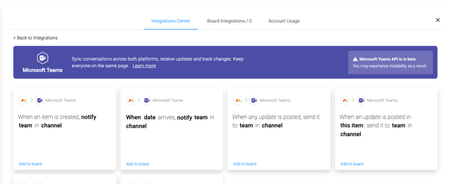
I know it is possible as https://support.monday.com/hc/en-us/articles/360010359819-Microsoft-Teams-Integration?source=search and Smartsheet integrations both do this. You can configure the app by allowing `adminconsent` and then selecting (on the web-service not in teams) which team & channel to have the service post to. Then the web application is able to make posts into that channel without the user configuring a connector/webhook. In addition when I look into the channel that was mapped, there is no connector configured. These apps have the exact functionality I'm looking for, and so far the only way to do this that I know of is to use the /messages graph api https://docs.microsoft.com/en-us/graph/api/channel-post-messages?view=graph-rest-beta&tabs=http or to configure a connector. The /messages api cannot be used by the application as far as I can tell. Though Monday.com appears to have a disclaimer that they are utilizing the beta features of the graph api. So how can I have my Teams app send a message to a specific channel within an organization without having to have the user configure a connector?Solved10KViews0likes5Comments
Pinning banner images to top of channels - full screen
I'm just developing a Team for our group of 400 people, and am having some trouble with images. For each of my channels, I wanted to pin a banner (which i've been able to do by adding it through a new conversation) to the top of each of my channels. The banners are nice and visual images, with some text over the top. The text is the name of the channel. I.e. Questions and Answers, and with some supporting text about what the purpose of that channel is. The issue i'm having, is that when adding an image to a conversation, it leaves space for text whether you add text to it or not, and means that the banner isn't really showing as visually as i'd like. I wanted it to just sit at the very top above all the conversations so that every time you came to that channel, you'd know what it was for... Any thoughts or workarounds? Even the fullest dimensions of the image would be great to know too. Thank you 🙂 Jodie9.6KViews0likes1Comment
Says I have hit the Channel Limit But I haven't
I am trying to create a new channel but I am getting a notification that I am out of channels. The team was showing only that I had like 103 channels and 1 inactive. I haven't deleted any channels in the past 14 days and certainly no where near 96 of them. What gives and how do I fix?7.1KViews0likes23Comments