canon
3 Topics
Windows App - RDP channel crashes when printing on a redirected canon printer
Hey team, I would like to know, if anyone else struggles with the following scenario: A canon printer is installed on a local client. The user is working in the AVD environment. The printers are redirected into the AVD-Session via "printer redirect". Since the users are migrating to the new "Windows App", the AVD session breaks as soon as the user is printing on a redirected Canon-Printer. When printing on another printer, there is no issue. Also: With the "Microsoft-Remotedesktop" Application, everything works as it should. A Microsoft ticket is already raised. I would like to know if there are other environments, which are encountering the same issue.2.1KViews1like10CommentsNot able to Register Universal Print ready printers
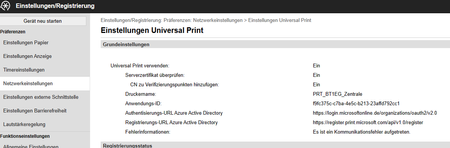
Hello, we have purchased three Canon C1333iF printers to use Microsoft Universal Print. These printers are Universal Print ready printers. We get an error message when we click register on the printer's online portal. Information such as the App ID, registration URL, and authentication URL are pre-populated by Canon. Canon support says that the error is with Microsoft. Attached I am sending a screenshot of the printer's Universal Print setting configuration. We can rule out the following: We can rule out a license and permissions issue, as we can't even get to the user account prompt. We can also rule out a network problem, as we have already tested this via a mobile hotspot. I would be very grateful for any hints and tips. regards Lucas3.9KViews0likes11Comments
Scan-to-email wrong timestamp
Hi all, I am posting this to the Canon forums and Microsoft Outlook forums. I have a co-worker that whenever they use our network attached Canon ImageCLASS MF247dw using scan-to-email on the printer itself, his scanned image emails come with the wrong time stamp, they are dated one hour back. This also happens for a couple other co-workers. I am 99% sure i have compared Outlook settings including timezone settings, and the Canon MF247dw address book settings across the users it works for and does not work for and as far as i see they all match. Everyone is set to the same time zone, checked settings across Outlook and the Windows 10 machines. For the life of me i cannot figure out why some co-workers scan-to-email comes through Outlook as correct time stamp, and some say they are one hour behind. I have also checked the settings for day light savings. We all use the same Windows 10 version, same Outlook versions. Any thoughts or tips?1.7KViews0likes1Comment