business central
11 Topics
New Attach Licenses for Business Central Premium - now available!
Hot this week - Microsoft just launched two new Attach Licences for Business Central Premium - Dynamics 365 Sales and Dynamics 365 Customer Service, at $20 per application. For customers with Business Central premium this is an amazing value add - for only $20 more, customers can take advanced of these capabilities, leverage the integration available across our Dynamics solutions, and truly transform and round out their backend and front end operations with these solutions. For partners, the new pricing SKUs can help expand your business applications footprint and address the critical digital transformation needs of customers today. Learn more about the new offer details and eligibility criteria and reach out to your customers now with the ready to go email template in this partner kit. Happy selling! Angela Angela Reese Kawano | Senior Partner Marketing Manager (She/Her) Business Applications & Global Industry Marketing | Partner Ecosystem Team Email: mareesek@microsoft.com| Phone: 202.2776441 | www.linkedin.com/in/angela-reese-kawano
Transferring Business Premium Licenses Between Partners
My understanding is that NCE imposes a strict limit of 300 Business SKU's per tenancy. If we are transferring from a different CSP partner to ours we normally purchase the licenses first and then ask the other partner to cancel. If we wish to transfer 290 Business Premium licenses then I presume that this process won't work?4.3KViews1like8Comments
Supporting customer's BC Environment without reseller link
Hi A customer has asked us to help them, but they would rather not accept the reseller link. They say that they have previously received support from another supplier w/o accepting a reseller link, but instead filling out a web form. Has anyone come across this before and if so. Could you point me in the direction of this web form? It concerns support on a BC environment. There is no license sale involved. Thanks. Br/ Annike
D365 Marketing attach with Business Central Premium base and 10 seats Sales Enterprise
Hi there! Just wondering about the new policies regarding attach and base licensing. It appears that it is now possible to qualify a Sales Enterprise Licence as an attach when using a Business Central Premium as a base Licence. I am wondering if the Marketing could also be considered as an attach if qualifying purchasing 10 Sales Enterprise Attach with BC Premium as the base? The Licencing guide is a bit general and does not specifiy that the 10 Sales enterprise seats should be bought full price. Care to clarify? Thanks a lot!Solved
Power Apps & Business Central Connector
Hi, I tried to create a Power App that connects to Business Central. When I look at the connector a while ago it gave me access to all tables, pages etc that had been published as web services. Now when I use that connector I can see a list of tables that don't reflect the published web services. I've created an app using the customer table to make sure that it was in fact looking at the right Business Central instance. I understand that the connector is still in Preview, but can anyone confirm whether this is the reason that I can no longer see my published web services? Thanks in advance. JohnHELP with AL Development for Dynamics 365 Business Central
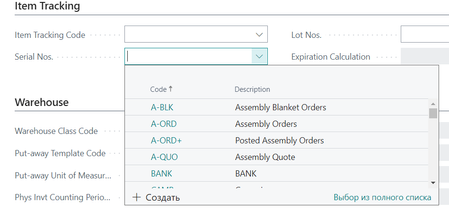
I need to show the table in the Brand Name field, but not all columns, but only two (Code and Description). The field "Brand Name" should be similar to the work of the field "Serial Nos.". Look, when the field expands, a table with two columns appears. I need the same, you know? That is, I mean that I need the Code column and the Description column in the same form as the Serias Nos. field (code and description) I need the same field, but I will name it the "brand name" and there I will have a Item table with a code and description. My code: tableextension 50115 "Brand Name" extends "Item" { DataCaptionFields = "No.", Description; fields { field(50105; "Brand Name"; Text[250]) { Caption = 'Brand Name'; Description = 'It is a code and description'; Editable = true; TableRelation = Item."No."; DataClassification = ToBeClassified; } } } pageextension 50115 ItemBrandPageExt extends "Item Card" { layout { addlast(Item) { field("Brand Name";Rec."Brand Name") { ApplicationArea = All; Caption = 'Brand Name'; ToolTip = 'It is code and description'; } } } } query 50115 ItemBrandQuery { Caption = 'ItemBrandQuery'; QueryType = Normal; QueryCategory = 'Item'; elements { dataitem(Item; Item) { column(No; "No.") { Caption = 'Code'; } column(Description; Description) {Caption = 'Description'; } } } trigger OnBeforeOpen() begin end; }1.1KViews0likes1CommentTop 5 Dynamics 365 Business Central Add-ons You Can’t Miss in 2025!
Boost Automation, Reporting, and E-Commerce with These Must-Have Extensions Microsoft Dynamics 365 Business Central is one of the most powerful and flexible ERP systems available today. But what truly elevates its potential is the vast ecosystem of add-ons designed to automate workflows, improve reporting, and enhance e-commerce capabilities. In 2025, as businesses demand faster, smarter, and more integrated solutions, the right Business Central extensions can make a world of difference. Below are the Top 5 Business Central add-ons that every developer, consultant, or business owner should explore this year. 1. Jet Reports – Advanced Financial Reporting Made Simple Best for: Finance Teams & Decision Makers Jet Reports transforms the way you generate financial reports in Business Central. Built for Excel lovers, it enables real-time data access and reporting without needing complex coding. Key Features: Real-time access to Business Central data Seamless integration with Excel Pre-built financial templates Drill-down capabilities for detailed analysis Why it’s a must-have: Jet Reports significantly reduces the time spent on month-end reporting and empowers teams with self-service insights. 2. Shopify Connector – Seamless E-Commerce Integration Best for: E-Commerce Businesses This powerful connector enables real-time synchronization between your Shopify store and Business Central. Key Features: Real-time order, product, and inventory sync Automatic financial posting and reconciliation Multi-store support Customer data synchronization Why it’s a must-have: It bridges the gap between front-end e-commerce and back-end ERP operations, ensuring consistency and speed in order processing. 3. Tasklet Factory Mobile WMS – Warehouse at Your Fingertips Best for: Supply Chain & Inventory Management Tasklet Mobile WMS enhances your warehouse operations by equipping workers with mobile scanning and real-time inventory updates. Key Features: Real-time mobile inventory control Barcode scanning support Easy user interface for warehouse staff Offline capability Why it’s a must-have: This add-on eliminates manual errors and boosts warehouse productivity by streamlining common warehouse tasks. 4. Continia Document Capture – Intelligent Document Automation Best for: Accounts Payable & Admin Teams Continia Document Capture automates the processing of purchase invoices, receipts, and other business documents using OCR (Optical Character Recognition). Key Features: Automatic data extraction from PDFs Seamless approval workflows Document storage and retrieval Integration with purchase and finance modules Why it’s a must-have: It cuts down data entry time, reduces paper usage, and ensures accuracy in invoice handling. 5. LS Central – Unified Retail Management Best for: Retail Chains & POS Integration LS Central is a comprehensive retail solution built on top of Business Central, offering a complete POS system, inventory management, and customer insights. Key Features: POS, inventory, e-commerce, and CRM in one system Real-time synchronization Personalized promotions and loyalty programs Unified data platform Why it’s a must-have: It’s ideal for retailers looking for an end-to-end solution that integrates with finance, inventory, and sales systems. Final Thoughts These five add-ons are more than just plugins—they are productivity multipliers. Whether you're managing warehouses, running a retail business, or handling financials, these Business Central extensions will help you automate, optimize, and grow. Want to see them in action? Watch the full video breakdown here: 👉 Watch on YouTube900Views0likes0CommentsLicenses required to retain access to historic data
Hi Team, Please validate if below statement is true. We need to know the minimum number of FO licenses required to retain access to historic data on F&O as the client is migrating from on-prem FO to the Business Central cloud. We believe it should be 1 according to resources available to us, but we have been told we may require all 20 FO Licenses to retain access. Please confirm which it is. Regards, KumarISV Offering SaaS vs On-Prem
Hi all, We are a partner and have some apps on the marketplace (appsource) for customers to download. We would like to offer the same apps for on-premise deplyments as well. How would we go about object numbers and customers' licenses? How do we add our object id range we develop in to be part of the customers' license? Thanks in advance!215Views0likes2Comments