breakout rooms
14 TopicsBreakout room issues to assign user to a room
Anyone else seen issues to assign a user to a break out room? Screenshot in Swedish but the "i" say "This user can't access breakout room" At the time for testing that user was signed in to Teams with an external identity and used Edge browser. Ended meeting and rejoined and this time it worked but that is not the case all the time. Issue seems to be random. This happens quite often last couple of months, anyone seen this?1.9KViews3likes7Comments
MS Teams Attendance - Not counting time in breakouts
Hi, We use MS Teams regularly and we noticed there are issues in some of the downloaded attendance. 1. We use breakouts in our calls, and Teams Attendance did not capture all attendance. (Example - Room 1 n 5 and 6 were captured but Rooms 2,3,4 were not captured) 2. We also noticed that the time attendance of some people who were in the call for the entire duration, is coming out short. (Example - 1 hour instead of 1 hr and 30 mins) What can we do to manage this attendance issues? We are the main organizer of the call and we manage the breakout rooms. Thank you855Views0likes1Comment
Why are participants being brought back to the lobby after breakout room?
I was delivering a training session on teams. I put participants into breakout rooms for an activity. After the 5 minutes were up, instead of all being brought back to the main room, they were all taken back to the lobby? Can anyone tell me why, and how I can a) stop this from happening before it does b) deal with it and stop it if it happens during the meeting Thanks in anticipation!635Views0likes0Comments
Teams rooms - Thematic self selection
Hi, I will be leading a workshop with 30 to 60 participants on Teams. I'd like to designate thematic break out rooms for discussion and allow participants to self-select based on their expertise and interests which room to join. Is this possible? What is the best way to do this without spending a lot of admin time to ask for everyone's interest during the call, writing down their names and then designating them to rooms?Solved1.1KViews0likes1Comment
Co-Organisers
Great work with the Co-Organisers within Teams Meeting Options. Are there plans to also include the control of the Breakout rooms to Co-Organisers without the Organiser having to set them up first and give others control? Could this be added as a Check Box to the Meeting Options? It's very annoying when the Organiser hasn't given others Breakout room controls and they lose connection whilst the breakout rooms are open and in use. Teams effectively take all members of the Breakout Rooms hostage. The only way to get them back is for someone to email all delegates and ask them to come back manually. I'm not always around to be able to log on as the Organiser and rescue the hostages! Can we have a button please 🙂
Turn the audio on in breakout rooms
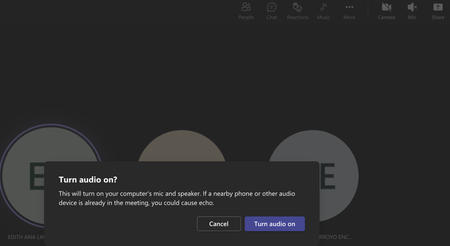
Hello everyone I've encountered the same problem while joining breakout rooms. My audio is always deactivated as well as my microphone. I managed to connect to the audio and activate my microphone but It's quite annoying as I constantly need to move from breakout rooms to monitor my learners. Is there a way to set up this in advance? Thank you2.2KViews0likes3Comments
Breakout Teams Question - Black Screen
Hello all! I host a lot of trainings but today faced an error that was new. I was able to move everyone to a breakout room but only group 1 could see and hear each other. The other rooms were unable to go off mute and saw a black screen. I went into the rooms, and they could hear me, but they could not hear/see each other. I closed and re-opened the rooms with no luck. Any thoughts? Thanks!3KViews1like2CommentsTeams Breakout Rooms
Hi, Wondering if anyone can help with the following problem: When using breakout rooms, some participants in our recurring meeting are not returned to the main room, but instead are bumped from the meeting altogether. What could be causing this? Thank you for any suggestions.771Views0likes0CommentsRe-use breakout rooms over multiple meetings
Hi, Would be great for Microsoft to add a feature to breakout rooms so that the same rooms can be used over multiple meetings as long as it is still within the same team (especially if it can pick up the same breakout room chat). It would also be awesome to be able to pre-create breakout room 'sets' with different room configurations. E.g. 'Writing Groups' with members assigned to breakout room group 1, 2, 3, etc. 'Reading Groups' with a different configuration of rooms. or 'Project X' groups and 'Cool use for business so that it hits Microsoft's radar' groups.3.1KViews0likes2Comments
Participant get stuck in breakout room lobby
Hi We have participants who get stuck in the lobby in breakout rooms, eventhough the main room meeting setting is set to allow everyone to skip the lobby. In the main meeting no get stuck in the lobby. When you check the meeting setting in the breakout room, only people from our organization can skip the lobby. The main room settings and the breakout room setting are not the same. Can you change the meeting setting default for meeting setting? We use Teams meetings only. No channel breakout rooms.2.5KViews0likes2Comments