branding
18 Topics
Edge Branding and OneDrive Client Sync App Support
I'm trying to configure Edge branding using the Edge Management Service. From the guide here https://learn.microsoft.com/en-us/deployedge/microsoft-edge-organization-branding it states: Are there any scenarios where organization branding can't be used? Yes, organization branding isn't supported for the following scenarios. Organization branding isn't applied if: OneDrive desktop sync is enabled. The OneDrive policy to exclude specific kinds of files from being uploaded is disabled. We have OneDrive client app installed on all our desktops. It's not clear to me why this would make this feature not supported. Any ideas/information on this?232Views0likes1CommentEdge Branding - Company Color Configuration
I'm looking to configure https://learn.microsoft.com/en-us/deployedge/microsoft-edge-organization-branding in Edge 130+. We already have a custom branding profile configured in EntraID. To date we have configured Edge using group policy. When we configure the policy https://learn.microsoft.com/en-us/deployedge/microsoft-edge-policies#organizationalbrandingonworkprofileuienabled we get our EntraID tenant/organisation name displayed on the profile pill and company logo as expected but we do not get the company color but rather a black color as follows: Where is the company color configured i.e. what aspect of Entra Branding does it correspond to?709Views0likes4CommentsNew UX and branding settings now available for the Viva Connections
We are excited to share updates on the UX and branding features within the Viva Connections. Change the look feature is now fully rolled out worldwide and the dark mode support for desktop side is coming soon to all tenants. 4KViews1like0Comments
Teams Premium - Under "Meetings", the point "Customization Policies" does not exist
Hi there! I activated the Teams Premium license on Monday. In the Teams Admin Center all Premium features are displayed and can be configured, except one: Customization Policies See https://learn.microsoft.com/en-us/microsoftteams/custom-meeting-backgrounds Why is the "Customization Policies" not shown in the navigation pane under "Meetings"? Tnx, AM1.8KViews0likes1CommentMicrosoft 365 Groups rebranding update
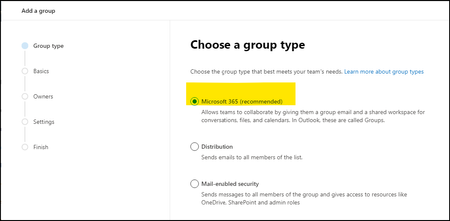
In our April blog post, we announced that we were rebranding Office 365 Groups to be Microsoft 365 Groups. In August, we reported that the Microsoft 365 admin center, the Azure portal, Stream, Yammer, and Planner were updated with the new name. Concurrently with the service updates, we also updated the documentation on docs.microsoft.com and support.microsoft.com to reflect the new name. Today, we’re thrilled to announce that rebranding of Microsoft 365 Groups is nearly complete across Microsoft 365. Teams, Outlook, SharePoint, the My Apps portal, and the other admin centers (e.g., Exchange, Security, Compliance, etc.) within Microsoft 365 are now updated with the new name. Below are some examples of these updates. As always, we welcome your comments and feedback! --The Microsoft 365 Groups team2.6KViews2likes1CommentStay on Brand during Document Creation using AI
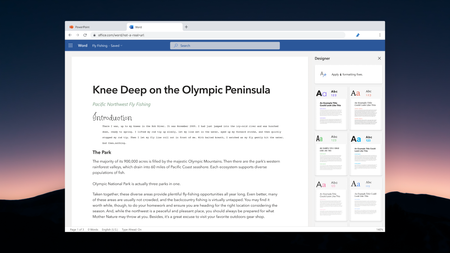
Do some users in your organization have to comply with branding guidelines when creating documents? If conveying your brand consistently in certain documents is important to your organization, we'd love to hear from you as we are exploring how to leveraging Intelligence and AI to help your employees build better documents that stay on brand. Fill out this short survey in order to help us understand what your organization needs and join the product team as we explore this space! https://forms.office.com/Pages/ResponsePage.aspx?id=v4j5cvGGr0GRqy180BHbR96mzd38ZhZEjNFtsGYHk15UOE9BVkRYWUg0VDdFNE1ZQkwxWkhWSkJUUy4u Thank you, Georges Senior Program Manager Word509Views0likes0CommentsCustomizing/Branding notification emails (e. g. Teams, Planner, etc)
Hi, some people do not like the look of the email notifcations from e. g. Teams or Planner. Is there any option to include a custom logo or change the look in some way, so that the notications match a corporate design a least a little bit? Kind regards, MarcSolved3.7KViews0likes2Comments
Footer option missing in Modern Communication Site
I have 2 tenants, one is for dev environment and another is the prod environment. In my first tenant (dev), I was able to add Footer to my pages via Change the Look -> Footer option. However, when I transferred to second tenant (prod), the Footer option is missing from Change the Look and I only see 3 options (Theme, Header, Navigation) Is there a way to activate this feature manually?Solved11KViews0likes7CommentsAdd Custom Colors in Color Palette of CEWP in SharePoint Online
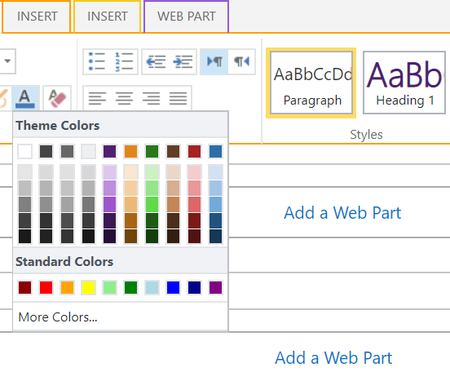
Hi, We have a requirement to incorporate custom colors used by the client in color palette (shown on edit of CEWP - see attached image) of a SharePoint Online site. We see that we can edit the last 6 slots of the color palette by changing the 'ContentAccent1' to 'ContentAccent6' values in .SPCOLOR file of Themes galley, creating a new theme using the new .SPCOLOR file in Composed Looks and applying the new theme on the site. However we have requirement to add more than 6 custom colors & their shades in the color palette. Has anyone come across this type of requirement and is there an way to achieve it? Also we see that in Microsoft PPT 2016 file, we can add our own custom 'color section' in the color palette by modifying .XML file of the theme. In SharePoint (from 2013 version onwards), there is no provision to modify the theme file directly (its linked through .SPFONT & .SPCOLOR files through Composed Looks). Is there any way to add such custom colors section in the color palette of SharePoint online site? Regards, Aashish Dhole1.7KViews0likes2Comments