bots
324 Topics
How to receive app mentions only from a channel, while having the consent to read user messages?
We're building a Teams bot (Azure Bot + Entra app) that a customer adds into a standard Teams channel. Members @mention the bot and it replies in the same thread. To make replies useful, when the bot is mentioned we want to read recent messages in that thread for context, including messages where the bot was not mentioned. We have two requirements that appear to be in tension, and we'd like your guidance on the best-supported way to satisfy both: a. Delivery: we want Teams to send our bot only the activities where it is @mentioned (not every channel message), to avoid unnecessary inbound load and Bot Framework rate-limit pressure in busy channels. b. Context read: on those mention turns, we want to read recent thread messages via Microsoft Graph (/teams/{team}/channels/{channel}/messages/{id}/replies). We've identified two approaches, each with their drawbacks: a. RSC (ChannelMessage.Read.Group) - all channel messages; team-scoped & consented by team owner at install (low friction) Concern: RSC forces delivery of every channel message; heavy backend filtering + bot framework rate-limit risk b. App permission (ChannelMessage.Read.All) - @mention-only; tenant-wide consent; tenant-admin consent Concerns: setup friction (admin consent URL, per app per tenant); read grant spans all standard channels, including ones the app isn't a member of Our core question: Option 1 gives the delivery we don't want but the scoping we like; Option 2 gives the delivery we want but a tenant-wide read grant we'd prefer to avoid. Specifically: Is there any supported way to keep @mention-only delivery and a channel-scoped (RSC-style) read grant, i.e. decouple RSC's message delivery from its read authorization? Can the tenant-wide read in Option 2 be narrowed to specific teams/channels (e.g., via a Teams application access policy or any resource-scoping mechanism), so the app can only read where it's intended to operate? Given our two requirements, which approach does Microsoft recommend, and is there any option we've missed? TIA!19Views0likes0Comments
Owner can't delete flow bot posts in teams channel
Since the new update (October 2023), owners of a team are not able to delete flow bot posts posted in a teams channel. Does anyone have a solution? I've had our Admin check the messaging policies and "Owners can delete sent messages" is toggled on.Solved14KViews1like14CommentsNew Teams Policy Controls Meeting Recording and Notetaking Bots
Microsoft recognized the problem posed when users attempt to join recording or notetaking bots to Teams meetings in early 2026. Now a new Teams meeting policy setting is available to control whether bots can join meetings. Allied to smarter bot detection and a program to work with ISVs to identify bots, organizations have a better chance of stopping the unexpected export of confidential information for processing outside the tenant. https://office365itpros.com/2026/08/24/teams-meeting-notetaking-bots/188Views0likes0Comments
Schedule daily recurring messages in Teams chat channels
This is my first post on this site! How do I set up a recurring message in a Teams chat channel? I want to remind my team daily at a specific time to put their project stand up status into our project channel. I'm assuming this would be a bot? If so, how can I find the bot? Thank you, Susan Keithley103KViews1like14CommentsCreate Bot without Developer Studio
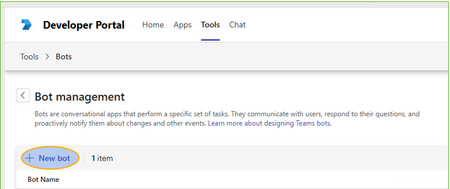
Hi, We have a bit hard policies and users are not able to use the Developer Studio by they own to make new Bot: If you press [New Bot] you can give the name, but then [Create Bot] start hanging and does nothing. Previously on Azure had a user setting which block or allow users to register apps. Now I need our tenant admins or application administrators (?) to setup the bot(s) manually. Does anybody knows if the bot registration for Teams is possible to do without developer studio? The Developer Studio shows only your own Bots, so they cannot do that for me using Developer Studio.261Views0likes3Comments
attach file option not visible with bot joined call
I have created bot using azure and recall.ai When bot joins adhoc or schedule team meetings, it is appearing as an external user. While we have created bot email as well in azure AD. And I think due to this we are not able to see attach file option in teams chat when bot gets invited into the adhoc or schedule meeting85Views0likes0Comments
Issue AADSTS50020 when using external tenant account to sign in into Microsoft Teams Bot app
Let's say that I am creating 2 Microsoft Teams Bot apps (A) and (B) with 2 app registration (A-reg) and (B-reg) in my tenant (F). Each app use Microsoft Graph API with Chat.ReadWrite, Chat.Create and Files.Read, and configured to multi-tenant type to allow users from other tenants to sign in and use the app. In this case, let's say users in tenant (C) needs to access the app hosted in my tenant (F) The problem here is the app (A) work perfectly but the app (B) fails to allow users from external tenants to sign in and use Microsoft Graph API. Both app work well with user in the same tenant. And I don't know which configuration is different between the 2 app. Below is what I've tried until now: + Create an Azure registration with multi-tenant type, setup Redirect URI, Application ID URI, add client ID of 'Microsoft Teams' and 'Microsoft Teams Web Client' to the authorized client applications, add Scopes for Application ID URI + Create Azure Web app to run the bot code and Azure Bot that accept the messaging endpoint, add OAuth connection (AAD v2) using the app registration before, add channel Microsoft Teams to the bot + Create the manifest.zip and request the admin tenant (C) to add to their tenant and publish for all users. Both apps then can be access from user in my tenant (F), is visible to users in tenant (C). However, no user in tenant (C) including the admin themselves can sign in to the bot. All attempt results in 'AADSTS50020: User account 'account@(C)' from identity provider 'https://sts.windows.net/tenant_C_id/' does not exist in tenant '(F)' and cannot access the application 'app_client_ID'(app_name) in that tenant. The account needs to be added as an external user in the tenant first. Sign out and sign in again with a different Azure Active Directory user account.' Did anyone experience the same issue? I went through many documents and topics but not yet find any solution.391Views0likes0Comments
Enable mic option in custom teams app
I have a copilot studio agent created using copilot studio. I want to upload this app and use in teams. How ever i need the mic button feature which is by default available in microsoft teams copilot app. So when user clicks this mic button the audio user speaks is automatically converted to text in message box. Is this possible to have a similar feature in custom app pointing to a copilot studio agent?159Views0likes0Comments
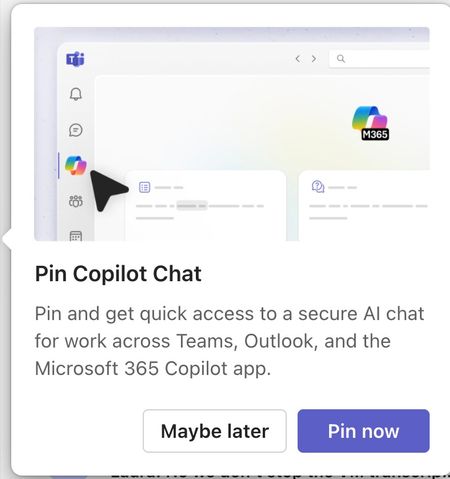
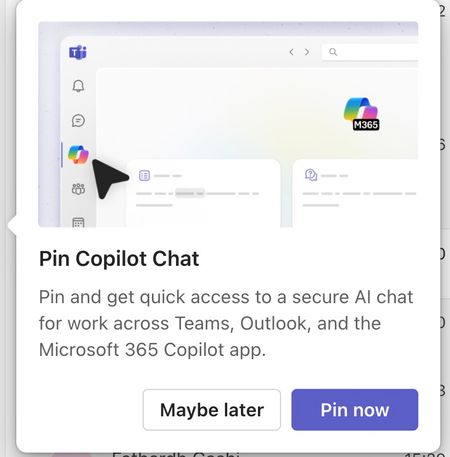
Please tell me how to disable the Pin Copilot message
Morning! I wrote a message yesterday but nobody replied, so here's another one so it doesn't get lost Can somebody tell me how to disable the annoying "Pin Copilot Chat" popup? every morning I have to say "Maybe Later" when I really mean to say NEVER IN A THOUSAND YEARS405Views0likes1Comment