bot
77 Topics
joinUrl is null when fetching via /chats/
Hi we have a production app for Teams that has broken as a result of a seemingly random api change that we can't find any documentation for in the api change log or anywhere for that matter. We are sending the following request via our front end app: https://graph.microsoft.com/v1.0/chats/19:meeting_MDc0NmQ4OWYtNTNiOC00NjY2LWIzYWItZGQ3ZTQyMWFjNzk2@thread.v2 { "@odata.context": "https://graph.microsoft.com/v1.0/$metadata#chats/$entity", "id": "19:meeting_MDc0NmQ4OWYtNTNiOC00NjY2LWIzYWItZGQ3ZTQyMWFjNzk2@thread.v2", "topic": "Besprechung mit <organiser_name>", "createdDateTime": "2025-08-21T10:41:11Z", "lastUpdatedDateTime": "2025-08-21T12:49:30.002Z", "chatType": "meeting", "webUrl": "https://teams.microsoft.com/l/chat/19%3Ameeting_MDc0NmQ4OWYtNTNiOC00NjY2LWIzYWItZGQ3ZTQyMWFjNzk2%40thread.v2/0?tenantId=<tenant_id>", "tenantId": "<tenant_id>", "isHiddenForAllMembers": false, "viewpoint": { "isHidden": false, "lastMessageReadDateTime": "2025-08-21T12:59:24.376Z" }, "onlineMeetingInfo": { "calendarEventId": null, "joinWebUrl": null, "organizer": { "id": null, "displayName": null, "userIdentityType": "aadUser" } } } In this request we would parse `onlineMeetingInfo` for the joinWebUrl however we now get `null` We've tried using the webUrl but this does not work since it doesn't contain the organisation Id which we later rely on. Our flow is the following: We make a graph api request to fetch the joinUrl We send the joinWebUrl to our backend That Url is passed to a Teams Bot we are hosting on Azure which parses the URL to send a bot join request to Microsoft. However the new webUrl does not have the organiser Id and as a result the bot fails to join. We've verified by hardcoding the organiser Id var meetingInfo = new OrganizerMeetingInfo { Organizer = new IdentitySet { User = new Identity { Id = <we_hard_coded_this> }, }, }; meetingInfo.Organizer.User.SetTenantId(tenantId) And we then use this as following: var tenantId = (meetingInfo as OrganizerMeetingInfo)?.Organizer .GetPrimaryIdentity() .GetTenantId(); var mediaSession = this.CreateLocalMediaSession(); var joinParams = new JoinMeetingParameters(chatInfo, meetingInfo, mediaSession) { TenantId = tenantId, }; if (!string.IsNullOrWhiteSpace(callParams.DisplayName)) { // Teams client does not allow changing of ones own display name. // If display name is specified, we join as anonymous (guest) user // with the specified display name. This will put bot into lobby // unless lobby bypass is disabled. joinParams.GuestIdentity = new Identity { Id = Guid.NewGuid().ToString(), DisplayName = callParams.DisplayName }; } if (!callParameters.TryAdd(chatInfo.GetMeetingId(), new() { AccessToken = callParams.AccessToken, AccountId = callParams.AccountId, BackendUrl = callParams.BackendUrl, JoinUrl = callParams.JoinUrl, Protocol = callParams.Protocol, Origin = callParams.Origin, InviterParticipantId = callParams.InviterParticipantId, SubscriptionId = callParams.SubscriptionId, })) { logger.Warning("Parameters for call already exist."); } var statefulCall = await this.Client.Calls() .AddAsync(joinParams) .ConfigureAwait(false); This is quite urgent as it's impacting our customers, could someone please have a look at provide us an update here? Thank you.272Views0likes2Comments
Questions About Alternatives to Multi-Tenant Bots After July 31, 2025 Deprecation
Hello, As the ability to create multi-tenant bots in Azure will be discontinued after July 31, 2025, I’d like to ask if there are any viable alternatives available now? If I create a single-tenant bot and publish it to the Teams App Store, will users from other tenants still be able to interact with the bot? Additionally, will the bot be able to access their basic user profile information (only user name and aadObjectId) and conversation data? From my understanding, access tokens obtained using the client ID and client secret are tenant-scoped, meaning they are not valid across other tenants. As a result, the bot cannot access user information such as profile photos or email addresses from users in other tenants — is that correct? I'd really appreciate any clarification or recommended best practices on this. Thank you!2.3KViews0likes3Comments
Maximum # of scopes in manifest 1.21
I am looking at the 1.21 version of the https://developer.microsoft.com/json-schemas/teams/v1.21/MicrosoftTeams.schema.json and I see the definition below for the scopes properties. It only allows a maximum of 3 items, which means that you cannot allow all 4 available values to be defined. E.g. the following definition in the bot manifest would be invalid scopes: ["team", "personal", "groupChat", "copilot"] Is this intentional? Thank you. "scopes": { "type": "array", "description": "Specifies whether the bot offers an experience in the context of a channel in a team, in a 1:1 or group chat, or in an experience scoped to an individual user alone. These options are non-exclusive.", "maxItems": 3, "items": { "enum": [ "team", "personal", "groupChat", "copilot" ] } }, "commandLists": { "type": "array", "maxItems": 3, "description": "The list of commands that the bot supplies, including their usage, description, and the scope for which the commands are valid. A separate command list should be used for each scope.", "items": { "type": "object", "additionalProperties": false, "properties": { "scopes": { "type": "array", "description": "Specifies the scopes for which the command list is valid", "maxItems": 3, "items": { "enum": [ "team", "personal", "groupChat", "copilot" ] } }Solved173Views0likes1CommentWhat is the recommended bot type for multi-tenant bots?
According to this https://learn.microsoft.com/en-us/azure/bot-service/bot-service-quickstart-registration?view=azure-bot-service-4.0&tabs=multitenant#bot-identity-information multi-tenant bots cannot be created after July 31, 2025. Another option to reach tenants other than ours is to use incoming webhooks. However, according to this https://learn.microsoft.com/en-us/microsoftteams/platform/webhooks-and-connectors/how-to/add-incoming-webhook?tabs=newteams%2Cdotnet, incoming webhooks will be deprecated at the end of 2025. I would like to create a bot that can be deployed to any Microsoft Teams outside our organization. What is the recommended approach? Thank you.Solved3.1KViews1like4CommentsAnnouncement Playback Service chat ¡HEPL!
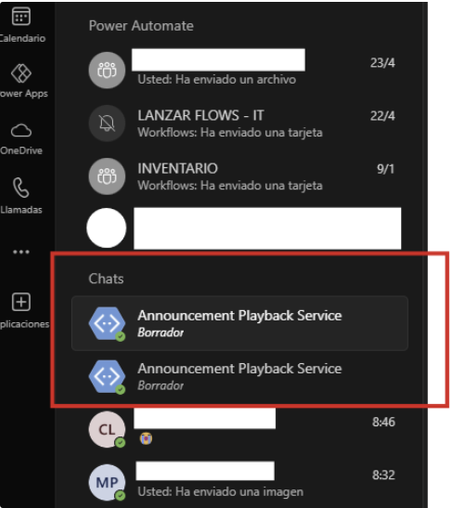
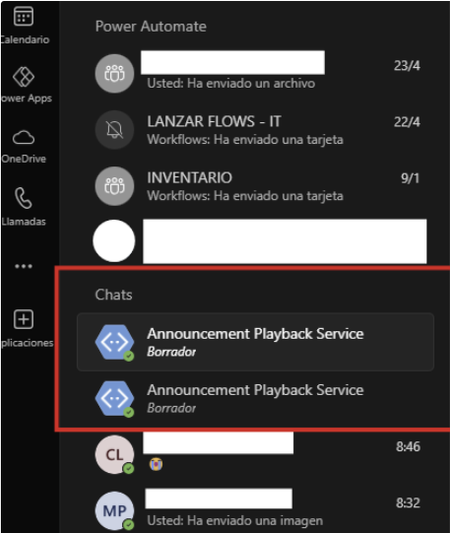
Hello, for a few weeks now, one or two chats with the same name "Announcement Playback Service" have been appearing in my recent chats without explanation. Since the new chat update, they have remained permanently static in recent chats. I can't remove them, delete them, move them, or hide them. They're very annoying. I want to remove them. Does anyone know how? I've attached photos. (desktop and web versions) is the same problem When trying to move them from container: When I hit "Discard" nothing happens:12KViews0likes4CommentsAnnouncement Playback Service chat ¡HEPL!
Hello, for a few weeks now, one or two chats with the same name "Announcement Playback Service" have been appearing in my recent chats without explanation. Since the new chat update, they have remained permanently static in recent chats. I can't remove them, delete them, move them, or hide them. They're very annoying. I want to remove them. Does anyone know how? I've attached photos. (desktop and web versions) is the same problem When trying to move them from container: When I hit "Discard" nothing happens:797Views0likes0Comments
Microsoft.Bot.Connector SendToConversationAsync Failed - 'Forbidden'
Hi. We use Microsoft.Bot.Connector (4.22.9) SendToConversationAsync for sending an activity to a conversation. Most of them are processed successfully, but some fail with 'Operation returned an invalid status code 'Forbidden'. How can I handle it? What is the reason? Also, I have a second question about "blocked conversation." If the user blocks the conversation, I think SendToConversationAsync will fail, too. How can I handle this, and what kind of error will be raised?386Views0likes5CommentsSeeking Best Practices for Performance Testing Bots in Microsoft Teams
Teams Meeting Bot This bot is automatically installed in all scheduled meetings across the organization. It interacts with the Microsoft Graph API via the 'api/messages' endpoint in the Bot Framework to retrieve meeting transcripts. These transcripts are then processed by an LLM model to generate a summarized version of the meeting. Chatbot This is a personal Teams chatbot built using the Bot Framework. It streams real-time responses from an LLM model based on user queries. We are planning a performance test for these bots. What would be the standard procedure to achieve this? Looking forward to your insights.584Views0likes2CommentsWho can help? Bing bots refuse to crawl the content.
Bing support has been ignoring me for the past 9 months, repeatedly sending the same response: "The submitted URL is known to Bing but has some issues preventing indexing. We recommend following the Bing Webmaster guidelines to increase your chances of indexing." I discovered the issue and fixed it, but even after a long time, the site still hasn't been indexed. I have tried all the methods multiple times to speed up indexing, but it didn’t work. Bing is connected, but Bing bots refuse to crawl the content.394Views1like1Comment
CSS Properties being stripped from Teams Chat messages from Bot
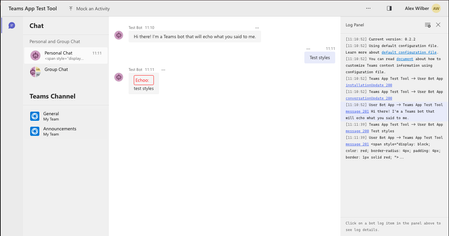
Hi Team, We've noticed that certain CSS properties are no longer appearing in HTML messages when sent to Teams Chat. Previously, our bot styled messages using display and border properties, but now these properties are missing from the HTML when we inspect the page. Steps to Reproduce: Start the Echo bot from the sample templates (I used Teams Toolkit to deploy it to Teams or run it in the Test tool). In the TeamsBot.ts file, modify the onMessage function by replacing await context.sendActivity(...) with the following code. This example adds styling to an echo message. const a: Partial<Activity> = { text: `<span style="display: block; color: red; border-radius: 4px; padding: 4px; border: 1px solid red; ">Echoo:</span> <span style="display: block;">${txt}</span>`, textFormat: TextFormatTypes.Xml }; await context.sendActivity(a); Note: I also tried sending the HTML directly with context.sendActivity(...) without setting the textFormat property in the Activity, and observed the same result. Run the bot in the Test tool and Teams to compare behavior. Observed behavior: In the Test tool: All styles are applied as expected. In Teams: Only the color property is applied, while display, padding, and border properties are ignored (stripped out of the HTML). Here’s an example of the HTML output in Teams: <div dir="auto" id="content-1730973548675" aria-label="Echoo: test styles properties" class="fui-Primitive ___16zla5h f1oy3dpc fqtknz5 fyvcxda"> <span style="color: red;">Echoo:</span> <span>test styles properties</span> </div> Could you provide insights on whether this change is intended, and if there are any workarounds for preserving these CSS properties in Teams messages? Thank you!1.6KViews11likes4Comments