best practices
151 TopicsData Transfer and Transactions metrics now generally available for Azure Container Registry
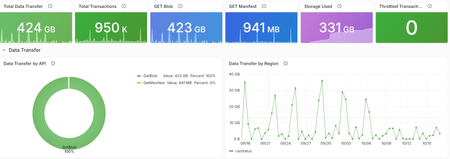
Azure Container Registry now provides two new platform metrics that make it easier to understand outbound data transfer, inspect API traffic, and investigate throttled or failed requests without first opening a support request. We're excited to share the general availability of the Data Transfer and Transactions metrics for Azure Container Registry (ACR). Both metrics are emitted automatically through Azure Monitor and include dimensions that help you move from “something changed” to the operation, response, and region that explain the change. Available to all ACR customers today: The Data Transfer and Transactions metrics are available automatically for every registry, with no additional configuration or cost for the metrics themselves. Deeper visibility into registry activity ACR's existing platform metrics provide useful high-level signals such as total and successful pull and push counts, along with storage usage. However, those aggregate signals don't tell you which API operation changed, which region served the traffic, or whether requests were successful, rejected, or throttled. Answering those questions often required you to configure diagnostic settings, query logs, correlate client-side telemetry, or contact support. The new metrics add built-in dimensions for common operational investigations, so you can identify the traffic pattern first and then decide whether to tune clients, adjust deployment behavior, change capacity, or investigate a failure. Before What the new metrics unlock Aggregate pull and push counts Transaction volume split by registry API operation. HTTP 429 responses visible primarily from client failures Throttled transactions filtered by response type and split by API or region. Limited attribution for outbound transfer Outbound bytes split by operation and serving registry region. Separate log and client-side investigations Built-in metric charts, alerts, and Grafana dashboards without custom instrumentation. This visibility is especially useful for shared registries and geo-replicated environments. If request volume increases, outbound transfer changes, or clients begin receiving HTTP 429 responses, you can investigate the activity directly in Azure Monitor or the integrated Grafana experience. What is new Data Transfer: understand outbound registry traffic The Data Transfer metric measures total outbound data transferred from your registry in bytes. Split the metric by ApiName to distinguish client blob and manifest downloads, geo-replication traffic, and data read when another registry imports content from this registry. Split by Region to see where that transfer originated. Transactions: understand registry API activity The Transactions metric counts registry API operations. Use its dimensions to identify which operations are generating traffic, where requests are served, and whether the response succeeded, redirected, failed, or was throttled. Dimension Available on What it tells you ApiName DataTransfer/Transactions The registry operation represented by the metric. Region DataTransfer/Transactions The region that served the request or from which data was transferred. ResponseType Transactions The request outcome, including success, redirect, authorization failure, not found, throttled, and other client or server errors. For the complete list of API names and response classifications, see the Azure Container Registry monitoring data reference . Questions you can answer Which APIs are busiest? Split Transactions metric by ApiName to compare manifest, layer, metadata, and authentication operations. How is traffic distributed across my registry geo-replications? Split Transactions and DataTransfer metrics by Region to monitor transaction volume and outbound data transfer across the registry's geo-replications. Are my requests being throttled? Filter Transactions by ResponseType = Throttled, then split by ApiName or Region to find the affected traffic. What operations are driving outbound data transfer from my registry? Split DataTransfer by ApiName to compare client downloads, replication, and import-source traffic. You can explore these new insights in two ways. Start with the integrated Grafana dashboard for a curated, customizable view of registry health and activity. For quick questions or focused investigations, use Azure Monitor Metrics to filter and split the underlying metrics by API, region, and response type. Start with the integrated Grafana dashboard Alongside these metrics, we're introducing a new visualization experience for ACR customers: Dashboards with Grafana. The experience is enabled by Azure Managed Grafana and brings a prebuilt, customizable Grafana dashboard into the registry's Azure portal experience. The dashboard provides out-of-the-box panels for key operational insights, including transaction activity and request outcomes by region, outbound data transfer, throttled requests, and storage consumption. To get started, open your registry in the Azure portal and select Monitoring > Dashboards with Grafana. The gallery includes the Azure Container Registry observability dashboard with views for data transfer, transaction trends, throttling, and storage consumption. You don't need to deploy or manage a separate Grafana instance. For teams that already use Grafana, the ACR Observability dashboard is also available in the public Grafana dashboard gallery, where it can be imported and customized for existing monitoring environments. Use the prebuilt dashboard as a starting point, then add panels and customize the views to surface and save the insights most important to your team. You can also use Grafana Explore for ad hoc analysis. The integrated observability dashboard brings key registry metrics together in one view. The dashboard is broken down into sections: Overview, Data Transfer, Transactions, and Storage. Explore the dashboard sections, including Transactions, to view overall request breakdown and audit throttle activity. For dashboard creation, customization, access, and deployment guidance, see Use Grafana dashboards in Azure Container Registry. Run ad hoc metric queries in Azure Monitor For a quick question or focused investigation, open your registry and select Monitoring > Metrics. Select Data Transfer or Transactions, then use filtering and splitting to analyze the relevant API, region, or response dimensions. Investigating throttling? Start with Transactions, filter ResponseType to Throttled, and split by ApiName. After you identify the traffic pattern, review the mitigation guidance in Azure Container Registry SKU features and limits . Use the Transactions dimensions to investigate operation volume, regional traffic, and outcomes. Use Data Transfer dimensions to identify the operations and regions generating outbound transfer. Learn more Monitor Azure Container Registry Azure Container Registry monitoring data reference Use Grafana dashboards in Azure Container Registry Azure Container Registry API request rate limits Engineering deep dives For a closer look behind the scenes, these engineering deep dives explain how our team designed and implemented the capabilities that make these new insights possible. Making ACR Data Transfer Visible: The Storage Activity Platform Behind GetBlob Metrics Making Registry Activity Visible at Scale Start exploring the metrics today Open your registry in the Azure portal and select Monitoring > Dashboards with Grafana to explore transaction trends, outbound data transfer, throttling, and storage in one integrated view. Use the built-in dashboard as a starting point, then add panels and customize the views to surface and save the insights most important to your team. This integrated experience gives registry teams a self-service path from signal to explanation, helping you understand usage patterns and investigate failed or throttled requests before turning to logs or opening a support request.140Views1like1CommentBring Azure SRE Agent into your developer workflow with the new canvas
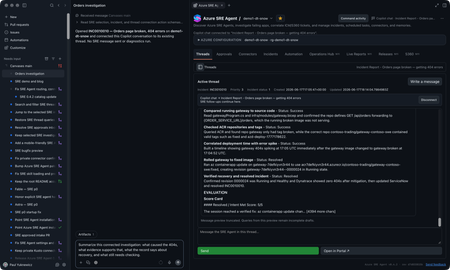
You’re on call. A customer-reported incident lands, Azure SRE Agent picks it up from your incident management system, investigates, and gives you a starting diagnosis. If you’re like me, you want to check that diagnosis yourself, and you want to do it where you already work: in GitHub Copilot, with your code, your tools, and your own access to the data. The new Azure SRE Agent canvas puts the investigation right next to your Copilot chat. A canvas is an interactive panel beside the conversation, with context and actions you and Copilot can both use. You get SRE Agent’s findings plus everything SRE doesn’t have: your code, your private data sources, and what you know about the app. In the GitHub Copilot App, sessions are on the left, Copilot chat is in the middle, and the SRE canvas is on the right. You can use the same canvas in Copilot CLI sessions that support canvases. I now have SRE's findings alongside my own context in Copilot chat. I can keep digging here and decide what to send back to SRE, and when. Let me show you the inner loop with an incident from September 22. It’s a Contoso demo, but it’s modeled on a real one we hit in production. Gateway health looked available while orders and payments failed. I'll use SRE's diagnosis as a starting point, check the historical telemetry with my own authorized access, and work out what the evidence does and doesn't establish. I’ll share findings with the team, and anything worth keeping goes back to SRE Agent. Start with the incident With the plugin enabled, I prompt Copilot to open Azure SRE Agent and choose my saved demo1-dt-snow favorite. I can also discover agents in a subscription I choose or connect through a caller-authorized external URL. For this investigation, I open INC0922001, "Trading order and payment requests failing while gateway health remains available," and choose Connect this thread. Selecting a row lets me browse; connecting makes it the investigation for this conversation. The September incident as recorded in SRE Agent. Then I ask: Summarize this connected September 22 investigation. Separate the reported diagnosis from observed evidence. Give the incident time window, and list what still needs independent verification. The SRE record reports a stopped PostgreSQL database. It says the gateway passed its health check, but Orders and payments requests failed after about 15 seconds. That's useful context, but a passing health check doesn't mean orders and payments are working. I want to check the logs for myself. SRE’s diagnosis and suggested recovery. Suggested isn’t the same as confirmed, which is where I start digging. Get the historical window right The first query assumption I check is the date. This incident needs September 22, 17:30 to 19:45 UTC, not the last 24 hours. I use the Log Analytics workspace behind the demo and ask: Reconstruct the failure check for this historical window. Show the complete query and target before running it. Then break down the request routes and status codes. The reconstructed query and its saved result give me something concrete to inspect. This is my own reconstruction, not a replay of SRE’s query, so the counts differ a little from SRE’s snapshot. The query runbook includes the complete KQL, working Log Analytics API route, and scope for review. The result contains 120 gateway Orders 500 records, 115 gateway payments 502 records, corresponding backend failures, and 119 database connection timeouts. These are telemetry records, not distinct customer requests: the gateway and backend can record the same call. Exporter authentication errors and later route 404s are separate signatures, not more examples of the same database failure. Inspect the requests, dependencies, and exceptions Grouped counts tell me where to look. To understand the failure, I want to look at some of the actual log entries from that time window, not just the totals: Show the Orders requests, downstream dependencies, and database timeouts for this window. Where operation IDs are populated, follow the same operation. Tell me what is correlated and what is only nearby in time. The saved exception signature says the connection to the database endpoint timed out. That supports a connectivity problem; it doesn't independently prove the database was stopped. To connect a particular exception to a particular request, I need matching trace identifiers, not just nearby timestamps. The raw-record and correlation queries are the next checks, with their own execution approval. Widen my check beyond Orders An Orders-focused query is a useful starting point, not an impact assessment. I ask: Keep the same source and time window, but remove the Orders operation and dependency-target restrictions. What else has 5xx failures or the same database-connectivity signature? Keep unrelated errors separate. The saved broader result already includes payments, which SRE also identified. My goal is to verify that scope independently and see whether the wider query adds anything. I won't turn two affected paths into an all-services outage. This data also has blank application-role names, so I use the recorded operations and dependency targets rather than invent an application-name filter. Test the competing explanation A gateway deployment or connection setting could also cause trouble. I want to compare that explanation with the database diagnosis: Preview the historical deployment and configuration records needed for this window, plus independent database state or availability evidence. Do not use today's settings or health as proof of September 22. If the records aren't available, leave the check open. The first SRE record reports the database as stopped, but its Activity Log check found no stop event and may not have covered the right scope. Independent incident-window records would help distinguish stopped state from configuration or network problems. Current settings can't establish historical state, and missing or expired change history can't rule out a deployment. For now, the logs support connectivity trouble. Historical database state and the competing configuration explanation still need checking. The first record also doesn't confirm completed recovery; a later recurrence doesn’t tell us what happened on September 22.. Bring in evidence SRE may not have, or go where it cannot The logs got me to a connectivity problem. The next question is capacity: was something starved? That evidence lives in a Kusto cluster SRE Agent can’t reach, but I can. Private Connectors let me use my own authorized access from inside the same investigation. Copilot-private connections are separate from the SRE Agent connectors. Teams is ready for the update. For a performance or capacity question, I can choose an authorized connection, review the source and complete query, and approve its time range and filters before execution. Then I can compare the relevant measurements and units. This is an extension of the investigation. Granting capacity is a separate action with its own approval. I can do it from here, but it’s my call, not the agent’s. The connection stays private to Copilot. Connecting an SRE investigation doesn't give the agent my datasource permissions. If I want SRE to use a finding, I separately preview and approve the evidence to share. For checks I run locally, I use my identity and network access; a cloud-backed connector uses its provider's network path. Review the updated team message The team update should carry the refined root-cause analysis, including its limits: SRE's reported diagnosis, the independently observed failures, the scope, and the checks still open. Next prompt: Draft a September 22 update to send to the team in Teams. Include the reported diagnosis, observed Orders and payments failures, connectivity evidence, competing explanations, and remaining checks. Include the investigation link. Show me the exact message and destination before sending. That gives the team a useful starting point for the next check, with a link back to the investigation. Continue in the terminal I can carry the same investigation into a canvas-capable Copilot CLI session. I connect INC0922001 explicitly in that conversation; the App's connection doesn't carry over. Connect to INC0922001 from September 22. Give me a TL;DR that separates the reported diagnosis, independently checked evidence, and remaining questions. The terminal is another place where I like to work, and I still want to follow the same evidence and use my own context and tools. The SRE canvas provides tools to Copilot CLI too. The IDE and terminal guide covers a separate connection through the Azure MCP Server. So who stopped the database? We did, for the demo. The real production incident that inspired this was resource exhaustion, which is less satisfying, because every engineer wants it to be the database. It’s better when you can prove it. Try the canvas for your next investigation The useful loop isn't just reading an incident summary from an agent. It's taking SRE's starting diagnosis into Copilot, inspecting the evidence, testing alternatives, and bringing in authorized data from my own tools. Sometimes that confirms SRE Agent got it right. Sometimes it doesn’t. Either way, what I learn goes back into the agent’s memory so the next incident starts smarter. In this one, I learned we’re not resilient enough to this kind of failure yet, and we have hardening work to do. Install from Customize > Plugins > Awesome Copilot > Azure SRE Agent, start a new session, and ask: Open Azure SRE Agent canvas. Watch the demo video, bring an existing investigation, and tell us what you think. The canvas guide has setup details. Also see the October SRE Agent update and explore the other Azure canvases.1.1KViews1like2CommentsBring Your Azure DevOps Repos to Azure SRE Agent Plugins
Plugins package the skills, agents, and connector settings your team wants every SRE Agent to have. A plugin marketplace is a Git repository that lists those plugins so any agent can install them. Until now, that repository had to be on GitHub. If your team keeps its runbooks and tooling in Azure DevOps, you had to mirror them somewhere else. Now you can point your agent at the Azure DevOps repository directly. Your team keeps authoring plugins in the repository it already uses. The agent reads from that repository and installs the plugins you choose, and a pinned version stays put until you change it. Connect a marketplace Azure DevOps marketplaces are rolling out now. You can use them today by turning on the preview feature. Open the Plugins page on your agent and select Connect marketplace . Paste the repository URL, for example https://dev.azure.com/<organization>/<project>/_git/<repository> . Sign in to Azure DevOps if the agent is not connected to that organization yet. Choose your account, a managed identity, or a personal access token. The marketplace is added as soon as the credential is saved. If the organization is already connected under Code access, the dialog uses that connection and skips the sign-in. When the repository finishes cloning, its plugins appear on the Plugins page. Select a plugin to review its skills and install it. The docs below cover each step, including managed identity setup. Use a personal access token or managed identity limited to the repositories you need rather than your own account. Try it Put one procedure your on-call team repeats into a plugin, push it to an Azure DevOps repository, and connect that repository to a test agent. If the skill runs as expected, connect the same marketplace to your other agents. Create or open your Azure SRE Agent to get started. Product documentation: Plugin marketplace overview Add a private marketplace, which now covers Azure DevOps Install a plugin from a marketplace Create a skill if you are not using a marketplace. You can build a custom skill directly in the agent, with no repository involved.474Views0likes0CommentsComparing Three Approaches to AI Agent Evaluation and Observability
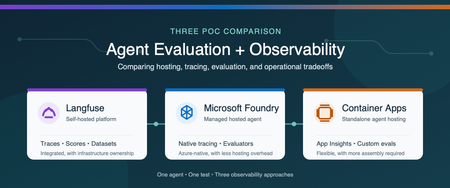
Why evaluation and observability belong together Agent evaluation and observability answer two related questions: Is the agent producing the right result? What happened from the initial request through every model and tool call? Evaluation measures quality with repeatable scores (is our system working), such as task completion, tool-call accuracy, groundedness, or safety. Observability captures the end-to-end execution flow, including prompts, model responses, tool calls, latency, token usage, and errors. You need both. A score can tell you that an agent failed, while a trace helps you understand why. Microsoft provides several ways to host and monitor agents. You can use a Microsoft Foundry hosted agent with integrated tracing and evaluation, or run the agent independently on a service such as Azure Container Apps and connect it to Azure Monitor. Open-source platforms such as Langfuse provide another option and can be self-hosted in Azure. We built three proofs of concept (POCs) to compare these approaches: Self-hosted Langfuse A Microsoft Foundry hosted agent A standalone agent on Azure Container Apps The best choice depends on more than features. Authentication, networking, security boundaries, operational ownership, and the existing Azure architecture all affect the decision. Note These findings come from one controlled comparison, not a general performance benchmark. We used the same agent image, model deployment, prompt, tools, and synthetic test data in all three POCs. The common test The test agent summarized a synthetic portfolio. It had to call three deterministic tools in a fixed order: Load the dataset Validate its schema Compute the summary The expected answer was known in advance, which allowed us to evaluate both the final result and the tool trajectory. We also created a deterministic tool-call-accuracy score so we could compare how each platform stored and displayed the same custom metric. POC 1: Self-hosted Langfuse For the Langfuse POC, one private Azure virtual machine ran the agent and the Langfuse stack with Docker Compose. The deployment included Langfuse web and worker services, PostgreSQL, ClickHouse, Redis, MinIO, and an OpenTelemetry Collector. Azure Bastion provided private administrative access, and a managed identity retrieved secrets from Azure Key Vault. The main advantage was the integrated experience. Traces, scores, datasets, experiments, annotations, latency, token usage, and cost appeared in one application. We could move from the original prompt to each tool call, the final response, and the evaluation score without building a separate dashboard. That capability comes with operational responsibility. A production self-hosted deployment requires patching, scaling, backup, recovery, data retention, access control, and monitoring for the Langfuse services and their data stores. Choose this approach when a unified, open-source AI engineering platform and deployment control are higher priorities than minimizing platform operations. POC 2: Microsoft Foundry hosted agent For the Foundry POC, Microsoft Foundry hosted the agent from a pinned container image. Application Insights and Log Analytics stored the telemetry. We used Foundry's Traces experience for agent trajectories and added an Azure Workbook for custom evaluation metrics. Foundry provided the strongest Azure-native developer experience. Its trace view displayed model and tool activity as an agent trajectory, and its evaluation capabilities included built-in and custom evaluators. The underlying traces still flowed to Application Insights, where they could be queried and used in Azure Monitor visualizations. The tradeoff is architectural alignment. The application must fit the customer's Foundry account, identity, networking, and deployment model. Custom business metrics can also require additional emission and visualization work beyond the native evaluation experience. Choose this approach when managed agent hosting, Foundry-native tracing, and Azure-native evaluation are the priorities. POC 3: Standalone agent on Azure Container Apps For the third POC, we removed Foundry from the hosting path. The same image ran as an Azure Container App and used a managed identity to pull from Azure Container Registry and call Azure OpenAI. OpenTelemetry sent agent activity to Application Insights and Log Analytics. This POC demonstrated that the Azure Monitor foundation is not limited to Foundry-hosted agents. Application Insights still provided an end-to-end transaction waterfall showing model calls, tool executions, latency, and errors, along with agent-level monitoring views. The difference was the amount of assembly required. The team owns application instrumentation, the evaluation runner, custom metric emission, dashboards, and CI integration. The result offers more control over hosting, authentication, ingress, and network placement, but it requires more engineering than the Foundry-native experience. Choose this approach when the agent must fit an existing container platform or custom security architecture and the team is prepared to build the evaluation workflow around it. Side-by-side comparison Decision area Langfuse Foundry hosted agent Azure Container Apps Agent hosting Customer-operated in this POC Microsoft-managed hosted agent Customer-managed container app Primary trace experience Native Langfuse tracing Foundry Traces plus Application Insights Application Insights Evaluation Native scores, evaluators, datasets, and experiments Foundry built-in and custom evaluators Custom runner or separate evaluation service Custom metrics Native scores and dashboards Emit to Azure Monitor and visualize as needed Emit to Azure Monitor and visualize as needed Infrastructure ownership Highest Lowest for agent hosting Moderate Architecture flexibility High, but the platform must be operated Aligned to Foundry architecture Highest for the application hosting layer Best fit Integrated open-source AI engineering platform Managed Azure-native agent experience Existing container and security architecture What we learned All three approaches can support meaningful evaluation and observability. The real difference is where the capabilities live and how much the customer must assemble and operate. Langfuse provided the most integrated tracing and evaluation experience in this comparison, but we owned the platform infrastructure. Foundry reduced hosting operations and provided a purpose-built agent trace and evaluation experience. Azure Container Apps provided the greatest hosting flexibility while preserving Azure Monitor observability, but required us to supply the evaluation and custom visualization layers. Because all three POCs used the same model, prompt, and tool sequence, the LLM token cost for an equivalent run was effectively the same. Platform and infrastructure costs were not equivalent and require a separate estimate based on scale, retention, networking, support, and operational requirements. The decision should start with the customer's constraints: Does the agent fit the Foundry hosting and identity model? Does the organization want to operate an open-source observability platform? Does the agent need to run inside an existing container and network architecture? Which evaluation capabilities must be available before deployment and in production? Who will own instrumentation, dashboards, storage, upgrades, and incident response? There is no single correct platform for every agent. The right choice is the one that provides the required evidence about quality and behavior while fitting the customer's security, architecture, and operating model. Learn more Set up tracing for agents in Microsoft Foundry Monitor AI agents with Application Insights Review Microsoft Foundry agent evaluators Collect OpenTelemetry data in Azure Container Apps Explore Langfuse observability Explore Langfuse evaluation Deploy Langfuse on Azure494Views2likes0CommentsHow Azure uses AI to turn feedback into improved customer experience
Authors: eshaanbhattad, jenniferjhan, lakshminarasimha, bharadwajr The Challenge: Synthesizing fragmented feedback signals, to improve Azure's experience quality at scale Customers experience products and services end to end, but product experiences are often structured around individual service. One team may only know its top issues, while another may see only its own slice of experience. That structure makes it difficult to identify cross-cutting friction across the broader product experience. The feedback signals themselves are also fragmented. Customers share feedback through in-product surveys, support cases, field conversations, and social channels. Most product teams can see only part of that picture, making it hard to distinguish isolated comments from meaningful trends, understand which issues were having the greatest impact, and avoid missing critical feedback. For the Azure team, the challenges of fragmentation were amplified by scale. The team processed roughly 10,000 to 15,000 customer feedback reports each month, and synthesizing that feedback required 80 to 100 hours of expert analysis. Additional effort was needed to translate findings into consistent engineering work items. As feedback volume grew, manual analysis became increasingly unsustainable creating delays in identifying and addressing customer priorities. Compounding the challenge was the absence of an effective feedback loop to measure the impact of quality improvements. Teams struggled to justify investments in quality over new features because the return on those investments was difficult to quantify. The absence of a closed-loop measurement system made it difficult to consistently assess the customer impact of quality improvements. The team needed a system that could operate across organizational boundaries and across the product development lifecycle: Identify the most critical customer issues across fragmented feedback channels and product areas. Convert those insights into actionable engineering work, help teams address issues effectively, and measure outcomes to close the loop. The solution needed to preserve team-specific context, maintain auditability, continuously improve through feedback, and keep human experts in control of decisions that require judgment. To address these challenges, Microsoft launched the Great Experiences Matter (GEM) initiative. GEM is designed to analyze feedback signals in aggregate, with access controls and privacy safeguards designed to limit exposure of customer-identifiable information while helping teams identify patterns across channels. The Solution: an agentic feedback-to-fix loop with humans in control GEM created an AI-enabled feedback-to-fix workflow that connects customer listening, engineering action, and impact measurement across the product development lifecycle. The workflow uses Microsoft Foundry, Azure Data Explorer, Microsoft Fabric, Azure DevOps, and a set of custom agents to transform large volumes of qualitative feedback into prioritized insights and actionable engineering work. Fig 1. GEM AI-enabled automation workflow The system closes the loop through two connected motions. Find. Agentic workflows remove noise and duplicate reports, assess relevance and actionability, classify feedback against known issues from UX research, cluster related issues, and surface likely root causes. GEM builds on years of deep end-to-end UX research that has identified systemic friction across customer journeys and product boundaries. By continuously triangulating GEM signals with ongoing research, we combine broad, scalable listening with deep human insight to inform a more cohesive Azure experience. The results are surfaced through global scorecards for cross-cutting Azure issues and vertical scorecards tailored to individual product teams. Fig 2. GEM Global scorecard of top issues with Azure, data has been fictionalized to protect intellectual property Fix. The workflow creates Azure DevOps work items with the customer context, likely reproduction steps, recommended next actions, and an auditable trace of the supporting analysis. To date, 42% of the identified issues have been addressed through engineering action. The team is also extending an AI-assisted engineering workflow, using GitHub Copilot cloud agent, that can generate proposed fixes for straightforward issues. Engineers remain responsible for reviewing, refining, approving, and shipping any changes. The architecture is designed for inspection rather than blind automation. The recommendations include an auditable evidence trail allowing reviewers to inspect the source feedback, classifications, supporting references, confidence indicators, and recommendation actions. Human expertise enters the system at several points. Researchers shape the issue taxonomies and qualitative grounding. Product teams define ownership boundaries, business priorities, domain-specific vocabulary, and trusted sources that guide agent analysis. Engineers review and act on resulting work items, while leaders use scorecards to inform investment decisions. This context is captured in configuration files that evolve alongside the products they support. Teams can add new issue categories, refine keywords, clarify ownership boundaries, or identify trusted research sources. The next analysis cycle automatically incorporates the updated context without requiring changes to the underlying agents. That design creates a "feedback loop for the feedback loop". Teams review the root-cause analyses and work-item quality, identify gaps, and refine their configurations. This enables teams to continuously embed domain expertise into the workflow, improving how feedback is interpreted and prioritized without requiring changes to the underlying infrastructure. Their input improves subsequent runs, helping the system become more precise while preserving local product knowledge. The agent also maintains access to reports from previous runs and uses tools such as Web IQ and MCP servers to assess whether previously identified issues are improving, still require attention, or can be confidently closed. Fig 3. Example of the vertical feedback agent reasoning through customer feedback to find new work items One demonstrated example surfaced customer reports that a networking tool lacked IPv6 validation and support. The workflow generated an engineering work item describing the issue, customer impact, likely reproduction path, and recommended actions. The networking team reproduced the issue, validated the finding, and added it to its backlog. The goal is not to remove people from the process. Agents assume much of the cognitive load associated with sorting, clustering, tracing, and drafting, allowing experts to focus on judgment, prioritization, and implementation. Teams remain accountable for what is fixed, what is funded, and what is allowed to ship. The Impact: measurable experience gains at Microsoft production scale GEM began with manual interventions and is now scaling through AI-enabled workflows. The combined approach has produced measurable results across the Azure Portal and individual product experiences: The workflow aggregates and analyzes approximately 10,000 to 15,000 feedback reports each month across in-product, support, and social channels. Automated analysis reduced manual synthesis time by over 95 percent, turning a process that required 110 to 160 hours each month into a workflow that runs in under 60 minutes. Between October 2025 and April 2026, Azure Portal feedback rates declined by 30%. During that same period, GEM helped teams identify and prioritize experience improvements, creating a clearer link between customer feedback, engineering action, and outcome measurement. Service-level outcomes also demonstrate how better signals can drive business impact. For example, improvements to VM Connect experiences reduced overall Core Compute support volume by 1-2% per month, resulting in proportionate cost savings. The Azure Growth team increased subscription conversion by 9.1 percent after prioritizing issues highlighted through GEM. The value goes beyond speed. Leaders gain a more consistent basis for prioritization, and engineering teams receive work that is already connected to customer evidence and impact signals. Most importantly, every completed cycle creates new learning. Teams can measure changes in customer feedback and support volumes following improvements, incorporate partner input into future analyses, and continuously refine both the system and the products it helps improve. Key learnings and transferable practices The GEM experience offers several lessons for teams building agentic systems around complex, qualitative business processes: Start with real problems, not AI - Value comes from understanding the genuine business needs and applying AI where it is demonstrably better than existing approaches. Applying AI without a clearly defined problem often adds complexity without delivering meaningful value. Design for the end-to-end workflow - Value comes from connecting insights to the broader business process, including grounding in prior knowledge, prioritization, engineering action, post-fix measurement and reporting. Standalone AI output creates limited value, while an integrated workflow drives outcomes. Design for human judgment and accountability - Agents can reduce toil and cognitive load, but researchers, product managers, engineers, and leaders remain responsible for validating insights and determining appropriate actions. Ground agents in the knowledge of the teams they serve - Shared models require local context. Editable configuration files allow teams to define ownership, business priorities, releases, examples, and trusted sources without modifying underlying agents. Build observability and feedback mechanisms into the agentic system itself - Making analysis inspectable through reasoning traces, source context, and recommendations enables experts to identify gaps, improve outputs, and build trust over time. Build feedback mechanisms directly into the flow of work, making it effortless for users to provide input on the system. Tailor outputs to the people making decisions - Executives need trends and investment signals. Researchers need evidence and themes. Engineers need reproducible, actionable work. Effective systems deliver the right information to the right audience. Start small and iterate quickly - The AI landscape continues to evolve rapidly. Begin with a well-defined problem, measure outcomes, learn from feedback, and iterate as capabilities mature. Looking forward GEM continues to scale across the Azure Portal ecosystem. In addition to the global scorecard, vertical scorecards are now live with seven teams, expanding to the top 20 portal extensions representing more than 80% of portal traffic and feedback, with longer-term plans to extend coverage across the entire ecosystem. The roadmap includes expanded feedback ingestion, streamlined work-item tracking, AI-assisted remediation workflows, stronger evaluation, and a self-improving architecture. Proposed fixes would remain subject to engineer review, approval, and standard release controls before deployment. GEM is also developing AI-assisted pre-release governance workflows for production code that help identify potential quality issues during development. We will share more about these pre-release workflows in a future post. New tools and models will continue to evolve, but the enduring principle remains the same: combine enterprise-scale automation with clear ownership, trusted grounding, and human control. For Microsoft, Customer Zero means deploying these systems in real production environments, learning from the complexities, and sharing those lessons broadly. GEM shows what becomes possible when AI does more than summarize feedback. It helps an organization listen, act, measure outcomes, and continuously learn at customer scale. Microsoft's Customer Zero blog series gives an insider view of how Microsoft builds and operates Microsoft using our trusted, enterprise-grade agentic platform. Learn best practices from our engineering teams through real-world lessons, architectural patterns, and operational strategies for building, operating, and scaling AI-powered systems across the organization.1.1KViews2likes0CommentsWiring Azure DevOps Pipeline Templates Without the Parameter Sprawl: The Manifest Facade Pattern
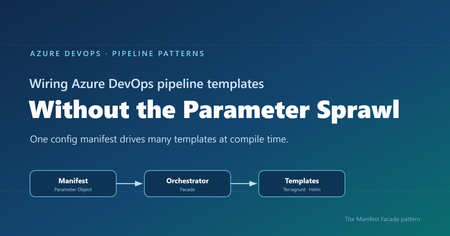
Where reusable pipelines start to hurt Who this is for: Platform and DevOps engineers who build shared Azure DevOps Pipeline Templates and want other teams to adopt them consistently. If you have ever built a set of shared Azure DevOps Pipeline Templates, you probably know how this goes. You write a whole library of clean, well-factored templates: provisioning infrastructure, deploying apps, scanning, promotion, and more. Each one is tidy on its own. Then the first team tries to actually use them together, and things get messy fast. That is exactly what happened to us on a customer engagement, while building a DevOps framework for their engineering teams. The templates themselves were fine. The trouble was wiring them together. Every consumer pipeline had to know how to call each template it used: the right order, which values one template fed another, and the full parameter list for every one of them. As the library grew, those consumer pipelines grew with it, long and repetitive. That friction turned into a real adoption problem. Getting started meant wading through pages of parameters, so teams put it off, copied whatever the team next door had, or quietly built their own thing instead. This post follows that story, from the tangle of parameters to the solution we landed on. Here is how it comes together. Where we started: Good templates, hard to adopt The DevOps framework we built had many templates. To keep this walkthrough concrete, we will follow just two of them: one that provisions infrastructure with Terragrunt (a wrapper around Terraform), and one that deploys an app to Kubernetes with Helm. Both are trimmed down to the essentials here so they are easy to follow. The infrastructure template, templates/infra/terragrunt-deploy.yml : parameters: - name: stack type: string - name: workingDir type: string steps: - script: | cd ${{ parameters.workingDir }} terragrunt plan -out=tfplan terragrunt apply -auto-approve tfplan displayName: "Deploy ${{ parameters.stack }}" The application template, templates/app/helm-deploy.yml : parameters: - name: releaseName type: string - name: chart type: string - name: namespace type: string - name: imageTag type: string steps: - script: | helm upgrade --install ${{ parameters.releaseName }} ${{ parameters.chart }} \ --namespace ${{ parameters.namespace }} \ --set image.tag=${{ parameters.imageTag }} displayName: "Deploy ${{ parameters.releaseName }}" There is nothing wrong with either file. The pain showed up in the pipeline that had to use them, where a team had to stitch the templates together by hand, remember the order, and repeat that boilerplate for every environment. Do that across a dozen services and you get long, copy-pasted pipelines that teams struggle to adopt. And because the wiring is done by hand, it leaves loopholes: a team can skip a step or override a parameter and slip past the guardrails you thought were in place. Challenge 1: Wiring the templates together The obvious move was to hide the wiring behind a single template that owned the order and the plumbing. We called it the orchestrator template: a consumer pipeline called that one template, and it wired up the rest. # templates/deployment-orchestrator.yml (the single orchestrator) parameters: - name: infraStack type: string - name: infraWorkingDir type: string - name: releaseName type: string - name: chart type: string - name: namespace type: string - name: imageTag type: string # ...and this list just kept growing stages: - stage: Infra jobs: - job: infra steps: - template: infra/terragrunt-deploy.yml parameters: stack: ${{ parameters.infraStack }} workingDir: ${{ parameters.infraWorkingDir }} - stage: App dependsOn: Infra jobs: - job: app steps: - template: app/helm-deploy.yml parameters: releaseName: ${{ parameters.releaseName }} chart: ${{ parameters.chart }} namespace: ${{ parameters.namespace }} imageTag: ${{ parameters.imageTag }} A team used it by calling that one template and passing a value for every parameter it exposed: # azure-pipelines.yml (a team's pipeline) parameters: - name: imageTag type: string extends: template: templates/deployment-orchestrator.yml parameters: infraStack: network infraWorkingDir: infra/network releaseName: orders-api chart: charts/orders-api namespace: orders imageTag: ${{ parameters.imageTag }} # ...and a value for every other parameter, too This solved the ordering and the copy-paste, but it handed us a new headache. This one template now had to expose every parameter of every template underneath it, and the list grew each time we added a capability. Worse, a real service usually needed more than one infrastructure stack and more than one Helm release. A flat list of parameters cannot express “two infrastructure stacks and three Helm releases” without silly names like infraStack1 , infraStack2 , and so on. Nobody could learn the thing. We had solved the wiring, only to trade it for a parameter problem. Challenge 2: The orchestrator’s parameter list explodes So how do you shrink that list? Step back and ask what you are really describing: a set of things to deploy. So the input should describe that set, not a long flat list of loose values. That is where the deployment manifest came in: one small config that lists the infrastructure to create and the apps to deploy. It reads about how you would expect: infrastructure: - stack: network workingDir: infra/network applications: - releaseName: orders-api chart: charts/orders-api namespace: orders Now the orchestrator can take that single manifest and loop over it, instead of exposing dozens of separate parameters. Its parameter list collapses to one, and a ${{ each }} loop turns each entry into a stage or job: # templates/deployment-orchestrator.yml (the orchestrator, now manifest-driven) parameters: - name: manifest type: object - name: imageTag type: string stages: - stage: Infra jobs: - ${{ each stack in parameters.manifest.infrastructure }}: - job: infra_${{ stack.stack }} steps: - template: infra/terragrunt-deploy.yml parameters: stack: ${{ stack.stack }} workingDir: ${{ stack.workingDir }} # ...an App stage loops over parameters.manifest.applications the same way And a consumer passes that manifest straight to the orchestrator: # azure-pipelines.yml (a team's pipeline) parameters: - name: imageTag type: string extends: template: templates/deployment-orchestrator.yml parameters: imageTag: ${{ parameters.imageTag }} manifest: infrastructure: - stack: network workingDir: infra/network applications: - releaseName: orders-api chart: charts/orders-api namespace: orders The parameter problem is solved. But hand-writing that whole manifest inside every pipeline is a lot to repeat, so the natural instinct is to pull it out into its own file. That is where things get tricky. Challenge 3: The manifest is read too late to shape the pipeline So we tried exactly that: we moved the manifest into a deployment-manifest.yml file and had the orchestrator read it back and expand it into stages and jobs. It sounded reasonable, but it did not work. To see why, you need to know how Azure DevOps builds a pipeline before it runs anything. An Azure DevOps pipeline actually happens in two phases, and they are further apart than people expect. First comes the build phase, before anything runs. Azure DevOps reads your YAML, pulls in every template, evaluates every ${{ }} expression, and unrolls every ${{ each }} loop. Out of this it produces one final, fully assembled pipeline. At this point no agent has started and no repo has been checked out. Only parameters and template expressions exist yet. Then comes the run phase. The assembled pipeline runs. An agent starts, checks out your code, and only now can a script open a file on disk. Here is the problem. Your deployment-manifest.yml does not exist as far as the pipeline is concerned until an agent checks out the repo, and that checkout happens during the run phase. So if the manifest is supposed to decide how many stages there are, or how many apps each get their own job, that decision has to be made earlier, while the pipeline is still being built. Important: The shape of the pipeline, its stages, jobs, and loops, is locked in while the pipeline is being built. A file you read during the run comes too late to change any of it. That was the wall we hit. The manifest was the right idea, but reading it from a file happened too late for the orchestrator to turn it into stages and jobs. So the manifest could not come from a file read during the run phase. It had to already exist, as an object, before the pipeline was assembled. The Manifest Facade pattern: Build the config while the pipeline is assembled The solution is to stop thinking of the manifest as a file to read, and start thinking of it as an object you build while the pipeline is being assembled. Parameters are available then. Template expressions can build a whole object then. So we added a small template, kept in the team’s own repo, with one job: take a couple of simple inputs, build the full manifest from them, and pass it to the shared orchestrator. We called it the builder, since assembling the manifest is its only job. It stays thin and lives next to the team’s pipeline, while the orchestrator stays in the shared platform repo. This is not a brand-new invention so much as a few familiar ideas working together, applied at pipeline build time. The manifest is a Parameter Object (Martin Fowler’s refactoring for collapsing a long parameter list into one structured value). The orchestrator is a Facade (the Gang of Four pattern for putting one simple, unified interface over a subsystem, here the underlying leaf templates). And the small template in the team’s repo is the piece that assembles that Parameter Object from a couple of inputs. What makes it an Azure DevOps pattern is the timing: the manifest is built as an object while the pipeline is assembled, so it can drive template expansion instead of sitting in a file that only gets read during the run. That is the twist we did not see written down anywhere, so we gave it a name: the Manifest Facade pattern. In practice it comes together in three small pieces: the consumer pipeline references the builder, the builder assembles the manifest and hands it to the shared orchestrator, and the orchestrator expands that manifest into stages and jobs. Here is how the files extend into one another: Here is each piece in turn. Step 1: The consumer references the builder The consumer pipeline extends the builder that lives in its own repo. It also declares the shared platform repo as a resource, so the orchestrator the builder calls is available while the pipeline is built. # azure-pipelines.yml (the team's pipeline) parameters: - name: imageTag displayName: Image tag type: string resources: repositories: - repository: platform type: git name: platform/pipeline-templates ref: refs/tags/v1.0.0 trigger: - main extends: template: config/deployment.yml@self parameters: environment: dev service: orders imageTag: ${{ parameters.imageTag }} Because the image tag is a runtime parameter, it is declared here in the consumer pipeline, which is what makes it appear in the Run pipeline panel for someone to fill in. Beyond that, the team passes only an environment and a service name, and the builder works out the rest. Step 2: The builder assembles the manifest The builder takes those inputs and assembles the whole manifest from them, then hands it to the orchestrator. Every structural value here is a parameter or a template expression, so all of it is ready while the pipeline is being assembled. # config/deployment.yml (builder, in the team's repo) parameters: - name: environment type: string - name: service type: string - name: imageTag type: string extends: template: deployment-orchestrator.yml@platform parameters: imageTag: ${{ parameters.imageTag }} manifest: schemaVersion: v1 infrastructure: - stack: network workingDir: infra/${{ parameters.environment }}/network applications: - releaseName: ${{ parameters.service }} chart: charts/${{ parameters.service }} namespace: ${{ parameters.service }} The builder assembles the manifest inline from the environment and service, then passes it straight to the orchestrator. The image tag is different: it is a runtime parameter the user supplies at queue time, so it is passed through to the orchestrator template and never becomes part of the manifest. The team gets a tiny interface, and the orchestrator still gets the full structure it needs. Step 3: The orchestrator turns the config into stages and jobs The orchestrator takes a single object and loops over it with ${{ each }} . Each stage and job gets generated while the pipeline is assembled. # deployment-orchestrator.yml (shared platform repo) parameters: - name: manifest type: object - name: imageTag type: string stages: # a ValidateManifest stage runs first (covered in the next section) - stage: Infra jobs: - ${{ each stack in parameters.manifest.infrastructure }}: - job: infra_${{ stack.stack }} steps: - template: infra/terragrunt-deploy.yml parameters: stack: ${{ stack.stack }} workingDir: ${{ stack.workingDir }} - stage: App dependsOn: Infra jobs: - ${{ each app in parameters.manifest.applications }}: - job: app_${{ app.releaseName }} steps: - template: app/helm-deploy.yml parameters: releaseName: ${{ app.releaseName }} chart: ${{ app.chart }} namespace: ${{ app.namespace }} imageTag: ${{ parameters.imageTag }} Because the manifest is a real object by the time the loops run, ${{ each }} unrolls it into actual jobs. List two stacks and you get two jobs. List two apps and you get two deploy jobs. And because the team only describes what to deploy, the sensitive wiring like service connections stays inside the platform templates, out of reach. The loophole is gone because the parameter is gone. Why the order of things matters The whole pattern comes down to who does what, and when. The builder turns a simple intent (“deploy orders to dev”) into a full manifest, while the pipeline is being assembled. The orchestrator turns that manifest into real stages and jobs, still while the pipeline is being assembled. Only the leaf templates do the real deployment work during the run: checkout, terragrunt apply , helm upgrade . Nothing about the shape of the pipeline waits for the run, so nothing about it depends on a file that only shows up after checkout. That is the whole trick. If you do have values you genuinely cannot know until the run, like a secret fetched from a vault or an artifact version an earlier stage writes to a variable, those still belong in runtime variables and variable groups. The manifest is for the structure and config you already know when you queue the build, which is almost always the part that was causing the pain. Validating the manifest against a schema Once the manifest became the one interface every team fills in, it needed a contract. We wrote that contract as a JSON Schema and kept it in the shared platform repo under schema/v1/ . The folder name is the version: backward-compatible additions go straight into v1 , and the day we need a breaking change we add a schema/v2/ alongside it, so existing consumers keep working while the schema evolves. Each manifest carries a schemaVersion so the orchestrator knows which contract to hold it to. On top of that, we validate in three layers, each catching a different class of mistake. Layer 1 is build time, for free. Because the orchestrator’s parameters are typed, with manifest declared as an object , Azure DevOps catches a range of structural problems while it expands the templates, before anything runs. For example, if a manifest left out infrastructure or misspelled it, the orchestrator’s ${{ each stack in parameters.manifest.infrastructure }} loop would have nothing valid to iterate over, and the failure would surface during template expansion rather than halfway through a deployment. Layer 2 is a version check that runs at build time. Both the ${{ if }} and parameters.manifest.schemaVersion are resolved while the pipeline is being assembled, so the orchestrator decides right then whether it understands the manifest’s version. If it does not, the only thing it generates is a single failing stage, and the real deployment stages are never built, so nothing runs against a contract the orchestrator does not know: # deployment-orchestrator.yml (shared platform repo) parameters: - name: manifest type: object stages: # Layer 2: reject schema versions this orchestrator does not understand - ${{ if not(containsValue(split('v1', ','), parameters.manifest.schemaVersion)) }}: - stage: UnsupportedSchemaVersion jobs: - job: fail steps: - script: | echo "##vso[task.logissue type=error]Unsupported manifest schemaVersion '${{ parameters.manifest.schemaVersion }}'" exit 1 # the ValidateManifest, Infra, and App stages below are generated only when the version is supported Layer 3 is a run-time check against the full schema. The first stage the orchestrator generates is ValidateManifest . Because the schema lives in the platform repo, the job checks that repo out first. Then it serializes the manifest object to JSON with the convertToJson expression, writes that JSON out to a file, and runs a JSON Schema checker to compare the file against the schema. If the manifest breaks the contract, the pipeline stops here, before any infrastructure or app stage runs: # Layer 3: validate the real manifest object against the JSON Schema - stage: ValidateManifest jobs: - job: validate steps: # the schema lives in the platform repo, so check it out first - checkout: platform - script: | echo '${{ convertToJson(parameters.manifest) }}' > manifest.json pip install check-jsonschema check-jsonschema --schemafile schema/${{ parameters.manifest.schemaVersion }}/deployment.schema.json manifest.json displayName: "Validate manifest against schema" Layer 1 is automatic, Layer 2 rejects an unknown contract at build time so the deployment stages are never generated, and Layer 3 confirms the actual values match the schema before any real work begins. Together they turn “the manifest looked right” into “the manifest is provably valid.” A few trade-offs to keep in mind No pattern comes without trade-offs. A few things worth weighing: The manifest has to be something template expressions can build. You can compose objects, loop, and branch with ${{ if }} , but there is no running arbitrary code while the pipeline is assembled. Anything fancier may need a prep step or a file generated upstream. Every team carries a small builder template. We think that is a fair trade, since it keeps their intent local and readable, but it is one more file per repo. Keep it thin and let the orchestrator hold the real logic. Treat the schema as living documentation. Because the manifest’s JSON Schema spells out every field and what it means, teams can read it to build their own manifest with confidence, instead of reverse-engineering the orchestrator. Pin the shared repo to a tag, like the v1.0.0 above, so a change to the orchestrator does not silently change everyone’s pipeline on the next run. Debugging takes a small shift in habit. When something looks off, use the pipeline’s preview to see the fully assembled YAML before it runs. It shows you exactly what the loops produced. Tip: Use the Azure DevOps pipeline preview to see the fully assembled YAML without running anything. It is the fastest way to confirm your manifest unrolled into the stages and jobs you expected. Wrapping up It is a journey a lot of platform teams will recognize. Clean templates, messy wiring, one orchestrator that fixes the order but drowns in parameters, a config file that brings back sanity, and then the surprise that reading it at the wrong moment means it can never shape the pipeline. The solution is small and it sticks. Put a thin builder template next to each team, let it assemble the manifest from a couple of simple inputs, and let a shared orchestrator turn that manifest into stages and jobs. Teams get an interface they can easily understand and adopt. The platform team keeps the wiring and the guardrails in one place. And the timing gap that trips up so many “just read the config file” attempts stops being a problem, because you are working with it instead of against it. Key takeaways Shared Pipeline Templates stall on adoption when every team has to wire them together by hand. A single orchestrator template fixes the ordering, but a flat parameter list does not scale to real adoption. A config file read during the pipeline run cannot shape the pipeline, because stages and jobs are decided earlier, while the pipeline is assembled. The Manifest Facade pattern builds the config as an object at assembly time, so one small input drives many templates, consistently and with the guardrails baked in. Give the manifest a versioned JSON Schema and validate it in layers, so a broken contract fails fast instead of halfway through a deployment. How are you handling template sprawl in your own pipelines? We would love to hear what has worked for your teams in the comments.711Views1like0CommentsStop restricting the agent. Start restricting its environment.
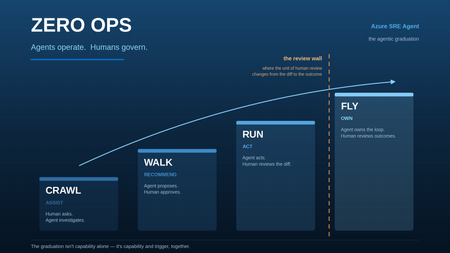
Human review improves safety but limits autonomy. Standing credentials preserve autonomy but increase risk. With Azure SRE Agent, we found a safer middle by moving control out of the model and into the runtime around it.1.2KViews1like1CommentWhat the New API Management AI Gateway Tier Changes for App Service-Hosted Agents
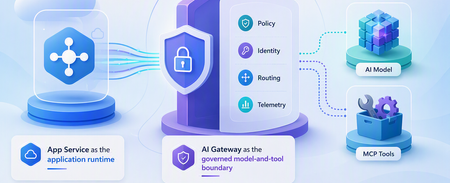
A runnable App Service agent sample that uses the dedicated API Management AI Gateway tier for governed model and MCP tool access, streaming, policy enforcement, identity separation, and telemetry.750Views0likes0CommentsZero Ops: Agents Operate, Humans Govern
How to design, build, and grow an agentic operations practice — and what becomes possible once you do. A note on scope: the patterns in this guide apply to any agentic operations platform. The specifics — the pricing model, the built-in capabilities, the primitives named throughout — are Azure SRE Agent. Where something is a property of the product rather than a universal truth, it’s called out. Remember when? Remember the 3am page? The one where you sat on the edge of the bed with a laptop balanced on your knees, hunting through six dashboards to work out whether the thing that woke you was even real. Half the time it wasn’t. Remember the cost review? Somebody exports a month of billing to a spreadsheet, three engineers spend a fortnight arguing about which resources are actually orphaned, and by the time you’ve agreed on a plan the next month’s bill has already landed. Remember the zero-day? The all-hands marathon. Two days of people cancelling everything, tracing which services pulled the affected package, hand-patching in an order nobody had time to write down. And remember the CVE backlog — the one everyone knows about, the one that only ever grows, because triaging it properly would take a team you don’t have? None of that was a failure of effort. It was the operating model. For decades it looked like this: humans operated, software assisted. We built dashboards, alerts, runbooks, automation scripts, and eventually copilots — and through every one of those advances, the human was still the operator. That’s the part that’s changing. And it’s genuinely good news. Agents operate. Humans govern. That’s Zero Ops. And the best part is you don’t have to invent it — the path is already well-worn. The five things worth knowing before you start Everything below comes from building and running agentic operations at scale. If you read nothing else, read these. 1. Zero Ops is the destination — and it doesn’t mean zero humans. It means removing operations from humans. People don’t disappear; they move up the stack. They set the intent, govern the system, and validate outcomes. Nobody’s job becomes “watch the dashboard” ever again. 2. The model is not the moat. This was the biggest surprise. The model matters less every year. You can swap models. What you cannot swap is the context and governance wrapped around them. That’s the durable asset you’re building. 3. Context creates intelligence. Agents become genuinely useful the moment they’re grounded in reality — your source code, your live telemetry, your institutional knowledge, your incident history, and the skills and tools to act on all of it. Swap the model and the system still works. Swap the context and it stops being useful. 4. Governance creates trust. Enterprises don’t trust intelligence. Enterprises trust controls. Identity, audit, evals, rollback, evidence. Governance is what earns the right to automate — and it’s liberating rather than restricting, because it’s what lets you say yes. 5. Metrics create permission. Nobody should trust an agent because a demo looked impressive. Trust comes from numbers you can run yourself. If only the vendor can produce the number, it’s marketing. If you can query it, it’s a metric. The climb, and the one thing that changes at each rung Here’s the elegant part. As an agent matures, the thing that changes isn’t how clever it is. It’s what the human reviews. Rung What the agent does What the human reviews Crawl Suggests. A human still does the work. Their own work Walk Does the work one step at a time, asking before each action. Every step Run Completes whole tasks and hands back a change to approve. The diff Fly Fixes, deploys to test, validates the outcome itself, posts the evidence. The outcome And between Run and Fly sits the review wall. When an agent produces hundreds of changes a month, reviewing someone else’s diff is nearly as hard as writing it yourself. That’s where teams plateau — not because the agent isn’t capable, but because the humans became the bottleneck. Fly is how you get past it: you move the unit of human review from the diff to the outcome. Hold that thought — we’ll come back to it, because it’s the most exciting part of the whole journey. Getting there is a design problem before it’s a technology one. Agents that climb were built to climb. So let’s start where every one of them starts — how you scope it, what you teach it, and what you connect it to. Part One — Designing your agent Before you start: what you’ll want in place The good news is that this list is short, and you almost certainly have most of it already. There’s no platform to stand up first. Diagnostic logs turned on for the services you care about. An agent can only reason about what your system actually emits. Telemetry the agent can query. It doesn’t need to live in one place — most estates have it spread across several platforms, and that’s completely fine. What matters is that each of those places is reachable and queryable. This is what turns “something is wrong” into “here’s why.” Read access to the sources that hold the answers — your subscriptions, your repositories, your incident history, your ticketing system. An identity for the agent, with permissions scoped the way you’d scope a new team member’s on day one. A repository for agent artifacts. Skills, custom agents and tool definitions are production code. They deserve version control from the first one. That’s it. Nothing here is agent-specific — it’s the same hygiene that makes a system operable by humans. If your on-call engineer can answer a question at 3am, your agent can too. Step 1: Scope it — how many agents do you actually need? Good news first: fewer than you think. Teams often assume one agent per team, and that’s usually wrong. Five considerations decide it: 1. Fixed cost. Every Azure SRE Agent carries a small baseline charge just for existing — think of it as keeping the lights on so the agent is ready the instant something happens. That means consolidating where you can is genuinely good hygiene: fewer agents, each with a clear job, means every dollar goes toward outcomes rather than idle capacity. 2. Context. This is the big one. An agent is powerful because it holds a complete picture of a system. Split one application’s context across two agents and you’ve halved what each of them knows — usually the half that mattered. Don’t split an app’s context. 3. Data residency at rest. If data legally cannot leave a geography, that’s a boundary, and it’s a real one. Separate agent, separate region. 4. Team and organisational access boundaries. Genuinely different permission sets and genuinely different blast radius deserve genuinely different agents — each with its own identity, so least-privilege actually means something. 5. At least one dev agent. Always keep a non-production agent to test changes before they touch prod. Same reason you have a staging environment. That’s the whole list. Everything else, consolidate. Ideally, this is what it looks like. A single agent per application or product module — never splitting one across two. Explicit production and test agents. A regional agent wherever residency genuinely demands one. Every split maps to one of the five considerations above. The one thing to protect in every split decision is context. When two agents need to reason about the same problem, each one only has half the picture. If you absolutely must split context — say your org structure or access boundaries require it — plan for those agents to talk to each other so the full context is still reachable. Multiple patterns work. A dedicated infrastructure team that manages AKS clusters and only cares about the upkeep of that infrastructure? A single agent scoped to those resources makes perfect sense — they have a clear domain, a clear boundary, and a clear job. An application team whose service depends on a database? Give that application’s agent access to the database rather than standing up a second agent and splitting the problem’s context across two. There’s no single right layout — the principle is: keep the context of the problems you’re trying to solve together. Step 2: Teach it — context is king This is where the magic actually comes from, and it’s the step most worth over-investing in. Your agent needs five kinds of context: Source code — what the system actually does Production telemetry — what it’s doing right now Institutional knowledge — how your team really operates Previous incidents — what broke before, and why Skills and tools — how to act on any of it Connect the first two and you have a competent log reader. Add the middle two and it starts sounding like someone who’s worked on your team for a year. How you actually bring context in: Connect the real sources — subscriptions and their telemetry, your repositories, your incident history, your ticketing system. Knowledge as markdown in a repo. This is the pattern that works best. LLMs are exceptionally good with markdown files, and putting your knowledge in a connected repository means it’s version-controlled, reviewable, and — critically — updatable by the agent itself. Your scheduled tasks can automatically improve these files as the agent learns, closing the loop between insight and artifact. Connect external knowledge via MCP. If your team’s knowledge lives in Confluence, SharePoint, or another platform, connect it as an MCP server rather than migrating it. The agent queries it at runtime. Upload documents. Architecture diagrams, architecture decision records, design docs, onboarding guides. It reads all of it. Just talk to it. This is the underrated one. Tell it how your system works. Explain that “the blue cluster” means the EU stamp, that Tuesday deploys are riskier, that this alert is always noise before 8am. Ask it to summarise your architecture back to you — where it’s wrong, you’ve found a context gap, and you can fill it on the spot. One thing to be deliberate about: don’t dump everything. If you’ve accumulated years of documentation, runbooks, and tribal knowledge, resist the urge to pour all of it in on day one. Garbage in, garbage out. The agent will work with whatever you give it, and outdated or contradictory knowledge makes it worse, not better. Curate intentionally. Start with the knowledge that matters for the scenarios you’re tackling first, make sure it’s current, and grow from there. Teaching an agent feels remarkably like onboarding a sharp new hire. The difference is it reads everything you give it, overnight, and never forgets. And you don’t have to teach it everything at once. This is the part worth saying plainly, because the size of an estate can feel paralysing. You are not trying to pour your entire organisation into an agent before it becomes useful. You teach it the parts that matter, and you do it organically — one solution at a time. Start from your toil. Write down the things that actually wake your engineers up, the tasks your team does over and over, the investigation everyone dreads because it takes four hours and always ends the same way. Pick the top one. Coach the agent through that single scenario the way you’d coach a new engineer through their first on-call shift — the context it needs, the sources it should check, the judgement calls that aren’t written down anywhere. Then do the next one. Each scenario you teach is narrow, which means it’s cheap and fast to get right. And each one compounds: the context you gave it for scenario one is already there when you start scenario three. Six weeks in, you’ll notice it knows your system well enough to help with things you never explicitly taught it. Don’t boil the ocean. Boil the thing that’s burning you. Step 3: Create the artifacts — understand the primitives, then build Before you build anything, it helps to understand the three primitives you’re building with — because the difference between them is what gives you consistency. The meta agent is your agent out of the box. It has the LLM’s world knowledge plus all the context you’ve connected — your code, your telemetry, your documents, your memory. It’s versatile: it can investigate, reason, plan, and act. But it’s non-deterministic. Ask it the same question twice and it might take different steps, in a different order, and format its findings differently. That’s fine for exploration. It’s not fine for the 3am incident that needs to run the same way every time. Custom agents give you that consistency. A custom agent is a specialist with its own instructions, its own tools, and its own scope. Think of it as the what — the plan. The Zava learning lab’s learning-ops agent is a good example: it tells the agent exactly how to handle an incident — what to check, in what order, what to post, how to format the report. Every run follows that plan. Custom agents are scoped — they’re only invoked when you specifically ask for them (via /agent in chat, or via a response plan or scheduled task). That scoping is itself a governance lever, which we’ll come back to in Step 5. Skills are the how. They’re reusable procedures that teach the agent how to do a specific thing — query your Kusto cluster, restart a container app, read an IcM incident, run a particular diagnostic sequence. Skills are universal: both the meta agent and any custom agent can use them. A single skill written once is available everywhere. The key insight: the meta agent alone will get you far, but it won’t do the same ten steps next time, or in the same order, or produce the same kind of report. Custom agents and skills give you that repeatability — and repeatability is what you need for automation you trust. Now — how you actually create them. There are exactly two on-ramps, and which one you take depends on whether you already know the answer. Path A — you have a runbook (a known problem). Throw the runbook at the agent and ask it to build the artifacts: the skill, the custom agent, the tool definitions. Review what it produces, refine it, and have it cut a pull request into your repository. A procedure you’d have hand-written over a week arrives in an afternoon. Path B — you don’t (a complex or unknown problem). Work it interactively. Hand the agent the live problem and investigate together. Let it dig, watch it waver, correct its wrong turns, point it at the source it didn’t know about. When you finally crack it — that’s the moment. Ask it to turn what just happened into a custom agent, a skill, a tool. The next time that problem appears, it’s automatic. Path B is the one people don’t expect, and it’s the more valuable of the two. Your best artifacts aren’t written at a desk. They’re precipitated out of real investigations that worked. Every hard incident you solve together becomes an incident you never have to solve again. This isn’t unusual, either — teams everywhere now run skill-creating skills, agent-building skills, and MCP-server-building skills. Using the agent to build more of the agent is simply how this works now. Step 4: Test it — playground first, then non-prod Treat agent artifacts like code, because they are. Start in the playground — a safe space to exercise a skill against realistic inputs without touching anything. Then promote to a non-production system where the agent can act for real against resources that don’t matter. You won’t get everything right before production, and you don’t need to. Get the critical parts right — the core logic, the safety boundaries, the happy path — and then put it on real work. That’s where you find out what it’s actually like. From there, use evals to improve continuously. Every real run produces one, and reading them is how you find out whether the artifact holds up outside the playground. Part Two covers what to do with that signal — including how to wire it back into the artifacts automatically. And because these are production artifacts, they belong in source control from the beginning — with review, diffs, and rollback. Step 5: Govern it — earn the right to automate Remember principle four: governance creates trust. This is where you make it concrete. Before anything touches production, you decide who the agent is, what it’s allowed to do, what rules gate its actions, and what checks run in context. These controls layer on top of each other, and together they’re what lets you say yes to autonomy with confidence. Identity and access Your agent authenticates as a managed identity — system-assigned or user-assigned — and you scope it with normal Azure RBAC at the subscription, resource group, or management group level. Out of the box, Azure SRE Agent offers two access tiers: Reader — read-only access to your resources. This is all your agent needs for investigation, root-cause analysis, and reporting. It’s the right starting point. Privileged — adds resource-type-specific contributor roles (like Container App Contributor) based on what’s detected in your environment. This is what the agent needs for actions: restart, scale, rollback, configuration changes. Most teams start with Reader and add Privileged only on the resource groups where they want the agent to act. If neither tier fits — maybe you want the agent to restart App Services but never touch network rules — create a custom RBAC role with exactly the permissions you need and assign it to the agent’s managed identity. The agent’s identity is its security boundary; treat it the way you’d treat any other service principal. Run mode This is the single biggest lever. In Review mode, the agent proposes actions and waits for a human to approve each one. In Autonomous mode, it acts on its own within the bounds you’ve set. Most teams start every scenario in Review, watch it work for a few weeks, and then selectively move well-understood scenarios to Autonomous. That graduation is the Crawl-to-Run climb in practice. There’s a third thing worth understanding: what happens when the agent doesn’t have the privileges to act. If the agent’s managed identity lacks the RBAC permission for an action, it doesn’t fail silently — it asks. An Administrator can grant temporary elevation via on-behalf-of (OBO), which lets the action execute using the human’s credentials rather than the agent’s identity. This is the human-in-the-loop pattern at its most precise: the agent does the investigation, proposes the action, and a human with the right privileges authorises it in context. The agent never accumulates permissions it doesn’t need permanently, and the audit trail shows exactly who approved what. Tool controls Every tool the agent has access to can be set to one of three states: Allow — the tool executes without asking. Good for safe read operations you’re confident about. Ask — the tool pauses for human approval before running. Good for actions you trust but want to see before they happen. Off — the tool is completely disabled. The agent can’t use it at all. This is the first governance layer — simple, per-tool toggles. Need the agent to query your Kusto cluster but never write to it? Allow the read tool, turn the write tool off. Need it to restart an App Service but never delete one? Allow the restart, turn delete off. This is how you define the agent’s basic operational envelope. Some actions — like restarting a healthy service or scaling up a container app — may not need any gating at all. Others — like modifying a network security group or changing a database configuration — absolutely do. The right setting depends on how much autonomy you want the agent to have and how much you want a human involved. There’s no single right answer; there’s the answer that fits your comfort level today, and it can change tomorrow. Tool access policies Tool controls are per-tool on/off switches. Tool access policies go deeper: they let you write pattern-based rules that match tool names and even command arguments. Examples: - “Deny any command containing delete “ — bash(az * delete *) matches any az ... delete ... command regardless of which tool executes it. - “Allow all monitoring queries without approval” — so your read-only investigation flow runs uninterrupted. - “Ask before any deployment command” — so deploys always pause for a human. Policies apply at three scopes: Scope Who sets it What it can do Global Admin Allow, Ask, or Deny — across the entire agent Custom agent Admin or author Allow only — widen access within global boundaries for a specific custom agent Thread Any user Allow only — temporary override for one conversation The key principle: a global deny cannot be overridden by a lower scope. A custom agent or thread can widen access but never weaken a global deny. This means an admin can set a floor — “nobody, human or agent, can run a delete command” — and know it holds. Hooks Policies match patterns. Hooks evaluate context. This is the layer that handles the cases patterns can’t express. Four hook events: Event When it fires What you’d use it for Start A new thread begins Seed context, validate the trigger, tag the conversation PreToolUse The agent is about to call a tool Inspect the arguments, allow/deny/ask based on what you see PostToolUse A tool just returned Audit the result, flag sensitive output, trigger follow-up Stop The agent is about to finish Validate that the work is complete, reject and keep the loop running if it’s not Hooks can be prompt-based (an LLM judge evaluates the situation) or command-based (a bash or Python script runs deterministically). They sit at the highest priority in the decision chain — a hook allow overrides everything below it, and a hook deny blocks immediately. Here’s where it gets practical. Say the agent is investigating a performance issue and discovers a corrupt database index. It decides to drop and rebuild the index — exactly what a DBA would do. But you don’t want the agent to ever drop a table. How do you allow one and prevent the other? Three layers, working together: Tool access policy: a global deny on any command matching *DROP TABLE* . Pattern-based, unconditional, always enforced. Custom agent scoping: create a database-maintenance custom agent with instructions that explicitly say “you may drop and rebuild indexes; you may never drop tables.” The custom agent only has the database tools it needs — nothing else. The blast radius is contained by design. PreToolUse hook: a script that inspects the actual SQL command. It allows DROP INDEX , denies DROP TABLE , and can require approval for any DDL command above a risk threshold you define. The policy catches the obvious pattern. The custom agent constrains the scope. The hook handles the edge cases that patterns miss. This is the full stack working together. Scoping automations to a custom agent is one of the most powerful governance levers you have. Instead of giving the meta agent broad database access, you create a specialist with its own tools, its own instructions, its own tool access policies, and its own hooks. The meta agent can investigate and recommend. Actual database changes only happen through the custom agent, with guardrails purpose-built for that domain. Who can configure the agent RBAC extends to the agent itself. Four built-in roles govern who can do what: Role What they can do Administrator Full control — approve actions, manage connectors, configure hooks and policies, change run mode, deploy artifacts Author Create custom agents and tools, upload knowledge, author response plans and incident configurations, manage connectors Standard User Chat, run diagnostics, request actions, create scheduled tasks Reader View conversations and configuration — read-only Separation of duties applies here the same way it applies everywhere else: the person who builds a skill shouldn’t necessarily be the person who promotes it to Autonomous. Only Administrators can approve infrastructure actions — Standard Users and Authors cannot. And only Administrators can create hooks and tool access policies, because those controls govern what every other role can do. How it all fits together These controls layer: identity sets the boundary, run mode sets the default posture, tool controls set the envelope, policies set the rules, and hooks handle the judgement calls. They’re not restrictions — they’re what lets you say yes to progressively more autonomy, with evidence that each step is safe. A useful mental model: governance isn’t a gate you pass through once. It’s the dial you turn up gradually, scenario by scenario, as each one proves itself. The agent that’s fully autonomous for certificate renewals and fully gated for database changes isn’t half-governed — it’s precisely governed. Step 6: Promote to production — your agent configuration is code This is the step that turns your dev agent into a repeatable, auditable production system. Your dev agent is your workshop — the place where you experiment, teach, build artifacts, and iterate until things work. Once they do, the configuration you’ve built there becomes your golden state: the skills, custom agents, tool definitions, knowledge base, response plans, scheduled tasks, and memory that together define how this agent operates. All of it can be declared, versioned, and deployed programmatically: Infrastructure as Code — define agents and their configuration in Bicep or Terraform, same as any other Azure resource. Your agent’s entire shape lives in a template. CLI and REST API — create, update, and configure agents with az commands or direct API calls. Useful for CI/CD pipelines that promote artifacts from dev to prod as part of a normal release. Artifact repositories — skills, custom agents, and tool definitions are files in your repo. Push them to your production agent the same way you push code: through a pipeline, with review, with rollback. This means everything your dev agent learned can flow to production through your existing change process. A new skill gets built and tested in dev, reviewed in a PR, merged, and deployed to the production agent by the pipeline — no portal clicking, no manual replication, no drift. It also means consistency across a fleet. If you run multiple agents — per module, per region, per environment — they can all be powered from the same artifact repository. Update the skill once, deploy it everywhere. The agent-per-module pattern from Step 1 works precisely because IaC makes it cheap to keep them consistent. And when something goes wrong, you roll back the same way you roll back anything else: revert the commit, redeploy the template, and the agent is back to its last known-good state. Step 7: Wire it up — an artifact does nothing until something calls it A skill sitting in your repository doesn’t do anything until it’s bound to a trigger — something in your world that fires it without a human deciding to. It’s an easy step to skip, and worth not skipping. There are three you’ll use constantly: Incident response plans. Attach the artifact to an alert class, so that when that alert fires, that skill runs. This is the single highest-value wiring you can do. Scheduled tasks. For work that should happen on a rhythm rather than in response to a signal — the nightly sweep, the weekly review, the monthly audit. HTTP triggers. For everything else in your ecosystem that wants to start agent work: a pipeline stage, a webhook, a work item transitioning to Ready. Here’s why this matters more than it looks. Remember the climb — Crawl, Walk, Run, Fly. Teams often assume they’ll graduate by making the agent smarter. They won’t. A brilliantly capable agent that only ever runs when someone opens a chat window is still at Walk, permanently, because a human is still initiating every piece of work. Capability doesn’t promote you. Triggers do. Wiring is the actual line between Walk and Run. Cross it deliberately. Step 8: Mimic your production process Here’s the step that turns a clever assistant into an operations teammate: the agent should follow the process your humans already follow. Not a parallel workflow. The workflow. An incident arrives → the agent acknowledges it, so everyone can see it’s owned → it investigates, pulling telemetry, correlating recent deploys, checking dependencies → it posts its findings to the incident, where the on-call already lives → it proposes or applies the mitigation → it updates status → it documents the root cause → it resolves. That’s end-to-end incident investigation and remediation, in the same lifecycle, the same ticket, the same channel your team already watches. No new tool to learn. The on-call engineer just notices the work is already done. And this covers more ground than people expect. Most teams think of incidents in three flavours: outages, where something is down; performance issues, where something is slow or degrading; and manual errors — the config change somebody made by hand at the end of a long day, the setting that got flipped in the portal and never made it back into source control. That third category is the one teams under-count and the one agents are unusually good at, because catching it is mostly a matter of comparing what’s running against what was declared — patient, unglamorous work that nobody wants to do at 2am. A worked example. The Zava learning lab agent runs exactly this loop — incident-triggered investigation and remediation across a live estate. Looking at its real runs: a typical end-to-end run takes about 32 tool calls and lands in a 5-to-12-minute band, with a median around 8.6 minutes from signal to finished work. Roughly five minutes to a mitigation, ten to a full resolution. Compare that with what it replaces: a page, someone waking up, ten minutes to orient, a scramble across dashboards, a colleague pulled in for a second opinion. Ninety minutes and two engineers, on a good night. A second example, from the other end of the lifecycle. A large software vendor running a multi-region estate — dozens of subscriptions, tens of thousands of resources — wired their agents into delivery rather than just incidents. A work item moves to Ready, and that’s the trigger. A custom agent picks it up, writes the code, opens the pull request, deploys the change to a test environment, and runs the validation suite against it — synthetic checks and browser-driven tests, the same ones a human would have run. Then it posts the result on the original work item. The engineer’s first involvement is reading an outcome that already has evidence attached. Same five design considerations from Step 1 govern their fleet: one agent per product module, explicit prod and test agents, and one extra agent in-region purely for data residency. These two examples bookend the same idea. One agent closes incidents; the other closes work items. Both were built the same way — context first, artifacts second, triggers third. Beyond incidents — the agent as a proactive partner It’s easy to think of agents as incident responders, because that’s where the value is most visible. But the best teams use them just as heavily when nothing is broken. Understand your system better. Ask the agent to explain your architecture back to you. Ask it what depends on what. Ask it to map the blast radius of a change you haven’t made yet. Ask it to find every resource in your estate that hasn’t been touched in six months, or every configuration that drifts from what’s declared in code. These aren’t investigations — they’re conversations. And the answers come grounded in your actual telemetry and source code, not a wiki page that was last updated in 2023. Get recommendations you didn’t ask for. Set up a scheduled task that reviews your infrastructure weekly and surfaces opportunities: resources that could be right-sized, SKUs that could be downgraded, replicas that could be consolidated, regions where you’re paying for redundancy you’re not using. The same task can check for reliability gaps: services without health probes configured, storage accounts without soft-delete enabled, deployments running without a rollback path. The agent sees all of it because it already has the context — it just needs a reason to look. Run proactive reliability reviews. Ask the agent to evaluate your service against the Azure Well-Architected Framework, or against your own best practices checklist. Ask it to compare your production configuration against your staging configuration and tell you what’s different — and whether the difference is intentional. Ask it to trace a customer-facing flow end to end and identify the single points of failure. Shift from reactive to preventive. This is the compounding value of the platform. Every incident the agent resolves teaches it something about your system. Over time, the agent that started as an incident responder becomes the thing that prevents incidents — because it’s seen enough of your system to spot the preconditions before they become symptoms. The cost analysis that catches the runaway resource before finance does. The capacity check that raises the quota before the 429s start. The configuration audit that catches the drift before it becomes an outage. The agent that only responds to incidents is useful. The agent that also prevents them is transformative. Part Two — Running it well Two loops, not one queue Once agents are working real incidents, the question stops being can it and becomes which ones. Make that a routing decision rather than a judgement call. Run two loops: an agent loop and a human loop. Every incident class is registered to one of them, so where an incident lands is a property of the class, decided in advance — not something someone works out at 3am. Promotion between loops is deliberate. Moving a class into the agent loop is a reviewable change with a written gate, and a written demotion trigger for when it stops earning its place. The safety net belongs to the incident system, not the agent. Define the conditions your process cares about — not acknowledged within x minutes, not mitigated, not handed off — and let the incident system escalate to the human loop when they’re breached. An agent that has stalled can’t be relied on to report that it has stalled; something outside it has to notice. And escalation should carry the work with it, so the human arrives to evidence already gathered rather than a blank page. Cost: know what an outcome costs One of the quietly wonderful things about agentic operations is that you can finally price an outcome. Agents consume metered units, and every unit maps to work. So instead of “what does our on-call cost?” — a question nobody has ever answered honestly — you get: this incident, end to end, cost this much. For the loop above: an entire incident investigated, mitigated, documented and resolved, in minutes, for under $30. Now price the alternative. Two engineers, ninety minutes, out of hours, plus the context-switch tax on whatever they were doing, plus the meeting the next morning to explain what happened. You’re comparing tens of dollars against hundreds — and that’s before you count the ninety minutes of customer impact that didn’t happen because the fix landed in eight minutes instead of an hour and a half. Multiply by your monthly incident volume and it stops being a cost conversation and starts being a capacity one. The question isn’t “can we afford this?” — it’s “what do we do with the engineering time we just got back?” But be careful not to measure the return only in money and minutes, because the larger part of it never shows up on an invoice. It’s the engineer who slept through the night. It’s the on-call rotation people stop quietly dreading, and the weekend that stayed a weekend. It’s the postmortem that never had to be written — and with it, the whole uncomfortable ritual of working out whose change it was — because the problem was caught and fixed while it was still one degraded instance rather than a customer-visible outage. Teams feel that long before finance notices the bill. Morale has always been a reliability metric; it just never had a dashboard. A few practical habits: - Set a consumption budget deliberately, and know who can raise it and how fast before you need them. - Watch cost per resolved outcome, not total spend. Total spend rising while cost-per-outcome falls is exactly what success looks like. - Use the right trigger for the job. Incident response plans and HTTP triggers bring the work to the agent the instant it matters. Scheduled tasks handle the work that belongs on a rhythm — the nightly sweep, the weekly review. Both have a place; the key is matching each scenario to the trigger that fits it. Live Reports — the UI beyond chat Most people first encounter their agent in a chat window, and chat is genuinely good for investigation and conversation. But it’s not the only surface — and for a lot of operational work, it’s not the best one. Live Reports are interactive HTML applications built by the agent and hosted on the platform. They call the same tools the agent uses — Kusto queries, Azure CLI, incident APIs, connector tools — and render the results as charts, tables, grids, and interactive controls. They’re not screenshots of a past conversation. They’re live applications that re-fetch data every time you open them. Here’s the part worth understanding from a cost perspective: the agent spends tokens when it builds the report — the conversation where you describe what you want. After that, opening the report calls the tools directly. No LLM is involved, so there’s no ongoing token consumption. Build it once, open it a hundred times, share it with your team — the investment is in the creation, and it pays off every time someone opens it. Think of Live Reports as the place where your agent’s intelligence becomes a permanent, shareable surface rather than a conversation that scrolls away. Scenarios where Live Reports shine: Morning triage view. What happened overnight? Which incidents are open, which were resolved autonomously, which need human attention? A single page your on-call opens at the start of every shift — always current, no queries to run. Agent fleet health. Across all your agents: which are healthy, which have degraded tool reliability, which haven’t run in a week? Per-tool success rates, outcome counts, cost-per-resolution trending. The monitoring dashboard you’d otherwise build in Grafana, except it’s already wired to the data. Governance and compliance. NSG audit results, CVE exposure by service, resource compliance against your policy baseline. The report that used to take two engineers a day to compile — now it’s a page that’s always current. Cost analysis. Per-agent spend, per-outcome cost, consumption trending with visual charts. The data that makes the cost conversation in Part Two actually work. On-call handover. A shift handoff report: what happened during this rotation, what’s still pending, what to watch. Built once, regenerated for every handover. Stakeholder status pages. Service health for leadership or customers — uptime, incident summary, SLA adherence — without exposing the underlying tools or conversations. Interactive explorers. Not just viewing data but acting on it. A compliance report where you can drill into a finding and ask the agent to open a remediation PR, right from the report surface. The pattern is the same every time: you tell the agent what you want to see, it builds the report, and from that point forward the report is a zero-cost, always-current application that anyone on your team can open. It’s the agent’s intelligence crystallised into a surface that doesn’t need the agent to be running. Monitor the agent You’ll want a few different lenses, because each sees something the others can’t: Layer What it gives you Live reports Your measurement dashboard — autonomy by scenario, throughput, tool reliability — refreshed from your own connectors every time you open it Scheduled tasks The agent reporting on itself: a weekly health narrative, and the loops that keep artifacts current Your own observability platform Independent health and reliability monitoring outside the agent — the layer that still works when the agent doesn’t Foundry Control Plane Auto-discovers your SRE agents across the subscription: status, error rate, run counts, plus start/stop/block lifecycle control, governed by normal Azure RBAC Agent 365 Organisation-wide registry, governance and security posture across every agent platform you run. Agent 365 is generally available; SRE Agent integration into it is on the roadmap One field-tested tip: track tool failure rate per tool, not in aggregate. The overall success rate in large estates typically sits above 98%, which is reassuring — but it can mask a single connector that needs a configuration fix. Watching each tool individually lets you catch those early, and the fix is usually straightforward: a stale token, a permission gap, a connector that needs reconnecting. Knowledge, evals and learning — insist on these Context isn’t a one-time setup. It’s a living asset, and it’s the thing that compounds — but only if your platform is built to let it. This is the section where what you’re running starts to matter a great deal, so it’s worth being direct about what to demand. Insist on an agent that learns without being told to. The common failure mode of agentic tooling is that all the good material stays in the chat thread. Someone works a hard problem with the agent at midnight, finally cracks it, and the reasoning evaporates when the tab closes. What you want instead is derived learning: the agent distils what it just worked out — the query that got there, the dead end worth avoiding, the service that behaves nothing like its documentation — and files it as durable, structured knowledge on its own, without anyone remembering to write it down. Azure SRE Agent does this automatically. Every investigation deposits something. What still needs your attention is the round trip to the original source of truth. Derived learning lives with the agent. Your runbook, your architecture note, your alert definition lives in your repository — and that’s the copy your humans read. Wire the automation that pushes a learning back into the original artifact as a pull request, so the knowledge doesn’t quietly fork into two versions. This is the single most valuable piece of plumbing most teams haven’t built yet. Insist on evals that run forever, not once. Evals get widely misread as a pre-production gate: test the skill, it passes, it ships, done. That’s the smaller half of the value. The bigger half is relentless — continuously evaluating the agent’s real runs in production. Did it stay in scope? Did it reach the right conclusion? Did it stop and ask when it should have? Did that skill quietly start failing at step four last Tuesday? Real traffic finds things no test suite will, and it finds them on your actual estate rather than on a fixture. Then close the loop, so eval results become work rather than a report nobody opens. Azure SRE Agent ships this as a first-class loop: scheduled tasks that watch the eval signal, notice the degradation, and act on it. Self-improvement — where it gets fun Which is where something rather lovely happens: the agent starts improving itself. It notices a runbook is out of date and updates it. It sees a skill failing at the same step and rewrites that step. It spots a recurring investigation and proposes a new custom agent to own it. It watches its own eval scores and opens a pull request against the artifact that slipped. Teams run learning-loop agents alongside their fleets, and watchdog agents that review other agents’ work. Every completed task should make the next task easier. That’s the flywheel — and it only turns when all three pieces are present: knowledge that accumulates by itself, evals that keep scoring real work, and automation wired to act on both. Put them together and the system stops being something you maintain and starts being something that maintains itself. Part Three — The Zero Ops journey: the art of the possible Now the fun part. Here’s what each rung actually feels like, across the scenarios teams really run. Crawl — the agent suggests, you do the work You’ve connected context and you’re asking questions. It’s already useful: “Which of these 40 alerts overnight actually mattered?” — and it tells you, with reasoning. At this rung the governance sweep produces its first report: here are your idle resources, here are the network rules that don’t match policy, here are the CVEs you’re exposed to. Just a list — but it’s a list nobody had time to produce before, and it took four minutes. The certificate scan tells you what expires in the next 90 days. The cost analysis names your top ten spenders and why they moved. The change reviewer reads an incoming change request and tells you, in plain language, what it actually touches and what depends on it — the blast-radius analysis somebody used to do by hand in a change advisory board meeting. You still do all the work. But for the first time, you can see everything. Walk — the agent does the work, one step at a time Now it acts, asking before each step. This is where investigation and root-cause analysis come alive. An alert fires and the agent has already pulled the telemetry, correlated the recent deployment, checked the dependency, and posted a probable cause on the incident — before the on-call has finished reading the title. The question responder starts answering “is the EU region healthy?” in your team channel, with evidence. The governance sweep grows a spine: it doesn’t just list the orphaned resources, it recommends what to do about each. The CVE report becomes a prioritised remediation plan. The change reviewer stops describing the change and starts drafting it — the implementation plan, the validation steps, and the rollback procedure, written before anyone approves anything. You approve every step. It feels slow. It is also where you discover exactly what your agent is good at — and every gap you find becomes tomorrow’s artifact. Run — the agent completes whole tasks; you review the change Triggers are wired now — incidents, webhooks, schedules — and work starts without you. This is the rung where the 3am page stops arriving. The alert-class handler takes a whole class end to end: fires on arrival, investigates, applies the safe mitigation — restart, scale up, roll back the release — documents it, resolves it. You read about it in the morning. This is the rung where the word self-healing finally earns its place. It’s worth being precise about what it means, because it’s a phrase that gets stretched: self-healing is when the agent detects a known failure class, decides on the response, and acts on it within bounds you pre-approved. Not “the agent does whatever it thinks best.” The class is chosen by you. The safe actions are enumerated by you. The agent’s contribution is that it does the work at 3am, correctly, without waking anyone — and tells you exactly what it did. And notice that this is granted per alert class, never per service. It’s completely normal for one fleet to run some classes at near-total autonomy while other classes sit at a deliberate zero, because nobody’s ready yet. That’s not inconsistency. That’s the control working. The capacity agent sees the quota curve heading for a wall and raises it before anything breaks. The certificate agent opens the renewal PR on schedule. The maintenance agent handles the planned work that used to eat somebody’s weekend — the scheduled patching round, the index rebuild, the node pool rotation — running it in the window, verifying it landed, and reporting on it. The change agent executes the approved change in non-production, validates it, and raises the pull request and the change record together. The governance sweep stops recommending and starts acting — opening pull requests against your infrastructure-as-code to close the findings it used to just report. The CVE backlog that only ever grew? It starts going down, because something is working it every single day. And the work-item loop appears: a backlog item goes in, a custom agent writes the code and opens a pull request. You review the diff. Which is exactly when you meet the review wall. Fly — the agent proves the outcome, and improves the system Fly is not “the agent can execute.” It’s two much better things. Fly, part one: the agent can prove the outcome is correct. It builds the fix. It deploys it to a test environment. It runs the validation itself — synthetic checks, browser tests, the full suite. Then it posts the evidence. You stop reviewing the diff and start reviewing the outcome. That’s how the wall comes down. Now the work-item loop closes completely: backlog item → code → deploy → tested → evidence posted. The release-safety agent doesn’t just roll back after an incident, it gates the deploy beforehand — validating in test and blocking the bad one. The governance sweep pushes its own fix to production, having proven in test that it works. And your standard changes — the well-understood, pre-approved, thousand-times-executed ones — get carried out in production end to end, validated, and the change record closed with the evidence attached. The change advisory board stops reviewing procedure and starts reviewing outcomes, which is what it always wanted to be doing. Fly, part two: the agent improves the system. It learns from every incident. It improves knowledge, artifacts, runbooks, skills — and its own custom agents. The alert-quality loop turns inward: it notices which of your alerts are chronic false positives and opens PRs to fix the alert rules themselves. Your monitoring gets better while you sleep. The system gets better without a human editing it. And back to where we started That 3am page? A whole class of them doesn’t reach a person anymore. The fortnight-long cost review? A standing job that finds the waste and opens the PR. The zero-day marathon? The agent maps exposure across every service in minutes, patches in test, proves it works, and hands you evidence. The CVE backlog that only grew? Something works it every day, and it shrinks. That’s Zero Ops. Not zero humans — zero operations for humans. Your people set intent, govern the system, and validate outcomes. Everything below that line takes care of itself. The proof We run Microsoft this way. Every number here is queryable — these aren’t product metrics, they’re trust metrics. Today: - 2,500+ Microsoft engineering teams - 5,400+ agents running in production - Median time from alert to mitigation: 4 minutes To date: - 1.47M incidents processed - 221K mitigated autonomously - 1.25M enriched for the on-call engineer - ~1M developer hours saved* In the last month alone: - 480K incidents handled - 91K mitigated autonomously - 32M agent actions executed - 60K deploy-and-validate runs - 97.9% of agent work ran autonomously That last number is the one worth sitting with. Ninety-eight percent of the work happens with no human in the conversation — and the two percent that does reach a person is the two percent that genuinely needs judgement. In closing It isn’t about building a better agent. It’s about building a system that deserves autonomy. Context makes it intelligent. Governance makes it trustworthy. Metrics make it provable. When those three come together — agents operate, and humans govern. And the best news: you don’t have to build this from the ground up. Azure SRE Agent already carries these learnings — the context, the governance, the evidence, and the metrics — so your team can start today. Pick one scenario. Give it context. Teach it your system. Work a real problem with it, and turn what you learn into something that persists. Then do it again next week. Start your Zero Ops journey: aka.ms/sreagent · Resources and community: aka.ms/sreagent/links *AI-calculated estimate, based on a conservative earlier baseline.2.9KViews7likes0CommentsMicrosoft Foundry Now Has an AI Gateway Control Plane — What Changes for App Service
Microsoft Foundry can now create or associate an APIM-based AI Gateway. Here is what changes for App Service agents, what remains in APIM, and the v2-tier requirement that affects existing gateways.2.5KViews1like1Comment