best practices
120 TopicsDevelop 5G Modern Connected Applications using Microsoft application accelerator
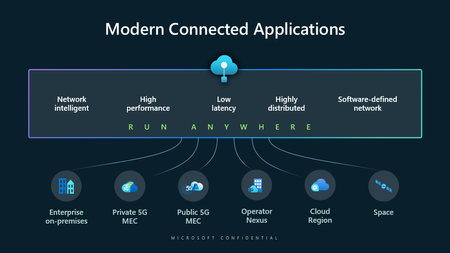
Today, 5G enables new applications for scenarios that were previously out of reach. From smart roads that can notify of obstacles in the road in real time to smart airports that can identify runway issues before they threaten safety, a new breed of real-time and mission-critical applications is emerging.Using Keycloak with Azure AD to integrate AKS Cluster authentication process
Integrating Azure Kubernetes Service (AKS) with Keycloak through Azure Active Directory (Azure AD) as an intermediary leverages Azure AD’s support for OpenID Connect (OIDC) to handle authentication and authorization. This integration enhances security, streamlines user management, and simplifies the authentication process for users accessing the AKS cluster.Introducing a better way to integrate Azure AD with API Management
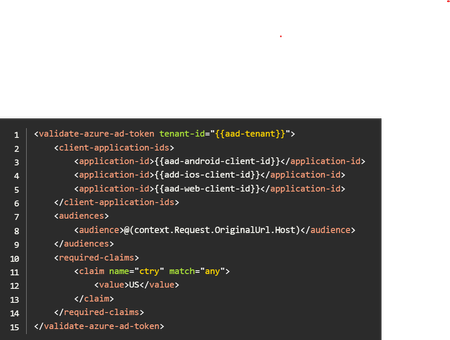
Since, well, the beginning of Azure API Management, you've been able to validate that the Json Web Token (JWT) coming into your Azure API Management service is valid before passing it onto the backend service. Azure Active Directory (AAD) is a mainstay of enterprise APIs, providing authentication and authorization controls for a wide variety of APIs from M365 APIs to custom-built APIs. It should be the centerpiece of your enterprise API security infrastructure. Wouldn't it be wonderful if they worked better together.Demystifying GitHub Copilot Security Controls: easing concerns for organizational adoption
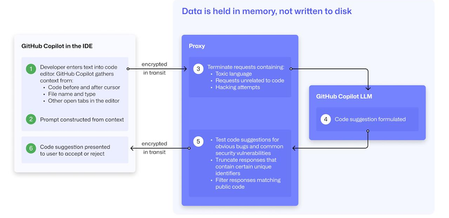
At a recent developer conference, I delivered a session on Legacy Code Rescue using GitHub Copilot App Modernization. Throughout the day, conversations with developers revealed a clear divide: some have fully embraced Agentic AI in their daily coding, while others remain cautious. Often, this hesitation isn't due to reluctance but stems from organizational concerns around security and regulatory compliance. Having witnessed similar patterns during past technology shifts, I understand how these barriers can slow adoption. In this blog, I'll demystify the most common security concerns about GitHub Copilot and explain how its built-in features address them, empowering organizations to confidently modernize their development workflows. GitHub Copilot Model Training A common question I received at the conference was whether GitHub uses your code as training data for GitHub Copilot. I always direct customers to the GitHub Copilot Trust Center for clarity, but the answer is straightforward: “No. GitHub uses neither Copilot Business nor Enterprise data to train the GitHub model.” Notice this restriction also applies to third-party models as well (e.g. Anthropic, Google). GitHub Copilot Intellectual Property indemnification policy A frequent concern I hear is, since GitHub Copilot’s underlying models are trained on sources that include public code, it might simply “copy and paste” code from those sources. Let’s clarify how this actually works: Does GitHub Copilot “copy/paste”? “The AI models that create Copilot’s suggestions may be trained on public code, but do not contain any code. When they generate a suggestion, they are not “copying and pasting” from any codebase.” To provide an additional layer of protection, GitHub Copilot includes a “duplicate detection filter”. This feature helps prevent suggestions that closely match public code from being surfaced. (Note: This duplicate detection currently does not apply to the Copilot coding agent.) More importantly, customers are protected by an Intellectual Property indemnification policy. This means that if you receive an unmodified suggestion from GitHub Copilot and face a copyright claim as a result, Microsoft will defend you in court. GitHub Copilot Data Retention Another frequent question I hear concerns GitHub Copilot’s data retention policies. For organizations on GitHub Copilot Business and Enterprise plans, retention practices depend on how and where the service is accessed from: Access through IDE for Chat and Code Completions: Prompts and Suggestions: Not retained. User Engagement Data: Kept for two years. Feedback Data: Stored for as long as needed for its intended purpose. Other GitHub Copilot access and use: Prompts and Suggestions: Retained for 28 days. User Engagement Data: Kept for two years. Feedback Data: Stored for as long as needed for its intended purpose. For Copilot Coding Agent, session logs are retained for the life of the account in order to provide the service. Excluding content from GitHub Copilot To prevent GitHub Copilot from indexing sensitive files, you can configure content exclusions at the repository or organization level. In VS Code, use the .copilotignore file to exclude files client-side. Note that files listed in .gitignore are not indexed by default but may still be referenced if open or explicitly referenced (unless they’re excluded through .copilotignore or content exclusions). The life cycle of a GitHub Copilot code suggestion Here are the key protections at each stage of the life cycle of a GitHub Copilot code suggestion: In the IDE: Content exclusions prevent files, folders, or patterns from being included. GitHub proxy (pre-model safety): Prompts go through a GitHub proxy hosted in Microsoft Azure for pre-inference checks: screening for toxic or inappropriate language, relevance, and hacking attempts/jailbreak-style prompts before reaching the model. Model response: With the public code filter enabled, some suggestions are suppressed. The vulnerability protection feature blocks insecure coding patterns like hardcoded credentials or SQL injections in real time. Disable access to GitHub Copilot Free Due to the varying policies associated with GitHub Copilot Free, it is crucial for organizations to ensure it is disabled both in the IDE and on GitHub.com. Since not all IDEs currently offer a built-in option to disable Copilot Free, the most reliable method to prevent both accidental and intentional access is to implement firewall rule changes, as outlined in the official documentation. Agent Mode Allow List Accidental file system deletion by Agentic AI assistants can happen. With GitHub Copilot agent mode, the "Terminal auto approve” setting in VS Code can be used to prevent this. This setting can be managed centrally using a VS Code policy. MCP registry Organizations often want to restrict access to allow only trusted MCP servers. GitHub now offers an MCP registry feature for this purpose. This feature isn’t available in all IDEs and clients yet, but it's being developed. Compliance Certifications The GitHub Copilot Trust Center page lists GitHub Copilot's broad compliance credentials, surpassing many competitors in financial, security, privacy, cloud, and industry coverage. SOC 1 Type 2: Assurance over internal controls for financial reporting. SOC 2 Type 2: In-depth report covering Security, Availability, Processing Integrity, Confidentiality, and Privacy over time. SOC 3: General-use version of SOC 2 with broad executive-level assurance. ISO/IEC 27001:2013: Certification for a formal Information Security Management System (ISMS), based on risk management controls. CSA STAR Level 2: Includes a third-party attestation combining ISO 27001 or SOC 2 with additional cloud control matrix (CCM) requirements. TISAX: Trusted Information Security Assessment Exchange, covering automotive-sector security standards. In summary, while the adoption of AI tools like GitHub Copilot in software development can raise important questions around security, privacy, and compliance, it’s clear that existing safeguards in place help address these concerns. By understanding the safeguards, configurable controls, and robust compliance certifications offered, organizations and developers alike can feel more confident in embracing GitHub Copilot to accelerate innovation while maintaining trust and peace of mind.
Introducing Vector Search Similarity Capabilities in Azure Cache for Redis Enterprise
The latest wave of generative AI, like large language models, has paved the way for significant advancements in the utilization of vector embeddings and vector similarity search. Large language models, such as OpenAI's GPT, are capable of learning complex patterns and representations from vast amounts of text, enabling them to generate rich semantic embeddings for words, sentences, and documents. By leveraging these learned embeddings, developers can now harness the power of vector similarity search, revolutionizing the way information is organized, retrieved, and analyzed in various domains, including fraud detection, recommendation systems, and information retrieval.Improving Web Application Performance Using Azure Cache for Redis
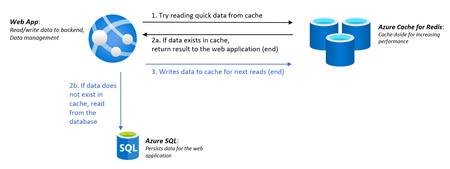
We recently released the Web App + Database and Cache in Azure portal | Create a resource for easily creating an Azure Cache for Redis with a Web App and a database. Adding Azure Cache for Redis to your web application can obliterate bottlenecks and provide a consistently fast and responsive user experience by caching the frequently accessed information to avoid the overhead of expensive API calls and database interactions. Try out adding Azure Cache for Redis to your web application today and see how much faster your app will run!
Semantic Kernel: What It Is and Why It Matters
Are you a developer who wants to leverage the power of large language models (LLMs) like GPT-enabled features in your applications or have you been wondering how to integrate them with your existing code and data to make your apps smarter? If you answered yes to any of these questions, then you need to check out Semantic Kernel. On today’s blogpost feature from the Open at Microsoft show, we will be featuring Semantic Kernel as well as exploring the highlights and key takeaways from this enlightening episode.