best practices
120 TopicsDemystifying GitHub Copilot Security Controls: easing concerns for organizational adoption
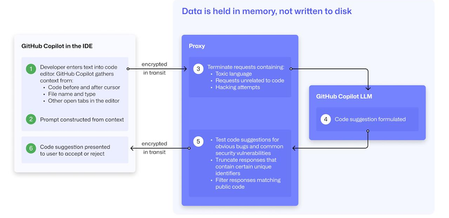
At a recent developer conference, I delivered a session on Legacy Code Rescue using GitHub Copilot App Modernization. Throughout the day, conversations with developers revealed a clear divide: some have fully embraced Agentic AI in their daily coding, while others remain cautious. Often, this hesitation isn't due to reluctance but stems from organizational concerns around security and regulatory compliance. Having witnessed similar patterns during past technology shifts, I understand how these barriers can slow adoption. In this blog, I'll demystify the most common security concerns about GitHub Copilot and explain how its built-in features address them, empowering organizations to confidently modernize their development workflows. GitHub Copilot Model Training A common question I received at the conference was whether GitHub uses your code as training data for GitHub Copilot. I always direct customers to the GitHub Copilot Trust Center for clarity, but the answer is straightforward: “No. GitHub uses neither Copilot Business nor Enterprise data to train the GitHub model.” Notice this restriction also applies to third-party models as well (e.g. Anthropic, Google). GitHub Copilot Intellectual Property indemnification policy A frequent concern I hear is, since GitHub Copilot’s underlying models are trained on sources that include public code, it might simply “copy and paste” code from those sources. Let’s clarify how this actually works: Does GitHub Copilot “copy/paste”? “The AI models that create Copilot’s suggestions may be trained on public code, but do not contain any code. When they generate a suggestion, they are not “copying and pasting” from any codebase.” To provide an additional layer of protection, GitHub Copilot includes a “duplicate detection filter”. This feature helps prevent suggestions that closely match public code from being surfaced. (Note: This duplicate detection currently does not apply to the Copilot coding agent.) More importantly, customers are protected by an Intellectual Property indemnification policy. This means that if you receive an unmodified suggestion from GitHub Copilot and face a copyright claim as a result, Microsoft will defend you in court. GitHub Copilot Data Retention Another frequent question I hear concerns GitHub Copilot’s data retention policies. For organizations on GitHub Copilot Business and Enterprise plans, retention practices depend on how and where the service is accessed from: Access through IDE for Chat and Code Completions: Prompts and Suggestions: Not retained. User Engagement Data: Kept for two years. Feedback Data: Stored for as long as needed for its intended purpose. Other GitHub Copilot access and use: Prompts and Suggestions: Retained for 28 days. User Engagement Data: Kept for two years. Feedback Data: Stored for as long as needed for its intended purpose. For Copilot Coding Agent, session logs are retained for the life of the account in order to provide the service. Excluding content from GitHub Copilot To prevent GitHub Copilot from indexing sensitive files, you can configure content exclusions at the repository or organization level. In VS Code, use the .copilotignore file to exclude files client-side. Note that files listed in .gitignore are not indexed by default but may still be referenced if open or explicitly referenced (unless they’re excluded through .copilotignore or content exclusions). The life cycle of a GitHub Copilot code suggestion Here are the key protections at each stage of the life cycle of a GitHub Copilot code suggestion: In the IDE: Content exclusions prevent files, folders, or patterns from being included. GitHub proxy (pre-model safety): Prompts go through a GitHub proxy hosted in Microsoft Azure for pre-inference checks: screening for toxic or inappropriate language, relevance, and hacking attempts/jailbreak-style prompts before reaching the model. Model response: With the public code filter enabled, some suggestions are suppressed. The vulnerability protection feature blocks insecure coding patterns like hardcoded credentials or SQL injections in real time. Disable access to GitHub Copilot Free Due to the varying policies associated with GitHub Copilot Free, it is crucial for organizations to ensure it is disabled both in the IDE and on GitHub.com. Since not all IDEs currently offer a built-in option to disable Copilot Free, the most reliable method to prevent both accidental and intentional access is to implement firewall rule changes, as outlined in the official documentation. Agent Mode Allow List Accidental file system deletion by Agentic AI assistants can happen. With GitHub Copilot agent mode, the "Terminal auto approve” setting in VS Code can be used to prevent this. This setting can be managed centrally using a VS Code policy. MCP registry Organizations often want to restrict access to allow only trusted MCP servers. GitHub now offers an MCP registry feature for this purpose. This feature isn’t available in all IDEs and clients yet, but it's being developed. Compliance Certifications The GitHub Copilot Trust Center page lists GitHub Copilot's broad compliance credentials, surpassing many competitors in financial, security, privacy, cloud, and industry coverage. SOC 1 Type 2: Assurance over internal controls for financial reporting. SOC 2 Type 2: In-depth report covering Security, Availability, Processing Integrity, Confidentiality, and Privacy over time. SOC 3: General-use version of SOC 2 with broad executive-level assurance. ISO/IEC 27001:2013: Certification for a formal Information Security Management System (ISMS), based on risk management controls. CSA STAR Level 2: Includes a third-party attestation combining ISO 27001 or SOC 2 with additional cloud control matrix (CCM) requirements. TISAX: Trusted Information Security Assessment Exchange, covering automotive-sector security standards. In summary, while the adoption of AI tools like GitHub Copilot in software development can raise important questions around security, privacy, and compliance, it’s clear that existing safeguards in place help address these concerns. By understanding the safeguards, configurable controls, and robust compliance certifications offered, organizations and developers alike can feel more confident in embracing GitHub Copilot to accelerate innovation while maintaining trust and peace of mind.Essential Microsoft Resources for MVPs & the Tech Community from the AI Tour
Unlock the power of Microsoft AI with redeliverable technical presentations, hands-on workshops, and open-source curriculum from the Microsoft AI Tour! Whether you’re a Microsoft MVP, Developer, or IT Professional, these expertly crafted resources empower you to teach, train, and lead AI adoption in your community. Explore top breakout sessions covering GitHub Copilot, Azure AI, Generative AI, and security best practices—designed to simplify AI integration and accelerate digital transformation. Dive into interactive workshops that provide real-world applications of AI technologies. Take it a step further with Microsoft’s Open-Source AI Curriculum, offering beginner-friendly courses on AI, Machine Learning, Data Science, Cybersecurity, and GitHub Copilot—perfect for upskilling teams and fostering innovation. Don’t just learn—lead. Access these resources, host impactful training sessions, and drive AI adoption in your organization. Start sharing today! Explore now: Microsoft AI Tour Resources.Building the Ultimate Nerdland Podcast Chatbot with RAG and LLM: Step-by-Step Guide
Large Language Models (LLMs) are popular in tech. In Belgium and the Netherlands, the podcast "Nerdland" is a favorite for tech and science fans. It covers topics like bioscience, space, robotics, and AI. With over 100 episodes, "Nerdland" is a goldmine of information. So, why not create a chatbot for "Nerdland" fans? This chatbot uses podcast content to engage and inform users. It allows the "Nerdland" community to interact with the content in new ways and makes the information accessible in many languages, thanks to LLMs' multi-language capabilities. This blog post explains the project's technical details, including the LLMs used, integration process, and deployment on Azure.Token Economics: The New FinOps for Agentic AI
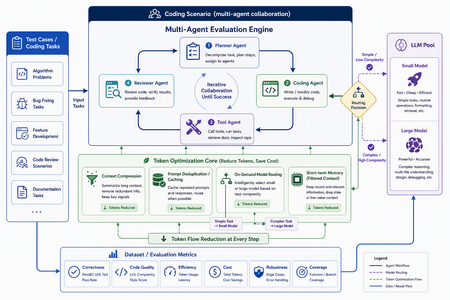
In AI applications, tokens are now cost — and token economics deserves architectural attention For a long time, AI application design started with model capability: Can the model write code? Can it reason? Can it use tools? Can it handle long context? Those questions still matter, but in the age of agentic applications, they are no longer sufficient. The more important production question is this: How many tokens does the architecture burn to complete one useful task? A classic chat application often maps one user turn to one model call. An agentic system is different. One user goal can trigger planning, retrieval, tool selection, tool execution, result interpretation, reflection, repair, and summarization. The user sees one instruction; the system may execute dozens of model calls behind the scenes. Tokens are no longer just a measure of text length. They become a measure of system design, runtime behavior, developer workflow, and business cost. GitHub Copilot’s 2026 move to usage-based billing through GitHub AI Credits captures the industry shift clearly. Usage is now aligned with token consumption, including input, output, and cached tokens. That matters because Copilot has evolved from an in-editor assistant into an agentic platform that can handle long, multi-step coding sessions across repositories. In that world, a tiny prompt and a multi-hour autonomous coding workflow should not be treated as the same economic unit. Token economics is therefore not about telling developers to “write shorter prompts.” It is about designing systems where: useful context is preserved, while noise is removed; repeated context is cached or deduplicated; simple tasks do not pay for frontier models; short-term state is managed structurally instead of copied repeatedly; every model call is metered, comparable, and governed. In short: token economics is the practice of making agentic AI economically sustainable. Scenario thinking: GitHub Copilot billing, Copilot SDK, GPT-5.5, Anthropic, and MAI-Code Model The new GitHub Copilot billing model provides a useful framing for developers. Copilot is no longer only autocomplete. It is becoming a programmable agentic platform. It can use models, call tools, work across files, stream responses, and participate in long-running coding workflows. With the GitHub Copilot SDK, developers can embed that agentic runtime into their own applications, services, and developer tools. That is powerful, but it also changes the cost model. Once an agent loop becomes programmable, token cost also needs to become programmable. If a system can plan, call tools, edit files, retry, repair, and summarize, it also needs to meter, route, cache, compress, and evaluate. EvalAgentic gives this idea a concrete playground. The project groups models into cost and capability tiers: Tier Example models Example price / 1K tokens Typical use LARGE claude-opus-4.8, gpt-5.5 $0.030 Agents, code generation, multi-step reasoning MID gpt-5.4-mini $0.012 Dialogue, summarization, extraction TINY gpt-5-mini $0.001 Classification, keyword matching, rule-like tasks This tiering lets us reason about real scenarios: GPT-5.5-class models are valuable for hard reasoning and engineering workflows, but they should not be the default for every step. Using a frontier model for simple classification is like hiring a principal architect to label folders. Anthropic high-capability models can be excellent for complex reasoning and coding, but they benefit from routing discipline. Requirements analysis, test interpretation, deployment explanation, and code generation may not need the same model tier. MAI-Code Model-style coding models should be treated as specialized capability layers. Their value is not just “better code generation”; it is deciding when code-specialized intelligence should be invoked in a larger agent pipeline. The real question is not “Which model is the best?” It is: Which model is the most economical and reliable for this step of this workflow? Four engineering techniques for saving tokens Context Compression: turn long text into executable structure Implementation principle Context Compression converts long natural-language context into the structured information an agent actually needs. Business documents are often verbose: resumes, contracts, product manuals, requirements, and support logs contain narrative text, boilerplate, repeated explanations, and low-value context. The next agent step may only need a few fields. EvalAgentic demonstrates this with a long resume-like input that is compressed into a compact JSON object. Instead of injecting the full original text into every prompt, the system extracts key fields and dynamically injects only the data required by the current task. A practical compression pipeline includes: Redundancy detection — identify long-tail text, repeated descriptions, stale history, and low-value context. Structured extraction — use Copilot or a mid-tier model to transform prose into JSON, tables, or typed schemas. Dynamic injection — inject only the fields needed for the next step. Recoverable references — preserve source pointers so compressed context remains auditable. How to evaluate Prompt token reduction before and after compression. Answer quality and task success rate. Schema fidelity and missing-field rate. Latency improvement. Cost per successful task. Compression is not summarization. Summaries are designed for humans. Structured compression is designed for agents. Prompt Deduplication / Cache: stop paying twice for the same context Implementation principle Many agent systems waste tokens because they repeatedly send the same context. The same resume, contract, repository README, user profile, API documentation, or business rule can be copied across turns and agents. Prompt Deduplication / Cache applies a simple principle: if context has already been processed, do not pay to process it again unless it has changed. A concrete design includes: compute a hash or semantic key for source context; reuse extracted structured results when content is identical or equivalent; apply a TTL for repeated entities, such as the 24-hour cache pattern shown in EvalAgentic; organize stable prompt prefixes to benefit from provider-level prompt caching where available; store shared context in an artifact store or memory layer so multiple agents do not copy the same blob. How to evaluate Cache hit rate. Cached token ratio. Duplicate prompt rate. Cost delta before and after caching. Correctness under cache, especially stale-cache failures. Caching is not “save everything forever.” Good caching knows when to reuse and when to invalidate. On-Demand Model Routing: let task complexity decide model tier Implementation principle On-Demand Model Routing routes each request to the cheapest model that can complete the task reliably. The entry point can use a rule tree, a lightweight classifier, or a hybrid complexity score. EvalAgentic’s routing tree is intentionally easy to explain: INCOMING REQUEST └─ Prompt < 500 tokens? ── YES ─→ TINY: classify / extract └─ NO ──→ multi-step reasoning? ├─ NO ─→ MID: dialogue / summary └─ YES ─→ LARGE: agent / code The engineering logic is straightforward: simple classification and keyword matching go to TINY; summarization and structured conversion go to MID; multi-step reasoning, coding, cross-file changes, and orchestration go to LARGE; code-specialized models such as MAI-Code Model can be placed in the coding phase rather than used across the whole pipeline. How to evaluate Routing accuracy. Cost per route. Quality regression by tier. Escalation rate from small models to larger models. End-to-end success rate. Routing does not mean “always use the smallest model.” It means frontier intelligence is reserved for the steps where it actually changes the outcome. Short-term Memory: preserve state instead of replaying history Implementation principle Short-term Memory controls context growth across multi-turn and multi-agent workflows. Without it, agents often replay the full conversation history, full tool outputs, and full intermediate reasoning on every turn. The context grows; quality may not improve; the bill definitely does. A better design stores state structurally: user goal; current plan; tool outputs and references; failure reasons; next actions; handoff artifacts between agents. In a multi-agent coding pipeline, the Requirements Agent should hand off a structured spec. The Coding Agent should read that spec, not the entire prior conversation. The Testing Agent should consume testable artifacts, not every word produced by the Coding Agent. How to evaluate Context growth curve across turns. Memory retrieval precision. Rework rate caused by missing state. Recovery quality after failed steps. Average input tokens per turn. Short-term memory is not about remembering everything. It is about remembering the next useful thing. EvalAgentic as a concrete evaluation example EvalAgentic is effective as an evangelism project because it turns token economics into an observable before/after system. The architecture has five layers: Frontend — frontend/index.html provides Tabs A / B / C, live SSE logs, and before/after charts. API — backend/server.py exposes FastAPI routes and Server-Sent Events streaming. Orchestration — eval.py handles A/B evaluation; coding_agents.py handles the multi-agent coding scenario. Core — compressor.py, router.py, gh_models.py, and token_meter.py implement compression, routing, Copilot SDK calls, and token metering. Providers — GitHub Copilot SDK and Microsoft Agent Framework provide model access and agent orchestration. Tab A: Compression comparison Tab A compares long-form context before and after structured compression. The key message is that token saving does not come from writing a clever sentence. It comes from converting verbose context into a structured artifact that downstream agents can consume efficiently. Tab B: On-demand model routing Tab B demonstrates that cost is not only about raw token count. If a system routes simple tasks to cheaper tiers and reserves expensive models for complex reasoning, total cost can fall even if some token counts increase. This is a subtle but important point: token economics is not token starvation; it is model portfolio optimization. Tab C: Coding scenario — multi-agent with Agent Framework Tab C is the most persuasive demo. The same deliverable — a Taobao-like goods-list site with HTML + JavaScript frontend, Flask backend, and Docker deployment — is produced twice by a four-agent pipeline: Requirements Agent; Coding Agent; Testing Agent; Deployment Agent. The before pipeline uses no compression and sends every agent to GPT-5.5 / LARGE. The after pipeline injects a compressed JSON spec and uses on-demand routing: requirements can use MID, coding can use LARGE, testing can use MID, and deployment can use TINY. This mirrors real enterprise development. Architecture and complex code generation may deserve frontier models. Test interpretation, deployment packaging, and simple validation often do not. Summary and refinement based on the project diagrams The EvalAgentic README describes three important visuals: the architecture flow, the routing tree, and the token-meter design. Together, they form a governance loop: User Scenario ↓ Context Compression ↓ Prompt Deduplication / Cache ↓ On-Demand Model Routing ↓ Short-term Memory ↓ Token Metering & Budget Actions ↓ Before / After Evaluation Optimize the path, not only the prompt Many teams start token optimization by editing prompt wording. That helps, but the largest waste usually lives in the execution path: how many calls are made, how much context is repeated, how often tools retry, and whether every step uses the same expensive model. EvalAgentic makes the path visible through A/B comparisons. Token Meter is the control plane of cost governance EvalAgentic’s token_meter.py uses a non-invasive interceptor pattern: INTERCEPTOR (@token_meter) ↓ COUNTER CORE: accounting / budget threshold / trigger ↓ ACTION HUB: throttle (>80% budget) / rollback (>budget) This is the right architectural instinct. Production systems need thresholds, throttling, rollback, and traceability. Without those controls, one retry loop can quietly turn a small user request into a budget incident. Cost metrics must be evaluated with quality metrics A system that cuts cost by 80% but drops success rate by 50% is not optimized. It is broken more cheaply. The evaluation matrix should combine cost, quality, latency, and reliability: Dimension Metric Why it matters Cost Cost per successful task Measures the real unit economics Token Input / output / cached tokens Identifies compression and cache opportunities Quality Pass rate / regression rate Ensures cheaper tiers do not break outcomes Efficiency Latency / retry count Prevents cheap models from causing expensive retries Governance Budget breach / rollback count Validates runtime control Narrative A simple three-line narrative works well for demos: Token is no longer a technical detail. It is the bill of your architecture. EvalAgentic shows the same scenario before and after cost-aware design. The goal is not to make models cheaper; the goal is to make agent systems economically governable. For a developer audience, the sharper version is: A good agent does not use the biggest model everywhere. It uses the right intelligence at the right step, with the right context, under the right budget. Practical recommendations for real projects Establish a token baseline first. Measure input, output, retries, tool calls, and cost per scenario before optimizing. Make compression a component, not a prompt habit. Define schemas, cache policies, and fallback behavior. Introduce a model routing matrix. Route by task type, complexity, risk, latency, and cost. Define handoff contracts between agents. Pass structured artifacts, not endless conversation history. Evaluate every optimization with A/B tests. Compare cost, quality, latency, and stability. Add budget actions. Throttle at a threshold, rollback on breach, and add circuit breakers for failed retries. Closing: token economics is the second curve of agent engineering The first phase of AI application development was about calling models. The second phase was about putting models into products. The next phase of agentic AI is about running those systems reliably, affordably, and governably. EvalAgentic matters because it turns Context Compression, Prompt Deduplication / Cache, On-Demand Model Routing, and Short-term Memory into something developers can run, compare, and explain. It moves token economics from opinion to instrumentation. Future AI applications will not only ask: How smart is this agent? They will ask: How many tokens does it spend per completed task? Which model did it use? Did it hit cache? Did retries run away? Did the system reserve frontier intelligence for the steps that deserved it? References kinfey/EvalAgentic GitHub Copilot is moving to usage-based billing Updates to GitHub Copilot billing and plans Copilot SDK - GitHub Docs8.5KViews4likes0CommentsGitHub Copilot for Azure: 6 Must-Try Features
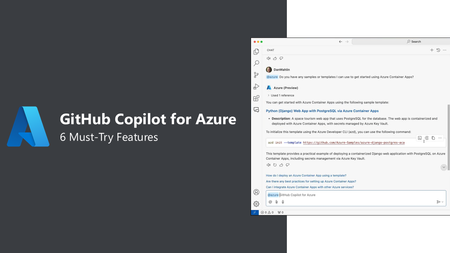
Ready to supercharge your Azure game right within GitHub Copilot? Dive into our latest blog where we break down six must-try features of GitHub Copilot for Azure. From deploying containers and managing AI models to exploring resources and planning migrations, we've got you covered. Check out the videos to see great examples of how GitHub Copilot for Azure can make your cloud projects smoother and more efficient.Improving Web Application Performance Using Azure Cache for Redis
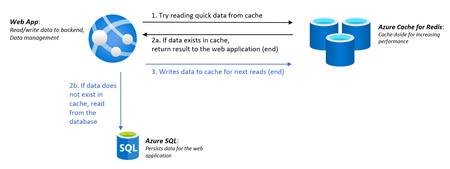
We recently released the Web App + Database and Cache in Azure portal | Create a resource for easily creating an Azure Cache for Redis with a Web App and a database. Adding Azure Cache for Redis to your web application can obliterate bottlenecks and provide a consistently fast and responsive user experience by caching the frequently accessed information to avoid the overhead of expensive API calls and database interactions. Try out adding Azure Cache for Redis to your web application today and see how much faster your app will run!