battery life
5 Topics
Microsoft Teams triggers GPU usage MacBook Pro 16
Hi there, I have isolated that Microsoft Teams is the only application that immediately triggers the GPU to switch to the high performance profile when it's running - for no reason to be honest, Microsoft Teams should not be doing this. It causes a significant loss in battery lifetime - no matter if idling in the back or not, because the GPU is constantly used according to activity monitor. I have the MacBook Pro 16 inch model and the profile is set to automatic graphics switching to make use of the integrated graphics as much as possible - Microsoft Teams immediately switches on the GPU on launch. Cheers, TakeoSolved11KViews0likes2Comments
Surface Book Keyboard battery present BUT NOT ON USE
Hello, Recently I changed keyboard battery of my surface book with performance base model. After replacement the battery is present on screen and battery reports. But it shows all the time 93%. Also I realized the device only using tablet battery and after it finished it turn off. Guarentee already finished and I don`t have any microsoft store in my country. So I need to fix myself. How can I fix this issue ?2KViews0likes3Comments
Surface Pro 11 Battery Issues?
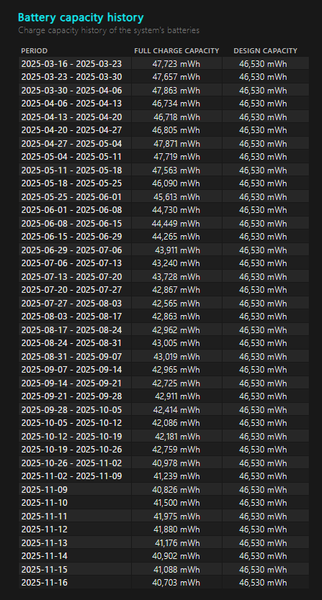
Its been less than one year on my surface pro 11 and i was feeling like the battery was not lasting as long as stated and also lagging at some points. When I did the battery health check it showed that it had dropped around 13% from design capacity. Is this normal and should I get it repaired/replaced under warranty? Its just bit of a hassle as I am outside of the US.... Microsoft surface pro users outside of the US doesnt seem to have the proper support also, no contact and no email response from raising tickets....500Views0likes1Comment
Surface Pro 12 battery drains when shut down
I bought a Surface Pro 12 last December and it has 2 problems (possibly interlinked) since the start. The first is that when it is shut down, the battery drains. Within 48 hours, 20-25% has usually gone. To try and fix this I have: 1. Changed power settings to ensure that pressing buttons means shut down (closing keyboard/lid = sleep but I never close those til I've seen all the lights go out) 2. Performed a factory reset from cloud and run all updates. I did not reinstall all my apps, just my microsoft onedrive. 3. Performed a hard shut down holding the button down 4. Completed a commandline shutdown using /s/t 0 5. Generated a battery report which shows the battery is in good nick 6. fiddled around with the UEFI settings (toggling on, reboot then off again or vice versa) 7. Have disabled fast start up. Nothing works, the battery still drains. Does anyone know what this may be and how to prove it, more importantly how to fix it. My lovely 1st line support guy at Microsoft is ready to ship it to engineers to take a look at but before anyone else does anything, I want to see if we can fix it... especially since there's no indication of a hardware error (as far as the OS is concerned, I know I know...). that call is on Monday 31st so if anyone could answer before then. Now just to add the second issue (because I have a hunch it's related to the first). When I boot up, the surface pro doesn't connect by Wifi to anything. I have to do a start, reboot to get it to connect. It will mostly connect to my wifi (the first wifi it ever connected to) but for every other wifi, hell no. My instinct says something is preventing it from fully shutting down. Many thanks in advance400Views0likes3Comments