azure
153 Topics
Modernize Together: The Power of Partner Community in the AI Era
Enterprise transformation is moving faster than ever. As organizations modernize applications, migrate critical workloads, and prepare their data for AI, they need more than technology. They need trusted guidance, proven experience, and a clear path from strategy to measurable business outcomes. Microsoft partners play a vital role in that journey. Yet even the strongest partner practices benefit from being connected to a broader community—one where peers can exchange ideas, learn from real-world experiences, stay current on Microsoft innovations, and work through the challenges that accompany complex enterprise frontier transformation. Why partner community matters Modernization and AI opportunities rarely follow a single, predictable path. Customer environments are complex, business priorities evolve, and new technologies and programs continue to emerge. A strong partner community helps members navigate that change together rather than in isolation. By participating actively, partners can: Learn from the field: Hear how peers are approaching customer conversations, assessments, migrations, and modernization programs—and apply those lessons to their own practices. Stay close to Microsoft: Receive timely updates on strategic priorities, skilling and sales programs, product roadmap, resources, and opportunities that can help strengthen customer engagements. Build trusted relationships: Connect with organizations facing similar challenges, exchange practical guidance, and identify opportunities to collaborate. Accelerate execution: Use shared insights and proven approaches to reduce reinvention, improve delivery confidence, and move customer opportunities forward faster. Shape what comes next: Bring field perspectives into the conversation and help inform how the broader ecosystem supports enterprise modernization. Community participation is not simply about receiving information. Its greatest value comes from contribution: asking questions, sharing what works, discussing what does not, and helping peers solve problems. That exchange turns individual experience into collective capability—and helps the entire partner ecosystem deliver greater customer impact. Join the Azure Migration & Modernization Partner community The Azure Migration & Modernization Partner community is a closed community of enterprise partners that meets monthly. It brings together Microsoft Enterprise partners focused on helping customers modernize their IT and data estates, establish secure cloud foundations, and create the conditions for AI and Analytics innovation. Each session creates space to hear updates, exchange insights, discuss common challenges, and connect with peers who understand the realities of enterprise frontier transformation. For partners building or expanding a modernization practice, this is an opportunity to strengthen capabilities, discover new approaches, and remain connected to the evolving Microsoft ecosystem. We invite eligible enterprise partners to join, participate, and contribute by clicking on Azure Migration and Modernization Partner Forum, Don't miss these new FY27 opportunities Organizations across industries are looking to modernize to innovate with AI and as you work with your customers, do not miss the chance to leverage two new Frontier Accelerate offers: Databases Presales Assessment + Proof of Value, which rewards strategic work to assess databases for modernization and AI use cases. Databases Conversion Bonus, which rewards eligible migrations from AWS and Google Cloud to Azure Databases. Together, these offers can help partners shape data opportunities earlier, carry them into execution, grow services revenue and Azure consumption, and help customers establish a trusted data foundation for AI. Review Frontier Accelerate partner-nominated resources and explore Frontier Accelerate for Azure to learn more. Modernization is a team effort. Join the community, learn from the ecosystem, and help enterprise customers move from AI ambition to impact.76Views1like0CommentsBurst IBM Spectrum Symphony workloads into Azure with the new Azure Compute Fleet provider plugin
A new resource connector links Symphony Host Factory to Azure Compute Fleet, so established Symphony environments can elastically extend into Azure. Why this matters for large-scale compute Enterprises running large scale AI, analytic, and high-performance computing (HPC) environments need more than infrastructure. They need to dynamically match thousands of jobs with available capacity while balancing performance, resilience, availability, and cost. Microsoft Azure and IBM are announcing the IBM® Spectrum Symphony Provider Plugin for Microsoft Azure Compute Fleet. The integration enables IBM Spectrum Symphony and Azure Compute Fleet to dynamically access and manage Azure compute capacity, providing an optimized execution environment and allowing enterprises to extend and elastically burst established Symphony environments to Azure. IBM Symphony is a proven workload orchestration platform used across financial services, manufacturing, life sciences, energy, and other compute-intensive industries. How the integration works At the center of the integration is an Azure resource connector for IBM Host Factory. The connector translates Symphony resource requirements into Azure Compute Fleet requests, creating a direct bridge between the Symphony orchestration layer and Azure infrastructure. The architecture maintains a clear separation of responsibilities: Symphony manages the workload while Azure Compute Fleet manages access to compute capacity. The request path is straightforward: When workload demand increases, Symphony determines the additional resources required through Host Factory. The Azure resource connector translates those requirements into a Compute Fleet request, and Azure provisions eligible infrastructure. The resulting Azure virtual machines join the Symphony environment as execution hosts and begin processing jobs. As workload demand decreases, the resources can be returned. What the plugin delivers The Microsoft and IBM collaboration brings together Symphony's enterprise workload orchestration capabilities with the scale and flexibility of Azure Compute Fleet: Dynamically provision and scale as Symphony workload demand increases or decreases, keeping resource use matched to actual need. Maintain workload performance through policy-driven elasticity governed by existing workload priorities and service- Take advantage of Azure Virtual Machines' wide array of SKU choices by flexibly deploying based on workload requirements and available capacity. Seamlessly leverage Spot instances, so that workloads can run at optimal cost. Support hybrid workload orchestration that extends established Symphony environments to Azure, realizing the cost and availability benefits of hybrid multicloud deployment. Capabilities available to Symphony customers on Azure Symphony on Azure enables customers to: Access a broader pool of Azure capacity by provisioning across multiple eligible VM families instead of relying on a single VM SKU. Select infrastructure using workload attributes such as vCPU, memory, storage, and other requirements. Balance availability and cost through a flexible combination of Azure Spot Virtual Machines and pay-as-you-go VMs. Increase workload throughput and infrastructure utilization by matching queued jobs with suitable Azure capacity. Expand compute capacity during periods of peak demand while provisioning steady-state infrastructure for typical usage. These capabilities are particularly valuable for financial risk calculations, scientific computing, engineering analysis, and other large-scale batch workloads. Different jobs can require different combinations of CPU, memory, performance, availability, and price, and Azure Compute Fleet can provision across eligible VM types and purchasing models, expanding the pool of infrastructure available to execute those workloads for faster, more cost-efficient deployments. Bringing established environments forward Many enterprises have invested years developing sophisticated Symphony environments with application-specific scheduling policies, priorities, queues, service-level objectives, and operational processes. The plugin preserves that investment: scheduling policy and operational process stay in Symphony, while Azure supplies elastic capacity underneath. Microsoft and IBM are working with joint enterprise customers across financial services and other compute-intensive industries to expand adoption and advance the integration. "Symphony's native enablement on Azure gives our joint customers a best-in-class platform for orchestrating HPC workloads with the performance, resilience, and cost efficiency they require," said Sripriya Srinivasan, General Manager, IBM Software Products, IBM. "This is a transformational step forward for hybrid computing." Partner opportunity For partners with HPC, risk analytics, or scientific computing practices, this opens repeatable engagement motions: assess existing Symphony estates, design the Compute Fleet capacity strategy across Spot and pay-as-you-go, package burst-to-Azure as a managed offer, and grow consumption as workloads scale. Get started Read the full technical walkthrough on how to burst IBM Spectrum Symphony into Microsoft Azure with the new Azure Compute Fleet cloud provider: Microsoft and IBM bring enterprise-scale workload orchestration to Azure with IBM Spectrum Symphony | Microsoft Community Hub To download the Azure Compute Fleet plugin for IBM® Spectrum Symphony, visit the Azure Marketplace.217Views0likes0Comments
Dell PowerScale for Azure is now Generally Available
We're excited to announce that Dell PowerScale for Azure – Dell managed is now Generally Available (GA). Following a successful Public Preview announced at Ignite, PowerScale for Azure is now production-ready for enterprise workloads. Co-developed with Dell as an Azure Native Integration, this fully managed service brings Dell's proven scale-out NAS technology and the PowerScale OneFS operating system directly into Azure — delivering the performance and scale enterprises expect with the simplicity of Azure-native provisioning, management, and billing. The solution is purpose-built for modern, data-intensive workloads such as AI/ML pipelines, media & entertainment, electronic design automation (EDA), high-performance computing, backup & recovery, and enterprise content management. Product highlights Dell-Managed Service: A streamlined experience where Dell handles deployment, monitoring, maintenance, and upgrades — freeing IT teams to focus on higher-value initiatives. Azure-Native Experience: Provision, manage, and monitor PowerScale directly from the Azure portal, with full Azure Resource Manager (ARM) integration and unified billing on your monthly Azure invoice. Enterprise-Grade Durability: Data is distributed across multiple nodes within the cluster for high durability and fault tolerance. Advanced Protection: Space-efficient erasure coding plus SyncIQ asynchronous replication across sites keep data available even during outages. Secure Private Access: Integrates into your Azure Virtual Network (VNet) via VNet Injection, with data encrypted at rest using Microsoft-managed keys. Massive scale & multi-protocol: Up to 8.4PB in a single namespace with simultaneous NFS, SMB, and S3 support, powered by custom PMEM-enabled compute SKUs engineered for Dell Consider a large health system running PACS (Picture Archiving and Communication System) imaging archives, Electronic Health Record (EHR) data pipelines, and AI/ML diagnostic workloads on an on-premises Dell PowerScale cluster. As PACS volumes grow alongside demand for AI-driven diagnostics, the team wants to scale into Azure for GPU-accelerated model training without re-architecting their environment. With Dell PowerScale for Azure, they can provision the fully managed service directly from the Azure portal, giving clinicians, researchers, and applications low-latency multi-protocol access to the same global namespace across NFS, SMB, and S3. Since Dell handles deployment, monitoring, and upgrades, IT teams stay focused on patient outcomes rather than infrastructure, while enterprise-grade durability and encryption at rest help protect sensitive patient data. Availability Dell PowerScale for Azure is generally available through the Azure Marketplace and Azure portal (search for Dell PowerScale for Azure – Dell managed). GA is rolling out in waves, starting with US East, with additional regions coming online shortly. Get started Azure Marketplace: Dell PowerScale for Azure – Dell managed Microsoft Learn: Dell PowerScale – Azure Native Integrations Solution Brief: Dell PowerScale for Microsoft Azure203Views2likes0CommentsNow Generally Available: Napster API as an Azure Native Integration
Microsoft is excited to announce the general availability of the Azure Native Integration with Napster API. Customers can now provision and manage Napster API resources directly from the Azure portal, with unified billing through Azure Marketplace and Microsoft Entra single sign-on into the dashboard where Omniagents are built, configured, and scaled. This milestone follows the public preview we announced at Microsoft Build 2026. Since then, we have worked alongside Napster to harden the integration, extend it across the Azure tooling surface, and act on what early adopters told us. For builders and technical teams, this represents a shift from standalone chat experiences to AI agents that operate as real interaction layers across products, services, and enterprise workflows. The agent is no longer a feature inside a product. The agent is the product. See it in action Before we get into the details, here is the whole thing end to end. This walkthrough starts where you would start; creating a Napster API resource in the Azure portal, then signing in to the Napster dashboard with Microsoft Entra single sign-on and building an Omniagent from scratch. The agent is called Ben. You will see his persona, his knowledge, and the tools he is allowed to call get configured, and then you will see him go live. From there the demo follows a single customer and Ben across three completely different surfaces: starting on a mobile device, moving to an on-site kiosk, and then picking the conversation back up by voice on a phone call two days later. Watch for what stays constant. Ben knows the product catalog, checks live inventory, takes action in connected systems, and brings in a human colleague when the moment calls for it and, crucially, still remembers who the customer is and what she was looking at every time she changes channel. Nothing in the demo is stitched together behind the scenes: it is one resource, one agent, and one memory, provisioned and billed like any other Azure service. Watch the walkthrough: building Ben on Azure, then one agent across three surfaces What is Napster API? Napster API is Napster's platform for building Omniagents: persistent, multi-channel AI agents with one identity, one memory, and one set of tools that show up across every channel an end user touches. The same Omniagent meets the customer on the website, in the mobile app, on video, and on the phone line — with the same face, the same voice, and the same memory of the last conversation. The clearest way to think about an Omniagent is as a digital worker: It has a role - customer support specialist, sales advisor, internal IT assistant. It carries the memory of past shifts and prior conversations. It has the tools it needs to do the job: APIs, knowledge bases, ticketing systems, CRMs. It shows up across every surface the end user touches, like a human worker who answers the door, the phone, and the inbox. When something is outside its scope, it hands off to a human colleague with the context already attached, and picks the thread back up when the human is done. Under the hood, that means persistent agents that hold context across web, mobile, voice, video, and telephony; real-time multimodal conversation; orchestration of your own tools and APIs so agents can open tickets, update records, and trigger workflows; configurable personas and avatars; knowledge bases and deterministic question-and-answer pairs for topics where exactness matters; and both SDKs and a no-code dashboard for building and iterating. Use cases Teams are already building on Napster API across a range of scenarios: Agentic commerce. Agents that guide end users through discovery, recommendations, purchase, and post-sales support in one continuous conversation across channels. Customer service. Agents that resolve issues end to end, escalate to humans with full context attached, and pick the thread back up across sessions. Internal operations and digital coworkers. Agents that orchestrate workflows, retrieve knowledge, and automate repetitive tasks for the workforce. Better together: Napster and Microsoft Microsoft and Napster codeveloped this Azure Native Integration and manage it together. It is not an external service bolted onto Azure, it is built to help enterprises operationalize persistent AI agents at scale, using the Azure controls and processes they already have. Benefit What it means for you Seamless development experience Provision and manage Napster API resources from the Azure portal, CLI, PowerShell, and SDKs, alongside your other Azure services, then build and operate Omniagents in the dashboard via single sign-on. Bring your own model, or use Napster Hosted Connect your own realtime model deployment in Microsoft Foundry so inference runs in your tenant. Or use the Napster Hosted tier, where Napster manages the model for you. Simplified billing Manage Napster API spend through Azure Marketplace, on the same invoice as the rest of your Azure consumption. No separate procurement, no separate billing relationship. Single sign-on with Microsoft Entra Move between Azure resources and the dashboard without re-entering credentials. Enterprise-ready foundation Built on Azure's compliance, security, and global infrastructure footprint. Get started in minutes Provisioning Napster API on Azure takes just a few clicks: Open the Azure portal and search for Napster API. Create a new resource and choose your subscription, resource group, region, and pricing tier. Launch the dashboard from the resource overview page using single sign-on, and start building your first Omniagent. Prefer the command line? The same resource can be created with Azure CLI, Azure PowerShell, or an ARM/Bicep template. See the developer tools reference below. Full step-by-step guidance is available in the Napster API documentation on Microsoft Learn. Resources Product documentation: Napster API on Microsoft Learn Quickstart: Create a Napster API resource Manage your resource: Manage Napster API FAQ: Napster API frequently asked questions Developer tools: Napster API SDKs and tools Azure Marketplace listing: Napster API Napster developer portal: developers.napster.com Azure Native Integrations overview: Azure partner solutions Tell us what you think Try it out, build your first Omniagent, and let us know how it goes, feedback from early adopters shaped this release, and it will shape what comes next. Get started today by searching for Napster API in the Azure portal.1KViews2likes0CommentsPartner Blog | FY27 is the year to execute on AI: A starting point for Azure partners
FY27 is the year to execute on AI. For Azure partners, that means moving more customer AI initiatives into production, modernizing the cloud, data, application, security, and governance foundations they depend on, and connecting those investments to outcomes customers can measure. Across the partner ecosystem, you are starting from different places. Some partners are already scaling AI solutions in production. Others are modernizing legacy environments, unifying data, or strengthening security and governance so customers are ready for what comes next. The opportunity is to understand where each customer is today and create a practical path forward. Microsoft has aligned FY27 customer conversations, go-to-market guidance, incentives, skilling, and partner resources around that goal. The focus is less on starting with a product and more on starting with what the customer is trying to achieve. In July, MCAPS Start for Partners and the Microsoft Partner FY27 GTM Kickoff laid out that direction. If you missed the events or want to revisit a specific topic, the content is available on demand: Watch MCAPS Start for Partners on demand Explore the Microsoft Partner FY27 GTM Kickoff The more important question now is what you do with that guidance. Turn customer priorities into Core and Frontier conversations Customers rarely begin by asking for a portfolio of technologies. They begin with a challenge, an ambition, or an outcome: modernize an aging application, make fragmented data useful, strengthen security, improve employee productivity, automate a process, or create a new customer experience. That is the starting point for FY27. Core conversations establish the foundation customers need to become AI-ready. Depending on the customer, that can mean modernizing infrastructure and applications, bringing data together on a governed platform, improving security, or establishing the controls required to operate AI with confidence. Continue reading here297Views0likes0CommentsBeyond Tokens: Rethinking AI Economics with Microsoft Foundry
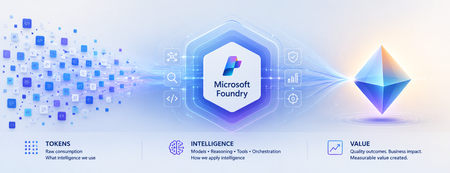
Beyond Tokens: Rethinking AI Economics with Microsoft Foundry From the cost of intelligence to the value of outcomes Enterprise AI has an accounting problem. Executives expect agentic AI to return roughly 171% on investment, according to one widely cited survey. Yet McKinsey finds only about 39% of organizations can attribute any earnings impact to AI at all. Both numbers can be true at once — because the gap between them is not a technology gap. It is a measurement gap. For the first few years of generative AI, one number dominated the economics conversation: tokens. How many tokens did a model consume? What was the cost per million tokens? Could a smaller model perform the same task? Those questions mattered when enterprises were experimenting with AI. They are no longer enough as AI moves into production. An enterprise agent doesn't simply consume tokens. It reasons, retrieves context, invokes tools, calls APIs, verifies its work, retries unsuccessful actions and sometimes escalates exceptions to humans. The model call might cost pennies. The business outcome could cost considerably more. Which leads to an increasingly important question: What is the right economic unit for intelligence? From AI experimentation to economic accountability The first wave of enterprise AI was about possibility: Can AI do this? The next wave is about production, as AI becomes embedded in software engineering, customer service, finance, healthcare and supply chains. And production changes the question: Should AI do this and at what cost? Microsoft has moved decisively onto this ground. In August 2026, the Microsoft Foundry team launched its Economics of Agent Optimization series, arguing that "tokens have become the new unit of technology spend" and that AI should be run as a managed investment system. On the latest earnings call, Satya Nadella described Microsoft's objective as "advancing the frontier on the cost-to-outcome curve, ensuring every customer can turn tokens into business results." The discipline is going mainstream too: 98% of FinOps teams now manage AI spend, up from 31% two years ago. Microsoft's series is largely about the numerator of that curve - making every request, agent and dollar more efficient. This article is about the denominator: what an outcome is, what it truly costs, and what it is worth. The evolution of Microsoft Foundry reflects the same shift. At Build 2026, Microsoft expanded the conversation beyond building agents toward tracing behavior, evaluating quality, monitoring production performance, optimizing agents and connecting their operation to ROI. Think of the progression as: Trace → Evaluate → Monitor → Optimize → ROI This is more than a technology roadmap. It represents a shift from observing AI as technology to managing AI as an economic asset. Tokens became the unit of spend. They were never the unit of value. Consider two AI agents handling the same customer-service workflow. Agent A costs $0.08 per interaction. Agent B costs $0.20. Agent A appears cheaper. But suppose Agent A successfully resolves only 55% of cases, while Agent B resolves 90%. The remainder require retries, additional reasoning or human intervention. Which agent is actually cheaper? The inexpensive interaction may produce the expensive resolution. This illustrates a fundamental problem: We often measure AI where it is consumed rather than where value is created. Tokens are a unit of consumption. Businesses operate in outcomes. A customer-service leader cares about issues resolved. An engineering leader cares about high-quality software reaching production. A finance leader cares about reconciliations completed accurately. The economic denominator needs to move closer to the business. The AI Economic Ladder I think of this evolution as an AI Economic Ladder: Tokens → Interactions → Tasks → Outcomes → Value Each step moves measurement closer to what the enterprise actually cares about. At the token level: What intelligence did we consume? At the interaction level: What did each AI run cost? At the task level: What did it cost to complete the work? At the outcome level: What did a successful result cost? At the value level: Was the outcome worth creating? An AI system can become more efficient at every technical metric while creating little economic value. Conversely, an expensive AI workflow could be extraordinarily valuable if it prevents revenue leakage, reduces operational risk or accelerates a critical business process. The objective isn't cheaper AI. It is better economics. Not every completed task is a successful outcome There is another complication. If an agent completes a workflow, should we count it as a successful outcome? Not necessarily. A meaningful outcome needs three characteristics: Completed. Quality-gated. Attributable. It must reach its intended end state, meet an explicit standard for quality, accuracy, safety or business acceptability, and be attributable to the agent or workflow that produced it. That gives us a more meaningful measure: Cost per Successful Outcome = Fully Loaded AI Workflow Cost / Completed, Quality-Gated, Attributable Outcomes The denominator becomes real only when named in business language: cost per prior authorization resolved in healthcare, per pull request triaged and tested in engineering, per disputed invoice reconciled in finance operations. If you cannot name the outcome in a sentence the process owner recognizes, you are not ready to measure it. The quality gate matters. With AI, "the system ran successfully" and "the system produced a good outcome" are not the same thing. Microsoft Foundry's tracing and evaluation capabilities become economically important for precisely this reason. Evaluation isn't merely quality control. It helps determine what gets counted as value. What does an AI outcome really cost? The true economic footprint goes far beyond inference: Model + Reasoning + Grounding + Tools + Orchestration + Infrastructure + Retries + Evaluation + Governance + Human Intervention Human intervention is particularly easy to overlook. Every time someone must review, correct, approve or recover an AI-generated outcome, the economics change. The same applies to verification. An agent reaching an acceptable result in three steps has different economics from one requiring fifteen steps and multiple retries. And verification is not a rounding error — it is the bulk of the bill. McKinsey's 2026 analysis of production agentic workflows found roughly 60% of an agentic task's cost is tied to refining answers — checking, repairing, re-verifying — not generating the initial response. Most of what you pay for is not intelligence. It is assurance. This means quality and economics are connected. The quality bar you set influences the cost you pay. The challenge isn't simply minimizing consumption. It is finding the right balance between quality, cost, speed and risk. Cost per outcome is only half the equation Now imagine two agents. Both cost $5 per successful outcome. One saves an employee ten minutes of administrative work. The other prevents $500 in revenue leakage. Their cost efficiency is identical. Their economics clearly aren't. So we need to move another step up the ladder: from Cost per Outcome to Value per Outcome. The question isn't only how cheaply AI can complete the work. It is: How much economic value does this outcome create relative to the intelligence required to produce it? Now the CIO, CFO, CAIO and business leader have a common conversation. Give every outcome an Intelligence Budget Not every problem deserves the smartest model available. Classifying an email may require relatively little intelligence. Resolving a complicated customer complaint may justify more context and reasoning. Assessing the risks in a multimillion-dollar contract may justify sophisticated reasoning, multiple validations and human review. Every business outcome therefore has an economically rational amount of intelligence worth spending on it. Call it an Intelligence Budget. This changes the architecture question from which model should we standardize on, to: What combination of model, reasoning, context, tools and human judgment does this outcome deserve? This is where Microsoft Foundry's model router becomes interesting. Individual requests can be dynamically routed so simpler work doesn't consume the same model resources as complex reasoning. If the Intelligence Budget is the economic principle, intelligent routing is one way of operationalizing it. The future enterprise AI architecture won't be about one model doing everything. It will route intelligence according to the economics, quality and risk of the outcome. Making AI economics observable None of this works without visibility. An AI system can be technically healthy and economically unhealthy — responsive and error-free while repeatedly choosing inefficient reasoning paths, invoking unnecessary tools or producing outputs requiring expensive human correction. AI economics and AI observability are becoming inseparable. Microsoft Foundry increasingly connects these disciplines. Tracing shows what an agent did. Evaluation determines whether it met required criteria. Observability helps monitor production behavior. Agent optimizer can test improvements across prompts, skills and models. Microsoft's emerging ROI capabilities take the next step by connecting operating costs with measures such as task completion, time saved and cost efficiency. Attribution is the bridge to the finance conversation. Teams place Azure API Management in front of Foundry endpoints as an AI Gateway, stream token telemetry into Application Insights, and use Entra Agent ID to give every agent run a discrete identity that maps cost to its cost center. Microsoft Agent 365 extends the discipline tenant-wide — spending policies, budget caps and departmental chargeback across Microsoft and third-party agents. Together, they create something enterprises have historically lacked: A feedback loop between how intelligence is consumed and what that intelligence accomplishes. The paradox of cheaper intelligence There is another reason AI economics will become more important as models get cheaper. The Jevons paradox suggests that when technology makes a resource cheaper and more efficient, total consumption can actually increase. AI may experience the same effect. Cheaper intelligence enables more agents, more reasoning and more workflows that were previously uneconomic. So we could see cost per unit of intelligence fall while total intelligence consumed rises. Cheaper AI may therefore produce larger AI bills. That isn't necessarily bad — provided value grows faster than consumption. The objective isn't minimum AI consumption. It is maximum economic value from AI consumption. From workload economics to portfolio economics As AI scales, economics becomes a capital-allocation question. I see three levels. Workload Economics: Is this AI system running efficiently? Outcome Economics: Is it producing quality outcomes economically? Portfolio Economics: Where should we put our next AI dollar? That final question will become increasingly important. An enterprise with hundreds of AI initiatives shouldn't assume every one deserves continued investment. Some should scale. Some need optimization. Some should be redesigned or consolidated. And some should be stopped. The ability to experiment cheaply created the first explosion of enterprise AI. The discipline to allocate capital intelligently will determine what scales. Who owns AI economics? Once an agent becomes part of how work gets done, its economics cannot remain purely an IT metric. The business understands the value of the outcome. Technology understands the architecture and optimization levers. Finance brings economic discipline and comparability. That suggests a shared model: Business owns the outcome. Technology owns the optimization levers. Finance owns the economic discipline. AI economics ultimately isn't just a technology-cost conversation. It is a business-performance and capital-allocation conversation. From abundant intelligence to intelligent economics We are entering an era where intelligence is becoming an increasingly abundant, programmable and variable-cost resource. Microsoft Foundry and the broader Microsoft AI stack are making it easier to build, evaluate, observe, optimize and govern that intelligence. But abundant intelligence does not guarantee abundant value. Enterprises still need to decide where AI belongs, how much intelligence each problem deserves, what defines a successful outcome, when humans should remain involved and which AI investments deserve more capital. The winners won't necessarily use the cheapest models. They won't consume the fewest tokens. And they won't be the organizations that build the most agents. They will become exceptionally good at moving up the AI Economic Ladder: from consumption, to outcomes, to value. Because the next era of AI won't be won by organizations that buy intelligence most cheaply. It will be won by those that convert intelligence into value most efficiently. Where to start: the first 90 days Define the denominator for your top three agents — what counts as done, what quality gate applies, who signs off. Instrument attribution — Azure API Management as an AI Gateway, token telemetry to Application Insights, Entra Agent ID on every run. Wire evaluations into the cost pipeline so only quality-gated outcomes count. Set Intelligence Budgets — model router per request, agent optimizer against your evaluators, Agent 365 policies as circuit breakers. Stand up a joint monthly review — business, technology and finance on one dashboard: outcomes delivered, cost per outcome, value per outcome. Frequently asked questions What is Cost per Successful Outcome in enterprise AI? The fully loaded cost of an AI workload divided by outputs that were completed, quality-gated and attributable - for example, cost per prior authorization resolved or per pull request triaged. It turns token metrics into the unit economics of AI-performed work. What is an Intelligence Budget? The economically rational amount of intelligence - model capability, reasoning, context, tools and human review — worth spending on a given outcome, based on its value and risk. Model router in Microsoft Foundry is one way to operationalize it. Why do AI agents cost more than single model calls? One agent task can involve planning, tool calls, retries and verification - many model calls with compounding context. Research on production agentic workflows attributes roughly 60% of task cost to refining and verifying answers, not generating the first response. Will falling model prices make AI cost management unnecessary? No. By the Jevons paradox, cheaper intelligence expands consumption, so total AI spend typically rises as unit prices fall. The discipline that matters is maximizing value per unit of intelligence. Who should own AI economics? A shared model: the business owns the outcome and its value, technology owns the optimization levers, and finance owns the economic discipline and review cadence. #MicrosoftFoundry #Agent365 #AzureAI #FinOps #AgenticAI #AIAgents #Azure #MicrosoftCostManagement #AIEconomics #Tokens References Microsoft Azure Blog: "The Economics of Agent Optimization: From pilots to measurable returns" (August 12, 2026) Microsoft FY26 Q4 earnings call (Satya Nadella, July 2026) McKinsey — "Cost versus value: managing agentic AI system performance" (July 2026) FinOps Foundation — State of FinOps 2026; Microsoft Learn — Model router for Microsoft Foundry; Agent optimizer; Foundry Control Plane cost optimization1KViews1like2CommentsSimplify AKS observability with Azure Native New Relic Service
An Azure Native path to New Relic Intelligent Observability for AKS AKS environments are dynamic by design. Applications can span clusters, namespaces, nodes, pods, and containers, while workloads scale and change continuously. Obtaining consistent visibility often requires platform teams to deploy and maintain monitoring components separately on every cluster. Azure Native New Relic Service simplifies this process by integrating New Relic onboarding and management into Azure. Customers can already use the service to: Create a new New Relic account or link an existing account from Azure. Configure the forwarding of Azure platform metrics and logs to New Relic. View the monitoring status of Azure resources. Consolidate procurement and eligible New Relic charges through Azure Marketplace. Monitor multiple Azure subscriptions through a single New Relic resource. With AKS extension support, customers can now extend this native management experience to their Kubernetes clusters. Install the New Relic integration from the Azure portal The new experience follows the same simple model used by Azure Native integrations for other compute resources. From an Azure Native New Relic Service resource, customers can navigate to New Relic account config > Azure Kubernetes Services, select an eligible AKS cluster, and choose Install Extension. Azure then deploys the New Relic Kubernetes integration by using the AKS cluster extensions framework. After deployment completes, the portal displays the installation status for the cluster. Customers can return to the same experience to review the status or select Uninstall Extension when monitoring is no longer required. AKS cluster extensions provide an Azure Resource Manager-based approach for installing and managing services on AKS. This gives customers a consistent Azure control plane experience for deployment and lifecycle operations instead of requiring a separate, manual Helm installation for each cluster. Gain deeper visibility into Kubernetes workloads The extension deploys the New Relic Kubernetes integration to the selected AKS cluster. The integration provides visibility across Kubernetes infrastructure and workloads, including cluster, node, namespace, deployment, pod, and container health and performance. Depending on the enabled New Relic configuration, customers can also bring together Kubernetes events, logs, and Prometheus-formatted metrics with application and Azure platform telemetry in New Relic. This helps application, platform, and site reliability engineering teams investigate issues across the stack without stitching together disconnected views. Teams can use New Relic to: Understand resource consumption and health across clusters, nodes, pods, and containers. Identify unhealthy workloads, container restarts, and capacity constraints. Correlate Kubernetes infrastructure signals with application performance data. Explore Kubernetes entities and relationships through New Relic's cluster experience. Create dashboards, alerts, and operational workflows using telemetry from Azure and AKS. The result is a more direct path from detecting an issue to understanding its impact on applications and users. Reduce operational toil with unified telemetry For organizations operating multiple AKS clusters, consistency is as important as visibility. Manual installation can lead to configuration drift, missed clusters, and additional work whenever monitoring components need to be changed. The Azure Native New Relic Service experience helps address these challenges by providing: Simplified onboarding: Install the integration from the Azure portal without building a separate deployment workflow. Centralized visibility: Review AKS extension status alongside other Azure resources connected to New Relic. Azure governance alignment: Use Azure Resource Manager and Azure role-based access control as part of the management experience. Lifecycle management: Install or remove the extension through a consistent Azure workflow. Unified, full-stack observability: Connect AKS telemetry with application, infrastructure, log, and Azure platform data in New Relic. This experience is particularly useful for platform teams that want to make observability available as a standardized service while allowing development teams to use New Relic for troubleshooting and performance optimization. Get started To begin monitoring AKS with Azure Native New Relic Service: Either browse to the Marketplace offer listing or in the Azure portal, create an Azure Native New Relic Service resource. Go to New Relic account config > Azure Kubernetes Services. Select the AKS cluster that you want to monitor. Select Install Extension and then confirm the installation. After the status changes to Installed, open New Relic to explore your Kubernetes data and configure the dashboards and alerts appropriate for your environment. If you face any technical challenges do raise a support ticket and share your feedback.351Views0likes0CommentsPartner Case Study | Siemens
The longstanding partnership between Microsoft and Siemens—a German tech conglomerate that focuses on industrial automation—helps solve a crucial challenge facing consumer packaged goods (CPG) and retail companies: fragmented processes across production. The CPG and retail industries—both essential to everyday life and major players on the global stage—experience multiple unique pain points. Consumers have rapidly shifting preferences; labeling and packaging regulations are more stringent than in past decades; and both product ingredients and waste reduction efforts must reflect sustainability goals—not to mention the complexity of global supply chains. In addition to all this, siloed teams and disconnected operations can take a serious toll, slowing down product launches, driving up compliance costs, and making it harder to keep up with market trends. Siemens' Integrated Lifecycle Management (ILM) is specifically tailored to address the complex needs of the CPG and retail industries. A single, reliable source of truth helps organizations manage industry complexity, minimize errors, and accelerate decision-making. By seamlessly connecting product development, program management, and brand management using AI and cloud innovation, Siemens' ILM helps these sectors remain agile and competitive in a fast-paced market. Cloud-powered lifecycle management tailored for CPG and retail At the core of Siemens' ILM is Siemens' Teamcenter X on Azure, a cloud-based product lifecycle management (PLM) platform. Teamcenter X securely integrates teams, processes, business systems, and critical product data. For CPG manufacturers, this accelerates innovation, shortens product development cycles, and provides the agility needed to quickly respond to changes in consumer demand and regulatory requirements. Additionally, Teamcenter X on Azure delivers powerful generative AI capabilities, including seamless integration with Microsoft Teams and its intuitive chat functionality. This significantly improves cross-team communication and collaboration, a critical advantage for any organization. Teamcenter X on Azure harnesses advanced AI to enhance productivity and innovation specifically within the demanding environment of CPG manufacturing. Powered by Microsoft Azure OpenAI Service, the application helps augment the creation, optimization, and debugging of code for factory automation software, while industrial AI makes visual quality inspection on the shop floor possible. Continue reading here Explore all case studies or submit your own Subscribe to case studies tag to follow all new case study posts. Don't forget to follow this blog to receive email notifications of new stories!445Views1like1Comment