azure
16 TopicsWho Can Access What? Designing RBAC and Identity in Azure
Who should be allowed to access an Azure resource? Azure makes it easy to create resources. The harder question comes afterwards: who should be allowed to access them? A Function App may need to read secrets from Key Vault. A Logic App may need to call APIs through API Management. A developer may need to deploy to Dev but have no access to Production. A CI/CD pipeline may need to deploy infrastructure without becoming an Owner of the entire subscription. This is where Azure Role-Based Access Control (RBAC) and Managed Identity become critical. In this article, I look at how to design access around people, applications and deployment pipelines, while keeping permissions as narrow as practical. The article covers: Azure RBAC and access scopes Least-privilege access Managed Identities Developer vs Production access boundaries Application identities CI/CD deployment permissions RBAC vs API authentication Privileged access and PIM Common RBAC design mistakes One of the key principles is simple: Give an identity only the permissions it actually needs. For example, if a Function App only needs to read secrets from Key Vault, giving it Contributor access to the entire Resource Group solves the problem with a much broader permission than necessary. Good RBAC design is not about assigning more permissions. It is about understanding: Who needs access? Why do they need it? What exactly do they need to do? At what scope should access be granted? How can that access be managed securely over time? I would be interested to hear how others approach RBAC and identity design in enterprise Azure environments. Full article: https://www.linkedin.com/pulse/who-can-access-what-designing-rbac-identity-azure-chethan-raj-ud6gc/171Views0likes0CommentsHow Should You Structure Dev, UAT, Staging and Prod in Azure?
This is one of those decisions that can look simple at the beginning of a project and become increasingly important as the environment grows. Should each environment have its own Resource Group? Should Production have a separate Subscription? Where should shared services live? How should naming, tagging and CI/CD fit into the design? There isn't one universal answer. The right structure depends on factors such as security boundaries, ownership, lifecycle, deployment processes and operational requirements. In this article, I look at: Dev, UAT, Staging and Production environment boundaries Resource Groups vs Azure Subscriptions Production isolation Naming conventions Azure tagging CI/CD considerations Blue/Green deployment considerations Common environment architecture mistakes The main idea is that environment architecture should be designed around clear operational and security boundaries rather than simply creating more Resource Groups. I would be interested to hear how others structure Dev, UAT, Staging and Production in enterprise Azure environments. Full article: https://www.linkedin.com/pulse/how-should-you-structure-dev-uat-staging-prod-azure-chethan-raj-ktfac/153Views0likes0Comments
Admin‑On‑Behalf‑Of issue when purchasing subscription
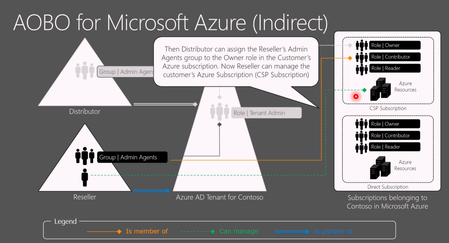
Hello everyone! I want to reach out to you on the internet and ask if anyone has the same issue as we do when creating PAYG Azure subscriptions in a customer's tenant, in which we have delegated access via GDAP through PartnerCenter. It is a bit AI formatted question. When an Azure NCE subscription is created for a customer via an Indirect Provider portal, the CSP Admin Agent (foreign principal) is not automatically assigned Owner on the subscription. As a result: AOBO (Admin‑On‑Behalf‑Of) does not activate The subscription is invisible to the partner when accessing Azure via Partner Center service links The partner cannot manage and deploy to a subscription they just provided This breaks the expected delegated administration flow. Expected Behavior For CSP‑created Azure subscriptions: The CSP Admin Agent group should automatically receive Owner (or equivalent) on the subscription AOBO should work immediately, without customer involvement The partner should be able to see the subscription in Azure Portal and deploy resources Actual Behavior Observed For Azure NCE subscriptions created via an Indirect Provider: No RBAC assignment is created for the foreign AdminAgent group The subscription is visible only to users inside the customer tenant Partner Center role (Admin Agent foreign group) is present, but without Azure RBAC. Required Customer Workaround For each new Azure NCE subscription, the customer must: Sign in as Global Admin Use “Elevate access to manage all Azure subscriptions and management groups” Assign themselves Owner on the subscription Manually assign Owner to the partner’s foreign AdminAgent group Only after this does AOBO start working. Example Partner tries to access the subscription: https://portal.azure.com/#@customer.onmicrosoft.com/resource/subscriptions/<subscription-id>/overview But there is no subscription visible "None of the entries matched the given filter" https://learn.microsoft.com/en-us/azure/role-based-access-control/elevate-access-global-admin?tabs=azure-portal%2Centra-audit-logs#step-1-elevate-access-for-a-global-administrator from the customer's global admin. and manual RBAC fix in Cloud console: az role assignment create \ --assignee-object-id "<AdminAgent-Foreign-Group-ObjectId>" \ --role "Owner" \ --scope "/subscriptions/<subscription-id>" \ --assignee-principal-type "ForeignGroup" After this, AOBO works as expected for delegated administrators (foreign user accounts). Why This Is a Problem Partners sell Azure subscriptions that they cannot access Forces resources from customers to involvement from customers Breaks delegated administration principles For Indirect CSPs managing many tenants, this is a decent operational blocker. Key Question to Microsoft / Community Does anyone else struggle with this? Is this behavior by design for Azure NCE + Indirect CSP? Am I missing some point of view on why not to do it in the suggested way?503Views0likes2CommentsPortable Azure topology and documentation snapshots with OSIRIS JSON
Ciao everyone, I’m working on https://github.com/osirisjson/osiris, a vendor-neutral specification for describing infrastructure resources and their relationships as portable point-in-time snapshots. To proof that the specification could work in real-scenarios I already built an initial https://osirisjson.org/en/docs/producers/hyperscalers/microsoft-azure in Go. You run on-premise and it connects through the Azure CLI, reads Azure subscriptions and emits an OSIRIS JSON document that can be used for documentation, topology diagrams, audits, configuration drift analysis, CMDB/IPAM/DCIM workflows, or controlled AI/context workflows without giving those platforms/tools direct access to Azure. The producer currently covers several Azure areas, including networking, compute, storage, identity, databases, containers, integration, observability, backup, automation, management groups, and cross-resource dependency edges such as Private Endpoint to PaaS targets, App Service to Application Insights / Log Analytics, AKS to subnets and node pools, and backup vault relationships. It supports two output purposes: documentation: minimal high-level projection for diagrams, inventory dashboards, and architectural documentation audit: deeper projection with readable properties and extensions after sensitive-field redaction This is not intended to replace Azure tooling, Azure Resource Graph, IaC, Azure Policy, or any existing governance/control-plane workflow. OSIRIS JSON is simply a read-only external producer that generates a vendor-neutral snapshot of the observed Azure environment. I would really appreciate feedback from Azure architects, cloud engineers, and governance practitioners on the mapping model: Which Azure resources and relationships are the most important for documentation and topology generation? Are the current connection types useful for real-world architecture views? What should be prioritized in next releases? Would a documentation/audit split be useful in enterprise environments? You find the current Azure producer documentation here: https://osirisjson.org/en/docs/producers/hyperscalers/microsoft-azure I would really appreciate any feedback, suggestions, edge cases, or ideas from people who operate, document, audit, or govern Azure environments and I also welcome anyone who want to participate on development. Ciao from Italy, Tia315Views0likes2Comments
[Architecture Pattern] Scaling Sync-over-Async Edge Gateways by Bypassing Service Bus Sessions
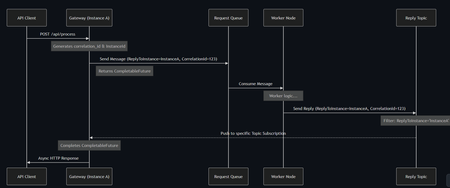
Hi everyone, I wanted to share an architectural pattern and an open-source implementation we recently built to solve a major scaling bottleneck at the edge: bridging legacy synchronous HTTP clients to long-running asynchronous AI workers. The Problem: Stateful Bottlenecks at the Edge When dealing with slow AI generation tasks (e.g., 45+ seconds), standard REST APIs will drop the connection resulting in 504 Gateway Timeouts. The standard integration pattern here is Sync-over-Async. The Gateway accepts the HTTP request, drops a message onto Azure Service Bus, waits for the worker to reply, and maps the reply back to the open HTTP connection. However, the default approach is to use Service Bus Sessions for request-reply correlation. At scale, this introduces severe limitations: 1. Stateful Gateways: The Gateway pod must request an exclusive lock on the session. It becomes tightly coupled to that specific request. 2. Horizontal Elasticity is Broken: If a reply arrives, it must go to the specific pod holding the lock. Other idle pods cannot assist. 3. Hard Limits: A traffic spike easily exhausts the namespace concurrent session limits (especially on the Standard tier). The Solution: Stateless Filtered Topics To achieve true horizontal scale, the API Gateway layer must be 100% stateless. We bypassed Sessions entirely by pushing the routing logic down to the broker using a Filtered Topic Pattern. How it works: 1. The Gateway injects a CorrelationId property (e.g., Instance-A-Req-1) into the outbound request. 2. Instead of locking a session, the Gateway spins up a lightweight, dynamic subscription on a shared Reply Topic with a SQL Filter: CorrelationId = 'Instance-A-Req-1'. 3. The AI worker processes the task and drops the reply onto the shared topic with the same property. 4. The Azure Service Bus broker evaluates the SQL filter and pushes the message directly to the correct Gateway pod. No session locks. No implicit instance affinity. Complete horizontal scalability. If a pod crashes, its temporary subscription simply drops—preventing locked poison messages. Open Source Implementation Implementing dynamic Service Bus Administration clients and receiver lifecycles is complex, so I abstracted this pattern into a Spring Boot starter for the community. It handles all the dynamic subscription and routing logic under the hood, allowing developers to execute highly scalable Sync-over-Async flows with a single line of code returning a CompletableFuture. GitHub Repository: https://github.com/ShivamSaluja/sentinel-servicebus-starter Full Technical Write-up: https://dev.to/shivamsaluja/sync-over-async-bypassing-azure-service-bus-session-limits-for-ai-workloads-269d I would love to hear from other architects in this hub. Have you run into similar session exhaustion limits when building Edge API Gateways? Have you adopted similar stateless broker-side routing, or do you rely on sticky sessions at your load balancers?172Views1like0Comments
Network Design Ideas for VMs in Azure
Hello, I am analyzing the current Azure environment at my new job and trying to figure out the architectural choices mostly networking wise. Currently, we have 10 VMs and each VM has its own VNet and they are all in the same region. In my experience so far, I have never seen such network design in Azure before. If all VMs are in the same region, we could have one Vnet and utilize subnets and NSGs to segment the VMs and control the traffic. Having so many different VNets makes it very complex to manage. Looking for opinions what other people think. Is this just a bad design or just to keep the VMs separate from each other.705Views0likes6CommentsBest Practices for Designing a Hub-and-Spoke Architecture in Azure
A Hub-and-Spoke architecture is a widely used networking topology in Azure that helps organizations centralize network management, enhance security, and optimize connectivity. However, designing an efficient Hub-and-Spoke model requires careful planning regarding network security, scalability, and cost optimization. What are the core components of a Hub-and-Spoke architecture in Azure? What factors should be considered when designing the hub (e.g., Virtual Network Gateway, Firewall, Security controls)? What are the key challenges you've encountered while implementing a Hub-and-Spoke architecture in Azure, and how have you addressed them?2KViews0likes3CommentsManaging Multiple VMs on Azure Similar to Workspace One
Hello, I currently manage an infrastructure of approximately 100 VMs. I would like to perform activities on Azure such as: Installing/removing apps Viewing all installed apps on the VMs Adding shortcuts to the desktop Adjusting timezone/date and time I am looking for a solution that can handle these tasks, similar to what Workspace One does, but for Windows Servers. How do you currently manage these tasks? Thank you! Feel free to post this on the Microsoft forum. If you need any further assistance, let me know!299Views0likes2Comments
Limits with my on prem AD DS domain wit "_" 😑
Hello every body, Here is my situation. I have a domain name : "domain_contoso.com" that all my servers were joined to it, and i don't have a synchronisation with MS Entra ID. My project now, is to migrate my servers to azure and i'm confused. In fact, i want to extend my active directory with this domain on a vm azure and configure trust and replication but the problem that i can't create a verified domain with the "_" and MS Entra Id doesn't accept that also. So, my questions are : - If i purchase a new verified domain "domaincontoso.com" where is without the "_" and i added it to MS Entra ID, then, i synchronise all my users from "domain_contoso.com" to MS Entra ID and i extend the same active directory on prem to a vm on azure with a config for the replication. That's work ? There's no risks ? - if i purchase a new verified domain "contoso.com" and create a new active directory on a vm azure witb this domain then , i configure the synchronisation to MS Entra ID. Also, i configure the trust with the on prem "domain_contoso.com" to ensure that all users on prem AD can access to the server with the new domain in Azure after migration. What is the best solution ? And what are the + and - ? Thank you very much767Views0likes3CommentsStore a file in Azure and make it accessible over the Internet
I wish to store a txt file in Azure and make it so that the file is accessible when someone goes to it's corresponding URL. No need for access control or authentication The file contain a filter list that the ABP extension will access via URL and this txt file will be stored somewhere in Azure. What Azure solution can I use for this which keeps the price down for us?1.3KViews0likes2Comments