azure
2419 Topics
URGENT: Microsoft Edge incorrectly flags paytracc.com as typosquatting after multiple reports
Microsoft Edge Website Typo Protection incorrectly flags https://paytracc.com as a possible misspelling of paytrace.com. Paytracc.com is the legitimate official domain of PayTracc, an independent financial technology product. “PayTracc” is the intentional registered brand spelling and is not impersonating or affiliated with PayTrace. The warning has continued despite repeated reports through the “Report that this site URL is not a misspelling” option. Technical verification: • https://paytracc.com returns HTTP 200 OK. • http://paytracc.com returns HTTP 301 and redirects to HTTPS. • A valid TLS certificate and HSTS are enabled. • Chrome and other browsers do not display this warning. • The issue is reproducible only in Microsoft Edge Website Typo Protection. This false positive is discouraging customers from accessing the website. Anyways to resolve this please? Affected domain: https://paytracc.com Incorrect suggested domain: paytrace.com16Views0likes0Comments
Is APIM Standard_V2 tier viable option from security standpoint if you have Developer portal enabled
From my understanding with APIM Standard_v2 tier you can only configure the gateway endpoint with private endpoint and have that behind something like application gateway to allow the ability to have WAF in front of it. But, the developer portal is reachable only over its public address and cannot have private endpoint. Even after adding a custom domain on the Developer portal endpoint, the default <name>.developer.azure-api.net address keeps responding and returns 200. If you set all your APIs to require approval for subscription , then for a production scenario where you would allow "Try this operation" functionality on your APIs through developer portal, is it safe to still use standard_v2 tier. Or are there some security problems associated with that?12Views0likes0CommentsWindows Autopilot ESP App Failures: My Troubleshooting Approach
Hi everyone, I’ve been working with Windows Autopilot and Microsoft Intune deployments and wanted to share a troubleshooting approach I use when a device fails during the Enrollment Status Page (ESP) Apps phase. When I see an Apps-stage failure, I normally start by checking: Which application failed in Intune. Whether the application is actually required during ESP. Win32 detection rules and installation commands. Application dependencies and assignment targeting. Autopilot/MDM diagnostic logs. Whether too many applications are being installed during ESP. One thing I’ve found particularly useful is separating applications that truly need to block provisioning from applications that can be installed after Autopilot has completed. I also try to avoid immediately resetting the device. Finding the failing application and understanding why it failed gives us a much better chance of preventing the same problem on future deployments. My basic workflow is: ESP failure → Identify failed app → Check assignment → Check install/detection → Review logs → Test with a controlled app set → Re-test Autopilot I'm interested in hearing how other Intune admins approach this. What logs or checks have helped you the most when troubleshooting ESP application failures? Thanks, Jayesh Kedar6Views0likes0Comments
Cannnot delete tenant
Hello, I am trying to delete one of our customers MS 365 Tenant, however this seems to keep failing due to a single Application Registration which cannot be deleted through Entra ID. The error i am getting is "Failed to delete application Tenant Schema Extension App. Error detail: Deletion of system application is not allowed." I have looked online for solutions but the only solution i can find is "Create a support ticket". I would love to do this but there is no support contract linked to this tenant so that option is not available. Any help would be appreciated! Kind regards, Jos Verhallen119Views0likes3Comments
Should AI agents receive permissions dynamically instead of having fixed access?
Hi everyone, As AI agents move from simple chat-based assistants toward performing real actions—such as querying databases, creating resources, modifying configurations, sending notifications, or executing workflows—I have been thinking about how their permissions should be designed. A traditional application typically has a relatively well-defined permission model. An AI agent, however, may perform different tasks depending on the conversation and the user's request. For example: • Task A may only require read access. • Task B may require creating a resource. • Task C may require modifying an existing configuration. • Task D may involve a potentially destructive operation. This raises an interesting security question: Should an AI agent have a fixed set of permissions for its entire lifetime, or should permissions be granted progressively based on the task it is currently performing? For example: User → AI Agent → Read-only permissions Then, if the user explicitly requests a change: User approval → Temporary elevated permission → AI Agent performs the operation → Permission revoked I see some potential advantages to this approach: 1. Reduced blast radius if the agent behaves unexpectedly. 2. Better alignment between permissions and the actual task. 3. Easier auditing of elevated operations. 4. Reduced risk from prompt injection or unintended actions. 5. Human approval could be required only for high-impact operations. However, it also introduces additional complexity around identity, token issuance, approval workflows, session management, and auditing. I'm curious how others are approaching this. Would you prefer: A. Fixed least-privilege permissions for each agent B. Dynamic/task-based permissions C. Fixed permissions with human approval for sensitive operations D. A combination depending on the workload For production AI agents, which model do you think provides the best balance between security and usability? Would be particularly interested in experiences from people implementing agents in enterprise environments.50Views0likes0CommentsEngineering an Azure Data Layer for Odoo Analytics Without Changing the ERP
One thing I have learned from working on ERP-driven data projects is that the ERP is rarely the place where you want to solve every analytics problem. We saw this firsthand in a manufacturing engagement where Odoo was being used across finance, inventory, procurement, and manufacturing, but reporting still involved substantial manual extraction and Excel-based consolidation. The interesting engineering question wasn't “How do we replace the ERP?” It was: “How do we build a reliable analytical layer around it without changing the transactional system?” That shaped the architecture. We used Odoo APIs and Azure Data Factory for ingestion, landing the data in Azure Data Lake Storage Gen2. From there, the data was organized into Bronze, Silver, and Gold layers: Bronze: Source-aligned Odoo data was retained with minimal transformation. Silver: Data was cleansed, standardized, and prepared across finance, inventory, procurement, and manufacturing domains. Gold: Analytics-ready data was prepared for downstream reporting and consumption. Azure Databricks with Spark handled transformation and KPI standardization, while Synapse/SQL layers provided structured analytical models for reporting. Power BI datasets consumed the prepared data, with Row-Level Security applied for role-based access. Why did this separation matter for the project? The important architectural boundary was: Odoo → transactional operations Azure data platform → ingestion, storage, transformation, standardization Power BI → analytical consumption That separation meant the reporting layer did not have to repeatedly extract and reshape data directly from the ERP. It also gave us a dedicated place to handle historical data and standardize information across business domains before it reached the reporting layer. What changed? The implementation automated 15+ Odoo-based reports and provided governed Power BI dashboards to 60+ business users. More importantly, teams moved away from repeated ERP extraction and spreadsheet consolidation toward a reusable analytical data layer. For our team, the bigger takeaway was that ERP modernization does not necessarily mean modifying the ERP. For teams building Azure data platforms around ERP systems, how are you drawing the boundary between API ingestion, historical storage, transformation, and analytical modeling?80Views0likes0CommentsLakeflow in Azure Databricks
Anyone who has ever built a data engineering stack from scratch knows the pattern: one ingestion tool to pull data from CRM and ERP, a separate orchestrator to stitch together the dependencies between jobs, notebooks or scripts doing the actual transformation, and a fourth system just to check whether all of that ran correctly last night. Each piece comes from a different vendor, with its own authentication, its own logs, and its own SLA. When something breaks at three in the morning, the first job isn't fixing the problem, it's figuring out which of the four tools it lives in. Lakeflow attacks that fragmentation head-on: it brings ingestion, transformation, and orchestration together into a single surface inside Azure Databricks, with Unity Catalog providing end-to-end governance. This isn't marketing repackaging of three products that already existed separately, it's the promise that the dependency between ingestion and transformation, column-level lineage, and access control stop being reconciled by hand across systems and start existing natively in the same graph. The three pieces that make up Lakeflow Lakeflow Connect covers ingestion, with point-and-click connectors for SaaS applications (Salesforce, Workday, ServiceNow), databases (SQL Server), and messaging, plus Zerobus Ingest, a serverless direct-write API for anyone with events coming from their own applications who doesn't want to stand up a message bus in the middle. Spark Declarative Pipelines is the transformation layer: instead of hand-writing the orchestration of streaming tables and materialized views, you declare the target table and the business logic, and the engine infers the dependency graph on its own, builds the DAG, and takes care of operational details like backfill and versioning. The name has changed over time (anyone who has followed the platform for a while will recognize it as the direct evolution of what used to be Delta Live Tables), but the underlying mechanism, declaring the desired result instead of the procedural step-by-step, remains the central idea. Lakeflow Jobs orchestrates all of it as a unified DAG: SQL workloads, Python code, declarative pipelines, dashboards, and external systems live in the same job definition, with data-driven triggers (a table was updated, a file landed in a volume), control-flow tasks, and no-code backfill runs. Hands-on: a simple end-to-end pipeline To make it concrete, here's how the three pieces fit together in a basic ingestion and declarative transformation pipeline: import dlt from pyspark.sql.functions import col # Streaming table: incremental ingestion via Auto Loader @dlt.table( comment="Raw order ingestion via Auto Loader" ) def orders_bronze(): return ( spark.readStream.format("cloudFiles") .option("cloudFiles.format", "json") .load("/Volumes/sales/bronze/orders_raw") ) # Materialized view: validation and enrichment @dlt.table( comment="Validated orders, with a quality filter" ) @dlt.expect_or_drop("positive_amount", "total_amount > 0") def orders_silver(): return ( dlt.read_stream("orders_bronze") .withColumn("total_amount", col("total_amount").cast("decimal(10,2)")) .filter(col("customer_id").isNotNull()) ) This snippet doesn't run on its own, it becomes a task inside a Lakeflow Job that can also kick off an AI/BI dashboard as soon as the "orders_silver" table is updated, using a data-driven trigger instead of a fixed time-based schedule. That binding between ingestion, transformation, and the next step in the flow, all in the same place, is what eliminates much of the glue work that today lives in a separate Airflow or Azure Data Factory. Governance without manual reconciliation The point that usually goes unnoticed by anyone looking only at the product surface is what happens underneath with Unity Catalog. Because ingestion, transformation, and orchestration share the same catalog, data lineage is captured end to end automatically, from the source table in SQL Server all the way to the final dashboard, without relying on manual annotation or on a third-party lineage system trying to infer relationships from logs. My take: this unification of governance is, in my view, Lakeflow's strongest argument, stronger even than the convenience of having a ready-made Workday connector. I've seen more than one data engineering project fail an audit not because the pipeline was wrong, but because nobody could prove with confidence where a specific number had come from, and how many transformations sat in between. Having that guaranteed structurally, rather than as a manual documentation process that is always out of date, changes the kind of conversation you have with the compliance team. System Tables come in as the observability piece: instead of building your own monitoring dashboard by querying each separate tool's API, you can build alerts and health reports directly on top of native SQL tables, with retention and schema standardized by Databricks itself. Cost: where the promise requires your own verification Databricks publishes some impressive cost-reduction figures, including a case of up to 83% lower ETL cost and up to 90x performance improvement reported by a specific customer. Those numbers deserve the standard skepticism any vendor benchmark does: they usually reflect a specific migration, from a poorly optimized stack to a new, well-tuned configuration. In practice, I'd test the real savings by running the same representative workload from your own environment on old vs. new, with equivalent cluster policies and compute mode (Performance vs. Standard on serverless compute), before using the marketing number in a budget justification to leadership. The mechanism behind the savings is real and makes technical sense: serverless compute with automatic optimization eliminates cold starts between sequential tasks in the same job, and granular per-task resource control avoids over-provisioning a cluster for a lightweight stage of the pipeline. That's different from guaranteeing that any migration will hit an 83% reduction. What this doesn't solve Consolidating ingestion, transformation, and orchestration into one platform doesn't remove the need for well-thought-out data modeling, nor does it replace architecture decisions about partitioning and clustering large tables. It also doesn't, on its own, solve the problem for teams that already have a heavy investment in Airflow with custom plugins that are hard to port, migrating legacy orchestration is still manual rewrite work, even with the dbt task and third-party integrations easing part of the path. And Lakeflow Connect's point-and-click connectors cover a specific set of sources, legacy systems or proprietary APIs without a native connector still depend on custom ingestion via Auto Loader or your own API. Bottom line Lakeflow doesn't invent a new data engineering paradigm, it removes the friction of coordinating three different tools to do what was always conceptually a single thing: bring data in from outside, transform it with confidence, and deliver it in the right shape to the next consumer. In practice: for anyone on Azure Databricks who already feels the pain of maintaining Data Factory, a third-party orchestrator, and a separate lineage catalog, it's worth piloting on a real pipeline before promising Databricks' cost-reduction number to anyone. References Databricks Blog, "Modernize your Data Engineering Platform with Lakeflow on Azure Databricks": https://www.databricks.com/blog/modernize-your-data-engineering-platform-lakeflow-azure-databricks Databricks Docs, "Get started: Build an ETL pipeline": https://docs.databricks.com/aws/en/getting-started/data-pipeline-get-started Microsoft Learn, "Tutorial: Build an ETL pipeline with Lakeflow pipelines - Azure Databricks": https://learn.microsoft.com/en-us/azure/databricks/getting-started/data-pipeline-get-started Microsoft Learn, "System tables": https://learn.microsoft.com/en-us/azure/databricks/admin/system-tables/130Views0likes0CommentsNot Every AI Decision Needs a Chat: Running a Pure Decision Model Straight from SQL
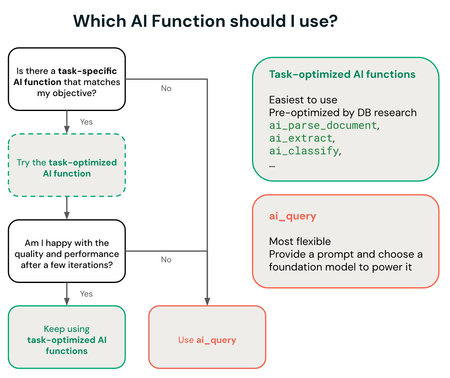
Anyone who has ever pointed a large language model at a bulk classification job, ticket triage, content moderation, queue routing, knows the discomfort: you're paying for a model that can write poetry just to choose between "urgent" and "not urgent". A general reasoning model is great when the question is open-ended, but when the right answer already sits among a handful of known options, it turns into expensive, slow overkill. A newer class of model attacks exactly that problem: instead of generating free text, it takes a discrete set of options and returns a calibrated decision, complete with a probability per option, at a fraction of the cost and latency of a chat model. And the detail that matters to anyone working with data: you can query this kind of model directly from SQL, against tables already governed by Unity Catalog, without writing a single line of agent orchestration code. What changes when the model only needs to decide, not converse A decision model isn't a smaller version of an LLM, it's a different category built for a different purpose. It doesn't hold conversation state, doesn't generate a natural-language explanation by default, and isn't trying to be useful for just any question. It solves a narrow problem: given a fixed set of possible labels, which one is most likely for this input, and with how much confidence. That matters because most real-world classification work in production, moderation, routing, triage, risk scoring, is already fundamentally this kind of closed decision. Running a general reasoning model for that kind of task is like hiring a senior consultant to stamp a form: it works, but the cost per decision stops making sense at scale. ai_query: the bridge between the model and data that already lives in Unity Catalog Azure Databricks exposes "ai_query", a general-purpose AI Function that queries any supported model directly from SQL or Python, no separate inference pipeline required. What sets it apart from task-specific AI Functions ("ai_classify", "ai_summarize", and similar) is control: "ai_query" lets you choose the model, the prompt, and the parameters manually, exactly what you need to point at a custom decision model hosted on your own Model Serving endpoint. Two requirements worth checking before you try this: "ai_query" doesn't run on Classic SQL warehouses, it needs Serverless; and the minimum Databricks Runtime is 15.4 LTS, with 18.2 or above recommended for the best performance. Hands-on: querying a custom decision model A custom decision model, in the Jev family, typically doesn't expose a standard chat-completions interface, it's served as a regular Model Serving endpoint, and the "ai_query" call uses the custom-model syntax, with explicit "endpoint", "request", and "returnType": SELECT ticket_id, description, ai_query( endpoint => "support-triage-decision", request => named_struct( "text", description, "channel", source_channel, "customer_plan", plan ), returnType => "STRUCT<category: STRING, urgency: STRING, confidence: DOUBLE>" ) AS decision FROM support.open_tickets WHERE status = 'new'; The structured return ("category", "urgency", "confidence") is already shaped to become a table column, no free-text parsing or regex needed to pull a field out of a chat response. It's the same pattern the official documentation uses for a traditional ML model (their example is a spam classifier), just swapping the endpoint for the decision model. My take: the win here isn't just cost per call, it's architectural. Putting the decision inside SQL itself means the result is born as a column in a governed table, right where Unity Catalog's lineage, access permission, and change history already apply. Compared to a separate agent pipeline that writes back to the lakehouse afterward, that's one less failure surface. Three ways to host the model, three levels of operational effort "ai_query" accepts three categories of model, and the choice between them changes how much infrastructure someone ends up maintaining: Platform-hosted model ("system.ai.*"), like the Claude, Llama, and Qwen families already offered as a service. Nothing to provision, it scales on its own, and it's the recommended option for anyone who just needs batch inference without customizing model weights. Provisioned-throughput model, for anyone who has already fine-tuned a foundation model or needs reserved capacity. Here the Model Serving endpoint has to be created and sized manually, but "ai_query" still handles the parallelization and retries of the batch query, it doesn't use the endpoint's own capacity for that. Custom or external model, the category a decision model like Jev falls into: a traditional ML model, trained outside the foundation-model ecosystem, or hosted outside Azure Databricks via an external model endpoint. It's the option with the most control, and also the one that demands the most infrastructure decisions on your own, creating and maintaining the serving endpoint is on whoever operates it. For anyone deciding where to invest platform effort, that list already works as a priority order: start with what the platform hosts for free, and only move to the custom option once the specific task justifies the extra work of operating the endpoint. Unity Gateway governance, with a real caveat A call to "ai_query" against a hosted model ("system.ai.*") is automatically routed through Unity Gateway, but only a subset of gateway functionality applies to that route: usage tracking and budget integration (including hard spend caps) work normally, but guardrails via service policy, inference tables, tracing tables, rate limits, and fallback between providers don't apply to a call routed through "ai_query". It's easy to assume that's "already included" and find out otherwise in production. What this doesn't solve on its own "ai_query" solves how the call gets there, not the quality of the decision. A custom decision model still depends on training curation and evaluation against ground truth, the documentation itself recommends using Agent Evaluation to measure batch accuracy before trusting the result in production. And unlike the platform's natively hosted "system.ai" models, a fine-tuned or fully custom model still requires provisioning and maintaining the Model Serving endpoint yourself, without the automatic autoscaling that natively hosted models get for free. Bottom line Not every AI problem is a conversation problem. When the output is a decision within a closed set of options, a decision model queried via "ai_query" tends to cost less, respond faster, and integrate better with data that already lives in Unity Catalog than standing up one more conversational agent to do the same triage. In practice: the question worth asking before writing the next classification prompt is simple, is this a decision among known options, or is it genuinely an open-ended question? The answer completely changes which kind of model is worth paying for. References Databricks Blog, "Running open-Jev in SQL on Databricks": https://www.databricks.com/blog/running-open-jev-sql-databricks Microsoft Learn, "Use ai_query - Azure Databricks": https://learn.microsoft.com/en-us/azure/databricks/large-language-models/ai-query Microsoft Learn, "Structured outputs on Azure Databricks": https://learn.microsoft.com/en-us/azure/databricks/machine-learning/model-serving/structured-outputs Databricks Docs, "ai_query function": https://docs.databricks.com/aws/en/sql/language-manual/functions/ai_query170Views0likes0CommentsA New Model Costs 60 Percent More by Default: Isolating the Financial Risk of Testing Frontier AI
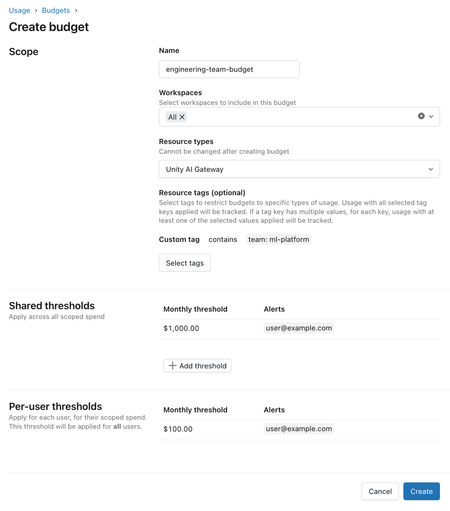
Every AI model launch comes with the same marketing promise, "frontier model", and the same question with no obvious answer behind it: genuinely better, or just more expensive with better talking points? The most common response is binary, lock down access until someone validates it calmly, which slows everyone down, or open it up to the whole team to test, which has already proven expensive in practice. When one pilot ran open access to a new model with no spend control, the average developer spent 60% more than before, with no quality gain proven at that point. Databricks documented the internal process that resolved this dilemma, not by choosing between fast and safe, but by splitting the two into phases with isolated financial responsibility: experimental access on launch day for more than 12,000 employees, with cost risk contained before the quality evaluation even finishes. The problem neither open nor locked-down access solves Locking down access until full validation sounds prudent, but it pushes the decision to a committee with no real urgency to respond quickly, and in the meantime the team loses the actual advantage of testing a new model early. Opening it up with no control solves the speed problem, but overshoots on the financial side, because nobody yet knows whether that specific model delivers a quality gain proportional to the higher cost that usually comes with a new launch. The blind spot common to both extremes is treating "granting access" and "controlling spend" as the same decision, when in practice they're two problems on different timelines, access can be immediate, cost control needs to last until the real evaluation is done. Phase 1: immediate experimental access via Unity Gateway The new model enters Unity Gateway, the company's central AI governance hub, and the configuration rolls out to more than 12,000 employees via the Unity Gateway CLI, installed on laptops through mobile device management. In the interface, the model shows up flagged as "Experimental", a simple visual signal that already tells the user this isn't a validated choice yet, without hiding the option or breaking the workflow for anyone who'd rather stick with the model they already know. Phase 2: isolating financial risk with layered budgets The part that avoids repeating the earlier pilot's problem is the layered budget design, with four tiers per user: an overall monthly cap, a daily safety limit against accidental overspend, adjustable via Slack when needed, a slice reserved for a premium model two to three times more expensive, only for tasks that actually justify it, and a separate slice exclusively for the new experimental model. The key point is that the newly launched model only draws from the experimental slice, isolating the financial risk from the rest of the person's budget. The official Unity Gateway documentation details how this budget is actually configured: a budget is scoped by workspace and resource type, accepts an optional resource tag to restrict it to a specific team, and supports up to four shared limits and twenty per-user limits, each able to trigger an email alert, usage blocking, or both. Usage blocking is applied approximately, based on a near-real-time estimate, so a burst of usage can exceed the configured limit before the block actually kicks in on the next call. My take: the detail that stands out most here isn't the number of budget tiers, it's the documentation being upfront about the imprecision of the blocking mechanism itself. An "approximate" block looks like a weakness at first glance, but it's exactly the kind of limitation no team notices until they trust the number too much and get surprised by a bill slightly above the configured cap. It's worth treating this kind of budget as a safety net against gross overspend, not as a mathematical guarantee of an absolute ceiling. Hands-on: creating a Unity Gateway budget for the experimental group A budget for the team that's going to test the experimental model, with both a shared and an individual limit, and both alert and block actions configured: databricks account budgets create --json '{ "budget_configuration": { "display_name": "experimental-model-platform-team", "filter": { "workspace_id": ["all"], "tags": {"team": ["ml-platform"]} }, "resource_types": ["UNITY_AI_GATEWAY"], "alert_configurations": [ { "scope": "SHARED", "monthly_threshold_usd": 1000, "alert_emails": ["email address removed for privacy reasons"], "action": "ALERT" }, { "scope": "PER_USER", "monthly_threshold_usd": 100, "alert_emails": ["email address removed for privacy reasons"], "action": "BLOCK_USAGE" } ] } }' The practical point of this design is that the shared limit works as an early alarm for the whole team, while the per-user block is the safety net that keeps a single person from burning through the entire group's budget alone, without requiring manual review of every request. Phase 3: three signals decide promotion or discard within days The decision to keep the new model as the default or drop it combines three signals, none sufficient on its own. The first is controlled benchmarking, internal tests covering both offline evaluation, like document reasoning and in-workspace search, and side-by-side comparison on a real task, like generating a pull request. The second is qualitative feedback from power users, collected via Slack and surveys, on how the model behaves in practice compared to the previous one. The third is cost tracking via OpenTelemetry, with all Unity Gateway traffic logged in a unified trace format, normalized per session and stratified by usage pattern, so early adopters with a different usage profile than the average user don't get compared apples-to-oranges. Combining the three signals, two models tested in this cycle confirmed a real per-session cost gain over their predecessor, a 29% drop in one case and 48% in the other, enough to promote them from experimental access to standard availability within three days. What this architecture doesn't solve on its own None of this replaces already having a mature internal evaluation suite capable of consistently running offline tests and real-task side-by-side comparisons, without that the three signals become two, formal benchmarking drops out, and the decision ends up leaning on subjective opinion more than it should. Normalizing cost by usage pattern is also a modeling choice, not an objective fact, if early adopters have a systematically different usage profile than the rest of the company, the per-session cost comparison carries a bias that needs reviewing, not just blind acceptance. And the budget block being approximate by design means this architecture protects against gross overspend, not against a small, recurring overshoot that never trips the configured alert. Is this design worth adopting? The real gain here isn't releasing a new model faster by itself, it's managing to do that without repeating the uncontrolled pilot's mistake, where access speed and financial accountability ended up decoupled from each other. For a company that already tests new models frequently, splitting budget into tiers and tying promotion to a combined signal, not an isolated benchmark, is a replicable architecture even outside the Databricks ecosystem. What actually requires real investment before you can copy that three-day result is the part the documentation takes for granted, already having a mature internal benchmark and cost-tracking infrastructure in place before the next frontier model shows up. References Databricks Blog, "How Databricks rolls out frontier models to 12,000 employees on Day 1": https://www.databricks.com/blog/how-databricks-rolls-out-frontier-models-14000-employees-day-1 Microsoft Learn, "Manage budgets for Unity Gateway - Azure Databricks": https://learn.microsoft.com/en-us/azure/databricks/ai-gateway/budgets Databricks Docs, "Manage budgets for Unity AI Gateway": https://docs.databricks.com/aws/en/ai-gateway/budgets122Views0likes0CommentsOne Command Opens Claude Code, Another Opens Codex: How Azure Databricks Governs Coding Agents
The best frontier model changes every few days, and that creates a structural dilemma for any company trying to give its whole team access to a coding agent. Locking into a single provider saves governance headaches, but leaves you stuck with a six-month-old choice right when something better shows up. Letting each team choose freely solves the stagnation problem, but scatters API keys, spend limits, and audit logs across a pile of disconnected systems, every coding agent with its own account, its own access secret pasted onto the developer's machine. Azure Databricks' Unity Gateway CLI attacks that dilemma without inventing a new permission system: it reuses the same Unity Catalog that already governs the rest of the company's data, and gives the developer the simplest possible experience, one command that opens the approved agent already authenticated, with no provider key pasted anywhere on the local machine. What the single command actually solves The Unity Gateway CLI (ug) is the single entry point for running coding agents against Unity Gateway: it handles OAuth, writes each agent's config file, and routes all traffic through whatever model or MCP server is already registered in the workspace. ug claude opens Claude Code, ug codex opens Codex CLI, ug gemini opens Gemini CLI, and the same CLI also covers OpenCode, GitHub Copilot CLI, and Pi, with ug --help listing the full supported set. Registering a tool follows the same simplicity pattern: ug mcp add connects a native Azure Databricks MCP server, Unity Catalog function, AI Search, SQL warehouse, or external connection already discovered in the workspace, without the developer having to wire that integration by hand. ug usage returns a seven-day consumption summary straight in the terminal, no separate dashboard needed for a quick check. The structural insight here isn't the command-line interface itself, it's what it avoids: without this central point, every team ends up pasting a provider's API key straight into each tool's local config, and the company loses aggregate visibility exactly when it needs it most, once coding-agent spend starts to scale. How the admin governs access and spend The detail that stands out most to anyone who already administers Azure Databricks: governing a coding agent doesn't require learning a new system. A model service is governed like any other protected Unity Catalog object, through the same three mechanisms as always. First, permission: in Catalog Explorer, granting EXECUTE on the model service to a user or group, under the Permissions tab, decides who can use that model through a coding agent. Second, rate limiting: still in Catalog Explorer, on the model service's Overview tab, setting a queries-per-minute (QPM) or tokens-per-minute (TPM) limit, for everyone or per user. Third, budget: an account admin creates a budget that aggregates spend across every Unity Gateway endpoint, with a configurable threshold to alert on, or block, usage before cost exceeds what was agreed. Once configured, you can confirm traffic is actually flowing through Unity Gateway and being recorded by querying the usage system table: SELECT service_name, requester, status_code, COUNT(*) AS calls FROM system.ai_gateway.usage WHERE service_type = 'MODEL_SERVICE' GROUP BY service_name, requester, status_code ORDER BY calls DESC; That means changing who has access to which model, or tightening a specific team's spend limit, is just another Unity Catalog permission change, not a parallel configuration the platform team has to learn from scratch. Smart Routing: per-task savings, still in Beta Smart Routing automatically picks the lowest-cost model capable of handling each task, so the developer doesn't have to choose a model for every prompt. The feature is in Beta and enabled per account: an account admin has to turn the preview on before any user can use it. Activation is per agent, via the CLI's own flag: ug codex --enable-smart-routing ug claude --enable-smart-routing The setting persists across sessions, and turning it off follows the same pattern (--disable-smart-routing). Two restrictions matter in practice: Smart Routing only chooses among model services prefixed system.ai, and the user needs EXECUTE on every candidate model in the routing pool, otherwise the request fails, naming exactly which model service is missing permission, not a generic error. Routing across different agents (say, from Claude Code to Codex) requires Omnigent, version 0.8.0 or later; within a single agent, routing already works on its own via the CLI. Tracking: from the usage table to OpenTelemetry Beyond querying system.ai_gateway.usage directly, Azure Databricks also exposes a ready-made dashboard: under Govern, in the top right of the Unity Gateway page, the Usage Dashboard tab includes a section dedicated to coding agents, with usage and cost charts per tool, no query needed. For anyone who wants finer granularity than the aggregate usage table, Azure Databricks also supports exporting metrics and logs via OpenTelemetry straight into a Unity Catalog managed Delta table, with the metric and log schema already defined for a CREATE TABLE. Claude Code, for example, exports this by setting CLAUDE_CODE_ENABLE_TELEMETRY and a set of OTEL_EXPORTER_OTLP_* variables pointing at the workspace's /api/2.0/otel/v1/metrics endpoint, but that path requires turning on the OpenTelemetry preview in Azure Databricks first. Hands-on: from zero to configured governance Installation requires Python 3.12 or later and uv, done once per device: uv tool install git+https://github.com/databricks/unity-gateway With that installed, the developer opens the approved agent, and on first use the CLI asks for the workspace URL and authenticates on its own: ug claude # Claude Code ug codex # Codex CLI ug gemini # Gemini CLI ug opencode # OpenCode ug copilot # GitHub Copilot CLI On the admin side, with no new API required: grant EXECUTE on the model service to a group in Catalog Explorer, set QPM or TPM on the same screen, and create an account budget covering the Unity Gateway endpoints. All three actions use the interface any Unity Catalog admin already knows, the coding agent just becomes one more consumer of the same model the platform already serves. What this doesn't solve on its own Smart Routing is still Beta, enabled per account, and restricted to regions with Unity Gateway support, so not every workspace has access today. Routing within a single agent only works if the user has EXECUTE on every candidate model, missing permission on just one candidate already breaks the request. Routing across different agents isn't native to the CLI, it depends on a specific Omnigent version. And fine-grained tracking via OpenTelemetry, while documented, requires turning on a separate preview, it doesn't come enabled by default alongside the CLI. Beyond that, not every client is covered via ug: Cursor IDE, for example, still depends on manual configuration (base URL and key pointed straight at Unity Gateway in the editor's own settings), the CLI only covers terminal-based agents. Is it worth adopting this way? The strongest point here isn't the CLI itself, it's the fact that governing a coding agent doesn't require a parallel permission system: it's the same Unity Catalog EXECUTE, the same per-model-service rate limit, the same account budget any Azure Databricks admin already uses for another workload. For a company already feeling the classic symptom, scattered provider keys, spend invisible until the bill arrives, reusing this mechanism lowers the cost of adoption precisely because it asks nobody to learn new governance, just apply what already exists to one more type of consumer. Smart Routing's payoff is real, but conditional on being available in your region and your account already having the preview turned on, so it's worth confirming that before promising the team routing savings. References Databricks Blog, "Deploy and manage coding agents at scale with the Unity Gateway CLI": https://www.databricks.com/blog/deploy-and-manage-coding-agents-scale-unity-gateway-cli Microsoft Learn, "Integrate with coding agents - Azure Databricks": https://learn.microsoft.com/en-us/azure/databricks/ai-gateway/coding-agent-integration-model-services Microsoft Learn, "Tutorial: Govern a coding agent's model access with Unity Gateway - Azure Databricks": https://learn.microsoft.com/en-us/azure/databricks/ai-gateway/govern-coding-agent-models Microsoft Learn, "Smart Routing for coding agents - Azure Databricks": https://learn.microsoft.com/en-us/azure/databricks/ai-gateway/smart-routing Unity Gateway, official repository: https://github.com/databricks/unity-gateway120Views0likes0Comments