azure virtual desktop
68 TopicsImproper AVD Host Decommissioning – A Practical Governance Framework
Hi everyone, After working with multiple production Azure Virtual Desktop environments, I noticed a recurring issue that rarely gets documented properly: Improper host decommissioning. Scaling out AVD is easy. Scaling down safely is where environments silently drift. Common issues I’ve seen in the field: Session hosts deleted before drain completion Orphaned Entra ID device objects Intune-managed device records left behind Stale registration tokens FSLogix containers remaining locked Defender onboarding objects not cleaned Host pool inconsistencies over time The problem is not technical complexity. It’s lifecycle governance. So I built a structured approach to host decommissioning focused on: Drain validation Active session verification Controlled removal from host pool VM deletion sequencing Identity cleanup validation Registration token rotation Logging and execution safety I’ve published a practical framework here: The framework is fully documented and includes validation logic and logging. https://github.com/modernendpoint/AVD-Host-Decommission-Framework The goal is simple: Not just removing a VM — but preserving platform integrity. I’m curious: How are you handling host lifecycle management in your AVD environments? Fully automated? Manual? Integrated with scaling plans? Identity cleanup included? Would love to hear how others approach this. Menahem Suissa AVD | Intune | Identity-Driven Architecture732Views0likes1Comment
Problems with FSLogix 3.26 - W11 MU - 10 users per Vm
Scenario Overview We are documenting a recurring intermittent Denial of Service (DoS) regarding user profiles in an AVD multi-session environment using Azure Files Premium (SMB). The issue consistently surfaces after updating to the FSLogix 3.26 branch (v3.26.126.19110). Root Cause Analysis (Failure Logs) Through deep log analysis, we identified a "driver poisoning" pattern unique to version 3.26: SMB/Kerberos Handshake Sensitivity: Under varying storage response times (latency spikes of ~350ms vs. the usual ~40ms), version 3.26 triggers an intermittent 1326 error (Logon failure: unknown user name or bad password). Driver Execution Flow Corruption: Unlike previous versions, after this initial network/authentication glitch, the 3.26 driver fails to release execution threads or volume handles properly. Catastrophic Failure (Error 267): The system attempts to access the SecuredProfileRegData path within the mounted VHDX, but the driver returns Event ID 26: "0x10b - The directory name is invalid". Unrecoverable "Zombie" State: Once Error 267 occurs, the VM becomes "poisoned." It blocks all subsequent login attempts and even prevents a clean uninstallation of the agent (MSI Error 0x80070643 due to files being "in use"), necessitating a full VM reboot or redeployment. Has anyone else been through this? My first step was to go back to Agent Version 2506 (2210 Hotfix 4) Evidence of Success with Version 2506 (2210 Hotfix 4) After performing a clean deployment and reverting to version 3.25.626.21064, metrics from April 24, 2026, show absolute stability on the same infrastructure: Consistent Logon Times: Average profile load time of 1.6 seconds across multiple concurrent users Storage Efficiency: FindFile response times remained stable between 39ms and 45ms, with the agent successfully retrying any momentary delays. Error Resilience: Unlike v3.26, if this version encounters an authentication glitch (e.g., on a local service account), it bypasses the error and remains functional, allowing domain users to log in without collateral blockages. Concurrency Support: Seamlessly managed over 20 simultaneously mounted volumes without pointer collisions or kernel hangs.897Views1like4Comments
Windows App Application Protection Policy
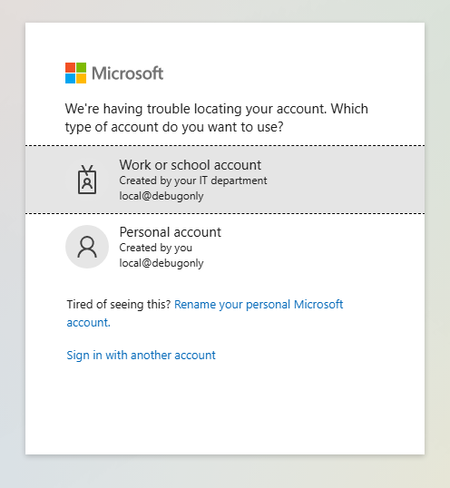
I have been testing out an Intune MAM policy to restrict copy/paste and drive redirection to AVD session hosts based on the link here: https://learn.microsoft.com/en-us/windows-app/require-device-security-compliance-intune?tabs=web#related-contentHowever, I've run into problems (in two separate tenants) that have halted me from being able to test. Setup Intune App Protection Policy targeting Windows Devices & Microsoft Edge\ Conditional Access Policy enforcing App Protection Policy when users access 'Azure Virtual Desktop' target resource via https://windows.cloud.microsoft.com Results First When signing into a user account targeted by the policy, they are prompted to Switch Edge Profile which signs in the user to a new Edge profile for 'Work or School Account'. The account has to sign in again. The account can access Windows App resources When launching a desktop session, this authentication page pops up for an account "local@debugonly" Second When signing into a user account targeted by the policy, they are prompted to Switch Edge Profile which signs in the user to a new Edge profile for 'Work or School Account'. The account has to sign in again. After sign in, the account loops with 'Switch Edge Profile' and gets stuck here I'm curious if anyone has gotten this to work and what was your setup? Or if Microsoft or provide some assistance or if this is in the wrong forum, any help would be appreciated.528Views0likes2CommentsSecure Boot Q&A opportunities continue in July
If you're still working through Secure Boot certificate update rollouts, Microsoft is continuing the conversation throughout July with three opportunities to get your questions answered by the people closest to the technology. Whether you're focused on Windows Server deployments, virtualization platforms, or OEM updates, these upcoming events are designed to help you navigate planning, validation, troubleshooting, and implementation questions in a live, interactive format. Microsoft engineers and subject matter experts will be available to respond directly to questions from the community. Coming up in July: July 1 - Windows Server Secure Boot AMA Ask Microsoft engineers about Secure Boot certificate updates in Windows Server environments, including deployment planning, monitoring, troubleshooting, and more. July 8 - Secure Boot Office Hours for virtualized environments Bring your questions about Hyper-V, Azure offerings, Windows 365, VMware, and other virtualization scenarios. July 15 - OEM Secure Boot Office Hours Connect with experts to discuss OEM-specific questions, such as firmware considerations, as you prepare for or validate Secure Boot certificate updates. Questions don't have to wait until the events start. With community events, you can post your questions and comments ahead of time, then join the discussion live or catch up when it's convenient for you. Hope you find these events helpful. You can also catch up on demand with the series of Secure Boot AMAs that have taken place over the past several months. Here are the three most recent editions: Ask Microsoft Anything: Secure Boot - June 2026 Ask Microsoft Anything: Secure Boot - May 2026 Ask Microsoft Anything: Secure Boot - April 2026193Views1like0Comments
Windows OS edition validation error
In one of my session hosts, the windows operating system version & edition has different values, On winver.exe" --> it gives Windows 11 multisession 22h2 whereas in registry, path to HKLM:\Software\Microsoft\Windows NT\CurrentVersion\ Keyname: ProductName Value; Windows 10 multisession Can someone experience this in similar, .. Thanks, RajkumarSolved383Views1like4CommentsGraphic issue on single session host personal avd
We recently deployed single session host with azure gallery image(windows1125H2enterprise+m365apps) and random users are facing graphic issue on the avd,screen fully get blue line unable to see anything on the display,how to resolve this?289Views0likes2Comments
Feature request: allow setting web client features from direct-launch-url
We use the "direct launch URL" feature of the AVD web client to deep link users to a session desktop (https://learn.microsoft.com/en-us/windows-app/direct-launch-urls?tabs=avd). One of the reason we use the web client is because we use AVD in exam halls on Chromebooks in kiosk-mode. The ChromeOS kiosk-mode only supports websites. Students are faced with a connection dialog in which they can toggle IME and Special Keys. The students have to enable IME, but since these are university-owned devices, they do not know and just click "Connect". We would like to be able to configure these client options automatically. For example, as query parameters in the direct-launch-url. Ideally, we would also skip the "Connect" dialog entirely and just go strait into the session once the direct-launch-url is loaded.301Views0likes2CommentsMicrosoft Technical Takeoff 2026: Windows + Intune
Deep dives. AMAs. Windows, Intune, Windows 365, and Azure Virtual Desktop. Tune in for virtual technical skilling that takes you deep inside the latest features, capabilities, and scenarios for commercial organizations and the IT professionals that support them. Microsoft Technical Takeoff 2026 for Windows + Intune is a great opportunity to skill up and learn from engineering and product teams behind the features. Day 1 - now on demand! Let's talk Windows and Intune: 2026 edition The latest in Windows 11 security Uplevel business continuity with Windows 365 Reserve Hotpatch updates demystified: answers to real-world questions Zero Trust in action: securing endpoints with Intune AMA: Windows Autopilot The AI‑powered admin: emerging trends in endpoint management Eliminating NTLM in Windows One platform, many industries: smart Android management with Intune Resiliency with Windows 365 and Azure Virtual Desktop Day 2 - now on demand! The latest in security for Windows 365 and Azure Virtual Desktop Secure Boot certificate updates explained Feedback wanted: App management in the enterprise Ready day one: how to get Windows users up and running fast Making the most of your Intune data Windows 365 reporting and monitoring updates Least privilege on Windows with Endpoint Privilege Management Windows 365 Frontline expands with Cloud Apps and more From panic to productive: point-in-time restore in Windows The Intune playbook for iOS management at scale Day 3 - now on demand! Why smarter Windows management starts with Intune Reporting at scale with Windows Autopatch update readiness User experience updates: Windows 365 Boot and more AI roundup: Intune agents for outcome-oriented innovation AMA: Getting the most from Security Copilot in Intune Manage Apple devices at scale: Intune security best practices Click less, manage more: simplify app deployment with Intune App Control for Business: same roots, new playbook Intune timing demystified: what really happens behind the scenes Migrating from VDI to Windows 365 Day 4 - now on demand! AMA: The latest in Windows hardware security Zero Trust DNS: Securing Windows one connection at a time AMA: Secure and manage AI and agentic capabilities in Windows Deploy and manage Windows 365 with Microsoft Intune Unpacking Endpoint Management: Live from Tech Takeoff 2026 Azure Virtual Desktop for hybrid environments Protect users, stop attacks: Passkeys on Windows AMA: AI and agentic features for Windows 365 Transitioning to post-quantum cryptography Resilience for the modern era: Windows quick machine recovery Please share your thoughts so we can keep bringing you these types of events!58KViews12likes27CommentsWindowsAppRuntime 1.4 Failures in AVD Multi-Session – Event ID 404 Production Case
We recently experienced a production issue in an Azure Virtual Desktop multi-session environment that initially looked random — but turned out to be a shared framework instability amplified by scale. Environment: AVD multi-session host pools FSLogix profile containers MSIX App Attach Intune-managed Clean golden image Everything looked healthy. Yet packaged applications started failing across multiple host pools. Symptoms observed Users reported: Error 0x80070005 AppXDeploymentServer Event ID 404 WindowsAppRuntime 1.4 marked as NeedsRemediation Failures persisted after: Reboots Host redeployments Image rebuild This was not: A profile corruption issue An App Attach packaging issue An Intune deployment failure What actually broke Under session churn conditions (logoff / new session / runtime re-validation), WindowsAppRuntime 1.4 entered a NeedsRemediation state. Event Viewer showed: AppXDeploymentServer Event ID 404 HRESULT 0x80070005 Runtime file creation failure under WindowsApps Multi-session did not cause the issue. It amplified it. Shared framework registration timing under concurrent sessions made a rare condition systemic. Why multi-session exposed it In single-session environments, runtime inconsistencies remain isolated. In multi-session: Shared framework dependencies are reused Concurrent validation occurs Host pools recycle under load Registration timing becomes critical What would be a rare edge case became recurring instability. Remediation approach Instead of periodic polling, we moved to event-driven self-healing. Detection trigger: AppXDeploymentServer Event ID 404 Remediation logic: Restart AppXSVC Re-provision WindowsAppRuntime 1.4 Prevent concurrent duplicate execution Log execution We implemented a Scheduled Task: Monitoring Operational log Triggering immediately on Event ID 404 Running under SYSTEM Deployed via Intune Win32 package Detection logic validating task presence This converted reactive troubleshooting into automated correction across host pools. Architectural takeaway Multi-session environments amplify shared dependency weaknesses. WindowsAppRuntime is not “just another component” — it is a platform dependency. If the runtime layer drifts, everything layered above it collapses: MSIX App Attach Packaged apps Registration consistency Self-healing must be part of AVD design. For the structured technical case study (including deployment pattern and remediation logic), full write-up here: https://modernendpoint.tech/avd-multi-session-failure-analysis/ Has anyone else observed WindowsAppRuntime 1.4 entering a NeedsRemediation state under multi-session load? Curious if others saw correlation with specific Windows updates. — Menahem Suissa Modern Endpoint Architect605Views1like2Comments
RemoteApp for Word/Excel with Google Drive
I want to set up RemoteApp so users can use Word and Excel remotely. At the same time, I want them to be able to access and save files directly from Google Drive within those apps. We currently only have 3 users who need this, but we plan to expand in the future. What’s the best way to do this? Do I need a specific setup, plugin, or service to make Google Drive work seamlessly with Word/Excel in a RemoteApp environment?375Views0likes2Comments