azure information protection
48 Topics
How much of your Microsoft 365 environment can you actually see at once?
Not how many users you have. Not how many sites, teams, apps or flows you have. How much of it can you actually see connected together? I've been working across Microsoft 365 environments for a while, and I kept running into the same thing. There is no shortage of information. If anything, there is probably too much of it. Users, groups, permissions, SharePoint, Teams, Power Apps, Power Automate, Power BI, Dataverse, OneDrive, Exchange, Intune, licensing, configuration... It's all there. But when you're actually trying to understand how everything fits together, it can be a different story. You open one blade. Find something. Open another. Cross-check it. Go back. Open something else. Before long, you're jumping between different parts of the tenant trying to build the bigger picture in your head. And if you're working with larger environments, that gets difficult pretty quickly. The information isn't necessarily missing. The relationships between the information are what can be difficult to see. That got me thinking about a slightly different question: Instead of "where do I find this information?" "Show me what's connected to this." That's where VisibleState started. Start anywhere. Follow the connections. Imagine starting with a single user. Instead of seeing that user simply as a record with a list of properties, imagine being able to explore the relationships around them: User → Groups → SharePoint → Teams → Power Apps → Power Automate → Power BI → Dataverse → OneDrive → Exchange → Intune Then the questions become different: What does this user have access to? Is that access direct or coming through a group? What resources are connected to them? What depends on something they're associated with? Which licenses are involved? Are there relationships that look unusual? If something changes, what else might be affected? Those questions aren't necessarily about finding another piece of information. They're about putting information that already exists into context. A report can tell you that something exists. A connected view helps you understand what it is connected to. Illustrative example below — not a real customer environment. I'm not suggesting Microsoft 365 doesn't already give us this information Quite the opposite. Microsoft 365 already gives administrators an incredible amount of information and tooling. The thing I've been thinking about is what happens when you want to look across those boundaries. Sometimes I don't want another export. I don't want another list. I don't necessarily want another dashboard. I want to start with something I'm looking at and ask: "What's connected to this?" And then keep following the trail. That's the idea I'm exploring with VisibleState. The interesting part is what happens when you change the viewpoint The same relationships can be useful for completely different reasons. For example: Administrators may want to understand access, permissions and dependencies. Security and governance teams may want to find unusual relationships or exceptions. Compliance teams may need to understand who can access something and why. People managing multiple environments may want a consistent way to understand what's there without rebuilding the picture manually every time. Leadership may not need to see the graph at all. They may simply want to know what's important, what's exposed and what could be affected. It's still the same underlying environment. You're just looking at it from a different angle. And that's where I think things get interesting. Where I'm at with it VisibleState started as something I was building to make my own work easier. I was spending a lot of time investigating environments, tracing access and putting information together for reports. The individual tasks weren't necessarily difficult. It was the jumping between different places and reconstructing the bigger picture that took the time. So I started building something that would let me approach the environment through the relationships instead. It's grown quite a bit from where it started, and I'm continuing to build it. I'm not posting this as a product launch, and I'm not looking for people to sign up. I'm genuinely interested in whether the problem I'm seeing is familiar to other people working with Microsoft 365. So I'm curious... If you could start with any object in your Microsoft 365 environment and immediately see what it's connected to, where would you start? Would it be: Users and access Groups and permissions SharePoint and Teams Power Apps, Power Automate, Power BI and Dataverse Licensing and resources Governance and unusual relationships Something completely different Maybe you've already got a good way of doing this. Maybe you still find yourself jumping between different services and piecing things together manually. Or maybe I'm looking at the problem from the wrong direction. What's the one relationship in your Microsoft 365 environment that you wish you could see instantly?216Views0likes0Comments
Sensitivity label "Certificate Error"
When applying Sensitivity Labels in Microsoft Office applications, we receive the following certificate warning: "The certificate issuer for this site is untrusted or unknown. Do you wish to proceed?" We have already excluded the required Microsoft Azure URLs from the firewall and disabled SSL/TLS inspection, but the issue still persists. Observations: 1.On the same domain-joined computer, when signed in with a local user account, Sensitivity Labels work correctly without any errors. 2.When signed in with a domain user account, the certificate warning appears while applying or accessing Sensitivity Labels. Could you please help us identify the root cause and provide a solution? Your assistance in troubleshooting this issue would be greatly appreciated.114Views0likes1CommentPrimer: How to Use RBAC for Applications to Control App Use of the Mail.Send Permission
The temptation to use the Mail.Send application permission in scripts can lead PowerShell developers into trouble because the permission allows access to all mailboxes, including sensitive executive and financial mailboxes. Fortunately, RBAC for Applications allows tenants to control the access that apps have to mailboxes and other Exchange content. All explained here with an example script to test RBAC of Applications. https://office365itpros.com/2026/02/17/mail-send-rbac-for-applications/943Views3likes4Comments
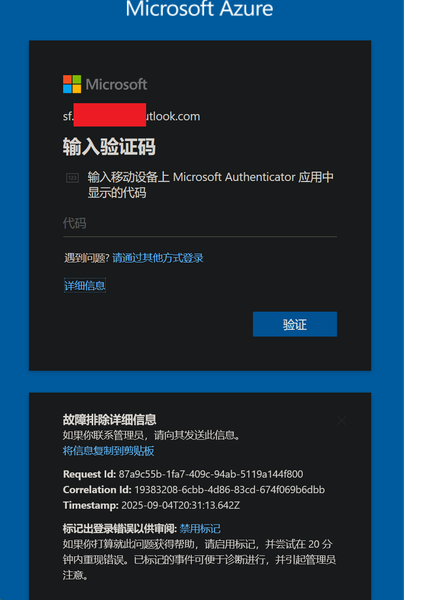
My Azure login is stuck at MFA and cannot proceed
In August, I was still able to log in to Azure, and by logging in through GitHub I could bypass 2FA. But now, no matter how I try, logging in via GitHub always requires 2FA. I can’t access my Azure account anymore—nothing works. The system prompts me to use Microsoft Authenticator to confirm a two-digit code in real time. My Microsoft Authenticator on my iPhone is logged into the same Microsoft account, but I’m not receiving any verification requests for Azure login. No matter how much I refresh, nothing shows up. I’ve already updated the Microsoft Authenticator app to the latest version from the App Store. However, my personal Microsoft account works fine and can log in without any issues.499Views0likes2CommentsAccount Hacked
Hello Community, My account has been hacked, copied and/or duplicated with some other account as I was originally Sids1 with this email for more than 6 months now and this has changed somehow. It's very concerning to me since I also found some other person named Siddhartha when I was logging into my account. I reported that to the Microsoft Account Team but have not received any replies yet. Please suggest anything that can be done to catch this hacker who is stealing my identity to and fro. Best Regards Siddhartha SharmaSolved1.5KViews1like4CommentsExternal people can't open files with Sensitivity Label encryption.
Question: What are the best practices for ensuring external users can open files encrypted with Sensitivity Labels? Hi all. I've been investigating proper setup of sensitivity labels in Purview, and the impact on user experience. The prerequisites are simple enough, creating and configuring the labels reasonably straightforward, and publishing them is a breeze. But using them appears to be a different matter! Everything is fine for labels that don't apply encryption (control access) or when used internally. However, the problems come when labels do apply encryption and information is sent externally. The result is that we apply a label to a document, attach that document to an email, and send it externally - and the recipient says they can't open it and they get an error that their email address is not in our directory. This is because due to the encryption, the external user needs to authenticate back to our tenant, and if they're not in our tenant they obviously can't do this so the files won't open. So, back to the question above. What's the easiest / most secure / best way to add any user we might share encrypted content with to our tenant. As I see it we have the following options: Users have to request Admins add the user as a Guest in our tenant before they send the content. Let's face it, they'll not do this and/or get frustrated. Users share encrypted content directly from SharePoint / OneDrive, rather than attaching it to emails (as that would automatically add the external person as a Guest in the tenant). This will be fine in some circumstances, but won't always be appropriate (when you want to send them a point-in-time version of a doc). With good SharePoint setup, site Owners would also have to approve the share before it gets sent which could delay things. Admins add all possible domains that encrypted content might be shared with to Entra B2B Direct Connect (so the external recipient doesn't have to be our tenant). This may not be practical as you often don't know who you'll need to share with and we work with hundreds of organisations. The bigger gotcha is that the external organisation would also have to configure Entra B2B Direct Connect. Admins default Entra B2B Direct Connect to 'Allow All'. This opens up a significant attack surface and also still requires any external organisation to configure Entra B2B Direct Connect as well. I really want to make this work, but it need to be as simple as possible for the end users sharing sensitive or confidential content. And all of the above options seem to have significant down-sides. I'm really hoping someone who uses Sensitivity Labels on a day-to-day basis can provide some help or advice to share their experiences. Thanks, Oz.3.5KViews0likes20Comments
Sensitivity Labels: Labeling Documents in OneDrive severly restricts sharing with external users
Hi everyone, i am currently implementing sensitivity labels for our org and this one thing is really holding me back. Previously, it was possible do create a word-document (or any file) in OneDrive, share it to an external gmail (or any other) address and let them access it after using an email OTP. Nice! I have just recently created a set labels and assigned them to me in Purview. Most labels, including the one that is assigned to docs by default, do not apply any encryption. A label existing on a document still seems to make sharing way harder/impossible in certain scenarios: Created a fresh gmail-address-->created a fresh word document with a default label (public, no sharing restrictions, no encryption)--> Shared said document to said gmail-address via Link --> opened link in private browser tab --> OTP-Verification happens --> Document opens up in browser, then IMMEDIATELY forwards me to our tenants login-page. There, the gmail address user obviously cant log in since he is not a guest and does not have an account. The fun part: You can (sometimes) use the browser "back" button to return to the document to read and edit. This... can't be intended, right? Research suggests to me that word for the web attempts to resolve the label, for which it has to access our tenant. It then fails since no tenant user is logged in and prompts me to do so. When i use a gmail address, create a personal MS account, invite this account into my tenant as a guest, accept the request and share to that user, the user can work with the doc just fine after completing his steps. But this is way to much work for IMO. Has anyone seen this issue? Did i misconfigure something? Has anyone found a solution or a reasonable workaround or are people just living with this loss of functionality? Do you think its just a bug and i should report it?Solved621Views0likes2Comments
Issues with Sensitivity Labels and "Specific email addresses or domains" - Not working
Hello! We have enabled Sensitivity Labels in our tenant. The access control settings for the label states that a specific domain gets the permission "Co-Author". When we enable the Sensitivity label on a document and sent it towards the approved domain, it results in an error message when authenticating to open the document: "Selected user account does not exist in tenant 'Veni AS' and cannot access the application in that tenant. The account needs to be added as an external user in the tenant first. Please use a different account." After doing some research I did some changes to the external domain within the Cross-tenant settings. The external domain now has the following settings: Inbound access: Allow access on external users and groups, within B2B Collaboration Allow access on external users and groups, within B2B direct connect Trust multifactor authentication from Microsoft Entra tenants, within Trust settings. Outbound access: Allow access on users and groups, within B2B Collaboration Allow access on users and groups, within B2B direct connect External Identities: Block access for external users and groups. (Inherited from default) After doing this change, I no longer get the same error message as above when authenticating to open the labeled document. Now I get the following error message: "You are not signed in to office with an account that has permission to open this document. You may sign in a new account into Office that has permission or request permission from the content owner" I have this working from another tenant to the same external domain and I have cross-checked the settings. Any idea on how to proceed, or if it is any obvious change I need to make in order to get this to work? All feedback appreciated! :-)415Views1like1Comment
Empowering Data Security with Azure Rights Management and Azure Information Protection
In today’s digital world, data is one of the most valuable assets a business can have. Whether it’s customer information, financial records, or internal documents, keeping that data safe is absolutely necessary. As more companies move to cloud-based systems and work in hybrid environments, the need for smart and reliable data protection tools is growing fast. That’s where Azure Rights Management (RMS) and Azure Information Protection (AIP) come in. These tools help businesses organize, label, and secure their data across different platforms, making sure it stays protected no matter where it goes. Understanding Azure Rights Management (RMS) Azure RMS is a cloud-based service designed to safeguard digital information through encryption, identity, and authorization policies. It ensures that data remains protected regardless of where it resides—on a local device, in the cloud, or in transit. Core Protection Workflow The Azure RMS protection process is straightforward yet powerful: Encryption: When a user initiates protection, the content is encrypted using strong cryptographic standards. Policy Attachment: An access policy is embedded within the file, defining what actions are permitted (e.g., read-only, no print, no forward). Authentication: Access is granted only after successful authentication via Azure Active Directory (Azure AD). Decryption and Enforcement: Once authenticated, the file is decrypted and the access policy is enforced in real time. Encryption Standards in Use Azure RMS employs: AES 128-bit and 256-bit encryption for securing documents. RSA 2048-bit encryption for protecting customer-specific root keys. These standards ensure that even if data is intercepted, it remains unreadable and unusable without proper authorization. Azure Information Protection: Beyond Encryption While Azure RMS focuses on securing content, Azure Information Protection (AIP) adds a layer of intelligence through classification and labeling. AIP enables organizations to define and apply sensitivity labels that reflect the value and confidentiality of their data. From Classic to Unified Labeling Microsoft has transitioned from the classic AIP client to the Unified Labeling Client, which integrates directly with Microsoft 365 compliance solutions. This shift simplifies management and enhances compatibility with modern Office applications. Sensitivity Labels in Action Sensitivity labels help organizations manage data access and usage by categorizing content into levels such as: Public: Safe for public distribution. General: Internal use only. Confidential: Restricted to specific internal groups. Highly Confidential: Limited to named individuals with strict usage controls (e.g., no printing or downloading). Labels can be applied manually by users or automatically based on content inspection, context, or metadata. Built-In Labeling in Office Apps Modern Office apps now support built-in labeling, eliminating the need for separate add-ins. This native integration ensures a smoother user experience and reduces the risk of compatibility issues or performance degradation. Licensing Overview To leverage AIP features, organizations must have the appropriate licensing: Office 365 E3 and above: Basic classification and labeling. AIP Plan 1: Included in Microsoft 365 E3 and EMS E3. AIP Plan 2: Included in Microsoft 365 E5 and EMS E5, offering advanced capabilities like automatic labeling and document tracking. Real-World Use Cases Access Control: Limit access to sensitive documents based on user roles or departments. Version Management: Use labels to distinguish between draft and final versions. Automated Workflows: Trigger encryption or archiving when documents reach a certain sensitivity level. Why Azure Information Protection Matters Implementing AIP brings a host of benefits: Persistent Protection: Data remains secure even when shared externally or accessed offline. Granular Control: Define who can access data and what they can do with it. Visibility and Auditing: Monitor access patterns and revoke access if needed. Hybrid Compatibility: Protect data across cloud and on-premises environments using the Rights Management connector. Centralized Management: Streamline policy creation and enforcement across the organization. Conclusion Azure RMS and AIP together form a powerful duo for modern data protection. By combining encryption, identity management, and intelligent labeling, organizations can confidently secure their most valuable asset information while enabling seamless collaboration and compliance.353Views0likes0Comments
AIP padlock icon missing in encrypted message
Hi, I have enabled AIP in my tenant along with sensitivity labels and encryption. I can send encrypted messages succesfully however the secure message - which contains a padlock icon referring to a microsoft website - is broken and fails to load. I’ve viewed the source of the message and tried to load the image in my browser. The image failed to load and I believe the image location is not valid anymore. Could you please validate and provide a fix so that the padlock icon loads successfully? Currently the secure message looks like a phishing email and will probably be treated as such.828Views0likes4Comments