azure front door
73 Topics
Protect against Brotli CVE-2026-111497 with Azure Web Application Firewall (WAF)
Google Brotli versions 1.0.3 through 1.2.0 contain a buffer overflow vulnerability in the Brotli decoder, according to the recently published CVE-2026-111497. A remote, unauthenticated attacker can send a crafted Brotli-compressed stream to corrupt decoder memory, expose sensitive memory contents, cause a denial of service, or potentially run arbitrary code. Any application that decompresses untrusted Brotli data may be affected. This includes Node.js and Python applications that bundle the vulnerable decoder, and services that accept request bodies with the Content-Encoding: br header. We strongly recommend upgrading Brotli to a patched version: 1.0.10, 1.1.1 or 1.2.1 (Brotli releases). If you use Node.js, upgrade to 22.23.4, 24.22.1 or 26.12.1 (Node.js security release). If you can't patch your applications right away, Azure WAF on Application Gateway, Application Gateway for Containers and Azure Front Door can help mitigate the inbound attack vector, which is Brotli-compressed request bodies sent to your application. Note: Azure WAF inspects only inbound requests to your application. It can't protect applications that fetch and decompress Brotli-encoded responses from external servers. Those applications must be patched. Built-in protection enabled by default If you use Azure WAF with DRS 2.2 on Application Gateway or Azure Front Door Premium, you're protected by default against crafted Brotli-compressed request bodies. Rule 920450 (Paranoia Level 1, enabled by default) checks requests against a list of restricted headers, and DRS 2.2 adds Content-Encoding to that list. The rule has a critical anomaly score, so a single match blocks the request when the WAF policy is in Prevention mode. Earlier rule set versions don't restrict the Content-Encoding header. If you're still on DRS 2.1, CRS 3.2 or earlier, we recommend upgrading to DRS 2.2 to get the latest protection. To learn how, see Upgrade CRS or DRS ruleset version. If your application uses Next.js image optimization, apply the BlockNextImageCVE2026111497 custom rule below, even if you're on DRS 2.2. Custom rules to mitigate CVE-2026-111497 The custom rules block two attack vectors: 1. CVE2026111497 blocks any request whose Content-Encoding header includes the br (Brotli) coding, which this attack uses. DRS 2.2 already covers this vector through rule 920450. We recommend this rule for: WAF policies still on DRS 2.1 or earlier, while you plan the upgrade. WAF policies where rule 920450 is disabled or overridden. Azure Front Door Standard, which supports custom rules only. Managed rule sets require Azure Front Door Premium. WAF policies attached to Azure Application Gateway for Containers. 2. BlockNextImageCVE2026111497 blocks any request to the Next.js image optimization endpoint, including under a base path. It URL-decodes and lowercases the request URI first, so encoded or mixed-case variants are also blocked. No managed rule set covers this vector. We recommend this rule for all WAF policies that protect Next.js applications, whatever rule set version they use. These rules may also block legitimate traffic. The first may block clients sending Brotli-compressed request bodies. The second blocks every image served through Next.js image optimization (for example, by the image component), so those images won't load. If you aren't sure whether your application relies on either, set the action to 'Log traffic only' first, and review your WAF logs before switching to 'Deny traffic'. You can remove the Content-Encoding rule once your applications are patched or your policy uses DRS 2.2. Keep the Next.js image optimization rule until your applications are patched. Azure WAF on Application Gateway and Application Gateway for Containers If you are using CRS 3.0 or CRS 3.1, upgrade your ruleset version to a later version first, then apply the custom rule. { "name": "CVE2026111497", "priority": 100, "ruleType": "MatchRule", "action": "Block", "matchConditions": [ { "matchVariables": [ { "variableName": "RequestHeaders", "selector": "Content-Encoding" } ], "operator": "Regex", "matchValues": [ "(?:^|,)[ \\t]*br[ \\t]*(?:,|$)" ], "transforms": [ "Lowercase" ] } ] } { "name": "BlockNextImageCVE2026111497", "priority": 90, "ruleType": "MatchRule", "action": "Block", "state": "Enabled", "matchConditions": [ { "matchVariables": [{"variableName": "RequestUri"}], "operator": "Regex", "negationConditon": false, "matchValues": ["^(?:https?://[^/?#]+)?/(?:[^?#]*/)?_next/image/?(?:\\?|$)"], "transforms": ["UrlDecode", "Lowercase"] } ] } Azure WAF on Azure Front Door { "name": "CVE2026111497", "priority": 120, "enabledState": "Enabled", "ruleType": "MatchRule", "action": "Block", "matchConditions": [ { "matchVariable": "RequestHeader", "selector": "Content-Encoding", "operator": "RegEx", "negateCondition": false, "transforms": [ "Lowercase" ], "matchValue": [ "(?:^|,)[ \\t]*br[ \\t]*(?:,|$)" ] } ] } { "name": "BlockNextImageCVE2026111497", "priority": 90, "ruleType": "MatchRule", "action": "Block", "enabledState": "Enabled", "matchConditions": [ { "matchVariable": "RequestUri", "operator": "RegEx", "negateCondition": false, "matchValue": ["^(?:https?://[^/?#]+)?/(?:[^?#]*/)?_next/image/?(?:\\?|$)"], "transforms": ["UrlDecode", "Lowercase"] } ] } Restrict request size The proof-of-concept payloads analyzed so far are about 23 MB each. Attackers may be able to craft smaller payloads, so treat size limits as an extra layer of protection, not a mitigation on their own. Whatever rule set version you use, we recommend the following: Azure WAF on Application Gateway and Application Gateway for Containers The proof-of-concept payloads are well above the default maximum request body size of 128 KB on Application Gateway and Application Gateway for Containers. We recommend setting the maximum request body size in your WAF policy to the smallest value your application needs. Learn more. Azure WAF on Azure Front Door To limit request body size, create a custom rule with a size constraint. For request body checks, the size is measured on the decoded body. Set the limit to the smallest value your application needs and make sure request body inspection is enabled in your WAF policy settings. The following example blocks request bodies larger than 40 KB. This rule supports limits of up to 128 KB. { "name": "BlockLargeRequestBody", "priority": 130, "enabledState": "Enabled", "ruleType": "MatchRule", "action": "Block", "matchConditions": [ { "matchVariable": "RequestBody", "operator": "GreaterThan", "negateCondition": false, "matchValue": [ "40960" ] } ] } You can find more information about custom rules on Azure WAF for Application Gateway or for Azure Front Door. Changelog 11/2 9:00 AM PST - Updated with additional custom rules14KViews3likes0Comments
Azure WAF custom rules for PHP2Shell mitigation
Written in collaboration with Gunjan Jain and yuvalpery As described in our earlier blog, Addressing PHP2Shell CVE-2026-109618 and CVE-2026-109619: upgrade guidance and Azure WAF mitigations, we strongly recommend upgrading to a patched version of PHP as soon as possible. Upgrading PHP remains the recommended and complete remediation for these vulnerabilities. For customers who are unable to upgrade immediately, this guidance provides WAF custom rules that can help reduce exposure to selected request patterns associated with exploitation techniques for these vulnerabilities. WAF custom rules The following three custom rules can be considered based on your application configuration and traffic patterns. Because custom rules can affect legitimate application traffic, review the potential application impact and validate the rules before enabling enforcement. Restrict PHP session upload progress PHP supports session upload progress for tracking file uploads. For applications that do not depend on this functionality, customers can use a custom rule to restrict multipart form requests containing PHP_SESSION_UPLOAD_PROGRESS. The rule checks for multipart/form-data requests whose inspected request body contains the PHP session upload progress token. Custom rule definitions: Azure Front Door WAF { "name": "BlockPhpSessionUploadProgress", "priority": 100, "enabledState": "Enabled", "ruleType": "MatchRule", "action": "Block", "matchConditions": [ { "matchVariable": "RequestHeader", "selector": "Content-Type", "operator": "Contains", "negateCondition": false, "transforms": ["Lowercase"], "matchValue": ["multipart/form-data"] }, { "matchVariable": "RequestBody", "operator": "Contains", "negateCondition": false, "matchValue": ["php_session_upload_progress"], "transforms": ["Lowercase"] } ] } Application Gateway and Application Gateway for Container (AGC) WAF { "name": "BlockPhpSessionUploadProgress", "priority": 90, "ruleType": "MatchRule", "action": "Block", "state": "Enabled", "matchConditions": [ { "matchVariables": [ { "variableName": "RequestHeaders", "selector": "Content-Type" } ], "operator": "Contains", "negationConditon": false, "matchValues": [ "multipart/form-data" ], "transforms": [ "Lowercase" ] }, { "matchVariables": [ { "variableName": "PostArgs" } ], "operator": "Contains", "negationConditon": false, "matchValues": [ "php_session_upload_progress" ], "transforms": [ "Lowercase" ] } ] } This rule reduces exposure through the PHP session-upload-progress path but does not address all exploitation paths associated with the vulnerabilities. Potential application impact: Applications that legitimately use PHP session upload progress will also match this rule. A substring match may also detect the token when it appears as harmless text or in uploaded content exposed to inspection. Limit deeply nested form parameters Customers can use a custom rule to identify unusually deep parameter nesting in application/x-www-form-urlencoded requests. The proposed rule detects request field names containing 20 or more levels of bracket nesting after URL decoding. Because the 20-level threshold is an application policy choice rather than a vulnerability-defined boundary, legitimate applications using deeply nested parameters may also match this rule. Custom rule definitions: Azure Front Door WAF: { "name": "PhpFormNesting20", "priority": 110, "enabledState": "Enabled", "ruleType": "MatchRule", "action": "Log", "matchConditions": [ { "matchVariable": "RequestHeader", "selector": "Content-Type", "operator": "BeginsWith", "negateCondition": false, "transforms": [ "Trim", "Lowercase" ], "matchValue": [ "application/x-www-form-urlencoded" ] }, { "matchVariable": "RequestBody", "operator": "RegEx", "negateCondition": false, "transforms": [ "UrlDecode" ], "matchValue": [ "(?:^|&)[^&=\\[]+(?:\\[[^&=\\]]*\\]){20}" ] } ] } Application Gateway and Application Gateway for Container (AGC) WAF { "name": "PhpFormNesting20", "priority": 91, "ruleType": "MatchRule", "action": "Log", "state": "Enabled", "matchConditions": [ { "matchVariables": [ { "variableName": "RequestHeaders", "selector": "Content-Type" } ], "operator": "BeginsWith", "negationConditon": false, "matchValues": [ "application/x-www-form-urlencoded" ], "transforms": [ "Trim", "Lowercase" ] }, { "matchVariables": [ { "variableName": "RequestBody" } ], "operator": "Regex", "negationConditon": false, "matchValues": [ "(?:^|&)[^&=\\[]+(?:\\[[^&=\\]]*\\]){20}" ], "transforms": [ "UrlDecode" ] } ] } Recommended deployment: Start with the rule in Log mode and review matches against legitimate application traffic. Consider moving the rule to Block only after validating application compatibility. Limit deeply nested multipart parameters Customers can apply a similar control to multipart/form-data requests by detecting deeply nested field names. The proposed rule detects multipart field names containing 20 or more levels of nesting where the relevant request content is available to WAF inspection. As with deeply nested URL-encoded parameters, legitimate applications may use complex multipart field structures. Custom rule definitions: Azure Front Door WAF { "name": "PhpMultipartNesting20", "priority": 111, "enabledState": "Enabled", "ruleType": "MatchRule", "action": "Log", "matchConditions": [ { "matchVariable": "RequestHeader", "selector": "Content-Type", "operator": "BeginsWith", "negateCondition": false, "transforms": [ "Trim", "Lowercase" ], "matchValue": [ "multipart/form-data" ] }, { "matchVariable": "RequestBody", "operator": "RegEx", "negateCondition": false, "matchValue": [ "(?i)(?:^|\\r?\\n)content-disposition:[ \\t]*form-data[^\\r\\n]*;[ \\t]*name[ \\t]*=[ \\t]*(?:\"(?:\\\\[\"\\\\]|[^\"\\r\\n\\[])+(?:\\[(?:\\\\[\"\\\\]|[^\"\\r\\n\\]])*\\]){20}|[^ \\t\\r\\n;\"\\[]+(?:\\[[^ \\t\\r\\n;\"\\]]*\\]){20})" ] } ] } Application Gateway and Application Gateway for Container (AGC) WAF { "name": "PhpMultipartNesting20", "priority": 92, "ruleType": "MatchRule", "action": "Log", "state": "Enabled", "matchConditions": [ { "matchVariables": [ { "variableName": "RequestHeaders", "selector": "Content-Type" } ], "operator": "BeginsWith", "negationConditon": false, "matchValues": [ "multipart/form-data" ], "transforms": [ "Trim", "Lowercase" ] }, { "matchVariables": [ { "variableName": "PostArgs" } ], "operator": "Regex", "negationConditon": false, "matchValues": [ "^[^\\[\\]]+(?:\\[[^\\]]*\\]){20}" ], "transforms": [] } ] } This rule targets deeply nested multipart field names. It does not restrict every multipart upload or provide complete mitigation for the underlying vulnerabilities. Recommended deployment: Start in Log mode, review matching traffic, and consider moving to Block only after validating the impact on your application. Deployment and validation considerations We recommend applying these custom rules only to affected PHP application domains and routes, including extensionless routes handled by PHP, rather than broadly applying them to unrelated applications. Before enabling enforcement: Review the potential impact on legitimate application traffic. Test each custom rule independently before deploying the rules together. Start applicable rules in Log mode and review legitimate matches. Verify the WAF policy scope and custom-rule precedence. After changing a rule to Block, validate both application behavior and the corresponding WAF events. Continue to prioritize upgrading PHP even when these controls are deployed. Custom rules may produce false positives, and WAF request-body inspection boundaries can affect coverage. An earlier terminal Allow rule in the WAF policy can also bypass subsequent custom-rule checks. The custom rules described above target selected request patterns associated with exploitation techniques for CVE-2026-109618 and CVE-2026-109619. They reduce selected attack surfaces but do not provide complete protection against either vulnerability. You can find more information about Custom Rules on Azure WAF for Application Gateway here or for Azure Front Door here. Upgrading to a patched version of PHP remains the recommended and complete remediation.7.8KViews1like2CommentsAddressing PHP2Shell CVE-2026-109618 and CVE-2026-109619: upgrade guidance and Azure WAF mitigations
Written in collaboration with yuvalpery and Gunjan Jain Introduction Today, two critical remote code execution (RCE) vulnerabilities were disclosed in PHP. We strongly recommend that customers upgrade to a patched version of PHP as soon as possible. Upgrading is the only way to fully remediate these vulnerabilities. Read more on the PHP official website. Microsoft has been part of the coordinated industry response to these vulnerabilities, working alongside the PHP Foundation, Wiz, security researchers, and other industry partners to help protect customers. Azure Web Application Firewall (WAF) has developed mitigations against known exploitation patterns to provide an additional layer of protection while customers apply the PHP security updates. These protections are intended to complement patching and are not a replacement for it. About the vulnerabilities: CVE-2026-109618 - RCE via OOM corruption CVE-2026-109619- RCE via stale global state Both vulnerabilities can be exploited over the network without privileges or user interaction, with a high potential impact on confidentiality, integrity, and availability. The vulnerabilities relate to PHP handling of memory when a request terminates abnormally, for example due to memory exhaustion or a fatal error. Under certain conditions, improper memory handling could allow an attacker to achieve remote code execution. Fixed versions: 8.5.12, 8.4.27, 8.3.36, 8.2.35. Refer to vendor guidancefor patching of different versions of PHP. Recommended action: upgrade PHP We recommend that customers: Upgrade all PHP deployments to a patched version, including virtual machines, containers, base images, and platform runtimes. We suggest prioritizing internet-facing workloads. Rebuild and redeploy container images that include their own PHP runtime, since updating the host does not update PHP inside an image. Migrate to a supported PHP branch if the branch currently in use no longer receives security fixes. Treat the Azure WAF mitigations below as a temporary, supplementary measure. They address a specific technique and do not remediate the underlying vulnerabilities. Azure WAF protection If you are unable to upgrade PHP to a patched version immediately, apply the following mitigations in the interim - Azure Front Door WAF: Apply the mitigation using custom rules for request-side mitigation and enable the managed rule for response-side mitigation. Application Gateway WAF: Apply the mitigation using custom rules for request-side mitigation and enable the rewrite rule for response-side mitigation. Application Gateway for Container WAF: Apply the mitigation using custom rules for request-side mitigation. See below sections for details. Mitigation using custom rules These custom rules can help reduce exposure to selected request patterns associated with exploitation techniques for these vulnerabilities. Depending on application traffic, the rules may result in false positives and affect legitimate requests. They are intended as temporary mitigations and do not replace the need to upgrade PHP. Learn more: Azure WAF custom rules for PHP2Shell mitigation. Request-side signals alone may not be sufficient to reliably identify certain exploitation attempts. Signals in the server response can provide additional evidence that malicious activity has occurred, enabling more targeted mitigation with higher confidence and lower false positives. For this vulnerability, Azure WAF identifies known malicious patterns in the session and removes the potentially malicious elements from the response before it reaches the client. This provides an additional layer of protection for supported exploitation scenarios, while patching PHP remains necessary to fully address the underlying vulnerability. Azure Front Door WAF: managed rule A managed rule to handle potential attack vector in response is currently rolling out for Azure Front Door WAF, expected to complete October 28. Once the rule is available, its details are as follows: Rule group: MS-ThreatIntel-Response-CVEs Rule ID: 99006001 Default state: disabled. Customers need to enable the rule. Supported rulesets: DRS 2.0, 2.1 and 2.2. Unlike other WAF rules, this rule does not block or challenge any traffic. When the rule identifies malicious signals in the session that provides strong evidence of exploitation, it removes the potentially malicious elements from the response while leaving the remainder of the response unchanged. Mitigation for this rule takes effect only when the rule action is set to Block on anamoly. Please note that the response side mitigation does not generate WAF log entries or hit counts. Application Gateway WAF: rewrite rule Customers can apply an interim mitigation now using the HTTP header rewrite capability of Application Gateway, which is available on v2 SKUs. A WAF managed rule for Application Gateway is expected to roll out at a later date. Until then, we recommend the following rewrite rule: 1. Create a rewrite rule in a rewrite set associated with your routing rule(s). 2. Add a condition that evaluates the Set-Cookie response header against the following regular expression: ^PHPSESSID=(?:[a-zA-Z0-9\-]|%2[Cc])*(?:[^a-zA-Z0-9\-;%]|%(?!2[Cc]))+[a-zA-Z0-9\-]*[^;]+; 3. Set the action to delete the matching Set-Cookie response header. Alternatively, the header can be set to a replacement value of your choice. Please note that setting a value overwrites the entire header, including attributes such as Path=/;. Additional considerations: The rule applies only to a Set-Cookie header that matches the pattern. Other Set-Cookie headers in the same response are not affected. We recommend validating the rule on a non-production gateway before broader deployment. For further information, see Rewrite HTTP headers and URL with Azure Application Gateway. Application Gateway for Containers (AGC): A WAF managed rule for Application Gateway for Containers is expected to roll out at a later date. In the interim, customers can apply the custom rules. Application Gateway for Containers does not support regex-based rewrite rules on HTTP response. Restrict request size The proof-of-concept payloads analyzed so far are about 60 MB each. Attackers may be able to craft smaller payloads, so treat size limits as an extra layer of protection, not a mitigation on their own. Whatever rule set version you use, we recommend the following: Azure WAF on Application Gateway and Application Gateway for Containers The proof-of-concept payloads are well above the default maximum request body size of 128 KB on Application Gateway and Application Gateway for Containers. We recommend setting the maximum request body size in your WAF policy to the smallest value your application needs. Learn more. Azure WAF on Azure Front Door To limit request body size, create a custom rule with a size constraint. For request body checks, the size is measured on the decoded body. Set the limit to the smallest value your application needs and make sure request body inspection is enabled in your WAF policy settings. The following example blocks request bodies larger than 40 KB. This rule supports limits of up to 128 KB. { "name": "BlockLargeRequestBody", "priority": 130, "enabledState": "Enabled", "ruleType": "MatchRule", "action": "Block", "matchConditions": [ { "matchVariable": "RequestBody", "operator": "GreaterThan", "negateCondition": false, "matchValue": [ "40960" ] } ] } Conclusion Following PHP security guidance and upgrading to a patched version is the recommended and complete remediation. Azure WAF mitigations can help reduce exposure during the upgrade period, and we encourage customers to upgrades at the earliest opportunity. Changelog 10/26/2026 9:00 AM PST - Updated with additional guidance around request size restrictions 10/21/2026 7:00 PM PST – Updated with additional guidance around custom rules37KViews1like4CommentsAzure Front Door edge actions: programmable compute for a secure, resilient, AI-ready edge
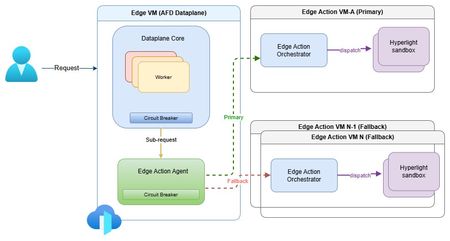
The need for secure edge programmability As modern web applications increasingly move decision-making closer to users, programmable compute at the edge is becoming a foundational capability for delivering low-latency, personalized, and intelligent experiences. Azure Front Door edge actions introduces lightweight customer-defined logic that executes close to users at Microsoft's global edge (https://aka.ms/edgeactionsblog). The engineering challenge extends well beyond moving code closer to the request path. It is about enabling edge programmability while preserving the core guarantees customers expect from a global edge platform: hyperscale performance and acceleration, strong security and tenant isolation, resiliency, and fast, controlled recovery. That sets up a much higher engineering bar than simply bringing a serverless runtime to the edge. Programmability introduces customer code, new execution paths, runtime dependencies, and additional failure modes directly into the critical request path. Architecture therefore must make flexibility a first-class capability without compromising the operational characteristics of a hyperscale edge platform. Preserving performance at hyperscale The first architectural challenge was preserving the performance characteristics of Azure Front Door while introducing programmable execution into the request path. Every additional execution step has the potential to increase latency, amplify failures, or reduce throughput at global scale. Edge actions was therefore designed to add programmability without changing the fundamental performance profile customers already expect from Azure Front Door. At request time, Azure Front Door evaluates the request, determines whether an edge action should be executed based on the associated rule, invokes the edge actions runtime, and applies the result inline. Because the runtime sits directly in the request path, every design decision was guided by a common principle: keep execution local whenever possible, bound latency when dependencies degrade, and ensure optional compute never becomes a platform-wide latency amplifier. Performance design principles Node-local execution keeps request processing on the same machine whenever possible, minimizing cross-node communications and preserving low latency. Minimized inter-node hops keep the common path compact while still enabling cluster-level fallback when local dependencies deteriorate. Connection reuse through Edge Action Agent reduces gRPC invocation overhead and improves hot path efficiency. Lightweight Hyperlight isolation provides strong tenant isolation with an execution model suitable for latency-sensitive edge workloads. Fast-fail and circuit-breaker protects latency by bounding waits on degraded dependencies and preventing cascading pressure. Together, these architectural choices introduce programmable compute without turning the Azure Front Door data plane into a distributed orchestration layer. The hot path remains local, predictable, and bounded, with fallback used only when necessary to preserve performance across the global edge. Security and tenant isolation by design Running customer-defined code on a shared global edge fundamentally changes the security model. Unlike traditional request processing, programmable execution introduces untrusted customer code directly into the request path, making strong isolation a foundational architectural requirement rather than an operational safeguard. For Azure Front Door edge actions, every execution is designed to run within a dedicated Hyperlight micro-VM, providing hardware-enforced isolation between customer workloads, the Azure Front Door data plane, and the underlying host environment. Security design principles Hypervisor-backed isolation ensures customer code executes within dedicated Hyperlight micro-VM boundaries rather than shared execution environments. Data plane separation isolates edge actions execution from Azure Front Door's core traffic-processing path. Minimal host surface area reduces the attack surface and limits privileged interactions. Restricted execution context exposes only the request information required to process a request. Reduced operational blast radius helps contain compromised or misbehaving workloads. These architectural boundaries extend beyond workload isolation. Azure Front Door's data plane remains physically separated from the edge actions orchestration service, while each execution receives only the minimum context required to perform its task. This defense-in-depth approach reduces both security risk and operational blast radius without compromising performance. Hyperlight: Security without sacrificing performance A key differentiator of Azure Front Door edge actions is its use of Hyperlight micro-VMs to provide hardware-backed isolation without introducing the traditional performance penalties associated with virtual machines. Hyperlight was designed to make VM-level protection practical for high-throughput function execution, enabling strong tenant isolation while remaining suitable for latency-sensitive edge workloads. Edge actions builds this foundation through the edge action orchestrator, which maintains a pool of warm Hyperlight sandboxes ready to serve requests. By reusing pre-initialized sandboxes instead of creating a new execution environment for every request, edge actions minimizes initialization overhead, reduces request latency, and sustains higher throughput under load. The result is a security model based on VM isolation that remains compatible with the performance expectations of a hyperscale edge platform. Critically, performance optimizations do not weaken isolation guarantees. After each execution, sandbox state is cleaned before reuse, ensuring that subsequent invocations cannot access data from prior executions while preserving the efficiency benefits of warm sandboxing. In internal benchmarking, lightweight edge actions executed in less than 2 ms inside Hyperlight, with approximately 1.27 ms of total sandbox overhead, demonstrating that strong isolation and high-performance edge execution can coexist. Security enables resiliency Security and resiliency are closely related architectural goals. Isolation helps contain malformed inputs, unexpected behavior, and execution failures, preventing individual workloads from affecting the broader platform. In a multitenant edge service, isolation is not only a security requirement; it is also a key resiliency mechanism. Resiliency built into the platform Strong isolation is not only a security property, but also a foundational resiliency mechanism. By containing malformed inputs, unexpected behavior, and execution failures within dedicated execution boundaries, the platform prevents individual workloads from affecting neighboring tenants or the broader service. At hyperscale, robust isolation is essential for maintaining customer trust and predictable platform reliability. Building on that foundation, Azure Front Door edge actions was designed around a simple operating principle: failures are inevitable, but their impact must be predictable, bounded, and recoverable. Because programmable compute introduces additional execution paths and runtime dependencies into the request path, resiliency must be built into the control points that determine when to execute, stop waiting, or fall back. The platform incorporates lessons learned from operating Azure services at a global scale, with a focus on minimizing blast radius, maintaining service continuity, and enabling controlled recovery when dependencies fail, overload, or time out. Resiliency principles Bound failure impact through isolation and containment. Recover predictably using health-aware routing and fallback paths. Protect customer availability first through graceful degradation. Fail fast rather than fail slowly to avoid latency amplification. Continuously validate assumptions through Game Days and fault injections. These principles translate into request-time behavior through deadlines, circuit breakers, fail-open behavior, and health-based fallback. Together, they ensure that optional programmable execution enhances application capabilities without compromising the stability of Azure Front Door's core request-processing pipeline. Continuous validation of resiliency assumptions Resilient architecture is credible only when validation becomes part of the operating model. For edge actions, Game Days and Fault Injections provide recurring opportunities to verify that architectural assumptions continue to hold under production-like stress. Validation includes chaos and failure injections, timeout and dependency-loss exercises, overload and queue-growth scenarios, mixed-workload testing, and interface fuzzing. These exercises answer practical production questions: Does fail-open behavior protect the request path? Do circuit breakers engage early enough? Does fallback routing preserve service continuity? Do malformed inputs remain contained? Repeated validation also strengthens operations. Detection improves, mitigation becomes more predictable, and recovery evolves from architectural intent into demonstrated operational capability. Built for future intelligent & modern workloads Edge actions is designed for lightweight programmable execution today, but the underlying architecture is intended to support increasingly intelligent decision-making over time. The engineering requirement remains unchanged: future intelligence workloads must operate within the same architectural constraints that govern today's request processing - bounded execution, strong isolation, predictable fallback, and protection of the common request path. Architectural implications for intelligence workloads Real-time AI inferencing for request classification and policy evaluation. Intelligent bot, abuse, and fraud detection closer to users. AI-assisted origin selection and traffic-routing decisions. Application-specific SLM-powered decision making at the edge. In that model, the objective is not simply to introduce more intelligence at the edge, but to ensure that intelligence inherits the same platform guarantees as every other component of the request path. Closing thoughts Programmable edge execution is becoming a foundational capability for modern distributed applications. The engineering challenge, however, extends far beyond running customer code closer to users. It is about preserving the system properties that customers already depend on while introducing a new execution surface into the critical request path. Edge actions demonstrates that edge programmability, performance, security, tenant isolation, and resiliency are not independent design goals - they are a single architectural problem that must be solved together. By keeping the common path protected, failures bounded, tenants strongly isolated, and recovery predictable, Azure Front Door edge actions extends the platform's capabilities without compromising the engineering principles that underpin a global hyperscale edge service. Learn more Introducing Hyperlight Edge actions samples: JavaScript request context718Views1like0CommentsIntroducing Azure Front Door edge actions - Bringing secure, programmable logic to the edge
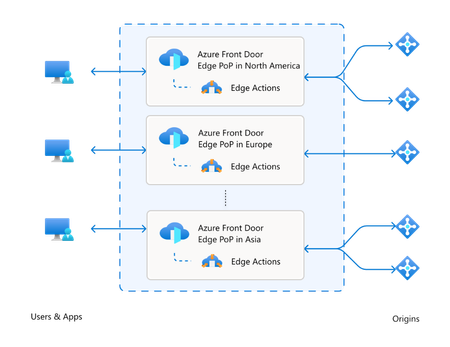
Modern web applications are expected to feel instant, secure, and personalized, no matter where users connect from or what device they use. Delivering that experience requires more than moving static content closer to users. It increasingly depends on making smart decisions at the edge, from validating requests and selecting the right origin to personalizing responses and stopping suspicious traffic before it reaches the backend. Because of this, over the last decade, compute resources for web applications have steadily moved closer to users. What began with content caching at the edge quickly evolved into dynamic routing, security enforcement, and intelligent application traffic management. Today, enterprises expect even more: programmable compute at the edge! Developers and platform teams want the flexibility to run lightweight logic at the edge without giving up the scale, security, and operational confidence they expect from Azure. Azure Front Door through its rulesets offers a robust, declarative framework for applying common traffic management and security policies, such as redirects, header manipulation, and conditional routing. They are optimized for scenarios where behavior can be defined statically and evaluated efficiently at scale. As customer workloads become more dynamic, and application logic increasingly moves closer to the user, additional capabilities are often required beyond declarative configuration. Meet Azure Front Door edge actions, now in public preview We are excited to announce Azure Front Door edge actions which represent Microsoft’s next step in this evolution. With edge actions, customers can execute custom logic directly at Microsoft’s global edge, enabling new classes of real-time personalization, security, and resiliency scenarios, without pushing complexity back to origins! Edge actions allow customers to author lightweight JavaScript functions that execute as part of Azure Front Door request processing. In the current public preview, edge actions are invoked during the client request phase and are attached to Azure Front Door routes through rulesets. This tight integration means edge actions work seamlessly with existing Azure Front Door capabilities, including Web Application Firewall (WAF), caching, and routing - while extending them with programmable logic. Customers can incrementally adopt edge actions without re-architecting their applications or delivery pipelines. What can you build with edge actions today Edge actions in public preview are optimized for lightweight, latency-sensitive scenarios that benefit from immediate decision-making. Common use cases include: A/B experimentation and canary rollouts: Evaluate request context at the edge and route users to different application experiences or releases without adding origin-side decision logic. Request and response header manipulation: Add, remove, or transform headers to support security controls, experimentation, routing, and application modernization patterns. Request rejection: Stop unwanted, malformed, or unauthorized requests before they consume origin resources. Dynamic origin selection: Choose the best origin based on request attributes, health signals, geography, device type, or business logic. URL rewrite and redirect: Adapt paths or redirect users at the edge to simplify migrations, campaign launches, localization, and application routing. Authentication and authorization scenarios: Validate tokens or request attributes close to the user, helping protect applications before traffic reaches backend services. Please refer to Azure/EdgeActionsSamples to start building edge actions today. Designed for industry leading security-first edge compute Running customer-defined code at the edge introduces unique security challenges. Edge environments now process untrusted user code at massive scales, making strong isolation non-negotiable for Azure. Enter Hyperlight: Microsoft’s foundation for secure execution. With Hyperlight, each edge action code runs in its own lightweight, hardware-backed micro-VM - like a secure apartment, isolated from neighbors. Unlike traditional virtual machines, Hyperlight micro‑VMs are extremely lightweight and do not have a general-purpose guest operating system. Because of their small footprint, they provide a much more reduced attack surface with a hardware-backed isolation boundary between every instance of customer code, the host infrastructure, and other tenants. This model allows Azure Front Door to combine the safety properties of hardware virtualization with the performance characteristics required for edge compute. Customer code is isolated by design to reduce blast radius to a single instance, helping protect both the platform and neighboring workloads. How edge actions fit into the request path When a client request reaches Azure Front Door, it follows Azure Front Door’s standard routing pipeline. The request is first evaluated against any configured WAF policies and routing rules. If a rule is configured to invoke an edge action, execution is handed off to the edge actions runtime (Hyperlight) at the edge POP. At execution time, Azure Front Door provides the edge action with a constrained, immutable context that includes request metadata, server variables, origin health information, and geo or device signals. The edge action can then modify the request, generate a response, or influence routing decisions, all within strict execution and resource limits designed to preserve platform stability. Ship safely with versions and execution filters Edge actions are built for operational confidence. Each edge action supports multiple versions of code, and customers can control which version executes using execution filters. This enables header-based routing, canary deployments, and A/B testing scenarios without downtime. Teams can gradually introduce new logic, validate behavior with real traffic, and roll back instantly if needed, bringing modern DevOps practices directly to the edge. Observe and operate with confidence Edge actions integrate with Azure’s existing observability stack. Customers can emit logs from their edge action code and correlate execution results with Azure Front Door access and routing logs. This unified view simplifies troubleshooting and provides visibility into edge execution behavior in production environments. Pricing Please refer to the pricing document for details regarding Edge actions pricing, including applicable billing meters and usage-based charges on invocations and execution time. What’s next for edge actions The public preview of edge actions represents the foundation of a broader roadmap. Over time, Microsoft plans to expand invocation points, capabilities, and integrations - while continuing to prioritize security, performance, and operational simplicity. Stay tuned for scenarios like response invocations, image/video optimizations, and edge inferencing during general availability. By combining programmable edge logic with Hyperlight-based isolation, Azure Front Door edge actions mark a significant milestone in Microsoft’s edge strategy - enabling customers to build faster, safer, and more adaptive applications on a global scale. Start building with Azure Front Door edge actions today! Explore the documentation and bring your complex edge scenarios to life.3.7KViews3likes0CommentsAzure Front Door: Resiliency Series – Part 2: Faster recovery (RTO)
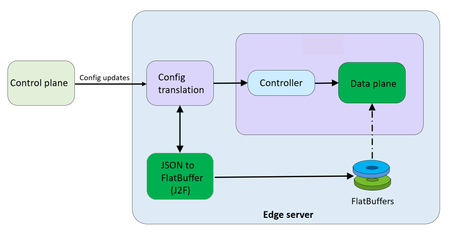
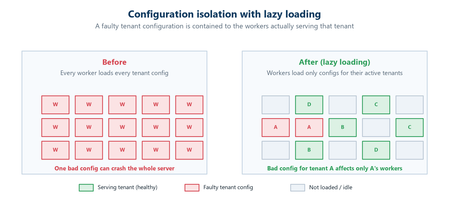
Abhishek Tiwari, Vice President of Engineering, Azure Networking Amit Srivastava, Partner Director of PM, Azure Networking Varun Chawla, Partner Director of Engineering, Azure Networking Karthik Uthaman, Principal Engineer, Azure Networking In Part 1 of this blog series, we outlined our four‑pillar strategy for resiliency in Azure Front Door: configuration resiliency, data plane resiliency, tenant isolation, and accelerated Recovery Time Objective (RTO). Together, these pillars help Azure Front Door remain continuously available and resilient at global scale. Part 1 focused on the first two pillars: configuration and data plane resiliency. Our goal is to make configuration propagation safer, so incompatible changes never escape pre‑production environments. We discussed how incompatible configurations are blocked early, and how data plane resiliency ensures the system continues serving traffic from a last‑known‑good (LKG) configuration even if a bad change manages to propagate. We also introduced ‘Food Taster’, a dedicated sacrificial process running in each edge server’s data plane, that pretests every configuration change in isolation, before it ever reaches the live data plane. In this post, we turn to the recovery pillar. We describe how we have made key enhancements to the Azure Front Door recovery path so the system can return to full operation in a predictable and bounded timeframe. For a global service like Azure Front Door, serving hundreds of thousands of tenants across 210+ edge sites worldwide, we set an explicit target: to be able to recover any edge site – or all edge sites – within approximately 10 minutes, even in worst‑case scenarios. In typical data plane crash scenarios, we expect recovery in under a second. Repair status The first blog post in this series mentioned the two Azure Front Door incidents from October 2025 – learn more by watching our Azure Incident Retrospective session recordings for the October 9 th incident and/or the October 29 th incident. Before diving into our platform investments for improving our Recovery Time Objectives (RTO), we wanted to provide a quick update on the overall repair items from these incidents. We are pleased to report that the work on configuration propagation and data plane resiliency is now complete and fully deployed across the platform (in the table below, “Completed” means broadly deployed in production). With this, we have reduced configuration propagation latency from ~45 minutes to ~20 minutes. We anticipate reducing this even further – to ~15 minutes by the end of April 2026, while ensuring that platform stability remains our top priority. Learning category Goal Repairs Status Safe customer configuration deployment Incompatible configuration never propagates beyond ‘EUAP or canary regions’ Control plane and data plane defect fixes Forced synchronous configuration processing Additional stages with extended bake time Early detection of crash state Completed Data plane resiliency Configuration processing cannot impact data plane availability Manage data-plane lifecycle to prevent outages caused by configuration-processing defects. Completed Isolated work-process in every data plane server to process and load the configuration. Completed 100% Azure Front Door resiliency posture for Microsoft internal services Microsoft operates an isolated, independent Active/Active fleet with automatic failover for critical Azure services Phase 1: Onboarded critical services batch impacted on Oct 29 th outage running on a day old configuration Completed Phase 2: Automation & hardening of operations, auto-failover and self-management of Azure Front Door onboarding for additional services March 2026 Recovery improvements Data plane crash recovery in under 10 minutes Data plane boot-up time optimized via local cache (~1 hour) Completed Accelerate recovery time < 10 minutes April 2026 Tenant isolation No configuration or traffic regression can impact other tenants Micro cellular Azure Front Door with ingress layered shards June 2026 Why recovery at edge scale is deceptively hard To understand why recovery took as long as it did, it helps to first understand how the Azure Front Door data plane processes configuration. Azure Front Door operates in 210+ edge sites with multiple servers per site. The data plane of each edge server hosts multiple processes. A master process orchestrates the lifecycle of multiple worker processes, that serve customer traffic. A separate configuration translator process runs alongside the data plane processes, and is responsible for converting customer configuration bundles from the control plane into optimized binary FlatBuffer files. This translation step, covering hundreds of thousands of tenants, represents hours of cumulative computation. A per edge server cache is kept locally at each server level – to enable a fast recovery of the data plane, if needed. Once the configuration translator process produces these FlatBuffer files, each worker processes them independently and memory-maps them for zero-copy access. Configuration updates flow through a two-phase commit: new FlatBuffers are first loaded into a staging area and validated, then atomically swapped into production maps. In-flight requests continue using the old configuration, until the last request referencing them completes. The data process recovery is designed to be resilient to different failure modes. A failure or crash at the worker process level has a typical recovery time of less than one second. Since each server has multiple such worker processes which serve customer traffic, this type of crash has no impact on the data plane. In the case of a master process crash, the system automatically tries to recover using the local cache. When the local cache is reused, the system is able to recover quickly – in approximately 60 minutes – since most of the configurations in the cache were already loaded into the data plane before the crash. However, in certain cases if the cache becomes unavailable or must be invalidated because of corruption, the recovery time increases significantly. During the October 29 th incident, a data plane crash triggered a complete recovery sequence that took approximately 4.5 hours. This was not because restarting a process is slow, it is because a defect in the recovery process invalidated the local cache, which meant that “restart” meant rebuilding everything from scratch. The configuration translator process then had to re-fetch and re-translate every one of the hundreds of thousands of customer configurations, before workers could memory-map them and begin serving traffic. This experience has crystallized three fundamental learnings related to our recovery path: Expensive rework: A subset of crashes discarded all previously translated FlatBuffer artifacts, forcing the configuration translator process to repeat hours of conversion work that had already been validated and stored. High restart costs: Every worker on every node had to wait for the configuration translator process to complete the full translation, before it could memory-map any configuration and begin serving requests. Unbounded recovery time: Recovery time grew linearly with total tenant footprint rather than with active traffic, creating a ‘scale penalty’ as more tenants onboarded to the system. Separately and together, the insight was clear: recovery must stop being proportional to the total configuration size. Persisting ‘validated configurations’ across restarts One of the key recovery improvements was strengthening how validated customer configurations are cached and reused across failures, rather than rebuilding configuration states from scratch during recovery. Azure Front Door already cached customer configurations on host‑mounted storage prior to the October incident. The platform enhancements post outage focused on making the local configuration cache resilient to crashes, partial failures, and bad tenant inputs. Our goal was to ensure that recovery behavior is dominated by serving traffic safely, not by reconstructing configuration state. This led us to two explicit design goals… Design goals No category of crash should invalidate the configuration cache: Configuration cache invalidation must never be the default response to failures. Whether the failure is a worker crash, master crash, data plane restart, or coordinated recovery action, previously validated customer configurations should remain usable—unless there is a proven reason to discard it. Bad tenant configuration must not poison the entire cache: A single faulty or incompatible tenant configuration should result in targeted eviction of that tenant’s configuration only—not wholesale cache invalidation across all tenants. Platform enhancements Previously, customer configurations persisted to host‑mounted storage, but certain failure paths treated the cache as unsafe and invalidated it entirely. In those cases, recovery implicitly meant reloading and reprocessing configuration for hundreds of thousands of tenants before traffic could resume, even though the vast majority of cached data was still valid. We changed the recovery model to avoid invalidating customer configurations, with strict scoping around when and how cached entries are discarded: Cached configurations are no longer invalidated based on crash type. Failures are assumed to be orthogonal to configuration correctness unless explicitly proven otherwise. Cache eviction is granular and tenant‑scoped. If a cached configuration fails validation or load checks, only that tenant’s configuration is discarded and reloaded. All other tenant configurations remain available. This ensures that recovery does not regress into a fleet‑wide rebuild due to localized or unrelated faults. Safety and correctness Durability is paired with strong correctness controls, to prevent unsafe configurations from being served: Per‑tenant validation on load: Each cached tenant configuration is validated during the ‘load and verification’ phase, before being promoted for traffic serving. Therefore, failures are contained to that tenant. Targeted re‑translation: When validation fails, only the affected tenant’s configuration is reloaded or reprocessed. Therefore, the cache for other tenants is left untouched. Operational escape hatch: Operators retain the ability to explicitly instruct a clean rebuild of the configuration cache (with proper authorization), preserving control without compromising the default fast‑recovery path. Resulting behavior With these changes, recovery behavior now aligns with real‑world traffic patterns - configuration defects impact tenants locally and predictably, rather than globally. The system now prefers isolated tenant impact, and continued service using last-known-good over aggressive invalidation, both of which are critical for predictable recovery at the scale of Azure Front Door. Making recovery scale with active traffic, not total tenants Reusing configuration cache solves the problem of rebuilding configuration in its entirety, but even with a warm cache, the original startup path had a second bottleneck: eagerly loading a large volume of tenant configurations into memory before serving any traffic. At our scale, memory-mapping, parsing hundreds of thousands of FlatBuffers, constructing internal lookup maps, adding Transport Layer Security (TLS) certificates and configuration blocks for each tenant, collectively added almost an hour to startup time. This was the case even when a majority of those tenants had no active traffic at that moment. We addressed this by fundamentally changing when configuration is loaded into workers. Rather than eagerly loading most of the tenants at startup across all edge locations, Azure Front Door now uses an Machine Learning (ML)-optimized lazy loading model. In the new architecture, instead of loading a large number of tenant configurations, we only load a small subset of tenants that are known to be historically active in a given site, we call this the “warm tenants” list. The warm tenants list per edge site is created through a sophisticated traffic analysis pipeline that leverages ML. However, loading the warm tenants is not good enough, because when a request arrives and we don’t have the configuration in memory, we need to know two things. Firstly, is this a request from a real Azure Front Door tenant – and, if it is, where can I find the configuration? To answer these questions, each worker maintains a hostmap that tracks the state of each tenant’s configuration. This hostmap is constructed during startup, as we process each tenant configuration – if the tenant is in the warm list, we will process and load their configuration fully; if not, then we will just add an entry into the hostmap where all their domain names are mapped to the configuration path location. When a request arrives for one of these tenants, the worker loads and validates that tenant’s configuration on demand, and immediately begins serving traffic. This allows a node to start serving its busiest tenants within a few minutes of startup, while additional tenants are loaded incrementally only when traffic actually arrives—allowing the system to progressively absorb cold tenants as demand increases. The effect on recovery is transformative. Instead of recovery time scaling with the total number of tenants configured on a server, it scales with the number of tenants actively receiving traffic. In practice, even at our busiest edge sites, the active tenant set is a small fraction of the total. Just as importantly, this modified form of lazy loading provides a natural failure isolation boundary. Most Edge sites won’t ever load a faulty configuration of an inactive tenant. When a request for an inactive tenant with an incompatible configuration arrives, impact is contained to a single worker. The configuration load architecture now prefers serving as many customers as quickly as possible, rather than waiting until everything is ready before serving anyone. The above changes are slated to complete in April 2026 and will bring our RTO from the current ~1 hour to under 10 minutes – for complete recovery from a worst case scenario. Continuous validation through Game Days A critical element of our recovery confidence comes from GameDay fault-injection testing. We don’t simply design recovery mechanisms and assume they work—we break the system deliberately and observe how it responds. Since late 2025, we have conducted recurring GameDay drills that simulate the exact failure scenarios we are defending against: Food Taster crash scenarios: Injecting deliberately faulty tenant configurations, to verify that they are caught and isolated with zero impact on live traffic. In our January 2026 GameDay, the Food Taster process crashed as expected, the system halted the update within approximately 5 seconds, and no customer traffic was affected. Master process crash scenarios: Triggering master process crashes across test environments to verify that workers continue serving traffic, that the Local Config Shield engages within 10 seconds, and that the coordinated recovery tool restores full operation within the expected timeframe. Multi-region failure drills: Simulating simultaneous failures across multiple regions to validate that global Config Shield mechanisms engage correctly, and that recovery procedures scale without requiring manual per-region intervention. Fallback test drills for critical Azure services running behind Azure Front Door: In our February 2026 GameDay, we simulated the complete unavailability of Azure Front Door, and successfully validated failover for critical Azure services with no impact to traffic. These drills have both surfaced corner cases and built operational confidence. They have transformed recovery from a theoretical plan into tested, repeatable muscle memory. As we noted in an internal communication to our team: “Game day testing is a deliberate shift from assuming resilience to actively proving it—turning reliability into an observed and repeatable outcome.” Closing Part 1 of this series emphasized preventing unsafe configurations from reaching the data plane, and data plane resiliency in case an incompatible configuration reaches production. This post has shown that prevention alone is not enough—when failures do occur, recovery must be fast, predictable, and bounded. By ensuring that the FlatBuffer cache is never invalidated, by loading only active tenants, and by building safe coordinated recovery tooling, we have transformed failure handling from a fleet-wide crisis into a controlled operation. These recovery investments work in concert with the prevention mechanisms described in Part 1. Together, they ensure that the path from incident detection to full service restoration is measured in minutes, with customer traffic protected at every step. In the next post of this series, we will cover the third pillar of our resiliency strategy: tenant isolation—how micro-cellular architecture and ingress-layered sharding can reduce the blast radius of any failure to a small subset, ensuring that one customer’s configuration or traffic anomaly never becomes everyone’s problem. We deeply value our customers’ trust in Azure Front Door. We are committed to transparently sharing our progress on these resiliency investments, and to exceed expectations for safety, reliability, and operational readiness.3.1KViews5likes0CommentsAzure Front Door: Implementing lessons learned following October outages
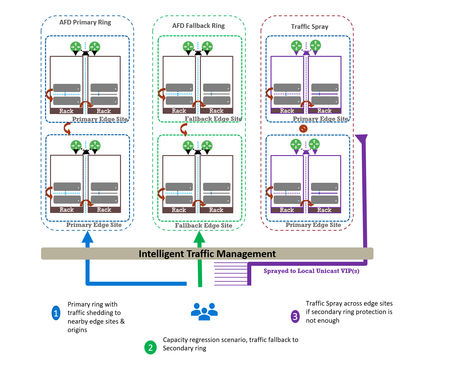
Abhishek Tiwari, Vice President of Engineering, Azure Networking Amit Srivastava, Principal PM Manager, Azure Networking Varun Chawla, Partner Director of Engineering Link to Part 2 - Azure Front Door Resiliency Series Link to Part 3 - Azure Front Door Resiliency Series Introduction Azure Front Door is Microsoft's advanced edge delivery platform encompassing Content Delivery Network (CDN), global security and traffic distribution into a single unified offering. By using Microsoft's extensive global edge network, Azure Front Door ensures efficient content delivery and advanced security through 210+ global and local points of presence (PoPs) strategically positioned closely to both end users and applications. As the central global entry point from the internet onto customer applications, we power mission critical customer applications as well as many of Microsoft’s internal services. We have a highly distributed resilient architecture, which protects against failures at the server, rack, site and even at the regional level. This resiliency is achieved by the use of our intelligent traffic management layer which monitors failures and load balances traffic at server, rack or edge sites level within the primary ring, supplemented by a secondary-fallback ring which accepts traffic in case of primary traffic overflow or broad regional failures. We also deploy a traffic shield as a terminal safety net to ensure that in the event of a managed or unmanaged edge site going offline, end user traffic continues to flow to the next available edge site. Like any large-scale CDN, we deploy each customer configuration across a globally distributed edge fleet, densely shared with thousands of other tenants. While this architecture enables global scale, it carries the risk that certain incompatible configurations, if not contained, can propagate broadly and quickly which can result in a large blast radius of impact. Here we describe how the two recent service incidents impacting Azure Front Door have reinforced the need to accelerate ongoing investments in hardening our resiliency, and tenant isolation strategy to mitigate likelihood and the scale of impact from this class of risk. October incidents: recap and key learnings Azure Front Door experienced two service incidents; on October 9 th and October 29 th , both with customer-impacting service degradation. On October 9 th : A manual cleanup of stuck tenant metadata bypassed our configuration protection layer, allowing incompatible metadata to propagate beyond our canary edge sites. This metadata was created on October 7 th , from a control-plane defect triggered by a customer configuration change. While the protection system initially blocked the propagation, the manual override operation bypassed our safeguards. This incompatible configuration reached the next stage and activated a latent data-plane defect in a subset of edge sites, causing availability impact primarily across Europe (~6%) and Africa (~16%). You can learn more about this issue in detail at https://aka.ms/AIR/QNBQ-5W8 On October 29 th : A different sequence of configuration changes across two control-plane versions produced incompatible metadata. Because the failure mode in the data-plane was asynchronous, the health checks validations embedded in our protection systems were all passed during the rollout. The incompatible customer configuration metadata successfully propagated globally through a staged rollout and also updated the “last known good” (LKG) snapshot. Following this global rollout, the asynchronous process in data-plane exposed another defect which caused crashes. This impacted connectivity and DNS resolutions for all applications onboarded to our platform. Extended recovery time amplified impact on customer applications and Microsoft services. You can learn more about this issue in detail at https://aka.ms/AIR/YKYN-BWZ We took away a number of clear and actionable lessons from these incidents, which are applicable not just to our service, but to any multi-tenant, high-density, globally distributed system. Configuration resiliency – Valid configuration updates should propagate safely, consistently, and predictably across our global edge, while ensuring that incompatible or erroneous configuration never propagate beyond canary environments. Data plane resiliency - Additionally, configuration processing in the data plane must not cause availability impact to any customer. Tenant isolation – Traditional isolation techniques such as hardware partitioning and virtualization are impractical at edge sites. This requires innovative sharding techniques to ensure single tenant-level isolation – a must-have to reduce potential blast radius. Accelerated and automated recovery time objective (RTO) – System should be able to automatically revert to last known good configuration in an acceptable RTO. In case of a service like Azure Front Door, we deem ~10 mins to be a practical RTO for our hundreds of thousands of customers at every edge site. Post outage, given the severity of impact which allowed an incompatible configuration to propagate globally, we made the difficult decision to temporarily block configuration changes in order to expedite rollout of additional safeguards. Between October 29 th to November 5 th , we prioritized and deployed immediate hardening steps before opening up the configuration change. We are confident that the system is stable, and we are continuing to invest in additional safeguards to further strengthen the platform's resiliency. Learning category Goal Repairs Status Safe customer configuration deployment Incompatible configuration never propagates beyond Canary · Control plane and data plane defect fixes · Forced synchronous configuration processing · Additional stages with extended bake time · Early detection of crash state Completed Data plane resiliency Configuration processing cannot impact data plane availability Manage data-plane lifecycle to prevent outages caused by configuration-processing defects. Completed Isolated work-process in every data plane server to process and load the configuration. January 2026 100% Azure Front Door resiliency posture for Microsoft internal services Microsoft operates an isolated, independent Active/Active fleet with automatic failover for critical Azure services Phase 1: Onboarded critical services batch impacted on Oct 29 th outage running on a day old configuration Completed Phase 2: Automation & hardening of operations, auto-failover and self-management of Azure Front Door onboarding for additional services March 2026 Recovery improvements Data plane crash recovery in under 10 minutes Data plane boot-up time optimized via local cache (~1 hour) Completed Accelerate recovery time < 10 minutes March 2026 Tenant isolation No configuration or traffic regression can impact other tenants Micro cellular Azure Front Door with ingress layered shards June 2026 This blog is the first in a multi-part series on Azure Front Door resiliency. In this blog, we will focus on configuration resiliency—how we are making the configuration pipeline safer and more robust. Subsequent blogs will cover tenant isolation and recovery improvements. How our configuration propagation works Azure Front Door configuration changes can be broadly classified into three distinct categories. Service code & data – these include all aspects of Azure Front Door service like management plane, control plane, data plane, configuration propagation system. Azure Front Door follows a safe deployment practice (SDP) process to roll out newer versions of management, control or data plane over a period of approximately 2-3 weeks. This ensures that any regression in software does not have a global impact. However, latent bugs that escape pre-validation and SDP rollout can remain undetected until a specific combination of customer traffic patterns or configuration changes trigger the issue. Web Application Firewall (WAF) & L7 DDoS platform data – These datasets are used by Azure Front Door to deliver security and load-balancing capabilities. Examples include GeoIP data, malicious attack signatures, and IP reputation signatures. Updates to these datasets occur daily through multiple SDP stages with an extended bake time of over 12 hours to minimize the risk of global impact during rollout. This dataset is shared across all customers and the platform, and it is validated immediately since it does not depend on variations in customer traffic or configuration steps. Customer configuration data – Examples of these are any customer configuration change—whether a routing rule update, backend pool modification, WAF rule change, or security policy change. Due to the nature of these changes, it is expected across the edge delivery / CDN industry to propagate these changes globally in 5-10 mins. Both outages stemmed from issues within this category. All configuration changes, including customer configuration data, are processed through a multi-stage pipeline designed to ensure correctness before global rollout across Azure Front Door’s 200+ edge locations. At a high level, Azure Front Door’s configuration propagation system has two distinct components - Control plane – Accepts customer API/portal changes (create/update/delete for profiles, routes, WAF policies, origins, etc.) and translates them into internal configuration metadata which the data plane can understand. Data plane – Globally distributed edge servers that terminate client traffic, apply routing/WAF logic, and proxy to origins using the configuration produced by the control plane. Between these two halves sits a multi-stage configuration rollout pipeline with a dedicated protection system (known as ConfigShield): Changes flow through multiple stages (pre-canary, canary, expanding waves to production) rather than going global at once. Each stage is health-gated: the data plane must remain within strict error and latency thresholds before proceeding. Each stage’s health check also rechecks previous stage’s health for any regressions. A successfully completed rollout updates a last known good (LKG) snapshot used for automated rollback. Historically, rollout targeted global completion in roughly 5–10 minutes, in line with industry standards. Customer configuration processing in Azure Front Door data plane stack Customer configuration changes in Azure Front Door traverse multiple layers—from the control plane through the deployment system—before being converted into FlatBuffers at each Azure Front Door node. These FlatBuffers are then loaded by the Azure Front Door data plane stack, which runs as Kubernetes pods on every node. FlatBuffer Composition: Each FlatBuffer references several sub-resources such as WAF and Rules Engine schematic files, SSL certificate objects, and URL signing secrets. Data plane architecture: o Master process: Accepts configuration changes (memory-mapped files with references) and manages the lifecycle of worker processes. o Workers: L7 proxy processes that serve customer traffic using the applied configuration. Processing flow for each configuration update: Load and apply in master: The transformed configuration is loaded and applied in the master process. Cleanup of unused references occurs synchronously except for certain categories à October 9 outage occurred during this step due to a crash triggered by incompatible metadata. Apply to workers: Configuration is applied to all worker processes without memory overhead (FlatBuffers are memory-mapped). Serve traffic: Workers start consuming new FlatBuffers for new requests; in-flight requests continue using old buffers. Old buffers are queued for cleanup post-completion. Feedback to deployment service: Positive feedback signals readiness for rollout.Cleanup: FlatBuffers are freed asynchronously by the master process after all workers load updates à October 29 outage occurred during this step due to a latent bug in reference counting logic. The October incidents showed we needed to strengthen key aspects of configuration validation, propagation safeguards, and runtime behavior. During the Azure Front Door incident on October 9 th , that protection system worked as intended but was later bypassed by our engineering team during a manual cleanup operation. During this Azure Front Door incident on October 29 th , the incompatible customer configuration metadata progressed through the protection system, before the delayed asynchronous processing task resulted in the crash. Configuration propagation safeguards Based on learnings from the incidents, we are implementing a comprehensive set of configuration resiliency improvements. These changes aim to guarantee that any sequence of configuration changes cannot trigger instability in the data plane, and to ensure quicker recovery in the event of anomalies. Strengthening configuration generation safety This improvement pivots on a ‘shift-left’ strategy where we want to ensure that we catch regression early before they propagate to production. It also includes fixing the latent defects which were the proximate cause of the outage. Fixing outage specific defects - We have fixed the control-plane defects that could generate incompatible tenant metadata under specific operation sequences. We have also remediated the associated data-plane defects. Stronger cross-version validation - We are expanding our test and validation suite to account for changes across multiple control plane build versions. This is expected to be fully completed by February 2026. Fuzz testing - Automated fuzzing and testing of metadata generation contract between the control plane and the data plane. This allows us to generate an expanded set of invalid/unexpected configuration combinations which might not be achievable by traditional test cases alone. This is expected to be fully completed by February 2026. Preventing incompatible configurations from being propagated This segment of the resiliency strategy strives to ensure that a potentially dangerous configuration change never propagates beyond canary stage. Protection system is “always-on” - Enhancements to operational procedures and tooling prevent bypass in all scenarios (including internal cleanup/maintenance), and any cleanup must flow through the same guarded stages and health checks as standard configuration changes. This is completed. Making rollout behavior more predictable and conservative - Configuration processing in the data plane is now fully synchronous. Every data plane issue due to incompatible meta data can be detected withing 10 seconds at every stage. This is completed. Enhancement to deployment pipeline - Additional stages during roll-out and extended bake time between stages serve as an additional safeguard during configuration propagation. This is completed. Recovery tool improvements now make it easier to revert to any previous version of LKG with a single click. This is completed. These changes significantly improve system safety. Post-outage we have increased the configuration propagation time to approximately 45 minutes. We are working towards reducing configuration propagation time closer to pre-incident levels once additional safeguards covered in the Data plane resiliency section below are completed by mid-January, 2026. Data plane resiliency The data plane recovery was the toughest part of recovery efforts during the October incidents. We must ensure fast recovery as well as resilience to configuration processing related issues for the data plane. To address this, we implemented changes that decouple the data plane from incompatible configuration changes. With these enhancements, the data plane continues operating on the last known good configuration—even if the configuration pipeline safeguards fail to protect as intended. Decoupling data plane from configuration changes Each server’s data plane consists of a master process which accepts configuration changes and manages lifecycle of multiple worker processes which serve customer traffic. One of the critical reasons for the prolonged outage in October was that due to latent defects in the data plane, when presented with a bad configuration the master process crashed. The master is a critical command-and-control process and when it crashes it takes down the entire data plane, in that node. Recovery of the master process involves reloading hundreds of thousands of configurations from scratch and took approximately 4.5 hours. We have since made changes to the system to ensure that even in the event of the master process crash due to any reason - including incompatible configuration data being presented - the workers remain healthy and able to serve traffic. During such an event, the workers would not be able to accept new configuration changes but will continue to serve customer traffic using the last known good configuration. This work is completed. Introducing Food Taster: strengthening config propagation resiliency In our efforts to further strengthen Azure Front Door’s configuration propagation system, we are introducing an additional configuration safeguard known internally as Food Taster which protects the master and worker processes from any configuration change related incidents, thereby ensuring data plane resiliency. The principle is simple: every data-plane server will have a redundant and isolated process – the Food Taster – whose only job is to ingest and process new configuration metadata first and then pass validated configuration changes to active data plane. This redundant worker does not accept any customer traffic. All configuration processing in this Food Taster is fully synchronous. That means we do all parsing, validation, and any expensive or risky work up front, and we do not move on until the Food Taster has either proven the configuration is safe or rejected it. Only when the Food Taster successfully loads the configuration and returns “Config OK” does the master process proceed to load the same config and then instruct the worker processes to do the same. If anything goes wrong in the Food Taster, the failure is contained to that isolated worker; the master and traffic-serving workers never see that invalid configuration. We expect this safeguard to reach production globally in January 2026 timeframe. Introduction of this component will also allow us to return closer to pre-incident level of configuration propagation while ensuring data plane safety. Closing This is the first in a series of planned blogs on Azure Front Door resiliency enhancements. We are continuously improving platform safety and reliability and will transparently share updates through this series. Upcoming posts will cover advancements in tenant isolation and improvements to recovery time objectives (RTO). We deeply value our customers’ trust in Azure Front Door. The October incidents reinforced how critical configuration resiliency is, and we are committed to exceeding industry expectations for safety, reliability, and transparency. By hardening our configuration pipeline, strengthening safety gates, and reinforcing isolation boundaries, we’re making Azure Front Door even more resilient so your applications can be too.20KViews25likes15CommentsIntroducing Layered Ingress Sharding: Achieving Single-Tenant Isolation in Multi-Tenant Services
Abhishek Tiwari, Vice President of Engineering, Azure Networking Amit Srivastava, Partner Director of PM, Azure Networking Varun Chawla, Partner Director of Engineering, Azure Networking Links to the three-part AFD blog series: Part 1 Part 2 Part 3 Why Multi‑Tenant Isolation Is Still Hard at Hyperscale Modern cloud platforms thrive on multitenancy. By sharing infrastructure across tenants, services like Azure Front Door (AFD) can deliver massive scale, global reach, and cost efficiency. At hyperscale, however, this efficiency comes with a hard truth: rare failures are inevitable, and their blast radius matters more than their frequency. When hundreds of thousands of tenants share a global data plane, a single misbehaving tenant, configuration regression, or zero-day exploit can turn a low probability event into a high impact outage. Over the years, the industry has developed many protections — rate limiting, circuit breakers, fair share scheduling, crash protection, and various sharding strategies. These techniques dramatically reduce average case risk, but they still struggle to bound worst case impact. In particular, they fall short of delivering what customers intuitively expect: single tenant isolation semantics (the guarantee that one tenant’s failure does not affect another) without requiring dedicated per-tenant infrastructure. At Azure Front Door, we’ve been working on a new architectural approach that directly targets worst case blast radius. Today, I’m excited to introduce Layered Ingress Sharding, a sharding strategy designed to enable single tenant fault isolation for largescale multitenant services. From Traditional Sharding to Ingress Sharding Traditional partitioning assigns each tenant to a fixed shard. This limits blast radius, but tenants in the same shard can still experience complete outages when that shard fails. Shuffle sharding improves on this by assigning each tenant to a subset of instances, where subsets partially overlap, dramatically reducing the probability of widespread impact. However, shuffle sharding still allows 100% availability loss for tenants in the affected shard, relies heavily on client retries, and introduces nontrivial capacity loss in overlapping shards. To address these limitations, we introduced Ingress Sharding. With ingress sharding, an ingress controller, which we call IRIS (Intelligent Routing with Ingress Sharding), sits directly on the data path. Ingress sharding uses shuffle sharding to construct shards from service instances; IRIS operates on top of these shards to perform tenant-aware, capacity-aware routing rather than introducing a new shard construction algorithm. IRIS identifies the tenant for each incoming connection and deterministically maps that tenant to a shard. Instead of relying on clients to retry when a shard is unhealthy, IRIS actively: Monitors the health of service instances Tracks available capacity in real time Retries and reroutes traffic internally Steers traffic away from unhealthy or overloaded instances Dynamically expands the set of service instances used for oversized tenants when sustained load exceeds a single shard’s capacity In effect, IRIS turns shard selection into a real-time, capacity-aware decision that is reevaluated for every new connection. This moves fault resilience and load balancing inside the platform, rather than pushing that burden onto clients. Ingress sharding significantly improves isolation and resilience, but on its own, a tenant can still experience a complete loss of availability if all instances in its shard are affected. Introducing Layers: Isolation Through Independence Layered Sharding adds a new dimension to multitenant isolation. In Layered Sharding, the service is divided into multiple independent layers. A layer represents an independent serving dimension of the system capable of handling tenant traffic independently. This technique was developed to reduce blast radius by changing how tenants are assigned across shards, rather than changing the underlying shard construction within a single layer. A key design goal is that layered sharding is orthogonal to the underlying sharding strategy. It works with existing approaches, whether that is standard partitioning-based sharding, shuffle sharding, or other shard assignment schemes used within a layer. Within each layer: Service instances are grouped into shards using an existing sharding technique (for example, traditional partitioning or shuffle sharding) Each tenant is assigned to a shard independently in that layer Crucially, tenant-to-shard assignments are randomized and independent across layers. This independence is what gives layered sharding its isolation properties, regardless of the specific sharding algorithm used within a single layer. The definition of a layer itself is intentionally flexible and service dependent. In Azure Front Door, each server naturally acts as one layer. In other services, a layer might correspond to a cluster, a scale unit, a fault domain, or even a regional partition — any unit capable of serving tenant traffic independently while preserving uniform load distribution. The result is powerful: even if a tenant’s traffic causes failures in one shard in one layer, it is statistically unlikely that the same tenant will collide with the same peers across many layers. Instead of experiencing a full outage, other tenants see at most a small, transient reduction in capacity, often invisible with standard retry behavior. Layered sharding alone already reduces availability impact across tenants. But when combined with ingress sharding, it enables something fundamentally stronger. Layered Ingress Sharding Layered Ingress Sharding integrates two complementary ideas: Layered Sharding spreads tenants across many independent layers with randomized shard assignments. Ingress Sharding dynamically routes traffic to healthy service instances across layers using real‑time health and capacity signals. The key blast radius reduction that enables single tenant isolation comes from the combination of independent shard randomization across layers with active, intelligent traffic steering. When a tenant misbehaves due to harmful traffic, a bad configuration, or an unknown vulnerability, IRIS detects unhealthy service instances and automatically routes traffic to healthy shards in other layers. Because shard assignments are independent, IRIS can always find unaffected capacity for well-behaved tenants. The resulting behavior is a fundamental shift in multitenant failure dynamics: Outages remain localized to the misbehaving tenant Healthy tenants continue to serve traffic Blast radius shrinks from fleetwide to tenant-local In effect, a shared multi‑tenant system begins to behave like it has single tenant‑ isolation semantics, without abandoning multitenancy. Why the Math Works The guarantees behind layered ingress sharding are not heuristic, they’re statistical. Because tenant-to-shard assignments are randomized independently across layers, the probability that two tenants repeatedly collide in the same shard follows a binomial distribution. With production representative configurations, tens of layers and shuffle-sharded service instances, the probability that an arbitrary tenant experiences a user-visible failure due to another tenant drops below what standard client retries already mask. Instead of asking “Can a noisy neighbor impact me?”, the system answers “What is the probability that a single connection attempt is unlucky across all layers?” and that probability decreases exponentially as the number of layers increases. This allows us to trade catastrophic outages for rare, isolated, and standard retry-mitigated events. A Hidden Benefit: Identifying Bad Tenants Layered ingress sharding provides an additional, powerful side benefit: automated identification of misbehaving tenants. Because shard assignments are computed independently across layers, a tenant that is consistently responsible for failures appears as a common factor across impacted shards and service instances. By correlating signals across layers, the platform can accurately identify the offending tenant and apply targeted mitigations such as isolation, throttling, or traffic steering without relying on coarse-grained circuit breakers that penalize everyone. This dramatically improves response time under high load or adversarial conditions while preserving availability for unaffected tenants. Beyond Azure Front Door While Layered Ingress Sharding was developed in the context of Azure Front Door, the underlying principle is broadly applicable. Any large‑scale multi‑tenant system that: Serves many tenants from shared infrastructure Can distribute traffic uniformly across independent layers Can enforce shard-level isolation within each layer can benefit from this approach. Layers don’t have to be servers they could be clusters, scale units, or regional partitions. The key is independent assignment across layers combined with intelligent ingress routing. We believe this pattern represents a reusable architectural strategy for building resilient, hyperscale, multi‑tenant services. Closing Thoughts Multi‑tenancy doesn’t have to mean shared fate. Layered Ingress Sharding shows that by combining probabilistic isolation with intelligent ingress routing, we can build systems where failures are expected, bounded, and automatically contained, even at hyperscale. Rather than eliminating failure, this approach mathematically constrains its impact. And in large‑scale multi‑tenant platforms, that distinction makes all the difference.Azure Front Door: Resiliency Series – Part 3: Tenant isolation
Abhishek Tiwari, Vice President of Engineering, Azure Networking Amit Srivastava, Partner Director of PM, Azure Networking Varun Chawla, Partner Director of Engineering, Azure Networking Azure Front Door serves hundreds of thousands of tenants from hundreds of edge locations, densely sharing the globally distributed edge fleet. That density is exactly what allows us to deliver global scale, performance, and cost efficiency. It also means that, without strong isolation, a single tenant’s incompatible configuration or anomalous traffic can, in the worst case, affect many other tenants. The October 2025 incidents reinforced how important it is to contain this class of risk. Our goal for this tenant isolation is simple to state and hard to achieve: no single tenant’s configuration or traffic should be able to impact any other tenant. In Part 1 of our three part mini blog series, we outlined our four‑pillar strategy for improving the resiliency of Azure Front Door: configuration resiliency, data plane resiliency, tenant isolation, and accelerated Recovery Time Objective (RTO). Part 1 detailed how we would make configuration propagation safer and how the data plane keeps serving from a ‘last‑known‑good’ (LKG) configuration, even if an incompatible configuration change is propagated to the data plane. Part 2 turned to recovery, showing how we bring the system back to full operation in an accelerated, predictable, and in a bounded timeframe. In this final part, we turn to the tenant isolation pillar that ensures that any single tenant configuration or traffic issues are limited in scope to that tenant alone and do not impact other tenants. We will also show how Azure Front Door achieves single-tenant containment through configuration isolation, lazy loading, and a micro-cellular layered ingress-sharding architecture. Repair status: all outstanding items now complete Before we dive into tenant isolation, here is a final update on the overall repair items from the two October 2025 incidents (you can review the details in our Azure Incident Retrospective sessions for the October 9th and October 29th incidents). We are pleased to report that all outstanding work across every pillar is now complete and fully deployed in production – including the tenant isolation work described in this post. With these safeguards in place, we have also returned configuration propagation latency to pre‑incident levels while keeping platform stability our top priority. In the table below, “Completed” means broadly deployed in production. Learning category Goal Repairs Status Safe customer configuration deployment Incompatible configuration never propagates beyond ‘EUAP or canary regions’ Control plane and data plane defect fixes; forced synchronous configuration processing; additional stages with extended bake time; early detection of crash state Completed Data plane resiliency Configuration processing cannot impact data plane availability Manage data‑plane lifecycle to prevent outages caused by configuration‑processing defects; isolated work‑process in every data plane server to process and load the configuration Completed 100% Azure Front Door resiliency posture for Microsoft internal services Microsoft operates an isolated, independent Active/Active fleet with automatic failover for critical Azure services Phase 1: onboarded critical services batch impacted on Oct 29th outage running on a day‑old configuration; Phase 2: automation & hardening of operations, auto‑failover and self‑management of onboarding for additional services Completed Recovery improvements Data plane crash recovery in under 10 minutes Data plane boot‑up time optimized via local cache; recovery time accelerated to under 10 minutes Completed Tenant isolation No configuration or traffic regression can impact other tenants Micro‑cellular Azure Front Door with ingress layered shards Completed Why isolation at edge scale is deceptively hard Traditional isolation techniques such as dedicating separate hardware to each tenant or running every tenant inside its own virtual machine are impractical at the edge. Edge sites are constrained on space, power, and capacity. The entire premise of a modern, multi-tenant application delivery platform is that any tenant can be served from any site closest to the user. We cannot simply partition hundreds of thousands of tenants onto dedicated machines without giving up either proximity, scale, or the efficiency that make the edge fast and cost efficient. Isolation therefore, must be achieved in software, inside a multi-tenant fleet. What we already do today Azure Front Door already includes several layers of tenant isolation and partitioning. However, the incidents in October clearly highlighted that these techniques were not enough. Prior to the incidents, our protection mechanisms included: Infrastructure partitioning. Edge sites were organized into physically isolated primary and fallback traffic rings. Noisy‑neighbor protection. Fair‑share resource allocation, rate limiting, and anomaly-based load protection kept any single tenant from monopolizing shared resources such as CPU, memory, or network bandwidth on an Azure Front Door server. Circuit breakers. Circuit breakers shed costly work first and can disable a risky per‑tenant feature before it exhausts shared resources on a server. Real‑time crash protection. A crash‑analysis system correlates crash signatures across machines and can pinpoint and block crash patterns caused by tenant IPs or traffic patterns. While these protections are valuable, many of them are reactive and proved insufficient during the October incidents. The next generation of isolation makes single‑tenant containment a fundamental part of the platform which governs how configurations are loaded, and how traffic is served. Configuration isolation: loading only what is needed Part 2 introduced ‘lazy loading’ as a recovery optimization technique. It is also an important configuration‑isolation mechanism. Historically, every worker on every edge server had to be ready to serve any tenant, which meant each worker loaded a large set of tenant configurations. A single incompatible configuration could therefore ripple across many workers. With lazy loading, a worker loads a tenant’s configuration and its TLS certificates only when it actually receives traffic for that tenant. The practical consequence for isolation is powerful: a faulty configuration can only affect the workers that have loaded that specific tenant, never the entire server or fleet. Combined with per‑tenant validation on load, and the Food Taster safeguard from Part 1 (a sacrificial process that pretests every configuration change in isolation), configuration problems are caught early and contained to the smallest possible footprint. Figure 1: With lazy loading, an incompatible configuration is contained to the workers serving that tenant, instead of poisoning the whole server. Tenant isolation: a micro-cellular, layered ingress sharding architecture Configuration isolation limits the blast radius of an incompatible configuration. Traffic isolation addresses the other half of the problem: a tenant whose anomalous traffic incident, like a sudden surge, a pathological request pattern, or malicious activity, could degrade a shared worker. Our approach is a micro‑cellular architecture that combines multiple concepts working together. Worker‑process isolation. Each edge server already runs many independent worker processes. Instead of letting every worker serve every tenant, we assign tenants to specific groups of workers. Those worker group (shards) become the unit of isolation: if a tenant destabilizes its shard, the impact is contained to that shard’s workers while the rest of the server keeps serving normally. Ingress sharding. Rather than a handful of fixed shards, we compose shards from overlapping subsets of a server’s workers. Even a modest number of workers can be combined into an enormous number of distinct, overlapping shards – giving us a very large number of fine‑grained fault domains without dedicating hardware to every tenant. Figure 2: Tenants are randomly assigned to different shards on each server (layer). Even when a good tenant shares the noisy tenant’s shard on one layer, routing steers its traffic to healthy shards on the others. Multi‑layer ingress sharding. This is where ‘layered’ comes in. Each edge server is treated as an independent layer, and each tenant is assigned to a different, randomly chosen shard on every server. Because assignments are independent from one server to the next, two tenants that happen to share a shard on one server are extremely unlikely to share a shard again on another server. The chance of any good tenant repeatedly colliding with a noisy tenant across many servers becomes vanishingly small. Intelligent ingress routing. Tying it together is a routing layer that terminates each incoming connection, identifies the tenant, and steers the request to that tenant’s assigned, healthy shard. If a shard is unhealthy or saturated, traffic is directed to the tenant’s healthy shards on other layers. Figure 3: Intelligent Ingress Routing The combined effect is that when a noisy tenant overwhelms or crashes its shard on one server, only that shard is affected. Because every other tenant is spread across a different, randomized set of shards, they continue to find healthy paths, and the routing layer moves their traffic accordingly. A worst-case availability problem is downgraded to, at most, a small and redistributable capacity problem, that the routing layer smooths over. An in-depth technical analysis of layered ingress sharding is available here for reference. Shrinking the blast radius Taken together, these mechanisms fundamentally change the shape of failure. In a uniform, fully shared fleet, an incompatible tenant can, in the worst case, affect a large share of the tenants on a machine, in an edge location, or beyond. With configuration isolation and layered ingress sharding, the same failure is confined to a subset of workers serving the offending tenant. Our target for this tenant isolation pillar is effectively single‑tenant containment: a configuration or traffic anomaly caused by one tenant should never cause issues to any other tenants. Figure 4: From a shared fleet where a single tenant can affect many, to micro‑cellular shards that confine impact to the offending tenant. Validating isolation in practice As with our recovery work, we don’t simply design these boundaries and assume they hold, we test them. Through deliberate fault‑injections, we have pushed noisy and faulty tenants into the system and confirmed that impact stayed contained to the offending shard, that healthy tenants kept serving, and that the routing layer steered around unhealthy shards as intended. This turns isolation from a design claim into a well-drilled, and repeatable outcome. Closing This post concludes our three-part mini blog series on Azure Front Door resiliency. We have shared how we are making configuration propagation safer (Part 1), recovering faster when failures do occur (Part 2), and containing the blast radius stemming from any single tenant through configuration isolation and a micro‑cellular, layered‑sharding architecture (Part 3). Resiliency, however, is not a project with an end date. It is an ongoing commitment. While this series concludes the blog series of our response to the October 2025 incidents, our investments in Azure Front Door’s resiliency, isolation, and recovery will continue. As we make further improvements, we will keep sharing them with you. We deeply value our customers’ trust in Azure Front Door. We remain committed to exceeding expectations for security, reliability, and transparency.2KViews5likes0CommentsHow Azure network security can help you meet NIS2 compliance
With the adoption of the NIS2 Directive EU 2022 2555, cybersecurity obligations for both public and private sector organizations have become more strict and far reaching. NIS2 aims to establish a higher common level of cybersecurity across the European Union by enforcing stronger requirements on risk management, incident reporting, supply chain protection, and governance. If your organization runs on Microsoft Azure, you already have powerful services to support your NIS2 journey. In particular Azure network security products such as Azure Firewall, Azure Web Application Firewall WAF, and Azure DDoS Protection provide foundational controls. The key is to configure and operate them in a way that aligns with the directive’s expectations. Important note This article is a technical guide based on the NIS2 Directive EU 2022 2555 and Microsoft product documentation. It is not legal advice. For formal interpretations, consult your legal or regulatory experts. What is NIS2? NIS2 replaces the original NIS Directive 2016 and entered into force on 16 January 2023. Member states must transpose it into national law by 17 October 2024. Its goals are to: Expand the scope of covered entities essential and important entities Harmonize cybersecurity standards across member states Introduce stricter supervisory and enforcement measures Strengthen supply chain security and reporting obligations Key provisions include: Article 20 management responsibility and governance Article 21 cybersecurity risk management measures Article 23 incident notification obligations These articles require organizations to implement technical, operational, and organizational measures to manage risks, respond to incidents, and ensure leadership accountability. Where Azure network security fits The table below maps common NIS2 focus areas to Azure network security capabilities and how they support compliance outcomes. NIS2 focus area Azure services and capabilities How this supports compliance Incident handling and detection Azure Firewall Premium IDPS and TLS inspection, Threat Intelligence mode, Azure WAF managed rule sets and custom rules, Azure DDoS Protection, Azure Bastion diagnostic logs Detect, block, and log threats across layers three to seven. Provide telemetry for triage and enable response workflows that are auditable. Business continuity and resilience Azure Firewall availability zones and autoscale, Azure Front Door or Application Gateway WAF with zone redundant deployments, Azure Monitor with Log Analytics, Traffic Manager or Front Door for failover Improve service availability and provide data for resilience reviews and disaster recovery scenarios. Access control and segmentation Azure Firewall policy with DNAT, network, and application rules, NSGs and ASGs, Azure Bastion for browser based RDP SSH without public IPs, Private Link Enforce segmentation and isolation of critical assets. Support Zero Trust and least privilege for inbound and egress. Vulnerability and misconfiguration defense Azure WAF Microsoft managed rule set based on OWASP CRS. Azure Firewall Premium IDPS signatures Reduce exposure to common web exploits and misconfigurations for public facing apps and APIs. Encryption and secure communications TLS policy: Application Gateway SSL policy; Front Door TLS policy; App Service/PaaS minimum TLS. Inspection: Azure Firewall Premium TLS inspection Inspect and enforce encrypted communication policies and block traffic that violates TLS requirements. Inspect decrypted traffic for threats. Incident reporting and evidence Azure Network Security diagnostics, Log Analytics, Microsoft Sentinel incidents, workbooks, and playbooks Capture and retain telemetry. Correlate events, create incident timelines, and export reports to meet regulator timelines. NIS2 articles in practice Article 21 cybersecurity risk management measures Azure network controls contribute to several required measures: Prevention and detection. Azure Firewall blocks unauthorized access and inspects traffic with IDPS. Azure DDoS Protection mitigates volumetric and protocol attacks. Azure WAF prevents common web exploits based on OWASP guidance. Logging and monitoring. Azure Firewall, WAF, DDoS, and Bastion resources produce detailed resource logs and metrics in Azure Monitor. Ingest these into Microsoft Sentinel for correlation, analytics rules, and automation. Control of encrypted communications. Azure Firewall Premium provides TLS inspection to reveal malicious payloads inside encrypted sessions. Supply chain and service provider management. Use Azure Policy and Defender for Cloud to continuously assess configuration and require approved network security baselines across subscriptions and landing zones. Article 23 incident notification Build an evidence friendly workflow with Sentinel: Early warning within twenty four hours. Use Sentinel analytics rules on Firewall, WAF, DDoS, and Bastion logs to generate incidents and trigger playbooks that assemble an initial advisory. Incident notification within seventy two hours. Enrich the incident with additional context such as mitigation actions from DDoS, Firewall and WAF. Final report within one month. Produce a summary that includes root cause, impact, and corrective actions. Use Workbooks to export charts and tables that back up your narrative. Article 20 governance and accountability Management accountability. Track policy compliance with Azure Policy initiatives for Firewall, DDoS and WAF. Use exemptions rarely and record justification. Centralized visibility. Defender for Cloud’s network security posture views and recommendations give executives and owners a quick view of exposure and misconfigurations. Change control and drift prevention. Manage Firewall, WAF, and DDoS through Network Security Hub and Infrastructure as Code with Bicep or Terraform. Require pull requests and approvals to enforce four eyes on changes. Network security baseline Use this blueprint as a starting point. Adapt to your landing zone architecture and regulator guidance. Topology and control plane Hub and spoke architecture with a centralized Azure Firewall Premium in the hub. Enable availability zones. Deploy Azure Bastion Premium in the hub or a dedicated management VNet; peer to spokes. Remove public IPs from management NICs and disable public RDP SSH on VMs. Use Network Security Hub for at-scale management. Require Infrastructure as Code for all network security resources. Web application protection Protect public apps with Azure Front Door Premium WAF where edge inspection is required. Use Application Gateway WAF v2 for regional scenarios. Enable the Microsoft managed rule set and the latest version. Add custom rules for geo based allow or deny and bot management. enable rate limiting when appropriate. DDoS strategy Enable DDoS Network Protection on virtual networks that contain internet facing resources. Use IP Protection for single public IP scenarios. Configure DDoS diagnostics and alerts. Stream to Sentinel. Define runbooks for escalation and service team engagement. Firewall policy Enable IDPS in alert and then in alert and deny for high confidence signatures. Enable TLS inspection for outbound and inbound where supported. Enforce FQDN and URL filtering for egress. Require explicit allow lists for critical segments. Deny inbound RDP SSH from the internet. Allow management traffic only from Bastion subnets or approved management jump segments. Logging, retention, and access Turn on diagnostic settings for Firewall, WAF, DDoS, and Application Gateway or Front Door. Send to Log Analytics and an archive storage account for long term retention. Set retention per national law and internal policy. Azure Monitor Log Analytics supports table-level retention and archive for up to 12 years, many teams keep a shorter interactive window and multi-year archive for audits. Restrict access with Azure RBAC and Customer Managed Keys where applicable. Automation and playbooks Build Sentinel playbooks for regulator notifications, ticket creation, and evidence collection. Maintain dry run versions for exercises. Add analytics for Bastion session starts to sensitive VMs, excessive failed connection attempts, and out of hours access. Conclusion Azure network security services provide the technical controls most organizations need in order to align with NIS2. When combined with policy enforcement, centralized logging, and automated detection and response, they create a defensible and auditable posture. Focus on layered protection, secure connectivity, and real time response so that you can reduce exposure to evolving threats, accelerate incident response, and meet NIS2 obligations with confidence. References NIS2 primary source Directive (EU) 2022/2555 (NIS2). https://eur-lex.europa.eu/eli/dir/2022/2555/oj/eng Azure Firewall Premium features (TLS inspection, IDPS, URL filtering). https://learn.microsoft.com/en-us/azure/firewall/premium-features Deploy & configure Azure Firewall Premium. https://learn.microsoft.com/en-us/azure/firewall/premium-deploy IDPS signature categories reference. https://learn.microsoft.com/en-us/azure/firewall/idps-signature-categories Monitoring & diagnostic logs reference. https://learn.microsoft.com/en-us/azure/firewall/monitor-firewall-reference Web Application Firewall WAF on Azure Front Door overview & features. https://learn.microsoft.com/en-us/azure/frontdoor/web-application-firewall WAF on Application Gateway overview. https://learn.microsoft.com/en-us/azure/web-application-firewall/overview Examine WAF logs with Log Analytics. https://learn.microsoft.com/en-us/azure/application-gateway/log-analytics Rate limiting with Front Door WAF. https://learn.microsoft.com/en-us/azure/web-application-firewall/afds/waf-front-door-rate-limit Azure DDoS Protection Service overview & SKUs (Network Protection, IP Protection). https://learn.microsoft.com/en-us/azure/ddos-protection/ddos-protection-overview Quickstart: Enable DDoS IP Protection. https://learn.microsoft.com/en-us/azure/ddos-protection/manage-ddos-ip-protection-portal View DDoS diagnostic logs (Notifications, Mitigation Reports/Flows). https://learn.microsoft.com/en-us/azure/ddos-protection/ddos-view-diagnostic-logs Azure Bastion Azure Bastion overview and SKUs. https://learn.microsoft.com/en-us/azure/bastion/bastion-overview Deploy and configure Azure Bastion. https://learn.microsoft.com/en-us/azure/bastion/tutorial-create-host-portal Disable public RDP and SSH on Azure VMs. https://learn.microsoft.com/en-us/azure/virtual-machines/security-baseline Azure Bastion diagnostic logs and metrics. https://learn.microsoft.com/en-us/azure/bastion/bastion-diagnostic-logs Microsoft Sentinel Sentinel documentation (onboard, analytics, automation). https://learn.microsoft.com/en-us/azure/sentinel/ Azure Firewall solution for Microsoft Sentinel. https://learn.microsoft.com/en-us/azure/firewall/firewall-sentinel-overview Use Microsoft Sentinel with Azure WAF. https://learn.microsoft.com/en-us/azure/web-application-firewall/waf-sentinel Architecture & routing Hub‑spoke network topology (reference). https://learn.microsoft.com/en-us/azure/architecture/networking/architecture/hub-spoke Azure Firewall Manager & secured virtual hub. https://learn.microsoft.com/en-us/azure/firewall-manager/secured-virtual-hub1.8KViews0likes4Comments