azure front door
70 Topics
Prohibiting Domain Fronting with Azure Front Door and Azure CDN Standard from Microsoft (classic)
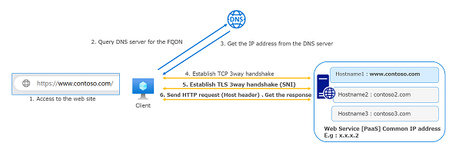
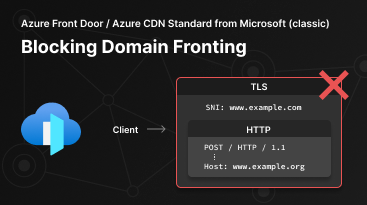
Azure Front Door and Azure CDN Standard from Microsoft (classic) are postponing the domain fronting blocking enforcement to January 22, 2024, and will add two log fields to help you check if your resources display domain fronting behavior by December 25, 2023.26KViews4likes15CommentsAzure WAF Tuning for Web Applications
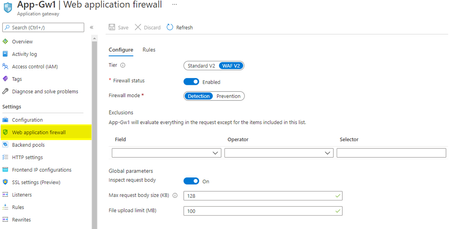
False positives occur when a Web Application Firewall (WAF) erroneously detects legitimate web traffic as malicious and subsequently denies access. For instance, an HTTP request that poses no threat may trigger WAF to classify it as an SQL injection attack due to how characters are passed through the request body, thereby causing the request to be rejected and denying access to the user. Find out in this post some examples to help reduce false positives in your Azure WAF environment.24KViews3likes5CommentsAzure Web Application Firewall: WAF config versus WAF policy
In this blog, we will explore the feature variations when deploying Azure Web Application Firewall (WAF) on Azure Application Gateway using WAF config or WAF policy. We will also show how WAF policies differ between Azure WAF for Azure Front Door and Azure Application Gateway deployments.21KViews8likes3CommentsAzure Front Door: Implementing lessons learned following October outages
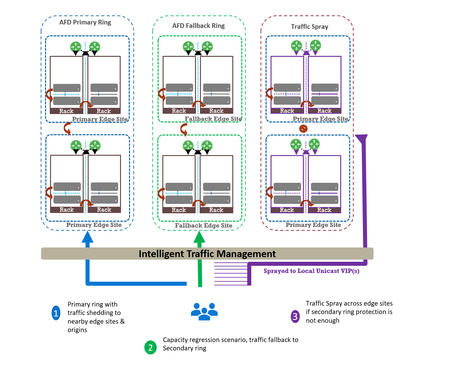
Abhishek Tiwari, Vice President of Engineering, Azure Networking Amit Srivastava, Principal PM Manager, Azure Networking Varun Chawla, Partner Director of Engineering Link to Part 2 - Azure Front Door Resiliency Series Link to Part 3 - Azure Front Door Resiliency Series Introduction Azure Front Door is Microsoft's advanced edge delivery platform encompassing Content Delivery Network (CDN), global security and traffic distribution into a single unified offering. By using Microsoft's extensive global edge network, Azure Front Door ensures efficient content delivery and advanced security through 210+ global and local points of presence (PoPs) strategically positioned closely to both end users and applications. As the central global entry point from the internet onto customer applications, we power mission critical customer applications as well as many of Microsoft’s internal services. We have a highly distributed resilient architecture, which protects against failures at the server, rack, site and even at the regional level. This resiliency is achieved by the use of our intelligent traffic management layer which monitors failures and load balances traffic at server, rack or edge sites level within the primary ring, supplemented by a secondary-fallback ring which accepts traffic in case of primary traffic overflow or broad regional failures. We also deploy a traffic shield as a terminal safety net to ensure that in the event of a managed or unmanaged edge site going offline, end user traffic continues to flow to the next available edge site. Like any large-scale CDN, we deploy each customer configuration across a globally distributed edge fleet, densely shared with thousands of other tenants. While this architecture enables global scale, it carries the risk that certain incompatible configurations, if not contained, can propagate broadly and quickly which can result in a large blast radius of impact. Here we describe how the two recent service incidents impacting Azure Front Door have reinforced the need to accelerate ongoing investments in hardening our resiliency, and tenant isolation strategy to mitigate likelihood and the scale of impact from this class of risk. October incidents: recap and key learnings Azure Front Door experienced two service incidents; on October 9 th and October 29 th , both with customer-impacting service degradation. On October 9 th : A manual cleanup of stuck tenant metadata bypassed our configuration protection layer, allowing incompatible metadata to propagate beyond our canary edge sites. This metadata was created on October 7 th , from a control-plane defect triggered by a customer configuration change. While the protection system initially blocked the propagation, the manual override operation bypassed our safeguards. This incompatible configuration reached the next stage and activated a latent data-plane defect in a subset of edge sites, causing availability impact primarily across Europe (~6%) and Africa (~16%). You can learn more about this issue in detail at https://aka.ms/AIR/QNBQ-5W8 On October 29 th : A different sequence of configuration changes across two control-plane versions produced incompatible metadata. Because the failure mode in the data-plane was asynchronous, the health checks validations embedded in our protection systems were all passed during the rollout. The incompatible customer configuration metadata successfully propagated globally through a staged rollout and also updated the “last known good” (LKG) snapshot. Following this global rollout, the asynchronous process in data-plane exposed another defect which caused crashes. This impacted connectivity and DNS resolutions for all applications onboarded to our platform. Extended recovery time amplified impact on customer applications and Microsoft services. You can learn more about this issue in detail at https://aka.ms/AIR/YKYN-BWZ We took away a number of clear and actionable lessons from these incidents, which are applicable not just to our service, but to any multi-tenant, high-density, globally distributed system. Configuration resiliency – Valid configuration updates should propagate safely, consistently, and predictably across our global edge, while ensuring that incompatible or erroneous configuration never propagate beyond canary environments. Data plane resiliency - Additionally, configuration processing in the data plane must not cause availability impact to any customer. Tenant isolation – Traditional isolation techniques such as hardware partitioning and virtualization are impractical at edge sites. This requires innovative sharding techniques to ensure single tenant-level isolation – a must-have to reduce potential blast radius. Accelerated and automated recovery time objective (RTO) – System should be able to automatically revert to last known good configuration in an acceptable RTO. In case of a service like Azure Front Door, we deem ~10 mins to be a practical RTO for our hundreds of thousands of customers at every edge site. Post outage, given the severity of impact which allowed an incompatible configuration to propagate globally, we made the difficult decision to temporarily block configuration changes in order to expedite rollout of additional safeguards. Between October 29 th to November 5 th , we prioritized and deployed immediate hardening steps before opening up the configuration change. We are confident that the system is stable, and we are continuing to invest in additional safeguards to further strengthen the platform's resiliency. Learning category Goal Repairs Status Safe customer configuration deployment Incompatible configuration never propagates beyond Canary · Control plane and data plane defect fixes · Forced synchronous configuration processing · Additional stages with extended bake time · Early detection of crash state Completed Data plane resiliency Configuration processing cannot impact data plane availability Manage data-plane lifecycle to prevent outages caused by configuration-processing defects. Completed Isolated work-process in every data plane server to process and load the configuration. January 2026 100% Azure Front Door resiliency posture for Microsoft internal services Microsoft operates an isolated, independent Active/Active fleet with automatic failover for critical Azure services Phase 1: Onboarded critical services batch impacted on Oct 29 th outage running on a day old configuration Completed Phase 2: Automation & hardening of operations, auto-failover and self-management of Azure Front Door onboarding for additional services March 2026 Recovery improvements Data plane crash recovery in under 10 minutes Data plane boot-up time optimized via local cache (~1 hour) Completed Accelerate recovery time < 10 minutes March 2026 Tenant isolation No configuration or traffic regression can impact other tenants Micro cellular Azure Front Door with ingress layered shards June 2026 This blog is the first in a multi-part series on Azure Front Door resiliency. In this blog, we will focus on configuration resiliency—how we are making the configuration pipeline safer and more robust. Subsequent blogs will cover tenant isolation and recovery improvements. How our configuration propagation works Azure Front Door configuration changes can be broadly classified into three distinct categories. Service code & data – these include all aspects of Azure Front Door service like management plane, control plane, data plane, configuration propagation system. Azure Front Door follows a safe deployment practice (SDP) process to roll out newer versions of management, control or data plane over a period of approximately 2-3 weeks. This ensures that any regression in software does not have a global impact. However, latent bugs that escape pre-validation and SDP rollout can remain undetected until a specific combination of customer traffic patterns or configuration changes trigger the issue. Web Application Firewall (WAF) & L7 DDoS platform data – These datasets are used by Azure Front Door to deliver security and load-balancing capabilities. Examples include GeoIP data, malicious attack signatures, and IP reputation signatures. Updates to these datasets occur daily through multiple SDP stages with an extended bake time of over 12 hours to minimize the risk of global impact during rollout. This dataset is shared across all customers and the platform, and it is validated immediately since it does not depend on variations in customer traffic or configuration steps. Customer configuration data – Examples of these are any customer configuration change—whether a routing rule update, backend pool modification, WAF rule change, or security policy change. Due to the nature of these changes, it is expected across the edge delivery / CDN industry to propagate these changes globally in 5-10 mins. Both outages stemmed from issues within this category. All configuration changes, including customer configuration data, are processed through a multi-stage pipeline designed to ensure correctness before global rollout across Azure Front Door’s 200+ edge locations. At a high level, Azure Front Door’s configuration propagation system has two distinct components - Control plane – Accepts customer API/portal changes (create/update/delete for profiles, routes, WAF policies, origins, etc.) and translates them into internal configuration metadata which the data plane can understand. Data plane – Globally distributed edge servers that terminate client traffic, apply routing/WAF logic, and proxy to origins using the configuration produced by the control plane. Between these two halves sits a multi-stage configuration rollout pipeline with a dedicated protection system (known as ConfigShield): Changes flow through multiple stages (pre-canary, canary, expanding waves to production) rather than going global at once. Each stage is health-gated: the data plane must remain within strict error and latency thresholds before proceeding. Each stage’s health check also rechecks previous stage’s health for any regressions. A successfully completed rollout updates a last known good (LKG) snapshot used for automated rollback. Historically, rollout targeted global completion in roughly 5–10 minutes, in line with industry standards. Customer configuration processing in Azure Front Door data plane stack Customer configuration changes in Azure Front Door traverse multiple layers—from the control plane through the deployment system—before being converted into FlatBuffers at each Azure Front Door node. These FlatBuffers are then loaded by the Azure Front Door data plane stack, which runs as Kubernetes pods on every node. FlatBuffer Composition: Each FlatBuffer references several sub-resources such as WAF and Rules Engine schematic files, SSL certificate objects, and URL signing secrets. Data plane architecture: o Master process: Accepts configuration changes (memory-mapped files with references) and manages the lifecycle of worker processes. o Workers: L7 proxy processes that serve customer traffic using the applied configuration. Processing flow for each configuration update: Load and apply in master: The transformed configuration is loaded and applied in the master process. Cleanup of unused references occurs synchronously except for certain categories à October 9 outage occurred during this step due to a crash triggered by incompatible metadata. Apply to workers: Configuration is applied to all worker processes without memory overhead (FlatBuffers are memory-mapped). Serve traffic: Workers start consuming new FlatBuffers for new requests; in-flight requests continue using old buffers. Old buffers are queued for cleanup post-completion. Feedback to deployment service: Positive feedback signals readiness for rollout.Cleanup: FlatBuffers are freed asynchronously by the master process after all workers load updates à October 29 outage occurred during this step due to a latent bug in reference counting logic. The October incidents showed we needed to strengthen key aspects of configuration validation, propagation safeguards, and runtime behavior. During the Azure Front Door incident on October 9 th , that protection system worked as intended but was later bypassed by our engineering team during a manual cleanup operation. During this Azure Front Door incident on October 29 th , the incompatible customer configuration metadata progressed through the protection system, before the delayed asynchronous processing task resulted in the crash. Configuration propagation safeguards Based on learnings from the incidents, we are implementing a comprehensive set of configuration resiliency improvements. These changes aim to guarantee that any sequence of configuration changes cannot trigger instability in the data plane, and to ensure quicker recovery in the event of anomalies. Strengthening configuration generation safety This improvement pivots on a ‘shift-left’ strategy where we want to ensure that we catch regression early before they propagate to production. It also includes fixing the latent defects which were the proximate cause of the outage. Fixing outage specific defects - We have fixed the control-plane defects that could generate incompatible tenant metadata under specific operation sequences. We have also remediated the associated data-plane defects. Stronger cross-version validation - We are expanding our test and validation suite to account for changes across multiple control plane build versions. This is expected to be fully completed by February 2026. Fuzz testing - Automated fuzzing and testing of metadata generation contract between the control plane and the data plane. This allows us to generate an expanded set of invalid/unexpected configuration combinations which might not be achievable by traditional test cases alone. This is expected to be fully completed by February 2026. Preventing incompatible configurations from being propagated This segment of the resiliency strategy strives to ensure that a potentially dangerous configuration change never propagates beyond canary stage. Protection system is “always-on” - Enhancements to operational procedures and tooling prevent bypass in all scenarios (including internal cleanup/maintenance), and any cleanup must flow through the same guarded stages and health checks as standard configuration changes. This is completed. Making rollout behavior more predictable and conservative - Configuration processing in the data plane is now fully synchronous. Every data plane issue due to incompatible meta data can be detected withing 10 seconds at every stage. This is completed. Enhancement to deployment pipeline - Additional stages during roll-out and extended bake time between stages serve as an additional safeguard during configuration propagation. This is completed. Recovery tool improvements now make it easier to revert to any previous version of LKG with a single click. This is completed. These changes significantly improve system safety. Post-outage we have increased the configuration propagation time to approximately 45 minutes. We are working towards reducing configuration propagation time closer to pre-incident levels once additional safeguards covered in the Data plane resiliency section below are completed by mid-January, 2026. Data plane resiliency The data plane recovery was the toughest part of recovery efforts during the October incidents. We must ensure fast recovery as well as resilience to configuration processing related issues for the data plane. To address this, we implemented changes that decouple the data plane from incompatible configuration changes. With these enhancements, the data plane continues operating on the last known good configuration—even if the configuration pipeline safeguards fail to protect as intended. Decoupling data plane from configuration changes Each server’s data plane consists of a master process which accepts configuration changes and manages lifecycle of multiple worker processes which serve customer traffic. One of the critical reasons for the prolonged outage in October was that due to latent defects in the data plane, when presented with a bad configuration the master process crashed. The master is a critical command-and-control process and when it crashes it takes down the entire data plane, in that node. Recovery of the master process involves reloading hundreds of thousands of configurations from scratch and took approximately 4.5 hours. We have since made changes to the system to ensure that even in the event of the master process crash due to any reason - including incompatible configuration data being presented - the workers remain healthy and able to serve traffic. During such an event, the workers would not be able to accept new configuration changes but will continue to serve customer traffic using the last known good configuration. This work is completed. Introducing Food Taster: strengthening config propagation resiliency In our efforts to further strengthen Azure Front Door’s configuration propagation system, we are introducing an additional configuration safeguard known internally as Food Taster which protects the master and worker processes from any configuration change related incidents, thereby ensuring data plane resiliency. The principle is simple: every data-plane server will have a redundant and isolated process – the Food Taster – whose only job is to ingest and process new configuration metadata first and then pass validated configuration changes to active data plane. This redundant worker does not accept any customer traffic. All configuration processing in this Food Taster is fully synchronous. That means we do all parsing, validation, and any expensive or risky work up front, and we do not move on until the Food Taster has either proven the configuration is safe or rejected it. Only when the Food Taster successfully loads the configuration and returns “Config OK” does the master process proceed to load the same config and then instruct the worker processes to do the same. If anything goes wrong in the Food Taster, the failure is contained to that isolated worker; the master and traffic-serving workers never see that invalid configuration. We expect this safeguard to reach production globally in January 2026 timeframe. Introduction of this component will also allow us to return closer to pre-incident level of configuration propagation while ensuring data plane safety. Closing This is the first in a series of planned blogs on Azure Front Door resiliency enhancements. We are continuously improving platform safety and reliability and will transparently share updates through this series. Upcoming posts will cover advancements in tenant isolation and improvements to recovery time objectives (RTO). We deeply value our customers’ trust in Azure Front Door. The October incidents reinforced how critical configuration resiliency is, and we are committed to exceeding industry expectations for safety, reliability, and transparency. By hardening our configuration pipeline, strengthening safety gates, and reinforcing isolation boundaries, we’re making Azure Front Door even more resilient so your applications can be too.19KViews25likes15CommentsNavigating Azure WAF Exclusions
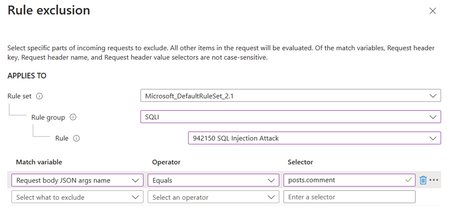
Exclusions in Azure WAF (Web Application Firewall) are a critical feature that allows administrators to fine-tune security rules by specifying elements that should not be evaluated by WAF rules. This capability is essential for reducing false positives and ensuring that legitimate traffic flows unimpeded. Exclusions are designed to fine-tune the WAF’s sensitivity, allowing legitimate traffic to pass through while maintaining robust security measures. They are particularly useful in scenarios where certain request attributes, such as specific cookie values or query strings, are known to be safe but might trigger WAF rules due to their content or structure.18KViews2likes0Comments
Protect against React RSC CVE-2025-55182 with Azure Web Application Firewall (WAF)
Please subscribe to this blog as we will be updating the suggested rules as new attack permutations are found. On December 3, 2025, the React team disclosed a critical remote code execution (RCE) vulnerability in React Server Components (RSC), tracked as CVE-2025-55182. The vulnerability allows an unauthenticated attacker to send a specially crafted request to an RSC “Server Function” endpoint and potentially execute arbitrary code on the server. This vulnerability affects applications using React RSC in the following versions: 19.0.0 19.1.0 19.1.1 19.2.0 Patched versions are available, and all customers are strongly encouraged to update immediately. About CVE-2025-55182 According to the React security advisory, the issue stems from unsafe deserialization within React Server Components, where server function payloads were not adequately validated. When exploited, an attacker can execute arbitrary code on the server without authentication. The NVD entry classifies this vulnerability as Critical, with a CVSS score of 10.0, due to its ease of exploitation and the potential impact on server-side execution. All organizations using React Server Components — or frameworks that embed RSC capabilities such as Next.js, React Router (RSC mode), Waku, @parcel/rsc, @vitejs/plugin-rsc, or rwsdk — should consider themselves potentially exposed until the relevant patches are applied. Azure WAF Mitigation to CVE-2025-55182 The primary and most effective mitigation for this vulnerability is to upgrade any unpatched React versions to the latest security-patched releases. Mitigation on WAF on Application Gateway or Application Gateway for Containers If you are using the latest and recommended Default Rule Set (DRS) 2.1, or the previous Core Rule Set (CRS) 3.2, a new CVE-specific managed rule is available in Azure Web Application Firewall (WAF) for Application Gateway and Application Gateway for Containers. Please ensure this rule is enabled and retains its default Anomaly Score–based action: Rule ID: 99001018 (DRS 2.1) or 800115 (CRS 3.2) Rule description: Attempted React2Shell remote code execution exploitation (CVE-2025-55182) This CVE-specific rule has also been added to CRS 3.1. However, for enhanced and more comprehensive protection specifically against CVE-2025-55182, we strongly recommend upgrading to DRS 2.1, which includes additional detection coverage and tuning for this vulnerability. If you are using CRS 3.0, there is no built-in CVE-specific protection for CVE-2025-55182, and upgrading to DRS 2.1 is strongly advised. If upgrading is not currently possible, you may implement custom WAF rules to detect this exploit pattern using a Block action. Any custom rules should be validated in a test or staging environment before being enforced in production. Custom rules definition for WAF on Application Gateway and Application Gateway for Containers: "customRules": [ { "name": "cve202555182", "priority": 1, "ruleType": "MatchRule", "action": "Block", "matchConditions": [ { "matchVariables": [ { "variableName": "PostArgs" } ], "operator": "Contains", "negationConditon": false, "matchValues": [ "constructor", "__proto__", "prototype", "_response" ], "transforms": [ "Lowercase", "UrlDecode", "RemoveNulls" ] }, { "matchVariables": [ { "variableName": "RequestHeaders", "selector": "next-action" } ], "operator": "Any", "negationConditon": false, "matchValues": [], "transforms": [] } ], "skippedManagedRuleSets": [], "state": "Enabled" }, { "name": "cve202555182ver2", "priority": 100, "ruleType": "MatchRule", "action": "Block", "matchConditions": [ { "matchVariables": [ { "variableName": "PostArgs" } ], "operator": "Contains", "negationConditon": false, "matchValues": [ "constructor", "__proto__", "prototype", "_response" ], "transforms": [ "Lowercase", "UrlDecode", "RemoveNulls" ] }, { "matchVariables": [ { "variableName": "RequestHeaders", "selector": "rsc-action-id" } ], "operator": "Any", "negationConditon": false, "matchValues": [], "transforms": [] } ], "skippedManagedRuleSets": [], "state": "Enabled" } ], Adding these custom rules may fail if your WAF runs on the old WAF engine. In this case, we strongly recommend upgrading your WAF policy to the next-generation WAF engine by moving to a newer ruleset: either to the latest DRS 2.1 which includes the built-in managed rule (preferred) or to the previous CRS 3.2, then apply the custom rules described above. If upgrading your ruleset version is not an option, and your WAF remains on the old WAF engine, you can instead use the following alternative rules: "CustomRules": [ { "Name": "cve202555182", "Priority": 1, "RuleType": "MatchRule", "MatchConditions": [ { "MatchVariables": [ { "VariableName": "PostArgs" } ], "Operator": "Contains", "MatchValues": [ "constructor", "__proto__", "prototype", "_response" ], "Transforms": [ "Lowercase", "UrlDecode", "RemoveNulls" ] }, { "MatchVariables": [ { "VariableName": "RequestHeaders", "Selector": "next-action" } ], "Operator": "Regex", "MatchValues": [ "." ], "Transforms": [] } ], "Action": "Block" }, { "Name": "cve202555182ver2", "Priority": 2, "RuleType": "MatchRule", "MatchConditions": [ { "MatchVariables": [ { "VariableName": "PostArgs" } ], "Operator": "Contains", "MatchValues": [ "constructor", "__proto__", "prototype", "_response" ], "ATransforms": [ "Lowercase", "UrlDecode", "RemoveNulls" ] }, { "MatchVariables": [ { "VariableName": "RequestHeaders", "Selector": "rsc-action-id" } ], "Operator": "Regex", "MatchValues": [ "." ], "Transforms": [] } ], "Action": "Block" } ] Mitigation for WAF on Azure Front Door: If you are using WAF on Azure Front Door, you can create custom WAF rules to detect this exploit pattern. These custom rules are configured with a Block action. We recommend validating them in a test or staging environment before enforcing them in production. "customRules": [ { "name": "cve202555182", "enabledState": "Enabled", "priority": 1, "ruleType": "MatchRule", "rateLimitDurationInMinutes": 1, "rateLimitThreshold": 100, "matchConditions": [ { "matchVariable": "RequestHeader", "selector": "next-action", "operator": "Any", "negateCondition": false, "matchValue": [], "transforms": [] }, { "matchVariable": "RequestHeader", "selector": "content-type", "operator": "Contains", "negateCondition": false, "matchValue": [ "multipart/form-data", "application/x-www-form-urlencoded" ], "transforms": [ "Lowercase" ] }, { "matchVariable": "RequestBody", "operator": "Contains", "negateCondition": false, "matchValue": [ "constructor", "__proto__", "prototype", "_response" ], "transforms": [ "Lowercase", "UrlDecode", "RemoveNulls" ] } ], "action": "Block", "groupBy": [] }, { "name": "cve202555182ver2", "enabledState": "Enabled", "priority": 2, "ruleType": "MatchRule", "rateLimitDurationInMinutes": 1, "rateLimitThreshold": 100, "matchConditions": [ { "matchVariable": "RequestHeader", "selector": "rsc-action-id", "operator": "Any", "negateCondition": false, "matchValue": [], "transforms": [] }, { "matchVariable": "RequestHeader", "selector": "content-type", "operator": "Contains", "negateCondition": false, "matchValue": [ "multipart/form-data", "application/x-www-form-urlencoded" ], "transforms": [ "Lowercase" ] }, { "matchVariable": "RequestBody", "operator": "Contains", "negateCondition": false, "matchValue": [ "constructor", "__proto__", "prototype", "_response" ], "transforms": [ "Lowercase", "UrlDecode", "RemoveNulls" ] } ], "action": "Block", "groupBy": [] } ] You can find more information about Custom Rules on Azure WAF for Application Gateway here or for Azure Front Door here. Changelog 1/19/2026 5:00 PST - Updated built-in managed rule for CRS 3.2 and CRS 3.1 on WAF for Application Gateway 12/20/2025 11:00 PST - Updated built-in managed rule on WAF for Application Gateway and Application Gateway for Containers 12/7/2025 23:30 PST - Updated custom rules to detect additional attack permutation 12/5/2025 17:45 PST - Updated custom rules to include additional transform "RemoveNulls".16KViews7likes1Comment