azure database for postgresql
173 Topics
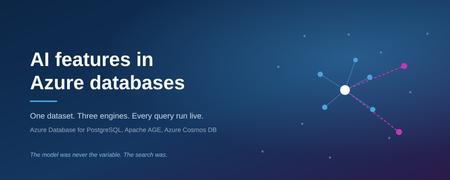
AI features in Azure databases
A support engineer hits a fault. Somebody solved the same fault two years ago, wrote down what fixed it, and closed the ticket. The engineer searches, finds nothing, and works it out from scratch. The answer was in the database the whole time. The search could not reach it. The cost of that is not abstract. It is the same diagnosis paid for twice, a vessel or a production line down for longer than it needed to be, and an organisation that cannot tell whether a fault is new or its fifth recurrence. The knowledge was captured. The organisation still could not use it. That is a retrieval problem, not a model problem, and it is where this experiment starts. It also explains why a model alone does not fix it: the limiting factor is what the system can find, not how well it writes. Azure Database for PostgreSQL and Azure Cosmos DB have both added vector search, full text search, hybrid ranking, and the ability to call a model directly. These arrived as feature announcements. What they do under a real question, what they cost, and where each one stops being the right tool are not in the announcements. So the same 1000 records were loaded into both engines and into a graph, and every query was run live against Azure. Nothing here is a screenshot or a recorded result. Each claim is a query that executed, with its wall clock time and its request unit cost recorded. Three questions were being answered: Where does keyword search beat vector search, and where does it collapse? What changes when the database calls the model itself, rather than an application doing it? Does a graph add anything that SQL over the same table cannot already do? The third one produced the most uncomfortable answer. Background Both engines now ship the same broad capability set, at different stages of maturity. Capability PostgreSQL flexible server Cosmos DB for NoSQL Vector index DiskANN, via pg_diskann DiskANN Full text search tsvector with GIN built in, BM25 scoring Hybrid ranking written by hand RRF() as a single clause Embeddings from inside the database azure_ai extension, generally available public preview Generation from inside the database azure_ai.generate() not available Graph Apache AGE extension no The asymmetry is the interesting part. PostgreSQL gives the database its own identity and lets it call a model, which moves work out of the application entirely. Cosmos DB gives hybrid ranking as one function call and keeps latency low. Neither is a superset of the other. Method Dataset. 1000 synthetic support tickets across maritime, energy, payments and retail, generated from a fixed seed so the results reproduce exactly. Each ticket has a title, a free text description written the way a person would write it, a resolution, a fault code, an asset, a team and a severity. Two design choices decide whether the experiment says anything: The same fault is described as shuddering, juddering, trembling and knocking by different people. Without that variation there is nothing for vector search to beat keyword search at. The fault code is excluded from the embedded text. Include it and vector search half answers code lookups, which destroys the contrast being measured. Stores. Store Configuration PostgreSQL flexible server pgvector at 1536 dimensions, DiskANN, azure_ai, Apache AGE AGE graph, same server 1000 tickets, 18 assets, 12 teams, 12 codes, 3209 edges Cosmos DB for NoSQL 3072 dimension vectors, DiskANN, full text index, autoscale to 5000 RU/s Models. One Microsoft Foundry account. text-embedding-3-large for both stores, gpt-5.5 for the application, gpt-4.1-mini for generation inside PostgreSQL. Authentication. Entra ID everywhere. Password authentication disabled on PostgreSQL, local authentication disabled on Cosmos DB and Foundry. No key or connection string exists anywhere in the build. Measurement. A four page web application executes each query and reports wall clock time. A script runs every endpoint against every input and then clicks every control in a real browser. Numbers below come from that run. The setup. Note the difference in the two lines on the right: for PostgreSQL the database calls the model itself, for Cosmos DB the application does it. Results: PostgreSQL Query Time Plain English search, embedding generated in the database 1.3 s Semantic search feeding a GROUP BY 540 ms Hybrid fusion written by hand 580 ms Retrieval and generation in one statement 2.7 s The query contains no vector. azure_openai.create_embeddings() runs inside the SQL, authenticated by the server’s own managed identity. Because a similarity search returns an ordinary relation, ordinary SQL aggregates over it: which teams, how many tickets, average hours to repair. This is the operation a separate vector store cannot perform, because the join does not exist across two systems. With azure_ai.generate(), one statement embeds the question, searches, builds the prompt and calls the model. There is no application tier in the loop, so anything that can run SQL can do it: a scheduled job, a report, a trigger. The cost of that convenience is latency. Every one of these timings includes the database going out to Foundry and back on the caller’s behalf, which is why the plain English search takes over a second. The next section shows what the same questions cost when the application does that work instead. Results: the graph Apache AGE runs inside the same PostgreSQL server used above. No second database and no sync job. Three of its four edge types restate columns that already exist: which asset a ticket is on, which team fixed it, which code it carried. The fourth does not. SIMILAR_TO links each ticket to its two nearest neighbours by embedding, restricted to neighbours with a different fault code and a cosine distance under 0.40. That produced 209 edges over 1000 tickets. Same code neighbours are skipped because the existing CODED edge already connects those. Measured against a retail point of sale fault: Reached by Assets Fault code walk 5 retail stores and distribution centres SIMILAR_TO walk 4 vessels and 2 substations, none carrying that fault code The first walk is reproducible in SQL. SELECT DISTINCT asset FROM tickets WHERE error_code = ... returns the identical rows, verified one by one. The second is not, because no column connects a checkout terminal to a ship’s bridge display. Expanding from a retail point of sale fault. Grey links are the fault code, which SQL could also follow. Magenta links are the embedding-derived edge, and they reach four vessels and two substations that carry no ERR-6205 ticket at all. Note also that the graph stores no text and no vectors, so it cannot be searched by meaning, only traversed. Vector search selects the entry node and the graph decides how far to walk from there. Results: Cosmos DB The same 1000 tickets, in a document database rather than a relational one, with the application rather than the database calling the model. Query Result Time RU Keyword ERR-5012 13 tickets 130 ms 3.6 Keyword shaking 0 tickets 130 ms 3.6 Vector, paraphrased symptom the same 13 tickets, none sharing a word with the query 190 ms 7.1 Vector, given a fault code unrelated tickets, confidently ranked 420 ms 7.1 Filtered vector meaning plus metadata in one query 180 ms 8.7 Hybrid, ORDER BY RANK RRF(...) both rankings fused in the engine 380 ms 70.5 Two results stand out. The shaking query returns zero. The tickets describe that exact fault, using other words. Vector search then returns those tickets from a sentence that shares no vocabulary with them. Handed a fault code instead, vector search fails, because a code carries no meaning to embed. The two methods fail at opposite things. Hybrid search costs roughly ten times a plain vector query, 70.5 RU against 7.1. It is one clause and it works well, but it is not free and should not be the default on every request. The fusion itself is reciprocal rank fusion, which combines the two result lists by position rather than by score: score = sum over lists of 1 / (k + rank) This matters in practice, because it means the BM25 relevance score and the cosine distance never have to be made comparable. Only the ordering is used. It is also why the demo shows rank rather than the fused score: the score is an artefact of the constant k. With both sets of numbers on the table, the latency gap is the clearest difference between the two engines. Cosmos DB answers a vector query in 190 ms where PostgreSQL takes 1.3 s, roughly seven times faster, because the application has already produced the vector before the query is sent. That is the trade: PostgreSQL removes the application and pays for it in latency. Results: retrieval versus model The final test holds the model constant and varies only the retrieval. Same deployment, same prompt, same question. Each side receives whatever its search returned. Retrieval Tickets passed Answer Keyword search 0 “We have no record of this happening before.” Vector search 8 Names the causes and fixes, cites 8 ticket IDs, all verified Same deployment, same prompt, same 1000 tickets. Only the retrieval differed. The first answer is not a hallucination and not a weak model. It is accurate about what it was given, and wrong about reality, because the retrieval beneath it failed. A system that returns no results produces a confident denial rather than an error, which is why this failure mode reaches production. It is also the expensive one. A wrong answer gets challenged. “We have no record of this” gets believed, and the engineer starts again from nothing. No alert fires, no error appears in a log, and the only visible symptom is work being repeated somewhere else in the organisation months later. Constraints encountered Findings that were not documented in anything read beforehand. Cosmos DB autoscale has an irreversible floor. The maximum cannot later be set below one tenth of the highest value ever provisioned on that container. Raising throughput to 20000 briefly during a load permanently floored the container at 2000 RU/s. Data plane and control plane RBAC are independent. A subscription Owner still receives 403 when reading documents without a Cosmos data plane role. Throughput changes are control plane only. With local authentication disabled the data plane SDK cannot alter RU/s at all, regardless of identity. azure_ai.generate() sends temperature = 0.2 with no override. Newer reasoning models accept only the default and reject the request, so in database generation required a separate gpt-4.1-mini deployment. An embedding call inside ORDER BY is evaluated once per row. Over a cross join that is 1000 model calls per query. Moving it into its own CTE fixes it. The symptom presents as an unreliable network. pg_diskann is limited to 2000 dimensions. text-embedding-3-large produces 3072, so PostgreSQL indexes a 1536 dimension prefix of the same model. Apache AGE is preloaded on Azure. LOAD 'age', which most tutorials instruct, fails with a privilege error. shared_preload_libraries replaces rather than appends and changing it restarts the server. The Gremlin API does not support Entra ID on the data plane. It requires an account key and a separate account, which is incompatible with a keyless deployment. AGE inside PostgreSQL provided a graph without a second database. Role assignments take two to four minutes to propagate. During that window the error reads “Principal does not have access to API/Operation”, which is indistinguishable from a genuine misconfiguration. The /models inference endpoint requires Azure AI Developer. Cognitive Services OpenAI User grants OpenAI/* but not MaaS/*. A pooled connection survives a network change as a black hole. After the client machine changed address, the shared PostgreSQL connection remained open but unresponsive, and queries blocked indefinitely. connect_timeout, TCP keepalives and statement_timeout convert this into a recoverable error; measured recovery is 1.3 seconds. Cost Per day, in NOK, for the deployment described above: Component Cost PostgreSQL flexible server, running 83.80 Cosmos DB about 13 Storage about 1.30 The database dominates. Stopping the PostgreSQL server between sessions is the entire cost strategy. Model usage is consumption priced and negligible at this volume. Two things follow from that. The search and retrieval capability itself is nearly free, because it is a feature of a database that is already being paid for rather than a separate product with its own licence and its own operations budget. And the meter that matters is compute hours on a server that can be stopped, not tokens, which is a more predictable line item than most AI spending. Takeaways Money spent on a better model does not buy a better answer if the retrieval is weak. Both sides of the final test held the same 1000 tickets. Only the search differed, and that alone separated a correct answer from a confident denial. The search layer is where the return on an AI investment is decided, and it is usually the cheapest part of the stack to improve. The two search methods are complements, not competitors. Keyword search is exact and literal, and it is what a serial number, a part code or an invoice number needs. Vector search is approximate and semantic, and it is what a symptom described in someone’s own words needs. Each fails at what the other does well. Real questions contain both, which is the argument for hybrid rather than for choosing. Hybrid search is not free. Ten times the request units of a vector query on this dataset. That is a per-query cost multiplier at production volume, so it belongs on the queries that mix a code with a description, not on every request by default. PostgreSQL and Cosmos DB answer different questions, and the choice has consequences beyond performance. PostgreSQL keeps the semantic result inside SQL, where it can be joined, aggregated, and handed to a model without an application in between, which means a scheduled job or a report can use AI without anyone building a service first. Cosmos DB is the low latency path and gives hybrid fusion as a single clause. The first changes who in an organisation is able to deliver something. The second changes what the user waits for. Keeping operational data and vectors in one engine removes a moving part. There is no second store to provision, secure, synchronise or reconcile, and no window in which the two disagree. The experiment never had to answer the question “which copy is right”, because there was only one. A graph earns its place only through edges that are not columns. Traversing relationships that already exist as foreign keys is a GROUP BY in different syntax, and calling that a graph capability will not survive a competent question. An edge derived from embeddings is different: it reaches records that no WHERE clause can, and in this dataset it connected failures across four separate parts of the business that shared no code, no component and no domain. Keyless is achievable end to end. Entra ID across both databases and the model account, with the database calling the model as its own managed identity, removed every key, password and connection string from the system. Nothing can leak from a repository or a configuration file, because nothing is there. The cost is understanding that data plane roles are assigned separately from control plane roles. Silent failures dominate, and they are the ones that reach production. Every significant defect in this build produced no error: counts inflated by a cartesian product, unresolved tickets averaged as zero hour repairs, near duplicate generated text, a stale process serving old code, and a connection that had stopped responding. Nothing alerted. Assertions over the data and a scripted pass over every endpoint caught all of them, and both took under a day to write. On a system that answers questions rather than returning rows, that kind of check is not optional, because a wrong answer looks exactly like a right one. Where this goes next: Azure HorizonDB Nothing in this experiment used Azure HorizonDB, but it changes the shape of the argument, so it belongs here. The pattern behind the scaling question is familiar: teams want to stay on PostgreSQL and eventually hit a ceiling. HorizonDB is Microsoft’s own PostgreSQL, built for workloads past that point, and it is in public preview. It carries the same AI surface used above, pgvector, DiskANN indexing, hybrid search with reciprocal rank fusion, and the azure_ai extension, so the code in this experiment transfers rather than being rewritten. What it adds is AI pipelines. Chunking, embedding, extraction, generation and ranking are declared in SQL as a pipeline that runs inside the database, on top of durable execution. The definition is a row in a system catalog. Execution survives a crash, retries failed steps, checkpoints partial work, and re-embeds only rows that are new or changed. That closes the remaining gap. This experiment showed a database answering a question. A pipeline is the same idea applied to keeping the data ready to be asked: no orchestrator, no separate worker, no job that quietly stops running. Both are preview features and should be read as direction rather than as something to put in front of customers this quarter. Not tested Scope was limited to what the two databases do on their own. Three things were left out deliberately and would change the conclusions if included. Agentic retrieval. Query planning, sub queries, iterative retrieval and reflection over multiple knowledge sources, as offered by Azure AI Search and Foundry IQ. That is a retrieval strategy built above the database, and it would have made the single query comparison meaningless. Reranking. A semantic reranking model over the candidate set. PostgreSQL exposes azure_ai.rank() for this and it was verified as working, but nothing in the experiment used it. Scale. 1000 rows is enough to show behaviour and not enough to show performance. The query planner in particular behaves differently: at this size it correctly ignores the vector index, because a sequential scan over a thousand rows is cheaper than the index startup cost. Try it yourself Everything described here is published, including the Terraform for the Azure resources and the generator for the dataset. https://github.com/Hanifff/ai-features-in-azure-databases git clone https://github.com/Hanifff/ai-features-in-azure-databases.git cd ai-features-in-azure-databases az login ./scripts/setup.sh That reads your current Azure context, provisions the resources, loads all three stores, and starts the application. The dataset is generated from a fixed seed, so the counts quoted in this post reproduce exactly. The PostgreSQL server is the only meaningful cost. Stop it when you are not using it, and run terraform -chdir=infra/terraform destroy to remove everything.71Views0likes0Comments
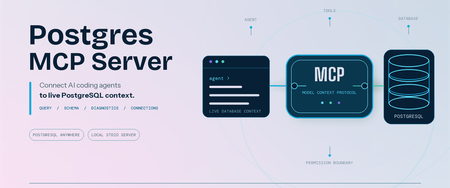
Postgres MCP Server: Connect AI coding agents to PostgreSQL
Coding agents can write SQL, troubleshoot applications, and reason about data. Useful database work starts with your schema and environment context. We are pleased to announce that Microsoft has open-sourced the Postgres MCP Server under the MIT License. Built entirely in Rust for fast, resource-efficient operation, it connects Model Context Protocol (MCP) compatible coding agents to PostgreSQL, so your agent can inspect real database context and run permitted operations. The server works with PostgreSQL locally, on-premises, on Azure, AWS, GCP, or through another PostgreSQL-compatible service. It is built for anyone who works with PostgreSQL through a coding agent, including application developers, database administrators, data professionals, platform engineers, and PostgreSQL enthusiasts. Give AI agents live PostgreSQL context The Postgres MCP Server exposes PostgreSQL operations as tools that your coding agent can call. After connecting to a profile, ask: "List the tables in my PostgreSQL database." "Show me the ten most recent orders." "Generate the schema for these tables and indexes." "What is slowing down my PostgreSQL server?" The tools let your agent: Generate queries and run analytics. Run read-only SQL or use separate tools for data and schema changes. Explore and design schemas. Inspect tables, indexes, functions, sequences, and other database objects before generating database changes. Diagnose performance. Detect server capabilities and collect focused performance metrics for the server and its queries. Manage connections. Create named connection profiles, connect to the right database, and switch between environments without placing credentials in the MCP client configuration. Install and connect securely Prerequisites: Node.js 22 or later, which includes npm and npx. Linux x64 or arm64, macOS x64 or arm64, or Windows x64. Windows on Arm uses x64 emulation. An MCP-compatible coding agent or client. A reachable PostgreSQL or wire-compatible database and a database role with the permissions needed for your intended tasks. No separate installation is required when you use npx; it downloads and runs the package for you. If you prefer the postgres-mcp command to be available globally, install the package: npm install --global @Microsoft/postgres-mcp The examples use npx. With a global installation, replace npx -y Microsoft/postgres-mcp with postgres-mcp. Create a profile and store its password: npx -y @Microsoft/postgres-mcp connection add local \ "postgresql://postgres@localhost:5432/postgres" npx -y @Microsoft/postgres-mcp connection set-password local The server stores the password in your operating system keyring, separate from the profile. For headless or CI environments without a keyring, use the environment-based connection option. Add the server to clients that use the mcpServers configuration: { "mcpServers": { "postgres": { "command": "npx", "args": ["-y", "@microsoft/postgres-mcp", "run"] } } } Configuration formats and file locations differ by client. The Postgres MCP usage guide includes examples for supported clients. For Azure Database for PostgreSQL, the server can use Microsoft Entra ID when a saved profile does not contain a password. PostgreSQL role permissions remain the security boundary. New profiles permit write tools unless you set access_mode: ro. For exploration, combine that setting with a read-only database role. Your MCP client controls approval prompts, and CSV tools can read only from approved local paths. Add expert PostgreSQL skills The open-source Postgres Skills repository complements the MCP server with expert guidance for query performance, indexing, vector search, security, operations, Azure workflows, and AI and knowledge graph scenarios. These reusable instructions help coding agents apply PostgreSQL best practices when investigating an issue or completing a task, while the MCP server supplies the live database context and permitted operations needed to act on that guidance. Next steps Explore the Postgres MCP Server repository. Review the Postgres MCP usage and security guide. Follow the Postgres Skills plugin setup guide. Share feedback or contribute through Postgres MCP GitHub issues. Thank you!60Views0likes0CommentsA Single View of Your PostgreSQL Estate: Database Hub in Public Preview
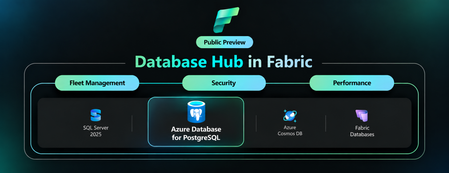
By Varun Dhawan, Matt McFarland, Erdem Tuna from Microsoft PostgreSQL team Azure Database for PostgreSQL support in Database Hub is now in public preview, bringing fleet visibility, security posture, and performance monitoring into one place. This preview is part of the broader vision outlined in our SQLCon Barcelona 2026 announcement: bringing database signals together so teams can see where attention is needed and take a well-informed next step. Here, we focus on the Azure PostgreSQL experience in Database Hub. Database Hub in Microsoft Fabric lets you monitor existing flexible servers in their Azure subscriptions and regions, without moving or mirroring data or building a new customer-managed telemetry pipeline. Baseline monitoring uses existing Azure Monitor metrics. Available capabilities vary by database service. Start with a practical question: Which PostgreSQL servers show sustained memory pressure, and which should I investigate first? Follow the three views below to narrow the scope and compare trends. See the PostgreSQL monitoring guide for setup and preview details. 1. Start with an estate-wide Overview Overview brings cross-engine findings and performance summaries into one starting point. Spot a signal worth investigating, such as elevated PostgreSQL memory usage, then open Estate to focus on the relevant resources. Figure 1: Overview combines cross-engine findings with performance summaries, including PostgreSQL, to help prioritize investigation. Illustrative mockup with sample data. 2. Focus on your Azure PostgreSQL estate In Estate, select the PostgreSQL view and filter by subscription or resource group to define the scope for the memory-pressure investigation. Compare the flexible servers you can access before choosing resources to examine: Filter your PostgreSQL estate by subscription or resource group to focus on the servers you manage. Review a flexible server's resource details in one place. The inventory represents server instances, not each database hosted inside them. Save and share a custom view for a scope you revisit regularly. Colleagues see only the resources their existing permissions allow. Figure 2: Estate filtered to PostgreSQL, bringing flexible server resources, status, findings, and subscription context into one inventory. Illustrative mockup with sample data. Once you have scoped your estate, switch to Performance and select the PostgreSQL servers you want to investigate. 3. Review security posture and performance Security posture In public preview, Database Hub assesses four aspects of your Azure PostgreSQL security configuration: Microsoft Entra authentication: identify servers where it is not enabled. Encryption at rest using customer-managed keys: review key management against your organization's policy. A server using service-managed keys is still encrypted at rest. Microsoft Entra authentication enforced: review whether Microsoft Entra authentication is required, rather than only available as an option. Public Network Access Disabled: review public exposure against your network policy. The private networking guidance explains the virtual network integration option. Performance monitoring In Performance, select the PostgreSQL dashboard and use CPU, memory, and storage summaries to identify servers that need a closer look. You can also review disk activity, connections, failed connections, and applicable read-replica lag. For the memory-pressure question, compare server trends over the same interval to distinguish sustained pressure from a brief spike. Use the Azure Monitor metric reference to match units and aggregation. Missing data is not proof of good health. Figure 3: Performance monitoring with PostgreSQL selected, illustrating utilization summaries and trends for closer investigation. Illustrative mockup with sample data. When a server needs a deeper look, continue in the Azure portal and PostgreSQL tools using the monitoring and diagnostics guidance. Preview scope: Monitoring is metric-based; query-level diagnostics remain in native PostgreSQL tools. Security findings are not a complete compliance audit. Database Hub does not automatically tune, resize, or remediate PostgreSQL servers. Check the servers selected in Performance: dashboard scope can differ from the Estate inventory. Why this matters if you run Postgres at scale Database Hub doesn't replace your PostgreSQL expertise or native tools. It reduces the work of finding which servers need attention, alongside your other supported database engines including SQL Database and Cosmos DB. The Database Hub FAQ explains the access boundaries and how the experiences fit together. Get started Review the Database Hub documentation and PostgreSQL prerequisites, then: Enable the preview: Ask your Fabric administrator to enable Users can access the Database hub (preview) in Tenant settings. Check access: Use a Microsoft Entra identity with Reader or greater permissions on each subscription containing the servers you want to monitor. Start here: open Database Hub in Microsoft Fabric. Scope your estate: In Estate, choose View: PostgreSQL and filter to the subscriptions or resource groups you manage. Compare servers: In Performance, select PostgreSQL, choose the servers to compare, and set the same time range and aggregation. Access boundary: Resource visibility and shared views do not grant permission to query databases. Existing PostgreSQL authentication and network controls still apply. As your PostgreSQL estate grows, Database Hub brings the bigger picture into focus, helping you see where attention is needed and take a more informed next step. We're excited to bring Azure PostgreSQL into this shared experience. Explore the public preview in Microsoft Fabric and discover a simpler way to stay on top of your PostgreSQL estate.186Views0likes0Comments
Database Change Management - Azure Database for PostgreSQL, GitHub Actions and Liquibase OSS
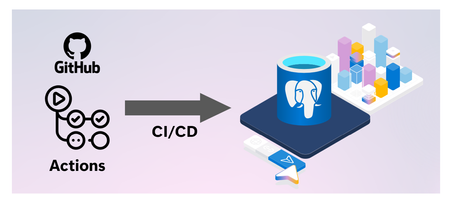
Introduction Database Change Management (DCM) is a comprehensive process of managing all changes to the database schema, objects, reference data, and code over the lifetime of an application. It encompasses version control, testing, deployment, and tracking of database evolutions in a consistent, reliable, and auditable manner. In modern DevOps practices, treating database changes just like application code helps maintain integrity across environments and reduces the risk of errors. Handling Database Change Management using Git Integrating database change management with GitHub brings the rigor, predictability, and safety of standard software development to relational database schemas. Much like application code deployments, where features are developed on feature branches, peer-reviewed via Pull Requests (PRs), and merged only after passing automated test suites. When integrated with GitHub Actions, database deployments transition from manual, error-prone runbooks executed by DBAs into fully automated, repeatable pipelines. When a pull request is merged into the master branch, GitHub triggers a workflow that automatically validates changelogs, dry-runs SQL changes against ephemeral test databases, and updates staging or production database servers, ensuring that database schema structures remain in perfect, synchronized step with the application code they support. Approach To implement database change management, multiple tools and frameworks must be used to handle automation, integrated approach and version management. Following Azure, Git and open-source tools will be used in this approach: Azure database for PostgreSQL (or Azure SQL database) GitHub repo GitHub actions Liquibase (open-source DB version control tool) Database schema migrations (using tools like Liquibase) are treated as declarative, version-controlled source files. This alignment allows teams to leverage the key advantages of Git: A single source of truth for database state A comprehensive and immutable audit trail of who modified what and when Ability to easily revert problematic schema changes by rolling back code commits. Tool Used – Liquibase Liquibase is an open-source, database-independent schema migration tool that treats database changes as code to automate continuous integration and deployment (CI/CD) pipelines. It operates by evaluating a user-defined core manifest file known as a Changelog, which contains granular, ordered tracking units called ChangeSets authored in SQL, YAML or JSON. When executed against a target database instance, the Liquibase engine checks the database's internal DATABASECHANGELOG tracking table to identify previously applied changesets by matching their unique combination of ID, Author, execution Filep and tag. Unexecuted changes (written in JSON or YAML) are dynamically translated via specialized JDBC drivers into dialect-specific SQL (such as PostgreSQL, SQL Server etc.) and executed within a single transaction wrapper. Beyond structural upgrades (update), Liquibase provides robust operational functionalities including Rollback capabilities, which allow to revert schema states back to targeted baseline schema tags or specific timestamps by executing explicit, user-defined “--rollback” blocks in reverse chronological order. Furthermore, it features comprehensive schema difference management via the “diff” and diff-changelog engines. This allows engineers to perform automated schema drift detection by comparing an active database against a reference baseline (or another active environment), instantly identifying disparities in tables, columns, indexes, or constraints, and auto-generating the exact operational changesets required to bring the environments back into structural synchronization. Migration-based Approach When managing database migrations, Liquibase provides three structural configuration patterns to declare and execute schema changes across environments: SQL, YAML, and JSON. Sample of SQL Changelog is given below. It follows SQL syntax of native database engine (PostgreSQL in this case): The Formatted SQL approach is highly recommended for database administrators and developers who require low-level control, as it uses standard, platform-native SQL scripts annotated with special comment tokens (like --changeset and --rollback) to direct the Liquibase parser. In contrast, the YAML and JSON approaches use a database-agnostic, declarative key-value abstraction model. Instead of raw DDL, developers define structural states using structural objects (such as “createTable” or “addColumn” fields). The Liquibase engine dynamically compiles these JSON/YAML objects into dialect-specific SQL using target JDBC drivers at runtime, while automatically inferring the exact inverse commands required for database rollbacks. Regardless of whether a team implements raw SQL for precise indexing and database-specific performance optimizations or leverages the strict serialization of JSON/YAML to maintain standardized, cross-platform migrations, all three file types integrate seamlessly into version control as a single source of truth for CI/CD automation. Versioning and Repeatable Migrations Liquibase governs schema versioning and repeatable migrations through a combination of tracking states and distinct changeset configurations. Unlike traditional application version numbering, Liquibase applies a state-driven versioning model where every discrete schema modification is tracked as an individual, ordered “changeset” identified by a unique composite key consisting of the id, author, changelog file and tag. When a deployment pipeline runs, the Liquibase engine queries the target database’s internal DATABASECHANGELOG table to evaluate this composite key signature; if the key exists, the migration is skipped to preserve environment stability. Architecture Overview A robust database change management architecture involves several key Azure components working together. At the core is Azure Database for PostgreSQL (Flexible Server) as the production-grade target database, often deployed with private endpoint connectivity to restrict network access. GitHub hosts the repository containing Liquibase migration scripts. GitHub Actions orchestrates CI/CD pipelines; a self-hosted runner, placed within the same Azure Virtual Network (VNet) as the database, executes Liquibase commands to apply migrations securely with minimal network latency. Secrets such as database connection strings and credentials are stored securely in Azure Key Vault or GitHub Secrets. Workflows use the Azure/login and azure/get-keyvault-secrets actions to fetch Azure secrets at runtime. GitHub secrets are fetched automatically when referenced in the workflow. Liquibase updates the “DATABASECHANGELOG” table on the PostgreSQL instance each time a migration is applied, providing full tracking. This formation ensures that all database changes are automated, auditable, and under version control. Following are the architectural components: GitHub repo containing the DDL/DCL scripts to be applied to the database engine. GitHub actions containing the workflow that can be scheduled based on push or commit or at a time. GitHub actions self-hosted runner on Azure VM. Azure PostgreSQL database instance where changes are to be applied. Following architecture uses same SQL scripts for multi-environment deployment. Azure Database for PostgreSQL Configuration Azure Database for PostgreSQL should be configured with a private endpoint and integrated into the Virtual Network to ensure self-hosted runner has secure, internal access. Appropriate database schemas should already be available. User account that is to be used for Liquibase migrations should have necessary access like create and modify tables, “DATABASECHANGELOG” table which Liquibase uses to track applied migrations. GitHub “secrets” or Azure Key Vault should be used to store database connection and user details. Rollback action can be used to revert database changes, however, point-in-time restore (PITR) backups should be enabled so that database can be reverted to previous states if migration causes unintended effects. Set firewall rules to restrict public access, configure SSL connections to enforce encrypted traffic for database communication. Azure Monitor should be used to capture audit logs. GitHub Actions and Self-hosted Runner GitHub Actions workflows will execute Liquibase commands, set up a self-hosted runner within the same VNet as the Azure Database fir PostgreSQL server. Provision a lightweight Azure VM (Linux recommended). Following software needs to be installed: OpenJDK Liquibase “psql” PostgreSQL client tool. GitHub Actions runner application and register it with the repository, assigning it labels (e.g., self-hosted) so workflows can target it. Attach Azure managed identity (system or user assigned) with necessary RBAC permissions to retrieve secrets from Azure Key Vault at runtime and connect to database. Liquibase Configuration Liquibase configuration contains two files as mentioned below: Changelog file – Database SQL statements pertaining to the changes. This file is the major component of the configuration as it would contain SQL statements that are to be applied to the database. E.g. postgresdb.changelog.sql. The file should follow Liquibase formatted SQL syntax. liquibase.properties – Contains peripheral details like schema and changelog configuration. Following are the key configuration parameters: changeLogFile=postgres_changelog/postgresdb.changelog.sql : Location of database changelog file relative to the location of where liquibase.properties file is stored. defaultSchemaName : Schema name in postgres database where changes will be applied. liquibaseSchemaName : Schema name in postgres database where Liquibase tracking tables will be created. logLevel : Level of logging by Liquibase execution. databaseChangeLogTableName and databaseChangeLogLockTableName : Liquibase tracking tables. Keep the default values. Setup & Execution Steps Please use the following GitHub repo to download all resources required for implementation. https://github.com/deepcontent2208/db_change_mgmt_liquibase_github.git CI/CD Pipeline Configuration CI Pipeline The Continuous Integration (CI) workflow in GitHub Actions should focus on validating migration scripts before they are merged into the main branch. Use triggers on pull requests targeting main. Begin steps by checking out the repository using actions/checkout@v4, ensuring that the sql migration and “liquibase.properties” files are available locally. Database authentication details can be stored either in Azure Key Vault or GitHub Secrets. These details will be extracted dynamically during workflow execution. Following is the code snippet for extraction: Next, execute Liquibase validate CI, by invoking CI GitHub workflow. Capture and report any validation errors to prevent faulty migrations from entering the code base. CD Pipeline Continuous Deployment (CD) workflows apply the validated migrations to target environments. Use on-demand triggers with workflow_dispatch for production deployments to avoid accidental changes. In your workflow configuration, after actions/checkout@v4, authenticate and fetch Key Vault secrets similarly to the CI pipeline. You may add environment approvals (GitHub Environments) for prod. 3 different CD workflows are being used – “Database Deployment”, “Database Rollback” and “Database Schema Drift”. Following is the architecture of schema deployment; it uses same repo to deploy across environments. Invoke Liquibase CD workflow pipeline to implement the changes. The same pipeline/workflow will work for DEV, QA and PROD as it is parameterized. Workflow will use the same SQL changelog file for all environments to ensure schema consistency across environments unless developers decide to use different SQL changelogs for different environments. Following snippet shows parameters for workflow execution. Release “tag” should be provided with proper tags. It will ensure Rollback can be done to the provided “tag”. Conclusion Database change management is critical for maintaining application integrity and enabling continuous delivery. Liquibase provides a mature and reliable framework for tracking, versioning, and applying schema changes and rollback in a production environment. By integrating Liquibase with Azure Database for PostgreSQL, Azure SQL Database, Azure SQL MI, GitHub Actions, a self-hosted runner, and Azure Key Vault, teams can establish fully automated and secure CI/CD pipelines for databases. Adopting migration-based workflows, enforcing version control, leveraging environment parity, and following best practices reduces deployment risks and supports auditing and compliance requirements. As database schemas evolve, having an auditable history and the ability to apply changes in a controlled, repeatable way empowers development teams to innovate while preserving data integrity.315Views3likes0CommentsRecovering TPS After a Cross-Database Migration
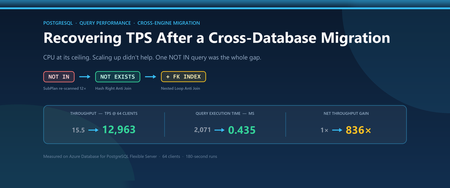
1. The Investigation A thorough investigation led to the following observations: CPU remained saturated. The server ran at 100% CPU throughout the benchmark, while wait samples showed that most time was spent executing SQL - indicating queries were either using CPU or waiting for it. Scaling up did not help. A larger SKU delivered only a small, proportional improvement and did not close the performance gap - a clear sign of slow transactions rather than a resource ceiling. Ranking statements by total execution time showed that the top query ran far longer on PostgreSQL than on the source database. Throughout the tests, no changes were made to SQL statements or application logic or flow. Under concurrent execution, the top-most query consumed all available CPU, starving every other operation of resources. We also eliminated any potential migration-related details: table statistics were current. On a freshly migrated database, missing statistics reproduce such symptoms and running ANALYZE fixes bad SQL plans for most queries. SELECT relname, n_live_tup, last_analyze, last_autoanalyze FROM pg_stat_user_tables ORDER BY n_live_tup DESC; 2. The Query and the Cause The top statement came from the order-status path, which called on each transaction to find any customer's orders that were still awaiting validation, and joined orders to order_validations expressed as "not yet validated" via a NOT IN subquery: AND o.order_id NOT IN (SELECT v.order_id FROM order_validations v WHERE v.validation_state = 'PASSED') This was the smoking gun evidence. NOT IN carries SQL's three-valued logic (TRUE, FALSE and UNKNOWN). If a subquery result contains a NULL and the outer value matches none of the non-NULL values, the predicate evaluates to UNKNOWN rather than TRUE, and the row is dropped. Because of these semantics, the Postgres planner does not turn a NOT IN subquery into an anti-join. It evaluates the predicate as a filter over the subquery result instead of joining against it. The previous engine performed the anti-join transformation, but Postgres does not. That difference results in the entire performance gap. The plan shows the consequence: -> Bitmap Heap Scan on orders o (actual time=695.848..2029.205 rows=5 loops=1) Filter: (... AND (NOT (ANY (order_id = (SubPlan 1).col1)))) SubPlan 1 -> Materialize (actual time=0.004..99.936 rows=1031970 loops=12) -> Seq Scan on order_validations v (actual rows=1530643 loops=1) Filter: (validation_state = 'PASSED') The subquery result - 1,530,643 PASSED validations - becomes materialized once and then re-scanned twelve times, once per candidate order row, equaling roughly 12.4 million row comparisons for a result which includes 12 rows. The damage does not stop at the subquery. Because the planner cannot see through the filter, the rest of the plan continues to degrade; a bitmap scan using orders_pkey, and products joined by a sequential scan that evaluated to keep 5 rows. A construct the planner cannot reason through does not just execute slowly; it corrupts the estimates every other node depends on. 3. The Fix The NOT IN predicate was re-written as NOT EXISTS and LEFT JOIN...IS NULL so that the planner could properly produce an anti-join. Both rewrites are equivalent: -- Option A: NOT EXISTS - "does a matching row exist?", a two-valued question WHERE NOT EXISTS (SELECT 1 FROM order_validations v WHERE v.order_id = o.order_id AND v.validation_state = 'PASSED') -- Option B: LEFT JOIN ... IS NULL - the same anti-join, spelled differently LEFT JOIN order_validations v ON v.order_id = o.order_id AND v.validation_state = 'PASSED' WHERE v.order_id IS NULL The plan changes shape immediately: -> Hash Right Anti Join (actual time=306.311..306.316 rows=5 loops=1) Hash Cond: (v.order_id = o.order_id) -> Seq Scan on order_validations v (actual time=0.008..231.238 rows=1530643 loops=1) Filter: (validation_state = 'PASSED') -> Hash (actual time=0.358..0.360 rows=12 loops=1) Buckets: 1024 Batches: 1 Memory Usage: 9kB The planner hashes the small 12-row portion and streams the large table past it as the probe side. One pass over each relation is sufficient, with no materialization and no rescans. Both rewrites compiled to identical plans - same cost, same node structure, same buffer counts, execution times within 0.14% of each other. There is a correctness benefit too **: NOT IN** can fail quietly, when a NULL appears in the subquery: it returns an empty result that looks like a legitimate "no rows found". NOT EXISTS is not exposed to that. 4. The Final Steps Everything above was measured with no index on foreign key order_validations.order_id which typically reflects a real post-migration state. CREATE INDEX idx_order_validations_order_id ON order_validations (order_id, validation_state); ANALYZE order_validations; With the order_id leading, the index is ordered on the anti-join key, and because validation_state is included, the inner side of the join is fully covered. Variant FK index Query time Buffers NOT IN no 2,071.51 ms 30,386 NOT IN yes 2,003.72 ms 30,386 NOT EXISTS no 306.40 ms 22,028 NOT EXISTS yes 0.435 ms 345 LEFT JOIN ... IS NULL yes 0.432 ms 345 Two results stand out. The index did nothing for `NOT IN`. 2,071 ms became 2,004 ms - run-to-run noise. The planner did not use the index, and it was right not to: the subquery result has to be materialized so it can be rescanned, so a selective index cannot contribute. It indicates the problem was never associated with the access path but with plan shape. The same index transformed `NOT EXISTS` - 306.40 ms to 0.435 ms: -> Nested Loop Anti Join (actual time=0.063..0.367 rows=5 loops=1) -> Bitmap Heap Scan on orders o (actual rows=12 loops=1) -> Index Only Scan using idx_order_validations_order_id on order_validations v (actual time=0.004..0.004 rows=1 loops=12) Index Cond: ((order_id = o.order_id) AND (validation_state = 'PASSED')) Heap Fetches: 0 Without the index, the anti-join had to hash 12 rows and streams1.53 million validation rows past the hash. With the index, the planner switched to twelve point lookups with a nested loop, and buffers needed for the whole query fell from 22,028 to 345. This test also corrects a tempting intuition, validation_state = 'PASSED' matches 60% of the table, which makes the column look index-proof. But in the nested-loop shape the index condition is (order_id = o.order_id AND validation_state = 'PASSED') — a point lookup per outer row, and there are only twelve outer rows. Selectivity depends on the predicate as used in the plan, not on the column alone. 5. Validating Throughput is Restored Re-running the same 64-client, 180-second benchmark with the index in place: Variant TPS Avg latency Transactions vs baseline Baseline - NOT IN 15.51 4,096.11 ms 2,839 - LEFT JOIN ... IS NULL 12,963.39 4.936 ms 2,331,899 836× NOT EXISTS 12,908.18 4.958 ms 2,322,025 832× 836× throughput, with latency down from four seconds to five milliseconds. Three things are worth drawing out: The baseline did not move. 15.69 TPS before the index and 15.51 after. Anyone who added the index without rewriting the query would have concluded the index was useless and dropped it. The rewrite's value grew from 3× to 836× once the index existed to support it. SQL rewrite alone would’ve looked like a modest win rather than a transformational one. Latency became predictable. The baseline’s pgbench progress windows has shown avg latency oscillating across a 23% spread; while the rewrites held within 0.9% deviation across the entire run. In the same 180 seconds, the baseline completed a total of 2,839 transactions while the rewrite completed 2,331,899. At the baseline rate, the same volume would take roughly 41.8 hours. 6. Takeaways A whole-database slowdown is often a bad query with concurrency. Rank statements by total execution time along with calls before scaling up hardware. CPU at its ceiling with backends executing rather than waiting is a query problem, not a capacity problem. Scaling up buys proportional relief at best. After a cross-engine migration, compare per-statement runtimes against the source platform. The queries that hurt are the ordinary-looking ones whose performance depended on an optimizer transformation the new engine does not perform. PostgreSQL does not transform a `NOT IN` subquery into an anti-join, because of SQL's three-valued NULL semantics. Rewriting to NOT EXISTS or LEFT JOIN ... IS NULL is what makes the anti-join available. Fix the plan shape first, then the access path. The same foreign-key index was worth nothing to NOT IN and 836× to NOT EXISTS on query time. `NOT EXISTS` and `LEFT JOIN ... IS NULL` compile to identical plans. Pick the one that reads more clearly. `NOT EXISTS` fixes correctness as well as speed. NOT IN silently returns nothing when the subquery contains a NULL. Appendix - Reproducing this yourself The six scripts below are a self-contained lab. They are synthetic stand-ins shaped to reproduce the same plan behavior, not a model of any real business. Run them in a scratch database. Prerequisites: PostgreSQL 14+ and a pgbench client. Sizing as measured: 10,000 customers, 50,000 products, 3,000,000 orders. File Purpose 01_schema.sql Creates customers, products, orders, order_validations 02_data.sql Loads the dataset and runs ANALYZE, then verifies row counts 03_indexes.sql Baseline index; the foreign-key index is commented out until round two bench_notin.sql Baseline - the migrated NOT IN shape bench_notexists.sql Fix A - NOT EXISTS bench_leftjoin.sql Fix B - LEFT JOIN ... IS NULL Note. .sql attachments are not supported on this platform, so all six scripts are reproduced in full in the companion document AntiJoin_Repro_SQL_Scripts.docx. Copy each into a file named exactly as listed above, saved as UTF-8 without a BOM, and keep the \set lines in the bench_*.sql files at column 1 - they are pgbench meta-commands, not SQL. Follow the run order given in that document. The foreign-key index is intentionally commented out in 03_indexes.sql so the first round measures the rewrite alone. Adding it too early removes the comparison the post depends on. Run order Run 01_schema.sql, then 02_data.sql, then 03_indexes.sql. Benchmark all three query files. This is the "no FK index" round. Uncomment and run the foreign-key index block in 03_indexes.sql. Benchmark all three query files again. pgbench -U postgres -h <server>.postgres.database.azure.com \ -c 64 -j 64 -T 180 -P 15 -r -n \ -f bench_notin.sql postgres Two things are easy to get wrong on the command line: The database name is a positional argument, not `-d`. In pgbench, -d floods the output with protocol noise. Put the database name last. -r reports per-statement latency across all clients; -P 15 prints progress every 15 seconds, which is how you confirm a run was stable rather than trending. Keep runs comparable: same client count, same duration, and a warm-up before every measured run. Capture plans separately in a single psql session - do not wrap the benchmark statements in EXPLAIN (ANALYZE), because the instrumentation overhead distorts the TPS you are trying to measure.330Views2likes2CommentsPostgres Skills: Give Your AI Agent PostgreSQL Expertise
Modern application development increasingly relies on AI agents to generate code, configure services, and accelerate delivery. But generic agents often stop at plausible SQL or broad recommendations. They do not reliably inspect the live database, account for PostgreSQL versions and extensions, distinguish self-hosted from managed environments, apply production guardrails, or verify that a change actually works. That gap matters when database decisions affect security, performance, availability, and customer experience. A syntactically correct query can still create an isolation issue, use an incompatible feature, recommend an unsupported managed-service command, or leave an application with a design that does not scale. The solution: PostgreSQL Skills PostgreSQL Skills closes this gap by giving agents the PostgreSQL expertise, live context, execution tools, and validation workflow needed to turn a generic answer into a safe, production-ready outcome that solves the application’s business problem. Its 32 expert sub-skills support PostgreSQL running locally, self-hosted, or on any cloud; Azure Database for PostgreSQL and HorizonDB. The plugin includes postgres-mcp for live database access and Azure CLI integration for managed-service operations. One install works across GitHub Copilot CLI, VS Code, Claude Code, and Codex CLI. Domain What you can do PostgreSQL Anywhere Build vector search, partition tables, implement row-level security, index JSONB data, and analyze query regressions on local, self-hosted, or cloud deployments Azure Database for PostgreSQL & HorizonDB Provision and scale servers, configure HA/DR and PITR, use Entra ID authentication, plan major-version upgrades, and get HorizonDB (Preview) guidance You do not need to choose a sub-skill or tell the agent which rules apply. The plugin checks your environment and routes each request to the guidance that fits your deployment. Live database context and PostgreSQL expertise, together The included postgres-mcp server gives your agent structured access to the database you are using. It can inspect schemas, roles, extensions, and server capabilities, run queries, and apply changes you approve. This grounds the work in live database state instead of assumptions. The sub-skills guide how the agent uses that access. They define what to check, which rules apply to your deployment, when to ask for confirmation, and how to validate the outcome. Together, postgres-mcp and the sub-skills help the agent move from a generic answer to a change that fits your database and has been verified. Try it yourself Choose a host and follow the setup path for your operating system. Install your host Add the marketplace and install PostgreSQL Skills GitHub Copilot CLI copilot plugin marketplace add microsoft/postgres-skills copilot plugin install postgres-skills@postgres-skills copilot plugin list # confirm postgres-skills is active Claude Code /plugin marketplace add microsoft/postgres-skills /plugin install postgres-skills@postgres-skills /plugin # confirm the plugin appears as installed Codex CLI codex plugin marketplace add microsoft/postgres-skills codex plugin add postgres-skills codex plugin list # confirm postgres-skills is active See it work: three developer scenarios PostgreSQL anywhere: enforce tenant isolation Prompt: "Add row-level security so each tenant can only access its own data." A generic agent with SQL access can write a CREATE POLICY statement. But it may not inspect table ownership, BYPASSRLS roles, existing policies, or how your application establishes tenant context. The policy can look correct while still leaving an isolation gap. With PostgreSQL Skills, the agent inspects the live schema and role model, identifies the tenant key, accounts for owner bypass behavior, and proposes the policy against your actual tables. It asks before enabling RLS, then tests allowed and denied access with representative roles. You get a verified security boundary, not just policy syntax. PostgreSQL application development: build hybrid search Prompt: "Add semantic and keyword search to my product catalog." A generic agent can generate a pgvector query and a full-text search query. It still leaves you to reconcile two result sets, choose compatible indexes, and adapt the example to your schema and PostgreSQL version. With PostgreSQL Skills, the agent inspects your catalog schema and extension availability, designs the embedding and text-search columns, creates the appropriate indexes, and combines both signals with reciprocal rank fusion. It runs the search against your data and verifies the result before calling the implementation complete. Azure PostgreSQL: connect an application without passwords or public access Prompt: "Connect my application to Azure Database for PostgreSQL without passwords or public internet access." A generic agent with Azure CLI access may provide the right ingredients: Entra authentication, a managed identity, and a private endpoint. It may not check which server is targeted, whether private networking is already configured, how the application identity maps to PostgreSQL, or whether disabling an existing authentication path will break deployed applications. With PostgreSQL Skills, the agent confirms the Azure connection and discovers the server, subscription, resource group, networking mode, and current authentication configuration. It identifies the application identity, proposes a private and passwordless connection plan, and explains every Azure and PostgreSQL object that will change. It asks before modifying identity, authentication, or network access, validates token-based connectivity, and leaves existing access in place until you confirm it can be removed. Guardrails for safe execution Acting on a database is only useful if it is safe on any host. One rule is universal: Every destructive or non-reversible action is confirmed with you first. This applies without exception on self-hosted and Azure deployments. If you're connected to Azure, three more rules kick in automatically: Azure guidance uses `azure_pg_admin`, never `SUPERUSER`. It never assumes access that the managed service does not grant. No `ALTER SYSTEM` and no OS-level access on Flexible Server. Azure changes go through az ... parameter set, matching how the service actually works. Connection-aware gating. Azure-only guidance loads only after the live connection confirms isAzure: true. It never guesses your environment or applies Azure rules to a database that is not one. Get started Repo: github.com/microsoft/postgres-skills. Visit the PostgreSQL Skills repository for installation commands, usage examples, and contribution guidance. Explore the open-source collection of PostgreSQL skills for AI coding agents, including installation commands, usage examples, and contribution guidance. Contribute: Follow CONTRIBUTING.md to add a reference file, register its triggers in the routing table, run the validation checks, and submit a pull request. Feedback: open an issue on the repo with what you tried and what broke The takeaway: generic agents can produce plausible database code, but solving real application problems requires PostgreSQL expertise, live environment context, production guardrails, and validation. PostgreSQL Skills brings those capabilities together so your agent can move beyond suggesting an answer to delivering a safe, deployment-aware, and verified outcome.604Views2likes0CommentsAugust 2026 Recap: Azure Database for PostgreSQL
Adaptive autovacuum Adaptive autovacuum enhances PostgreSQL built-in autovacuum process in Azure Database for PostgreSQL flexible server, adjusting vacuum activity to changing workload conditions to maintain database health by cleaning dead tuples, reducing table and index bloat, and lowering the risk of transaction ID wraparound without requiring administrators to tune static autovacuum settings. The feature uses workload and table-level signals to adapt autovacuum behavior, balancing maintenance work with application performance. It is especially valuable for databases with variable update and delete patterns, where fixed thresholds and scale factors can cause vacuuming to run too late or too aggressively. Learn more: Adaptive Autovacuum in Azure Database for PostgreSQL flexible server Pre-upgrade Validation Checks now generally available, including CLI support Pre-upgrade Validation Checks for Azure Database for PostgreSQL Flexible Server are now generally available through the Azure portal and CLI. Assess your server’s readiness for a major version upgrade without performing the upgrade, identify compatibility issues and upgrade blockers, and review actionable remediation guidance before your planned upgrade window. This helps teams address prerequisites earlier and make upgrade planning more predictable. With Azure CLI 2.89.0 or later, use the --validate-only parameter with az postgres flexible-server upgrade to incorporate readiness checks into scripts and operational workflows. In the Azure portal, select Validate only in the Upgrade pane to review results and download a CSV report. Resolve any blocking issues, rerun validation, and initiate the major version upgrade separately when ready. Learn more: Run pre-upgrade validation checks New PgBouncer metric: Total client connections (Preview) The new Total client connections (Preview) metric gives Azure Database for PostgreSQL Flexible Server customers a server-level view of client connections currently tracked by PgBouncer - including active, idle, waiting, and authenticating connections. Unlike backend connection metrics, it captures client-side connection usage, helping you understand how close your application is to the configured pgbouncer.max_client_conn limit and investigate connection pressure. Available as client_connections_total, the metric complements existing active and waiting client connection metrics to support capacity planning and troubleshooting. To collect PgBouncer metrics, enable pgbouncer.enabled and metrics.pgbouncer_diagnostics, then view the metric in Azure Monitor where the preview is available. The value represents the current connection count, not a cumulative total over time. Documentation: Monitor PgBouncer metrics August 2026 PostgreSQL minor version update Azure Database for PostgreSQL Flexible Server now supports PostgreSQL minor versions 18.6, 17.11, 16.15, 15.19, and 14.24 as part of the August 2026 release. These updates keep workloads current within their existing PostgreSQL major version. The August maintenance release also includes security fixes, hardening improvements, and service reliability fixes. Existing servers receive the update through scheduled maintenance. Deployment proceeds region by region, so availability can vary and the global rollout can take up a few weeks. Monitor your server’s maintenance notifications to understand when the update will be applied. Learn more: Supported versions of PostgreSQL Elastic Clusters now available for PG18 Powered by Citus 14.0, Elastic Clusters bring Postgres 18 capabilities to a fully managed, distributed Postgres experience on Azure. Build new applications or modernize existing ones with the performance, reliability, and developer improvements of PostgreSQL 18—combined with the flexible scaling and operational simplicity of Azure Postgres Elastic Clusters. You can explore PostgreSQL 18 performance improvements, new SQL capabilities, and developer-focused features while scaling distributed workloads across tables, shards, and nodes. New and Improved Troubleshooting Guides for Azure Postgres Updated troubleshooting guidance is now available for Azure Database for PostgreSQL flexible server. You can use the expanded documentation to diagnose high CPU, memory, IOPS, temporary file usage, and autovacuum issues, helping you identify root causes and resolve performance problems more efficiently. The update provides end-to-end investigation workflows for the built-in troubleshooting guides and explains how to correlate Azure Monitor metrics, Query Store statistics, session data, and server logs. You can learn how to configure the required telemetry, identify the query, session, wait events, or configuration behind an issue, and apply targeted mitigations before deciding to scale your server. Our modernized troubleshooting guides deliver richer performance insights, intuitive controls, and clearer recommendations to help users diagnose issues faster, optimize configurations confidently, and improve performance across CPU, memory, storage, and autovacuum workloads. Azure Advisor Enhancements Advisor now features three new active monitors for your Azure Database for PostgreSQL flexible server covering your Storage, Connectivity, and Compute configurations. These recommendations ensure you can take advantage of storage auto-grow, enable the built-in connection pooler, and upgrade legacy performance SKUs to the current configurations when needed. Terraform support for Premium SSDv2 You can now use Terraform to deploy Azure Database for PostgreSQL Flexible Server with Premium SSD v2 storage. Premium SSD v2 gives you more control over storage performance by letting you independently configure capacity, IOPS, and throughput. This can be especially useful for workloads that need higher storage performance without increasing disk size. Support is now available in the azurerm_postgresql_flexible_server resource starting with AzureRM provider version 5.4.0. You can configure Premium SSD v2 by setting storage_type to PremiumV2_LRS, along with the desired IOPS and throughput values. resource "azurerm_postgresql_flexible_server" "example" { name = "example-postgresql" resource_group_name = azurerm_resource_group.example.name location = azurerm_resource_group.example.location sku_name = "GP_Standard_D4s_v5" storage_type = "PremiumV2_LRS" storage_mb = 131072 storage_iops = 3000 storage_throughput = 125 } Premium SSD v2 supports up to 64 TiB capacity, 80,000 IOPS and 1,200 MB/s throughput, depending on your storage and compute configuration, and is available with General Purpose and Memory Optimized compute tiers. For more details, see the Premium SSD v2 documentation and the AzureRM provider update. Entra-ID token refresh libraries for .NET, JavaScript, and Python: GA We’re announcing General Availability of Entra ID token refresh libraries for .NET, JavaScript, and Python to simplify how applications authenticate with Azure Database for PostgreSQL using Entra ID. When using Entra ID–based authentication, access tokens are short-lived and need to be refreshed periodically. This often requires additional logic in the application to handle expiration, retries, and reconnection scenarios. These new libraries take care of that complexity by automatically refreshing tokens behind the scenes, so applications can maintain uninterrupted database connections without custom token management. With built-in support for token renewal, these libraries help: Reduce the need for manual token refresh logic in your application code Improve reliability for long-running or connection-pooled workloads Simplify adoption of Entra ID authentication across different language stacks Whether you're building new applications or migrating existing ones to use Entra ID, these libraries make it easier to integrate secure, passwordless authentication while keeping connection handling straightforward. Extended support for Azure PostgreSQL As PostgreSQL versions approach end of standard support, planning ahead remains the best way to maintain access to the latest features, performance improvements, and security updates. Customers running older PostgreSQL versions should review their upgrade plans and take advantage of available migration and upgrade resources to ensure a smooth transition to a supported version. For customers who need additional time to complete their upgrades, Extended Support can help bridge the gap by providing continued support coverage and critical security updates beyond the end of standard support. We encourage customers to evaluate their PostgreSQL deployments, understand upcoming lifecycle milestones, and develop an upgrade strategy that aligns with their business needs. Learn more: Azure Database for PostgreSQL flexible server extended support362Views2likes0Comments
Better Price Performance: Azure Postgres V3 & V5 Compute Compared
Azure customers can select newer compute options and scale resources in real time with minimal disruption to business operations. This flexibility allows you to scale capacity as demand changes, match compute and memory profiles to each workload, and test new hardware configurations before moving production workloads. Using this opportunity to improve workload performance and cost efficiency over time results in real improvements to both price and performance. New Compute Can Change Workload Economics A newer compute generation is not merely a different SKU name. Changes in processor architecture, clock speed, memory bandwidth, storage throughput, and virtualization can materially affect application performance. Azure Database for PostgreSQL offers multiple options across General Purpose and Memory Optimized tiers. Customers can change the compute size and move between hardware generations without rebuilding the database platform. Reviewing these options regularly ensures that workloads are optimized and able to maximize performance and cost investments. A workload that was appropriately sized when deployed may no longer be running on the most cost-effective infrastructure. Periodic evaluation of newer compute generations can reveal opportunities to improve throughput, latency, or capacity without increasing spend. The opportunity to upgrade Azure Postgres workloads while maintaining the same operating costs presents a valuable option for anyone currently consuming V3 family compute. Take advantage of these capabilities by scaling your Azure Postgres workloads today: Scale Compute in Azure Database for PostgreSQL Flexible Server - Azure Database for PostgreSQL | Microsoft Learn Benchmarking V3 and V5 PostgreSQL Compute To measure the potential impact, we compared two Azure Database for PostgreSQL servers. Each server was provisioned with 4 General Purpose vCores, 16 GiB memory, and SSD Storage with 7500 IOPS. We ran the same CPU-intensive workload under identical test conditions with increasingly concurrent client workloads. Across repeated test runs, the V5 server processed approximately 40% more transactions than the comparable V3 configuration at effectively the same price. Benchmark resources and provisioning steps are included in the appendix. (Higher is better) The result represents approximately 40% more transaction throughput for the same spend in this specific benchmark. (Lower is better) The V5 configuration completed the workload in less time, indicating lower overall execution latency in this benchmark. For CPU-intensive workloads, this improvement translates to higher transaction volumes, reduced processing backlogs and latency, and provides additional capacity for future growth at approximately the same cost. Database performance also depends on memory, storage, I/O latency, concurrency, query design, indexing, PostgreSQL configuration, and application behavior. This result should therefore be treated as a workload-specific reference benchmark rather than a universal performance claim. The most meaningful comparison is one performed with a representative version of your own workload. Infrastructure should be reviewed continuously Cloud optimization is not a one-time sizing exercise. A server selected several years ago may continue to operate reliably while missing newer price-performance improvements. Regular infrastructure reviews help teams identify opportunities before older choices become unnecessary cost or capacity constraints. Teams should periodically review: Available compute family options in their Azure regions CPU, memory, storage, and I/O utilization Current and projected workload demands Transactions or queries completed per unit of cost Performance under representative load Migration requirements and expected downtime For additional guidance on optimizing Azure Database for PostgreSQL workloads, see Plan Azure Database for PostgreSQL flexible server deployments for operational performance on Microsoft Learn. Azure’s continued investment in regions, datacenters, and compute infrastructure gives customers new ways to improve their workloads. Realizing that value requires regularly reviewing what has become available, measuring it against real application behavior, and adopting it where the business case makes sense. The combination of continued platform investment from Microsoft and your active optimization becomes an ongoing partnership focused on helping your businesses perform, scale, and succeed. Appendix This appendix provides the resources and provisioning steps used for the benchmark. Benchmark Resources The benchmark was deployed using the following bicep file definition, named “postgres-flex-compute-benchmarks.bicep”: param administratorLogin string = 'benchAdmin' @secure() param administratorLoginPassword string = '' param serverEdition string = 'GeneralPurpose' type serverConfiguration = { serverName: string skuName: string } param storageSizeGB int = 32 param storageTier string = 'P40' //7500 IOPS param location string = 'canadacentral' param haMode string = 'Disabled' param availabilityZone string = '2' param serverConfigs serverConfiguration[] = [ { serverName: 'bench-standard-d4s-v3' skuName: 'Standard_D4s_v3' // 4 vCores, 16 GiB memory, 6400 Max IOPS } { serverName: 'bench-standard-d4s-v5' skuName: 'Standard_D4s_v5' // 4 vCores, 16 GiB memory, 6400 Max IOPS } ] resource servers 'Microsoft.DBforPostgreSQL/flexibleServers@2025-08-01' = [for serverConfig in serverConfigs: { location: location name: serverConfig.serverName properties: { createMode: 'Default' version: '18' administratorLogin: administratorLogin administratorLoginPassword: administratorLoginPassword availabilityZone: availabilityZone storage: { storageSizeGB: storageSizeGB autoGrow: 'Disabled' type: 'Premium' tier: storageTier } network: { publicNetworkAccess: 'Enabled' } backup: { backupRetentionDays: 7 geoRedundantBackup: 'Disabled' } highAvailability: { mode: haMode } } sku: { name: serverConfig.skuName tier: serverEdition } }] // Create the firewall rule on every server. resource serverFirewallRules 'Microsoft.DBforPostgreSQL/flexibleServers/firewallRules@2025-08-01' = [ for (serverConfig, i) in serverConfigs: { name: 'AllowAll' parent: servers[i] properties: { startIpAddress: '0.0.0.0' endIpAddress: '255.255.255.255' } } ] The following plpgsql function was created to prioritize CPU operations: CREATE OR REPLACE FUNCTION leibniz_pi(iterations integer) RETURNS double precision LANGUAGE plpgsql AS $$ DECLARE i integer; result double precision := 0; sign double precision := 1; BEGIN FOR i IN 0..iterations - 1 LOOP result := result + sign / (2 * i + 1); sign := -sign; END LOOP; RETURN 4 * result; END; $$; Provisioning Steps Provision two Azure Database for PostgreSQL flexible servers using comparable V3 and V5 compute configurations using the following CLI command: $password = Read-Host "Password" -MaskInput az deployment group create ` --resource-group <your_resource_group_name> ` --template-file ./postgres-flex-compute-benchmarks.bicep ` --parameters administratorLoginPassword="$password" Once the servers have been provisioned, create the “leibniz_pi” function on each server. Use containerized environments to execute a pgbench while passing in the custom plpgsql function: 'SELECT leibniz_pi(10000000);' | docker run --rm -i ` -e PGPASSWORD="<YOUR_PG_PASSWORD>" ` postgres:18 ` pgbench -n -c 8 -j 8 -T 300 -f - ` "host=<V3_OR_V5_SERVER_NAME>.postgres.database.azure.com port=5432 dbname=postgres user=benchAdmin sslmode=require" Repeat the test runs and record transaction throughput, execution time, and relevant resource metrics. Compare the results while accounting for workload variability and any differences in the underlying compute architecture.580Views2likes0CommentsWhy PostgreSQL Still Inspires Builders
The PostgreSQL project turned 30 years old in July. As it enters middle-age, developers and builders rely on it more today than ever. In the crowded and competitive SQL database market, what is driving this popularity? PostgreSQL is a great fully featured database, but it’s not clearly better than the alternatives (SQL Server, MySQL, Oracle) on performance benchmarks or in feature-by-feature comparisons. Its popularity stems from other factors: the community’s focus on reliability and stability, and its open governance and lenient licensing. Together these qualities of PostgreSQL have spawned an ecosystem of extensions and forks built around its stable core. A stable open core My claim that PostgreSQL is more reliable than other databases is based on my experience and not on any hard data. I don’t know of any rigorous study on the count and severity of regressions in new releases of different database engines. Companies love to show off their TPC-C benchmark performance numbers, but we don’t have such an easily measurable metric for reliability. I’ve written code for a few different database engines in my engineering career (SQL Server, MemSQL/Singlestore in the MySQL ecosystem, and Azure HorizonDB in the PostgreSQL ecosystem). Of those, PostgreSQL is on the more conservative, careful and rigorous end of the engineering spectrum. The PostgreSQL committers may move a little more slowly when adding new features, but they move with great care. PostgreSQL’s open and independent governance model prevents a single company from dominating its evolution. That said, large companies such as Microsoft and Amazon employ teams of engineers whose job is writing open-source PostgreSQL engine code (not working on proprietary closed source forks for their respective companies). Application developers have learned to expect a steady stream of new features year after year as a result. PostgreSQL can run on a laptop, your own server running a variety of different operating systems, or on any of a dozen different PostgreSQL cloud services (see Table 1 below). It’s the database that gives builders the most choice and least single vendor lock-in. Built to extend and fork The PostgreSQL source code is also an important building block in many PostgreSQL derived databases and services. Folks building applications in the PostgreSQL ecosystem have a broad choice of vendors and systems. PostgreSQL’s permissive license makes it the most forked open-source database engine. There are forks that specialize in data warehousing, distributed SQL and cloud native OLTP. Its code base is a building block generating billions in revenues across the global economy for various companies. The table below shows some of the PostgreSQL compatible databases or services in production today. They include more specialized forks built to handle use cases that community Postgres is not as good at (i.e., data warehousing) as well as services that run mostly unmodified Postgres as a cloud service. The databases in bold are available on Azure. Category Product/Service Name Compatibility Cloud Native OLTP Azure HorizonDB, AWS Aurora PostgreSQL, Google AlloyDB, Neon, PolarDB PostgreSQL forks designed to run on top of specialized WAL and page storage services enabling lower latency writes, faster failovers, storage auto grow/shrink, efficient read scale out etc. Managed OLTP Services Azure Database for PostgreSQL AWS RDS PostgreSQL, Google CloudSQL PostgreSQL, Supabase, Crunchy Data Run mostly unmodified PostgreSQL as a service attached to off-the-shelf cloud storage (managed disks) and virtual machines Distributed SQL extensions or forks CitusDB (Azure PostgreSQL Elastic Clusters), YugabyteDB, Aurora DSQL, Aurora Limitless Shard data across a cluster of machines with a PostgreSQL compatible distributed query layer on top enabling read and write scale out. Distributed SQL with Postgres compatibility Google Spanner, CockroachDB These are not Postgres forks, but are sharded databases that aim for PostgreSQL query and wire compatibility Data warehousing extensions or forks Greenplum, ParAccel (powers AWS Redshift), Aster Data, TimescaleDB Postgres forks that add parallel query processing and column stores for data warehousing Document database forks or extensions Azure DocumentDB, FerretDB MongoDB compatibility layer on top of Postgres storage Table 1 – Postgres based databases or services; Not an exhaustive list. For more see PostgreSQL derived databases - PostgreSQL wiki No other open-source database has as many successful product offerings based on its source code or its query and wire protocols. MySQL would be a distant second place as far as number of derived databases or services. The databases listed above aren’t all fully compatible with community PostgreSQL, but many are highly compatible. Postgres on Azure At Azure, we’ve built three services around PostgreSQL shown in bold in Table 1 Azure Database for PostgreSQL runs Postgres on Azure virtual machines and Azure managed disks managing backups, high availability, and geo-replica’s as needed. It offers the Citus extension (via the Elastic Clusters configuration) to shard data across a cluster of Postgres worker machines to scale out writes and reads as needed. Azure HorizonDB extends the core PostgreSQL engine with a custom storage layer that has specialized WAL and page services improving performance, reliability and scalability. It frees up Postgres to run queries and transactions by pushing the work to make data durable and highly available into the storage layer (replication, checkpointing, WAL archival, etc.). Azure DocumentDB gives customers the option to build apps against a MongoDB compatible service on top of PostgreSQL’s solid foundation. So, thank you to the PostgreSQL developers (and community) for the hard work they’ve put in over three decades. The family of Postgres derivative or compatible databases wouldn’t exist with their foundational work. Choosing Postgres gives builders the confidence they’re building on a mature, reliable and flexible foundation. Who knows where a new fork or extension may take Postgres in the future. About PostgreSQL Perspectives PostgreSQL Perspectives is a monthly blog series featuring insights from Microsoft engineers, contributors, and builders working with PostgreSQL. Explore more articles on the Microsoft for PostgreSQL blog.483Views4likes0Comments