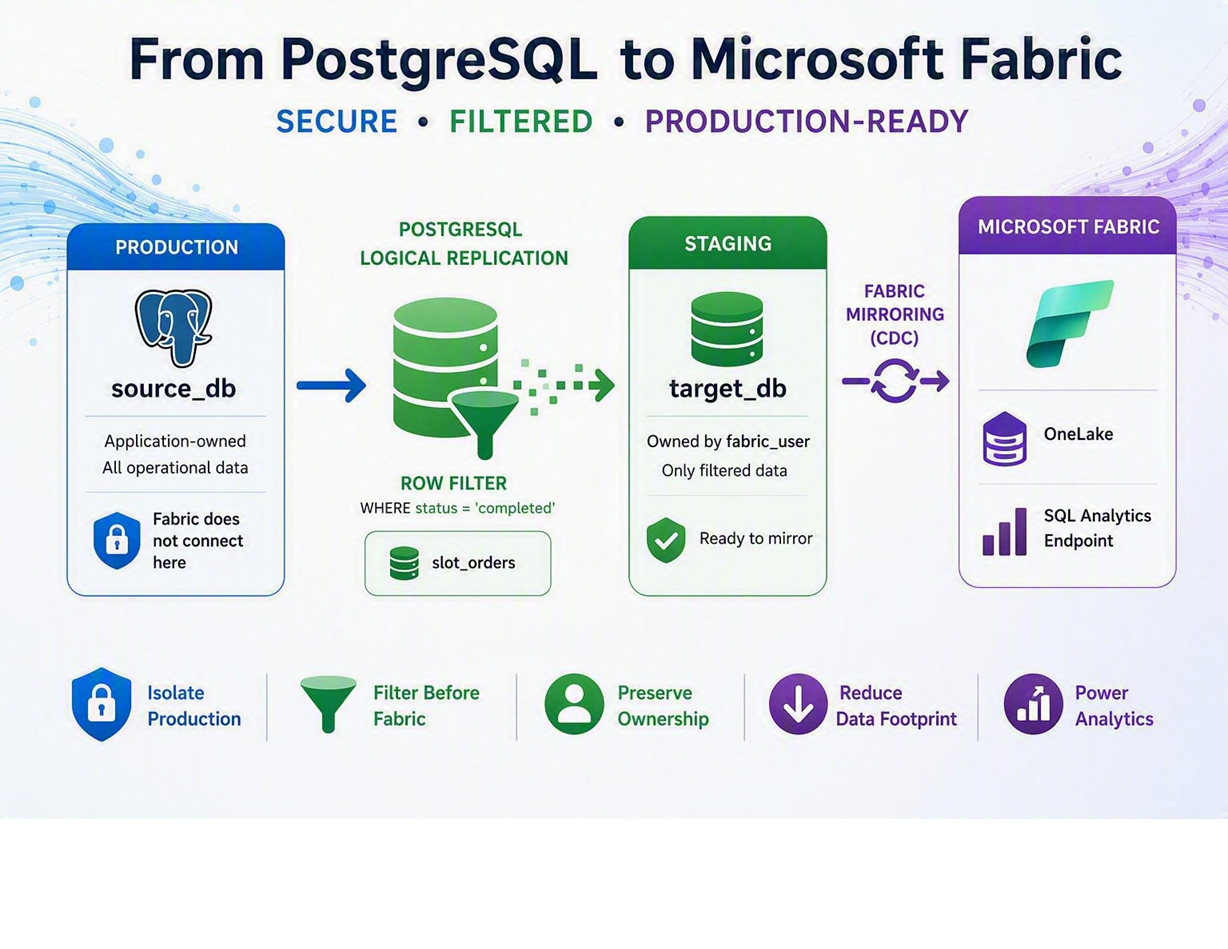
How to use PostgreSQL logical replication and row filters to build a secure, production-ready staging layer for Microsoft Fabric Mirroring
Microsoft Fabric Mirroring provides a powerful and straightforward way to bring operational PostgreSQL data into Microsoft Fabric with a near real-time, zero-ETL experience. Organizations can quickly unlock analytics, reporting, AI, and data engineering capabilities without building and maintaining complex integration pipelines.
As customers begin adopting Fabric Mirroring in production environments, additional requirements often emerge around security, ownership boundaries, and data governance. Production databases frequently contain sensitive information, application-owned schemas, and large datasets where only a subset of the data is actually required for analytics. In these scenarios, directly mirroring the production database may not align with enterprise governance requirements.
This article presents a PostgreSQL-native architecture that combines Microsoft Fabric Mirroring with PostgreSQL logical replication and row filtering. By introducing a staging database inside Azure Database for PostgreSQL Flexible Server, organizations can isolate production workloads, preserve ownership boundaries, and selectively mirror only the data required for analytics while continuing to benefit from the simplicity and power of Microsoft Fabric.
Core idea
Mirror a staging database into Microsoft Fabric, not the production database directly. Populate the staging database with PostgreSQL logical replication and row filters.
The Challenge
Microsoft Fabric Mirroring is designed to simplify analytics integration, but production environments often introduce two practical challenges.
Challenge 1: Ownership Requirements
In many enterprise environments, production tables are owned by application service accounts and database administrators maintain strict ownership controls. Introducing a Fabric-specific user directly into production schemas can create governance and security concerns.
Challenge 2: Lack of Row-Level Filtering
Many analytics workloads do not require complete tables. For example, a company may have billions of rows in an orders table while only needing completed orders, or a logs table where only error events are useful for analytics.
|
Source table |
Typical source size |
Rows required in analytics |
|
orders |
Large transactional table |
Completed orders only |
|
logs |
High-volume operational table |
Error records only |
|
transactions |
Large financial/event table |
Settled transactions only |
Mirroring the entire dataset can increase storage consumption, network traffic, synchronization overhead, and unnecessarily expose operational data that will never be used for analysis.
Proposed Architecture
Instead of mirroring the production database directly into Fabric, introduce a dedicated staging database located on the same Azure Database for PostgreSQL Flexible Server instance.
Architecture overview
- source_db remains the production database.
- target_db becomes the staging database.
- PostgreSQL logical replication transfers only filtered data into target_db.
- Microsoft Fabric mirrors target_db, not source_db.
The proposed architecture currently uses the same Azure Database for PostgreSQL Flexible Server for the staging database (target_db). If additional isolation is desired, we can further separate the solution by hosting the staging database on a dedicated PostgreSQL Flexible Server. In this approach, Microsoft Fabric would connect exclusively to the staging server, providing a clearer separation between source and consumption workloads.
Architecture Benefits
Security Isolation
Fabric never needs direct access to the production database. The production database remains isolated from Fabric, and Fabric interacts only with the staging database.
Ownership Separation
Application teams continue owning production objects, while Fabric owns only staging objects. This creates a cleaner security boundary and aligns more closely with enterprise governance requirements.
Data Filtering Before Mirroring
PostgreSQL logical replication supports row filters, allowing only the required subset of rows to be replicated into the staging database.
CREATE PUBLICATION pub_orders_filtered FOR TABLE orders WHERE (status = 'completed');Only completed orders are replicated. Pending, cancelled, or draft orders never reach the staging database and therefore never reach Fabric.
Reduced Analytics Footprint
- Lower storage consumption
- Reduced network traffic
- Faster synchronization
- Simpler governance
- Better data minimization practices
Step-by-Step Implementation
In this example, the source database is source_db, the staging database is target_db, the sample table is orders, adminuser is the replication user, and fabric_user is the Fabric mirroring account.
|
Object |
Purpose |
|
source_db |
Production database |
|
target_db |
Fabric staging database |
|
orders |
Example table |
|
adminuser |
Replication user |
|
fabric_user |
Fabric mirroring account |
Step 1: Create Replication User
CREATE ROLE adminuser WITH LOGIN REPLICATION PASSWORD '<REPLACE_WITH_PASSWORD>';
Step 2: Create Databases
CREATE DATABASE source_db;
CREATE DATABASE target_db;
Step 3: Configure Source Database
Using psql command
\c source_db
CREATE TABLE IF NOT EXISTS orders ( id BIGINT PRIMARY KEY, customer_id INT, status TEXT, created_at TIMESTAMP DEFAULT now() );
ALTER TABLE orders REPLICA IDENTITY FULL;
Step 4: Create Publication With Row Filtering
CREATE PUBLICATION pub_orders_filtered FOR TABLE orders WHERE (status = 'completed');
Step 5: Create Logical Replication Slot
SELECT pg_create_logical_replication_slot ( 'slot_orders', 'pgoutput' );
Step 6: Configure Target Database
\c target_db
CREATE TABLE IF NOT EXISTS orders ( id BIGINT PRIMARY KEY, customer_id INT, status TEXT, created_at TIMESTAMP );
Step 7: Create Subscription
This is one of the most important parts of the architecture. The subscription is created in target_db, but it connects back to source_db on the same Azure Database for PostgreSQL Flexible Server.
CREATE SUBSCRIPTION sub_orders
CONNECTION 'host=127.0.0.1 port=5432 dbname=source_db user=adminuser password=<REPLACE_WITH_PASSWORD>'
PUBLICATION pub_orders_filtered
WITH ( create_slot = false, slot_name = 'slot_orders', copy_data = true, enabled = true );
Why host=127.0.0.1?
The publication and subscription communicate inside the same PostgreSQL server. The subscription runs in target_db and connects back to source_db using host=127.0.0.1, keeping the staging architecture inside the PostgreSQL service boundary.
Same-server replication flow
target_db subscription
connects to
source_db publication
on the same PostgreSQL server
Step 8: Prepare Fabric User
CREATE ROLE fabric_user LOGIN REPLICATION PASSWORD '<REPLACE_WITH_PASSWORD>';

\c target_db
GRANT CREATE ON DATABASE target_db TO fabric_user;
GRANT USAGE ON SCHEMA public TO fabric_user;
GRANT CREATE ON SCHEMA public TO fabric_user;
After fabric mirroring is enabled at server level, we can grant the azure_cdc_admin to fabric_user
GRANT azure_cdc_admin TO fabric_user;Step 9: Changing ownership of objects to fabric_user in target_db
\c target_db
GRANT fabric_user TO adminuser;
ALTER TABLE orders OWNER TO fabric_user;
At this point, source_db remains owned by the application or operational owners, while target_db is prepared for Fabric Mirroring ownership requirements.
Step 10: Configure Fabric Mirroring
Enable Fabric Mirroring for target_db, not source_db. Fabric now receives only the filtered data already present in the staging database.
Validation
Insert sample rows into the source database and verify that only rows matching the publication filter appear in the staging database.
Insert sample data
\c source_db
INSERT INTO orders VALUES
(1, 100, 'pending', now()),
(2, 101, 'completed', now()),
(3, 102, 'completed', now());
Generate additional test data
INSERT INTO orders ( id, customer_id, status, created_at )
SELECT
COALESCE(m.max_id, 0) + s.num,
CASE WHEN random() > 0.5 THEN 200 ELSE 300 END,
CASE WHEN random() > 0.5 THEN 'pending' ELSE 'completed' END,
now()
FROM
( SELECT MAX(id) AS max_id FROM orders ) m,
generate_series(1,1000) s(num);
Validate source database
\c source_db
SELECT count(*), status
FROM orders GROUP BY status;
Example source output
count | status
-------+-----------
472 | completed
531 | pending
Validate target database
\c target_db
SELECT count(*), status
FROM orders GROUP BY status;
Example target output
count | status
-------+-----------
472 | completed
Only completed rows are replicated into the staging database.
Monitoring Replication
SELECT * FROM pg_stat_subscription;SELECT slot_name, plugin, slot_type, database, active FROM pg_replication_slots;Example slot output
slot_name | plugin | slot_type | database | active
---------------------+----------+-----------+-----------+--------
slot_orders | pgoutput | logical | source_db | t
pgaz_cdc_slot_25395 | pgoutput | logical | target_db | t
|
Slot |
Purpose |
|
slot_orders |
Filtered logical replication from source_db to target_db |
|
pgaz_cdc_slot_xxxxx |
Fabric-created slot for target_db to Microsoft Fabric replication |
Direct Mirroring vs Staging Architecture
|
Feature |
Direct Fabric Mirroring |
Staging Architecture |
|
Production isolation |
Limited |
Yes |
|
Dedicated Fabric ownership boundary |
Limited |
Yes |
|
Row filtering before Fabric |
No |
Yes |
|
PostgreSQL-native transformations |
Limited |
Possible |
|
Data minimization |
Limited |
Strong |
|
Deployment complexity |
Lower |
Higher |
|
Governance flexibility |
Moderate |
High |
When Should You Use This Pattern?
- Highly regulated environments
- Multi-tenant systems
- Large transactional databases
- Sensitive production workloads
- Analytics platforms requiring filtered data
- Scenarios where Fabric should not directly access production tables
Examples include mirroring completed orders only, settled transactions only, error records only, or specific customer segments.
When Might Direct Mirroring Be Better?
- Entire tables are required.
- Governance requirements are straightforward.
- Production access is already approved.
- Simplicity is the primary objective.
If filtering and ownership isolation are not requirements, direct mirroring will generally be simpler to operate.
Operational Considerations
Logical replication and Fabric Mirroring both consume worker processes. If messages similar to the following appear in server logs, review background worker capacity.
Example warning
WARNING: out of background worker slots
In that case, consider increasing max_worker_processes to ensure logical replication workers and Fabric CDC workers can start successfully.
Conclusion
Microsoft Fabric Mirroring provides a powerful mechanism for bringing PostgreSQL data into Fabric with minimal operational complexity. However, production environments often require stronger control over security boundaries, ownership models, and data exposure than a direct mirroring approach can provide.
By combining PostgreSQL logical replication, row filtering, and a dedicated staging database, organizations can create a secure and production-ready mirroring architecture. The production database remains isolated, Fabric interacts only with staging objects, and PostgreSQL performs the data filtering before information reaches analytics platforms.
The result is a flexible architecture that extends the capabilities of Fabric Mirroring while preserving PostgreSQL governance, security, and operational best practices.

 Microsoft