Recent Discussions
Azure SQL Firewall / Locks
Hi there, I have 2 environments. I'm more of admin on Azure environment (recently made as subscription admin) after which Dev issue - Azure SQL I'm having difficulty to remove IP from Azure SQL Firewall. (Earlier i was able to) today my manager granted me subscription admin and as SQL Security Manager and it still not able to remove grayed out IPs.183Views0likes1CommentProblem with Linked Service to SQL Managed Instance
Hi I'm trying to create a linked Service to a SQL Managed Instance. The Managed Instance is configured with a Vnet_local endpoint If I try to connect with an autoresolve IR or a SHIR I get the following error The value of the property '' is invalid: 'The remote name could not be resolved: 'SQL01.public.ec9fbc2870dd.database.windows.net''. The remote name could not be resolved: 'SQL01.public.ec9fbc2870dd.database.windows.net' Is there a way to connect to it without resorting to a private endpoint? Cheers Alex141Views0likes1CommentAzure Data Factory ForEach Loop Fails Despite Inner Activity Error Handling - Seeking Best Practices
Hello Azure Data Factory Community, I'm encountering a persistent issue with my ADF pipeline where a ForEach loop is failing, even though I've implemented error handling for the inner activities. I'm looking for insights and best practices on how to prevent internal activity failures from propagating up and causing the entire ForEach loop (and subsequently the pipeline) to fail, while still logging all outcomes. My Setup: My pipeline processes records using a ForEach loop. Inside the loop, I have a Web activity (Sample_put_record) that calls an external API. This API call can either succeed or fail for individual records. My current error handling within the ForEach iteration is structured as follows: 1.Sample_put_record (Web Activity): Makes the API call. 2.Conditional Logic: I've tried two main approaches: •Approach A (Direct Success/Failure Paths): The Sample_put_record activity has a green arrow (on success) leading to a Log Success Items (Script activity) and a red arrow (on failure) leading to a Log Failed Items (Script activity). Both logging activities are followed by Wait activities (Dummy Wait For Success/Failure). •Approach B (If Condition Wrapper): I've wrapped the Sample_put_record activity and its success/failure logging within an If Condition activity. The If Condition's expression is @equals(activity('Sample_put_record').status, 'Succeeded'). The True branch contains the success logging, and the False branch contains the failure logging. The intention here was for the If Condition to always report success, regardless of the Sample_put_record outcome, to prevent the ForEach from failing. The Problem: Despite these error handling attempts, the ForEach loop (and thus the overall pipeline) still fails when an Sample_put_record activity fails. The error message I typically see for the ForEach activity is "Activity failed because an inner activity failed." When using the If Condition wrapper, the If Condition itself sometimes fails with the same error, indicating that an activity within its True or False branch is still causing a hard failure. For example, a common failure for Sample_put_record is: "valid":false,"message":"WARNING: There was no xxxxxxxxxxxxxxxxxxxxxxxxx scheduled..." (a user configuration/data issue). Even when my Log Failed Items script attempts to capture this, the ForEach still breaks. What I've Ensured/Considered: •Wait Activity Configuration: Wait activities are configured with reasonable durations and do not appear to be the direct cause of failure. •No Unhandled Exceptions: I'm trying to ensure no unhandled exceptions are propagating from my error handling activities. •Pipeline Status Goal: My ultimate goal is for the overall pipeline status to be Succeeded as long as the pipeline completes its execution, even if some Sample_put_record calls fail and are logged. I need to rely on the logs to identify actual failures, not the pipeline status. My Questions to the Community: 1.What is the definitive best practice in Azure Data Factory to ensure a ForEach loop never fails due to an inner activity failure, assuming the inner activity's failure is properly logged and handled within that iteration? 2.Are there specific nuances or common pitfalls with If Condition activities or Script activities within ForEach loops that could still cause failure propagation, even with try-catch and success exits? 3.How do you typically structure your ADF pipelines to achieve this level of resilience where internal failures are logged but don't impact the overall pipeline success status? 4.Are there any specific configurations on the ForEach activity itself (e.g., Continue on error setting, if it exists for ForEach?) or other activities that I might be overlooking? Any detailed examples, architectural patterns, or debugging tips would be greatly appreciated. Thank you in advance for your help!283Views0likes1CommentCopy Data Activity Failed with Unreasonable Cause
It is a simple set up but it has baffled me a lot. I'd like to copy data to a data lake via API. Here are the steps I've taken: Created a HTTP linked service as below: Created a dataset with a HTTP Binary data format as below: Created a pipeline with a Copy Data activity only as shown below: Made sure linked service and dataset all working fine as below: Created a Sink dataset with 3 parameters as shown below: Passed parameters from pipeline to Sink dataset as below: That's all. Simple, right? But the pipeline failed with a clear message "usually this is caused by invalid credentials." as below: Summary: No need to worry about the Sink side of parameters etc. which I have used same thing for years on other pipelines and all succeeded. This time the API failed to reach a data lake from source side as said "invalid credentials". In Step 4 above one could see the linked service and dataset connections were succeeded, ie. credentials have been checked and passed already. How come it failed in data copy activity complaining an invalid credentials? Pretty weird. Any advice and suggestions will be welcomed.124Views0likes1CommentData flow sink to Blob storage not writing to subfolder
Hi Everybody This seems like it should be straightforward, but it just doesn't seem to work... I have a file containing JSON data, one document per line, with many different types of data. Each type is identified by a field named "OBJ", which tells me what kind of data it contains. I want to split this file into separate files in Blob storage for each object type prior to doing some downstream processing. So, I have a very simple data flow - a source which loads the whole file, and a sink which writes the data back to separate files. In the sink settings, I've set the "File name option" setting to "Name file as column data" and selected my OBJ column for the "Column Data", and this basically works - it writes out a separate file for each OBJ value, containing the right data. So far, so good. However, what doesn't seem to work is the very simplest thing - I want to write the output files to a folder in my Blob storage container, but the sink seems to completely ignore the "Folder path" setting and just writes them into the root of the container. I can write my output files to a different container, but not to a subfolder inside the same container. It even creates the folder if it's not there already, but doesn't use it. Am I missing something obvious, or does the "Folder path" setting just not work when naming files from column data? Is there a way around this?108Views0likes1CommentUser Properties of Activities in ADF: How to add dynamic content in it?
On ADF, I am using a for each loop in which I am using an Execute Pipeline Activity which is getting executed for different iterations as per the values of the items provided to the For-Each Loop. I am stuck on a scenario which requires me to add the Dynamic Content Expression in the User Properties of individual activities of ADF. Specific to my case, I want to add the Dynamic Content Expression in the User Properties of Execute Pipeline Activity so that I get to individual runs of these activities on Azure Monitor with a specific label attached to it through its User Properties. The necessity to add the Dynamic Content Expression in the User Properties is due to the reason that each execution in respective iterations of these activities corresponds to a particular Step from a set of Steps configured for the Data Load Job as a whole, which has been orchestrated through ADF. To identify the association with the respective Job-Step, I require to add Dynamic Content Expression in its User Properties. Any sort of response regarding this is highly appreciated. Thank You!235Views1like1CommentAzure Data Factory - help needed to ingest data, that uses an API, into a SQL Server instance
Hi, I need to ingest 3rd-party data, that uses an API, into my Azure SQL Server instance (ASSi) using Azure Data Factory (ADF). I'm a report developer so this area is unfamiliar to me, although I have previously integrated external, on-premise SQL Server data into our ASSi using ADF so I do have some exposure to the tool (just not API connections). The 3rd-party data belongs to a company named 'iLevel' (in case this is relevant). iLevel have provided some API documentation which is targeted for an experienced data engineer that understands API connections. This documentation has just a few sections before the connection focused details end. I'll list them below: 1) It mentions to download 'Postman Collection' and mentions no more than this. I've never heard of Postman Collection and I don't know why it's needed. Through limited exposure online, I don't understand its purpose, certainly not in my scenario. 2) It has the title 'Access to the API' and then lists four URLs which are the endpoints (I don't know which to use and will need to ask iLevel of this but, I guess, any will do for testing purposes). 3) Authentication and Authorization a) Generate a 'client id' and 'client secret' by logging into iLevel and generating these values with some clicks of a button. I've successfully generated both these values. b) Obtain an Access Token - it'll be easier to screenshot the instructions for this (I've blanked part of the URL for confidentiality). These are all the instructions on connection to the 3rd-party data. Unfortuntely for me, my lack of experience in this area means these instrcutions don't help me. I don't believe I'm any closer to connecting to the 3rd-party source data. Taking into consideration the above instructions but choosing to try and error in ADF, a tool I'm a little bit more familiar with, I've performed the following steps: 1) Created a Linked Service. I understand the iLevel solution is in the cloud and therefore the 'AutoResolveIntegrationRuntime' option has been selected as the 'Connect via integration runtime' value. For the 'Base URL' I've entered one of the four URL endpoints that were listed in the documentation (again, I will need to confirm which endpoint to use). The 'Test Connection' returns a successful result but I think it means nothing because if I were to placed 'xxx' at the end of the Base URL and test the connection, it stills returns successful when I know the URL with the 'xxx' post-fix isn't legit. 2) Create an ADF Pipeline containing 'Web activity' and 'Set variable' objects. The only configuration under the Web activity is the 'Settings' pane which has: The 'Body' property has (the client id and client secret taken from the iLevel solution are included in the body but blanked out): If the Web activity is successful then the Pipeline's next object (the Set variable) should assign the access token to a variable - as I understand this is what the Web activity is doing: The 'Value' property has: This is as far as I've got into my efforts of this integration task because the Web activity object fails when executed. The error message does state it is to do with an invalid 'client id' or 'client secret' - see below: You may direct to focus on the incorrect client id or client secret, however I don't have any confidence that I understand how to configure ADF to obtain an access token, and I'm maybe missing something if I see no need for Postman Collection use. What is Postman Collection and do I need it for what I'm trying to achieve? If yes, can anyone provide training material that suits my need? Have I configured ADF correctly and it is indeed an issue with the client id or client server, or is the error message received just a by-product of an incorrect ADF configuration? Your help will be most appreciated. Many thanks.162Views0likes1CommentADF - Support for Federated Identity Credentials
Our team is working on migrating existing pipelines to Azure Data Factory (ADF). As part of this effort, we are evaluating ADF for executing Kusto commands and would like to use an existing Microsoft Entra application registration authenticated through Federated Identity Credentials (OIDC workload identity federation). Today, ADF appears to primarily support Managed Identity-based authentication patterns. Is there any planned support for using a customer-owned App Registration with Federated Identity Credentials (FIC)? If so, is there any public roadmap or timeline that can be shared? We are actively moving away from secret- and certificate-based authentication. Supporting FIC would allow us to continue using our existing application identities, which already have the required permissions on source and destination datasets, and would avoid the need to introduce additional User Assigned Managed Identities and request new permission grants from dataset owners as part of the migration.44Views0likes2CommentsUnable to INSERT rec into Table.
I am using the ADF . Execute Pipeline activity. My PL is parametrized. My stage table have the below rec: network_org_name partner_name parent_partner_name CorPart_number pipeline_run_id activity_run_id Se Network Producing UB SA S Reine Company Ltd 1226133 ebf961f9-3afc-4abc-9ee0-111330c9f1eb 858c1b5c-a699-4e73-84d8-3a42cab115d2 WITH CodeSourceTableCTE AS ( SELECT DISTINCT p.[partner_number] ,n.[network_org_number] FROM [utl].[stg_partner_network_org] stg LEFT JOIN [utl].[partner] p1 ON stg.[parent_partner_name] = p1.[partner_name] INNER JOIN [utl].[partner] p ON stg.[partner_name] = p.[partner_name] AND ISNULL(p.[delete_ind], '') <> 'Y' AND ISNULL(p.[parent_partner_number], '') = ISNULL(p1.[partner_number], '') AND ISNULL(p1.[delete_ind], '') <> 'Y' AND ISNULL(stg.[corpart_number], '') = ISNULL(p.[external_id], '') INNER JOIN [utl].[network_org] n ON stg.[network_org_name] = n.[network_org_name] WHERE stg.[partner_name] IS NOT NULL ) MERGE [utl].[partner_network_org] T USING CodeSourceTableCTE S ON T.[partner_number] = S.[partner_number] AND T.[network_org_number] = S.[network_org_number] WHEN MATCHED AND (ISNULL(T.[delete_ind], '') <> 'N') THEN UPDATE SET T.[delete_ind] = 'N', T.[last_modified_date] = GETUTCDATE(), T.[last_modified_by] = '@{pipeline().parameters.Source_File_Name}' WHEN NOT MATCHED BY TARGET THEN INSERT ([partner_number], [network_org_number], [created_date], [created_by], [last_modified_date], [last_modified_by], [delete_ind]) VALUES (S.[partner_number], S.[network_org_number], GETUTCDATE(), '@{pipeline().parameters.Source_File_Name}', GETUTCDATE(), '@{pipeline().parameters.Source_File_Name}', 'N'); SELECT COUNT(*) FROM [utl].[partner_network_org] WHERE [created_by] = '@{pipeline().parameters.Source_File_Name}' But when I am trying to check using below select * from utl.partner_network_org where partner_number in (select partner_number from utl.partner where last_modified_by like '%corpart%') I don't see records any help is appreciated84Views0likes1CommentADF unable to ingest partitioned Delta data from Azure Synapse Link (Dataverse/FnO)
We are ingesting Dynamics 365 Finance & Operations (FnO) data into ADLS Gen2 using Azure Synapse Link for Dataverse, and then attempting to load that data into Azure SQL Database using Azure Data Factory (ADF). This is part of a migration effort as Export to Data Lake is being deprecated. Source Details Source: ADLS Gen2 Data generated by: Azure Synapse Link for Dataverse (FnO) Format on lake: Delta / Parquet Partitioned folder structure (e.g. PartitionId=xxxx) Destination: Azure SQL Database Issue Observed in ADF When configuring ADF pipelines: Using ADLS Gen2 dataset with: Delta / Parquet Recursive folder traversal Wildcard paths We encounter: No data returned in Data Preview Or runtime error such as: “No partitions information found in metadata file” Despite this: The data is present in ADLS The same data can be successfully queried using Synapse serverless SQL Key Question for ADF / Synapse Engineers What is the recommended and supported ADF ingestion pattern for: Partitioned Delta/Parquet data produced by Azure Synapse Link for Dataverse Specifically: Should ADF: Read Delta tables directly, or Use Synapse serverless SQL external tables/views as an intermediate layer? Is there a reference architecture for: Synapse Link → ADLS → ADF → Azure SQL Are there ADF limitations when consuming Synapse Link–generated Delta tables? Many customers are now forced to migrate due to Export to Data Lake deprecation, but current ADF documentation does not clearly explain how to replace existing ingestion pipelines when using Synapse Link for FnO. Any guidance, patterns, or official documentation would be greatly appreciated.111Views0likes1CommentWeb activity failure due to Invoking endpoint failed with HttpStatusCode - 403 -- help?
Hi, I have an Azure Data Factory (ADF) instance that I am using to create a Pipeline to ingest external (cloud based) 3rd party data into my Azure SQL Server database. I am a novice with ADF and have only used it to ingest some external SQL data into my SQL database - it did work. The external source I'm attempting to extract from uses an OAuth 2.0 API and an API is something I've not used before. Using Postman (never used this software before this attempt), I have passed the external source's base_url, client_id, and client_secret, and in return successfully received an access token. This tells me that the base_url, client_id, and client_secret values I passed are correct and accepted by the target source/application. Feeling encourage to implement the same values into ADF, I first created a Linked Service which with a successful test connection returned - see below. This Linked Service uses the same values as the Postman entry which granted an access token. I then created a Pipeline with a Web activity object within it. The General and User Properties don't have any configuration, only the Settings tab does which shown below. Again, the URL, Client ID and Client Secret configured here are the same as those used in Postman (and the Linked Service). I execute the Web object and it returns with a failure - see below. The error states the endpoint refused the request (for an access token). Is this accurate as I was able to receive an access token via Postman when using the same credentials? I don't understand why via Postman I can received an access token but via ADF it errors. I'm wondering if I've completed the ADF parts incorrectly, or if there is more needed just to received an access token, or if it's something else? Are you able to advise what's taking place here? Thanks.181Views0likes1CommentCopy data using ODBC fails: "Format of the initialization string [...] starting at index 0"
We ran into a frustrating issue in ADF where a Copy activity using an ODBC source (Databricks) consistently failed with the same error, despite the connection test and data preview working perfectly fine. This post describes the issue and we hope to get some help from the community :) Our Setup: - Source: Databricks (via ODBC linked service, self-hosted IR) - Sink: Azure SQL Database - ADF Component: Copy Activity - Integration Runtime: Self-hosted IR The goal is to simply copy a table from Databricks into Azure SQL. We also tried to copy only a couple rows but same error. What works: - Test Connection on the ODBC linked service → passes - Data Preview on the ODBC dataset → returns correct data - Azure SQL sink linked service connection test → passes And here is what goes wrong: Running the Copy Activity in the pipeline gives: ``` ErrorCode=InvalidParameter, 'Type=Microsoft.DataTransfer.Common.Shared.HybridDeliveryException, Message=The value of the property '' is invalid: 'Format of the initialization string does not conform to specification starting at index 0.', Source=, ''Type=System.ArgumentException, Message=Format of the initialization string does not conform to specification starting at index 0., Source=System.Data,' ``` This is the source config: ODBC Dataset: ```json { "type": "OdbcTable", "typeProperties": { "tableName": { "value": "@concat(dataset().catalog, '.', dataset().schema, '.', dataset().table)", "type": "Expression" } }, "parameters": { "catalog": { "type": "string" }, "schema": { "type": "string" }, "table": { "type": "string" } } } ``` Copy Activity Source: ```json "source": { "type": "OdbcSource", "queryTimeout": "02:00:00" } ``` ODBC Connection String (sanitized): ``` Driver={Databricks ODBC Driver}; Host=<databricks-host>; Port=443; HTTPPath=/sql/1.0/warehouses/<warehouse-id>; AuthMech=11; Auth_Flow=1; Auth_Client_ID=<client-id>; Auth_Client_Secret=<client-secret>; Auth_Scope=<scope>/.default; OIDCDiscoveryEndpoint=https://login.microsoftonline.com/<tenant>/v2.0/.well-known/openid-configuration; SSL=1; ThriftTransport=2 ``` - AuthMech=11 = Azure Active Directory authentication - Auth_Flow=1 = Service Principal / Client Credentials via OIDC - Self-hosted IR is used What we tried: 1. Hardcoding catalog parameter instead of using the global parameter --> Same error 2. With and without column mappings from Copy activity --> Same error 3. Removing double curly braces around client secret in Terraform (i.e. from Auth_Client_Secret={${pwd}} to Auth_Client_Secret=${pwd}) --> Same error 4. Using a query (top 10 rows) instead of table config in the source of copy activity --> Same error 5. Verifying all linked services and datasets work in preview --> All work fine We find the error confusing and are unsure how to continue. It suggests the issue is specific to how ADF handles the ODBC connection string during pipeline execution on the Self-hosted IR, as opposed to interactive operations (like preview data). Any help is appreciated. Thanks in advance!59Views0likes1CommentMy Azure DevOps Git configuration failed to load in Azure Data Factory
I have an Azure Data Factory that have been running for years and have been hooked up with DevOps Git configuration with no real automation, its just a place to store changes. Im using it for a monthly data transformation, so im not into it on a daily basis. Suddenly yesterday the Github repository failed to load and i cant figure out why. I have been into the app registration to see if any secrets have expired, and i have one that expires in 25 days, but that shouldnt be a problem yet. I can also open my Github project through devops and navigate to the service connections, so i still have access to the repository, i just cant get ADF to load it properly. Any ideas about what to do from here?74Views0likes1CommentNumber of concurrent transactions supported for an Azure SQL 4 vCores
I have an Azure SQL: Parameters Specifications Deployment Model General Purpose – Serverless SKU / Performance Tier Standard Series Database Size 128 GB Max vCores 4 vCores (scalable within Serverless range) How many concurrent transactions are supported for an Azure SQL db with the above specifications. Thanks29Views0likes1CommentADF - REST API Copy Data Activity - Best Practices
Hey everyone, I'm relatively new to Azure and am using Azure Data Factory (ADF) to extract data from Vonigo via their API. Everything is working, but I'm looking for ways to improve efficiency. Right now it takes 30+ minutes to pull all franchise data for a given report. The challenge is that Vonigo only allows reports to be run for one franchise at a time, and switching franchises requires a separate API call. My current process is: Select a franchise from a list Run all required reports for that franchise Save the results to Blob Storage Move to the next franchise and repeat (We'll eventually ingest the files into our silver layer for transformation.) Speed Issue One thing that significantly slows the pipeline down is that many activities are running sequentially. If I disable sequential execution, I've seen cases where data gets written to the wrong destination or associated with the wrong franchise. Has anyone successfully parallelized a similar process while maintaining data integrity? Are there specific points in the workflow where parallel execution would be safe? Pagination / Loop Issue Originally, I used a Lookup activity to inspect the most recently created file. An If activity would then determine whether the file contained any records: If records existed, increment the page number and continue. If no records existed, end the loop. This worked, but the Lookup activity added noticeable overhead. To improve performance, I changed the logic to use the Copy Activity output instead. Specifically, I'm checking the amount of data read from the last API call. Pages with no records appear to consistently return the same data-read value, so I use that to determine when to stop paging. This approach is much faster, but it feels more fragile since it's relying on an indirect indicator rather than the actual record count. Would you trust the Copy Activity output in this scenario, stick with the Lookup approach, or recommend a different pattern altogether? Thanks for any suggestions.111Views0likes5CommentsInterative authoring of the IR in ADF Managed Virtual Network is disabling frequently
The testing of connections in linked services ,importing the schemas etc interative authoring of the IR is getting disabled frequently and for enabling it its again taking 3 to 4 min not 1 min. A simple copy data activity is taking 2 sec of time with self hosted IR,here with Azure IR(managed virtual network) its taking about 2.4 min to be in queue and then its copying the data I can see Interactive authoring for Azure IR is having the below option, Auto termination after 60 minutes of inactivity eventhough the interactive authoring is getting disabling frequently that too with in a creation pipeline with copy activity of 5 min task. Could you please help us on this with some suggestions4.5KViews1like1CommentSwitch Azure SQL Provisioned to Serverless and back to Provisioned
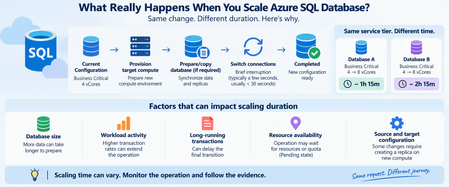
Hi Can we switch Azure SQL from "Provisioned" to "Serverless" and back to "Provisioned" without any interruptions? Wanted to observe how serverless works for a week. Data should never be lost while switching the mode (NOT a transactional data). Its more of nightly refresh and nothing much happening during day time. Its a retail dataWH. Currently im connecting to the below Azure SQL which is a provisioned instance. We are scaling up or down per our needs / work load and paying $X. sql-xxxx-xxx-xxx-dev.database.windows.net Nightly process runs at higher cores and then scales back to the lowest 2 core. When someone queries tables, joins during day time, it takes 10-30 mins or so depending on the table size. I'm wondering if i switch to serverless i would save money even if billed by seconds since nightly process runs 1hr and not much of querying every day during day time. i would like to test that.340Views1like3CommentsCounting distinct values
I’m trying to create a view but I’m struggling to find a solution to this issue. I need a method that counts multiple visits to the same location as one if they occur within 14 days of each other. If there are multiple visits to the same location and the gap between them is more than 14 days, then each should be counted separately. For example, in the attached screenshot: Brussels had visits on 08/05 and 15/05, which are less than 14 days apart, so this should be counted as one visit. Dublin had visits more than a month apart, so these should be counted as two separate visits. Could someone please guide me on how to achieve this? Thanks.120Views0likes3Comments
Events
Recent Blogs
- What started as a routine customer discussion quickly evolved into a strategic modernization conversation. A service that had quietly synchronized business-critical data for years was approaching ret...Jul 24, 2026199Views1like0Comments
- TLS certificate pinning in Azure Database for PostgreSQL Transport Layer Security (TLS) encrypts data in transit between client applications and the server and authenticates the service endpoint ...Jul 24, 2026110Views0likes0Comments