azure ad
54 Topics
Web-signin 3rd party IDP not working
We have a working Entra ID SAML federation to a third-party IdP that uses FIDO2/WebAuthn (IdP as Relying Party) for browser sign-in, and we are trying to use the same federation through Windows Web sign-in on an Entra-joined Windows 11 device — but the IdP page loads blank in the WebView and Microsoft-Windows-WebAuthN/Operational records zero events, while the same security key works fine for FIDO2 sign-in with login.microsoft.com as RP on the same device. Questions: - Is WebAuthn brokering to third-party Relying Parties inside the Web sign-in WebView supported? - If not, is it on the roadmap? - What is the supported architectural path for delivering passwordless Windows sign-in using a federated IdP's own FIDO2/WebAuthn credentials, given Graph API passkey provisioning is Beta-only?201Views0likes1Comment
How to target Azure VPN (Microsoft-Registered) app with Conditional Access Policies?
I have an Azure Point-to-Site VPN Gateway configured using the Microsoft-registered Azure VPN Client App ID (Audience value: c632b3df-fb67-4d84-bdcf-b95ad541b5c8). Everything is working correctly for our users. The issue I am having is that anyone with an Entra account can connect to the VPN and I want to restrict this with a blocking Conditional access policy. I do not want to create a custom app registration, because then I will have to change the 'audience' value on the app gateway and all user's will need to modify their VPN clients. The problem is I need to target the Microsoft-registered Azure VPN app in a Conditional Access policy but it does not appear in my Enterprise Applications list or in the CA app picker when searching. My questions: Why does the Microsoft-registered app not automatically create a service principal in my tenant the way other Microsoft apps do? Is there a supported way to make it appear in the CA app picker without creating a custom app registration or changing the gateway Audience value? Has anyone successfully targeted c632b3df-fb67-4d84-bdcf-b95ad541b5c8 in a CA policy while keeping it as the gateway Audience value? Thanks for the assistance here305Views0likes2CommentsHow Do I Target the Azure VPN Client in a Conditional Access Policy?
I am using the Azure VPN Client to connect users to an Azure VPN Gateway using their Entra ID credentials to authenticate. I want to target this application with a CA policy that requires MFA every time it connects. The problem is that I don't see the applications in my Enterprise Apps and all of my searching says that it won't appear because it was "pre-certified" by Microsoft. In the Gateway setup I used the Audience GUID of c632b3df-fb67-4d84-bdcf-b95ad541b5c8. And this is working as expected. The only solution that I have found for targeting the Azure VPN Client app is to create a Service Principal using that Audience GUID. This seems like a bit of a hack, so I am posting here to see if there are any other methods that I am missing to target this app when it doesn't appear in my Enterprise Apps list.881Views1like4Comments
Android Teams login fails during ADFS federation with SSL error
Hello Android mobile users cannot sign in to Microsoft Teams The login fails during the ADFS federation step due to an SSL error Environment Android OS versions 10 to 14 Microsoft Teams mobile app Entra ID federated with on premises ADFS ADFS service URL is masked Public certificate issued by Sectigo Issue description After entering the account in Teams the sign in process redirects to ADFS The page does not load correctly and shows infinite loading or a blank screen The same account works normally on PC browser PC Teams and Outlook Web The issue occurs only on Android mobile apps that use WebView Android log summary OAuth2 WebView client received SSL error Primary error SSL untrusted Wildcard certificate for masked domain Certificate issued by Sectigo Public Server Authentication CA Troubleshooting performed Device date and time verified Teams app cache cleared and app reinstalled Issue reproduced on multiple Android versions and devices PC authentication works with the same certificate Questions Can Android WebView or Microsoft mobile authentication fail with SSL untrusted when the ADFS server does not provide a complete certificate chain Is full chain certificate configuration required on ADFS IIS for mobile authentication Can SSL inspection or proxy interception cause this issue only on Android apps while PC browsers work normally Are there official Microsoft recommendations for certificate configuration when using ADFS federation with Android mobile apps Additional information The same behavior occurs in other Microsoft mobile apps The suspected causes are incomplete certificate chain or network SSL inspection Thank you1.1KViews0likes1Comment
Graph http 449 throttled
We are experiencing a lot of Microsoft Graph trolling errors from some of our applications that are hosted in Azure Web App Services and other third party such as Front App to name one. I am trying to find an approach or strategy to figure out and narrow down what may be causing so many of these events. Whether I can narrow down by application or process, I am not sure yet. We enforce MFA on all our users, but of course, on Azure Enterprise Applications, we don't, which are used extensively in our ecosystem of apps. Any help is much appreciated here.147Views0likes1CommentJourney to Passwordless Authentication Might Include Some Bumps
Microsoft recommends passwordless authentication to help secure Microsoft 365 tenants. The latest is synced passkeys, something that apparently leads to “syncability,” whatever that might mean. In any case, after some struggles, I managed to enable synched passkeys for my iPhone and then started to consider how to remediate user accounts that are flagged with a high-risk (compromised) status when they can’t simply update their password. https://office365itpros.com/2025/12/04/passwordless-authentication/166Views0likes0Comments
Nested App Authentication (NAA) token to protect middle-tier server
I'm working on an outlook addin and want to use the NAA accesstoken to validate the user on an api running on a php webserver. The addin runs as a taskepane (created with yo office) with the app only manifest. I have setup NAA to do Microsoft graph calls on behalf of the user. I have used this guid to setup NAA (copy/past) https://learn.microsoft.com/en-us/office/dev/add-ins/develop/enable-nested-app-authentication-in-your-add-in I have setup a php server (not in Microsoft infrastruktur) for a simple API, that handlers MySQL calls and app only calls to Microsoft graph. The php api authenticate itself with a client secret from the Azure app registration. Both are working as expected. Can i use the accesstoken from the NAA, to authenticate the user on the php server? If it can be done how do I validate the token?288Views0likes1Comment
Azure AD Health Failing
I am on the latest version of Azure AD Connect (2.5.79.0)... There are no network/DNS/connectivity issues at our site, it seems to me that Azure AD Health Service is having trouble because the endpoint is experiencing a service issue.. Is anyone else having the same problem with failure alerts/etc? I checked by running "Test-MicrosoftEntraConnectHealthConnectivity -Role SYNC" command, the stack trace throws an undocumented error number and complains of rate limiting issues... smells like the server is being overwhelmed or there are other issues slowing down the endpoint/service with the consequence that connections are piling up causing this error: Connectivity Test Step 1 of 2: Testing dependent service endpoints begins ... AAD CDN connectivity is skipped. Connecting to endpoint https://login.microsoftonline.com Endpoint validation for https://login.microsoftonline.com is Successful. Connecting to endpoint https://s1.adhybridhealth.azure.com/providers/Microsoft.ADHybridHealthService/diagnostics/version Endpoint validation for https://s1.adhybridhealth.azure.com/providers/Microsoft.ADHybridHealthService/diagnostics/version is Successful. Connectivity Test Step 1 of 2 - Testing dependent service endpoints completed successfully. Connectivity Test Step 2 of 2 - EventHub data upload procedure begins ... Tenant Id is successfully collected during agent registration. Server rejected Eventhub data upload, here is the exception: Microsoft.ServiceBus.Messaging.ServerBusyException: The request was terminated because the entity is being throttled. Error code : 50002. Sub error : 101. Please wait 4 seconds and try again. To know more visit https://aka.ms/sbResourceMgrExceptions and https://aka.ms/ServiceBusThrottlingS:N:ADHSPRODWUSEHSYNCIA:EVENTHUB:ADHSPRODWUSEHSYNCIA~22527,CL:30,CC:32,ACC:356250,LUR:WinEnd,LUT:2025-10-08T03:03:12.2035867Z,RC:1 TrackingId:<<< anonymized tracking ID>>> 0, SystemTracker:adhsprodwusehsyncia:eventhub:adhsprodwusehsyncia~22527, Timestamp:2025-10-08T03:03:13 at Microsoft.ServiceBus.Common.ExceptionExtensions.ThrowException(Exception exception) at Microsoft.ServiceBus.Common.AsyncResult.End[TAsyncResult](IAsyncResult result) at Microsoft.ServiceBus.Messaging.EventHubSender.Send(EventData data) at Microsoft.Identity.Health.AgentV1.ConfigurationPowerShell.TestAzureADConnectHealthConnectivity.TestInsightServiceDataUploadProcedure() Azure AD Connect Health agent could not communicate to the Health Service using port 5671. As a result, agent communication will fall back to use port 443, but use of port 5671 is recommended. Please allow outbound communication using port 5671. Tenant Id is successfully collected during agent registration. Server rejected Eventhub data upload, here is the exception: Microsoft.ServiceBus.Messaging.ServerBusyException: The request was terminated because the entity is being throttled. Error code : 50002. Sub error : 101. Please wait 4 seconds and try again. To know more visit https://aka.ms/sbResourceMgrExceptions and https://aka.ms/ServiceBusThrottlingS:N:ADHSPRODWUSEHSYNCIA:EVENTHUB:ADHSPRODWUSEHSYNCIA~22527,CL:30,CC:32,ACC:356837,LUR:IncomingUsage_ADHSPRODWUSEHSYNCIA-5,LUT:2025-10-08T03:03:54.9448143Z,RC:1 TrackingId:<<< anonymized tracking ID>>>, SystemTracker:adhsprodwusehsyncia:eventhub:adhsprodwusehsyncia~22527, Timestamp:2025-10-08T03:04:00 at Microsoft.ServiceBus.Common.ExceptionExtensions.ThrowException(Exception exception) at Microsoft.ServiceBus.Common.AsyncResult.End[TAsyncResult](IAsyncResult result) at Microsoft.ServiceBus.Messaging.EventHubSender.Send(EventData data) at Microsoft.Identity.Health.AgentV1.ConfigurationPowerShell.TestAzureADConnectHealthConnectivity.TestInsightServiceDataUploadProcedure() Azure AD Connect Health agent could not communicate to the Health Service using port 5671. As a result, agent communication will fall back to use port 443, but use of port 5671 is recommended. Please allow outbound communication using port 5671.Profile photo component adds unwanted overlay
Component https://myaccount.microsoft.com Run command: ms-settings:yourinfo Environment Profile picture uploaded through https://myaccount.microsoft.com Profile picture uploaded through Run command (WIN+R): ms-settings:yourinfo Retrieved via Microsoft Graph SDK / Graph REST API endpoint /v1.0/me/photos/$value Steps to Reproduce Go to https://myaccount.microsoft.com. Upload a new profile picture (no presence, badge, or branding requested). Retrieve the profile picture using Microsoft Graph endpoint: GET https://graph.microsoft.com/v1.0/me/photos/$value Render the image in the client application. Expected Result The raw profile photo is shown exactly as stored—no overlays, rings, badges, or branding. Actual Result The component renders an overlay (e.g., presence badge/ring/branding) on top of the photo, altering the image. Impact Users see altered profile photos, leading to inconsistencies with expectations. Breaks brand/UX design guidelines that rely on unmodified profile images. Severity Medium–High (affects identity consistency across apps using Graph). Notes This happens even though no overlay option was requested in either the upload or retrieval flow. Alternative: Steps to Reproduce and working as expected Run command (WIN+R): ms-settings:yourinfo Upload a new profile picture (no presence, badge, or branding requested). Retrieve the profile picture using Microsoft Graph endpoint: GET https://graph.microsoft.com/v1.0/me/photos/$value Render the image in the client application. Expected Result The raw profile photo is shown exactly as stored—no overlays, rings, badges, or branding. Actual Result The raw profile photo is shown exactly as stored—no overlays, rings, badges, or branding.98Views0likes0CommentsMy Azure login is stuck at MFA and cannot proceed
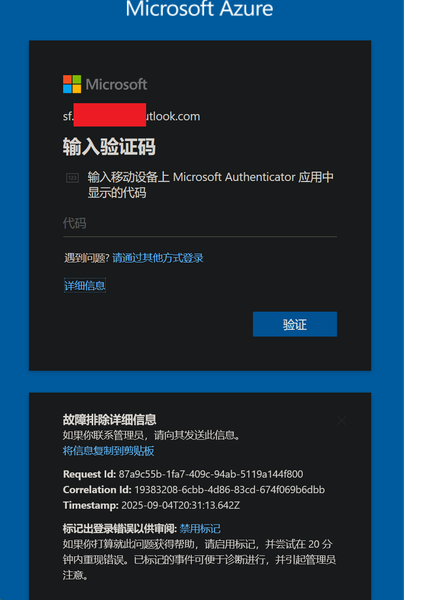
In August, I was still able to log in to Azure, and by logging in through GitHub I could bypass 2FA. But now, no matter how I try, logging in via GitHub always requires 2FA. I can’t access my Azure account anymore—nothing works. The system prompts me to use Microsoft Authenticator to confirm a two-digit code in real time. My Microsoft Authenticator on my iPhone is logged into the same Microsoft account, but I’m not receiving any verification requests for Azure login. No matter how much I refresh, nothing shows up. I’ve already updated the Microsoft Authenticator app to the latest version from the App Store. However, my personal Microsoft account works fine and can log in without any issues.492Views0likes2Comments