azure ad
56 Topics
Add custom attributes to users (or devices) to map hardware peripherals
Hello everyone, I am seeking some help, guidance or suggestions with the following situation. We are looking for a solution that could map peripherals (such as monitors) to a user or a device. Once we have that info, we will utilize an additional tool to extend our visibility over the assets & assignments. I reviewed a few documentations and videos about potential solutions, and I just want to know if that's possible or I should not invest time on it any longer. The scope is the following: 1. We've collected information about connected monitors using Intune Script detection. That's perfect. It already maps devices with monitor's serial numbers and other details. 2. Export in CSV is fine (although, the data is not a 100% accurate, we have an internal data base that we can compare). 3. Now, how can we properly map that data to the cloud objects? What the best approach is? Logically, the monitors should be added to the devices, but Intune Custom Attributes are not easily populated/managed (?). On the other hand, Entra AD is capable of managing such expressions and overall has better capabilities (or am I wrong?) when it comes to operating with cloud objects. I am really looking for a human response; more of a knowledge share. I'd appreciate if someone shares their experience with similar scenarios. :) I apologise in advance if my question is not in the right section. Docs: https://learn.microsoft.com/en-us/graph/extensibility-overview?tabs=http https://www.reddit.com/r/AZURE/comments/1e5z3kv/add_customextension_attribute_in_entra_id/ https://www.reddit.com/r/AZURE/comments/1dz4cru/comment/lcdf2ev/?context=3&share_id=UqZR0m9s-9SWiHOiVwwAM&utm_content=1&utm_medium=ios_app&utm_name=ioscss&utm_source=share&utm_term=1 https://www.youtube.com/watch?v=kBm-fjqg0PU https://www.youtube.com/watch?v=LHXfFoygiOA Thanks :)270Views0likes3CommentsMicrosoft Entra ID Provisioning: SelectUniqueValue and the "Apply this mapping" limitation
In Microsoft Entra ID's provisioning service, the SelectUniqueValue() expression has a specific restriction: When an attribute mapping uses SelectUniqueValue(), the "Apply this mapping" setting must be configured as "Only during object creation." It cannot be configured as "Always." This restriction is related to how the provisioning engine generates unique attribute values and how those values are maintained throughout an object's lifecycle. 1. How SelectUniqueValue() works The SelectUniqueValue() function evaluates a list of candidate values in priority order and selects the first value that does not conflict with an existing value in the target directory. For example, consider generating a user's userPrincipalName: SelectUniqueValue( Join("", [FirstName], [LastName], "@company.com"), Join("", [FirstName], ".", [LastName], "@company.com"), Join("", [FirstName], [LastName], [EmployeeID], "@company.com") ) The provisioning engine evaluates candidates in sequence: JohnSmith _AT_ company.com John.Smith _AT_ company.com JohnSmith12345 _AT_ company.com It selects the first available candidate. The important distinction is that this is a uniqueness-selection operation, not simply a string transformation. 2. Why the "Always" setting is incompatible Consider the following scenario. Initial provisioning Two employees exist: Employee Generated UPN John Smith (Employee 100) JohnSmith _AT_ company.com John Smith (Employee 200) John.Smith _AT_ company.com The second employee receives the alternate UPN because the preferred value is already taken. Subsequent provisioning cycles Suppose Employee 100 leaves the organization and email address removed for privacy reasons eventually becomes available. If SelectUniqueValue() were evaluated continuously as an ordinary update mapping, Employee 200 could potentially receive a different result: Attribute Value Existing UPN John.Smith _AT_ company.com Newly preferred candidate JohnSmith _AT_ company.com That could result in an unwanted identity change, even though Employee 200's name and other source attributes have not changed. Restricting the mapping to object creation avoids this class of problem. There is also an important implementation distinction: selecting a unique value during creation is different from evaluating whether an existing object's current value should be retained during an update. The latter requires preserving identity stability, not merely finding an available candidate. The example illustrates the design rationale; it does not establish that Microsoft's engine would actually perform that reassignment if the restriction were removed. 3. What Microsoft officially documents Microsoft explicitly states that: SelectUniqueValue() is intended only for object creation. The mapping must use Only during object creation. The function must be top-level and cannot be nested inside another function. The target attribute cannot have a matching precedence configured. These are documented product restrictions, not merely recommended practices. Microsoft Learn+1 Microsoft does not explain the internal implementation reason for the creation-only restriction in that documentation. The identity-stability explanation above is a plausible rationale, rather than a confirmed statement from Microsoft engineering. Official reference: https://learn.microsoft.com/en-us/entra/identity/app-provisioning/functions-for-customizing-application-data?utm_source=chatgpt.com#selectuniquevalue 4. Implications for Workday-to-Active Directory (or any external directory) provisioning This limitation becomes particularly relevant when provisioning sAMAccountName or userPrincipalName from Workday. Suppose an employee's last name changes: Event Desired UPN Initial hire Jane.Smith _AT_ company.com Marriage/name change Jane.Jones _AT_ company.com With SelectUniqueValue() configured for object creation, the provisioning service will not reevaluate the UPN mapping for the existing AD user. Consequently, you cannot use that same mapping to both: Generate a collision-free UPN when creating a user. Automatically update the UPN when Workday reports a name change. 5. Feature Request / Future Development: Removing the SelectUniqueValue() Restriction Microsoft could significantly improve the Entra ID provisioning service by extending SelectUniqueValue() to support the "Always" attribute mapping setting, allowing uniqueness validation during both object creation and subsequent updates. The current restriction creates a functional gap in identity lifecycle management, particularly for organizations integrating authoritative HR systems such as Workday with Active Directory. 5.1 Proposed enhancement Microsoft should introduce an update-aware implementation of SelectUniqueValue() that supports the following behaviors: Preserve existing values: If the target attribute already contains a valid value and the source attributes have not changed, retain that value rather than selecting a different candidate. Detect source attribute changes: When an authoritative source attribute changes, such as FirstName, LastName, or PreferredName, reevaluate the expression and determine whether an identity update is appropriate. Perform uniqueness validation: Evaluate candidate values against existing objects in the target directory, excluding the object currently being updated. Support collision-free updates: If the preferred candidate is already assigned to another object, evaluate subsequent candidates in the expression, just as the function does during initial provisioning. Maintain identity stability: Prevent unintended renaming simply because a previously unavailable candidate becomes available. 5.2 Proposed configuration options Rather than simply removing the restriction, Microsoft could introduce an additional configuration setting governing how uniqueness expressions behave during updates. Proposed mode Behavior Creation Only Current behavior; evaluate only during initial provisioning Always — Preserve Existing Retain the existing value unless it is empty or an explicit reevaluation condition is met Always — Reevaluate on Source Change Recalculate when relevant source attributes change Always — Force Reevaluate Recalculate on every provisioning cycle, even when source attributes remain unchanged The "Always — Reevaluate on Source Change" option would be particularly valuable for HR-driven identity provisioning. 5.3 Technical considerations for Microsoft To implement this functionality reliably, Microsoft would need to address several technical challenges. Self-exclusion during uniqueness checks When evaluating a candidate against Active Directory, the provisioning engine must exclude the current object's identity from the uniqueness search. Otherwise, the existing user could incorrectly be identified as a collision with themselves. Concurrency and race conditions Two provisioning operations could generate the same candidate simultaneously. Microsoft should ensure that uniqueness is revalidated immediately before committing an attribute change, with appropriate conflict handling. Distinguishing source changes from directory changes A newly available username should not automatically trigger a rename. The engine should distinguish between changes in authoritative source attributes and changes in the availability of candidate values. Safe updates to identity attributes Updates to userPrincipalName, sAMAccountName, and other identity-related attributes can affect authentication, email addressing, and downstream applications. The feature should provide optional controls for preserving existing values, auditing changes, and restricting automatic renaming. 5.4 Business justification This enhancement would deliver several benefits: Complete identity lifecycle automation: Support initial provisioning and subsequent identity changes using the same expression framework. Reduced administrative overhead: Eliminate the need for custom PowerShell scripts, scheduled tasks, or external automation solely to manage uniqueness during updates. Consistent naming policies: Apply the same collision-handling rules throughout an employee's lifecycle. Improved reliability: Reduce the risk of duplicate identities and inconsistent naming conventions. Better HR integration: Allow Workday and other authoritative HR systems to drive name changes without requiring separate provisioning mechanisms. 5.5 Recommended feature request to Microsoft Feature Request: Support SelectUniqueValue() with "Always" Attribute Mapping in Microsoft Entra ID Provisioning Product: Microsoft Entra ID — Inbound HR Provisioning / Workday to Active Directory Current Limitation: The SelectUniqueValue() expression is restricted to attribute mappings configured with "Apply this mapping" set to "Only during object creation." This prevents organizations from using the provisioning service's built-in uniqueness validation when updating existing Active Directory objects. Requested Enhancement: Extend SelectUniqueValue() to support the "Always" mapping option, enabling uniqueness validation during both object creation and updates. The enhanced functionality should: Exclude the current target object from uniqueness checks. Support reevaluation when relevant source attributes change. Preserve existing values when no relevant changes have occurred. Evaluate alternate candidates when a proposed value conflicts with another directory object. Provide configurable controls to prevent unintended identity changes. Business Impact: Organizations using Workday or other HR systems as authoritative identity sources cannot fully automate changes to identity attributes such as userPrincipalName and sAMAccountName while maintaining uniqueness through the native provisioning expression engine. This limitation requires additional automation outside Microsoft Entra ID, increasing operational complexity, maintenance requirements, and potential points of failure. Expected Outcome: Enable Microsoft Entra ID provisioning to provide consistent, collision-aware identity attribute management throughout the complete employee lifecycle, including initial hiring, name changes, rehiring, and other HR-driven identity updates. This enhancement would reduce dependence on external scripts and improve the completeness of Microsoft's native HR-driven identity provisioning capabilities. 5.6 Current Microsoft position Microsoft's documentation continues to explicitly restrict SelectUniqueValue() to object creation. I found no documented commitment or announced release date for update support. Microsoft Learn+1 The feature request above is therefore a proposed product enhancement, not an existing capability or announced roadmap item.193Views0likes2Comments
How to target Azure VPN (Microsoft-Registered) app with Conditional Access Policies?
I have an Azure Point-to-Site VPN Gateway configured using the Microsoft-registered Azure VPN Client App ID (Audience value: c632b3df-fb67-4d84-bdcf-b95ad541b5c8). Everything is working correctly for our users. The issue I am having is that anyone with an Entra account can connect to the VPN and I want to restrict this with a blocking Conditional access policy. I do not want to create a custom app registration, because then I will have to change the 'audience' value on the app gateway and all user's will need to modify their VPN clients. The problem is I need to target the Microsoft-registered Azure VPN app in a Conditional Access policy but it does not appear in my Enterprise Applications list or in the CA app picker when searching. My questions: Why does the Microsoft-registered app not automatically create a service principal in my tenant the way other Microsoft apps do? Is there a supported way to make it appear in the CA app picker without creating a custom app registration or changing the gateway Audience value? Has anyone successfully targeted c632b3df-fb67-4d84-bdcf-b95ad541b5c8 in a CA policy while keeping it as the gateway Audience value? Thanks for the assistance here356Views0likes2Comments
Web-signin 3rd party IDP not working
We have a working Entra ID SAML federation to a third-party IdP that uses FIDO2/WebAuthn (IdP as Relying Party) for browser sign-in, and we are trying to use the same federation through Windows Web sign-in on an Entra-joined Windows 11 device — but the IdP page loads blank in the WebView and Microsoft-Windows-WebAuthN/Operational records zero events, while the same security key works fine for FIDO2 sign-in with login.microsoft.com as RP on the same device. Questions: - Is WebAuthn brokering to third-party Relying Parties inside the Web sign-in WebView supported? - If not, is it on the roadmap? - What is the supported architectural path for delivering passwordless Windows sign-in using a federated IdP's own FIDO2/WebAuthn credentials, given Graph API passkey provisioning is Beta-only?296Views0likes1Comment
O365 Email Migration to Another Tenant while Deferring Migration of Sharepoint files
Hi, This is the context: ChildCompany has O365 and it has an Azure AD in hybrid mode synchronizing to a on-prem AD server. They have an internal domain ChildCompany.com, and an external domain ChildCompany.com where they also receive and send email using O365. ParentCompany is going absorb the ChildCompany some time in next year, and I was asked about the integration options. According to this https://download.microsoft.com/download/b/a/1/ba19dfe7-96e2-4983-8783-4dcff9cebe7b/microsoft-365-tenant-to-tenant-migration.pdf I could do a phased migration, where the end state is that they decomm their onprem AD and that they only use our ParentCompany systems. The business requirement is to start their integration with Email, and then in later phases do the Sharepoint integration as that requires way more analysis on their data sources, as they also have wikis and many other on prem legacy stuff. They are less than 50 users, so I can use Quest migration tools for the email part, but I wonder what needs to happen in what order. This is what I have in mind: Migrate their current O365 into our ParentCompany Office 365 subscription, so that they can continue logging in into their domain joined windows machines using childCompany.co, so they start using ParentCompany.com email addresses, but the problem then is how can they continue using their sharepoint and onedrive resources associated with the Azure and local domain at ChildCompany.com? This is more or less what I have in mind, for the intermediate step, the cutover: Child Company ParentCompany --------------------- ---------------- On-Prem | MS Cloud: | MS Cloud: ---------------|----------------------|-------------- Local AD (ADFS)| Azure Subscription | Azure Sub | Azure AD | Azure AD |--------------------- |--------------------- | O365 Sub -> | O365 Sub | Exchange mailboxes-> | Exchange mailboxes | Sharepoint? -> | ??? | -------------------- |--------------------- I wonder how could it be possible to defer the sharepoint and onedrive migration, so that the child company users can still work on their sharepoint files using their normal auth methods, while disabling childcompany.com as MX so they start using ParentCompany.com mailboxes.Is that even possible? Would make more sense to try to migrate everything at once? That is way more work, but I'm weighting my options.2KViews0likes7CommentsHow Do I Target the Azure VPN Client in a Conditional Access Policy?
I am using the Azure VPN Client to connect users to an Azure VPN Gateway using their Entra ID credentials to authenticate. I want to target this application with a CA policy that requires MFA every time it connects. The problem is that I don't see the applications in my Enterprise Apps and all of my searching says that it won't appear because it was "pre-certified" by Microsoft. In the Gateway setup I used the Audience GUID of c632b3df-fb67-4d84-bdcf-b95ad541b5c8. And this is working as expected. The only solution that I have found for targeting the Azure VPN Client app is to create a Service Principal using that Audience GUID. This seems like a bit of a hack, so I am posting here to see if there are any other methods that I am missing to target this app when it doesn't appear in my Enterprise Apps list.958Views1like4Comments
My Azure login is stuck at MFA and cannot proceed
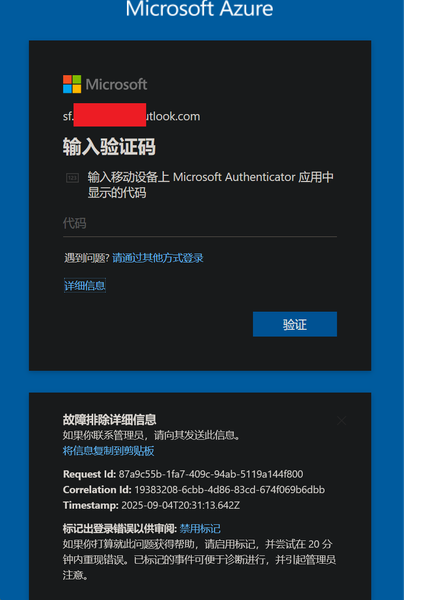
In August, I was still able to log in to Azure, and by logging in through GitHub I could bypass 2FA. But now, no matter how I try, logging in via GitHub always requires 2FA. I can’t access my Azure account anymore—nothing works. The system prompts me to use Microsoft Authenticator to confirm a two-digit code in real time. My Microsoft Authenticator on my iPhone is logged into the same Microsoft account, but I’m not receiving any verification requests for Azure login. No matter how much I refresh, nothing shows up. I’ve already updated the Microsoft Authenticator app to the latest version from the App Store. However, my personal Microsoft account works fine and can log in without any issues.675Views0likes2Comments
Android Teams login fails during ADFS federation with SSL error
Hello Android mobile users cannot sign in to Microsoft Teams The login fails during the ADFS federation step due to an SSL error Environment Android OS versions 10 to 14 Microsoft Teams mobile app Entra ID federated with on premises ADFS ADFS service URL is masked Public certificate issued by Sectigo Issue description After entering the account in Teams the sign in process redirects to ADFS The page does not load correctly and shows infinite loading or a blank screen The same account works normally on PC browser PC Teams and Outlook Web The issue occurs only on Android mobile apps that use WebView Android log summary OAuth2 WebView client received SSL error Primary error SSL untrusted Wildcard certificate for masked domain Certificate issued by Sectigo Public Server Authentication CA Troubleshooting performed Device date and time verified Teams app cache cleared and app reinstalled Issue reproduced on multiple Android versions and devices PC authentication works with the same certificate Questions Can Android WebView or Microsoft mobile authentication fail with SSL untrusted when the ADFS server does not provide a complete certificate chain Is full chain certificate configuration required on ADFS IIS for mobile authentication Can SSL inspection or proxy interception cause this issue only on Android apps while PC browsers work normally Are there official Microsoft recommendations for certificate configuration when using ADFS federation with Android mobile apps Additional information The same behavior occurs in other Microsoft mobile apps The suspected causes are incomplete certificate chain or network SSL inspection Thank you1.2KViews0likes1CommentGraph http 449 throttled
We are experiencing a lot of Microsoft Graph trolling errors from some of our applications that are hosted in Azure Web App Services and other third party such as Front App to name one. I am trying to find an approach or strategy to figure out and narrow down what may be causing so many of these events. Whether I can narrow down by application or process, I am not sure yet. We enforce MFA on all our users, but of course, on Azure Enterprise Applications, we don't, which are used extensively in our ecosystem of apps. Any help is much appreciated here.226Views0likes1Comment
Microsoft Authenticator Passkeys for Entra ID on unmanaged devices
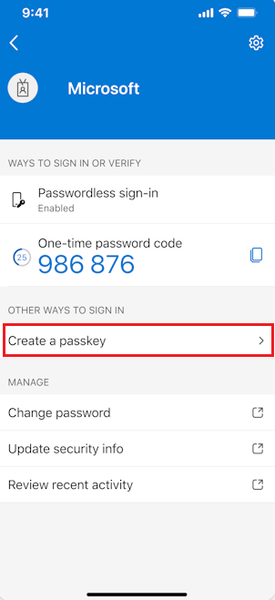
Hello, has anyone successfully registered passkeys on an unmanaged phone in an organisation with device compliance policies? Use case is to provide a phishing-resistant MFA option via Authenticator app for logging into apps on their desktop. Users already have authenticator app on their phone and do number matching MFA. https://learn.microsoft.com/en-us/entra/identity/authentication/how-to-register-passkey-authenticator?tabs=iOS When I select "Create a passkey" - I need to log into my account. However I'm blocked from successful authentication because I have conditional access policies to require compliant devices. As my mobile phone is not enrolled into Intune, I never get to the step where the passkey is created and registered. Based on the constraints - it seems like passkeys cannot be used for unmanaged/BYOD devices for organisations that have device compliance policies. It can only be used for users who have enrolled their mobile phone. Looking to see if anyone has tips or different experience using passkeys on unmanaged mobile phones to log into Entra?1KViews0likes1Comment