artificial intelligence
89 TopicsAzure OpenAI Landing Zone reference architecture
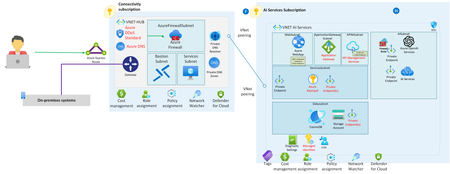
In this article, delve into the synergy of Azure Landing Zones and Azure OpenAI Service, building a secure and scalable AI environment. Unpack the Azure OpenAI Landing Zone architecture, which integrates numerous Azure services for optimal AI workloads. Explore robust security measures and the significance of monitoring for operational success. This journey of deploying Azure OpenAI evolves alongside Azure's continual innovation.216KViews45likes21CommentsSecurity Best Practices for GenAI Applications (OpenAI) in Azure
This article presents an in-depth guide on security best practices for GenAI applications that use LLM models within the Azure platform. Aimed at developers and system administrators, it explores the essentials for maintaining the confidentiality, integrity, and availability of LLMs such as Azure OpenAI. It delves into practical measures for addressing security challenges, including data breaches, misuse of AI, and regulatory compliance, while also emphasizing the role of a shared responsibility model in cloud security. The guide provides a comprehensive roadmap for implementing layered security strategies, encryption protocols, access controls, and monitoring practices to ensure the robust security of LLM applications in Azure.75KViews20likes0CommentsEmpowering AI: Building and Deploying Azure AI Landing Zones with Terraform
Discover the power of deploying Azure AI Landing Zones with Terraform. Explore best practices, secure connectivity, and streamlined access to Azure AI services. Learn to create a strong cloud foundation, optimize performance, and ensure governance for your AI solutions. Join us on this practical journey to harness the true capabilities of AI.31KViews9likes17CommentsDemystifying Azure OpenAI Networking for Secure Chatbot Deployment
Embark on a technical exploration of Azure's networking features for building secure chatbots. In this article, we'll dive deep into the practical aspects of Azure's networking capabilities and their crucial role in ensuring the security of your OpenAI deployments. With real-world use cases and step-by-step instructions, you'll gain practical insights into optimizing Azure and OpenAI for your projects.28KViews7likes9CommentsAI Studio End-to-End Baseline Reference Implementation
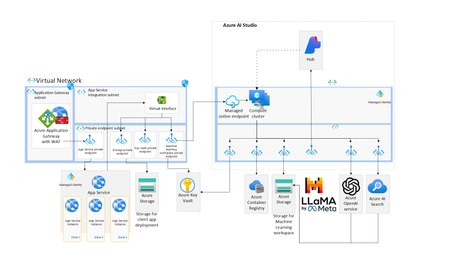
Discover the Future of AI Deployment with Azure AI Studio’s Baseline Reference Implementation Azure AI Studio is reshaping the landscape of cloud AI integration with its commitment to operational excellence and strategic alignment with core business objectives. We are thrilled to introduce Azure AI Studio’s end-to-end baseline reference implementation—a streamlined architecture crafted for seamless, scalable, and secure AI cloud deployments. Embark on a journey to deploy sophisticated AI workloads with confidence, supported by Azure AI Studio's robust baseline architecture. Whether it's hosting interactive AI playgrounds, constructing complex AI workflows with Promptflow, or ensuring resilient and secure deployments within Azure's managed network environment, this implementation is your blueprint for success. Embrace a new era of AI innovation where security and scalability converge with organizational compliance and governance. Join us in deploying tomorrow's AI solutions, today.4.4KViews6likes0CommentsAzure OpenAI chat baseline architecture in an Azure landing zone
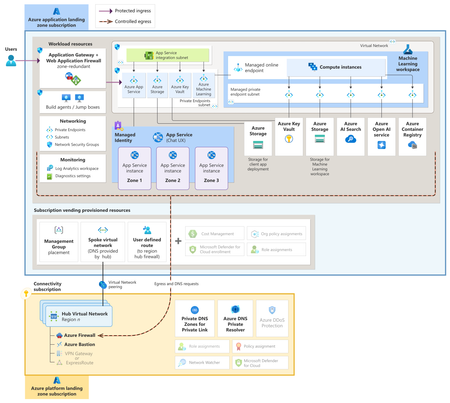
Unlock the potential of AI in the cloud. Our Azure OpenAI Chat Baseline Architecture provides the blueprint you need to transition from testing to a full production environment, all within an Azure landing zone. Ensure security, scalability, and governance are part of your AI strategy. Get started with our concise guide and embrace the future of AI on Azure.7.9KViews6likes0CommentsAzure Resiliency: Proactive Continuity with Agentic Experiences and Frontier Innovation
Introduction In today’s digital-first world, even brief downtime can disrupt revenue, reputation, and operations. Azure’s new resiliency capabilities empower organizations to anticipate and withstand disruptions—embedding continuity into every layer of their business. At Microsoft Ignite, we’re unveiling a new era of resiliency in Azure, powered by agentic experiences. The new Azure Copilot resiliency agent brings AI-driven workflows that proactively detect vulnerabilities, automate backups, and integrate cyber recovery for ransomware protection. IT teams can instantly assess risks and deploy solutions across infrastructure, data, and cyber recovery—making resiliency a living capability, not just a checklist. The Evolution from Azure Business Continuity Center to Resiliency in Azure Microsoft is excited to announce that the Azure Business Continuity Center (ABCC) is evolving into resiliency capabilities in Azure. This evolution expands its scope from traditional backup and disaster recovery to a holistic resiliency framework. This new experience is delivered directly in the Azure Portal, providing integrated dashboards, actionable recommendations, and one-click access to remediation—so teams can manage resiliency where they already operate. Learn more about this: Resiliency. To see the new experience, visit the Azure Portal. The Three Pillars of Resiliency Azure’s resiliency strategy is anchored in three foundational pillars, each designed to address a distinct dimension of operational continuity: Infrastructure Resiliency: Built-in redundancy and zonal/regional management keep workloads running during disruptions. The resiliency agent in Azure Copilot automates posture checks, risk detection, and remediation. Data Resiliency: Automated backup and disaster recovery meet RPO/RTO and compliance needs across Azure, on-premises, and hybrid. Cyber Recovery: Isolated recovery vaults, immutable backups, and AI-driven insights defend against ransomware and enable rapid restoration. With these foundational pillars in place, organizations can adopt a lifecycle approach to resiliency—ensuring continuity from day one and adapting as their needs evolve. The Lifecycle Approach: Start Resilient, Get Resilient, Stay Resilient While the pillars define what resiliency protects, the lifecycle stages in resiliency journey define how organizations implement and sustain it over time. For the full framework, see the prior blog; below we focus on what’s new and practical. The resiliency agent in Azure Copilot empowers organizations to embed resiliency at every stage of their cloud journey—making proactive continuity achievable from day one and sustainable over time. Start Resilient: With the new resiliency agent, teams can “Start Resilient” by leveraging guided experiences and automated posture assessments that help design resilient workloads before deployment. The agent surfaces architecture gaps, validates readiness, and recommends best practices—ensuring resiliency is built in from the outset, not bolted on later. Get Resilient: As organizations scale, the resiliency agent enables them to “Get Resilient” by providing estate-wide visibility, automated risk assessments, and configuration recommendations. AI-driven insights help identify blind spots, remediate risks, and accelerate the adoption of resilient-by-default architectures—so resiliency is actively achieved across all workloads, not just planned. Stay Resilient: To “Stay Resilient,” the resiliency agent delivers continuous validation, monitoring, and improvement. Automated failure simulations, real-time monitoring, and attestation reporting allow teams to proactively test recovery workflows and ensure readiness for evolving threats. One-click failover and ongoing posture checks help sustain compliance and operational continuity, making resiliency a living capability that adapts as your business and technology landscape changes Best Practices for Proactive Continuity in Resiliency To enable proactive continuity, organizations should: Architect for high availability across multiple availability zones and regions (prioritize Tier-0/1 workloads). Automate recovery with Azure Site Recovery and failover playbooks for orchestrated, rapid restoration. Leverage integrated zonal resiliency experiences to uncover blind spots and receive tailored recommendations. Continuously validate using Chaos Studio to simulate outages and test recovery workflows. Monitor SLAs, RPO/RTO, and posture metrics with Azure Monitor and Policy; iterate for ongoing improvement. Use the Azure Copilot resiliency agent for AI-driven posture assessments, remediation scripts, and cost analysis to streamline operations. Conclusion & Next Steps Resiliency capabilities in Azure unifies infrastructure, data, and cyber recovery while guiding organizations to start, get, and stay resilient. Teams adopting these capabilities see faster posture improvements, less manual effort, and continuous operational continuity. This marks a fundamental shift—from reactive recovery to proactive continuity. By embedding resiliency as a living capability, Azure empowers organizations to anticipate, withstand, and recover from disruptions, adapting to new threats and evolving business needs. Organizations adopting Resiliency in Azure see measurable impact: Accelerated posture improvement with AI-driven insights and actionable recommendations. Less manual effort through automation and integrated recovery workflows. Continuous operational continuity via ongoing validation and monitoring Ready to take the next step? Explore these resources and sessions: Resiliency in Azure (Portal) Resiliency in Azure (Learn Docs) Agents (preview) in Azure Copilot Resiliency Solutions Reliability Guides by Service Azure Essentials Azure Accelerate Ignite Announcement Key Ignite 2025 Sessions to Watch: Resilience by Design: Secure, Scalable, AI-Ready Cloud with Azure (BRK217) Resiliency & Recovery with Azure Backup and Site Recovery (BRK146) Architect Resilient Apps with Azure Backup and Reliability Features (BRK148) Architecting for Resiliency on Azure Infrastructure (BRK178) All sessions are available on demand—perfect for catching up or sharing with your team. Browse the full session catalog and start building resiliency by default today.1.5KViews5likes0Comments
Accelerating Enterprise AI Adoption with Azure AI Landing Zone
Introduction As organizations across industries race to integrate Artificial Intelligence (AI) into their business processes and realize tangible value, one question consistently arises — where should we begin? Customers often wonder: What should the first steps in AI adoption look like? Should we build a unified, enterprise-grade platform for all AI initiatives? Who should guide us through this journey — Microsoft, our partners, or both? This blog aims to demystify these questions by providing a foundational understanding of the Azure AI Landing Zone (AI ALZ) — a unified, scalable, and secure framework for enterprise AI adoption. It explains how AI ALZ builds on two key architectural foundations — the Cloud Adoption Framework (CAF) and the Well-Architected Framework (WAF) — and outlines an approach to setting up an AI Landing Zone in your Azure environment. Foundational Frameworks Behind the AI Landing Zone 1.1 Cloud Adoption Framework (CAF) The Azure Cloud Adoption Framework is Microsoft’s proven methodology for guiding customers through their cloud transformation journey. It encompasses the complete lifecycle of cloud enablement across stages such as Strategy, Plan, Ready, Adopt, Govern, Secure, and Manage. The Landing Zone concept sits within the Ready stage — providing a secure, scalable, and compliant foundation for workload deployment. CAF also defines multiple adoption scenarios, one of which focuses specifically on AI adoption, ensuring that AI workloads align with enterprise cloud governance and best practices. 1.2 Well-Architected Framework (WAF) The Azure Well-Architected Framework complements CAF by providing detailed design guidance across five key pillars: Reliability Security Cost Optimization Operational Excellence Performance Efficiency AI Landing Zones integrate these design principles to ensure that AI workloads are not only functional but also resilient, cost-effective, and secure at enterprise scale. Understanding Azure Landing Zones To understand an AI Landing Zone, it’s important to first understand Azure Landing Zones in general. An Azure Landing Zone acts as a blueprint or foundation for deploying workloads in a cloud environment — much like a strong foundation is essential for constructing a building or bridge. Each workload type (SAP, Oracle, CRM, AI, etc.) may require a different foundation, but all share the same goal: to provide a consistent, secure, and repeatable environment built on best practices. Azure Landing Zones provide: A governed, scalable foundation aligned with enterprise standards Repeatable, automated deployment patterns using Infrastructure as Code (IaC) Integrated security and management controls baked into the architecture To have more insightful understanding of Azure Landing zone architecture pls visit the official link here and refer diagram below: The Role of Azure AI Foundry in AI Landing Zones Azure AI Foundry is emerging as Microsoft’s unified environment for enterprise AI development and deployment. It acts as a one-stop platform for building, deploying, and managing AI solutions at scale. Key components include: Foundry Model Catalog: A collection of foundation and fine-tuned models Agent Service: Enables model selection, tool and knowledge integration, and control over data and security Search and Machine Learning Services: Integrated capabilities for knowledge retrieval and ML lifecycle management Content Safety and Observability: Ensures responsible AI use and operational visibility Compute Options: Customers can choose from various Azure compute services based on control and scalability needs: Azure Kubernetes Service (AKS) — full control App Service and Azure Container Apps — simplified management Azure Functions — fully serverless option What Is Azure AI Landing Zone (AI ALZ)? The Azure AI Landing Zone is a workload-specific landing zone designed to help enterprises deploy AI workloads securely and efficiently in production environments. Key Objectives of AI ALZ Accelerate deployment of production-grade AI solutions Embed security, compliance, and resilience from the start Enable cost and operational optimization through standardized architecture Support repeatable patterns for multiple AI use cases using Azure AI Foundry Empower customer-centric enablement with extensibility and modularity By adopting the AI ALZ, organizations can move faster from proof-of-concept (POC) to production, addressing common challenges such as inconsistent architectures, lack of governance, and operational inefficiencies. Core Components of AI Landing Zone The AI ALZ is structured around three major components: Design Framework – Based on the Cloud Adoption Framework (CAF) and Well-Architected Framework (WAF). Reference Architectures – Blueprint architectures for common AI workloads. Extensible Implementations – Deployable through Terraform, Bicep, or (soon) Azure Portal templates using Azure Verified Modules (AVM). Together, these elements allow customers to quickly deploy a secure, standardized, and production-ready AI environment. Customer Readiness and Discovery A common question during early customer engagements is: “Can our existing enterprise-scale landing zone support AI workloads, or do we need a new setup?” To answer this, organizations should start with a discovery and readiness assessment, reviewing their existing enterprise-scale landing zone across key areas such as: Identity and Access Management Networking and Connectivity Data Security and Compliance Governance and Policy Controls Compute and Deployment Readiness Based on this assessment, customers can either: Extend their existing enterprise-scale foundation, or Deploy a dedicated AI workload spoke designed specifically for Azure AI Foundry and enterprise-wide AI enablement. Attached excel contains the discovery question to enquire about customer current setup and propose a adoption plan to reflect architecture changes if any. The Journey Toward AI Adoption The AI Landing Zone represents the first critical step in an organization’s AI adoption journey. It establishes the foundation for: Consistent governance and policy enforcement Security and networking standardization Rapid experimentation and deployment of AI workloads Scalable, production-grade AI environments By aligning with CAF and WAF, customers can be confident that their AI adoption strategy is architecturally sound, secure, and sustainable. Conclusion The Azure AI Landing Zone provides enterprises with a structured, secure, and scalable foundation for AI adoption at scale. It bridges the gap between innovation and governance, enabling organizations to deploy AI workloads faster while maintaining compliance, performance, and operational excellence. By leveraging Microsoft’s proven frameworks — CAF and WAF — and adopting Azure AI Foundry as the unified development platform, enterprises can confidently build the next generation of responsible, production-grade AI solutions on Azure. Get Started Ready to start your AI Landing Zone journey? Microsoft can help assess your readiness and accelerate deployment through validated reference implementations and expert-led guidance. To help organizations accelerate deployment, Microsoft has published open-source Azure AI Landing Zone templates and automation scripts in Terraform and Bicep that can be directly used to implement the architecture described in this blog. 👉 Explore and deploy the Azure AI Landing Zone(Preview) on GitHub: https://github.com/Azure/AI-Landing-Zones16KViews5likes9Comments
Selecting the Right Agentic Solution on Azure - Part 1
Recently, we have seen a surge in requests from customers and Microsoft partners seeking guidance on building and deploying agentic solutions at various scales. With the rise of Generative AI, replacing traditional APIs with agents has become increasingly popular. There are several approaches to building, deploying, running, and orchestrating agents on Azure. In this discussion, I will focus exclusively on Azure-specific tools, services, and methodologies, setting aside Copilot and Copilot Studio for now. This article describes the options available as of today. 1. Azure OpenAI Assistants API: This feature within Azure OpenAI Service enables developers to create conversational agents (“assistants”) based on OpenAI models (such as GPT-3.5 and GPT-4). It supports capabilities like memory, tool/function calls, and retrieval (e.g., document search). However, Microsoft has already deprecated version 1 of the Azure OpenAI Assistants API, and version 2 remains in preview. Microsoft strongly recommends migrating all existing Assistants API-based agents to the Agent Service. Additionally, OpenAI is retiring the Assistants API and advises developers to use the modern “Response” API instead (see migration detail). Given these developments, it is not advisable to use the Assistants API for building agents. Instead, you should use the Azure AI Agent Service, which is part of Azure AI Foundry. 2. Workflows with AI agents and models in Azure Logic Apps (Preview) – As the name suggests, this feature is currently in public preview and is only available with Logic Apps Standard, not with the consumption plan. You can enhance your workflow by integrating agentic capabilities. For example, in a visa processing workflow, decisions can be made based on priority, application type, nationality, and background checks using a knowledge base. The workflow can then route cases to the appropriate queue and prepare messages accordingly. Workflows can be implemented either as chat assistant or APIs. If your project is workflow-dependent and you are ready to implement agents in a declarative way, this is a great option. However, there are currently limited choices for models and regional availability. For CI/CD, there is an Azure Logic Apps Standard template available for VS Code you can use. 3. Azure AI Agent Service – Part of Azure AI Foundry, the Azure AI Agent Service allows you to provision agents declaratively from the UI. You can consume various OpenAI models (with support for non-OpenAI models coming soon) and leverage important tools or knowledge bases such as files, Azure AI Search, SharePoint, and Fabric. You can connect agents together and create hierarchical agent dependencies. SDKs are available for building agents within agent services using Python, C#, or Java. Microsoft manages the infrastructure to host and run these agents in isolated containers. The service offers role-based access control, MS Entra ID integration, and options to bring your own storage for agent states and Azure Key Vault keys. You can also incorporate different actions including invoking a Logic App instance from your agent. There is also option to trigger an agent using Logic Apps (preview). Microsoft recommends using Agent Service/Azure Foundry as the destination for agents, as further enhancements and investments are focused here. 4. Agent Orchestrators – There are several excellent orchestrators available, such as LlamaIndex, LangGraph, LangChain, and two from Microsoft—Semantic Kernel and AutoGen. These options are ideal if you need full control over agent creation, hosting, and orchestration. They are developer-only solutions and do not offer a UI (barring AutoGen Studio having some UI assistance). You can create complex, multi-layered agent connections. You can then host and run these agents in you choice of Azure services like AKS or Apps Service. Additionally, you have the option to create agents using Agent Service and then orchestrate them with one of these orchestrators. Choosing the Right Solution The choice of agentic solution depends on several factors, including whether you prefer code or no-code approaches, control over the hosting platform, customer needs, scalability, maintenance, orchestration complexity, security, and cost. Customer Need: If agents need to be part of a workflow, use AI Agents in Logic Apps; otherwise, consider other options. No-Code: For workflow-based agents, Logic Apps is suitable; for other scenarios, Azure AI Agent Service is recommended. Hosting and Maintenance: If Logic Apps is not an option and you prefer not to maintain your own environment, use Azure AI Agent Service. Otherwise, consider custom agent orchestrators like Semantic Kernel or AutoGen to build the agent and services like AKS or Apps Service to host those. Orchestration Complexity: For simple hierarchical agent connections, Azure AI Agent Service is good choice. For complex orchestration, use an agent orchestrator. Versioning - If you are concerned about versioning to ensure solid CI/CD regime then you may have to chose Agent Orchestrators. Agent Service still miss this feature clarity. We have some work-around but it is not robust implementation. Hopefully we will catch up soon with a better versioning solution. Summary: When selecting the right agentic solution on Azure, consider the latest recommendations and platform developments. For most scenarios, Microsoft advises using the Azure AI Agent Service within Azure Foundry, as it is the focus of ongoing enhancements and support. For workflow-driven projects, Azure Logic Apps with agentic capabilities may be suitable, while advanced users can leverage orchestrators for custom agent architectures. In Selecting the Right Agentic Solution on Azure – Part 2 (Security) blog we will examine the security aspects of each option, one by one.1.8KViews5likes0Comments