app
38 Topics
Default scheduling mode Project app
Hi, the default scheduling mode of projects (fixed duration vs fixed effort) used to be configured in the general parameters settings in Power Apps, of the Project app (project for the web). But since that portal recently changed, I can't find it anymore. Do any of you know where those settings are to be found? Ps the personal and advanced settings options in the navigation bar of the Project app don't work. I checked that in two different tenants. The advanced settions popout does nothing (it is still in development I believe), the personal settings generates an error. In any case these don't seem to be the General Paramenters section anyway. Curious if some of you know where it is to be found...422Views0likes5Comments
Project Online (CSOM): Encountering 'User Not Found in Active Directory or Project DB'
Issue We are attempting to access Project Online data in Project Permission mode using app-only authentication, specifically to bypass MFA for programmatic access, as we aim for continuous, automated access without any user-interaction. We are using CSOM, using Microsoft.ProjectServer.Client.ProjectContext in .NET 4.8 to connect to Project Online. Despite following several documented approaches with client certificates, client secrets, and OAuth configurations, we keep encountering errors like 401 Unauthorized and User not found in Active Directory or in project db. Below is a summary of our steps. Despite multiple attempts, we consistently receive errors blocking access. We have followed recommended documentation for client credentials, certificates, and permissions but still face access issues. Technology Project Online CSOM in .NET 4.8 Microsoft.ProjectServer.Client.ProjectContext Azure AD (Entra ID) Solutions Attempted Client Certificate Authentication: Configuration: Registered an app in Azure AD (Entra) with a client certificate and set permissions including Sites.FullControl.All. NOTE: we could not select Project permissions (Project.Read, etc.) in the Application Permissions screen, only within the delegated permissions screen. Token Acquisition: We acquired an access token using az account get-access-token --resource=https://.sharepoint.com. Request Attempted: URL: https://%3Ctenant%3E.sharepoint.com/sites/%3cproject-site%3e/_api/ProjectData/Projects Outcome: {"error":"invalid_request","error_description":"App is not allowed to call SPO with user_impersonation scope"} Client Secret with Client Credentials: App Registration: Configured client ID and client secret in Azure AD with permissions for Project.ReadWrite.All and Sites.Selected. Token Acquisition: Called the token endpoint: Endpoint: https://login.microsoftonline.com/%7bTENANT_ID%7d/oauth2/v2.0/token Parameters: client_id, scope= https://%3Ctenant%3E.sharepoint.com/.default, client_secret, grant_type=client_credentials Access Attempt: URL: https://%3Ctenant%3E.sharepoint.com/sites/%3cproject-site%3e/_api/ProjectData/Projects Response: HTTP/1.1 401 Unauthorized Response Body: " " Outcome: Despite obtaining a valid token, the request returns a “Please sign in” page, rather than an access token. SharePoint AppPermissionRequest Configuration using /sites/pwa/layouts/15/appinv.aspx: Configuration: Set up AppPermissionRequest XML in SharePoint for permissions like: Outcome: This configuration did not make any differences, and did not grant the required permissions in Project Permission mode, as SharePoint app permissions do not seem to cover Project-specific access, it seems. Project Online access remains blocked. <AppPermissionRequest Scope="[http://sharepoint/content/sitecollection]" Right="FullControl"/> Microsoft Graph API Exploration: Goal: Investigated Graph API as an alternative. Outcome: Microsoft Graph lacks Project Online-specific permissions, limiting access to SharePoint and directory data, which does not meet our need for project-specific data access. Microsoft.Identity.Client and client certificate Configuration: CSOM using the following code to login: Outcome: Access fails with User:<customercontent></customercontent> not found in Active Directory or in project db public static void Login(this ProjectContext context) { var clientId = "xxx"; var clientSecret = "xxx"; var authority = "https://login.microsoftonline.com/xxx"; var scope = "https://xxx.sharepoint.com/.default"; var certificate = new X509Certificate2("c:\\temp\\cert.pfx", "xx"); var app = ConfidentialClientApplicationBuilder.Create(clientId) .WithCertificate(certificate) .WithAuthority(new Uri(authority)) .Build(); AuthenticationResult result = TaskHelper.BlockingAwait(() => app.AcquireTokenForClient(new[] { scope }).ExecuteAsync()); string accessToken = result.AccessToken; context.ExecutingWebRequest += (sender, e) => { e.WebRequestExecutor.RequestHeaders["Authorization"] = "Bearer " + accessToken; }; } Key Questions: Is there a method for app-only authentication in Project Online in Project Permission mode__ that bypasses MFA for automated access? Has anyone succeeded in applying app-only credentials for Project Online access__, specifically in Project Permission mode? Are there any alternative permission configurations__ (like Azure AD settings, conditional access policies, or app permissions) that could facilitate this access? Thank you in advance! Edit: Sorry for the bad formatting.221Views0likes0Comments
Project for Web
Hello, I have made a project in Project for Web, and I would like to grant the team access, but some guidelines indicate the proper use of this board. Can I include some guidelines in the project itself so that users can refer to them? What are the methods by which I can accomplish this? should it be feasible? Thanks641Views0likes3CommentsMS Project for teams
One of my colleagues has created a Project Plan on Teams using the Microsoft Project app. It is very similar to the Microsoft Planner tab. but I just cannot seem to create any flows for this in Power Automate. There is a Project Roadmap connector in PA but there doesn't seem to be a way to automatically add tasks or create buckets in the Project App.Solved748Views0likes1Comment
Question on difference PWA instances
Hi, I am researching how to setup permissions in PWA. I'm a SharePoint Administrator, so I understand those permissions and I see there is a way to change the permission management between SharePoint Permissions Mode and Project Permissions Mode. My main question is, do these permissions affect any PWA that others might have or is it only my instance of PWA? My manager wants a more fine-grained permission set, and it looks like it is best to use the Project Permissions Mode for that. Can I change my PWA and not affect any others as a way to test these permissions? Update: I see this page on https://learn.microsoft.com/en-us/project/manage-project-web-app-permissions-project-server-permission-mode suggests that this is the case, but kind of worried about changing permissions because the permissions are deleted when changing between each way. Appreciate any help! Thanks, MontySolved694Views0likes3CommentsProject for the web model driven app BPF issue
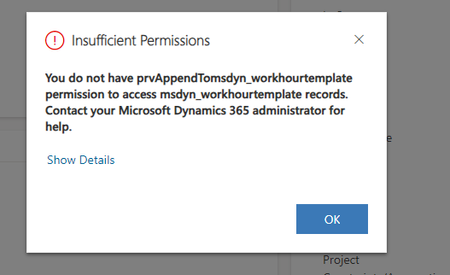
Hi everyone, I am using the Project for the web model driven app with the accelerator solution as a managed solution in my environment. My users reported that during New Project (record) creation, the BPF workflow is not visible and when they fill out mandatory form fields and click save, they get an error. On existing records the BPF is visible, users can also change values on form fields. New record creation, the BPF is missing and they get the "insufficient permission issue" No permission changes were made at environment level, and it was working until a few days ago. Please advise if anyone came across a similar situation. Thanks.471Views0likes0CommentsHow to Open a XPS File on My Mac?
Hey everyone, I recently received an XPS file from a colleague, and I'm using a Mac. I've been struggling to figure out how to open this .xps file on my MacBook. It seems that XPS files are not natively supported on macOS, and I'm not sure what the best way to go about it is. Does anyone have experience with opening XPS files on a Mac? Are there any reliable third-party apps or methods that you can recommend? I would greatly appreciate any guidance or suggestions on how to view and work with XPS files on my Mac. Thanks in advance!4.5KViews0likes2Comments
Get Started with Project Web App Web Part.
Hello - is this only available for SharePoint On Prem? I have a do a demo on projects and I got a P3 licence with the intent of showing how to integrate with SharePOint but I don't have these options on the left wth my desktop client. I have an SPO account not on prem. I don't have a https://xxx.onmicrosoft.com/sites/pwa/default.aspx page. I just have the web app location https://project.microsoft.com/xxx.onmicrosoft.com/en-US#/hubnew What am I missing? Thanks https://support.microsoft.com/en-us/office/add-an-existing-sharepoint-task-list-to-project-web-app-6f7b8294-2284-43ed-be4b-a8480f472674Solved2.2KViews0likes5CommentsDifferences Project online, Project pour le web, Project Web App
Bonjour, je suis utilisateur de MS Project sur les versions 2010 à 2021. Je ne comprends pas les différences entre Project online, Project pour le web, Project Web App et les Project versions de bureau... J'au lu pas mal de chose là dessus mais ça n'est pas clair. Par exemple là : https://support.microsoft.com/fr-fr/office/projet-pour-le-web-et-project-online-6569170c-5c8e-474e-a7f0-642872f62f8a. C'est quoi la différence ? d'avance merci. xavier34000Solved1.1KViews0likes4Comments