announcement
146 TopicsSkype for Business Online - End of Life - July 31, 2021
Today Microsoft announced that Skype for Business Online will be retiring on July 31, 2021. Though we didn’t know the exact date until today, we have been preparing for this for the past year and are ready to support you however we can as we work together to help you make this transition. We knew this was coming, we have been preparing for this for the past year, now we know the official date. We hope this does not come as a shock to you as MS Teams has taken center stage for Intelligent Communication and Modern Collaboration and Microsoft as an organization is not going to support Skype for Business (SfB) online in the long term. All of our investments and feature enhancements have been in Teams and Teams will continue to receive these investments for the future.195KViews4likes10CommentsAzure Monitor for Windows Virtual Desktop is generally available!
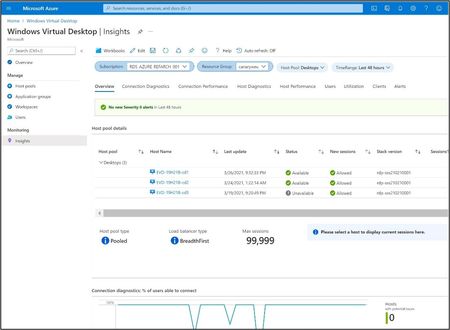
Today, we are thrilled to announce that Azure Monitor for Windows Virtual Desktop is now generally available! Building on top of Azure Monitor, Windows Virtual Desktop Insights provides IT administrators with a 360° view of their environment’s health. With Azure Monitor for Windows Virtual Desktop, you can find and troubleshoot problems in the deployment, view the status and health of host pools, diagnose user feedback and understand resource utilization. General availability comes with many improvements, including the following: Improved data collection and new guidance to help you optimize for cost Updated setup experience with easier UI, expanded support for VM set-up, automated Windows Event Log setup, and more Relocated Windows Virtual Desktop agent warnings and errors at the top of the Host Diagnostics page to help you prioritize issues with the highest impact Accessibility enhancements Workbook versioning: GA release is Version 1.0.0 For our existing users- if you used Azure Monitor for Windows Virtual Desktop in public preview, we have made some updates to our guidance and default configuration to help reduce your Azure Monitor Log Analytics cost in GA. If you haven’t already, you must take action to implement these revised recommendations. See our blog post for instructions. We are incredibly excited about this major milestone and are looking forward to continuing to provide updates and expand scenario support in our monitoring journey. As always, we welcome your comments and feedback below! Best, Logan Silliman Learn more about Azure Monitor for Windows Virtual Desktop: Get started with Using Azure Monitor for Windows Virtual Desktop Estimate and manage your Log Analytics storage costs with Estimate Azure Monitor costs Review terms and concepts in our glossary If you encounter a problem, check out our troubleshooting guide for help27KViews6likes0CommentsNew Microsoft Certified: SQL AI Developer Associate Certification
AI is transforming how data-driven applications are built, and SQL professionals are at the center of this new era. Whether you're a database developer, administrator, analyst, or architect, your SQL expertise is more critical than ever. With the rise of AI, quality data and secure, optimized queries are foundational to building intelligent, scalable solutions. We’re introducing the Microsoft Certified: SQL AI Developer Associate Certification to help you validate your ability to integrate AI capabilities directly into SQL-based solutions without needing to move your data, learn entirely new platforms, or move away from the T-SQL skills you already use every day. To earn this new Certification, you need to pass Exam DP‑800: Developing AI‑Enabled Database Solutions, currently in beta. Is this the right Certification for you? The Microsoft Certified: SQL AI Developer Associate Certification is designed for SQL professionals who build and maintain SQL-based applications and who want to integrate AI capabilities directly into their data solutions. As you collaborate closely with application developers, database administrators, architects, AI engineers, and DevSecOps teams, skills validated by this certification support the delivery of scalable, secure, and high-performance AI‑enabled applications. This Certification demonstrates your ability to: Design and build database solutions using structured and semi-structured data. Use AI-assisted tools to accelerate SQL development and database management. Secure, optimize, and deploy enterprise-grade SQL solutions. Implement vectors, embeddings, and retrieval-augmented generation (RAG) patterns within SQL database architectures. As a candidate for this Certification, you should have experience writing T-SQL, developing databases on Microsoft SQL platforms, and working with continuous integration and continuous deployment (CI/CD) workflows in GitHub. We also recommend familiarity with AI concepts, such as embeddings, vectors, and models, in addition to AI-assisted development tools. Skills measured by the exam include: Applying advanced T-SQL techniques for AI-ready database solutions. Building vector and semantic search experiences directly in SQL. Implementing RAG workflows to ground large language model (LLM) outputs and reduce hallucinations. Integrating LLMs into SQL-based applications without migrating data. Designing secure, compliant, and scalable AI-enabled data solutions. Exposing SQL data through APIs by using Data API builder. Building and monitoring data APIs by using Data API builder and event-driven change patterns. These capabilities power use cases like semantic and hybrid search, chatbots, personalized recommendations, fraud detection, and predictive analytics. Ready to prove your skills? The first 300 candidates can save 80% Take advantage of the discounted beta exam offer. The first 300 people who take Exam DP-800 (beta) on or before April 3, 2026, can get 80% off. To receive the discount, when you register for the exam and are prompted for payment, use code DP800Belzoni. This is not a private access code. The seats are offered on a first-come, first-served basis. As noted, you must take the exam on or before April 3, 2026. Please note that this discount is not available in Turkey, Pakistan, India, or China. How to prepare Get ready to take Exam DP-800 (beta): Review the Exam DP-800 (beta) exam page for details. The Exam DP-800 study guide explores key topics covered in the exam. Work through the self-paced skilling Plan on Microsoft Learn: Become a SQL AI Developer: Prepare for Certification Exam DP-800. Connect with Microsoft Training Services Partners in your area for in-person offerings. Need other preparation ideas? Check out Just How Does One Prepare for Beta Exams? Ready to get started? Remember, the number of spots is limited to the first 300 candidates taking Exam DP-800 (beta) on or before April 3, 2026. Beta exam rescoring begins when the exam goes live, with final results released approximately 10 days later. For more details, read Creating high-quality exams: The path from beta to live. Stay tuned for general availability of this Certification in May 2026. Additional information You can take Certification exams online, from your home or office. Learn what to expect in Online proctored exams: What to expect and how to prepare. For more cloud and AI Certification updates, read our recent blog post, The AI job boom is here. Are you ready to showcase your skills? Get involved: Help shape future Microsoft Credentials. Join our Microsoft Worldwide Learning SME Group for Credentials on LinkedIn for beta exam alerts and opportunities to help shape future Microsoft learning and assessments. Explore Microsoft Credentials on AI Skills Navigator.27KViews9likes9CommentsThe 2023 brand new Surface Product Line-up
We launched new Surface devices powered by Windows 11, enabling high-impact work through innovative design, industry-leading performance, on-the-go connectivity, and chip-to-cloud security. Click here to read the announcement! ➡️ Introducing new Surface devices that take the Windows PC into the next era of computing | Microsoft Devices BlogNew Certification for machine learning operations (MLOps) engineers
Do your co-workers rely on you to deploy, operationalize, and maintain machine learning and generative AI solutions in production? Are you working at the intersection of data science, DevOps, and generative AI? If so, the Microsoft Certified: Machine Learning Operations Engineer Associate Certification is designed for you. This Certification validates your ability to operationalize not only traditional machine learning but also generative AI solutions on Azure, reflecting how AI roles have evolved from model experimentation to enterprise-scale AI operations. To earn this Certification, you need to pass Exam AI-300: Operationalizing Machine Learning and Generative AI solutions, currently in beta. Key skills validated by this Certification To earn the MLOps engineer Certification, you must demonstrate your ability to: Design and implement secure, scalable MLOps infrastructure. Automate resource provisioning and deployments by using GitHub Actions, Bicep, and Azure CLI. Orchestrate training, manage model registration and versioning, and monitor production models. Deploy and operationalize generative AI solutions by using Microsoft Foundry. Implement quality assurance, observability, and safety evaluations for generative AI systems. Optimize retrieval-augmented generation (RAG) pipelines and fine-tuned models for performance, accuracy, and cost efficiency. This Certification replaces the Microsoft Certified: Azure Data Scientist Associate Certification (Exam DP-100), which is retiring on June 1, 2026, and reflects the evolution of AI in the enterprise. Exam DP-100 focused on validating your ability to design and implement data science solutions, including data exploration, model training, evaluation, and deployment. Exam AI-300 expands the scope significantly. It retains training and evaluation but places much stronger emphasis on validating your knowledge and experience in automation, infrastructure as code (IaC), continuous integration and continuous deployment (CI/CD), lifecycle governance, observability, drift detection, cost control, and the operationalization of generative AI systems. For more details on the retirement of Exam DP-100, and the latest cloud and AI Certification updates, read our recent blog post, The AI job boom is here. Are you ready to showcase your skills? Skill area Exam AI-300 (new) Exam DP-100 (old) MLOps infrastructure Full CI/CD, IaC (Bicep, Azure CLI), GitHub Actions Basic workspace and compute setup Model lifecycle management Core focus, including registration, versioning, rollout/rollback, monitoring Full lifecycle from training to deployment GenAIOps infrastructure End-to-end lifecycle, including security, automation, and model management with Foundry Basic generative AI setup and experimentation QA and observability Generative AI evaluation, tracing, safety metrics, drift detection, cost monitoring Model evaluation and responsible AI principles Generative AI performance optimization RAG optimization, embedding model selection and tuning, advanced fine-tuning, synthetic data management Basic prompt engineering and fine-tuning Ready to prove your skills? Take advantage of the discounted beta exam offer. The first 300 people who take Exam AI-300 (beta) on or before April 2, 2026, can get 80% off market price. To receive the discount, when you register for the exam and are prompted for payment, use code AI300Meridian. This is not a private access code. The seats are offered on a first-come, first-served basis. As noted, you must take the exam on or before April 2, 2026. Please note that this discount is not available in Turkey, Pakistan, India, or China. Get ready to take Exam AI-300 (beta): Review the Exam AI-300 (beta) exam page for details. The Exam AI-300 study guide explores key topics covered in the exam. Want even more in-depth instructor-led training? We’re creating new instructor-led training that will be released in late March 2026. Connect with Microsoft Training Services Partners in your area for in-person offerings. Need other preparation ideas? Check out Just How Does One Prepare for Beta Exams? You can take certification exams online, from home or the office. Learn what to expect in Online proctored exams: What to expect and how to prepare. The rescore process starts on the day an exam goes live, and final scores for beta exams are released approximately 10 days after that. For details on the timing of beta exam rescoring and results, check out Creating high-quality exams: The path from beta to live. Ready to get started? Remember, only the first 300 candidates can get 80% off Exam AI-300 (beta) with code AI300Meridian on or before April 2, 2026. Stay tuned for general availability of this Certification in May 2026. Learn more about Microsoft Credentials. Related announcements We recently migrated our subject matter expert (SME) database to LinkedIn. To be notified of beta exam availability or opportunities to help with the development of exam, assessment, or learning content, sign up today for the Microsoft Worldwide Learning SME Group for Credentials.24KViews5likes30CommentsUpdated Installation Instructions for Windows Server 2019 Features on Demand Preview
Server Core: Features added to App Compatibility, a Feature on Demand This FoD significantly improves the app compatibility of Windows Server Core by including a set of binaries and packages from Windows Server with Desktop, without adding any of the Windows Server Desktop GUI or Windows 10 GUI experiences. The FoD package is available on a separate ISO and installs on Windows Server Core only. Important Please try out this FoD, and verify that current applications and tools run on the preview release as expected. Also, try any server app (from Microsoft or not) that you want to use on Server Core but currently cannot use, and please let us know about any successes or failures. More details on this FOD and install instructions can be found here.19KViews0likes0CommentsAnnouncing the Microsoft Tech Community!
Today we are pleased to announce the launch of the Microsoft Tech Community, bringing multiple communities together in one central location to support discussions and best practice sharing across a variety of Microsoft products and services. The Microsoft Tech Community is an evolution of the Office 365 Network, growing to support new Azure; Windows Server, and SQL Server Communities and in future many more communities. The URL of the new community will change soon to http://techcommunity.microsoft.com and redirects will be in place for any existing URL on the http://network.office.com domain. In today's announcement, not only will you see new communities added but you will also see the following features: New Navigation Menu that reflects all of your favorite spaces, making it easier for you to navigate from space to space. Spaces can be discussions, blogs or idea exchanges and when favorited will appear here. Microsoft Ignite Community page launched: https://network.office.com/t5/Microsoft-Ignite-Conversations/bd-p/IgniteCommunity Discussions about Microsoft Ignite are happening here: https://network.office.com/t5/Microsoft-Ignite-Conversations/bd-p/IgniteCommunity Coming soon: Discussion threads for each session! Make sure you favorite the Microsoft Ignite Content space to stay up to date on the latest sessions! You can find the Microsoft Ignite Community Page via the new navigation menu under 'Events'. In our roadmap, this Events landing page will house more than just Microsoft Ignite but in the lead-up to the September event all our events efforts will be focused on Microsoft Ignite. New styling applied to Avatars. Colored rings indicate different community roles: 'Red' = a MTC (Microsoft Tech Community) Community Manager 'Blue' = a Microsoft Employee 'Green' = a Microsoft MVP (Most Valuable Professional) Profile Hovercards activated when hovering over a member's avatar so you can easily see which organization they belong to and what their activity is on the MTC A 'Follow' button will be applied soon and we are working on a 'People' section to help you manage your networks and feeds from the people you follow in the MTC Toggle between Blogs and Discussions in Communities: While we don't have blogs everywhere in the community yet, we are supporting the concept of blogs in the community. This will be where Microsoft Product Experts will be sharing product news, insight into how Microsoft products work and best practices they've observed. 'Favorite' Blog spaces to power your feed in your Home Page. We have temporarily taken the Community Ideas section offline while we are working on some bug fixes. While you wait you can use the Community Discussion space to share feedback on the new community. Once Community Ideas are back online we'll be making an announcement in the Community Info Center. Coming soon: 'More Resources' links in the right hand rail of Communities Continuing to refine threading and whitespace in conversations for desktop and on mobile Ability to 'Follow' users via a button on their hovercard 'People' section (more on this soon) More Blogs & More Communities! The following fixes to bugs have been applied: Notification alert is now back on your Avatar via the Profile Menu To fix this bug we had to revert back to our original larger Profile Menu. We are investigating ways to make this profile menu smaller Community Spaces tiles are now wider to support longer Space names Removed the 'Sign In' text next to the Avatar placeholder image to support a better mobile experience Known bugs and issues we are working on fixing: @mentions not working on all browsers Line breaks in Firefox and on iOS in incorrect places Styling of the hyperlinks in the notifications feed Replies, Likes and Views Icons not appearing in IE 11 and IE 9 browsers Please continue to share your feedback in the new Microsoft Tech Community. We are scheduled to shut down the Office 365 Network on Yammer on September 15 (read announcement here). If you have questions about the future of groups that exist on the Yammer network and unable to find them on the new Microsoft Tech Community, please let us know via the Community Discussion space. Thank you for your input so far, we will continue to make updates to features of the MTC and the best way to stay informed is by favouriting the Community Announcements space to power your feed.17KViews38likes14CommentsWindows Server 2022 Datacenter: Azure Edition Available on Azure
As part of Azure Automanage, new scenarios and capabilities unlock with Automanage for Windows Server and its Azure IaaS virtual machines running Windows Server 2022 Datacenter: Azure Edition. The first three are Hotpatch (Preview), SMB over QUIC, and Extended Network for Azure. We update Windows Server Azure Edition machines annually with new features and we update Automanage for Windows Server continuously to make operating those features easy and reliable. Learn more about everything that’s new. Hotpatch (Preview): update without rebooting With many organizations moving to a zero-trust security model, you can now deploy security updates without having to frequently reboot your Windows Server virtual machine. Hotpatching reduces the need to schedule security updates because you can deploy updates as soon as they become available. The hotpatch preview is now available on the GA release of Windows Server 2022 Azure Edition (server core). Follow these steps to participate in the hotpatch preview. SMB over QUIC: securely access file servers A common challenge has been securely accessing file servers remotely over an untrusted network and without a VPN when you’re on a mobile device or working remotely. Now, generally available—SMB over QUIC. SMB over QUIC introduces an alternative to the TCP network transport, providing secure, reliable connectivity to edge file servers over untrusted networks like the internet. It doesn't stop there though: Automanage machine best practices (preview) for Windows Server also includes SMB over QUIC management. QUIC uses certificates to provide its encryption and organizations often struggle to maintain complex public key infrastructures. Automanage machine best practices ensure that certificates do not expire without warning and that SMB over QUIC stays enabled for maximum continuity of service. Extended Network: preserve on-premises IP addresses When you migrate to Azure, there are some virtual machines that cannot change their IP address. Now generally available is an extended network for Azure, which allows you to migrate Windows Server workloads to Azure while preserving the original IP address. Automanage resources Automanage blogs in Azure Governance and Management and Windows Admin Center on Tech community Automanage announcements at Ignite Automanage for Windows Server on docs Automanage on Azure.com16KViews3likes0Comments