announcement
146 Topics
Viva Engage: posting announcements as delegate
Hi. As a delegate (e.g. for a senior leader), I used to be able to post announcements on their behalf in a community where I am an administrator. Now, I can only do that if they are an administrator themselves. Am I getting this wrong? Is there another way to get people able to post announcements without being an admin? If not, can this be fed back to the Viva Engage product owners please? I'd often want to post an announcement on their behalf, without them being a community admin (with the permissions and request emails that entails).210Views0likes0Comments
📣 MSLE Onboarding Session — Português
Olá, 👋 Espero que estejam bem! ✨Participe da sessão de introdução ao programa MSLE para Educadores! Nesta sessão: ✅ Vamos explorar os benefícios e o alcance do programa ✅ Conhecer em detalhe os dois portais principais aos quais você terá acesso ✅ Esclarecer todas as suas dúvidas em um ambiente colaborativo Este é o seu primeiro passo rumo a uma experiência enriquecedora, onde conhecimento, inovação e comunidade se unem para impulsionar você ao próximo nível. No horário indicado, favor realizar acesso ao link.Upcoming Updates to the MSLE Program Structure
The Microsoft Learn for Educators (MSLE) program goals include helping educators integrate in-demand technical skills into their teaching and better prepare students for today’s workforce. Through the program, educators gain access to ready-to-teach Microsoft Official Curriculum, including courseware, assessments, and teaching resources aligned to industry-recognized Microsoft Certifications. MSLE also provides professional development opportunities, certification pathways, and a global community of educators, enabling faculty to stay current, collaborate with peers, and deliver engaging, real-world learning experiences. As we look ahead to the upcoming fiscal year, we’re making an important update to how the MSLE program is structured. What’s changing Currently, educators can participate in MSLE either as an individual educator or as part of an educational institution, with institutions receiving a distinct set of expanded benefits. Moving forward, we will no longer differentiate between these two participation models. All participants in the MSLE program will be classified as individual educators, creating a more unified and streamlined experience for our global educator community. What this means for you As part of this change: The majority of MSLE benefits will remain the same, including access to Microsoft Official Curriculum, teaching resources, and the global educator community Lab access will continue to be available, however labs will no longer be offered at no cost as a standard program benefit We understand how valuable hands-on lab experiences are for teaching and learning, and we are working to ensure continued access through updated models. Looking ahead We will be sharing more details in the coming weeks to support your planning as you prepare for the upcoming school year, including: Updated guidance on lab access and options Changes within the MSLE portal and program experience Resources to help you adapt your course planning If you have questions or would like to connect with other educators, we encourage you to stay connected via the MSLE Tech Community for support, discussion, and updates. Thank you for your continued partnership and for the important work you do to equip students with in-demand technical skills. Warm regards, The Microsoft Learn for Educators Team443Views1like1Comment📣 Last Call: Help Shape the Future of AI Skills Navigator for Higher Ed
We’re finalizing upcoming AI Skills Navigator Customer Feedback Sessions and are looking for a few MSLE educators to join a live focus group with our product team. This is a unique opportunity to: ✅ Preview AI Skills Navigator before broader rollout ✅ Share real-world classroom and curriculum use cases ✅ Influence how AI skilling experiences are designed for higher education ✅ Provide direct input that helps shape upcoming product capabilities If you're interested in how AI can better support your students — this is your chance to help guide what comes next. 🕒 What to Expect Live demo of AI Skills Navigator Facilitated discussion with the product team Open forum to share feedback from an educator’s perspective Time commitment: 1 hour Participation logistics will be shared with selected volunteers. 👉 Interested in joining? Please complete the Learning Product Customer Connections Participant Opt-in Form Selected participants will be contacted by Ifrah, Customer Experience Program Manager, with next steps this week. Spots are limited — we hope to hear from you! — The AI Skills Navigator Product Team225Views0likes0Comments📣 Call for Volunteers to participate in a focus group on AI Skills Navigator
We’re looking for volunteers to join an upcoming AI Skills Navigator Customer Feedback sessions! Share feedback, influence product direction, and help shape how AI Skills Navigator supports educators and students. What to expect Demo of AI Skills Navigator A facilitated discussion with the AI Skills Navigator product team Opportunities to share feedback on educator use cases Early insight into where AI Skills Navigator is headed for higher education 📅 Session details: Participation logistics will be shared with selected volunteers. Time commitment: 1-hour 👉 Interested? Please fill out Learning Product Customer Connections Participant Opt-in Form. Ifrah, the Customer Experience Program Manager, reach out to you with the next steps during the week of April 20th. Thank you for helping us build better skilling experiences for educators and learners! — The AI Skills Navigator Product Team388Views0likes1CommentNew resource for MSLE educators: A research informed guide to generative AI
Announcing a new resource for MSLE educators (and anyone supporting research): The Academic Researcher’s Guide to Generative AI: Methods and Prompting with Microsoft 365 Copilot Chat. This is a practical, research-informed guide for faculty, graduate students, and research staff who want to use generative AI as an assistant and tool for thinking—without compromising scholarly integrity. Guide sections include - Foundations + limitations: how generative AI works and why critical engagement matters Robust prompting as a research skill (clarity, structure, and documentation) Workflow-ready use cases you can run in Microsoft 365 Copilot Chat (any license level), with an emphasis on transparency and disclosure For departments or research groups seeking a common reference for responsible AI‑assisted research practices, this resource provides a useful starting point and can be accessed through the link provided.180Views0likes0CommentsApril 2026 MSLE Newsletter available now!
Head over to the blog section and read the newest edition of the MSLE Newsletter, also available in Arabic, Chinese (Traditional), French, Portuguese, and Spanish From the Microsoft Learn for Educators community page, select Blogs from the top navigation menu. There, you’ll find the Microsoft Learn for Educators News blog where you can find the newsletter. Additional language versions can be found as attachments to the blog.150Views0likes0Comments
New AI-900 Lab Simulations
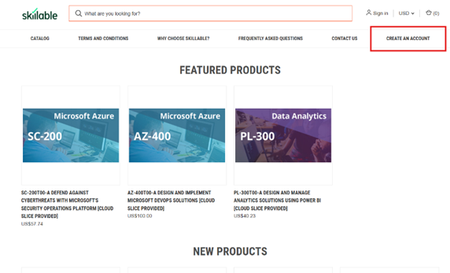
We’re excited to announce the launch of new AI-900 lab simulations, designed to help educators deliver more interactive, scalable, and learner-friendly AI experiences. Moving forward, all AI‑900 lab requests will be fulfilled using these new simulations. As part of Microsoft Learn for Educators (MSLE), eligible educators can access lab seats to provision Azure-based labs for students—supporting interactive learning and skills validation in a guided, low-risk environment. Important Institutions that are part of MSLE receive free lab seats. Individual educators with MSLE receive discounted lab seats. Learn more about eligibility and program options in the MSLE Program Overview. For details on purchasing traditional lab seats, see the section below or visit the MSLE Lab FAQ. __________________________________________________________________________________________________________________________________________________________________ Understanding Simulation-Based Labs Simulation-based labs and traditional labs both help learners apply theory in practice—but they do so in different ways. Understanding these differences helps educators set expectations, guide students effectively, and maximize learning outcomes. This post outlines: What simulation-based labs are How they differ from traditional labs What Is a Simulation-Based Lab? A simulation-based lab is a software-driven, interactive environment that mirrors real-world scenarios using digital models. Instead of working with physical equipment or live cloud resources, learners interact with virtual tools that respond dynamically to their decisions. Simulation-based labs typically include: Step-by-step guidance and prompts Real-time, automated feedback Built-in hints and checkpoints A safe, repeatable environment for experimentation Because simulations are standardized and risk-free, learners can focus on understanding concepts, practicing workflows, and building confidence—without worrying about misconfigurations or resource constraints. Key Differences: Traditional Labs vs. Simulation-Based Labs Aspect Traditional Lab Simulation-based Lab Accessibility Limited by location and time Accessible anytime online Feedback Instructor-dependent Immediate digital feedback Repetitions Limited by time or materials Unlimited repeat practice Consistency Varies by student level Standardized experience for all learners Simulation-based labs have a similar interface as traditional labs, as both are hosted in the same environment. For more information about simulation-based labs and tips on how to navigate them, please refer to the attached document. If you have additional questions, post them in Connect and Ask Questions and a member of the MSLE Team will be happy to assist. ____________________________________________________________________________________________________________ Purchasing Traditional Lab Seats (For Individual MSLE Educators) If you’re an individual educator and would like to purchase discounted traditional lab seats, follow the steps below: Visit the Skillable Marketplace and select Create an Account. 2. Choose Click to access the Account Request Form. 3. Complete the form and select Microsoft Learn for Educators (MSLE) as your affiliation. 4. Submit your request for approval. Once approved, you’ll be able to purchase discounted lab seats for your students.