aip
16 TopicsSharing: PDF readers that support Purview labels
As I was researching on Adobe Acrobat reader and Sensitivity labels, I decided to check if the common alternative PDF readers out there are able to support Purview MIP Sensitivity labels. There is already a published documentation on this for SharePoint-Compatible PDF readers that supports Microsoft IRM: https://learn.microsoft.com/en-us/purview/sp-compatible-pdf-readers-for-irm (last updated Nov-2023) but I wanted to see if these same PDF readers supports the ability for end-users to use/ select labels similar to that of Adobe Acrobat As of 11-June-2025; atleast one of them clearly do: Nitro PDF: Yes. Documentation shows that users can see and use the sensitivity labels. PDF -X.change Editor: Yes. Documentation show that users can see and use the sensitivity labels. (check the official website, I can't hyperlink it because the site is blocked. FOX PDF editor: No. Documentation only states RMS and not clear if it show Purview labels. This is for F.O.X.I.T editor (spelled without the ".") but for some reason there is a community ban on that word and it won't allow me to post the full name PDFescape: No. Sumatra PDF: No Okular: No If there are other PDF readers that I've missed, I encourage you list it down in the comment below. Would love to grow this list.2KViews5likes4Comments
AADSTS50020: protected PDF issue for external users
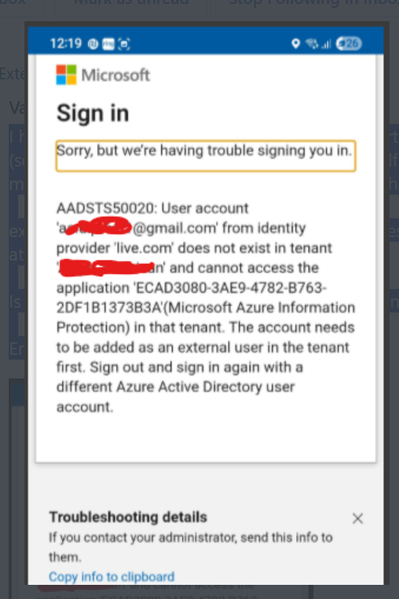
I have been recently (don't know when it was started) observed getting error from protected PDF (sensitivity label with user defined permission) file while trying to open that pdf via AIP viewer mobile app (Android/iOS) AS external user (who has permission to open/view). No issue with Office file types protected. external (not internal, not guest) user (currently testing with gmail.com account, other O365 tenant user) getting error as attached from AIP view mobile app. We do have AIP excluded at conditional access policy which helped so far to avoid this problem for external users. Is there been any recent change in behavior around user defined protected PDF? Since user having problem is external, have no clue where to look for log and start investigation. Error code: AADSTS50020866Views1like3CommentsInbound Screening & PCI-DSS
PCI-DSS frowns on having credit card numbers and related information in systems not otherwise in scope. Yet we sometimes have law enforcement asking for us for researching by these very terms; they send these sometimes via E-mail. I wonder therefore whether Exchange can screen using DLP policies, with the intent of adding controls, such as masking or adding "no forwarding, no printing," and so on. Possible? Advisable?568Views0likes2Comments
Journaling and AIP- emails in cryoserver landed not encrypted
We used AIP in our org and want to encrypt emails. We used build in - encrypt-only and some custom labels in Outlook. Emails are fully encrypted based on the labels but copies of this emails kept (forwarded by dedicated connector) in cryoserver (journaling) are not encrypted. Is any AIP option to fix it?900Views0likes1Comment
Trouble in Opening MIP Files (Azure information Protected Files)
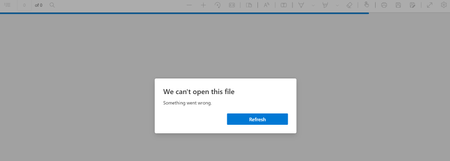
The latest Microsoft Edge stable version 109 for Windows and Mac has issues opening MIP files. We receive a message stating "Something went Wrong" When we downgraded Edge to the Version 108 we are able to open the MIP files in Windows and Mac Is anyone else having the same issue?Solved2.7KViews0likes5Comments
AIP Log Analytics
Hi, I'm trying to create a query for Azure Information Protection that will generate a report for the number of classification labels applied during the day that includes the application name and label type. Example: Classification Label Label Type Application Type Amount Public New Label Outlook 10 Internal Upgrade Label Word 15 Currently what I have: InformationProtectionLogs_CL | where Activity_s == "NewLabel" | where ApplicationName_s == "Word" or ApplicationName_s == "Outlook" | where LabelName_s == "Highly Confidential QA" or LabelName_s == "Confidential QA" or LabelName_s == "Internal QA" or LabelName_s == "Public QA" | project Label_Name = columnifexists("LabelName_s",""), Application_Name = columnifexists("ApplicationName_s",""), Label_Type = columnifexists("Activity_s", "NewLabel") | summarize New_Labels = count(Label_Type) by Label_Name | sort by New_Labels desc Any help is greatly appreciated.Solved2.2KViews0likes2CommentsBlock labelled file upload in Teams (AIP)
Hello community, I am using Azure Information Protection to label files and documents. I would like to forbid my users to share (inside and outside my organization) files in Teams with label "Super Secret". I know that I can block channel messages containing credit card number and other things using DLP. And I would like to do the same with files based on AIP labels. The final goal is to prevent files containing super secret data being upload to the cloud. Regards,Solved3.4KViews2likes3Comments
Azure Information Protection unified label
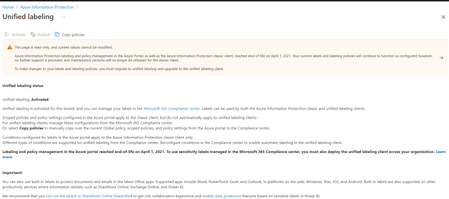
Hi Azure Information Protection (AIP) reached end-of-life April 1, 2021. I need to modify the existing labels and labeling policies in the MS 365 Compliance center since it's not available in Azure anymore. I have already activated Unified labeling, but when I do update on the labels and policies in o365 and publish it nothing changed in the labels for the clients. here is the page that I can see in Azure AIP page: any idea? Thanks in advance.895Views0likes0Comments
Azure Information Protection (AIP) for encrypting end to end in MS Teams?
Hi all, Because the the decision of the European court, I am thinking (school tenants) about how to protect the Data in a way that even organizations in the USA can not read it. I am thinking about using AIP: https://docs.microsoft.com/de-de/azure/information-protection/what-is-information-protection 1) Can I use AIP for encrypting? I have heard this would be possible. 2) Encrypts AIP data of MS Teams, too? 3) If it encrypted by AIP, is it then protected against government reading from other countries? Maybe in this way it would be allowed to use MS Teams in our schools.Solved5.5KViews0likes3Commentsdrop down Sensitivity label in Teams
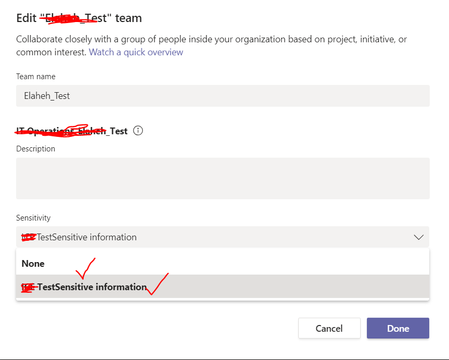
Hi, I have implemented AIP and enabled sensitivity labels in Teams as well. Any idea why in some teams I can see sensitivity labels on the drop down list when I edit teams, but I don't see in some others? I just see 'None' on the list of 'Sensitivity label' to select on the other created teams.Solved2KViews0likes5Comments