aip
17 Topics
Azure Information Protection (AIP) for encrypting end to end in MS Teams?
Hi all, Because the the decision of the European court, I am thinking (school tenants) about how to protect the Data in a way that even organizations in the USA can not read it. I am thinking about using AIP: https://docs.microsoft.com/de-de/azure/information-protection/what-is-information-protection 1) Can I use AIP for encrypting? I have heard this would be possible. 2) Encrypts AIP data of MS Teams, too? 3) If it encrypted by AIP, is it then protected against government reading from other countries? Maybe in this way it would be allowed to use MS Teams in our schools.Solved5.4KViews0likes3CommentsAzure Information Protection - How to identify and reassign ownership to files when staff leave?
Hi there - just implementing Azure information protection for the first time and I'm trying to find out the best way to deal with the scenario where a users leaves a company and the business/IT administrator wants to be able to find all the files that user had protected using AIP labels and that the ex employee was the sole owner of and then wishes to reassign the ownership of those files (either automatically or manually) to another user in the company. I know the super user can be created who can take ownership of an AIP protected file however the problem is (i) how do you identify all the files a particular person was the sole owner of across both an on premise file server (where scanner has been deployed) and SharePoint? (ii) how do then use the output from (i) and reassign ownership to all the relevant files. Thanks Gerry4.2KViews0likes1Comment
Azure AIP - No data displayed in the Data Discovery (preview) tab
Hey Everyone. I am experiencing a weird issue on the portal. I had an Azure AIP Scanner deployed and running in Azure and on-prem. I was able to view found files in the portal however currently I can see that X amount of files have been discovered but when I go to the share to see what are the files exactly I am getting nothing shown on the screen: "No data to display"? Is anyone experiencing similar problem currently? I have attached two screenshots. Regards, Wojciech3.5KViews0likes5Comments
Block labelled file upload in Teams (AIP)
Hello community, I am using Azure Information Protection to label files and documents. I would like to forbid my users to share (inside and outside my organization) files in Teams with label "Super Secret". I know that I can block channel messages containing credit card number and other things using DLP. And I would like to do the same with files based on AIP labels. The final goal is to prevent files containing super secret data being upload to the cloud. Regards,Solved3.3KViews2likes3CommentsAIP Policies - What determines the order fo the policies? Example?
You can move AIP policies up and down. So it seems the order matters. What is an example where I would need to pay attention to the order and what does it determine? For example my users would get 3 policies: - the standard (global) policies für all company users (e.g. public, internal, confidential, restricted (protected)) - a department policy (Sales Restricted (protected)) - a policy allowing some users customized protection Would this also be the recommended order? Thanks, FranckTrouble in Opening MIP Files (Azure information Protected Files)
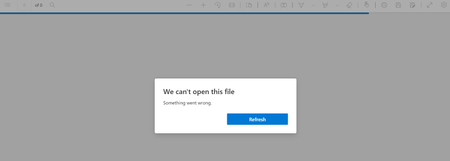
The latest Microsoft Edge stable version 109 for Windows and Mac has issues opening MIP files. We receive a message stating "Something went Wrong" When we downgraded Edge to the Version 108 we are able to open the MIP files in Windows and Mac Is anyone else having the same issue?Solved2.6KViews0likes5Comments
AIP Log Analytics
Hi, I'm trying to create a query for Azure Information Protection that will generate a report for the number of classification labels applied during the day that includes the application name and label type. Example: Classification Label Label Type Application Type Amount Public New Label Outlook 10 Internal Upgrade Label Word 15 Currently what I have: InformationProtectionLogs_CL | where Activity_s == "NewLabel" | where ApplicationName_s == "Word" or ApplicationName_s == "Outlook" | where LabelName_s == "Highly Confidential QA" or LabelName_s == "Confidential QA" or LabelName_s == "Internal QA" or LabelName_s == "Public QA" | project Label_Name = columnifexists("LabelName_s",""), Application_Name = columnifexists("ApplicationName_s",""), Label_Type = columnifexists("Activity_s", "NewLabel") | summarize New_Labels = count(Label_Type) by Label_Name | sort by New_Labels desc Any help is greatly appreciated.Solved2.1KViews0likes2Comments
drop down Sensitivity label in Teams
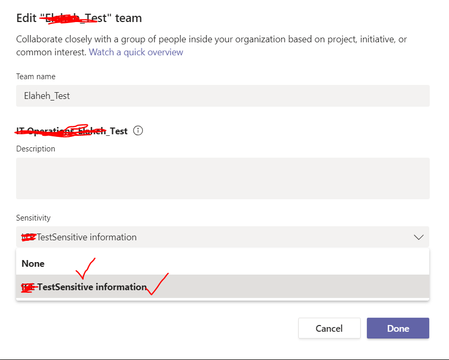
Hi, I have implemented AIP and enabled sensitivity labels in Teams as well. Any idea why in some teams I can see sensitivity labels on the drop down list when I edit teams, but I don't see in some others? I just see 'None' on the list of 'Sensitivity label' to select on the other created teams.Solved1.9KViews0likes5CommentsExport MDCA policy matches information via web console or API
Hi Everyone, This is my maiden post and thought this community to be able to give me guidance and help on my situation. I have created a policy to detect file violations using defender for cloud apps (previously MCAS), and the total count has reached approx. 1.2 million for specific Azure Info Protection (AIP) labels that matches the files stored on OneDrive and SharePoint Online. I'd like to export the records in an efficient manner, and I've explored: 1) via website, which limits to 5,000 records onto csv file 2) via Graph API which limits to 100 records every 2-seconds based on API calls limit imposed system wide Both are not working out, as (1) I can't live with 5,000 records, and the work around would be to implement an RPA via say PowerAutomate desktop or UI Path to do some form of web-scraping to download records and changing the advanced filters to a modified date range... even then, I am not quite sure how to do this yet, and if someone out there knows it, do let me know so that I can attempt to figure out via self-learning. Option (2) which is the method I've attempted, is futile as the process is inconsistent and I am continuously facing errors every time I execute scripts to download the records and export them onto the csv file. I'd like to know if anyone in the community has a better way/approach for me to deal with this situation. I tried to segregate my policy by the year of detection (2020, 2021 and 2022), and I am seeing 500k records for 2022, and 300k records for 2021, likely another 400k records for 2020 and before. I am quite stuck at the moment and would appreciate if anyone have any ideas on how to deal with exporting the information captured in the policy which I've created to detect file violations on the tenant. Caroline_Lee GershonLevitz-MSFT for visibility and recommendations.. 🙂