ai
1420 Topics
Accelerate healthcare innovation with Dragon Copilot apps and agents in Microsoft Marketplace
Imaging spending less time navigating systems and more time caring for patients. AI brings data, insights, and content directly into the flow of work. Dragon Copilot streamlines clinical documentation and routine tasks, so clinicians spend less time navigating systems and more time focused on patient care. By simplifying physician and nursing charting, notes, flowsheets, and radiology reporting, it reduces rework and cognitive burden, helping care teams work more efficiently and confidently throughout the day. Microsoft Marketplace now supports Dragon Copilot AI Apps and Agents, creating a scalable path for partners to bring innovation directly into clinical workflows. Dragon Copilot unifies intelligence and context at the point of care, while Microsoft Marketplace is how partner innovation becomes part of that experience, enabling AI apps and agents and to operate within the trusted procurement, security, and governance frameworks customers already rely on. Partners building AI apps and agents for Dragon Copilot can use Microsoft Marketplace as their commercial engine. Marketplace supports multiple enterprise‑ready sales motions, whether selling direct, or through partners for channel-led sales. This gives partners flexibility in how they go to market and meet customers where they prefer to buy. With support for per‑user and flat‑rate pricing, flexible billing options, and contract terms ranging from monthly to multi‑year, Marketplace enables partners to align their commercial model to customer procurement needs while scaling globally through trusted Microsoft purchasing, security, and global commerce. Dragon Copilot offer types in Microsoft Marketplace Microsoft Marketplace will support a family of Dragon Copilot offer types designed for partner solutions across clinical roles and workflows. The first offer type - Dragon Copilot Physician Apps and Agents - is now available, enabling partners to publish solutions that surface directly within physician workflows. Each offer type defines the intended user, where the solution appears in Dragon Copilot, and how customers discover, purchase, and deploy it, making offer selection a strategic decision that shapes monetization and the end-to-end customer experience. Supported offer type Dragon Copilot Physician Apps and Agents AI solutions that will surface directly inside Dragon Copilot at the physician point of care. They deliver in‑workflow access to insights, task automation, clinical decision support, and documentation assistance without requiring clinicians to leave their existing tools. These solutions are purchased through Microsoft Marketplace and become automatically available within Dragon Copilot after deployment. (Available in the United States) Best for: AI apps or agents built specifically for physician workflows Partners delivering role‑based intelligence Scenarios where fast, in‑context action inside Dragon Copilot is critical How it works Bringing an app or agent to Dragon Copilot through Microsoft Marketplace is designed to be simple and enterprise‑ready. Marketplace provides the commercial, operational, and discovery foundation so partners can focus on building differentiated AI experiences. Healthcare organizations can also choose to build and deploy apps or agents in Dragon Copilot and expand usage through the Marketplace. Step 1: Create offer selecting the offer type Begin in Partner Center by choosing the Dragon Copilot offer type that best aligns to your solution and target clinical persona. This choice determines where your solution surfaces inside Dragon Copilot, which roles it supports, and how customers discover, purchase, and activate it. After choosing the offer type, define pricing, billing, contract terms, and sales options. Microsoft Marketplace offers flexible pricing, sales channels, anc contract lengths to meet healthcare organizations' needs. Step 2: Customer discovery After publishing, customers can discover and purchase Dragon Copilot AI apps and agents through Microsoft Marketplace and through in-product experiences like, Azure. Step 3: Customer purchase Customers purchase Dragon Copilot solutions through the Azure portal using the same streamlined experience they use for other offers on Microsoft Marketplace. Customers complete their subscription details, and billing begins once they configure their account. From there, they are redirected to the Dragon Admin Center to complete a few final configuration steps and begin using the solution. Step 4: Customer usage After purchase, customers are guided to the Dragon Admin Center, where they activate and manage their Dragon Copilot solutions. From the admin experience, customers can complete any required configuration, assign the app or agent to the appropriate users or roles, and control how it is made available within Dragon Copilot workflows. The Dragon Admin Center provides a centralized place for customers to enable partner solutions, manage access, and ensure deployments align with their security, governance, and operational policies so AI apps and agents are ready for use at the point of care with minimal setup. What this means for you As Dragon Copilot adoption accelerates, Microsoft Marketplace provides a clear, scalable foundation for partner participation. With a dedicated Dragon Copilot offer type, partners can publish AI apps, agents, through a defined commercial model, gain targeted visibility through Dragon Copilot–specific discovery, and take advantage of Microsoft go‑to‑market programs. Learn more Read through our documentation on how extensions for Dragon Copilot work and how to build your own - AI apps and agents | Microsoft Learn Check out the sample repo with sample code and more - microsoft/dragon-copilot-extension-samples74Views0likes0CommentsPartner Blog | Building the foundation for AI: Cloud, data, security, and AI skills for partners
Customers are moving beyond AI experimentation. They are looking for partners who can connect AI ambition to the cloud, data, security, governance, and business application capabilities required to put AI to work. That makes skilling across the Microsoft stack increasingly important. It can also make the question of where to start more difficult. This month, there is a simpler starting point. The Microsoft Partner Skilling Hub Agent can recommend training, answer skilling-related questions, and generate personalized technical skilling plans based on your role and goals. From there, you can build a focused path across Frontier Transformation, agents, Microsoft 365 Copilot, certifications, hands-on learning, and co-sell execution. The foundation for AI is broader than AI skills Frontier Transformation is the shift from targeted AI pilots to repeatable, governed AI capabilities embedded into the flow of work, business processes, and customer engagement. For partners, delivering that transformation requires more than expertise in a single AI product. It requires teams that understand how cloud infrastructure, data, security, agents, and business applications work together. That foundation matters across customer segments. For partners serving small and medium-sized businesses (SMBs), it can support you in guiding customers toward practical AI adoption while addressing security, governance, productivity, and business process needs together. This month, focus your skilling plan on five areas: validating your technical expertise, building agent platform capabilities, developing AI business application skills, earning industry-recognized certifications, and applying those skills through hands-on learning. Continue reading here18Views0likes0CommentsAsk Microsoft Anything: Why Cybersecurity Needs a New Security Stack for the AI Era with David Weston
David Weston leads Agentic Security at Microsoft, where he and his team build the AI models, autonomous agents, and evaluation systems redefining how defenders operate. At Microsoft since the Windows 7 era, he has worked across exploit mitigation design, malware analysis, APT research, and led security engineering for Windows, Xbox, Azure OS, and Microsoft's Offensive Security Research & Engineering group. His current work is leading teams training frontier security models, agentic security systems for defenders, and pushing AI-driven vulnerability discovery through Microsoft's Multi-Model Agentic Scanning Harness (MDASH). A longtime member of the research community and former CISA technical advisor, David is a regular presenter at BlueHat, Black Hat, and DEF CON. Key areas Dave and his team can discuss: The vision behind Project Perception How AI is changing the economics of cyber offense and defense Lessons learned from building MDASH and Microsoft's AI security initiatives Security-first AI development and deployment What's next for defenders as agentic systems become mainstream This will be a TEXT-BASED AMA, so ask your questions in the comment section down below and David and team will be answering via comment replies during the live hour!3KViews7likes16CommentsBringing all your Integration workloads to Logic Apps Standard
We recently announced the end of life of BizTalk Server and provided a path forward for our customers. As part of that commitment, we’re investing in tooling and guidance that reduces migration complexity and helps teams modernize confidently to Azure Logic Apps Standard. Because enterprise integration programs are rarely “lift and shift,” we’re pairing automation with best practices, reference architectures, and field-proven guidance to support you from assessment through cutover. In our December 2025 announcement, we outlined a long-term direction for enterprise integration: Azure Logic Apps is the successor to BizTalk Server. Customers can modernize at a pace that balances continuity with innovation—while moving to a cloud platform designed for scale, hybrid operations, DevOps, and AI-assisted automation. The strategy centers on three principles: a predictable BizTalk lifecycle runway, preservation of existing investments, and a practical, guided migration path to Logic Apps. What makes this strategy credible is not just the vision—but the concrete tooling and guidance that back it up. Announcing the Logic Apps Migration Agent: An Open-source project to provide an AI End-to-End Modernization Experience Today we’re announcing the Logic Apps Migration Agent—an open-source Microsoft project that delivers an AI-assisted, end-to-end modernization experience with a structured, stage-gated workflow. Built by the product group and shaped by direct field feedback, the agent operationalizes how migrations should be executed: discover what you have, plan what you’ll modernize, convert incrementally, and validate continuously. The result is a repeatable approach that helps customers (and partners) migrate from BizTalk and other integration platforms to Azure Logic Apps with greater speed and confidence—without compromising governance or correctness. The agent reinforces the modernization strategy through: Discovery → Planning → Conversion: Aligns to Microsoft modernization guidance so teams understand scope, dependencies, and gaps before committing to conversion. Human-in-the-loop checkpoints: Uses AI to accelerate analysis and baseline conversions while enforcing review and approval steps for mission-critical correctness and governance. VS Code + GitHub Copilot integration: Brings migrations into a code-first workflow—enabling developer-centric refactoring, DevOps practices, and consistent implementation patterns for Logic Apps. Incremental, flow-group migration: Modernize one logical unit at a time to reduce risk, support phased cutovers, and avoid big-bang rewrites. Bring-your-own black-box testing: Import existing files, test cases, and specifications to validate behavior and reduce custom test harness work. In short, the Migration Agent turns high-level modernization guidance into a repeatable, auditable process teams can trust. This alignment is critical for customers running mission‑critical integrations. It replaces uncertainty with a clear path: modernize incrementally, reuse what works, validate every step, and emerge on Azure Logic Apps with a platform ready for the next decade of integration and AI-driven automation. What you should focus on? Target architecture decisions: the agent will propose integration patterns, but will not choose partitioning strategy, reliability approach, or network topology—you will decide what “great” looks like. Semantic equivalence: The Agent will generate baseline artifacts, but domain-specific mapping, transformation nuances, error handling semantics, and edge cases still require human validation. Connector and parity gaps must be addressed: if a source platform capability has no 1:1 equivalent, the migration may require redesign (custom code, Local Functions, API Management, Service Bus patterns, or alternative connectors). Performance, security, and operations hardening remain essential: identity, secrets, policies, monitoring, cost controls, and SRE practices are not “one-click.” Cutover planning is outside the scope of automation: data/backlog reconciliation, dual-run strategies, and rollback plans remain project workstreams. More mission critical features for Logic Apps Standard and Hybrid We are weeks away from shipping the following features, aimed at any customers in the Enterprise Application Integration space: HL7 In-App operations in general availability. MLLP Receive/Send In-App connector in Public Preview. Rules Engine In-App operation for XML facts in Public Preview. MSMQ In-App connector in Public Preview. Oracle DB In-App connector in Public Preview. Flat File generation In-App operations in Public Preview. Support for local container registry (Hybrid deployment model). Integration accounts support (Hybrid On premises). NMS In-App connector in Public Preview. Improvements to our EDI capabilities. BizTalk Mapper to Data Mapper Migration path What about other integration platforms? Yes—the Logic Apps Migration Agent is designed to be customizable so you can migrate from any integration platform to Logic Apps (not just BizTalk). The open architecture lets you plug in new discovery, analysis, and conversion skills for the source product you’re modernizing, while keeping the same stage-gated workflow and human-in-the-loop checkpoints. We provide guidance and examples to help you extend the agent for other platforms than BizTalk —so you can tailor mappings, transformation rules, and validation to your customer’s standards and target patterns in Logic Apps. Benefits Faster time to value with a guided process: A structured discovery→planning→conversion workflow reduces uncertainty and helps teams move from assessment to execution with clear checkpoints. Higher confidence migrations: Human-in-the-loop validation, artifacts generation, and black-box testing support mission‑critical correctness and governance. Customizable for your source platform and standards: Extend the agent with product-specific discovery and conversion steps, tailor mappings and transformation rules, and align outputs with your target Logic Apps patterns and engineering conventions. Open-source transparency and control: Review how the tool works end-to-end, validate what it produces, and adopt changes at your pace without waiting for a closed release cycle. Community-driven innovation: Benefit from contributions across Microsoft, partners, and customers—new adapters, mapping packs, and best practices can be shared and reused. Lower total migration cost: Automating repeatable tasks reduces manual effort while preserving the ability to invest partner expertise where it matters most (architecture, governance, reliability, and operations). Reusable accelerators for partners: Partners can create differentiated offerings by packaging templates, validation suites, CI/CD pipelines, and domain-specific patterns on top of the agent. For companies providing professional services: this agent is meant to augment your delivery—not replace it. By automating repeatable groundwork (inventory, baseline conversion, and validation scaffolding), it frees your teams to focus on the higher‑value work customers rely on you for: defining target architecture, refining mappings and patterns, hardening security and governance, implementing CI/CD, performance tuning, and driving cutover and operating model changes. Because the project is open source and extensible, partners can also package reusable accelerators (templates, connectors, mapping packs, test harnesses) and build differentiated migration offerings on top of the same trusted process. Review our public documentation here: https://learn.microsoft.com/en-us/azure/logic-apps/migration/migration-agent-overview Recommendations: Consider the following recommendations when using the Agent: Structure your projects along with all dependencies in directories. Include bindings, MSIs. configuration files, source code, schemas, maps, pipelines, even documentation. Review each stage thoroughly. Suggest changes to tailor each stage to include all dependencies, and your architecture and requirements preference. While you can run the agent in any workstation with VSCode, if you want to test your Logic Apps solution, make sure your VSCode workstation has access to a test environment if you want the agent to test against any target system or dependencies. Make sure you increase the Maximum number of requests for the Copilot Chat as follows (we recommend changing the value from 60 to 1000) Check the following video for a demonstration on how the Agent works and let us know if you have any questions in the comments.1.8KViews1like0CommentsBuilding human-centric security skills for AI
AI is reshaping the workplace, and the organizations thriving in this new era know it takes more than just cutting-edge tech to succeed. A new kind of company is emerging—the so-called Frontier Firm. These organizations are building their business models around on-demand intelligence and hybrid human-AI collaboration. They understand that no matter how advanced technology is, it’s people—armed with the right skills, judgment, and foresight—who make the difference. Through targeted skilling and a culture of shared responsibility, Frontier Firms are ensuring their people are prepared to meet the security demands of an AI-driven world. This growing need for cross-functional security skilling is a central theme in our new e-book Skilling for Secure AI: How Frontier Firms Lead the Way, and we’ve pulled together three takeaways across all roles that preview how leading organizations are approaching this era. Let’s take a closer look at the key insights shaping secure AI skilling today: 1. Human expertise is critical when securing your organization in the age of AI AI may be transforming how to approach daily work, but it doesn’t replace the need for human oversight, judgment, or creativity. As AI tools become more powerful, so does the opportunity for human decisions to drive meaningful impact. That’s why Frontier Firms are strengthening their commitment to human expertise. These companies are equipping their people with the skills to use AI responsibly, securely, and collaboratively. For example, whether it’s reskilling IT teams to manage system permissions or upskilling data specialists to evaluate which datasets are appropriate for use, Frontier Firms are investing in targeted security skilling. By focusing on building expertise, these organizations empower their teams to move faster, innovate more confidently, and safeguard outcomes at every step. 2. Everyday use of AI makes security skilling fundamental across the organization With AI extending into more roles, understanding where human expertise intersects with security risk is becoming essential across the organization. For instance, business leaders can use AI to analyze performance data and line-of-business users can leverage AI to generate content. Each of these AI interactions underscores the need for widespread skilling that helps employees make informed, secure, and ethical choices when working with AI. That’s why security skilling can’t be siloed. Frontier Firms are addressing this shift by making security skilling a shared, organization-wide priority. They’re focused on making secure habits a familiar and consistent part of everyday work. By doing so, they’re building a workforce that understands how to use AI tools effectively and securely, reinforcing security as a core part of productivity. 3. Continuous learning is how to stay agile in a changing world Building security skilling across the organization is an important step, but lasting impact comes from making that learning continuous and adaptive. That’s why Microsoft offers resources like Microsoft Learn for Organizations, designed to help teams build and sustain skills across roles. As the landscape evolves, organizations need to weave security skilling into their culture, so every employee feels empowered to grow their capabilities alongside the technologies they use. Frontier Firms understand this nuance and are developing ongoing strategies to build future-ready security resilience across their workforce. From hosting annual hackathons to creating quarterly forums where teams can exchange ideas, Frontier Firms empower employees to adapt, respond, and lead through change. Showcasing expertise in action: Microsoft Credentials for Security As organizations work to stay ahead in AI, proving relevant skills has become increasingly important. Employers want candidates who can show they know how to use secure AI, while job seekers aim to stand out in a highly competitive market. Microsoft, with over thirty years of experience in credentialing, offers a broad range of Certifications tailored to security roles such as Security Operations Analyst and Cybersecurity Architect, as well as Applied Skills credentials for practical scenarios involving tools like Microsoft Sentinel or Microsoft Defender. Explore Microsoft Credentials for Security. Empowering people is the strategy for securing AI By building skilling strategies that reach across functions, Frontier Firms are prioritizing trust, accountability, and long-term resilience. Their success reinforces that equipping people with the right skills to securely use AI can give organizations a lasting competitive edge. Looking to identify and contextualize AI and security learning opportunities across your organization? Explore our new e-book, Skilling for Secure AI: How Frontier Firms Lead the Way—and be sure to check out the readiness tool at the end to help assess how prepared your teams are for today’s security needs.1.5KViews0likes1CommentAI agent ownership change
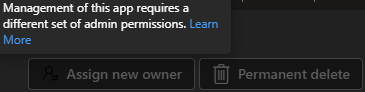
I was just in the M365 Admin Center because I needed to transfer ownership of an agent for a colleague – but it now suddenly looks like Microsoft has changed something in their permission structure. As a result, I can no longer transfer ownership of agents, and the system tells me that I don't have permission to manage that particular app. So, the question is: do I now also need the Application Administrator role in order to continue managing this? I get this message:128Views1like2CommentsCopilot, Microsoft 365 & Power Platform Community call
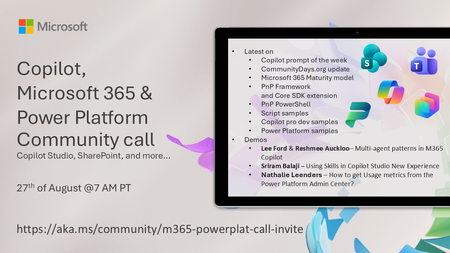
💡 Copilot, Microsoft 365 & Power Platform weekly community call focuses on different use cases and features within the Microsoft 365 and Power Platform - across Microsoft 365 Copilot, Copilot Studio, SharePoint, Power Apps and more. Demos in this call are presented by the community members 🙏 👏 Looking to catch up on the latest news and updates, including cool community demos, this call is for you! 📅 On 27th of August we'll have following agenda: Copilot prompt of the week CommunityDays.org update Microsoft 365 Maturity model PnP Framework and Core SDK extension PnP PowerShell Script samples Copilot pro dev samples Power Platform samples Lee Ford & Reshmee Auckloo– Multi-agent patterns in M365 Copilot Sriram Balaji – Using Skills in Copilot Studio New Experience Nathalie Leenders – How to get Usage metrics from the Power Platform Admin Center? 📅 Download recurrent invite from https://aka.ms/community/m365-powerplat-dev-call-invite 📞 & 📺 Join the Microsoft Teams meeting live at https://aka.ms/community/m365-powerplat-dev-call-join 💡 Building something cool for Copilot, Microsoft 365 or Power Platform (Copilot Studio, SharePoint, Power Apps, etc)? We are always looking for presenters - Volunteer for a community call demo at https://aka.ms/community/request/demo 👋 See you in the call! 📖 Resources: Previous community call recordings and demos from the Microsoft Community Learning YouTube channel at https://aka.ms/community/youtube Microsoft 365 & Power Platform samples from Microsoft and community - https://aka.ms/community/samples Microsoft 365 & Power Platform community details - https://aka.ms/community/home 🧡 Sharing is caring!53Views0likes0CommentsCopilot, Microsoft 365 & Power Platform product updates call
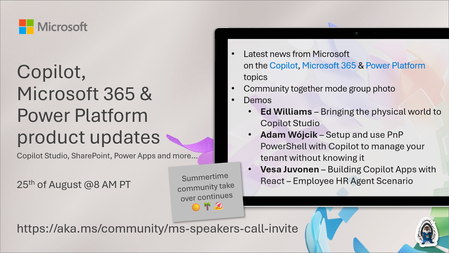
💡Copilot, Microsoft 365 & Power Platform product updates call concentrates on the different use cases and features within the Microsoft 365 and in Power Platform. Call includes topics like Microsoft 365 Copilot, Copilot Studio, Microsoft Teams, Power Platform, Microsoft Graph, Microsoft Viva, Microsoft Search, Microsoft Lists, SharePoint, Power Automate, Power Apps and more. 👏 Weekly Tuesday call is for all community members to see Microsoft PMs, engineering and Cloud Advocates showcasing the art of possible with Microsoft 365 and Power Platform. 📅 On the 18th of August we'll have following agenda: News and updates from Microsoft Together mode group photo Ed Williams – Bringing the physical world to Copilot Studio Adam Wójcik – Setup and use PnP PowerShell with Copilot to manage your tenant without knowing it Vesa Juvonen – Building Copilot Apps with React – Employee HR Agent Scenario 📞 & 📺 Join the Microsoft Teams meeting live at https://aka.ms/community/ms-speakers-call-join 🗓️ Download recurrent invite for this weekly call from https://aka.ms/community/ms-speakers-call-invite 👋 See you in the call! 💡 Building something cool for Microsoft 365 or Power Platform (Copilot, SharePoint, Power Apps, etc)? We are always looking for presenters - Volunteer for a community call demo at https://aka.ms/community/request/demo 📖 Resources: Previous community call recordings and demos from the Microsoft Community Learning YouTube channel at https://aka.ms/community/youtube Microsoft 365 & Power Platform samples from Microsoft and community - https://aka.ms/community/samples Microsoft 365 & Power Platform community details - https://aka.ms/community/home 🧡 Sharing is caring!137Views0likes0CommentsModel router updates: new regions, a refreshed model pool, and understanding the hill climb
Across Microsoft, "hill climbing" has become shorthand for how real AI progress happens: not in one dramatic leap, but through a disciplined loop. Microsoft AI defines the hill climb as an organization that continuously improves, cycle after cycle, through more compute, better data, and sharper evaluation. Reinforcement fine-tuning in Foundry defines it as improving the deployable model package one measured step at a time across quality, latency, and cost. Different altitudes, same premise: progress is not a one-shot decision. It's a loop. For most teams, the decision of what model to use when is made manually or with custom routing tools. A developer picks a model based on benchmarks, familiarity, or the last launch that made headlines, ships it, and revisits the choice only when something breaks. In an ecosystem where the frontier moves monthly, that decision goes stale fast. Model router in Foundry Models brings the hill climb to the selection layer. What's new: a bigger pool, in more places This release expands where teams can deploy model router, broaden the supported model pool, and delivers updates through a stable endpoint. Together, these changes help teams run production workloads in more locations, match a wider range of tasks to suitable models, and adopt supported updates without changing the application integration. A refreshed model pool. The supported model list now includes Anthropic Claude Opus 4.8 — a high-capability model built for complex reasoning and long-form generation, for scenarios that demand depth, structure, and quality — and the GPT-5.6 family. Just as importantly, the pool is pruned: gpt-5-chat, gpt-5.2-chat, gpt-5.3-chat, Deepseek-V3.1 have been removed from the model router as models reach the end of their lifecycle and are deprecated in Foundry. New region availability. The model router is now available in 28 regions for global standard and 21 data zone regions. For many organizations, inference requests must stay within specific geographic boundaries for regulatory, governance, or customer-trust reasons — and intelligent routing shouldn't force a compromise on that. Find the full list of regions here. The most important detail is what you don't have to do: these updates occur automatically*. The endpoint remains stable as the supported model pool is refreshed, so teams do not need to redeploy the model router to receive the update. Applications can continue using the same integration while the model router evaluates requests against the current supported pool. Teams should continue monitoring routing traces and application outcomes to confirm that quality, cost, latency, and governance requirements are met. *Models from Anthropic still need to be deployed separately before they can be routed to through the model router. Interested in hearing more about what's new to the model router? Tune in for the next episode of Model Mondays with Sanjeev Jagtap and Lee Stott, where they talk all things model router from evaluations to hill climbing. Sign up here to watch live or view the replay: Model Mondays - Spotlight On Model router in Microsoft Foundry | Microsoft Reactor The selection-layer hill climb At the selection layer, a step is a routing decision. Each one is a micro-optimization against your objective, and each one is instrumented: every response from the model router includes a model field showing which underlying model was selected, so the climb leaves a complete, auditable trail. Model router supports three parts of the optimization loop: A/B testing to compare two router configurations to understand quality, cost, and latency tradeoffs; model decomposition to use routing results to decompose a single-model application into a multi-model or multi-agent design, and continuous routing to keep the router in production for continuous per-request selection. Each pattern turns model choice into a measured, repeatable process rather than a fixed decision. 1. A/B Testing Question: Which model or routing strategy should I use in production? A/B testing helps teams compare candidate models, model families, or router configurations against the same workload. Representative traffic is sent to competing deployments, and teams compare quality, cost, latency, and governance outcomes. The goal is to understand tradeoffs and identify the model or routing strategy that best meets workload requirements before promoting it to production. 2. Model Decomposition Question: What work is my application actually doing? Model decomposition uses model router as a diagnostic tool. By deploying the model router against a representative workload and examining routing telemetry, teams can see how requests naturally separate into different task classes. Simple retrieval, classification, and summarization requests may route to smaller models, while reasoning, planning, and agentic workflows may require more capable models. The goal is not to choose a winner, but to understand the structure of the workload and uncover opportunities for optimization, specialization, or architectural improvements. 3. Route continuously Question: Why choose a single model at all? Route continuously is the pattern model router was designed for but is not limited to. Rather than treating model selection as a one-time decision, teams leave the model router in production and allow the best-fit model to be selected for each request. As the supported model pool, regional availability, and platform capabilities evolve, teams can continue using the same endpoint while evaluating whether updates improve workload outcomes. Model selection becomes an ongoing optimization process rather than a project that must be repeated every time the model landscape changes. Together, these patterns illustrate a broader shift: the model router is more than a model. It is a tool for the optimization loop itself, helping teams evaluate tradeoffs, understand workload behavior, test hypotheses, and continuously refine model selection as requirements evolve. Whether used to compare candidate models, decompose applications into specialized tasks, or automate per-request routing in production, model router turns model selection into an observable, measurable, and repeatable process. As the model landscape continues to change, that optimization loop becomes a durable advantage. Getting Started Ready to start your own hill climb? Whether you're exploring the model router for the first time, evaluating routing strategies against your workload, or building a long-term optimization practice, these resources can help you move from experimentation to production with Microsoft Foundry. What's new in model router? Sign up for the next Model Mondays episode for a deep dive into new features, optimization patterns, and the latest model router updates. How do I build agents with model router? Check out the Model Router Agents Lab and build agent experiences with routing, retrieval, web search, tool calling, and multi-agent patterns. How do I evaluate model router? Compare model router against baseline models using your own prompts, then review quality, cost, latency, and routing decisions with the Auto Evaluation Toolkit. How do I optimize model router for my workload? Start your hill-climbing journey with the Model Mastery workshop, where you'll test one optimization lever at a time and measure how each change impacts workload outcomes. How do I build a model router optimization playbook? Explore the Model Releases repository to track new capabilities, understand the optimization question behind each release, and try focused notebooks that demonstrate one optimization lever at a time.2KViews2likes0Comments
How valuable would a Nonprofit Check Plus API be for validating nonprofit status?
Would a Nonprofit Check Plus API make it easier for an organization to verify a nonprofit before making a donation or starting a partnership? I would like to know why people specifically prefer to use it and the advantages if any. Are there alternatives to the same means?