admin
37 TopicsMicrosoft 365 Copilot and AI Agent readiness and resiliency with SharePoint Content Governance
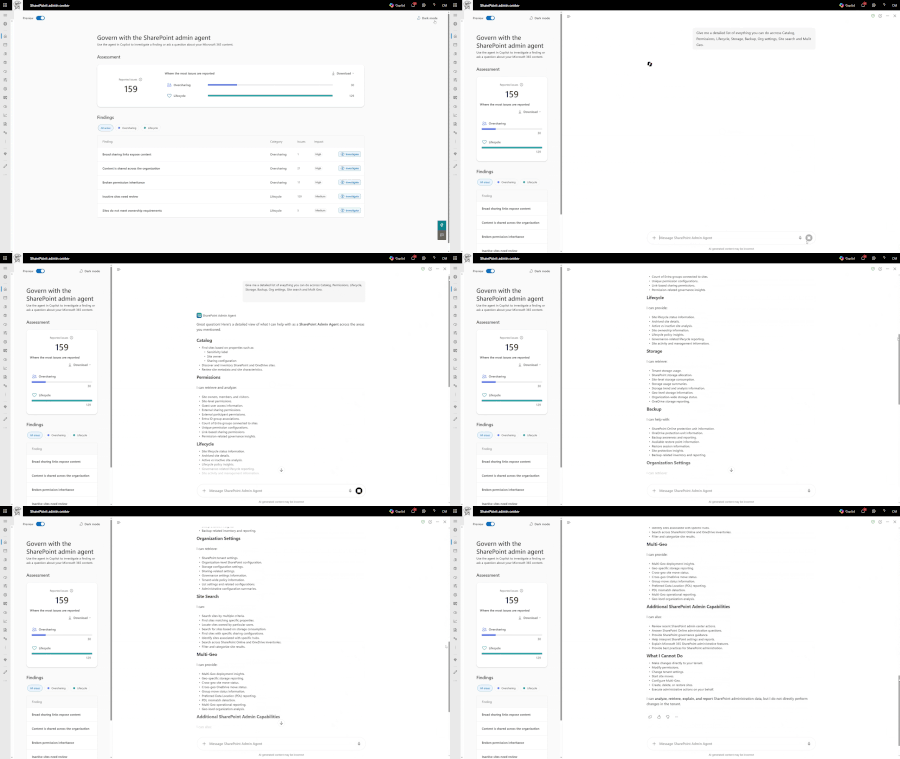
In the AI era, governance isn't a barrier to innovation. It's what makes innovation possible at scale. Winning with Copilot and AI agents takes more than speed and scale. It requires readiness to embrace AI and resilience to recover when things go wrong. That's the power of AI-first governance: accelerating innovation, strengthening trust, and maximizing AI return on investment. Today at Microsoft Ignite ’26, we're announcing exciting new content governance innovations to help organizations accelerate their Frontier Transformation with AI Agents, Autopilots, Agent 365, and Work IQ. Governance innovations for resilient AI at scale As you unveil AI Agents in your organization, either just getting started or deploying at scale, content governance becomes even more important to get right. SharePoint is the #1 content citation source in Microsoft 365 Copilot and AI Agents. Let us look into SharePoint content governance innovations across two main themes - readiness and resiliency, along with foundational security and enterprise lifecycle scenarios. Readiness for AI at scale addresses oversharing, content lifecycle and sprawl, the risks boards now see as the biggest obstacles to AI transformation. New agentic skills power new security and storage management capabilities to address them. Resilient AI is all about business continuity, especially in the era where agents are integral part of the workforce. Organizations must be prepared for unforeseen situations such as an agent going rogue and accidentally deleting content. With this backdrop, let us dive into innovations across the following pillars: Readiness for Copilot and AI Agents at Scale SharePoint Admin Agent - Enhancements Govern agents' traffic to M365 resources Enhancements in SharePoint oversharing controls Resilient AI: Business continuity even when agents go off script Rewind when agents go off script Microsoft 365 Backup: Teams support Entra Backup Security and Compliance capabilities in SharePoint, OneDrive, and Teams Microsoft 365 Storage Management and Enterprise Lifecycle Readiness for Copilot and AI Agents at Scale Readiness is about ensuring your content is permissioned rightfully, organized in manageable clusters, has lifecycle guardrails, and in parallel knowing agent traffic across your Microsoft 365 estate before AI Agents use it. We are bringing many innovations to Copilot native governance capabilities powered by SAM (SharePoint Advanced Management) and to agent governance in the lens of Microsoft 365 resources. Let’s dive in. 1. SharePoint Admin Agent – Generally Available At Microsoft 365 Confernece’26, we introduced the SharePoint Admin Agent, Microsoft’s first-party AI assistant for managing your rapidly growing digital estate across Microsoft 365. As the content backbone of Microsoft 365, SharePoint powers Teams, OneDrive, Loop, Copilot, and more. It sits at the center of content governance, spanning permissions, lifecycle, resilience, and relevance across users, apps, and now, AI agents. The SharePoint Admin Agent brings these capabilities together in one simple conversational experience, with powerful skills across Permissions and Oversharing Management, Storage, Lifecycle, Multi-Geo, and Catalog. Today we are thrilled to announce many enhancements in the admin agent. SharePoint Admin Agent’s Starter Prompts: You can try various starter prompts categorized under various skills: Catalog, Permissions, Lifecycle, Storage, Organizational Settings and Multi-Geo. Permissions and Oversharing Management skill – Generally Available Admins can detect oversharing, see who has access to what and protect sensitive content, all in plain language. Ask "Find overshared sites in my tenant" and the agent builds a prioritized list to review and act on, whether you have hundreds of sites or millions. Lifecycle skill – Generally Available Ensuring content is current is critical to ensuring that Copilot serves the right content and with optimal utilization of storage. Helps admins stay in control of content from creation to end of life by identifying inactive, outdated, and ownerless sites and enabling actions like reviews and archival. For example, you could simply ask the agent: “List my inactive and ownerless sites”. Storage skill – Generally Available Gives admins a clear view of tenant storage trends and active-versus-archive growth, helping them identify content sprawl, optimize capacity, and reduce unnecessary costs with confidence. Here are some of the prompts that you can use in this v2 release, more enhancements are upcoming. "Compare active and archive SharePoint storage growth" "Help me set up a file archive policy" "How much version storage is used across the tenant?" Multi-Geo skill – Generally Available Microsoft 365 Multi-Geo enables customers to comply with their organization's data residency requirements by ensuring that users' data is hosted within a specific geo where the user is located. The new Multi-Geo skill in SharePoint Admin agent assists the admin in moving the OneDrives to the user’s Preferred Data Location (PDL) along with following key capabilities: Identify content to be moved Initiate moves: Move OneDrive to users' Preferred Data Locations. Monitor moves: Track the status and progress of ongoing moves across OneDrive, SharePoint sites, and Microsoft 365 Groups. Catalog skill – General Availability The Catalog skill connects the SharePoint Admin Agent to Catalog Management, so the agent understands your tenant the way your business is organized. Using built-in categories like Department and Locale, along with any custom categories you've added, the agent can: Show how content is organized in your tenant: View site counts, site lists and groups of content in Catalog. Organize content using the skill: Leverage Catalog skill to create most relevant groups of SharePoint sites and OneDrive accounts with recommendations such as group sites in a certain department that are Highly Confidential. Recommend next steps: such as inactive content cleanup, archiving, version-history limits or a permissions review, scoped to the right group of sites instead of the whole tenant. Governance Hub for Admins – Generally Available Dec. 2026 As organizations accelerate their AI transformation, content governance can quickly become overwhelming. Admins don’t need more reports. They need to know what needs attention, what to do next, and have a simple way to act. Today, we’re thrilled to introduce Governance Hub for Admins, powered by the SharePoint Admin Agent. It is readily available in Home tab of the SharePoint Admin Center and brings assessments, findings, recommendations, and actionable tasks together into a single experience - helping admins move from insight to action and govern content at scale 2. Agent governance in the lens of Microsoft 365 resources SharePoint, OneDrive, and Teams SharePoint and Teams administrators often ask – for my top secret and confidential resources, which agents are accessing them and who instantiated them, can I control at site or team level which agents are allowed? We have an answer for you. Agent 365 offers a breadth view of all agents in your enterprise. To complement that breadth view, we are introducing depth view of agents in the lens of Microsoft 365 resources, specifically SharePoint sites, Teams, and OneDrive under the umbrella of Agent Lineage. The new Agent governance node in the SharePoint admin center puts every agent governance action against Microsoft 365 resources in one place. Admins can go from insight to action without switching between reports and settings. Start with the Overview. The Overview page gives you the big picture: how many agents are accessing your Microsoft 365 content, which agents and resources are most active, which content Microsoft 365 Copilot uses most, and how that access breaks down by sensitivity label and department. Suggested actions, such as restricted access control (RAC), restricted content discovery (RCD) and site access reviews, are one click away. Drill down with the Agent Access Heatmap. It provides a panoramic view of your Microsoft 365 resources be it millions of SharePoint or OneDrive sites or Teams along with the agentic traffic. Agent Access Heatmap for SharePoint and OneDrive – General Availability Dec’26 Agent Access Heatmap extends Microsoft Agent 365 capabilities with content context. The heatmap offers rich visual insights on agent access with additional dimensions like sensitivity, departments, and agent platforms – giving you visibility in a single view. Admins now have effective tools for observing and governing agent actions like pausing agentic access to a site or scoping more granular access. Find the busiest areas, then apply the appropriate content guardrails as needed. Control whom an agentic user can collaborate with – Public Preview Dec. 2026 As agentic users proliferate in your organization, they can accumulate content permissions and further share it with other users in your organization while performing their work, like human users. To ensure agentic users securely collaborate with other users and in essence of work, you need a simple way to control which users the agentic users can collaborate with. We are thrilled to introduce a control that does just that. When a new agent template is onboarded in Agent 365 portal, you can turn on the setting for “Restrict collaboration by agentic users” which will ensure agentic users associated with this agent template can only share sites and content with their manager. While AI admins can set the collaboration boundary when onboarding an agent template in Agent 365, SharePoint admins can now manage it, along with the rest of their agent content guardrails, from the new Settings page under Agent Governance in the SharePoint admin center. What you observe in the Agent Access Heatmap, you can now act on in Settings. Restricted access for apps and agents at site level – General Availability Every Entra registered agent has a blueprint identity, much like third-party applications. The agent blueprints and applications with broad reaching permission across all sites or teams in your organization can increase the risk of data disclosure. We are thrilled to introduce restricted app access control - a new setting that empowers SharePoint Administrators to achieve fine-grained permissions by restricting which 3rd party applications or agent blueprints can access specific business critical sites or high-profile users' OneDrive data. Simply run the cmdlet below using SharePoint Online Management PowerShell: Set-SPOSiteRestrictedAppAccessControlList –Identity <SiteURL> -ListType DenyList -AddRestrictedAppIds <ApporAgentBlueprintIDs> 3. Enhancements in content oversharing controls from SharePoint Advanced Management (SAM) Permissions and oversharing report for Autopilots & Groups - Generally Available Site Permissions reports now extend to Microsoft 365 and Security Groups and Autopilots, enabling admins to instantly identify every site a user/group or autopilot can access and the scope of that access — closing a critical blind spot in oversharing governance. And clear remediation pathways are available through Restricted Access Control (RAC) and Restricted Content Discovery (RCD) policies. Learn more. SharePoint admin viewing permissions report for specific large security groups. Catalog management with custom SharePoint Properties – Generally Available At Microsoft 365 Conference’26 we introduced Catalog Management V1. It brings order to sprawling SharePoint estates by grouping sites the way your business actually works: by department, region, project or function. The result is a central catalog of sites you can understand, govern and get ready for Copilot and agents. Today, we're taking it further. You can now tailor Catalog Management to your tenant using information you already have. There are three new ways to customize your catalog: Custom SharePoint site properties: use the site metadata you already maintain. Microsoft Entra ID extension attributes: group sites using the attributes already set in your directory. CSV site lists: upload your own list of sites to create a custom group. You don't have to rebuild your structure from scratch. Your catalog reflects how your organization is already set up, and it updates as your metadata changes. Governance Hub for Site Owners – Public Preview Site owners have a critical role to play in ensuring accuracy of site information, including the site's necessity, its owners, members, permissions, and sharing settings. We’re introducing the Governance Reviews Dashboard, a centralized, actionable view where site owners can see all pending site governance reviews (inactivity, ownership, attestation, access reviews) across the sites they own. The dashboard shows required actions, due timelines, and site enforcement status and allows site owners to act directly from one place. Combined with consolidated policy notifications, it replaces multiple emails with a single, actionable governance surface. Resilient AI: Business continuity even when agents go off script Resiliency is all about business continuity so that in unexpected situations like ransomware incidents or agents gone rogue, which will happen, and accidentally deleting content you can recover quickly. 1. Agent rewind – Private Preview Security 101 foundational primitive is – assume breach. In the same fashion in the AI agentic era, the first principle is – assume agents go rogue. But then, what will you do when an agent has gone rogue and deleted or made read-only massive number of resources in your Microsoft 365 tenancy? No worries, this is where Agent Rewind comes to action. Today, we are thrilled to announce the Private Preview of Agent rewind, one of the existential resiliency capabilities that you need for this AI agentic era wherein you can rewind unintended actions. Simply pick a time stamp to which you want to “rewind” your Microsoft 365 resources, Agent Rewind will take care of brining that known good state. In fact, it can suggest to you a good time stamp too. Connected with this preview, we are also launching in-line anomaly detection and prioritized recovery so that you can react to specific events like ransomware or mass deletions and recovery your most recently active content first to get back to business quickly. Sign up here for the preview here. 2. Microsoft 365 Backup In the AI era, the speed at which individuals get work done is greatly accelerated. So too is the speed at which bad actors can take advantage of weaknesses in cyber-attack scenarios, and the speed at which an inadvertent agentic action can take place. Given this, it's more important than ever to put proper resilience capabilities in place. Microsoft 365 Backup was built to do just that, in a uniquely secure, scalable, and performant manner. For those not familiar, Microsoft 365 Backup provides ultra-fast large scale and backup (near day-zero protection) and recovery capabilities. The solution is a critical component of any M365 customer’s cyber resiliency story. You can onboard the native M365 Backup application via the M365 admin center, or you can leverage a Microsoft 365 Backup Storage app built by the one of the recognized backup partner solutions. Just be sure to ask for the version of the partner app built on M365 Backup Storage MBS to get the performance and security benefits of the platform. For example, Veeam Data Cloud Premium and AvePoint Express Recovery for Microsoft 365. These vendors provide extended capabilities that deliver a fuller set of capabilities to you to ensure you never have to trade off speed for feature or service coverage. You can get everything you need and more with one of their better-together M365 Backup Storage hybrid solutions. We heard from our customers and partners about the need to expand and extend native platform capabilities. Teams Backup – Private Preview Today, we’re expanding Microsoft 365 Backup with Teams Channel Backup in private preview, helping organizations protect the collaboration that keeps work moving. Administrators can protect channels and associated data within a Team, recover channels including their associated SharePoint content, and restore deleted or edited channel text messages within a 30-day recovery window. New channels created in protected teams are automatically protected, reducing administrative effort and helping organizations recover from accidental deletion or unwanted changes with confidence. Note that hard deletion protection/recovery is not yet supported. Interested in the preview, sign up here. Entra Backup and Recovery Premium - Public preview Business resilience starts with resilient identities. Today, we’re announcing the public preview of Microsoft Entra Backup and Recovery Premium, integrated with Microsoft 365 Backup. Daily snapshots provide a 30-day recovery window for users, groups, applications, and Conditional Access policies, and agent identities and agent blueprints, enhancing agentic resiliency. Separately, hard deletion protection can now be enabled. Learn more about that here. 90-day to 10-year Backup Restore Point Retention Generally Available Customers have varying recovery window needs. 90-day to 2 year protection and recovery windows is now generally available for OneDrive accounts, SharePoint sites, and Exchange Online mailboxes. Additionally, up to 10 year recovery window is now available for SharePoint sites and OneDrive accounts, helping organizations recover business-critical content long after a snapshot is created. Administrators can configure each backup policy’s recovery window to 3 months, 6 months, or 1–10 years in one-year increments. Longer recovery windows are opt-in, with recovery history building over time. Learn more about configuring the backup recovery window. Security & Compliance capabilities in SharePoint, OneDrive, and Teams 1. App Intelligence for SharePoint and OneDrive – Generally Available Dec 2026 As AI-native apps multiply, admins need a clear answer to a simple question: which apps can reach our content, and should they? We have an answer for you. Today, App Intelligence is generally available worldwide in the SharePoint admin center. It brings together application permissions and available activity data in one place, so admins can see which apps need attention, why they matter, and what to do next. Working with the SharePoint admin agent, admins can: Review priority apps that need immediate attention, based on permission scope, sensitive-site reach and observed activity. Assess high privileged access to focus on apps with broad or tenant-wide permissions, with a clear distinction between what an app is allowed to do and what it was actually observed doing. Restrict access when an app's risk warrants action, with guided steps to apply Restricted Access Control. View the assessment report and download the evidence needed for follow-up with security and compliance teams. To get started, open App Intelligence in the SharePoint admin center and select Review priority apps in the Copilot pane. Learn more Review application access with App Intelligence. 2. SharePoint Content Events - Private Preview Most security incidents are found too late, through a ticket or a report, after the damage has spread and is harder to contain. SharePoint Content Events changes that. It continuously monitors content activity across your tenant and alerts admins to unusual activity like mass deletions, mass downloads or oversharing. Admins can quickly tell a malicious attack from an honest mistake and act before it escalates. Today, we are excited to announce Content Events has entered Preview as part of SharePoint Advanced Management (SAM). Sign up for Private Preview. 3. Microsoft Baseline Security Mode (BSM) 2026 – General Availability Security is no longer a point-in-time deployment — it’s a continuous journey. At Ignite ’25, we introduced Microsoft Baseline Security Mode 2025 to help organizations move from one-time hardening to secure-by-default protections that keep pace as their environments change. Today, we’re announcing the General Availability of Microsoft Baseline Security Mode (BSM) 2026, next major milestone in the BSM journey in helping organizations operationalize secure by default protections across their Microsoft environments. We are expanding with more Microsoft services configurations and adding application pillar. Check out Microsoft baseline security mode blog. 4. Microsoft 365 Information Barriers (IB) enhancements Microsoft 365 Information Barriers (IB) is a compliance control that prevents specific people or groups in an organization from communicating or collaborating with each other across Microsoft 365 services. It’s mainly used to avoid conflicts of interest and meet FINRA regulatory requirements. We are happy to announce the following enhancements to Microsoft 365 Information barriers: Teams Explicit Mode – Public Preview We heard your feedback for enhancements in Teams IB. Today we are thrilled to announce public preview of Teams Explicit Mode support. With this control, admin can update an existing ‘Implicit’ mode Team to ‘Explicit’ mode. The access and sharing of the associated Team’s SharePoint site and Microsoft 365 group will honor the Explicit mode setting. Agent Builder people picker experience honors Info Barriers – General availability We are thrilled to announce that agent builder people picker experience now honors information barriers (IB). With this control, users will only be able to share a declarative agent with other compatible users in the tenant. Learn about Information Barriers | Microsoft Learn Microsoft 365 Storage Management and Enterprise lifecycle 1. Microsoft 365 Archive Automated file level archive in SharePoint – General Availability You can now go to the SharePoint admin agent and ask it to: "Help create an inactive files archive policy by archiving all files that have not been accessed in 12 months." It is that simple to achieve archival of inactive content in SharePoint. File level Archive gives you a way to detect and move inactive files without needing to archive the whole site, saving you 75% off list in storage costs. That content remains searchable by end users or admins, is easily reactivated in place by any user with file read permissions and continues to work seamlessly with Purview functionality. Best of all, you are only charged for usage if your total storage consumption is greater than your pre-allocated quota, and there are no reactivation fees (just like site archiving)! Existing manual and API-based controls are still available, with controls spanning admin, site, file-level UI, and through Graph APIs or PowerShell. SAM (SharePoint Advanced Management) Inactive File Policy – Public Preview To make the process of identifying and acting on inactive files, we are excited to announce inactive files policy - adding to our portfolio lifecycle products in SAM. Simply configure the inactivity period, file types, and scope of sites, and SAM lifecycle engine will take care of the rest. Use the new New-SPOFileArchivePolicy PowerShell cmdlet to create policies that automatically archive inactive SharePoint files, or ask the SharePoint admin agent to create the policies for you. 2. Microsoft 365 Storage Management Enhancements SharePoint Admin Agent: Storage Skill – Generally Available As referenced above, we heard your feedback to make storage management seamless, and this Ignite we are thrilled to share an agentic way to manage your storage growth. Announcing general availability of Storage Agentic Skill, part of the SharePoint Admin Agent. You can ask basic to advanced storage related questions to the agent, and it will do the hard work of analyzing all your sites in your tenant and provide answers and actionable insights. Tenant-wide Version Trimming and What-if Analysis – Public Preview The “what if analysis” capability gives you a way to test which versions the trimming feature will delete and what the impact of that action will be. You can then run the actual tenant-level trimming job to free up storage space. This is very similar to the existing site and doclib level trimming capabilities but expanded for a tenant-wide job. The tenant-wide version trimming and what-if analysis is available to all Copilot customers. The initial release will be via PowerShell only and will be followed up by SharePoint admin agent support. Learn more about trimming versions at tenant level. SharePoint Extra Storage Pay-as-you-go Meter – General Availability in Jan. 2027 We’re also making it easier than ever to manage and pay for your active data. Microsoft 365 SharePoint Storage is in public preview and goes to general availability in Jan. 2027. This pay-as-you-go meter allows you to grow your active storage usage with very little operational overhead. It works seamlessly with Microsoft 365 Archive so that you are charged the lowest possible blended rate only for storage that you're using on a daily basis (charged monthly). Archive usage is charged if total active + archive storage usage exceeds your pre-allocated quota. Now there's no need to prepay up to a year in advance for storage packs that you'll grow into later, no need to try to precisely manage that prepaid level through predictive efforts, and no risk of breaching storage payment compliance. Pricing for the pay-as-as-you-go meter matches the storage pack at $0.20/GB/month. Learn more about enabling Microsoft 365 SharePoint Storage. 3. Microsoft 365 Enterprise Lifecycle Enhancements Multi-Geo: Default geo move – Public Preview Microsoft 365 Multi Geo provides enterprise customers with the ability to expand their Microsoft 365 presence to multiple geographic regions within a single existing Microsoft 365 Tenant. A Multi-Geo tenant has a default geography, and one or more satellite geographies where their tenant data is stored. As Microsoft opens new data centers in new countries, some customers wish to relocate their default geography to a new location. For example, a customer may choose to relocate their default geo from the Europe macro-region to the Germany local region, to ensure that data resides within Germany. We are now enabling customers to change their primary geo for SharePoint and OneDrive from a broader region like Europe or Asia Pacific to a more specific local region like Germany or Korea, respectively. This capability is currently in public preview. Get started now! If you are new to Microsoft 365, learn how to try or buy a Microsoft 365 subscription. For all the private previews mentioned in this blog, you can sign up Private Preview. Ignite’26 Conference – Related Sessions BRK218: SharePoint: Modernize your knowledge platform for the AI era , Tues 11/17, 2:00 PM – 2:45 PM, Moscone West | Level 2, Room 2002 THR852: Why AI Fails Without a Knowledge Strategy, Tues 11/17, 4:40-5:05 PM Moscone South | The Hub, Theater D BRK211 - Secure and Govern Microsoft Copilot and Cowork, Thurs 11/19, 11:30 AM - 12:15 PM, Marriott Marquis | Lower B2, Yerba Buena Salon 9 LTG1168: The foundation of Trusted AI: SharePoint security and resiliency, Thurs 11/19, 9:00-9:15 AM, Moscone South | The Hub, Lightning Talk 2 BRK219: AI in the Flow of Work: OneDrive for the AI Era, Thurs 11/19, 2:45 to 3:30 PM PT Marriott Marquis, Lower B2, Yerba Buena Salon 7 BRK217: Real-World AI Transformation with Copilot in SharePoint, Thurs 11/19, 4:00 PM – 4:45 PM, AMC Metreon | Level 3, Theater 12 LAB650: Build a Knowledge-Powered Workspace with Copilot in SharePoint, Tues 11/17 | 2:00 PM – 3:15 PM, Wed, 11/18 | 4:00 PM – 5:15 PM, Thurs, 11/19 | 4:30 PM – 5:45 PM, Fri, 11/20 | 10:45 AM – 12:00 PM PREL39 - Ready secure govern Copilot & Cowork, Mon. 11/16, 1:00 PM – 5:00 PM, Moscone West | Level 2 | Room 2016 Ignite on-demand session: Agent rewind – Brad Gussin Ignite on-demand session: Agent governance for M365 Admins – Agent Lineage – Vinod Kurpad2.8KViews2likes1CommentSharePoint Showcase: 5 Ways Organizations Improve Business Processes with Copilot in SharePoint
AI becomes most impactful when it helps with the work teams already do every day. The challenge is rarely a lack of information. It is turning trusted information into a clear, repeatable process without starting from scratch each time. That is where Copilot in SharePoint can help. It works with the content and structure already in SharePoint, including sites, pages, lists, libraries, and files. Teams can ask questions, compare and summarize content, organize information, create outputs, and turn repeatable multi-step processes into reusable skills. The examples below are based on real customer scenarios from organizations exploring Copilot in SharePoint. To protect customer confidentiality, organization names and identifying details have been generalized. What matters is the pattern: start with trusted SharePoint content, define the work that needs to happen, keep people in control, and make the process easier to repeat.3.1KViews1like0CommentsSharePoint Online Content Security Policy (CSP): Enforcement Dates and Guidance
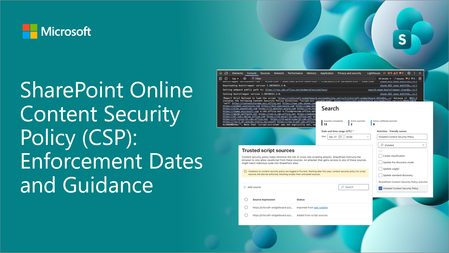
Content Security Policy (CSP) is a critical browser security feature designed to protect web applications. SharePoint Online is rolling out CSP enforcement for all tenants starting March 1, 2026.23KViews2likes33CommentsAnnouncing SharePoint eSignature for Microsoft Word
We are excited to announce that SharePoint’s native eSignature service is now integrated with Microsoft Word. This new capability allows you to request electronic signatures directly from Word documents, without the need to manually create PDFs. By bringing eSignatures into the flow of Word, you can create eSignature templates, accelerate document approvals, eliminate physical signing steps, and maintain compliance and security within the Microsoft 365 environment. Figure: Invoking SharePoint eSignature in Word Key features: Seamless Word integration: You can insert signature fields into Word documents and request signatures without leaving the familiar Word interface. The eSignature functionality is accessed from the Word Insert ribbon and eliminates toggling between applications or converting files to PDFs before sending for signature. Automatic PDF creation & storage: When you send a signature request from Word, recipients will sign an automatically generated PDF copy of the Word document. The signed PDF is saved in the same SharePoint location as the original Word file. Your document never leaves the Microsoft 365 trust boundary during this process, ensuring end-to-end security and compliance. Word documents as eSignature templates: You can reuse your Word files as eSignature templates, streamlining repetitive signing processes. Integrated audit trail and notifications: SharePoint eSignature provides built-in tracking. Both senders and signers get email notifications throughout the signing process, and you can view the activity history (audit trail) in the signed PDF to verify when and by whom it was signed. Security and compliance controls: Administrators have control over how eSignature for Word is used in the organization – it can be enabled for specific users via an Office group policy and even limited to certain SharePoint sites. And SharePoint eSignature enables logging of eSignature activities in the Purview Audit log. “SharePoint eSignature for Word gives us a seamless, compliant, and secure way to complete documents directly within Microsoft 365. It streamlines our workflows and increases security by keeping sensitive content inside our trusted environment—eliminating the cost and complexity of third-party tools.” Cloudwell, SharePoint eSignature for Word early adopter How to request a signature in Word Figure: Requesting eSignatures from Word Open a document in Word Desktop: Make sure your Word document is saved in a SharePoint site that has SharePoint eSignature enabled. Insert a signature field: Go to the Insert tab on the ribbon. You will see an option ‘eSignature fields’ (if enabled by your admin). Insert signature fields at the appropriate location in your document where a signature is required. Add recipients and a note: Add the internal or external signers email addresses and optionally include a note for the signers. The note will be included in the mail sent to the signers. Send for signature: Once you’ve filled in the request details, send the request. SharePoint eSignature will automatically create a PDF version of your document and send a secure signing link to the designated signers. The signer will receive an email invitation to review and sign the PDF document. Automatic saving and notification: The signed PDF is saved into the SharePoint library, right next to your original Word document. You can now open the signed PDF to review the document. Once the request is sent, you can immediately send a new request or use the document (with the eSignature fields already inserted) as a template for future agreements. “I can see the integration of SharePoint eSignature, in Microsoft Word, being a game changer for our users. With native eSignature capabilities, our users can initiate and complete the signing process without ever leaving Word. This eliminates friction points allowing our users to stay in the flow of their work.” SharePoint eSignature for Word early adopter, Europe. Benefits of SharePoint eSignature for Word SharePoint eSignature for Word simplifies and accelerates the signing process, offering several key benefits: Faster turnaround: By enabling direct signature requests from Word, you remove manual steps (like printing, scanning, or converting Word documents to a PDF). Enhanced productivity: Users stay in the flow of work. There’s no need to switch focus to send documents for signature. Reusing Word documents as eSignature templates means you don’t have to start from scratch for each new request. Compliance and security: Documents are kept within your Microsoft 365 trust boundary during the signing process. "The feature itself is very user-friendly. One aspect that we particularly appreciated was the automation of the PDF conversion step. Being able to initiate the e-signature directly from Word eliminates the need for manual PDF conversion, making the entire process much more efficient.” SharePoint eSignature for Word early adopter, North America Availability and rollout SharePoint eSignature for Microsoft Word is now rolling out to devices on the M365 Beta and Current Channels and will complete by early July for the United States, Canada, United Kingdom, Europe, and the Australia-Pacific region. It will be available globally by the end of 2025. Getting started: How to enable this feature To use eSignature in Word, a few steps are required by administrators: Enable SharePoint eSignature: First, your tenant needs to have SharePoint eSignature configured in the Microsoft 365 Admin Center and the Word checkbox enabled. Apply a policy to allow Word integration: Once the service is enabled, apply the policy “Allow the use of SharePoint eSignature for Microsoft Word.” Once this policy is enabled (via Intune, Group Policy manager, or the Cloud Policy service for Microsoft 365) it will activate the Word ribbon capabilities for your users. Client requirements: Users will need to be on Word Desktop using the Microsoft 365 Current Channel (or Beta Channel). To learn more about SharePoint eSignature configuration and usage, check out Overview of SharePoint eSignature - Microsoft Syntex | Microsoft Learn Feel free to add any comments or questions below. Thanks!7.1KViews9likes0CommentsJust One Week Away from Our Digital SharePoint Event!
Join us next week Wed, Jan. 29, 2025, at 9 AM – 10 AM PST for our upcoming SharePoint event! 📝Register today-https://aka.ms/SharePointEvent And now, a word from Jeff_Teper about what to expect from the event: From Concept, to Creation, to Impact! Join Jeff Teper, CJ Tan, & Melissa Torres to explore the latest SharePoint capabilities and see how our customers are leveraging some of the latest tools. Discover new features, tips, and tricks to push boundaries. Whether you create sites, publish news, manage workflows, collaborate, or just want to learn more, this event is for you! Skill up your SharePoint IQ with the latest on: Simpler authoring & more compelling content – Lower barriers to create professional-looking content and ensure you can harness the best of what the web has to offer for your intranet Greater engagement & reach – Scale your message to meet people where they work. Copilot and agents, powerful workflows, and automation– Build automated subject matter experts and save your team time while managing and automating content workflows. We will also have dedicated time during the event for live Q&A where you will get to interact with multiple product makers – bring your questions and feedback. Summary of event information Event name | SharePoint: From Concept, to Creation, to Impact + Live AMA Date/time | Wednesday, January 29, 2025, 9:00 AM – 10:00 AM PST. Location | Online - Register today: https://aka.ms/SharePointEvent. Add to calendar | Save this event to your calendar. Engage with us on social You can engage with our current social posts or show us your excitment using #SharePoint or #SharePointevent M365 LinkedIn SharePoint X social handle Related resources Jeff Teper announcement blog-https://aka.ms/SharePointEvent/Blog "Ignite 2024: Agents in SharePoint now in general availability” by Adam Harmetz. Microsoft Ignite 2024 breakout session: Reimagine content management with agents in SharePoint. Subscribe to the SharePoint blog. Follow us on social. Learn more about SharePoint.1.3KViews1like0Comments8 Components of SharePoint Information Architecture
What is Information Architecture (IA)? IA is the practice of organizing, structuring, and labelling content in an effective and sustainable way. It ensures that information is easy to find, manage, and use. In the context of SharePoint, IA involves defining site structures, navigation, content types, metadata, and governance policies. As a business decision maker, investing in robust information architecture can be transformative. The greatest benefit is the enhanced efficiency and productivity it brings to our organization. The goal is to reduce time spent searching while minimizing duplication. Establishing good information architecture early on is crucial. It lays the foundation for growth and scalability. We hope you can avoid the pitfalls of a cluttered and chaotic environment that can hinder productivity. Make your SharePoint intuitive and manageable, and one that can adapt seamlessly to evolving business needs. While designing, or redesigning, your own IA, consider establishing, optimizing, and utilizing the following eight key SharePoint components: Root Site Hub sites Home sites SharePoint start page Organization Assets Application Catalog Learning Hub and Viva Learning SharePoint Premium: Content Center We will spend the rest of this article explaining each component, including screenshots, links, plus tips and tricks along the way. Root Site The root site in SharePoint Online is a special site that is provisioned automatically when you set up your Microsoft 365 subscription. This site serves as the top-level site for your organization's SharePoint environment. The URL of the root site typically follows the format https://yourorganization.sharepoint.com, where "yourorganization" is the name of your organization – i.e., for Contoso, its https://contoso.sharepoint.com. This site is THE base element in information architecture in the cloud. If your environment was set up before April of 2019, then your root site is a Classic Teams Site. To best utilize the Root as your Intranet, we need to replace the Classic Teams Site with a modern communication Site. So, the Root Site has a special functionality which is available to SharePoint admins, and it is called replace site. 💡 Learn how to modernize your root site and then review the Home site information below. Hub sites A second key element is Hub Sites – the connective tissue between sites. Hub sites help organize sites based on any classification like departments/business units, Locations, Projects, etc. As part of Modern Architecture, it is not recommended to use Sub Sites, so if we have all independent site collections, Hub is the component which will establish relationships between sites. Below are some key benefits of using hub sites: Shared navigation and brand Roll-up of content and scoped, connected search A home (page) destination for the hub 💡 Learn more about SharePoint hub sites, and guidance for planning your hub sites. Home site The third key element of information architecture is Home Site. A SharePoint home site provides a customized landing experience that reflects the organization’s brand, voice, and priorities. A SharePoint home site also serves as the gateway to other portals in your organization’s intranet. Additionally, it provides 2 Major Capabilities – Global Navigation – The Navigation you have on your App Bar. So independent of where you are on SharePoint you always have access to Global Navigation. Viva Connections – Using Viva Connections you can design your Dashboard, and which can be directly rendered on teams, even we have capability to render your Intranet on Teams using Viva Connections. showcase how you can design your home site. 💡 Learn more about planning, building, and launching a SharePoint home site for your organization. SharePoint start page This is a page which is built on top of user context and is personalized based on user activity. Users can see the sites they are following, sites they frequently visit, and the latest news published on the site’s user has access to and featured links. This is a key element as it breaks the boundary of working on a specific device. Additionally, the SharePoint start page provides a start’ing point for people to create their own sites and pages. utilize the platform. Organization Assets The next key element in IA is Organization Assets, if your company is looking to save and manage files for the entire organization to use, you have the capability to define one or more libraries as an Organization Assets Library. Examples Images and Office Templates. When a user designs a Modern SharePoint Page by edit it and adding web parts, especially the ones which use file picker, when you have Organization Assets Library configured, users see an additional vertical called “Your Organization” which can store images and logos which can be used across organization. modern SharePoint page with an Image web part in Edit mode, helping people access and use organization images and graphic assets. Another capability is Office Templates, which enables users to select the tab for their organization where they see Office templates when they create a new Office document. an org-approved, published template which can be reused across the company to provide consistency and common branding. 💡 Learn more about Organization Assets Library. Application Catalog It is a special site collection that holds all custom built or third-party applications. The Application Catalog allows Tenant Administrators and Global Administrators to deploy custom code. For the very first time when a tenant is provisioned an Administrator needs to provision the application catalog. There can be 2 types of application catalogs - Tenant App Catalog Site Collection App Catalog Based on governance and information architecture it is a good idea to have a defined approach on which applications should be deployed at tenant level, and which one should be deployed at site collection level. If a custom application is meant to be used by multiple sites on the tenant, it is a good idea to deploy it on Tenant App Catalog. third-party components deployed. 💡 Learn more about Managing Apps on Application Catalog Additionally, for custom code locally scoped for a specific site collection, it is a good idea to use site collection app catalog. These are not created by default; they can be provisioned by running PowerShell cmdlets for any specific site collection. The Above Architecture Diagram explains how Application Catalogs are provisioned in Microsoft 365. 💡 Learn more about Provisioning and using site collection application catalog. Learning Hub Learning hub can be a distinct SharePoint site collection, created as a home for Learning and Trainings in your tenant. As a site collection administrator, one can use this site to host custom training content. t with a Hero Webpart. ument Library displaying multiple folders which are security trimmed based on Mail-Enabled Security Groups for that specific Department. Viva Learning can showcase your custom training modules alongside other paid training services you subscribe to, making learning part of daily work as Viva Learning right within Microsoft Teams. This is a great component while thinking about your IA. This can help in having consistent training methodology and better consumption and adoption of training content to increase knowledge and skill building. Viva Learning home page within Teams showing a blend of training from the SharePoint Learning Hub and LinkedIn Learning. 💡 Learn More about Viva Learning here Content Center Syntex Content Center is a site template which is another modern template apart from communication sites and modern team sites. This site template has a very specific function and is used to build and manage document processing models, applying models to document libraries to automatically classify files and extract information. This capability is part of SharePoint Premium and provides capability for processing a lot of documents as you consider planning and implementation across all content types and scale use cases. – Used to host document processing models. 💡 This comprises of 2 key elements Syntex in general and then specific details to learn about content center. Bringing it all together... Overall, these are the eight key elements which define your core information architecture for SharePoint in Microsoft 365. When we connect them together it would define an organized IA, and an expanded use of your SharePoint investment in Microsoft 365. A well-designed Information Architecture is crucial for any organization as it ensures that information is organized, structured, and labeled in an effective and sustainable way. This makes it easy for users to find, manage, and use the information they need, which in turn enhances efficiency and productivity. A well-designed IA involves defining site structures, navigation, content types, metadata, and governance policies. This reduces the time spent searching for information and minimizes duplication, ultimately leading to a more intuitive and manageable environment that can adapt seamlessly to evolving business needs. -Prakul10KViews10likes0CommentsRemote Event Receivers retirement update in SharePoint Online
Remote Event Receivers are retiring as part of the announced SharePoint Add-In and Azure ACS retirements in SharePoint Online, but we've listened to your feedback and provided an option that will stay longer available and we're further improving webhooks to be a better alternative for Remote Event Receivers11KViews4likes34Comments