admin
66 Topics
[Community tool] Find the GPO, registry value and Intune setting for any Office ribbon button
Hi everyone, as a technical service owner for Microsoft 365 Apps, one question comes up for me again and again: which policy actually controls this button or option? The information is all there – in the Office ADMX/ADML templates, the Office Fluent UI control ID lists, the Intune Settings Catalog and many Learn articles. But I never found it in one place, so every answer meant connecting several sources by hand. Especially when onboarding new colleagues, this costs a lot of time. So I built a free community tool for it: Office Admin Explorer https://tools.pascal-donath.de/office-admin-explorer/ How it works It's a clickable mock of Word, Excel, PowerPoint and Outlook (ribbon, File menu, Options, Trust Center). Click any element and you get: idMso and Policy ID (for customUI and the "Disable commands" policy) the ADMX policy with its exact path in Group Policy Management the registry value it writes, with ready-to-copy PowerShell or .reg the matching Intune Settings Catalog entry Cloud Policy notes, step-by-step guides and Microsoft Learn links The search covers all Office ADMX policies (2,400+) and command IDs (8,000+), including elements that aren't part of the mock. Also included Ribbon builder – hide or disable buttons, groups or tabs and export the result as customUI XML, a macro-free add-in (.dotx / .xlam / .ppam) or the "Disable commands" policy for Group Policy and Intune Deployment view – configuration.xml generator for the Office Deployment Tool User Support view – typical user problems: symptom → cause → fix Policy names and registry values are checked against Microsoft's ADMX/ADML files, and the Intune mapping against the Graph settings catalog. It runs in the browser without sign-in and is available in English and German. Please test any configuration on a lab device or pilot group first. I'd like your input How do you handle this today – ADMX search, Group Policy Search, the Intune catalog, your own documentation? Which Office settings do you get asked about most often? I'd like to add the most requested ones next. If you find a wrong or outdated entry, every entry has a "Report it on GitHub" link – corrections are very welcome. Thanks! Pascal --- *Transparency note: The tool was developed with the help of AI. The content is based on my own admin experience, and policy names, registry values and Intune mappings are validated automatically against Microsoft's official sources (ADMX/ADML templates, Fluent UI control lists, Microsoft Graph settings catalog). This is a community project and not affiliated with Microsoft.*
How can specific users be exempted from a tenant-scoped Microsoft 365 Apps Policy?
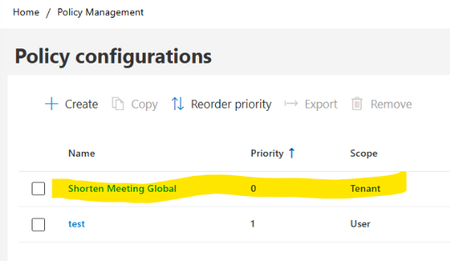
Hello, I am looking for guidance regarding Microsoft 365 Apps Cloud Policy Service behavior and policy precedence. Current configuration: In Microsoft 365 Apps Admin Center → Policy Management (config.office.com), we have the following policies: Policy 1 Name: Shorten Meeting Global Scope: Tenant Priority: 0 Configured settings: Shorten appointments and meetings = Enabled Reduce the end time of short appointments and meetings = 5 minutes Reduce the end time of long appointments and meetings = 10 minutes Policy 2 Name: Test Scope: User (Security Group) Priority: 1 Assigned only to a dedicated test group Relevant settings configured as Not Configured Observed client behavior: On corporate-managed devices, affected users receive the following registry values: HKCU\Software\Policies\Microsoft\Cloud\Office\16.0\Outlook\Options\Calendar shortenevents = End_Early endearlyshort = 5 endearlylong = 10 The Outlook option: File > Options > Calendar > Shorten appointments and meetings is greyed out. Additional validation: Using the same Microsoft 365 account on an external non-corporate device: The above registry path is not present. The Outlook option is editable. Testing performed: A user-scoped Cloud Policy was created and assigned to a dedicated security group. For the "Shorten appointments and meetings" setting, only the following options are available: Enabled Not Configured There is no Disabled option. but the Tenant policy continued to apply and the Outlook option remained locked. Questions Is there a supported way to exempt specific users from a tenant-scoped Microsoft 365 Apps Cloud Policy when the setting only supports "Enabled" and "Not Configured" and does not provide a "Disabled" option? Does Not Configured in a User-scoped policy allow evaluation to continue to the lower-priority Tenant policy? If policy precedence is changed so that: Test Policy = Priority 0 Tenant Policy = Priority 1 would the User policy potentially suppress the Tenant setting? Is there a supported way in Microsoft 365 Apps Cloud Policy Service to provide exceptions for specific users while keeping the Tenant policy as the organizational default? Has anyone successfully implemented an exclusion or override scenario for the "Shorten appointments and meetings" setting? Any guidance or documentation references would be greatly appreciated. Thank you.
How to allow B2B users in Microsoft Places workgroups?
Our company recently purchased another company. While we are preparing migrating users from the two legacy tenants to a new, third tenant, we collaborate with each other using Cross Tenant Synch and Cross Tenant Access. I am currently testing out Places, but I am unable to add my team members from the other company to a Workgroup in Places: "1 user(s) couldn't be added, the administrator has disabled adding these user(s) to any workgroup". Any idea how/where I can change this? I am Global Admin.
Microsoft Sway - Restricting Access to Templates
Hi all, We are assessing the usage of Sway for internal project and change communications, and have a concern that those with access to Sway could create content which does not follow internal approved designs and patterns. Are there mechanisms in place to allow us to control which templates the content creator could use as a baseline for their content, whether that involves access to explicitly approved templates only (workflows for approvals??), or restricting access to marketplace or generally available content? TIA Geoff
Can we configure filter for me in Office Online Server On-premise(Sharepoint)
We are using SharePoint Server 2019 along with Office Online Server (On-premise). Multiple users work on the same worksheet simultaneously. However, when one user applies a filter on sheet1, it affects all the users instead of being user- specific. Is there any workaround to make the filter apply only for individual users?24 hour format - Onedrive
Good afternoon. My time format in OneDrive, on the regional site is 24 hours. But the file history or file change history in OneDrive is shown in 12 hours. An example If I make a change to a file at 14:00, OneDrive shows 02:00 Here in Spain we use 24 hours as the preferred format and for our company with more than 100 employees it is important to control this well. Can you help me? Regards, Thank youMac Legacy Outlook - Emails moves to Draft folder
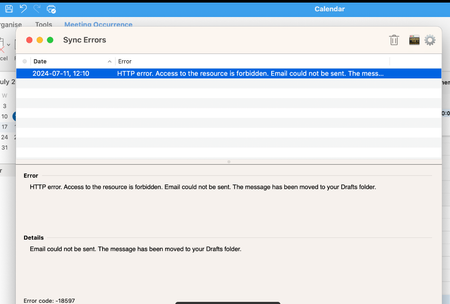
Hi All, Has anyone observed/faced an issue with the Legacy version of Outlook for MAC? When sending an email, it gets moved to the Draft folder with the Error "HTTP error. Access to the resource is forbidden. Mail could not be sent. The message has been moved to your Drafts folder.” But when you go to the Draft folder and resend it, it goes or even switches to a new outlook works perfectly fine.
Why is it possible to create broken 365 app config files?
I've been trying to configure Intune win32 deployable Office & 365 applications for my company, and it's been driving me insane. I used the deployment tool and the config creator to create deployments for Office, Visio, & Project. Office worked fine, but Visio & Project have not been working at all. Just failing instantly. I've just done hours of investigating and trial-and-error and have found the problem: Visio and Project are not available in en-gb language. I tried installing through Intune (instant fail), then directly from the setup.exe with the config: instant fail. Neither gave any useful error information. I then changed the config to show the installation display (which was hidden, as it's meant for mass deployment), which then said the language is not compatible. I thought that had to be a mistake, why wouldn't British English work? I then tried making it the same language as the device's Office installation (also en-gb) using MatchInstalled, hoping it was just some bug - this seemed to work, it didn't show the language error any more! It was now showing a connectivity error. Ugh. I spent a while trying to diagnose this before changing the language in the config to en-us, and it worked instantly. Why was I able to create the configs for Visio and Project using the official Microsoft tool with en-gb as the language when that was never going to work?