admin
654 Topics
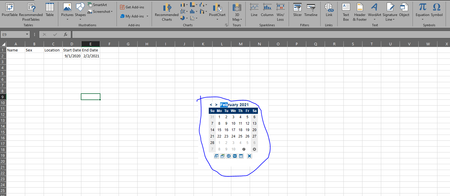
Excel Date Picker
Hello , I would like to add date picker on an excel sheet. The goal is to create an excel file and have this sent to users to fill in. When filling the excel, and click on the start date, a calendar dropdown should appear and users select the date from the calendar so as to eliminate different date format and make it unique across the document. I was able to get a date picker add-in however this wont work because I am sending to users please see below:640KViews0likes13CommentsHow do I make text to columns automated?
Hi there - I will be doing some reporting and have one column with some data separated by commas, I need to separate the data into columns and then make that rule apply to any further data I add to the end of the list so that I don't have to manually convert text to columns each time I add more data into the column with the combined data. Is there a way of doing this? Please help!! Shakeh81KViews0likes11Comments
Retrieve deleted cells
Hi, my colleague accidentally deleted few columns in one of our sheets in the excel spreadsheet. We press undo until it says that there's no more undo action can be done. But the columns did not appear again. We don't have back-up of the previous data that were stored in the said columns or cells that were deleted. I hope you can help me in retrieving those cells. Thank you. Hoping for your response.78KViews0likes1Comment
Conditional format 30-60-90 days to 1year old
I am trying to automatically highlight a date when it is 30-60-90 days from its due date but I want to use the date a certificate was issued. Example: I have a cert that was issued on 5-26-2021 and expires 1 year from that date. In the photo, I want that cell to highlight when today is less than 30-60-90 days from 26-may-2022. I want to keep the issued date in the cell but I want it to highlight when it is 30-60-90 days from its 1 year expiry date(without having to add expiry date. I don't want more info than needed.)Solved67KViews0likes16Comments
EXCEL LOGO
Hello everyone, I have a question. Office programs' logos always start with their first letter. Example: Like Word-W. However, Excel's logo is a combination of the letters X and L. I would like information about the creation process of logos. Can anyone with knowledge help? Kind regards.50KViews0likes4CommentsCreating a formula to autofill a range of cells based on input
Hello, I am trying to create a formula that takes the input from a cell and fills a range of cells based on the numerical value entered. I'm not sure if there is a default function to a EX: If cell B1 contains a numerical value of 5, Cells A2:A would increment by 1. A B C D E 1 | Enter a number: 5 2 | 1 3 | 2 4 | 3 5 | 4 6 | 5 7 | 8 | 9 | 10 |Solved47KViews0likes12Comments