admin
661 Topics
Conditional formatting
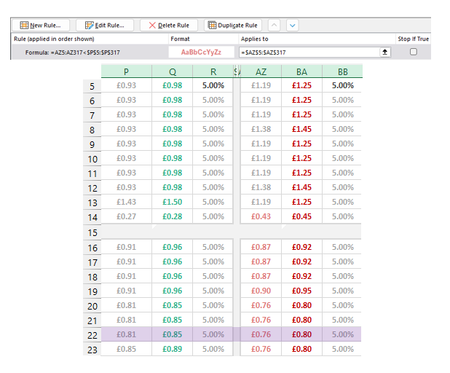
I'm making a rule to Highlight cells in Column AZ when the value is lower than Adjacent cells in Column P. For the most part it works except for two cells in AZ (1 shown as an example) that are higher than P but are being picked up by the conditional formatting. The two cells I'm focusing on here are P14 (£0.27) and AZ14 (£0.43). £0.43 should not be being highlighted pink as it isn't lower than £0.27. This has to be something obvious but I have looked at it too long. Please help if you can :)Solved131Views0likes3Comments
Add-in not working in EXCEL 2024 HOME SUBSCRIPTION.
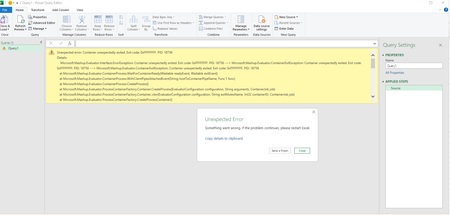
I have office home 2024 subscription. Recently, when I try to add an add-in from the add-in tab in excel it shows error. It was working fine. I had python and some other add-ins through the add-in menu. Can somebody help? I have tried all methods suggested by AI tools.96Views0likes0Comments
Referenced cells do not identify themselves with color
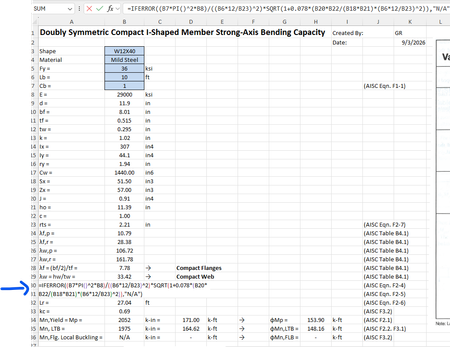
For some reason when I create a formula that references other cells, I cannot get those cells to "identify" themselves with a specific color. For example, in the image below the formula references cells B7, B8, B6, etc but they are just black text and don't show up in color per standard excel documents. Usually they "glow" with a specific color so you can find them easily in big spreadsheets. How do I get the colors back?Solved489Views0likes2Comments
Excel Desktop Filter Checkboxes Not Visible – Windows 11 / Office Home & Student 2021
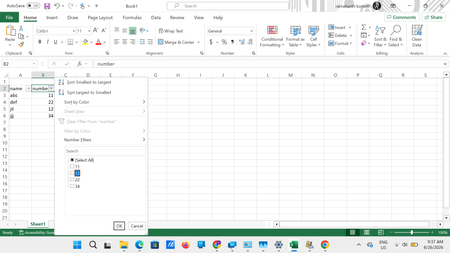
Excel Desktop Filter Checkboxes Not Visible – Windows 11 / Office Home & Student 2021 I am facing a persistent display/rendering issue in the Excel desktop application when using filters. When I apply a filter to a column, the filter dropdown opens correctly and the values are displayed. The filter functionality itself also works. However, the checkboxes beside the individual values are not visible properly. As shown in the attached screenshot, the values such as 11, 12, 22, and 34 are displayed in the filter list, but the checkbox controls beside them are either missing/not rendered correctly. Interestingly, the Select All checkbox area also appears abnormal. System details Operating System: Windows 11 Microsoft Office: Home & Student 2021 Application: Microsoft Excel Desktop Office is fully updated with the latest available updates. The same Excel file works correctly in Excel for the Web, where all filter checkboxes are displayed normally. Troubleshooting already performed by Microsoft Support Microsoft Support has already remotely checked the system and tried several troubleshooting steps, including: Reinstalling Microsoft Office Creating/modifying relevant Windows Registry entries Creating system restore/checkpoints during troubleshooting Creating and testing with a new Windows user profile Checking and installing all available Office updates Unfortunately, the issue still persists. Since the problem does not occur in Excel for the Web, it appears to be specific to the Excel desktop application's UI/rendering on my Windows 11 system. Has anyone experienced a similar issue with filter dropdown checkboxes not rendering or appearing invisible in Excel Desktop? Could this be related to: Excel hardware graphics acceleration/rendering Windows display scaling or DPI settings GPU/display drivers Office 2021 UI rendering Windows 11 accessibility/display settings A known Excel Desktop bug Any suggestions, known fixes, or confirmation of a similar issue would be appreciated. Screenshot attached for reference.403Views0likes2Comments
GLSU Excel add-in fails to load after Office update from Version 2607 to 2608
Our Excel add-in, Process Runner GLSU , fails to load after Microsoft Office updates from Version 2607 to Version 2608. This started August 17, 2026 and is actively growing in scope. Error messages: Excel: Cannot run the macro 'onLoad' VBA: System Error &H80004005 (-2147467259). Unspecified error VBA: Compile error in hidden module: ThisWorkbook Has anyone encountered similar issue with their own custom add-on. If yes, any pointers to fix it. We are seeking help on priority. Thanks, Vrushali Pawale, Sr. Manager, Insightsoftware.1.1KViews0likes1Comment- 197Views0likes4Comments