add-in
62 Topics
Cannot install addins
I am a Microsoft 365 Personal user. When I try to add the Claude for Excel Addin (for the Desktop version of Excel), I get an error: "Error loading add-ins. One or more add-ins failed to load. See your add-ins.". However, this is not specific to the Claude addin, since every addin gives the same error. When I click on the My-Addins option and then "refresh", I get another error: "Access denied to catalog." Signing in and out of Office does not fix the issue. Clearing the Office 365 cache did not fix the problem. The issue extends to Powerpoint and Word as well. I cannot add any addins to the web versions of Office either. Interestingly, if I download an XML manifest file, I can use the "Manage my addins" option in the web versions of Office 365 to manually add the addins. But still no luck with the Desktop versions. Anyone have any thoughts on how to fix this? Do I need to manually reinstall Office 365? I also noticed that the "Get Add-ins" button in "Account" settings is disabled.746Views1like2CommentsAccess to subAddress Property of Hyperlinks in Powerpoint Javascript API
Recently my company has me developing a Taskpane Add-in for Powerpoint using the Javascript API. Right now the API is still missing a 'subAddress' property for the Powerpoint.Hyperlink class. My heart's deepest longing is to add a slide to a presentation with existing slide-to-slide hyperlinks, check those hyperlinks for discrepancies between the slide ID and the text (ie: a Hyperlink reading '13' that now links to slide 14), and finally correct the text to the subaddress ID of the hyperlink in Javascript. It is my burning passion to do this for every hyperlink in my presentation with the push of a button. In the interest of all mankind I would ask that the 'subAddress' property of the hyperlinks be available for use in addition to the 'address' and 'screenTip' properties which now exist. To the microsoft dev who can grant me this boon I offer half my kingdom. Truly there is no dev more favoured than thee.130Views1like4CommentsPrimer: How to Use RBAC for Applications to Control App Use of the Mail.Send Permission
The temptation to use the Mail.Send application permission in scripts can lead PowerShell developers into trouble because the permission allows access to all mailboxes, including sensitive executive and financial mailboxes. Fortunately, RBAC for Applications allows tenants to control the access that apps have to mailboxes and other Exchange content. All explained here with an example script to test RBAC of Applications. https://office365itpros.com/2026/02/17/mail-send-rbac-for-applications/617Views3likes4Comments
Sync Issues with Tracking Meetings from Outlook to Dynamics 365
Hello, my work uses the Dynamic 365 App for Outlook to track meetings as appointments in Dynamics 365, but it has failed several times for several users (on both Mac and Windows, in Old and New Outlook and on web browsers); some meetings will fail to track immediately while in some cases, meetings that were successfully tracked will stopped working and are no longer tracked in Dynamics. In the spoiler below is a sanitized version of the diagnostic log for meetings that used to be tracked that stopped working: In the log, we have the following error message: "lastsyncerror": "ExchangeSyncGeneralCrmItemSyncError;Microsoft.Crm.Asynchronous.EmailConnector.ErrorSource.Crm:130;T:188\r\nActivityId: [Removed]\r\n>Exception : Microsoft.Crm.Asynchronous.EmailConnector.ExchangeSyncException: Failed to sync item to CRM server : System.ServiceModel.FaultException`1[Microsoft.Xrm.Sdk.OrganizationServiceFault]: There is no active transaction. This error is usually caused by custom plug-ins that ignore errors from service calls and continue processing. at System.Runtime.Remoting.Proxies.RealProxy.HandleReturnMessage(IMessage reqMsg, IMessage retMsg) +0x27 at System.Runtime.Remoting.Proxies.RealProxy.PrivateInvoke(MessageData& msgData, Int32 type) +0x1ba at Microsoft.Xrm.Sdk.IOrganizationService.Execute(OrganizationRequest request) at Microsoft.Xrm.Sdk.WebServiceClient.WebProxyClient`1.ExecuteAction[TResult](Func`1 action) +0x15 at CrmSDKLib.OrganizationServiceWrapper.<>c__DisplayClass10_0.<Execute>b__0() in C:\\__w\\1\\s\\src\\lib\\CrmSDK\\OrganizationServiceWrapper.cs:line 13..." In Outlook, when I look at these meetings and check the app it gives the message: Recurring appointment occurrence cannot be tracked However, we have other series of recurring meetings that have been successfully tracked that does not run into the issue. Anyone has encountered this or similar issue? How do we resolve this so going forward the app can track all meetings without issue? Please let me know, thank you!415Views0likes2Comments
How do I export macros to new install of Word?
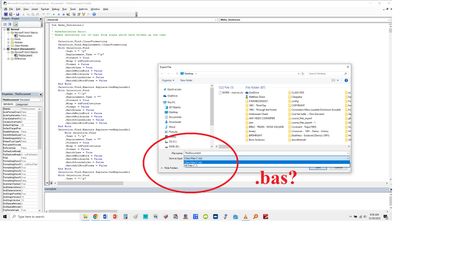
I'm using Office 2013. I have created several macros for Word using the VBA project. I want to export and use them on a new install of Word. I go: FILE > EXPORT FILE. But, it will only let me save as a Class File (.cls). When I've tried to import into the new stall, nothing happens. It says that I need to use the .bas format. Well, . . . VBA doesn't allow that option. Does anyone jknow what I'm missing here? Any solutions? Thanks!102Views0likes1Comment
Report all active users in tenant and their installed integrated apps
Our security team has requested that we block the install of any Copilot apps until our AI policy is in place. Before we do this, I'd like to know what apps from Microsoft 365 admin center > Settings > Integrated apps > Available apps are currently installed by our users. I don't see any way that the UI offers this capability, so I believe it will be PowerShell. I did already run the following script, but it returns only 2 apps, which are apps we have deployed to our users. It's possible our 2600 users haven't installed anything else, but not probable. Install-Module O365CentralizedAddInDeployment Import-Module -Name O365CentralizedAddInDeployment Connect-OrganizationAddInService Get-OrganizationAddIn If the above isn't possible, it would also be useful to find a script that would give me a list of users who have a given app (from 365 Integrated apps > Available apps) installed, such as CopilotForce or Microsoft Copilot Studio.762Views0likes2CommentsPowerPoint JS API: Can't Create Lines with Negative Slope Using addLine
We are encountering a technical issue with the PowerPoint JavaScript API when attempting to create lines with negative slope (lines that go upward from left to right). Despite various approaches, we can only create lines with a positive slope (going downward from left to right). Reproduction Steps: Using the ShapeCollection.addLine method to create lines Attempting to create a line that goes upward (with a negative slope) Regardless of the parameters passed, the lines always render with a positive slope Code Examples and Results Example 1: Attempt to create an upward sloping line const upLine = shapes.addLine(PowerPoint.ConnectorType.straight, { left: 250, top: 300, width: 100, height: -200 // Negative height should create upward slope }); Result: Line appears to go downward with a positive slope despite the negative height value Example 2: Attempt to create two connecting lines (a V shape) // First line - downward const leftLine = shapes.addLine(PowerPoint.ConnectorType.straight, { left: 150, top: 100, width: 100, height: 200 }); // Second line - intended to go upward const rightLine = shapes.addLine(PowerPoint.ConnectorType.straight, { left: 250, top: 300, width: 100, height: -200 }); Logged Coordinates: Left line: start(150,100), end(250,300) Right line: start(250,300), end(350,100) Result: While the coordinates look correct, the actual line rendering doesn't match these coordinates. Both lines appear to have positive slopes. Expected Behavior: We expect to be able to create lines with negative slopes (going upward from left to right) by specifying a negative height value, which should represent a decrease in the Y coordinate as X increases. Actual Behavior: The API seems to normalize or ignore the negative height value, resulting in lines that always have a positive slope regardless of the height parameter's sign. Technical Environment: PowerPoint Add-in Using PowerPoint JavaScript API Impact: This limitation prevents us from creating basic geometric shapes like V, triangles, or other shapes that require lines with different slopes in our add-in. Additional Information: We've ruled out simple parameter errors by logging the actual coordinates of the lines. The coordinates appear correct in the logs but don't match what's rendered on screen. Thank you for your assistance in resolving this issue. Let me know if you'd like to include your version/platform info or tweak any part before posting!190Views0likes1Comment
Sendto Onenote
I have tried and tried.... Im using O365 Business. I have tried both the PC, Mac and web version without any luck. Im not able to find the sendto Onenote option what so ever. Its not to be found anywhere. I even tried an IT consultant, but couldnt help either. Anyone with any suggestions/solutions?189Views0likes2Comments
Office.js preview features release
Office.js for PowerPoint has had a couple of preview features (getImageAsBase64, getSlideAsBase64) in preview now for nearly a year. I've done my best to search for any updates from the office.js on release timeline for these features with no luck. These two API calls are super convenient and enable features in the add-ins for PowerPoint which is near impossible to create using alternative solutions. Anyone out there with any knowledge on when we can expect these beta/preview features to be production ready?229Views2likes3CommentsSolution for a document workflow with versioning, status, owner and resubmission date
Hello Community We are currently looking for a solution to capture our internal knowledge in a kind of knowledge base. We already evaluted several tool for things like that, but all seem too sophisticated for our basic needs. So I start this discussion here at the top node, please feel free to move it, if there is a place where it fits better. We are looking for a system, that can handle the standard office 365 document file types word, excel, powerpoint, Visio and pdf. We would like to implement following functions, which we believe should not be difficult to implement, but currently we lack the knowledge of how to do. Automatic, unique number generator for each new knowledge document several document templates to ensure uniform and easy to navigate/read document structure interlink documents if they reference each other in content status like "in work", "revised", "released", incl. versioning workflow Assign a user how is in charge in careing for the content of the document in terms of actuality, correctness, etc. date reminder for periodically review the document after releasing (e.g. yearly) allow search in document title and content I think, a lot of the functions is already implemented in the standard functionality of sharepoint. But maybe there are easy add-on tools with which we can implement those functions "as a prototype" without having much knowledge about deep-dive .net coding. Looking forward to any interesting hints and answers108Views0likes1Comment