add-in
66 TopicsClaude for PowerPoint – administrator permission on Microsoft 365 Personal
Hi, I’m using Microsoft 365 Personal on a Mac and installed Claude for PowerPoint directly from the Office Add-ins Store. The add-in installs successfully and appears in PowerPoint. However, when I open it, before reaching the Claude sign-in screen, Office displays: “You don’t have permission to use this add-in. Contact your system administrator to request access.” My Microsoft account is personal and is not connected to a work/school organization, so I don’t have a Microsoft 365 administrator. Microsoft Support confirmed that the add-in is installing correctly, but we were unable to identify why administrator permission is being requested. Does Microsoft 365 Personal have any Office Add-ins permission, privacy setting, or account-level restriction that could cause this message? Thanks!238Views0likes1Comment
ChatGPT for Excel update failed, followed by Office add-in catalog errors
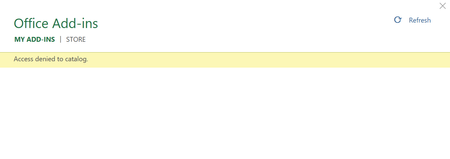
I am using Microsoft 365 Personal and Excel Desktop on Windows. The issue originally started when Excel told me that the ChatGPT for Excel add-in needed to be updated. I clicked "Update Now", but the update never completed. The Update button became disabled, and even after waiting for a long time and restarting Excel, ChatGPT still showed that an update was required. I then tried to remove the ChatGPT add-in, but Excel displayed an error saying that ChatGPT could not be removed and that I should try again later. After that, Excel started showing: "Error loading add-ins. One or more add-ins failed to load. See your add-ins." When I opened My Add-ins and clicked Refresh, Excel displayed: "Access denied to catalog." I then performed the following troubleshooting steps: Office is fully updated. I signed out and signed back into my Microsoft account. I cleared the Office add-in cache. Microsoft Edge WebView2 Runtime is installed and running. I tried running Excel as administrator. I performed Quick Repair. I performed Online Repair. I completely reinstalled Microsoft 365. Excel for the web can access and use Office add-ins normally. After reinstalling Microsoft 365, the ChatGPT for Excel add-in disappeared completely. I am now unable to reinstall it because Excel Desktop still shows: "Error loading add-ins. One or more add-ins failed to load." and "Access denied to catalog." The problem therefore started with a failed ChatGPT for Excel add-in update, and then developed into a broader Office add-in catalog problem in Excel Desktop. Please investigate whether there is an issue with the Office Add-in catalog / Microsoft Marketplace authentication or add-in update process for Microsoft 365 Personal accounts.266Views1like3Comments
All Office add-ins broken after Windows update
**All Office add-ins broken after Windows update — "Access denied to catalog" on Microsoft 365 Family (Word, Windows 11 Pro)** All Office add-ins stopped working on my machine this week, immediately following a Windows update. They had been working normally the week before. **Symptoms** 1. Home > Add-ins > More Add-ins > My Add-ins returns: **"Access denied to catalog."** 2. Attempting to load any add-in returns: **"ADD-IN ERROR — You don't have permission to use this add-in. Contact your system administrator to request access."** 3. Status bar intermittently shows: **"Error loading add-ins — One or more add-ins failed to load."** This affects **every** add-in, not one publisher. I first noticed it with Claude for Microsoft 365, but no add-in from any vendor will load, and the catalog itself won't enumerate. **Environment** - Microsoft 365 Family (consumer subscription — there is no tenant and no administrator to contact) - Windows 11 Pro - Microsoft® Word for Microsoft 365 MSO (Version 2608 Build 16.0.20326.20072) 64-bit - Microsoft account uses a custom domain address **Troubleshooting already completed — please don't re-suggest these** - Privacy settings verified: "Turn on all connected experiences," "Experiences that analyze your content," and "Experiences that download online content" are all enabled and **not** greyed out - Cleared the add-in cache at %LOCALAPPDATA%\Microsoft\Office\16.0\Wef\ - Signed out of and back into the Microsoft account inside Word - Office fully updated via File > Account > Update Options - Refreshed the Admin Managed tab in the add-ins pane - **Online Repair of Microsoft 365 completed**, followed by a reboot — error persists on a brand new blank document - Confirmed no work or school account under Settings > Accounts > Access work or school **What I'm asking** Since a clean reinstall of the client did not change the behavior, this looks service-side rather than local. Specifically: 1. Is there a known regression in the recent Windows/Office update affecting the add-in catalog request on consumer subscriptions? 2. "Access denied to catalog" implies an identity or entitlement check failing upstream. Is there a way to see what identity the desktop client is actually presenting to the catalog service? 3. My Microsoft account is a custom-domain address. If that domain has ever had a Microsoft 365 tenant associated with it, could the client be resolving my identity against that tenant and inheriting its Office Store policy, despite my license being Family? I contacted Microsoft Support by chat; the agent confirmed the issue appears broader than a single add-in and referred me here. Happy to provide screenshots, build numbers, or logs. Thanks in advance.271Views0likes1Comment
Cannot install addins
I am a Microsoft 365 Personal user. When I try to add the Claude for Excel Addin (for the Desktop version of Excel), I get an error: "Error loading add-ins. One or more add-ins failed to load. See your add-ins.". However, this is not specific to the Claude addin, since every addin gives the same error. When I click on the My-Addins option and then "refresh", I get another error: "Access denied to catalog." Signing in and out of Office does not fix the issue. Clearing the Office 365 cache did not fix the problem. The issue extends to Powerpoint and Word as well. I cannot add any addins to the web versions of Office either. Interestingly, if I download an XML manifest file, I can use the "Manage my addins" option in the web versions of Office 365 to manually add the addins. But still no luck with the Desktop versions. Anyone have any thoughts on how to fix this? Do I need to manually reinstall Office 365? I also noticed that the "Get Add-ins" button in "Account" settings is disabled.1.5KViews1like2CommentsAccess to subAddress Property of Hyperlinks in Powerpoint Javascript API
Recently my company has me developing a Taskpane Add-in for Powerpoint using the Javascript API. Right now the API is still missing a 'subAddress' property for the Powerpoint.Hyperlink class. My heart's deepest longing is to add a slide to a presentation with existing slide-to-slide hyperlinks, check those hyperlinks for discrepancies between the slide ID and the text (ie: a Hyperlink reading '13' that now links to slide 14), and finally correct the text to the subaddress ID of the hyperlink in Javascript. It is my burning passion to do this for every hyperlink in my presentation with the push of a button. In the interest of all mankind I would ask that the 'subAddress' property of the hyperlinks be available for use in addition to the 'address' and 'screenTip' properties which now exist. To the microsoft dev who can grant me this boon I offer half my kingdom. Truly there is no dev more favoured than thee.236Views1like4CommentsPrimer: How to Use RBAC for Applications to Control App Use of the Mail.Send Permission
The temptation to use the Mail.Send application permission in scripts can lead PowerShell developers into trouble because the permission allows access to all mailboxes, including sensitive executive and financial mailboxes. Fortunately, RBAC for Applications allows tenants to control the access that apps have to mailboxes and other Exchange content. All explained here with an example script to test RBAC of Applications. https://office365itpros.com/2026/02/17/mail-send-rbac-for-applications/1.1KViews3likes4CommentsSync Issues with Tracking Meetings from Outlook to Dynamics 365
Hello, my work uses the Dynamic 365 App for Outlook to track meetings as appointments in Dynamics 365, but it has failed several times for several users (on both Mac and Windows, in Old and New Outlook and on web browsers); some meetings will fail to track immediately while in some cases, meetings that were successfully tracked will stopped working and are no longer tracked in Dynamics. In the spoiler below is a sanitized version of the diagnostic log for meetings that used to be tracked that stopped working: In the log, we have the following error message: "lastsyncerror": "ExchangeSyncGeneralCrmItemSyncError;Microsoft.Crm.Asynchronous.EmailConnector.ErrorSource.Crm:130;T:188\r\nActivityId: [Removed]\r\n>Exception : Microsoft.Crm.Asynchronous.EmailConnector.ExchangeSyncException: Failed to sync item to CRM server : System.ServiceModel.FaultException`1[Microsoft.Xrm.Sdk.OrganizationServiceFault]: There is no active transaction. This error is usually caused by custom plug-ins that ignore errors from service calls and continue processing. at System.Runtime.Remoting.Proxies.RealProxy.HandleReturnMessage(IMessage reqMsg, IMessage retMsg) +0x27 at System.Runtime.Remoting.Proxies.RealProxy.PrivateInvoke(MessageData& msgData, Int32 type) +0x1ba at Microsoft.Xrm.Sdk.IOrganizationService.Execute(OrganizationRequest request) at Microsoft.Xrm.Sdk.WebServiceClient.WebProxyClient`1.ExecuteAction[TResult](Func`1 action) +0x15 at CrmSDKLib.OrganizationServiceWrapper.<>c__DisplayClass10_0.<Execute>b__0() in C:\\__w\\1\\s\\src\\lib\\CrmSDK\\OrganizationServiceWrapper.cs:line 13..." In Outlook, when I look at these meetings and check the app it gives the message: Recurring appointment occurrence cannot be tracked However, we have other series of recurring meetings that have been successfully tracked that does not run into the issue. Anyone has encountered this or similar issue? How do we resolve this so going forward the app can track all meetings without issue? Please let me know, thank you!577Views0likes2Comments
How do I export macros to new install of Word?
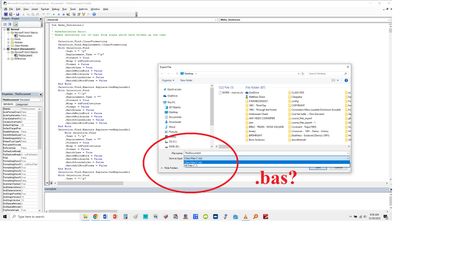
I'm using Office 2013. I have created several macros for Word using the VBA project. I want to export and use them on a new install of Word. I go: FILE > EXPORT FILE. But, it will only let me save as a Class File (.cls). When I've tried to import into the new stall, nothing happens. It says that I need to use the .bas format. Well, . . . VBA doesn't allow that option. Does anyone jknow what I'm missing here? Any solutions? Thanks!170Views0likes1Comment
Office.js preview features release
Office.js for PowerPoint has had a couple of preview features (getImageAsBase64, getSlideAsBase64) in preview now for nearly a year. I've done my best to search for any updates from the office.js on release timeline for these features with no luck. These two API calls are super convenient and enable features in the add-ins for PowerPoint which is near impossible to create using alternative solutions. Anyone out there with any knowledge on when we can expect these beta/preview features to be production ready?308Views2likes3Comments