adaptive card
14 Topics
Adaptive Cards in Teams channel messages: fixed narrow width — request for width control
Hi Teams Platform team, We post structured status reports as Adaptive Cards into a Teams channel. The card consistently renders at a fixed width of 448 px on a 1080p display at 100% scaling with a maximized Teams desktop client — well below the available channel message stream width. Wide multi-column tables get truncated or wrapped, which significantly hurts readability. What we've tried No card-level `width` property exists in the Adaptive Cards schema. `msteams.width: "Full"` is documented to apply only to Stageview / task module / tab — silently ignored in channel messages (tested). Same payload via three delivery paths — Incoming Webhook, Logic App "Post adaptive card in chat or channel", and Microsoft Graph `POST /teams/{id}/channels/{id}/messages` — all render at the same narrow fixed width. The constraint is in the Teams channel-message renderer, not in any delivery layer. Minimal repro payload (7-column results table; all field names and values replaced with generic placeholders): { "type": "message", "attachments": [ { "contentType": "application/vnd.microsoft.card.adaptive", "content": { "$schema": "https://adaptivecards.io/schemas/adaptive-card.json", "type": "AdaptiveCard", "version": "1.5", "msteams": { "width": "Full" }, "body": [ { "type": "TextBlock", "text": "Pipeline Report — run-001", "weight": "Bolder", "size": "Medium" }, { "type": "Table", "gridStyle": "accent", "firstRowAsHeaders": true, "columns": [ { "width": 2 }, { "width": 1 }, { "width": 2 }, { "width": 1 }, { "width": 2 }, { "width": 1 }, { "width": 1 } ], "rows": [ { "type": "TableRow", "cells": [ { "type": "TableCell", "items": [{ "type": "TextBlock", "text": "Col-1", "weight": "Bolder", "size": "Small" }] }, { "type": "TableCell", "items": [{ "type": "TextBlock", "text": "Col-2", "weight": "Bolder", "size": "Small" }] }, { "type": "TableCell", "items": [{ "type": "TextBlock", "text": "Col-3", "weight": "Bolder", "size": "Small" }] }, { "type": "TableCell", "items": [{ "type": "TextBlock", "text": "Δ Col-3", "weight": "Bolder", "size": "Small" }] }, { "type": "TableCell", "items": [{ "type": "TextBlock", "text": "Col-4", "weight": "Bolder", "size": "Small" }] }, { "type": "TableCell", "items": [{ "type": "TextBlock", "text": "Δ Col-4", "weight": "Bolder", "size": "Small" }] }, { "type": "TableCell", "items": [{ "type": "TextBlock", "text": "Status", "weight": "Bolder", "size": "Small" }] } ] }, { "type": "TableRow", "cells": [ { "type": "TableCell", "items": [{ "type": "TextBlock", "text": "item-a", "size": "Small" }] }, { "type": "TableCell", "items": [{ "type": "TextBlock", "text": "mode-x", "size": "Small" }] }, { "type": "TableCell", "items": [{ "type": "TextBlock", "text": "0.000/0.000","size": "Small" }] }, { "type": "TableCell", "items": [{ "type": "TextBlock", "text": "+0.00%", "size": "Small", "color": "Good" }] }, { "type": "TableCell", "items": [{ "type": "TextBlock", "text": "0.000/0.000","size": "Small" }] }, { "type": "TableCell", "items": [{ "type": "TextBlock", "text": "-0.00%", "size": "Small", "color": "Attention" }] }, { "type": "TableCell", "items": [{ "type": "TextBlock", "text": "✅ Pass", "size": "Small" }] } ] } ] } ] } } ] } `msteams.width: "Full"` is present but has no visible effect in the channel message context. Feature request Either of: Honor `msteams.width: "Full"` in channel-message context (not just Stageview/task module/tab), OR Add a card-level property (e.g. `msteams.channelWidth: "Full" | "Default"`) explicitly scoped to channel messages. Is this a known limitation with an existing tracking item, or should we also file it on the M365 Feedback Portal for upvotes? Thanks!908Views1like5CommentsHow to forward an adaptive card sent from teams bot
Is there a way to enable forwarding an adaptive card sent from MS teams bot, currently the card is being sent to user using bot framework api. But the user is unable to forward the same adaptive card to other users or channels.278Views0likes1Comment
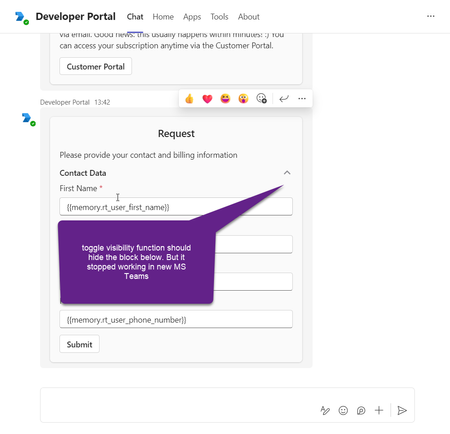
Adaptive card 'Toggle visibility' function stopped working in the New MS Teams
Toggle visibility function in adaptive cards stopped working in the new version of MS Teams. The issue is not reproducible in the older version of MS Teams. It can be reproduced in developer portal with the following card structure example: { "type": "AdaptiveCard", "$schema": "http://adaptivecards.io/schemas/adaptive-card.json", "version": "1.4", "body": [ { "type": "Container", "items": [ { "type": "TextBlock", "text": "Request", "size": "Large", "wrap": true, "weight": "Bolder", "spacing": "Small", "horizontalAlignment": "Center" }, { "type": "TextBlock", "text": "Please provide your contact information", "wrap": true, "spacing": "Medium" }, { "type": "Container", "items": [ { "type": "ColumnSet", "columns": [ { "type": "Column", "width": "stretch", "items": [ { "type": "TextBlock", "text": "Contact Data", "wrap": true, "style": "default", "fontType": "Default", "size": "Medium", "weight": "Bolder" } ] }, { "type": "Column", "width": "20px", "items": [ { "type": "Image", "url": "https://adaptivecards.io/content/up.png", "id": "chevronUp1" }, { "type": "Image", "url": "https://adaptivecards.io/content/down.png", "id": "chevronDown1", "isVisible": false } ], "selectAction": { "type": "Action.ToggleVisibility", "targetElements": [ "contactData", "chevronDown1", "chevronUp1" ] } } ] }, { "type": "Container", "items": [ { "type": "Input.Text", "id": "rt_user_first_name", "errorMessage": "Please input contact person first name", "label": "First Name", "spacing": "Small", "value": "{{memory.rt_user_first_name}}", "isRequired": true }, { "type": "Input.Text", "label": "Last Name", "id": "rt_user_last_name", "errorMessage": "Please input contact person last name", "spacing": "Small", "value": "{{memory.rt_user_last_name}}", "isRequired": true }, { "spacing": "Small", "regex": "^[a-zA-Z0-9._-]+@[a-zA-Z0-9.-]+\\.[a-zA-Z]{2,4}$", "isRequired": true, "value": "{{memory.rt_user_email}}", "placeholder": "email address removed for privacy reasons", "label": "Email", "type": "Input.Text", "id": "rt_user_email", "errorMessage": "Please provide the contact person email" }, { "spacing": "Small", "regex": "^[+][0-9]{10,12}$", "maxLength": 13, "value": "{{memory.rt_user_phone_number}}", "placeholder": "+1", "label": "Phone Number", "type": "Input.Text", "id": "rt_user_phone_number", "errorMessage": "Asking you to kindly enter the phone number in the international format, starting with +, then the country code, operator code and your local number." } ], "id": "contactData", "spacing": "Small" } ] } ] }, { "type": "Container", "items": [ { "type": "ActionSet", "actions": [ { "type": "Action.Submit", "title": "Submit" } ] } ] } ] }2KViews3likes7Comments
Command menu not show in Teams mobile app
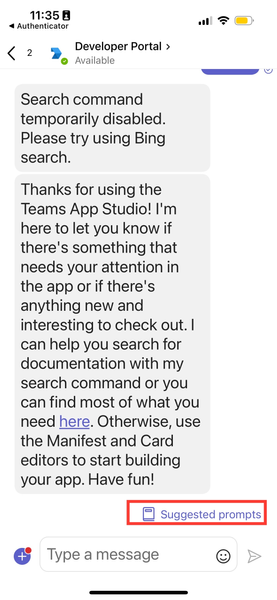
Hi, I just create my chat bot on Teams and I add some "Command menu" in Teams Developer page. So that can show on Desktop but did not show on mobile application. Here's my short manifest from Developer page. "bots": [ { "botId": "497ed9a0-1823-4a6c-8d3c-b0281b024645", "scopes": ["personal"], "commandLists": [ { "commands": [ { "title": "Change use case", "description": "เปลี่ยนหัวข้อในการสนทนา" }, { "title": "Read privacy policy", "description": "อ่านนโยบายความเป็นส่วนตัว" }, { "title": "Read terms of use", "description": "อ่านข้อกำหนดและเงื่อนไขการใช้บริการ" } ], "scopes": ["personal"] } ], "isNotificationOnly": false, "supportsCalling": false, "supportsVideo": false, "supportsFiles": false } ] But when I testing Adaptive Card via Developer Protal that will show "Suggested prompts" on the bottom right. So the "Command menu" and "Suggested prompts" are the same feature? and why that not working on my bot? Here's the attachment466Views0likes4Comments
There is no shadow when moving mouse upon an adaptive card column which was set "Selection action".
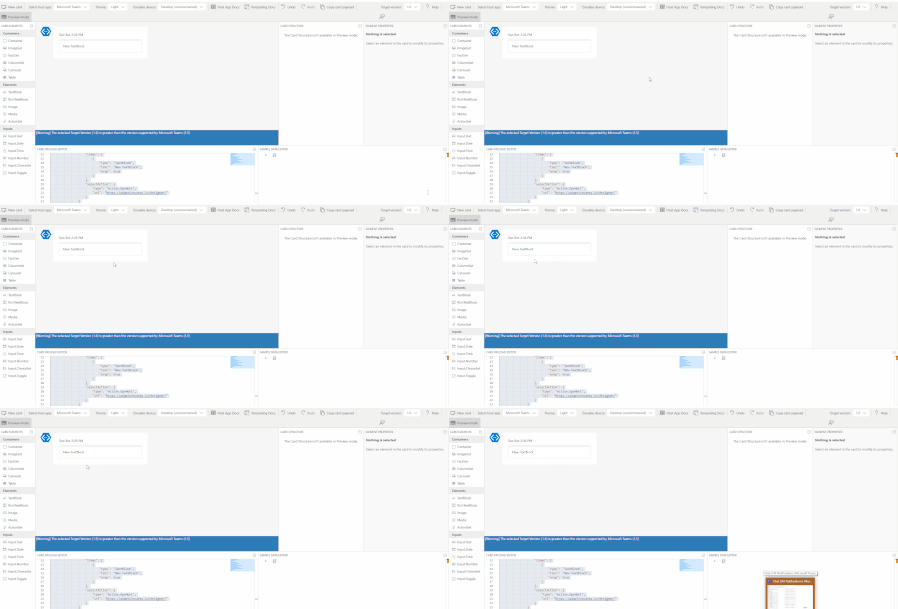
There is a shadow when moving mouse upon an adaptive card column which was set "Selection action" in adaptive card designer. However, with same adaptive card codes, there is no shadow when moving mouse upon an adaptive card column which was set "Selection action" in teams chat. The adaptive card codes is : { "type": "AdaptiveCard", "$schema": "http://adaptivecards.io/schemas/adaptive-card.json", "version": "1.6", "body": [ { "type": "ColumnSet", "columns": [ { "type": "Column", "width": "stretch", "items": [ { "type": "TextBlock", "text": "New TextBlock", "wrap": true } ], "selectAction": { "type": "Action.OpenUrl", "url": "https://adaptivecards.io/designer/" } } ] } ] }674Views0likes3CommentsHow to use the adaptive metadata
I want to use adaptive metadata store some data in teams bot, and get the data in handleTeamsTaskModuleFetch() when I click the button in the adaptive card. Is it possible? If not, can anybody please give an example how to use the adaptive metadata correctly.1.7KViews0likes7CommentsHow To Create A Basic Adaptive Card and Post It To Teams
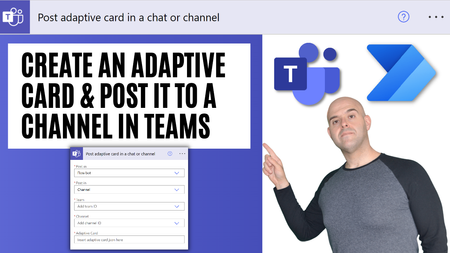
This tutorial will demonstrate how to use the adaptive card designer to create a basic adaptive card consisting of static text and a clickable button with an embedded Url. It will also demonstrate how to post an adaptive card to a channel in Microsoft Teams using Microsoft Power Automate. This tutorial is intended to introduce adaptive cards and how they can be utilized in Microsoft Teams and Power Automate for simple use cases such as posting reminder messages. https://youtu.be/BGlrKBTJIKU6KViews0likes0Comments[bug] MS Teams for IOS, Adaptive Card action button is renders incorrect (trims)
Hello we have developing Teams bot, and main flow is using Adaptive Card with Adaptive actions. on Mobile version of MSTeams iOS(version 3.8.1), is renders incorrect (trims or event does not shown) screenshots below. On Adaptive Designer, Desktop Version, Web and Android is OK but on iOS we faced with problem. Here is Adaptive Card Json: { "type": "AdaptiveCard", "version": "1.2", "body": [ { "type": "ColumnSet", "columns": [ { "type": "Column", "width": "50px" }, { "type": "Column", "width": "stretch", "items": [ { "type": "TextBlock", "text": "Hello, ", "wrap": true }, { "type": "TextBlock", "text": "I am here to help you. Please choose one of the topics below to start", "wrap": true } ] } ] }, { "type": "Container", "id": "actionContainer", "items": [ { "type": "ColumnSet", "columns": [ { "type": "Column", "width": "auto", "items": [ { "type": "ActionSet", "actions": [ { "type": "Action.Submit", "data": { "type": "ShowCard", "keyCard": "@key1", "fromMenuKey": "@command1" }, "title": "[ Word1 word2 word 3]" } ], "spacing": "Small" } ], "spacing": "Small" }, { "type": "Column", "items": [ { "type": "TextBlock", "size": "Small", "weight": "Lighter", "text": "All necessary word \n word2 word3 word 4", "horizontalAlignment": "Right", "wrap": true, "spacing": "None" } ], "verticalContentAlignment": "Center", "selectAction": { "type": "Action.Submit", "data": { "type": "ShowCard", "keyCard": "@key2", "fromMenuKey": "@command2" }, "title": "[ Word1 Word2 Word3 Word6]" }, "width": "stretch" } ], "spacing": "Small", "separator": true }, { "type": "ColumnSet", "columns": [ { "type": "Column", "width": "auto", "items": [ { "type": "ActionSet", "actions": [ { "type": "Action.Submit", "data": { "type": "ShowCard", "keyCard": "@key3", "fromMenuKey": "@command3" }, "title": "[ word1 word2 word3 word6 ]" } ] } ], "spacing": "Small" }, { "type": "Column", "items": [ { "type": "TextBlock", "size": "Small", "weight": "Lighter", "text": "If you have word1 question word2 word3 word4 word5", "horizontalAlignment": "Right", "wrap": true, "spacing": "None" } ], "verticalContentAlignment": "Center", "selectAction": { "type": "Action.Submit", "data": { "type": "ShowCard", "keyCard": "@key4", "fromMenuKey": "@command4" }, "title": "[ Request word help ]" }, "width": "stretch" } ], "spacing": "Small", "separator": true } ] }, { "type": "ColumnSet", "id": "searchColumnset", "columns": [ { "type": "Column", "width": "auto" }, { "type": "Column", "width": "stretch", "items": [ { "type": "Input.Text", "id": "searchInputText", "placeholder": "Key word " } ] }, { "id": "searchColumn", "type": "Column", "width": "stretch", "items": [ { "type": "ActionSet", "actions": [ { "type": "Action.Submit", "data": { "type": "runDialog", "dialog": "SearchDialog", "fromMenuKey": "@command1" }, "title": "Search" } ] } ] }, { "type": "Column", "width": "auto", "height": "stretch" } ] }, { "type": "TextBlock", "id": "navigationTextBlock", "text": "Help" } ], "$schema": "http://adaptivecards.io/schemas/adaptive-card.json" }1.9KViews0likes2CommentsShare to Ms Teams - preview a Hero Card
I'm trying to do a Teams integration into our application. There is a "Share to Ms Teams" button and when the user clicks on it, I want to show a Hero Card preview instead of the default preview it offers. Is there a way I can do it? Share to Ms Teams: https://developer.microsoft.com/en-us/microsoft-teams/share-to-teams#scroll-to-teams https://docs.microsoft.com/en-us/microsoftteams/platform/concepts/build-and-test/share-to-teams1.2KViews0likes1Comment
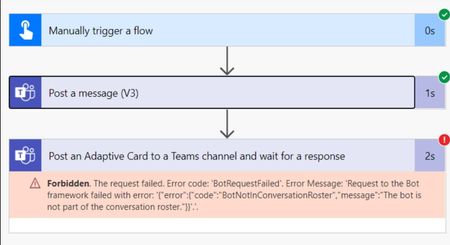
The bot is not part of conversation roster error in Adaptive card message to Teams in flow
I made two actions in a flow in Power Automate. 1. Post a message to a Teams channel 2. Post an Adaptive Card to Teams channel I got an error in the Adaptive card message. "The bot is not part of conversation roster" Please help me to find the reason and a solution.8.9KViews0likes6Comments