adaptive card
14 Topics
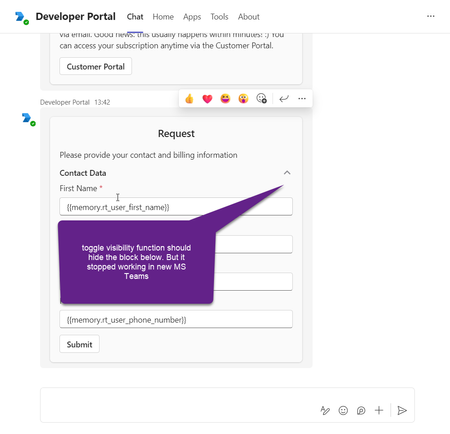
Adaptive card 'Toggle visibility' function stopped working in the New MS Teams
Toggle visibility function in adaptive cards stopped working in the new version of MS Teams. The issue is not reproducible in the older version of MS Teams. It can be reproduced in developer portal with the following card structure example: { "type": "AdaptiveCard", "$schema": "http://adaptivecards.io/schemas/adaptive-card.json", "version": "1.4", "body": [ { "type": "Container", "items": [ { "type": "TextBlock", "text": "Request", "size": "Large", "wrap": true, "weight": "Bolder", "spacing": "Small", "horizontalAlignment": "Center" }, { "type": "TextBlock", "text": "Please provide your contact information", "wrap": true, "spacing": "Medium" }, { "type": "Container", "items": [ { "type": "ColumnSet", "columns": [ { "type": "Column", "width": "stretch", "items": [ { "type": "TextBlock", "text": "Contact Data", "wrap": true, "style": "default", "fontType": "Default", "size": "Medium", "weight": "Bolder" } ] }, { "type": "Column", "width": "20px", "items": [ { "type": "Image", "url": "https://adaptivecards.io/content/up.png", "id": "chevronUp1" }, { "type": "Image", "url": "https://adaptivecards.io/content/down.png", "id": "chevronDown1", "isVisible": false } ], "selectAction": { "type": "Action.ToggleVisibility", "targetElements": [ "contactData", "chevronDown1", "chevronUp1" ] } } ] }, { "type": "Container", "items": [ { "type": "Input.Text", "id": "rt_user_first_name", "errorMessage": "Please input contact person first name", "label": "First Name", "spacing": "Small", "value": "{{memory.rt_user_first_name}}", "isRequired": true }, { "type": "Input.Text", "label": "Last Name", "id": "rt_user_last_name", "errorMessage": "Please input contact person last name", "spacing": "Small", "value": "{{memory.rt_user_last_name}}", "isRequired": true }, { "spacing": "Small", "regex": "^[a-zA-Z0-9._-]+@[a-zA-Z0-9.-]+\\.[a-zA-Z]{2,4}$", "isRequired": true, "value": "{{memory.rt_user_email}}", "placeholder": "email address removed for privacy reasons", "label": "Email", "type": "Input.Text", "id": "rt_user_email", "errorMessage": "Please provide the contact person email" }, { "spacing": "Small", "regex": "^[+][0-9]{10,12}$", "maxLength": 13, "value": "{{memory.rt_user_phone_number}}", "placeholder": "+1", "label": "Phone Number", "type": "Input.Text", "id": "rt_user_phone_number", "errorMessage": "Asking you to kindly enter the phone number in the international format, starting with +, then the country code, operator code and your local number." } ], "id": "contactData", "spacing": "Small" } ] } ] }, { "type": "Container", "items": [ { "type": "ActionSet", "actions": [ { "type": "Action.Submit", "title": "Submit" } ] } ] } ] }1.9KViews3likes7Comments
Adaptive Cards in Teams channel messages: fixed narrow width — request for width control
Hi Teams Platform team, We post structured status reports as Adaptive Cards into a Teams channel. The card consistently renders at a fixed width of 448 px on a 1080p display at 100% scaling with a maximized Teams desktop client — well below the available channel message stream width. Wide multi-column tables get truncated or wrapped, which significantly hurts readability. What we've tried No card-level `width` property exists in the Adaptive Cards schema. `msteams.width: "Full"` is documented to apply only to Stageview / task module / tab — silently ignored in channel messages (tested). Same payload via three delivery paths — Incoming Webhook, Logic App "Post adaptive card in chat or channel", and Microsoft Graph `POST /teams/{id}/channels/{id}/messages` — all render at the same narrow fixed width. The constraint is in the Teams channel-message renderer, not in any delivery layer. Minimal repro payload (7-column results table; all field names and values replaced with generic placeholders): { "type": "message", "attachments": [ { "contentType": "application/vnd.microsoft.card.adaptive", "content": { "$schema": "https://adaptivecards.io/schemas/adaptive-card.json", "type": "AdaptiveCard", "version": "1.5", "msteams": { "width": "Full" }, "body": [ { "type": "TextBlock", "text": "Pipeline Report — run-001", "weight": "Bolder", "size": "Medium" }, { "type": "Table", "gridStyle": "accent", "firstRowAsHeaders": true, "columns": [ { "width": 2 }, { "width": 1 }, { "width": 2 }, { "width": 1 }, { "width": 2 }, { "width": 1 }, { "width": 1 } ], "rows": [ { "type": "TableRow", "cells": [ { "type": "TableCell", "items": [{ "type": "TextBlock", "text": "Col-1", "weight": "Bolder", "size": "Small" }] }, { "type": "TableCell", "items": [{ "type": "TextBlock", "text": "Col-2", "weight": "Bolder", "size": "Small" }] }, { "type": "TableCell", "items": [{ "type": "TextBlock", "text": "Col-3", "weight": "Bolder", "size": "Small" }] }, { "type": "TableCell", "items": [{ "type": "TextBlock", "text": "Δ Col-3", "weight": "Bolder", "size": "Small" }] }, { "type": "TableCell", "items": [{ "type": "TextBlock", "text": "Col-4", "weight": "Bolder", "size": "Small" }] }, { "type": "TableCell", "items": [{ "type": "TextBlock", "text": "Δ Col-4", "weight": "Bolder", "size": "Small" }] }, { "type": "TableCell", "items": [{ "type": "TextBlock", "text": "Status", "weight": "Bolder", "size": "Small" }] } ] }, { "type": "TableRow", "cells": [ { "type": "TableCell", "items": [{ "type": "TextBlock", "text": "item-a", "size": "Small" }] }, { "type": "TableCell", "items": [{ "type": "TextBlock", "text": "mode-x", "size": "Small" }] }, { "type": "TableCell", "items": [{ "type": "TextBlock", "text": "0.000/0.000","size": "Small" }] }, { "type": "TableCell", "items": [{ "type": "TextBlock", "text": "+0.00%", "size": "Small", "color": "Good" }] }, { "type": "TableCell", "items": [{ "type": "TextBlock", "text": "0.000/0.000","size": "Small" }] }, { "type": "TableCell", "items": [{ "type": "TextBlock", "text": "-0.00%", "size": "Small", "color": "Attention" }] }, { "type": "TableCell", "items": [{ "type": "TextBlock", "text": "✅ Pass", "size": "Small" }] } ] } ] } ] } } ] } `msteams.width: "Full"` is present but has no visible effect in the channel message context. Feature request Either of: Honor `msteams.width: "Full"` in channel-message context (not just Stageview/task module/tab), OR Add a card-level property (e.g. `msteams.channelWidth: "Full" | "Default"`) explicitly scoped to channel messages. Is this a known limitation with an existing tracking item, or should we also file it on the M365 Feedback Portal for upvotes? Thanks!796Views1like5CommentsChannel welcome message to direct the user to a tab
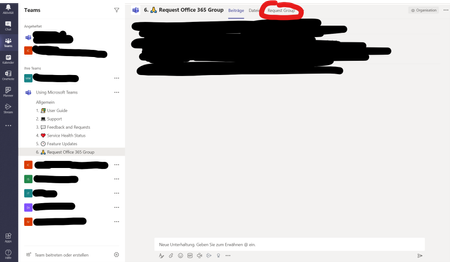
I have created a new channel in our Corporate-wide supportteam called "Request Office 365 Group" and I would love to direct the users directly to the "Request Group" tab, where a simple form is attached. What's the best way to do that? Thanks in advance.6.8KViews1like1Comment