accessibility
432 Topics
A script to wake up monitors
I'm running Windows 11 Professional 26H2 and I've made two scripts that I put in the taskbar, one of them puts my monitors to sleep and the other one puts my computer to sleep. I just said the command “click” followed by the names of those two scripts and it activates them. I would like to know how to make a script that will wake the monitors up. Honestly I used copilot to help me write those scripts, but now Microsoft has updated copilot to a female's voice now and I get very little time to speak what I want to it and then it says I've used all my available credits and I think that's a very poor design considering I've been using Windows computers since 3.0 came out and I have never seen a feature be taken away from A Windows operating system. This is aggravating because I am differently abled and I have brain damage so sometimes I can't explain things the right way and with copilot I used to just be able to speak to it and it would understand me and even show it live video of certain things because I can't always explain what I'm looking at. I thought that was a very beneficial thing to do to copilot and it's hard to believe that now I have to pay for those features that were free, to me that is poor customer service. The bottom line is I need somebody to kindly help me write a script that will wake my monitors up please.65Views0likes2CommentsWindows 11 Search Function Suddenly Stops Working
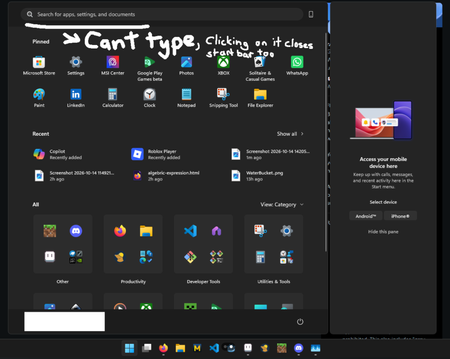
This morning, after turning on my computer, it was unusually sluggish. During the reboot process, the system froze, so I held down the power button to force a shutdown. After restarting, the system responded normally, but I noticed that most of Windows' native search functions were malfunctioning: the search box disappeared, was unresponsive, or wouldn't accept text. At first, I suspected that I had accidentally deleted a component using RevoUninstaller two months ago, but the system had been rebooting normally until then. Additionally, some system applications are running abnormally and take a very long time to open. I've already tried running the troubleshooter and selecting the Reset this PC (keep my files) option, but neither resolved the issue. Specs: CPU: AMD Ryzen 9 9900X RAM: 32GB Graphics Card: NVIDIA RTX 5080 (16GB), AMD Radeon Graphics Storage: 209GB used / 1.82TB total OS: 64-bit Windows 11, Product ID: 00342-22935-85203-AAOEM54Views0likes1CommentTitle: Severe Font Rendering Issue After Installing KB5122385 and KB5120998 on Windows 11 25H2
Hello Microsoft Team, I would like to report a significant font rendering issue that appeared immediately after installing Windows updates KB5122385 and KB5120998. Issue Description After installing these updates, text rendering became noticeably degraded across multiple web browsers, including: Google Chrome Microsoft Edge Mozilla Firefox The issue included: Blurry text rendering. Distorted fonts. Reduced text sharpness and clarity. Overall degradation of readability and user experience. System Information Operating System: Windows 11 Version 25H2 Processor: Intel Core i9-13900HK Memory: 32 GB RAM Graphics Adapter: Intel Iris Xe Graphics Graphics Driver Version: 32.0.101.7088 Troubleshooting Performed I spent a considerable amount of time diagnosing the issue and tested several common solutions, including: Resetting Windows font settings to default. Reconfiguring and recalibrating ClearType. Disabling Hardware Acceleration in the affected browsers. Restarting the system multiple times. Reviewing display and graphics-related settings. None of these actions resolved the problem. Verified Resolution After extensive testing, I determined that the only solution that completely restored normal font rendering was: Uninstalling KB5122385. Uninstalling KB5120998. Restarting Windows. Immediately after removing these updates, font rendering in Chrome, Edge, and Firefox returned to normal. Text became sharp, clear, and properly rendered again. Request for Investigation Based on my testing, there may be a compatibility issue within Windows components responsible for font rendering, text display, graphics handling, or related system functions introduced by these updates. Because the issue affects multiple browsers, including Firefox, it does not appear to be limited to Chromium-based browsers and may be related to Windows itself. I recommend that the Windows engineering team investigate this issue, as other users may be experiencing: Blurry text. Distorted fonts. Reduced display quality in browsers. The need to remove Windows updates as a temporary workaround. The issue was consistently reproducible on my system, and uninstalling the updates was the only action that restored normal behavior. Thank you for your time and attention. I hope this report helps identify and resolve the root cause of the problem. Best regards, Hossam Soliman968Views0likes5Comments
Full-screen video freezing issue
한국어와 영어로 글을 남깁니다. 이 글을 남기기 이전에 기술 지원을 24시간 대기 중이라는 분에게서 받았습니다. 그 분은 가장 해결 확률이 높고 가장 해결이 완벽에 가까운 방식을 제안했습니다. 그건 코덱을 업데이트하거나 코덱을 설치하라는 것이었습니다. 전 이 방법이 해결방법에 가깝다고 느낍니다. 제가 드리려는 말은 우연히 이 문제를 해결했다고 생각하기에 그 해결 방법을 공유하는 것입니다. 윈도우 제품에는 사소한 버그가 있고 서로 다른 프로그램이 충돌하는 경우가 있을 수 있으며 특정 프로그램이 버그를 만들 때도 있기 때문입니다. 전 전체화면으로 영상을 시청할 때에 멈추는 증상이 해결이 안 되었어요. 신기한 건 다른 회사의 그래픽 카드를 사용할 때엔 이런 문제가 발생하지 않는다는 점이었습니다. 인텔 ARC 그래픽 카드는 이런 문제가 없어요. AMD의 라데온 그래픽 카드를 사용할 때에 다 좋은데 이 문제 때문에 좀 불편했습니다. 지금도 인텔 CPU와 인텔 GPU를 쓰면 문제가 없고, 인텔 CPU와 AMD GPU 혹은 AMD CPU와 AMD GPU를 쓰면 전체화면 영상이 멈춥니다. 모니터는 상관이 없던 것 같아요. 그래서 결론은 코덱을 찾아볼 수도 있는데 어떤 코덱이 필요한지 제가 정확하게 모르거든요. 우연하게 찾은 해결책은 윈도우 설정에 작업 표시줄 옵션이 있습니다. 거기서 작업 표시줄 단추 합치기 및 레이블 숨기기 / 작업 표시줄 단추 합치기 및 다른 작업 표시줄의 레이블 숨기기 / 더 작은 앱 아이콘 표시 옵션을 조절하는 것이었습니다. 항상-작업 표시줄이 꽉 찼을 때-안 함 중에 문제가 해결되는 옵션을 고르세요. 전 작업 표시줄이 꽉 찼을 때를 3개 모두 설정해 두니 전체화면 영상이 더 이상 멈추지 않아요. 라데온 그래픽카드 드라이버 문제일 수도 있고 이 라데온 프로그램이 윈도우와 우연하게 충돌이 일어나는 것일 수도 있을 것 같아요. 전 전문가가 아니라 우연히 옵션 조정으로 방법을 찾았다는 점만 말하고 싶습니다. 그러므로 이 문제는 해결이 될 수도 사용자에 따라서 해결이 되지 않을 수도 있습니다. 제가 지내던 커뮤니티에선 라데온 그래픽카드 드라이버 프로그램이 이전부터 전문적이지 않다는 이야기가 돌았는데 전 그 때 그 말을 믿지 않았지만 지금은 그 말에 신빙성이 있다는 생각도 듭니다. 엔비디아 지포스에서도 동일한 증상이나 멈춤 현상이 있는 것 같기는 합니다. 윈도우의 호환성 문제일 수도 있겠지요. 잘은 모르겠지만요. 도움이 되시길 바랍니다. I am posting this in both Korean and English. Before writing this, I received assistance from a technical support representative who was available around the clock. They suggested a solution that was highly likely to work and offered the most complete fix: updating or installing the necessary codecs. I believe this is the right approach. I am sharing this because I managed to resolve the issue—albeit somewhat by chance—and want to pass on the solution. Windows products can have minor bugs, conflicts between different programs can occur, and specific programs can sometimes trigger these issues. I wasn't able to resolve the issue where the video would freeze during full-screen playback. Interestingly, this problem didn't occur when using graphics cards from other manufacturers; Intel Arc graphics cards, for instance, don't have this issue. While AMD Radeon graphics cards are otherwise excellent, this specific problem was a bit of a hassle. Even now, I experience no issues when using an Intel CPU with an Intel GPU, but the video freezes in full-screen mode if I pair an Intel CPU with an AMD GPU or use an AMD CPU with an AMD GPU. The monitor didn't seem to be a factor. I suppose I could look into codecs, but I'm not exactly sure which ones are needed. I stumbled upon a solution within the Windows taskbar settings. The fix involved adjusting options such as "Combine taskbar buttons and hide labels," "Combine taskbar buttons and hide labels on other taskbars," and "Use small taskbar buttons." You should experiment with the available settings—"Always," "When taskbar is full," or "Never"—to find the one that resolves the issue. For me, setting all three options to "When taskbar is full" stopped the full-screen videos from freezing. This could be an issue with the Radeon graphics card driver, or perhaps a random conflict between the Radeon software and Windows. I am not an expert; I simply wanted to share a method I discovered by chance while tweaking settings. Consequently, this solution might work for some users but not for others. In the online community I frequent, there had long been talk that Radeon graphics card driver software wasn't exactly professional-grade; I didn't believe it at the time, but now I’m starting to think there might be some truth to it. That said, it seems like similar symptoms or freezing issues occur with Nvidia GeForce cards as well. It could be a Windows compatibility issue, though I’m not entirely sure. I hope this helps.116Views0likes2Comments
Intel Extension 2.0.10200.8 keeps reappearing after successful installation
Windows Update repeatedly offers Intel – Extension – 2.0.10200.8, even though update history shows it was successfully installed. After restarting, the same update returns and requires another restart. This causes repeated mandatory restarts under our organisation’s update policy and affects device compliance. How can we safely clear this update from the queue and stop it reappearing without disabling other Windows updates?49Views0likes0CommentsWindows 11 forces PIN validation on boot for Edge, Teams and Phone Link
Hello. I am facing a persistent issue in Windows 11 where Microsoft Edge (running multiple windows and dozens of open tabs that I must keep active), Teams, and the Phone Link app demand PIN validation (Windows Hello) via toolbar prompts or "Your account requires attention" notifications upon every system startup. OneDrive is the only app that does not experience this issue. I want to make it absolutely clear that I DO NOT want to disable any convenience features (automatic reopening of apps on boot and Edge startup boost are enabled by necessity), I DO NOT want to switch to a local account (I strictly need settings synchronization active between my other Windows 11 devices), and I DO NOT clear cookies on close. To save time and avoid repetitive, generic troubleshooting steps, please note that I have already performed advanced troubleshooting procedures. I have disabled the Windows Hello requirement in settings, cleared credentials in Credential Manager, reset the Ngc security cache folder via terminal, applied local Group Policies for Edge, and even implemented a registry startup queue delay to prevent overcrowded login requests before the internet connection stabilizes. The issue gets temporarily fixed for 2 or 3 startups after applying these fixes, but Windows automatically overwrites or ignores these directives and goes back to demanding the PIN to revalidate the Single Sign-On (SSO) token of my personal Hotmail email across native background apps. There is clearly a hidden system maintenance scheduled task or a Cloud Identity Service component forcing this strict re-authentication cyclically, overriding user preferences. How can I stop Windows Hello from interfering with the automatic, silent login of these specific apps without breaking my device synchronization settings?153Views0likes2CommentsFile Explorer Crashing or Freezing Frequently on Windows 11
I am gotting frequent crashes and freezing issues with File Explorer on my Windows 11 system. It often becomes unresponsive or closes unexpectedly, especially when browsing folders or using network drives, which disrupts my workflow and makes it difficult to manage files efficiently.21KViews3likes9Comments
Clipboard History does not recognize the Delete key on Windows 11
I recently moved to Windows 11 (installed from scratch), and as soon as it was ready I activated the Clipboard History with the Win+V shortcut, since I really liked this feature on Windows 10. But after a short while I noticed the Windows 11 Clipboard History does not recognize the Delete key anymore. On Windows 10 this works: - Invoke the Clipboard History with Win+V - Scroll to the entry you want to delete with your arrow keys - Hit Delete on your keyboard and that entry will be removed from the history. Clipboard History remains open so you can repeat this for as many entries as you like. On Windows 11: - Invoke the Clipboard History with Win+V - Scroll to the entry you want to delete with your arrow keys - Hit Delete on your keyboard, then the Clipboard History closes with no error or message. If you invoke the Clipboard History again, the entry is still there. So apparently there are only two options on Windows 11 now, use the "Clear all" button to remove all the entries from the history. Or click the 3 dots next to each entry you want to remove and then click Delete, which is... annoying if compared to Windows 10. Is there a way to make the Delete key work again?7.9KViews32likes43Comments
Windows 11 Insider Build 29683.1000 - Explorer.exe does not start automatically after sign-in
Windows version: Windows 11 Pro Insider Preview Build 29683.1000 Issue: Black screen after sign-in; desktop and taskbar do not load. Temporary workaround: Running explorer.exe manually from Task Manager restores the desktop. Troubleshooting already performed: DISM SFC Registry verification New user profile test System Restore Attempted in-place repair installation When the issue started: Approximately 1-2 months ago. The ISO download and repair installation could not be completed. Help is required. Pradeep Kumar Bebarta46Views0likes0CommentsSave the date: Windows office hours - October 15, 2026
Need answers from the people behind the products you manage every day? Join us for Windows Office Hours on October 15th from 8:00–9:00 AM PT, where experts from Windows, Microsoft Intune, Configuration Manager, Windows 365, Windows Autopilot, security, public sector, FastTrack, and more will be available to answer your questions. This is a live, chat-based event with no video and no meeting link. Simply join the discussion, ask your questions, and participate in conversations with Microsoft engineers and specialists. If you can't attend live, post your questions on the event page in advance and we'll address them during the session.132Views0likes0Comments