Word
634 Topics
Multiple word documents are open simultaneously causing performance issues.
Does anyone know what the optimal size of Word documents should be if you have multiple word documents open simultaneously? I frequently access two Word documents at are about 800KB each. When I have both open, I notice a significant performance degradation when I do searches, add/modify/delete contact, toggle between the documents. This really impacts my productivity. I am wondering I should reduce the size of these files or move them to a different drive or memory stick to improve performance. I don't want to break these documents up yet given that instead of having two Word documents open, I might have four Word documents open simultaneously and still have the performance issues. I have performed online repairs of Microsoft 365 and checked my addins but nothing seems to help.18Views0likes1Comment
Latest thinking displaying SharePoint version number in a Word document
This seems to very unreliable or unpredictable. [Many years ago, I think it used to work fine - I sued it]. There are various incantations out there involving the using {Version} or {_UIVersionString} in Information management policy settings (having enabled) it and using label from Quickparts. Some say you need to make a content type for the library, other don't think this is necessary. Some report that the whole feature is deprecated. So can it be done in the lates version of everything? (Please don't link me back to one of the many old articles describing a method unless you are using it an up to date environment and it works) At the moment I have some documents that sometimes work and sometimes don't with docuemtns in the same library using the same template behing differently - a randomness I hate - I cant even build a reliable truth table for what makes it work or not: it's like a table lamp with a loose flex, flickering on and off. I keep think there must be an easier way to do this - surely we can't be the only orgnaisation who wants the same version number as the user sees in SharePoint as a field in the footer or the Word document? Why doe sversion (the column that appears when you enable version control) simply not appear as a document property or a field in Word? (Is there a way to add it without lables? Although the option to control the document information panel in word seems to have gone.)1.4KViews5likes1CommentMake numbering independent of position
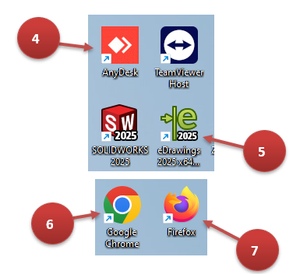
Yes. I want to try that... (The actual question is placed at the end of the post) Below there's a gimmick ilustration of what I'm trying to achieve. The actual document I'm working on is an instructions manual of a complex machine with lots of elements. I want to place referenceable identification numbers of the elements contained in explanations throughout my document. Here I made some baloons by inserting round shapes with added texts and and also some arrows, with the Numbering Style giving me those identification numbers. These let me copy and paste, getting the next number every time. Problem 1: I can't create a new baloon for SolidWorks (for example) and assing it any desired number, like 5. Using "Set Numbering Value..." would do a mess. It seems that doing it would set the first element (that doesn't even show in the ilustration) to 5 and then re-number everything from that. Problem 2: I couldn't find any way to cross-reference headings or numbered lists insided texts in shaper nor inside text boxed. I guess that this is a subject for another post. Question: Is it possible to insert a new list item at any position of that same existing list in another paragraph or shape? It would be something like inserting number 3 like this: 1. Item 2. Item 4. Item Other location: 3. Item136Views0likes6CommentsHow to add a new field to existing XML Mapping
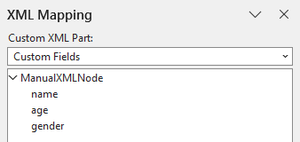
Hi, everyone! Good day! I've made an XML file which I imported to my doc using XML Mapping Pane -> (Add new part...) and I used it to map some texts. How could I add new fields to this XML Mapping? What I tried: I tried editing the XML file and then importing it again. As a result, I have two XML Mappings with the same name that act as completely separate mappings. I couldn't even find a way to delete the older one.Solved108Views0likes6Comments
How do I correct heading numbering?
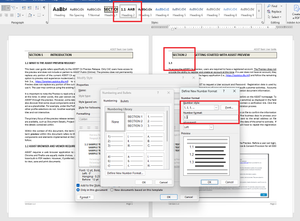
UPDATE: I couldn't remove this post, after I discovered the issue. Thanks! I need to update heading numbering within an old document. Custom headings were made (as pictured) but I need the heading levels 2 and 3 to include the parent heading number of each. When I attempt to update the level 2 heading for Section 2, it wants to continue with Section 1 (see pictured example). In the number format, I do not know how to tell Word to include the parent numbers? I included "1." thinking it was intelligent enough to know that was just a format designation of the parent heading, but I guess that isn't how. I realize I may be making some glaring mistakes, but just trying to get it right. So this is a learning moment. The caveat here is that I'm not creating the heading from scratch but rather, trying to update the existing document headings. I did follow some online suggestions but none of them addressed including the parent value in this scenario. Section 2 <Heading Level 1 text format> <-- Here I need the word "Section" to proceed the level 1 heading number 2.1 <Heading Level 2> <-- Here I need the level 2 heading to include the parent section level number 2.1.1 <Heading Level 3> <-- Here I need the level 3 heading to include level 1 and 2 numbers.Solved168Views0likes8Comments
Word: Performance and functionality concerns
Hi! Is this happening to you, too? I work on a team that has incorporated co-authoring in a way that it has become an instrumental part of our workflow and processes. We are the only team in our organization to have significant issues with Word: Comments are ghost multiplying (from under 50 to over 4,000) Mark-up is inconsistently available Changes are not always saving for various contributors Formatting, especially custom table styles, are auto-reformatting to something illegiable Important documents are slow to load, if they do Real-time editing is, on occasion, impossible . . . and more. I researched and found some insights. I can't find anything "out there" that would suggest others are experiencing these types of roadblocks. Are you? I am sorry if you are, but I'd be happy to know we're not alone. Do you have any tips or things you've done to improve your experience? Some context: We actively and regularly contribute to documents asynchronously (large and small), apply custom branding styles, comment (and @ team members in comments), share links in team chats, channels, and provide access to others through Outlook links. The majority of the team uses PC, but likely accesses and edits files through chats, channels, emails, Teams, Online, and OneDrive. We also have one Mac, which handles the heavy load for branding and formatting as well. I appreciate any perspectives! Thank you.47Views0likes1Comment