settings
2295 TopicsUpcoming change: disabling Teams meeting recording expiration notification emails
Hello, We wanted to share an important update regarding email notifications for expired Microsoft Teams meeting recordings. Based on valuable feedback from our community, we’ve decided to make a change to how notifications are handled. What’s changing: Starting June 1st, we will stop sending email notifications for expired Microsoft Teams meeting recordings. We are making this change due to complaints we received from many customers about the high volume of notifications which they deemed low value. This change allows us to respect your preferences while ensuring critical communications remain accessible. Recording expiration and deletion policies remain unchanged and items that expire will be deleted even when notifications are not being sent. How to keep receiving notifications: For those customers that would like to continue receiving email notifications, we will create a new setting and make it available before June 1st. This will be a per-tenant setting. We will send another message center post once this setting is available and update our documentation in this discussion and on our support page. After June 1st: If you didn’t change notification settings before the deadline, you can still re-enable them at any time by running the PowerShell command. Note: Our original message center post incorrectly asked recipients to fill out a survey and failed to include a link to the survey. We are committed to providing options that work for your organization, and we would like to hear from you. If you have questions or additional feedback about this change, please complete this survey and join the discussion: Teams Meeting Recording Notification Changes – Fill out form Thank you for being part of our community.266Views1like2Comments
Auto-saving transcription files in a folder?
I'm currently working in a project which requires the usage of meeting transcription files (not recordings!), and I couldn't find a foulder at OneDrive, or Sharepoint that contains the transcription files (.vtt), I know I can manually download it at the meeting recap but manually downloading it would make my project kinda pointless, is there any way that I can configure it to automatically save the transcription file at a folder like it happens with recordings? Thank you!36Views0likes0Comments
External Accessbto “Allow only specific domains” How does this affect meeting participant identity?
Hi everyone, We have recently changed our Microsoft Teams External Access setting from: “Block only specific external domains” to “Allow only specific external domains.” This means only explicitly approved domains are allowed for 1:1 chat, calling, and federation. I would like clarification regarding how this impacts Teams meetings. Scenario: If a user from a domain that is not on the allowed list is invited to a Teams meeting: If they join the meeting while signed into their work/school Teams account, will they still appear with their authenticated name (e.g., Name (External))? Or will they appear as Anonymous because their domain is not permitted under External Access? My understanding is that External Access (federation) controls chat and calling, but meeting identity is governed separately by meeting policies and authentication status. Can someone confirm if this is correct? Thank you in advance for your guidance.38Views0likes0Comments
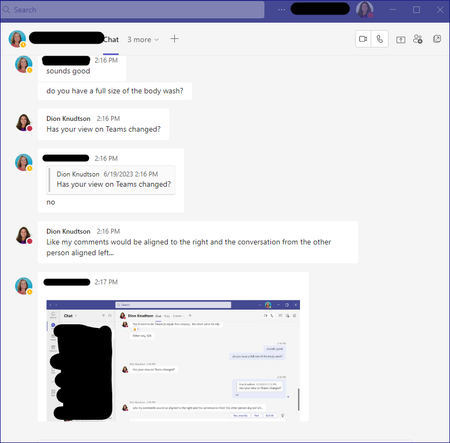
Why is my conversation view left aligned for me and the person I'm talking to
Note - My question is NOT about the Compact view for the left side list of Team conversations. My question is for the conversation area itself. Why is my conversation fully left aligned versus split between my comments on the right and replies on the left? What it is NOW: What is WAS and what I want back. Just an fyi, my screenshot is from someone else, I had to use their screenshot to get the example. Either way, my comments since I'm making them should be right aligned:15KViews0likes10Comments
Document Library Settings
Many times when someone opens a document from a teams document library, it shows the document as modified even though no actual changes were made to the document. The default at my company is that documents open in edit mode and they auto save so one solution would be to set it to open in view only mode, but my company doesn't want to change that at the company wide level. Is there any way to do this at the SharePoint library level? I also don't want to make document checkout mandatory.75Views0likes1CommentFormal Complaint: The UX Failure of Microsoft Authenticator and Teams Guest Access
To the Microsoft Product & Engineering Teams, I am writing this not just as a frustrated user, but as a systems engineer and developer who has just spent several hours navigating the Kafkaesque labyrinth that is your current authentication ecosystem. The transition to a new mobile device while maintaining "Guest" access to an external organization (Rihter d.o.o.) has been an exercise in systemic failure. Specifically, I would like to highlight the following critical UX flaws: The Identity Paradox: Your system’s inability to gracefully handle a personal Outlook account acting as a Guest in an Entra ID tenant is baffling. Receiving the error "You can't sign in here with a personal account" while trying to access a tenant I am already a member of is a fundamental logic failure. Visual Inconsistency (The "Briefcase" vs. "Initials"): The fact that an account can appear in Authenticator as a "One-time password" nalog with initials, yet be completely non-functional for Teams until it is manually re-added as a "Work/School" nalog with a briefcase icon, is a UI disaster. The "Action Required" Loop: I was trapped in a cycle where the app demanded action but provided no path to resolution within the mobile environment. I had to resort to using a desktop browser in Incognito mode just to force the system to generate a valid QR code for the new hardware. Mandatory Hardware Security (Passwordless): Forcing users to implement device-wide PINs or biometrics on their private hardware just to use the "Approve" notification feature is overreach. There should be a clear, frictionless fallback to TOTP codes within Teams without degrading the entire app's functionality. App vs. Web Desynchronization: It is unacceptable that a web browser (in Desktop mode) can successfully authenticate a session while the native Teams app on the same device remains stuck with stale tokens and cached AADSTS90023 errors. As someone who designs low-level architectural specifications (DREL), I find the lack of interoperability and the "black box" nature of these errors (like AADSTS90023) to be a significant step backward for professional productivity. I hope this feedback reaches someone who prioritizes user flow over bureaucratic security layers. Best regards, Milan Lakatoš Petrović Systems Engineer & Freelance Programmer74Views0likes0CommentsMulti-app camera - Stops Teams from detecting webcams
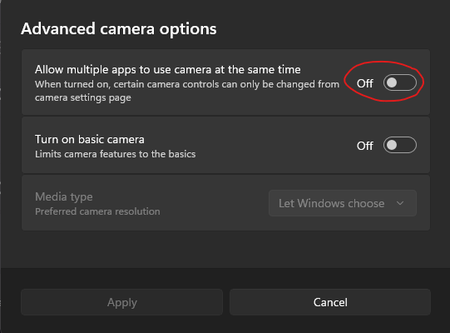
Hi. We have a load of shared meeting rooms that are setup with Jabra panacast webcams. When you open Teams it shows that no devices are connected but if you open the camera app or any other app like zoom the camera works fine. The only way to get it to work is to enable this setting. This settings for Multi-app camera cannot be enabled by Intune or powershell/regedit. There are some posts on reddit that suggest I am not alone and there are others having this issues too. So.. its either a bug with the Teams app itself or the windows OS Thanks, Cam72Views0likes0Comments
Shared Number Group Channel Operator Options Missing in Microsoft Teams 260043.403
After updating to Microsoft Teams version 260043.403, options in Group Channels related to shared number / calling queue operator availability appear to have changed. Previously, when selecting a channel associated with a calling queue, operators could: View a list of all queue operators See each operator’s availability for that specific calling queue (not general Teams presence) Change their own availability for that queue With this update, the ability for operators to change their availability now appears to be located under Settings → Calls. However, the channel-level view that displayed the availability of other operators seems to have been removed entirely. Can someone confirm whether the operator availability view within Group Channels has been deprecated, or if it is now accessible elsewhere in Teams?54Views0likes0CommentsStarLeaf + Teams integration
Hi all, I have a user that wants to integrate StarLeaf into one of his Microsoft Teams group. He is not the owner of the group. The issue he reported: "Currently, Starleaf for Teams is installed, but when there is any attempt to setup using the integration token generated from our systems admin in Starleaf, an error occurs." The link for instructions he used: https://support.starleaf.com/integrating/starleaf-for-microsoft-teams/#3-Install+StarLeaf+for One of the errors he gets: "Something went wrong. Reinstall StarLeaf for Teams." Any idea of what to do? Kind regards, Dino2KViews2likes8Comments
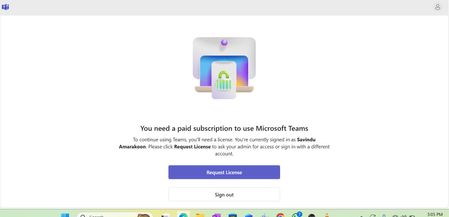
Microsoft Teams – “You need a paid subscription to use Microsoft Teams”
Hi everyone, I’m currently unable to sign in to Microsoft Teams using my work account. When I launch the Teams desktop app, I receive the following message: "You need a paid subscription to use Microsoft Teams. To continue using Teams, you’ll need a license. You’re currently signed in as [my account]. Please click Request License to ask your admin for access or sign in with a different account." However, according to our admin, a Microsoft Teams Premium license (or equivalent Microsoft 365 license) has already been assigned to my account. I can also see Teams listed under My Apps in the Microsoft 365 portal. I have tried the following steps: Signed out and signed back in Tried Teams web app (teams.microsoft.com) in an InPrivate or Incognito browser Cleared Teams cache from %appdata%\Microsoft\Teams Reinstalled the Teams desktop client Unfortunately, the same message still appears. Could someone please advise: Is this a known sync or license propagation issue? Should the admin reassign the license or refresh it from the Microsoft 365 Admin Center? Are there any other steps to force Teams license validation? Any guidance would be greatly appreciated. Thank you, Savindu1.1KViews1like2Comments