Scheduling
31 TopicsHello from the Skype Business Services Conferencing team!
My name is Subramanian Vasudevan and I am a developer on the Skype Business Services team working on Conferencing! Hit me up for any questions or concerns you may have on your Skype for Business meetings experience. Look forward to hearing from you all!4KViews4likes12Comments
Skype for Business web scheduler - remove meeting
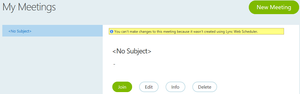
Hello, When i access https://sched.lync.com i see a meeting that i've created in Oulook but deleted. One question: how can i remove the meeting from web scheduler? It states that i cannot make changes online(like in the picture attached).1.9KViews2likes2Comments
Outlook calendar: Syntax for describing meeting series is off
When I set up a meeting series to occur on the fourth Wednesday of each month, for example, the calendar invite defaults to read "Occurs every fourth Wednesday." This is incorrect. The problem is more obvious if the meeting falls on, say, the second Wednesday (or whatever day) of the month. The invite then reads "Occurs every second Wednesday." No it does not! "Occurs on the second Wednesday monthly" is what it should read. Please fix!!!137Views1like2Comments
"Scheduling Poll" unintentionally pitted against "Scheduling Assistant ... Why not both?
As a guest invited to a fellow outlook user's scheduling poll, it is unnecessarily difficult to propose additional times that make any sense. It's a strong start towards solving the scheduling problem it's intended to, but it doesn't usually hit the mark, and that's a missed opportunity. Several times, I received a scheduling poll, and each proposed time has already been rejected by one or more required attendees. This is where the "Propose another time" button at the bottom of the poll should help us, . . . Well it's not actually helpful, and will likely generate a lot of email traffic with low chances of helping. I'll explain. The first part of the problem is that there is just no information available about everyone else's schedule. So, how should we expect attendees to propose a reasonable suggestion, even if they are in the same organization and could have had that Free/busy information they need, elsewhere? Going across domains, it makes sense that the information isn't available. But 9 times out of 10, it actually is, because people are using this with people at their workplace. I just would have had to just start over from scratch, although that's bad form because the poll is already in play and this would nominally appear as a conflict. It's also pretty obvious duplicate effort. There just needs to be a better transition between meeting poll and a standard meeting invitation's scheduling assistant view. A person doing that would have to log in if they weren't already, but that seems perfectly fine. Perhaps more importantly, I've got to point out that this is a side-effect of the organizer-as-dictator problem that has been endemic to Outlook & exchange for decades. "FindTime"/"Scheduling Poll" has its place among cross-domain internet email users, but within a work or school environment, it's just good code thrown after bad. The fact that we sometimes need to do a poll before putting any info on the actual calendar is just silly. That's what the calendar is supposed to be for, but locking in the times and making yourself "organizer" just makes the work more awkward. And one last thing, I think it's a mistake that each "Propose another time" sends out another reply-all message. Considering how I described above that we're left just guessing what time could be any good, then sending two or three suggestions in as many separate email messages seems very wasteful. We should be able to set up a few times before saving them and having the poll email re-sent only one more time.975Views1like1Comment
Centralized Scheduling in Teams
We are a non-profit behavioral healthcare organization transitioning to Teams to provide telehealth services. We currently use Zoom for these telehealth appointments and have schedulers create the appointments in Zoom and then enter the meeting links in our EHR. We want to use Teams to do this but cannot seem to find a way to have a user schedule an appointment between a provider and client without delegating calendars in Outlook (which we don't want to do). Does anyone have a good way of having a non-meeting participant schedule for another user and a client?Solved1.6KViews1like2Comments
Room scheduling and access to chat
When using room scheduling, where the link to the Teams meeting is in that invite, would the recipient also get access to the chat? We know there is an option to only give invited guests access to the chat when setting up a Teams meeting. I need to understand if there is an additional step that our staff would need to do to restrict that chat access. Thanks! Jim1.8KViews1like3Comments