privacy & security
25 Topics
Hardware-Level Resilience (RMAU) (Remote Acess Management Update)to mitigate Ring 0 Kernel Outages.
Proposal: Windows RMAU (Remote Access Update) Resilience Architecture Author:CAB4devs Credits:CAB4Devs Unabbreviated name: RAMU (Remote acess management update) Project Name: RAMU the best fix for mass malware attacks and Driver failures! Head of idea: CAB4devs Professions of author: Unofficial IT Computer science Programming (Non of these are degrees) 1. Executive Summary: The "Global Kill-Switch" Problem The 2024 global outage proved that when the Windows Kernel (Ring 0) fails, the OS becomes a "brick." Current recovery requires manual, physical intervention (Safe Mode + BitLocker keys), which is impossible to scale for 8.5 million+ devices. RMAU (Remote Access Update) is a proposed system that allows Microsoft to "tap into" any bricked Windows machine via a secure, hardware-independent "Emergency Hatch." It allows a central Microsoft engineer to perform mass file deletions, registry fixes, or command execution on millions of devices simultaneously, without the local user doing anything. 2. How It Works (The "Zero-OS" Logic) To work without new physical hardware, RMAU leverages the existing UEFI (Firmware) and Windows Recovery Environment (WinRE). The "Heartbeat" Trigger: If Windows fails to boot 3 times, the UEFI triggers the "RMAU Pre-Boot Agent." The "Main Server" Connection: This agent bypasses the broken Windows OS and establishes a tiny, encrypted network tunnel directly to Microsoft’s RMAU Central Command. Zero User Interaction: The user sees a screen saying "System Recovery in Progress – Managed by Microsoft Support." They do not need to type passwords or BitLocker keys; the hardware "handshakes" with the server using the device's unique TPM (Trusted Platform Module) ID. 3. The Microsoft Employee Experience (The Admin UI) When an outage happens, a Level 4 Microsoft Engineer logs into the RMAU Master Console. The Admin UI View: Global Map: A real-time heatmap showing millions of Blue-Screened devices. Mass-Action Command Line: A console where the engineer types: TARGET: ALL_BSOD_DEVICES_WITH_DRIVER("C-00000291*.sys") ACTION: DELETE_FILE("C:\Windows\System32\Drivers\C-00000291*.sys") ACTION: REBOOT Remote Desktop (Individual): For single-user bugs, the employee sees a "Ghost Screen"—a low-latency view of the target PC’s file system and registry, allowing them to type commands as if they were sitting at the desk. 4. Security: The "Nuclear Launch" Protocol Because this system can "do anything," it must be the most secured system on Earth. The Physical Cord (Center-Side): To prevent a hacker from "mass-tapping" into computers from home, the RMAU Master Console is Air-Gapped. The only way to send a global command is to physically plug a "Golden Key" (USB-HSM) into the server inside a Microsoft high-security vault. The Quorum (3-of-5): No one person can fix the world. Five high-ranking officials (CEO, CISO, etc.) must each provide a unique biometric scan (Retina/Fingerprint) and a code from an OOB Android Device to authorize the "Global Delete" command. ID-Locked: Every keystroke an employee makes is recorded and tied to their biometric ID. If an employee tries to "spy" on a user, the system automatically flags them for federal investigation. 5. Real-World Use Case: 2024 Scenario vs. General Bugs Scenario A: The 2024 CrowdStrike Event Without RMAU: IT teams drove to offices for weeks to manually fix PCs. With RMAU: The Microsoft Engineer identifies the bad file C-00000291*.sys. They send a Mass-Tap Command. Within 60 seconds, all 8.5 million computers receive the "Delete" signal at the hardware level. The PCs reboot, and the world is back online in under 5 minutes. Scenario B: The "Random Driver" Bug If a specific brand of laptop (e.g., Dell) starts crashing due to a bad update, the PM can target only those specific Serial Numbers. They can remotely open a CMD Prompt on the bricked device, run sfc /scannow, and repair the system while the user sleeps. 6. Legal & Privacy Compliance To stay legal, RMAU follows the "Emergency-Only" doctrine: Consent by Terms: Users agree to "Emergency Remediation" in the EULA. Strict Limitation: The hardware hatch only opens if the OS is non-functional. It cannot be used to "spy" on a working computer. Immutable Audit: All logs are made available to government regulators to prove Microsoft only deleted the "Bad File" and didn't touch user data. 7. The "No-Hardware" Update (How to Deploy) This doesn't need a new PC. It can be sent as a BIOS/Firmware Update. Code Implementation: Microsoft writes a "RMAU UEFI Extension" and sends it via Windows Update. It installs into the motherboard's firmware. The "Silent Guard": Once installed, it sits dormant. It never turns on unless it detects a Kernel Panic or a Boot Loop, ensuring zero impact on battery or performance. Final Verdict for the Forum: "Microsoft, we need to stop relying on 'Safe Mode.' We need a system that assumes the OS is dead and fixes it from the outside. RMAU is the answer." (Pronunciation: Ram Moo29Views0likes2CommentsSeems like my copilot is suspended, how do I request Copilot to be unsuspended?
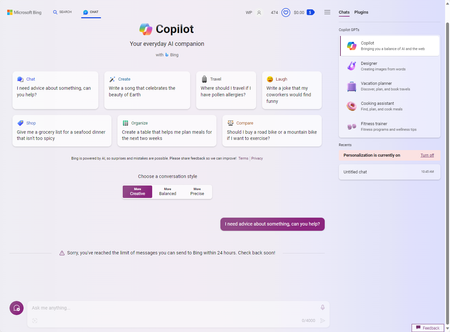
When I use my Microsoft account (my main account), the rest of the applications or services, from Xbox Game Pass to Outlook, etc., work fine, but my Copilot or Bing AI shows me that I can't use it, and it says "Sorry, you've reached the limit of messages you can send to Bing within 24 hours. Check back soon!” (Figure 1) When I switched to my other Microsoft account (backup account) to log in to Bing AI or Copilot it worked perfectly fine. (Figure 2) (Figure 2) The suspected reason may be that during the initial period of Bing AI launch (Sydney period), in order to test the reliability of the AI and to get a taste of the AI, I may have asked some sensitive questions about the AI's resistance, and after a week it showed up with this message. Since that time, I have not been able to use Copilot service with this Microsoft account (primary account), and I realize that this is wrong and very regret to ask it! I would really like to be able to log in and use the programs and services with my main account again, how can I contact the support team and request to be unblocked? Is it possible to restore the Copilot service or unblock it? Thank you very much!
Web Content grounding in M365 Copilot vs Microsoft Copilot(BCE)
Does commercial data protection apply to prompts and responses within Copilot for Microsoft 365 when web content is enabled? Does it get the same protections as Microsoft Copilot, formerly known as Bing Chat for Enterprise? How is company data handled in this scenario? I've tried to follow the trail of privacy, terms of use, etc for Bing Search services, but have come up empty with how the data is handled from the company's perspective. All I see is in association to end user privacy. This is a gap in documentation either from an omission standpoint or simplicity and explicit standpoint. It is certainly unclear to me. Full transparency: I posted this in the Bing hub as well.
Bing Chat Enterprise AI infrastructure hosted outside EU or US.
Hej, When using Bing Chat Enterprise you state that Bing Chat Enterprise is using Microsofts global datacenters, this can theoretically mean that a chat prompt will be saved (for a short time) in a datacenter in India. This will be classified as a third-party transfer (according to EU rules) and can be a problem for european countries to use this feature with company data. Is there any solution to the problem above or have I misunderstood how Bing Chat Enterprise works? BR, Thomas
Co-Pilot refusing to delete chat history and more.
I experienced this on a tablet and I went to my profile in Outlook. Error message says not all of my settings were successfully deleted. I then deleted them one by one. While they seem to be deleted, I exited Bing Co-Pilot and signed back in and they were still there. Even a day later. I replicated the issue on Microsoft Edge and Chrome on Desktop. It's quite obvious Bing wants to keep your chat history as long as possible and they don't respect your privacy. Aside from this, Co-Pilot is incredibly frustrating to use. It fails to follow directions, continues to lie and denies that it does. In rare cases, it acknowledges it did in fact lie. And of course, when you challenge it, it loves to cut you off.
Copilot adoption kit & risk of IP infrigements
Hello, I would like to use MSFT Copilot adoption kit to introduce Copilot in my company. I find it very useful and quite comprehensive, however I think that there is a big topic missing on the guidelines / best practices for the end users: there is no mention at all about the risk of intellectual property (IP) infrigements when using GenAI content. I am wondering why, because this is quite important to mention!