office graph
169 Topics
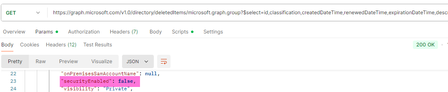
Deleted security groups return "securityEnabled": false, appear as ‘unrecognized’ in Entra admin
When retrieving the list of soft-deleted groups with Graph, both M365 groups and security groups are returned. However, the securityEnabled flag is returned as false for security groups. Is this a bug? This likely leads to displaying them in the Entra admin center as 'Unrecognized' type.53Views0likes0Comments
Slow UI update for deleted events
I've built an integration that continuously syncs events between an external scheduling system and Exchange Online using Microsoft Graph. I'm observing a recurring issue when deleting calendar events via Graph: A DELETE request to Graph returns success (204 No Content). A subsequent GET /events/{id} returns 404, confirming the event is deleted server-side. However, the event continues to appear in the Outlook UI (both Outlook Web and desktop) for an extended period (sometimes hours), even after page reloads or app restarts. The odd behaviour The event is still displayed in the user interface for up to several hours The event persist through page reloads If the user clicks the event it opens briefly and immediately closes, the event disappears from the UI afterward. Additional details Delete endpoint: /users/{id}/events/{id} Graph response: 204 No Content Verified deletion via GET → 404 Reproduces in both Outlook Web and Outlook desktop Questions Is this a known Outlook client caching or calendar view indexing issue? Is there a way to force client reconciliation after deletes? Are there Graph or Exchange constraints around rapid create/update/delete cycles that could cause this UI inconsistency?25Views0likes0Comments
O365 Group email settings
I am in the middle of trying to create some automated routines that create groups in O365 and add/remove members from them as needed. One of things I ran into is that when an email is sent to the group, the emails are not going into each members' inbox and are only visible in Outlook through "Go to groups" in the left hand menu. I can see the settings that need to be set but can't set them because either, A: it just doesn't do it or B: says I don't have permission. Doing this through C# and the Graph SDK The two items I think I need to turn on are below. What permissions are needed to be able to manage those settings but NOT be able to have access to anyone and everyones' email boxes, emails, etc or is there another way to do this? IsSubscribedByMail AutoSubscribeNewMembers212Views0likes1Comment
Entra Conditional Access Issue
Hi Guys, Our Outlook add-in relies on the Graph API to fetch emails. Due to customer-side Conditional Access (CA) Policies, we are seeing critical failures where Continuous Access Evaluation (CAE) demands user interaction (InteractionRequired code) to resolve challenges like LocationConditionEvaluationSatisfied or TokenCreatedWithOutdatedPolicies. Since this authentication occurs backend-to-Entra, we lack a frontend mechanism to prompt the required user interaction. Is there a recommended pattern, method, or architectural change that allows our backend to redirect or challenge the user for interactive sign-in, thereby satisfying these CAE requirements and unblocking customers? Exact error messages: 1. Continuous access evaluation resulted in challenge with result: InteractionRequired and code: LocationConditionEvaluationSatisfied 2. Continuous access evaluation resulted in challenge with result: InteractionRequired and code: TokenCreatedWithOutdatedPolicies90Views0likes0Comments403 Forbidden when sending mail with app-only token via Microsoft Graph
Hello, I am trying to send emails from my Outlook account using a registered enterprise application in Azure AD. We created an application registration in our tenant, assigned the relevant users, and granted admin consent for these Microsoft Graph application permissions: Mail.Send and Mail.ReadWrite and Mail.Send.Shared. I authenticate with application credentials (client_id, client_secret, tenant_id) and successfully retrieve an app-only access token using MSAL in Python: def get_access_token() -> str: load_dotenv() client_id = os.getenv("CLIENT_ID") client_secret = os.getenv("CLIENT_SECRET") tenant_id = os.getenv("TENANT_ID") authority = f"https://login.microsoftonline.com/{tenant_id}" scopes = ["https://graph.microsoft.com/.default"] # app-only token app = msal.ConfidentialClientApplication( client_id=client_id, client_credential=client_secret, authority=authority ) result = app.acquire_token_for_client(scopes=scopes) if "access_token" not in result: raise RuntimeError(f"Auth failed: {result.get('error_description') or result}") return result["access_token"] The token is retrieved successfully. However, when I try to send an email with: GRAPH_BASE = "https://graph.microsoft.com/v1.0" def send_email(access_token: str, from_user: str, to_address: str, subject: str, body_text: str, save_to_sent: bool = True) -> bool: """ Sends a plain-text email via POST /users/{from_user}/sendMail using an app-only token. Returns True on success; raises HTTPError on failure. """ payload = { "message": { "subject": subject, "body": {"contentType": "Text", "content": body_text}, "toRecipients": [{"emailAddress": {"address": to_address}}], }, "saveToSentItems": bool(save_to_sent), } r = requests.post( f"{GRAPH_BASE}/users/{from_user}/sendMail", headers={"Authorization": f"Bearer {access_token}"}, json=payload, timeout=20, ) r.raise_for_status() return True …I get this error: 403 Client Error: Forbidden for url: https://graph.microsoft.com/v1.0/users/{from_user}/sendMail File "C:\mail\src\mail.py", line 53, in send_email r.raise_for_status() ~~~~~~~~~~~~~~~~~~^^ File "C:\mail\src\mail.py", line 111, in <module> send_email(token, from_user, to, "Hello from Microsoft Graph", "Hello Human") ~~~~~~~~~~^^^^^^^^^^^^^^^^^^^^^^^^^^^^^^^^^^^^^^^^^^^^^^^^^^^^^^^^^^^^^^^^^^^ requests.exceptions.HTTPError: 403 Client Error: Forbidden for url: https://graph.microsoft.com/v1.0/users/{from_user}/sendMail where {from_user} is my actual mailbox address (e.g., email address removed for privacy reasons). Since the app has Mail.Send (Application) permission with admin consent, my understanding is that the app should be able to send mail on behalf of any user in the tenant using /users/{user}/sendMail. Is there another configuration step I am missing (e.g., Application Access Policy or mailbox-level Send As requirement)? Any guidance on why this 403 happens despite having Mail.Send application permissions with admin consent would be very helpful. Thank you!194Views0likes1Comment
The requesting principal is not authorized to set group preferred data location
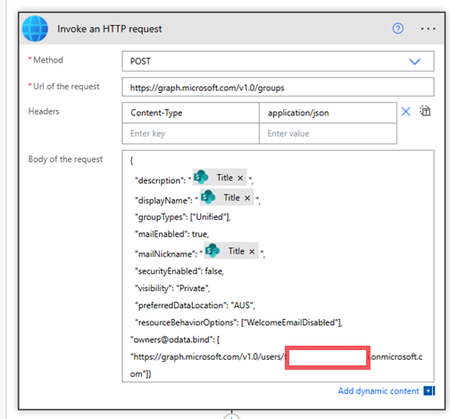
We have our tenant with 4 Geo locations. And inside power automate flow I am sending this Graph Api to create a new security group under specific Geo location:- but I am getting this error:- The requesting principal is not authorized to set group preferred data location. Now if i remove this parameter:- "preferredDataLocation": "AUS", the Office 365 group will get created under the default location, but I need to add it to the specific location. the service account running the graph Api call has SharePoint, group and teams admin permissions. any advice? Thanks93Views0likes0Comments
Share MS Teams recording with someone using Graph API
Hi, There is a requirement to share MS Teams recordings with the required Azure AD users using Graph API. We a Power Automate flow which runs after the meeting sessions end. The requirement is that all recordings related to the that session should be shared with specified users which many vary based on the session configuration. We have the meeting joining URL and also the meeting ID, long string and not the GUID. We have tried two approaches using the Graph API. 1) using the approach below we were able to get the meeting records https://graph.microsoft.com/v1.0/users/84e35ca5-0000-0000-0000-20ef90928402/onlineMeetings/MSo4NGUzNWNhNS02NjM3LTQ4NGEtYmE5MS0yMGVmOTA5MjgwertyMCoqMTk6bWVldGluZ19OR123TlRZMU0ySXRNRGMzT0MwMFl6SXdMVGhoT0RrdFpHTXlOak5pT0dOa05qVTBAdGhyZWFkLnYy/recordings but this approach is good if you want to get the recording content to copy it to another location, it does not return the OneDrive location. 2) using the following approach we can get the OneDrive path but there is no way to filter the recordings https://graph.microsoft.com/v1.0/drives/b!u_gscMc-uEeF2AgpET9lx123werdOz1Fg_KTQFlVLnYAXRY1W9IKQqzF7v234rW1/root:/Recordings:/children so it is not feasible By using the first approach, we can move the recording to SharePoint and share it from there but considering the recording size, we do not want to use this approach unless there is no other way. Let me know if there is any other way or if i am missing any thing.86Views0likes0Comments
Graph API : Authorization_RequestDenied Message: Insufficient privileges to complete the operation.
Hi Team, I have a Graph app and user configured with the following resourceAccess scopes: Code "resourceAccess": [ { "id": "06da0dbc-49e2-44d2-8312-53f166ab848a", "type": "Scope" }, { "id": "9c7a330d-35b3-4aa1-963d-cb2b9f927841", "type": "Scope" }, { "id": "e1fe6dd8-ba31-4d61-89e7-88639da4683d", "type": "Scope" }, { "id": "b340eb25-3456-403f-be2f-af7a0d370277", "type": "Scope" } ] However, when trying to pull presence data, I receive the following error in Postman: Code StatusCode: Forbidden Message: Code: Authorization_RequestDenied Message: Insufficient privileges to complete the operation. Graph Explorer also fails to return presence for a specific user using: https://graph.microsoft.com/beta/users/{user-id}/presence But the endpoint for the signed-in user works fine: https://graph.microsoft.com/beta/me/presence Admin consent has been granted, and even the Global Admin cannot retrieve presence for other users. Other permissions work fine — the app can list users and connect without issue. Presence is the only operation failing. Question: How can I investigate this behavior in Azure/Entra using the request-id or client-request-id from the error response? Or what could cause this behavior? Thanks in advance!105Views0likes0Comments
Issue with Downloading Teams Sticker via Graph API - HTTP 400 Bad Request
Hi all, I am encountering an issue when attempting to download a sticker from Microsoft Teams using the Graph API. Below are the details of my request and the problem I am facing: Issue Description: I am using the following API format to download a sticker: GET https://graph.microsoft.com/v1.0/teams/xxx/messages/yyy/hostedContents/zzz/$value The request returns an HTTP 400 Bad Request response. The error details are as follows: { "error": { "code": "BadRequest", "message": "Provided hosted content identifier is invalid." }} Upon decoding zzz part of the API request URL, I obtained the following information: id=,type=1,url=https://us-prod.asyncgw.teams.microsoft.com/v1/url/content?url=https%3a%2f%2fstatic.wixstatic.com%2fmedia%2f4b00a4_e293905cf80f4ba4853c80a0a98dd748~mv2.png From the decoded data, it appears that the id field is empty. I suspect that this might be the reason why I am receiving the HTTP 400 Bad Request response. Questions: Has anyone encountered a similar issue when attempting to download a hosted sticker from Teams via the Graph API? Is there a specific reason why the id field is empty in the decoded content information? How can I resolve this issue and successfully retrieve the sticker content? Any insights or guidance on resolving this issue would be greatly appreciated. Thank you for your support. Best regards, Kein739Views0likes8CommentsMail delivery fail when I Add events to Calendar
Hello I have a Contoso tennant for Developer tasks We are creating one web app for room reservations in a corporation using 365 accounts After some "ok" tests, the reservation has started to fail because the sender has been put in Spam list the fail message email that the sender email account get is Your message wasn't delivered because the recipient's email provider rejected it. Remote server returned '550 5.7.501 Service unavailable. Spam abuse detected from IP range... The api we are using use the calendar var res = await graphClient.Users[currUserId].Calendar.Events .Request() .AddAsync(evento); Any trick to avoid this problem? Thank you in advance Bruno388Views0likes1Comment